
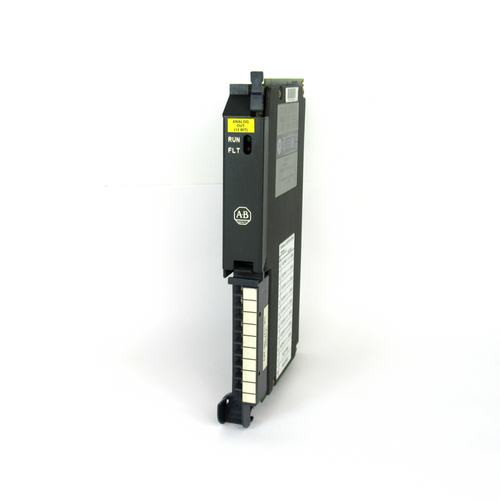
AB 1771-OFE Series B Analogue Output Modules
AB 1771-OFE Series B Analogue Output Modules
Module Overview:
Functionality: The 1771- OFE is an intelligent block transfer module that converts binary or quadruple BCD values supplied
by the processor into analogue signal outputs. It has four independently isolated differential output channels with selectable scaling, data format, etc.
It requires no external power supply and occupies only one I/O slot.
Output range: There are three versions, 1771-OFE1 is a voltage output, 1 - 5V dc, 0 - 10V dc, +10V dc can be selected through the configuration jumper;
1771-OFE2 and 1771-OFE3 are current outputs, 4 - 20mA and 0 - 50mA respectively, and the latter two are factory-set.
Communication mode: The processor transmits data to and from the module through the BTW and
BTR instructions in the ladder program to send output values, set modes and receive status information.
Installation steps:
Preparation for installation: Comply with the relevant EU directives, calculate the power requirement before installation
to avoid overloading the backplane and power supply of the I/O chassis.
Module Setup: Can be installed in any slot of the I/O chassis, but avoid grouping with discrete high-density modules,
and keep away from AC or high-voltage DC modules. Set configuration jumpers, including the
last state configuration jumper (determines the output state in the event of a communication failure) and the voltage range configuration jumper (for 1771-OFE1)
Installation and Connections: Install the keying strip, insert the module smoothly into the chassis and secure it, and connect the 1771-WH junction arm;
use the 1771-WC junction arm to connect to analogue equipment with the sensor cable shielded and grounded at the chassis end only.
The module is configured:
Configuration: Configure the module using a Block Transfer Write command (BTW) with a 13-word maximum
write block containing output data, data format, and scaling information.
Data format and scaling: data format can be BCD or binary, scaling function can convert data to engineering units,
by setting the corresponding scaling value, the maximum scaling value is 9999, the minimum is - 9999, and the maximum must be greater than the minimum.
Default Configuration: At power-on, the module microprocessor defaults to positive data words, no scaling, and BCD data format.
Programming Points:
Programming Format: The programming format is different for different processors, PLC-2, PLC-3, PLC-5 have their own characteristics,
and the module does not allow the enable bit of the read/write instruction to be set to ON at the same time.
Programming Considerations: Including block length and scaling considerations (e.g., different settings for no-channel scaling, partial-channel scaling,
and full-channel scaling), block transfer boundary words (PLC-2 processor),
and module update time (8 milliseconds for BCD and scaling, and 1.6 milliseconds for binary and no scaling).
Performance
Optimisation of hardware mounting and layout: Choose the location of the modules in the I/O chassis appropriately,
avoiding the grouping of discrete high-density modules, and keeping them away from AC or high-voltage DC modules in order
to reduce electromagnetic interference.
Modules that are too close to these sources of interference may result in unstable signal transmission and affect the accuracy of
the analogue output. Installing the module in a location away from the source of interference with
good shielding and grounding can effectively reduce the impact of electromagnetic interference
on the performance of the module and improve the quality of signal transmission .
Ensure that the sensor cable is properly connected and well shielded, and the cable shield is grounded only at the chassis end to reduce noise interference.
If the shield is not properly grounded or shielded cable is not used, external noise may be coupled into the signal line,
resulting in fluctuations or errors in the output signal.
The use of high quality shielded cables, such as Belden 8761, and grounding in strict accordance with the specifications,
can enhance the module's anti-interference ability and ensure the stability of the output signal.
Fine adjustment of parameter configuration: According to the actual application requirements, precisely set the output range and data format of the module.
Different analogue devices have different requirements for input signals, and the correct choice of output range
and data format can ensure the compatibility of the module with the device and improve the output accuracy.
For devices requiring 0 - 10V voltage input, setting the output range of the 1771-OFE1 module to 0 - 10V and selecting the appropriate data
format (e.g., binary or BCD) can match the output of the module with the requirements of the device,
avoiding data conversion errors caused by incompatible formats.
Reasonable use of the scaling function to convert data to actual engineering units can improve the readability and practicality of the data.
When setting the scaling parameters, it should be ensured that the maximum scaling value is greater than the minimum scaling value,
and the format of all the scaling information is consistent with the format of the module sent to the data table.
For an application that measures temperature and converts it to voltage output, the temperature value can be accurately converted to
the corresponding voltage signal output by precisely setting the scaling parameters, which is convenient for subsequent monitoring and control.
Improved programming strategy: Depending on the type of processor, choose the appropriate programming method and strictly follow
the programming specifications. When using PLC - 2, PLC - 3, PLC - 5 and other processors, pay attention to the use of block transfer instructions
and restrictions, avoid enabling the enable bit of read/write instructions at the same time to prevent data transfer errors.
For the PLC-2 processor, programs should be written according to its specific programming structure to ensure correct data transfer and processing.
Optimise the settings for block length and scaling by determining whether to scale all channels and how to set the scaling values according to
the actual situation. In some applications, only some channels may need to be scaled, in which case the block length
and scaling parameters should be set appropriately to improve data processing efficiency.
If only two channels are scaled, the appropriate block length can be set and the scaling value can be entered accurately
to avoid unnecessary calculations and data transfers and to improve the system operation efficiency .
Regular calibration and maintenance: Regular calibration of the module ensures the accuracy of its output.
The calibration process includes preparatory work (e.g. switching off the power, connecting the test equipment, etc.)
and calibration operations for each channel.
For the voltage output version of the module, the output voltage is calibrated by adjusting the potentiometer; for the current output version of the module,
the corresponding current calibration operation is also required.
Regular calibration can detect and correct possible deviations of the module in time to ensure its long-term stable operation.
Pay close attention to the running status of the module, through the indicator lights and diagnostic bits to timely detect faults and take appropriate measures.
When the red FAULT indicator lights up, the connection, configuration and hardware status of the module should be checked according to the fault prompts, a
nd the faulty parts should be replaced in time to ensure that the module works normally.
If the output of a channel is found to be abnormal, the cause of the fault can be determined by reading the diagnostic bit information,
such as whether the data is out of range, whether the scaling is correct, etc., and then carry out targeted repair.
- OMRON
- ABB
- General Electric
- EMERSON
- Honeywell
- HIMA
- ALSTOM
- Rolls-Royce
- MOTOROLA
- Rockwell
- Siemens
- Woodward
- YOKOGAWA
- FOXBORO
- KOLLMORGEN
- MOOG
- KB
- YAMAHA
- BENDER
- TEKTRONIX
- Westinghouse
- AMAT
- AB
- XYCOM
- Yaskawa
- B&R
- Schneider
- KONGSBERG
- NI
- WATLOW
- ProSoft
- SEW
- ADVANCED
- Reliance
- TRICONEX
- METSO
- MAN
- Advantest
- STUDER
- DANAHER MOTION
- Bently
- Galil
- EATON
- MOLEX
- DEIF
- B&W
- ZYGO
- Aerotech
- DANFOSS
- Beijer
- Moxa
- Rexroth
- Johnson
- WAGO
- TOSHIBA
- BMCM
- SMC
- HITACHI
- HIRSCHMANN
- Application field
- XP POWER
- CTI
- TRICON
- STOBER
- Thinklogical
- Horner Automation
- Meggitt
- Fanuc
- Baldor
- SHINKAWA
- Other Brands
- UniOP
- KUKA
- Iba
- Beckhoff
- ADLINK
-
 Bonfiglioli VF W30 63UFC2 Gear Reducer
 -
 Bonfiglioli S1011PP71 Gearbox 4.7 to 1
 -
 Bonfiglioli W63 U7 P90B14 V6 Gear Reducer
 -
 Bonfiglioli BN63B6 FD Geared Motor with VFR49F1P63B5 Reducer
 -
 Bonfiglioli T56BN/4 Three Phase Motor
 -
 Bonfiglioli MVF62/A Worm Gearbox 7 to 1
 -
 Bonfiglioli VF44 FA1 P63B14 Gearbox 60 to 1
 -
 ICME T71B4 Motor with Bonfiglioli MVF49F1
 -
 Bonfiglioli BN71B4 Motor with MVF49 Gearbox
 -
 Bonfiglioli C31 3P P63 PV V5 Gear Reducer
 -
 Bonfiglioli BN80B4 Electric Motor 8F31020004
 -
 Bonfiglioli VF/W30/63UFC2 Gear Reducer i=168
 -
 Bonfiglioli MPD1006S0006 In-Line Planetary Gearbox
 -
 Bonfiglioli LC 120 2 40 STD 80A1 CD Gearbox
 -
 Bonfiglioli Vectron ZBA400-010FC Brake Unit
 -
 Bonfiglioli VF44 U14 Worm Gearbox B03181367918
 -
 Bonfiglioli 8XNC63040004 Electric Motor IP55
 -
 Bonfiglioli W110U P100B5 Worm Gearbox
 -
 Bonfiglioli VF63/FC1 P80 Gearbox 203160152 i=15
 -
 Bonfiglioli VMN JB00017191 Gear Unit
 -
 Bonfiglioli AGL202-031FC Inverter 0.37 kW
 -
 Bonfiglioli BN71B2 Geared Motor with VF44
 -
Bonfiglioli S1011PP71 Gearbox 4.7:1
-
 Bonfiglioli VF W30 63UFC2 Gear Reducer
 -
Bonfiglioli VF44FA146HSB3 Gear Reducer
-
 Bonfiglioli MP105 Planetary Gearbox 18:1
 -
 Bonfiglioli VF49 L1 P1 P63B5 Worm Gearbox
 -
 Bonfiglioli 55aN-4 Electric Motor
 -
 Bonfiglioli W63UF1100N56CB3 Gear Reducer
 -
 Bonfiglioli A302NUH-52.7N145TC Gear Reducer
 -
 Bonfiglioli VF49 L1 P1 P63B5 Worm Reducer i=45
 -
 Bonfiglioli MPD1006S0006 Precision Planetary Gearbox
 -
 Bonfiglioli SYN10S22007AF Frequency Drive 7.5A
 -
 Bonfiglioli VF44 U14 Worm Gearbox B03181367918
 -
 Bonfiglioli CM-485-T Communication Module
 -
 Bonfiglioli W75 UF1 D30 P80 B14 Gearbox i=100 B6
 -
Bonfiglioli VF44 ALP63B5 Industrial Gear Reducer
-
 Bonfiglioli 8XNC63040004 Electric Motor IP55
 -
 Bonfiglioli ACT201-11FA Frequency Inverter
 -
 Bonfiglioli BN56B4 Gearmotor VF30F1P56B5 1650RPM
 -
Bonfiglioli SYN10-T-400-05-AF Drive
-
Bonfiglioli AGL402-071FA Inverter
-
 Bonfiglioli BN90LA4-BA Brake Motor
 -
Bonfiglioli MPD1006S0006 Planetary Gearbox
-
Bonfiglioli BCS40 Permanent Magnet Motor
-
 Bonfiglioli WR110U192 Gear Reducer
 -
 Bonfiglioli VF44 U14 B03181367918 Worm Gearbox
 -
Bonfiglioli VFR49 P1 Gear Reducer
-
Bonfiglioli A102USSC95B Helical Gearbox
-
Bonfiglioli BN71C4 AC Motor 0.75 kW
-
 Bonfiglioli VF63 V P80B5 Worm Gearbox
 -
 Bonfiglioli SPL400 23F SynPlus Inverter 11kW
 -
Bonfiglioli RAN 24/SB B3 Bevel Gearbox 1:1
-
 Bonfiglioli VF110 FC1 P100 B14 B6 Gear Reducer
 -
 Bonfiglioli Vectron KP500 Keypad 179675500
 -
 Bonfiglioli MVF 62/F Worm Gearbox i=45
 -
Bonfiglioli BN56B4 Gearmotor with VF30F1P56B5
-
 Bonfiglioli SYN10S 22001AF IP65S Inverter
 -
 Bonfiglioli Engineering 2B HMI Touch Panel 12 Inch
 -
 Bonfiglioli BN 71 B 2 VF44 F1 P71B14 Gearmotor
 -
Bonfiglioli VF49 L1 P1 P63B5 Gearbox 45:1
-
Bonfiglioli BN56B4 Gearmotor with VF30
-
Bonfiglioli WR86U138P80B5B8 Gear Reducer
-
Bonfiglioli BN27C4 Gear Motor 0.09 kW
-
 Bonfiglioli Vectron ACT401-19FA Inverter
 -
 Bonfiglioli 8E35020568-752623 Motor
 -
 Bonfiglioli MP105 Planetary Gearbox 40:1
 -
BONFIGLIOLI VECTRON BTD5-1870-05-400-ENC8A-PA08-CA12-X
-
Bonfiglioli LC 120 2 40 STD 80A1 CD Industrial Gearbox
-
 SYN10 T 400 05 AF Bonfiglioli SYN10 Frequency Drive
 -
 Bonfiglioli ACT401-19A Frequency Inverter
 -
 Bonfiglioli C102PP71 Gear Motor 13.4:1
 -
Bonfiglioli C312 P P90 Speed Reducer
-
 VEM K21R 71 G 4 Motor with Bonfiglioli VF44
 -
 Bonfiglioli C31 3 P P63 PV Bevel Gear Reducer V5
 -
Bonfiglioli WR75UD28150P71B5B3 Gearbox
-
Bonfiglioli ACT401-13FA Frequency Inverter
-
Bonfiglioli VF62/P Worm Gearbox 38:1
-
Bonfiglioli ME210124001Y C Helical Gearbox
-
Bonfiglioli VF63PIP90BI4 Gearbox
-
Bonfiglioli ACT 401-19A Frequency Inverter
-
Bonfiglioli C102PP71 Variable Speed Gearmotor
-
Bonfiglioli C312 P P90 Reducer with Clutch
-
 Bonfiglioli VF44 F1 10 Gearmotor with VEM Motor
 -
 Bonfiglioli C31 3 P P63 PV V5 Reducer
 -
 Bonfiglioli WR75UD28150P71B5B3 Gearbox
 -
Bonfiglioli ACT401-13FA Frequency Inverter
-
Bonfiglioli VF 62/P Worm Gearmotor 38 to 1
-
Bonfiglioli ME210124001Y Inline Gearbox
-
 Bonfiglioli VF63PIP90BI4 Worm Gearbox
 -
Bonfiglioli VF86FC256 Worm Gearbox 1010B03004
-
Bonfiglioli VF44F1 Gearmotor 0.43kW 460V
-
Bonfiglioli W 75 UF1 D30 P80 B14 Gearbox i=100
-
Bonfiglioli VF63NP80B5 Worm Gearbox
-
 Bonfiglioli 300R3133FPP80POG0A Gear Reducer
 -
Bonfiglioli VF49F1N56C Gearbox
-
 Bonfiglioli Trasmittal 300L19 Gearmotor with MEZ UD 1104 Motor
 -
 Bonfiglioli BCS30 Permanent Magnet Motor with Encoder
 -
Bonfiglioli BN56B4 Gearmotor with VF30 Reducer
-
Bonfiglioli VF44 Gearbox 100480150
-
Bonfiglioli VF63PIP90B14 Gearbox
-
Bonfiglioli 830420150 BN63A4 230/400-50 IP55 CLF B14 with VF30F2 P63B14B3-I40
-
Bonfiglioli BN63A2 Motor
-
Bonfiglioli VF44 ALP63B5 Gearbox
-
 Bonfiglioli A102 UR P80 Gearbox
 -
 Bonfiglioli MP 105 2 16 STD 95A1 CD 19 S1 OR SB KE Planetary Gearbox
 -
Bonfiglioli T56BN/4 Motor
-
Bonfiglioli 8E20020594-M285018 Motor
-
Bonfiglioli VF49 V P71 B5 Gearbox
-
Bonfiglioli X VFR49 L1 FA1 180 P63B5 B3 Gearbox
-
Bonfiglioli W63U7P90B14V6 Right Angle Gear Reducer
-
 Bonfiglioli VF/W30/63UFC2 Gear Reducer i=168
 -
Bonfiglioli VF44 Gear Reducer 100480150
-
Bonfiglioli ACU 201-07 FA Frequency Converter
-
Bonfiglioli BN-80B-4 Motor with VF63 Gearbox 38:1
-
Bonfiglioli MVF 49 Gear Reducer for Servo Motor
-
 Bonfiglioli ACT 400-034 A Frequency Inverter 11kW
 -
Bonfiglioli SYN10-S-220-03-AF AC Drive 0.5HP
-
Bonfiglioli LC 090 1 7 STD FM CD 19 KE Gearbox
-
Bonfiglioli TQFK070350GR80A1CD Gear Unit
-
Bonfiglioli BN 80 B6 FD Three Phase Motor
-
Bonfiglioli W63U Worm Gear Reducer
-
Bonfiglioli 830G2310M-B048052 Gear Motor
-
Bonfiglioli VF49P128P71B5B3 Worm Gearbox
-
Bonfiglioli W75UD30719/140B3 Worm Gearbox
-
Bonfiglioli VF49F17HSB3 Worm Gearbox
-
 Bonfiglioli C12 2P 20.6 P90 B3 Gearbox
 -
Bonfiglioli BN80B4 623136 Geared Motor


