
Yokogawa AIP 830 Single Circuit Operation Keyboard
Yokogawa AIP 830 Single Circuit Operation Keyboard
Product Core Overview
AIP830 is a single loop operation keyboard designed specifically for desktop HIS, using a one-to-one adaptation mode, where one desktop HIS is used with only one AIP830 keyboard. Its core feature lies in the integration of an independent USB speaker in addition to the conventional buzzer alarm function (electronic buzzer), which can achieve sound output function and meet the diverse needs of sound prompts in industrial scenarios. This product belongs to Class I equipment of IEC 61010-1 installation category, which means it is not directly connected to the main power supply and has higher safety during use.
Standard specification details
(1) Basic Product Attributes
Keyboard type: tablet keyboard, integrated sound function (USB speaker)
Appearance color: black, color standard equivalent to Munsell color code N1.5, in line with the common dirt resistant and versatile design requirements of industrial equipment
(2) Interface and Communication Specifications
Interface type: Equipped with 2 USB A-type interfaces (Note: Both interfaces must always be directly connected to the computer and cannot be transferred through intermediate devices such as hubs to ensure signal transmission stability)
USB standard compatibility:
Keyboard operation function: compatible with USB 2.0 standard, supports full speed transfer, adopts bus power supply mode, no additional power adapter required
Sound function: compatible with USB 1.1 standard, supports full speed transmission, and also uses bus power supply mode
(3) Power parameters
Input voltage: 5V ± 5%, the voltage supply is directly taken from the USB port of the connected PC, without the need for independent power supply, simplifying the installation process
Maximum current consumption: 1A, power consumption controlled within a reasonable range, will not cause excessive burden on the USB power supply of the PC
(4) Weight specifications
Version without VESA bracket: approximately 2.0kg, easy to move and place
Version with VESA bracket: Approximately 2.5kg (Note: AIP830 with VESA bracket must be installed in a position that can withstand at least 10kg of weight, ensuring stable installation and avoiding detachment during use)
(5) Environmental adaptation conditions
Temperature range:
Normal working environment: 5 ℃ to 40 ℃, which can meet the temperature requirements of most indoor scenarios such as industrial control rooms and computer rooms
Storage and transportation environment: -20 ℃ to 60 ℃, with good temperature resistance, suitable for transportation and storage conditions in different regions and seasons
Humidity range: 20% to 80% RH (non condensing), avoid using in environments with high humidity and easy condensation to prevent damage to internal electronic components due to moisture
Keyboard layout and functional design
(1) Button composition and classification
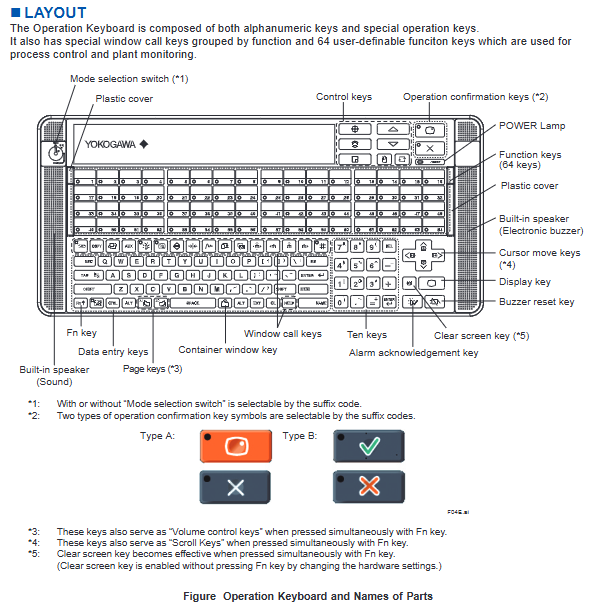
The key layout of AIP830 keyboard balances universality and industrial operation specificity, mainly including the following categories:
Basic input keys: alphanumeric keys that meet regular character and number input requirements
Specialized operation keys: including control keys, operation confirmation keys, cursor movement keys, display keys, buzzer reset keys, Fn keys, numeric keys, screen clearing keys, data input keys, container window keys, alarm confirmation keys, page flipping keys, etc., covering the core control scenarios in industrial operations
Function grouping key: a special window calling key divided by function, which facilitates users to quickly switch to the corresponding operating interface
Custom Function Keys: Equipped with 64 customizable function keys, specifically designed for process control and factory monitoring scenarios. Users can assign commonly used operations, interface calls, and other functions to these keys according to their actual work needs, greatly improving operational efficiency
(2) Optional configuration function
Mode selection switch: supports selecting whether to equip this switch through suffix code. Users can decide whether to need mode switching function based on the complexity and requirements of the operation process
Operation confirmation key: provides two types of key symbols (Type A and Type B), which can be selected through suffix codes to adapt to different users' operating habits or the unified operating standards within the enterprise
(3) Design of combination function keys
By combining the Fn key with other keys, additional functions can be achieved to enhance the practicality and ease of operation of the keyboard
Page turning key (3 notes): When pressed simultaneously with the Fn key, it can be used as a volume control key to adjust the sound volume
Cursor movement key (4 notes): When pressed simultaneously with the Fn key, it can be used as a scroll key, making it convenient to quickly scroll through content in long document and long list interfaces
Clear screen button (5 notes): By default, it needs to be pressed simultaneously with the Fn button to take effect; If it needs to be pressed separately to take effect, it can be achieved by modifying hardware settings, flexibly adapting to the operating habits of different users
(4) Other core components
POWER Lamp: Intuitively displays the power status of the keyboard
Plastic protective cover: Provides dust-proof and scratch resistant protection for the core area of the keyboard
Built in dual sound components: including an electronic buzzer (for bumping alarms) and a USB speaker (for sound function output), to meet different types of sound prompt needs
External dimensions and installation specifications
(1) Keyboard body size
Cable length: 2300 ± 100mm, longer cables can flexibly adapt to different placement distances between keyboards and PCs, improving the freedom of installation layout
Key dimension annotation: Key dimensions such as body length and width should refer to the F02E.ai drawing in the document (applicable to AIP830-1 model)
Tolerance standard:
When the reference size is above 0.5mm and equal to or less than 120mm, the nominal tolerance is ± 0.8mm, and the combined nominal tolerance is ± 1.5mm
When the reference size exceeds 120mm, the nominal tolerance follows the JEM 1459 standard to ensure product size consistency and installation compatibility
(2) VESA bracket installation dimensions
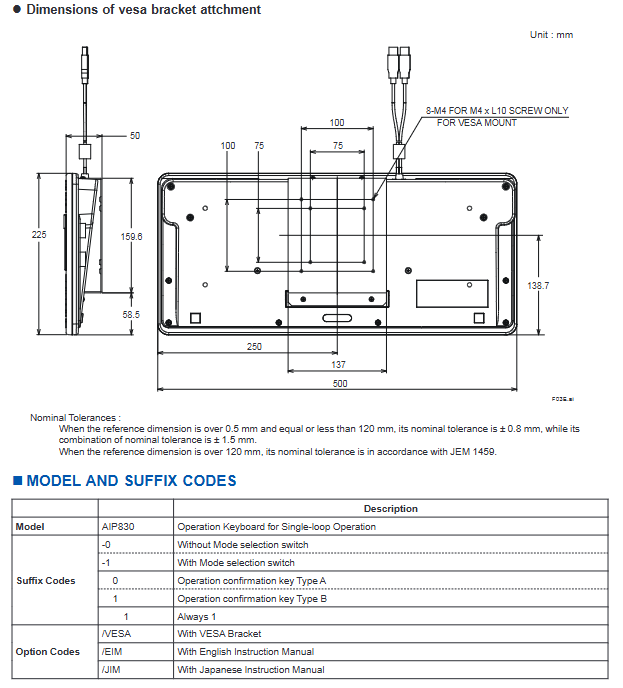
Products with VESA option codes are equipped with VESA brackets, and their installation dimensions should refer to the F03E.ai drawing in the document. The core parameters are as follows:
Screw specifications: 8-M4, only applicable to M4 × L10 screws. When installing, it is necessary to strictly match the screw specifications to avoid loose installation caused by incompatible screws
Installation hole spacing: Supports two VESA standard installation hole spacings of 100 × 100mm and 75 × 75mm, compatible with most VESA standard installation brackets, wall brackets, etc. on the market
Key installation dimensions (unit: mm): 225, 159.6, 138.7, 58.5, 250, 137, 500 (specific locations need to be confirmed in conjunction with the drawings)
Tolerance standard: Consistent with the dimensional tolerance standard of the keyboard body, ensuring the accuracy of bracket installation
Model and coding rules
The model of AIP830 consists of three parts: basic model, suffix code, and option code. Users can choose a combination according to their actual needs. The specific coding rules are as follows:
Detailed description of coding category and coding value
Basic model AIP830 single circuit operation keyboard (core model identification)
Postfix code-0 without mode selection switch (suitable for simplified operation scenarios without mode switching)
Suffix-1 with mode selection switch (suitable for complex operation scenarios that require multi-mode switching)
The suffix code 0 operation confirmation key is Type A (symbol style follows Type A standard)
The operation confirmation key for suffix code 1 is Type B (symbol style follows Type B standard)
The suffix code 1 has a fixed encoding value, which is included in all models
Option code/VESA with VESA bracket (supports wall mounting, bracket installation, and other fixing methods)
Option code/EIM comes with an English manual (convenient for English environment users to refer to)
Option code/JIM comes with a Japanese manual (convenient for Japanese language users to refer to)
For example, model AIP830-111/VESA/EIM indicates that the keyboard is a version with mode selection switch, operation confirmation key Type B, VESA bracket, and comes with an English manual.
Applicable standards and compliance requirements
The compliance of AIP830 keyboard depends on the connected PC device. Only when the certification mark corresponding to the standard is marked on the connected PC, the keyboard meets the requirements of the standard. The specific applicable standards are as follows:
(1) Safety standards
CSA standard: requires PC labeling with CSA markings
CE Marking (EU CE Certification): PC marking is required for CE marking
EAC Marking (Eurasian Economic Union Certification): PC marking of EAC mark is required
Moroccan Compliance Marking (C م Marking): PC is required to mark this marking
(2) EMC (Electromagnetic Compatibility) Compliance Standards
CE Marking (EU CE Certification): PC marking is required, and it should be noted that EN 61000-3-2 and EN 61000-3-3 standards are not applicable to AIP830
RCM (Australia and New Zealand certification): requires PC labeling with RCM mark
KC Marking (Korean certification): PC marking of KC mark is required
EAC Marking (Eurasian Economic Union Certification): PC marking of EAC mark is required
Moroccan Compliance Marking (C م Marking): PC is required to mark this marking
Note: For detailed information on the above standards, please refer to the "System Overview" document (document numbers GS 33K01A10-50E, GS 33K01A20-50E).
- OMRON
- ABB
- General Electric
- EMERSON
- Honeywell
- HIMA
- ALSTOM
- Rolls-Royce
- MOTOROLA
- Rockwell
- Siemens
- Woodward
- YOKOGAWA
- FOXBORO
- KOLLMORGEN
- MOOG
- KB
- YAMAHA
- BENDER
- TEKTRONIX
- Westinghouse
- AMAT
- AB
- XYCOM
- Yaskawa
- B&R
- Schneider
- KONGSBERG
- NI
- WATLOW
- ProSoft
- SEW
- ADVANCED
- Reliance
- TRICONEX
- METSO
- MAN
- Advantest
- STUDER
- DANAHER MOTION
- Bently
- Galil
- EATON
- MOLEX
- DEIF
- B&W
- ZYGO
- Aerotech
- DANFOSS
- Beijer
- Moxa
- Rexroth
- Johnson
- WAGO
- TOSHIBA
- BMCM
- SMC
- HITACHI
- HIRSCHMANN
- Application field
- XP POWER
- CTI
- TRICON
- STOBER
- Thinklogical
- Horner Automation
- Meggitt
- Fanuc
- Baldor
- SHINKAWA
- Other Brands
- UniOP
- KUKA
- Iba
- Beckhoff
- ADLINK
-
 Sigmatek MDD111-1 DIAS Drive Axis Module
 -
 Sigmatek DKL042 05-024-042 Terminal Module
 -
 Sigmatek DM822 Control Module
 -
 Sigmatek CDM167 12-008-167-O Module
 -
 Sigmatek TAE151 Touch Display Unit
 -
 Sigmatek DCC041 SLIDES Module 05-700-041-D
 -
 Sigmatek AKM65M-ANC2GBB0 PM Servo Motor
 -
 Sigmatek ETT221 01-230-221 Operator Terminal
 -
 Sigmatek SLIDES DAM 124 Analog Module
 -
Sigmatek AKM31C-ANCNGBB0 Servo Motor
-
 Mannesmann Demag Sigmatek CP626 Central Unit
 -
 SIGMATEK 0332.554.03 Board 371071000154
 -
 SIGMATEK 12-250-021 Base Plate Back Panel CM5V020
 -
 SIGMATEK DM162 S-DIAS Digital Mix Module
 -
 DEMAG ERGOTECH 061 381 66 Sigmatek 9842.243.02 Circuit Board
 -
 SIGMATEK CP313-1 PLC Module
 -
Sigmatek ETV0551-2 VARAN Touch Terminal
-
 Sigmatek SDM 081 FS S-Dias Safety Module
 -
 DEMAG 05-250-023 Ergotech Motherboard with Sigmatek TMS012
 -
Sigmatek CM5V020 12-250-023-K Wiring Base
-
 Sigma Tek 5000B-37 Attitude Gyro Indicator
 -
 Sigmatek SDD120-2 DIAS Drive
 -
 Sigmatek CME221 Memory Module
 -
 Sigmatek DCP640 DIAS Central Unit
 -
 Sigmatek STO040 Safety Output Module
 -
Sigmatek CET281 Control Panel
-
 Sigmatek CIPC LX800 Demag NC5 CPU
 -
 Sigmatek DKL093 05-024-093 Terminal Module
 -
 Sigmatek AI088 20-009-088 Analog Input Module
 -
Sigmatek CAI888 Analog Input Module
-
SIGMATEK CCA021 12-025-021 Analog Output Module
-
SIGMATEK 1104.579.05 Control Module
-
SIGMATEK SDI100 Digital Input Module
-
 SIGMATEK C-IPC 256MB LX800 Compact Dias
 -
 SIGMATEK 9423.090.02 Control Module
 -
SIGMATEK C-IPC 256 Power Supply 148498
-
 SIGMATEK CAI025 Analog Input Module
 -
 SIGMATEK CTO166 Digital Output Module
 -
 SIGMATEK CP112 20-004-112 Processor Module
 -
SIGMATEK CAI887 12-009-887 Safety Module
-
 Sigma-Tek 4000B-31 Directional Gyro 1U262-002-42
 -
Sigmatek C-IPC 256MB LX800 IPC Controller
-
Sigmatek C-IPC 01-450-031 Industrial PC LX800
-
Sigmatek C-IPC 256 Industrial PC Controller
-
Sigmatek CCP-531 PLC Processor Module
-
Sigmatek CDI163 Digital Input Module
-
 Sigmatek ETV0501 VARAN Terminal 12-230-0501
 -
 Sigmatek CTMS020 C-DIAS Technology Module
 -
 Sigmatek CIV512 VARAN Switch Module
 -
 Sigmatek HU011 20-080-011 Interface Module
 -
SIGMATEK SLIDES DAM 124 Module
-
 SIGMATEK C-IPC 161 01-450-161L Industrial PC
 -
SIGMATEK C-IPC 128MB VIA 733MHz 01-450-024-K
-
 SIGMATEK 12-780-012 R8-IPC Geode LX800 Module
 -
SIGMATEK CAM124 Analog Module
-
 SIGMATEK S1 032-8AF61-R4 EZ Servo Motor
 -
 SIGMATEK CTO163 Digital Output Module
 -
 SIGMATEK CCP082 12-004-082 Processor Module
 -
 SIGMATEK CRCH081 C-DIAS Temperature Module
 -
 SIGMATEK PC322-K 01-310-322-K Industrial PC
 -
SIGMATEK SDD310-2 Servo Drive
-
 SIGMATEK AI084 Analog Input Module
 -
SIGMATEK CRCH081 12-752-081 Temperature Module
-
Sigma-Tek 5000L-4 Attitude Gyro 1U284-001-3
-
 SIGMATEK CM5V020 12-250-023-K Wiring Module
 -
Sigma-Tek 4000H-6 Directional Gyro IU262-035-7
-
 SIGMATEK Dias DCP160 05-004-160 Processor Module
 -
SIGMATEK 0147.395.02 Control Module
-
SIGMATEK A1084 Control Module
-
SIGMATEK DI200 20-006-2000 Digital Input Module
-
Sigmatek DNC115 Encoder Module
-
 Sigmatek DAM122 05-017-122 Analog Module
 -
Sigmatek 9802.289.01 Control Board TA71 Display
-
Sigmatek TO127 20-007-127 Digital Output Module
-
Sigmatek DNC031 05-011-031 Digital Module
-
Sigmatek VI022 20-003-022 Interface Module
-
Sigmatek CAI085 Analog Input Module
-
 Sigmatek CP111 S-DIAS CPU Module
 -
Sigmatek CTMS030 Krauss Maffei Module
-
 Sigmatek CAM123 Control Module
 -
 Sigmatek TAE732-P 01-240-732-P Touch Display Unit
 -
Sigmatek MDM021 Digital Mixed Module
-
Sigmatek DCP642 DIAS Central Unit
-
 Sigmatek CST022 12-014-022 C-DIAS Module
 -
 Sigmatek SRO021 20-893-021 Safety Relay Output
 -
 Krauss Maffei MC5 Control System Sigmatek
 -
 Sigmatek DC061 Module 18-24VDC 300mA
 -
 Herrmann EVT0855 Ultrasonic Welder Touch Panel
 -
Sigmatek CIV521 Control Module 1.4A 2W
-
Sigmatek DDI61 05-006-161 Digital Input Module
-
SIGMATEK ETT312-E Touch Terminal 01-230-312
-
Cessna S3326-1 Sigma Tek 5000B-67 Gyro 1U149-015-9
-
SIGMATEK PS101 Power Supply Module
-
SIGMATEK 0332.554.03 Control Module 371071000154
-
 SIGMATEK ETT312-E Touch Terminal 01-230-312
 -
SIGMATEK CDM163 Control Module
-
 SIGMATEK VSV046 16-023-046 Module
 -
SIGMATEK AM221 20-017-221 Analog Module
-
SIGMATEK CTS051 12-053-051 Control Module
-
SIGMATEK AM221 20-017-221 Analog Module
-
Sigmatek CSDI161 12-891-161 Safety Input Module
-
Sigma Tek 4000C-1 Directional Gyro Indicator
-
Sigmatek ETV0501 12-230-0501 VARAN Terminal
-
Sigmatek DDM165 SLIDES Module
-
Sigmatek N100 20-011-100 Control Module
-
Sigmatek AKM54K-ANC2R-B0 PM Servo Motor
-
Sigmatek CTO166 Digital Output Module
-
Sigmatek CP212-K 20-004-212-K CPU Module
-
Sigmatek CDI161 Digital Input Module
-
Sigmatek DCC080 05-700-080-2 Control Module
-
 SIGMATEK SCP011 S-DIAS Safety CPU
 -
SIGMATEK SCP011 S-DIAS Safety CPU
-
SIGMATEK SRO022 Relay Output Module
-
SIGMATEK MDD 121 Drive Axis Module
-
SIGMATEK DSI021 SLIDES Siemens Interface
-
SIGMATEK DIAS DCP161 Module 05-004-161
-
 Sigmatek ETT312 Built-in Touch Terminal
 -
SIGMATEK DCP 643 DIAS Controller System
-
SIGMATEK CIO021 Multi I/O Module
-
SIGMATEK CTMS020 Control Module
-
 Sigmatek CME 221 Memory Module
 -
Sigmatek 0420.615.01 Control Board
-
Sigmatek CP111 20-004-111 CPU Module
-
Sigmatek 9405.065.03 Control Board
-
Sigmatek ETEK 01-450-032-K C-IPC 256MB Industrial PC
-
Sigmatek CTO163 12-007-163 Safety Output Module
-
Sigmatek TO081 20-007-081 Digital Output Module
-
 Sigmatek SI021 20-022-021 Safety Input Module


