
Foxboro Evo FDSI Triconex integrator driver product
Brand Foxboro (formerly Invensys, under Schneider Electric)
Document version PSS 31S-3A9 B3
The core positioning is an integrated driver based on the TSAA protocol, which enables data exchange and unified management between the Triconex security controller and the Foxboro system
The core protocol Triconex System Access Application (TSAA) protocol is designed specifically for secure applications
Core carrier FBM232 (single module, non redundant), FBM233 (dual module, redundant)
Foxboro Evo FDSI Triconex integrator driver product
Product basic information
Key content of the project
Product Name Foxboro Evo FDSI Triconex Integrated Driver
Brand Foxboro (formerly Invensys, under Schneider Electric)
Document version PSS 31S-3A9 B3
The core positioning is an integrated driver based on the TSAA protocol, which enables data exchange and unified management between the Triconex security controller and the Foxboro system
The core protocol Triconex System Access Application (TSAA) protocol is designed specifically for secure applications
Core carrier FBM232 (single module, non redundant), FBM233 (dual module, redundant)
Core functions and advantages
(1) System integration and data interaction
Bidirectional data read and write: Supports real-time data exchange between Foxboro system and Triconex controller, including input and output of analog (integer/IEEE single precision floating-point) and digital quantities.
Efficient access method: The I/O points of the Triconex controller can be directly accessed through the TriStation tag name or Modbus alias without additional adaptation.
Batch operation support: A single write command can achieve multi-point writing, improving data transmission efficiency.
System Function Reuse: Directly supports the standard factory management functions (such as startup and fault detection) and operator display interface of Foxboro Evo/I/A Series, without the need for separate development.
(2) Redundancy and reliability design
Redundant configuration: FBM233 dual modules can form a redundant architecture, which is divided into a master module and a tracker module. The modules monitor the health status and share device information through communication links.
Fault switching: When the main module fails, it automatically switches to the tracking module without data loss during the switching process, and can also be manually triggered through System Manager.
Fault maintenance: When FBM or network faults occur, replacing modules or repairing the network will not affect the normal transmission of on-site I/O signals.
(3) Diagnostic and monitoring capabilities
Enhanced Diagnostic Monitoring (EnDM): Supports the integration of Triconex Enhanced Diagnostic Monitor software, which can be directly launched from Foxboro System Manager to monitor the hardware, communication, and application status of the Triconex controller.
Diagnostic data output: All diagnostic data of Triconex devices are provided through DCI input blocks, which can quickly develop FoxView process graphics to display diagnostic information and status.
Connection detection: System Monitor can detect the real-time connection status of devices. When a device fails, the FDSI ECB201 object will enter a warning state and trigger a system alarm.
(4) SOE event logging function
Event Collection: Sequence of Events (SOE) messages generated by the Triconex system can be collected and recorded to the AIM * Historian or Alarm Provider application through the Aprint mechanism.
Configuration management: SOE configuration information (device IP, event destination, alarm block, time zone, SOE point list) is stored in an XML file, independent of the control application configuration.
Capacity support: The TSAA workstation driver supports up to 10000 Triconex tags for SOE data collection.
Software and hardware compatibility and requirements
(1) Hardware compatibility
Hardware type, supported models, and requirements
FBM module FBM232 (single module, 10/100 Mbps Ethernet), FBM233 (redundant module, 10/100 Mbps Ethernet)
Triconex controllers Tricon v9.7. x and above, Trident v1.2 and above (excluding v2.0-2.1.1), Tri GP v2.1.2 and above
The communication module Tricon requires installation of NCM/TCM module, while Trident requires installation of CM module
Network devices support switches; Trident v3.0 CIM module does not support hubs
(2) Software and System Requirements
Category specific requirements
Foxboro system version I/A Series software v8.4 and above, Control Core Services v9.0 and above
Operating System Windows XP ®、 Windows 7 ®、 Windows Server ® In 2003 Windows Server ® 2008 R2
Configure software FDSI Configurator (to configure Ethernet ports), TriStation (to configure Triconex devices)
Diagnostic software Triconex EnDM v2.8.0+(requires System Manager v2.5+for direct startup)
Key technical parameters
Parameter category specific specifications
Single FBM supports up to 10 Triconex devices (actual quantity depends on performance and configuration)
DCI connection capacity up to 2000 (used for reading and writing Triconex controller data)
Data point capacity of up to 32000 digital I/O points, or up to 2000 analog systems/I/O values (can be mixed configured)
The fastest data scanning rate is 50 milliseconds per time (not exceeding the Triconex controller's own scanning rate, default is 200 milliseconds per time)
Communication timeout setting: If the controller does not receive a data request for 2 minutes, it will stop sending data
Support control block ECB block (ECB200/FBM232, ECB202/FBM233, ECB201/Triconex devices); DCI block (13 types including BIN, BOUT, IIN, IOUT, etc., including redundancy types)
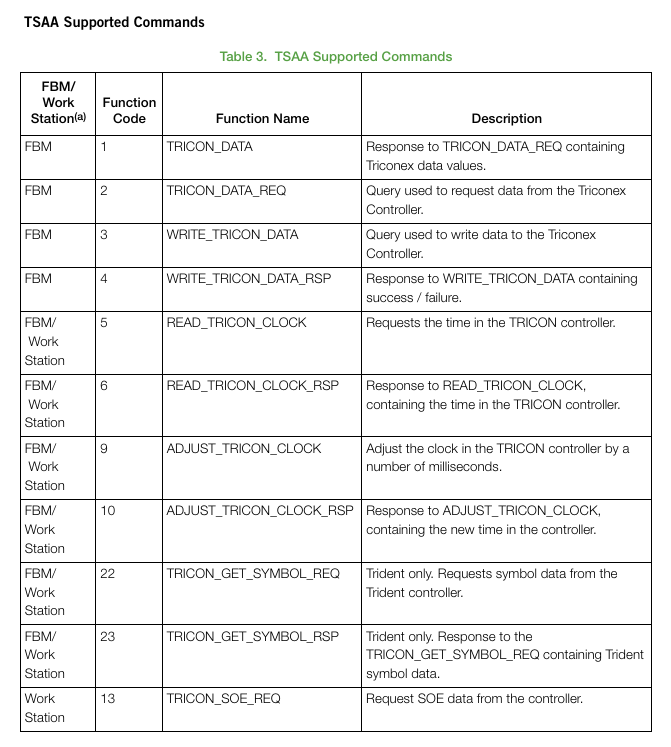
Supports 13 core commands of TSAA (such as data request/response, clock read/write/adjust, SOE data request, etc.)
Installation and Configuration
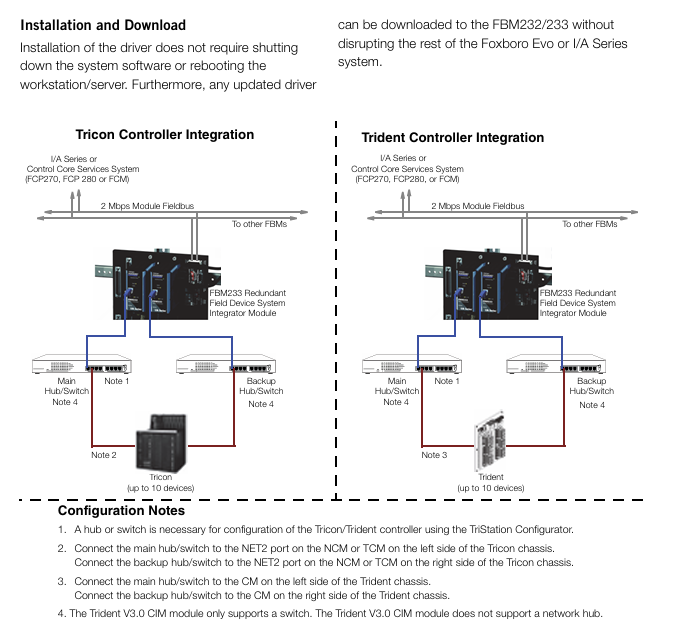
Installation feature: Driver installation does not require shutting down system software or restarting workstations/servers; When updating the driver, it can be directly downloaded to FBM232/FBM233 without affecting the operation of other parts of the Foxboro system.
Configuration tool:
Driver configuration: Use FDSI Configurator (to be installed on a compatible workstation/server);
Device configuration: Use the TriStation Configurator to configure the Triconex controller;
SOE configuration: Maintain SOE point and device configuration information through XML files, independent of control applications.
Network configuration:
The Triconex controller needs to be connected to the FBM through a primary/backup hub/switch;
The Trident V3.0 CIM module only supports switches and does not support hubs.
Key issues
Question 1: What is the core integration value of FDSI Triconex Integrated Driver? How to achieve efficient interconnection between Triconex safety controller and Foxboro system?
Answer: The core integration value lies in the deep integration of Triconex security system and Foxboro automation system without the need for separate interface development. It directly reuses the factory management functions, operating interface, and diagnostic tools of Foxboro system, reducing integration costs and improving system consistency. Efficient interconnection implementation method: ① Based on the TSAA protocol designed by Triconex for secure applications, establish a 10/100 Mbps Ethernet connection through FBM232 (single module) or FBM233 (redundant module); ② Support direct access to device I/O points using TriStation tag names or Modbus aliases, and enable multi-point writing with a single command; ③ Driver installation and updates do not require downtime, the configuration process is simple, and a single FBM can connect up to 10 Triconex devices, meeting the integration requirements of medium and large-scale projects.
Question 2: What are the redundant configuration and fault handling designs of this driver? How to ensure the reliability of data transmission?
Answer: Redundancy and fault handling design: ① Hardware redundancy: FBM233 dual modules are used to form a master-slave architecture, with real-time monitoring of health status and sharing of device information between modules; ② Fault switching: When the main module fails, it automatically switches to the tracking module without data loss, and also supports manual switching; ③ Maintenance convenience: In case of FBM or network failure, replacing modules or repairing the network will not affect on-site I/O signals. Data transmission reliability guarantee: ① Communication link redundancy: Build dual links through primary/backup hubs/switches; ② Data scanning mechanism: a scanning rate of up to 50 milliseconds per scan (adapted to controller capabilities) to ensure real-time performance; ③ Timeout protection: If the controller does not receive a request within 2 minutes, it will stop sending to avoid invalid transmission; ④ Diagnostic warning: System Monitor detects connection status in real-time, DCI block outputs diagnostic data, EnDM tool monitors equipment status, and detects potential faults in advance.
Question 3: What Triconex controller models and system environments does the driver support? How can data processing capabilities match project requirements of different scales?
Answer: Compatibility between controller and system environment: ① Supported Triconex controllers: Tricon v9.7. x and above, Trident v1.2 and above (excluding v2.0-2.1.1), Tri GP v2.1.2 and above; ② Compatible Foxboro systems: I/A Series v8.4 and above, Control Core Services v9.0 and above; ③ Supported operating systems: Windows XP/7/Server 2003/2008 R2. Data processing capability adaptation: ① Equipment capacity: A single FBM can support up to 10 Triconex devices, which can be expanded through multiple FBMs; ② Data point capacity: Supports up to 32000 digital I/O points or 2000 analog values, meeting the signal acquisition needs of small (single device) to medium to large (multi device cluster) projects; ③ Connection capacity: 2000 DCI connections can cover the data exchange needs of multiple devices, SOE logs support the collection of 10000 tags, and are suitable for high demand security event tracing scenarios.
- OMRON
- ABB
- General Electric
- EMERSON
- Honeywell
- HIMA
- ALSTOM
- Rolls-Royce
- MOTOROLA
- Rockwell
- Siemens
- Woodward
- YOKOGAWA
- FOXBORO
- KOLLMORGEN
- MOOG
- KB
- YAMAHA
- BENDER
- TEKTRONIX
- Westinghouse
- AMAT
- AB
- XYCOM
- Yaskawa
- B&R
- Schneider
- KONGSBERG
- NI
- WATLOW
- ProSoft
- SEW
- ADVANCED
- Reliance
- TRICONEX
- METSO
- MAN
- Advantest
- STUDER
- DANAHER MOTION
- Bently
- Galil
- EATON
- MOLEX
- DEIF
- B&W
- ZYGO
- Aerotech
- DANFOSS
- Beijer
- Moxa
- Rexroth
- Johnson
- WAGO
- TOSHIBA
- BMCM
- SMC
- HITACHI
- HIRSCHMANN
- Application field
- XP POWER
- CTI
- TRICON
- STOBER
- Thinklogical
- Horner Automation
- Meggitt
- Fanuc
- Baldor
- SHINKAWA
- Other Brands
- UniOP
- KUKA
- Iba
- Beckhoff
- ADLINK
-
 Sigmatek MDD111-1 DIAS Drive Axis Module
 -
 Sigmatek DKL042 05-024-042 Terminal Module
 -
 Sigmatek DM822 Control Module
 -
 Sigmatek CDM167 12-008-167-O Module
 -
 Sigmatek TAE151 Touch Display Unit
 -
 Sigmatek DCC041 SLIDES Module 05-700-041-D
 -
 Sigmatek AKM65M-ANC2GBB0 PM Servo Motor
 -
 Sigmatek ETT221 01-230-221 Operator Terminal
 -
 Sigmatek SLIDES DAM 124 Analog Module
 -
Sigmatek AKM31C-ANCNGBB0 Servo Motor
-
 Mannesmann Demag Sigmatek CP626 Central Unit
 -
 SIGMATEK 0332.554.03 Board 371071000154
 -
 SIGMATEK 12-250-021 Base Plate Back Panel CM5V020
 -
 SIGMATEK DM162 S-DIAS Digital Mix Module
 -
 DEMAG ERGOTECH 061 381 66 Sigmatek 9842.243.02 Circuit Board
 -
 SIGMATEK CP313-1 PLC Module
 -
Sigmatek ETV0551-2 VARAN Touch Terminal
-
 Sigmatek SDM 081 FS S-Dias Safety Module
 -
 DEMAG 05-250-023 Ergotech Motherboard with Sigmatek TMS012
 -
Sigmatek CM5V020 12-250-023-K Wiring Base
-
 Sigma Tek 5000B-37 Attitude Gyro Indicator
 -
 Sigmatek SDD120-2 DIAS Drive
 -
 Sigmatek CME221 Memory Module
 -
 Sigmatek DCP640 DIAS Central Unit
 -
 Sigmatek STO040 Safety Output Module
 -
Sigmatek CET281 Control Panel
-
 Sigmatek CIPC LX800 Demag NC5 CPU
 -
 Sigmatek DKL093 05-024-093 Terminal Module
 -
 Sigmatek AI088 20-009-088 Analog Input Module
 -
Sigmatek CAI888 Analog Input Module
-
SIGMATEK CCA021 12-025-021 Analog Output Module
-
SIGMATEK 1104.579.05 Control Module
-
SIGMATEK SDI100 Digital Input Module
-
 SIGMATEK C-IPC 256MB LX800 Compact Dias
 -
 SIGMATEK 9423.090.02 Control Module
 -
SIGMATEK C-IPC 256 Power Supply 148498
-
 SIGMATEK CAI025 Analog Input Module
 -
 SIGMATEK CTO166 Digital Output Module
 -
 SIGMATEK CP112 20-004-112 Processor Module
 -
SIGMATEK CAI887 12-009-887 Safety Module
-
 Sigma-Tek 4000B-31 Directional Gyro 1U262-002-42
 -
Sigmatek C-IPC 256MB LX800 IPC Controller
-
Sigmatek C-IPC 01-450-031 Industrial PC LX800
-
Sigmatek C-IPC 256 Industrial PC Controller
-
Sigmatek CCP-531 PLC Processor Module
-
Sigmatek CDI163 Digital Input Module
-
 Sigmatek ETV0501 VARAN Terminal 12-230-0501
 -
 Sigmatek CTMS020 C-DIAS Technology Module
 -
 Sigmatek CIV512 VARAN Switch Module
 -
 Sigmatek HU011 20-080-011 Interface Module
 -
SIGMATEK SLIDES DAM 124 Module
-
 SIGMATEK C-IPC 161 01-450-161L Industrial PC
 -
SIGMATEK C-IPC 128MB VIA 733MHz 01-450-024-K
-
 SIGMATEK 12-780-012 R8-IPC Geode LX800 Module
 -
SIGMATEK CAM124 Analog Module
-
 SIGMATEK S1 032-8AF61-R4 EZ Servo Motor
 -
 SIGMATEK CTO163 Digital Output Module
 -
 SIGMATEK CCP082 12-004-082 Processor Module
 -
 SIGMATEK CRCH081 C-DIAS Temperature Module
 -
 SIGMATEK PC322-K 01-310-322-K Industrial PC
 -
SIGMATEK SDD310-2 Servo Drive
-
 SIGMATEK AI084 Analog Input Module
 -
SIGMATEK CRCH081 12-752-081 Temperature Module
-
Sigma-Tek 5000L-4 Attitude Gyro 1U284-001-3
-
 SIGMATEK CM5V020 12-250-023-K Wiring Module
 -
Sigma-Tek 4000H-6 Directional Gyro IU262-035-7
-
 SIGMATEK Dias DCP160 05-004-160 Processor Module
 -
SIGMATEK 0147.395.02 Control Module
-
SIGMATEK A1084 Control Module
-
SIGMATEK DI200 20-006-2000 Digital Input Module
-
Sigmatek DNC115 Encoder Module
-
 Sigmatek DAM122 05-017-122 Analog Module
 -
Sigmatek 9802.289.01 Control Board TA71 Display
-
Sigmatek TO127 20-007-127 Digital Output Module
-
Sigmatek DNC031 05-011-031 Digital Module
-
Sigmatek VI022 20-003-022 Interface Module
-
Sigmatek CAI085 Analog Input Module
-
 Sigmatek CP111 S-DIAS CPU Module
 -
Sigmatek CTMS030 Krauss Maffei Module
-
 Sigmatek CAM123 Control Module
 -
 Sigmatek TAE732-P 01-240-732-P Touch Display Unit
 -
Sigmatek MDM021 Digital Mixed Module
-
Sigmatek DCP642 DIAS Central Unit
-
 Sigmatek CST022 12-014-022 C-DIAS Module
 -
 Sigmatek SRO021 20-893-021 Safety Relay Output
 -
 Krauss Maffei MC5 Control System Sigmatek
 -
 Sigmatek DC061 Module 18-24VDC 300mA
 -
 Herrmann EVT0855 Ultrasonic Welder Touch Panel
 -
Sigmatek CIV521 Control Module 1.4A 2W
-
Sigmatek DDI61 05-006-161 Digital Input Module
-
SIGMATEK ETT312-E Touch Terminal 01-230-312
-
Cessna S3326-1 Sigma Tek 5000B-67 Gyro 1U149-015-9
-
SIGMATEK PS101 Power Supply Module
-
SIGMATEK 0332.554.03 Control Module 371071000154
-
 SIGMATEK ETT312-E Touch Terminal 01-230-312
 -
SIGMATEK CDM163 Control Module
-
 SIGMATEK VSV046 16-023-046 Module
 -
SIGMATEK AM221 20-017-221 Analog Module
-
SIGMATEK CTS051 12-053-051 Control Module
-
SIGMATEK AM221 20-017-221 Analog Module
-
Sigmatek CSDI161 12-891-161 Safety Input Module
-
Sigma Tek 4000C-1 Directional Gyro Indicator
-
Sigmatek ETV0501 12-230-0501 VARAN Terminal
-
Sigmatek DDM165 SLIDES Module
-
Sigmatek N100 20-011-100 Control Module
-
Sigmatek AKM54K-ANC2R-B0 PM Servo Motor
-
Sigmatek CTO166 Digital Output Module
-
Sigmatek CP212-K 20-004-212-K CPU Module
-
Sigmatek CDI161 Digital Input Module
-
Sigmatek DCC080 05-700-080-2 Control Module
-
 SIGMATEK SCP011 S-DIAS Safety CPU
 -
SIGMATEK SCP011 S-DIAS Safety CPU
-
SIGMATEK SRO022 Relay Output Module
-
SIGMATEK MDD 121 Drive Axis Module
-
SIGMATEK DSI021 SLIDES Siemens Interface
-
SIGMATEK DIAS DCP161 Module 05-004-161
-
 Sigmatek ETT312 Built-in Touch Terminal
 -
SIGMATEK DCP 643 DIAS Controller System
-
SIGMATEK CIO021 Multi I/O Module
-
SIGMATEK CTMS020 Control Module
-
 Sigmatek CME 221 Memory Module
 -
Sigmatek 0420.615.01 Control Board
-
Sigmatek CP111 20-004-111 CPU Module
-
Sigmatek 9405.065.03 Control Board
-
Sigmatek ETEK 01-450-032-K C-IPC 256MB Industrial PC
-
Sigmatek CTO163 12-007-163 Safety Output Module
-
Sigmatek TO081 20-007-081 Digital Output Module
-
 Sigmatek SI021 20-022-021 Safety Input Module


