
CyberPower UT650EG / UT850EG User’s Manual
CyberPower UT650EG / UT850EG User’s Manual
Core Security Directive (Must See)
To avoid fire, electric shock, or equipment damage, the following requirements must be strictly followed:
Installation environment: It can only be used in indoor temperature and humidity controlled environments (see technical parameters for specific range). It is forbidden to expose it to direct sunlight, heat sources (such as heaters and furnaces), do not cover the heat dissipation holes, and stay away from conductive pollutants.
Load limit: It is prohibited to connect non computer devices such as medical/life support equipment, microwave ovens, vacuum cleaners, etc; High power equipment such as laser printers, copiers, and shredders cannot be connected to battery powered sockets (which can easily overload and damage UPS).
Usage taboos: Do not allow liquids or foreign objects to enter the equipment, and do not place liquid containers around UPS; Power off before cleaning, and prohibit liquid or spray cleaners; Battery maintenance should be carried out by professionals and unauthorized personnel are prohibited from accessing it.
Emergency response: In case of emergency, press the "OFF" button and unplug the power cord to cut off the UPS power supply; If overload is detected, the device will sound a long beep alarm, power off and remove at least one load before restarting.
Equipment installation process
1. Open box inspection
The packaging box should contain:
Core components: UPS host (1 unit, UT650EG or UT850EG)
Accessories: User Manual (1 book), USB Data Cable (1 piece, only equipped with UT850EG)
2. Hardware installation steps
Battery charging: The device can be used directly after receiving it, but it is recommended to charge it for at least 8 hours (to offset the power loss during transportation and storage). Simply plug the UPS into an AC outlet (it can be charged in both on/off states).
Load connection: In the power-off state, connect the computer, monitor, and external data storage device to the "Battery Backup&Surge Protected Outlets" and disable high-power devices.
Power access: Insert the UPS plug into a grounded 2-hole 3-wire socket (wall plugs need to be protected by fuses or circuit breakers). Do not share the same circuit with high-power devices such as air conditioners and refrigerators, and try to avoid using extension cords.
Startup: Press the power switch, the power indicator light will turn on and the device will beep once, indicating successful startup.
Overload handling: If overload is detected, the device will sound a long alarm, and at least one load needs to be removed from the power supply. Wait for 10 seconds and confirm that the circuit breaker/fuse is normal before restarting.
Long term maintenance: To maintain the optimal condition of the battery, it is necessary to always connect the UPS to an AC socket; When storing for a long time, it is necessary to fully charge the battery and cover it for storage. Charge it every 3 months to extend the battery life.
Basic Operation Guide
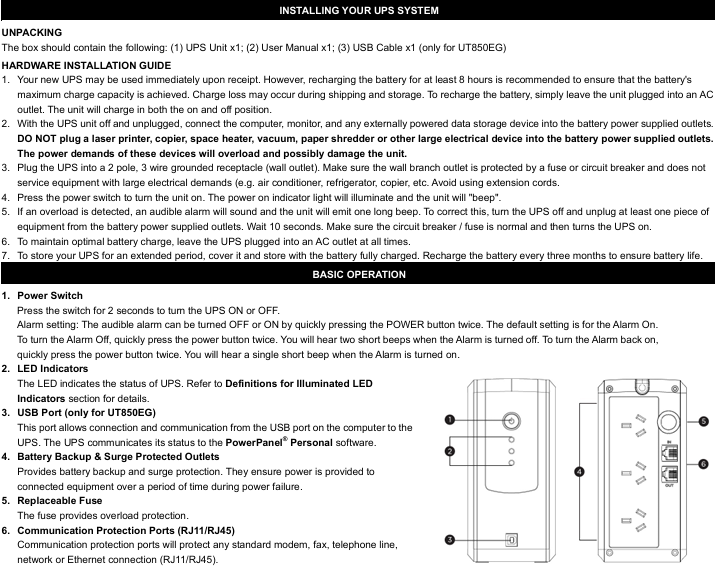
1. Core buttons and interface functions
Function Description of Operating Components
Press and hold the power switch for 2 seconds to turn on/off the device; Quickly press twice to turn on/off the sound alarm (default on, 2 short beeps when turning off the alarm, 1 short beep when turning on the alarm)
The LED indicator light displays the UPS status (such as normal mains power, battery charging, fault, etc., see the "LED Status Definition Table" for details)
USB interface (UT850EG only) connects to the computer's USB port through PowerPanel ® Personal software for UPS status communication and monitoring
The battery powered socket provides battery backup and surge protection, providing continuous power supply to the load during power outages
The replaceable fuse provides overload protection. If it melts due to overload, it needs to be replaced according to the specifications
Communication protection ports (RJ11/RJ45) protect modems, fax machines, telephone lines, and network/Ethernet connections from surge damage
2. Definition of LED indicator status
Different colors and flashing modes correspond to different device states, and the key explanation is as follows:
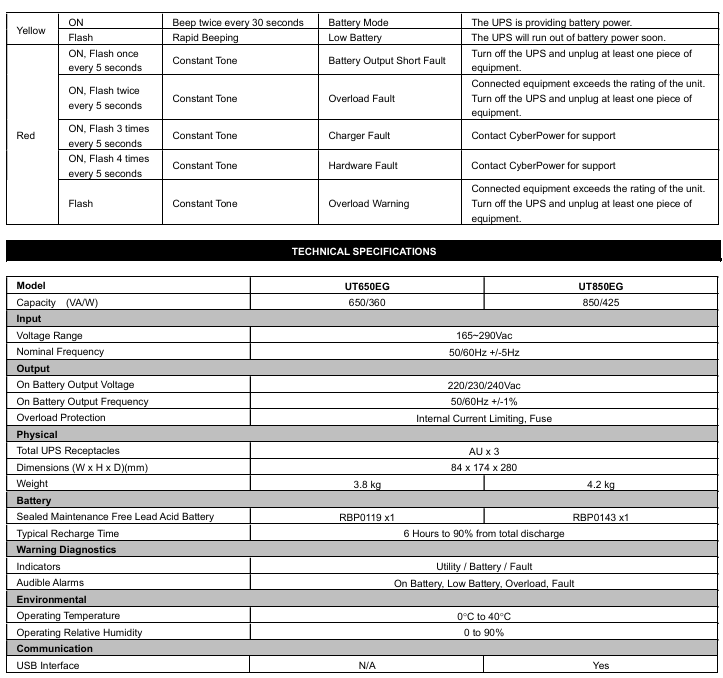
LED color, light status, sound alarm, UPS status, specific description
Green constant light - Energy saving mode (ECO): The mains power is normal, and the UPS is running in energy-saving mode
Green slow flashing - Battery charging is normal, UPS is charging the battery
The yellow light stays on and beeps twice every 30 seconds. The battery mode is interrupted, and the UPS switches to battery power supply
Yellow flashing, fast buzzing, low battery level, battery is about to run out, data needs to be saved and power off as soon as possible
Red constantly on+flashing once every 5 seconds with a continuous beep. Battery output short circuit fault. Power off and remove at least one load before restarting
Red constantly on+flashing twice every 5 seconds, continuous long beep. Overload fault. The load exceeds the rated capacity of the UPS and needs to be powered off to remove some of the load
Red constantly on+flashing 3 times every 5 seconds with a continuous beep. If the charger is faulty, please contact CyberPower technical support
Red constantly on+flashing 4 times every 5 seconds with a continuous beep. Hardware failure requires contacting CyberPower technical support
Red flashing, continuous beeping, overload warning, load overload, power outage is required to remove part of the load
Technical parameters (UT650EG vs UT850EG)
Parameter category UT650EG UT850EG
Capacity (VA/W) 650 VA/360 W 850 VA/425 W
Input voltage range 165~290 Vac; Frequency 50/60 Hz ± 5 Hz (both versions are consistent)
Output battery mode output voltage 220/230/240 Vac; Frequency 50/60 Hz ± 1% (both identical)
Overload protection with built-in current limit and fuse (both versions are the same)
Physical dimensions (width x height x depth) 84 x 174 x 280 mm; weight 3.8 kg Dimensions (width x height x depth) 84 x 174 x 280 mm; weight 4.2 kg
Sealed maintenance free lead-acid battery (model RBP0119 × 1); Charge the sealed maintenance free lead-acid battery (model RBP0143 × 1) to 90% within 6 hours after complete discharge; Charge to 90% within 6 hours after complete discharge
Adapt to working temperature range of 0-40 ℃ in the environment; Relative humidity 0~90% (both versions are the same)
Communication interface without USB interface equipped with USB interface (supports PowerPanel) ® Software monitoring)
Indicator light/alarm mains/battery/fault indicator light; Supports battery, low battery, overload, and fault alarms (both are the same)
Troubleshooting plan
Common problems, possible causes, and solutions
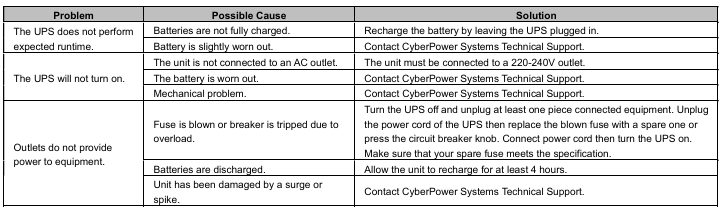
The UPS battery life did not meet expectations, and the battery was not fully charged; Keep the UPS connected to the power source for charging with slight battery loss; Contact CyberPower technical support to test batteries
UPS cannot be turned on and is not connected to an AC socket; Battery loss; Mechanical fault confirmation connected to 220-240V grounding socket; Contact technical support to replace batteries or repair hardware
The socket has no power supply to overload the load, causing the fuse to melt/the circuit breaker to trip; Battery depletion; The equipment is damaged by a surge, power is cut off, some loads are removed, fuses that meet specifications are replaced or circuit breakers are reset before restarting; Charge for at least 4 hours; Contact technical support for maintenance
- OMRON
- ABB
- General Electric
- EMERSON
- Honeywell
- HIMA
- ALSTOM
- Rolls-Royce
- MOTOROLA
- Rockwell
- Siemens
- Woodward
- YOKOGAWA
- FOXBORO
- KOLLMORGEN
- MOOG
- KB
- YAMAHA
- BENDER
- TEKTRONIX
- Westinghouse
- AMAT
- AB
- XYCOM
- Yaskawa
- B&R
- Schneider
- KONGSBERG
- NI
- WATLOW
- ProSoft
- SEW
- ADVANCED
- Reliance
- TRICONEX
- METSO
- MAN
- Advantest
- STUDER
- DANAHER MOTION
- Bently
- Galil
- EATON
- MOLEX
- DEIF
- B&W
- ZYGO
- Aerotech
- DANFOSS
- Beijer
- Moxa
- Rexroth
- Johnson
- WAGO
- TOSHIBA
- BMCM
- SMC
- HITACHI
- HIRSCHMANN
- Application field
- XP POWER
- CTI
- TRICON
- STOBER
- Thinklogical
- Horner Automation
- Meggitt
- Fanuc
- Baldor
- SHINKAWA
- Other Brands
- UniOP
- KUKA
- Iba
- Beckhoff
- ADLINK
-
 Lust LTi Drives CDA34.010 W3.0 Frequency Inverter
 -
 LTi SO22.003.0010.0000.0 ServoOne Junior Drive
 -
LUST LTi Drives CDA32.008 Servo Drive
-
 LUST LTi DRIVES LSH-074 Servo Motor
 -
 Lti CDB32.004.C2.4.SH AC Servo Drive
 -
 Lust LTi Drives VF1202S Frequency Inverter
 -
Lust LTI Drives CDB32.004.C3.0.SH Servo Controller
-
LUST SO84.012.0030.1700.2 Servo Drive
-
 Lust LTi CDB32.004 Servo Drive
 -
LUST LTI Drives CDA34.006 Servo Drive
-
 LTi DRiVES BR-090.03.540-UR Braking Resistor
 -
 Lust LTI Drives CDA34.017 Servo Controller
 -
 Lust LTi Drives CDE34.010.D2.4 Positioning Controller 10A
 -
 LTi Drives LSH-050-3-30-48/T1 PM Servo Motor
 -
 LTI CDD34.005.C2.1 Servo Drive Controller
 -
LUST LTI Drives CDB32.003.C2.4 Servo Drive
-
 LTI D-35633 Drive Servo Drive Controller
 -
 LTI Drives GmbH SO22.003.0042.0000.0 Servo Controller
 -
LTi Drives SO84.006.1030.0000.2 Servo Controller
-
 LUST LTi Drives CDA32.008 C1.4 HF V180.15 1.5 kW
 -
 LTI Drives Servo One SO84.045.0010.0001.2-W 22 kW
 -
Lust LTI CDE32.003.C2.4 Servo Drive Controller
-
LUST LTI Drives CDA34.003 Servo Controller
-
LUST LTI Drives CDA32.006 Servo Controller
-
Lust LTi Drives CDE32.004 Servo Drive
-
LUST LTi Drives SO84.012 Servo Controller
-
 LTI DRIVES LSH-060 Servo Motor
 -
LUST LTI Drives CDE32.004 with CM-DPV1
-
 LTi DRiVES SO84.016 Servo Drive
 -
LTI Drive CM-DPV1 Communication Module
-
LTi DRiVES DSM4-05.4-20R82-400 Servo Motor
-
LUST LTI Drives CDA34.003 Servo Controller
-
LTI Drives Servo One SO84.045.0010.0001.2-W 22 kW
-
LUST LTI Drives CDB32.008 W2.4 BR PC1 Servo Drive
-
LTi Drives SO84.006.1030.0000.2 Servo Controller
-
LTI DRIVES CDE34.010D2.4 Servo Drive Controller
-
 Hettich Rotanta 46 RSC Control Board VF1204S
 -
Lust LTI Drives CDA34.017.C2.CP Servo Controller 7.5 kW
-
LUST LTI Drives CDA34.003.C3.0 Servo Controller 0.75 kW
-
Lust LTI Drives CDA34.008.C1.3 Servo Controller 3 kW
-
Lust LTi Drives CDB22.004.0111.00.0 Servo Drive
-
LTi Drives SO84.032.0030.1000.2 Servo Controller
-
LUST LTi CDA32.004 C1.4 H08 B0 Servo Controller
-
LTI DRIVES CDB34.010 C2.4 Servo Drive
-
LUST LTi Drives CDA32.008 C1.4 Servo Controller
-
 LTI Motion CDE32.003.C3.0 Servo Positioning Controller
 -
LTI DRIVES CDE34.010 D2.4 Servo Drive Unit
-
 LUST LTi Drives CDD34.005.C2.1 Servo Drive
 -
 LTi Drives SO84.012.0002.0100.2 Servo Controller
 -
LUST LTi Drives CDE34.010.D2.4 Servo Drive
-
LUST LTI Drives CDF30.008 Servo Drive
-
LTi Drives SO CM-P.0010.11.00.0 Power Module
-
 LTi DRiVES SO84.008.0002.0100.2 Servo Controller
 -
LTI MOTION Servo Drive SO22.006.0040.1000.1
-
LTi DRiVES SO24.007.0030.1000.0 ServoOne Junior
-
LTi DRiVES LUST BC1300 Braking Module
-
LUST LTI DRIVES CDE34.010 Variable Frequency Drive
-
LUST LTI DRIVES CDA32.004 Servo Drive
-
LTi DRiVES LST-074-2-30-560/T1 Servo Motor
-
LUST LTI DRIVES CDB32.008 Servo Drive Module
-
 Lust Antriebstechnik LTI Drives VF1204S Inverter
 -
Lust LTI Drives CDE32.008 C3.0 Positioning Controller
-
LTI Drives LUST Servo One C-5633 D-35633
-
 Lust LTI Drives CDA34.008.C1.3 Servo Controller 3kW
 -
LTI CDF30.008 C2.6 Servo Drive 10962161
-
LUST LTi Drives CDB32.004 C2.3 SH Servo Drive
-
Lust LTi Drives CDE34.010 D2.0 Servo Drive
-
 LTi Motion CDA32.006 Servo Drive with CM-CAN1
 -
Lust LTI Drives CDB32.008 C2.3 Servo Controller
-
LTi CDE34.017.W3.0 Servo Drive
-
LUST LTI LST-074-2-30-320/T1 Servomotor
-
Lust LTi CDF30.002 C3.0 Positioning Controller
-
LTi DRIVES CDF30.008.C2.4 Drive
-
 LUST LTI CDB32.008 W2.4 BR PC1 Drive
 -
LTi SO84.004.0002.0100.2 Servo Controller
-
LTi SO84.012.0030.0011.2 ServoOne Drive
-
LTI Drives LUST Servo One C-5633 D-35633
-
LTi DRiVES c-line Smart Card A028.V01.1
-
LUST LTI CD A34.008 W1.4 BR Drive
-
 LUST LTI LSH-097-2-30-560/T1 Servomotor
 -
LUST LTI LST-074-2-30-320/T1 Servomotor
-
LUST LTi CDB32.004 C2.4.SH Servo Drive
-
 LTI Drives PM-E40.2DRA054P Pitch Inverter
 -
Lust LTI Drives CDF30.008 Servo Drive 8673548
-
LTI Drives CDF30.002.C0.7 Servo Controller
-
 Lust LTI Drives CDB32.008.W2.4 Servo Drive
 -
Lust LTI Drives CDB34.003 Servo Motor Driver
-
Lust LTI Drives CDA32.004 Servo Drive 3084456
-
Lust LTI Drives CDE34.005.W2.2 Servo Drive
-
Lust LTI Drives CDA34.006.W3.0 Servo Drive
-
 LTI Drives CDF30.008.C2.4 Servo Controller
 -
LTI Drives Lust CDB32.004.C2.4.SH Servo Drive
-
 Delta Design 1666339-501 Micro Stepper PCB 114970
 -
 APEXEL 100X Microscope Mobile LED Pocket Lens
 -
 Micro Innovation XV-152-D4-10TVR-10 Touch Screen
 -
 Micro Innovation XVH330-57MPI-1-10 Touch Screen Glass
 -
 Delta Design 1666339-501 Micro Stepper PCB 114967
 -
Micro Design MC100-MA V3 Board
-
 Delta Design 1666339-501 Micro Stepper PCB 114968
 -
Delta Design 1666339 PCB Micro Stepper ITR 116487
-
Micro Innovation XV-440-10TVB-1-10 Panel
-
 Sterling 9B21-3 Micro Switch Durable Design
 -
ATTINY104-XNANO Microchip AVR Prototype Board
-
 Delta Design 1666339 Micro Stepper PCB ITR 116539
 -
Super Micro X7SBJ Industrial Main Board
-
 Delta Design NMS BD 1698437-501 Stepper Board
 -
 Micro Innovations Turbo Track Keyboard KB420BL
 -
Micro Design PC-1 PC-1-H-DU010 Operator Panel
-
 TCI MICRO MD 250mA 7W Dimmable LED Driver
 -
 Delta Design 1666339 Micro Stepper PCB ITR 116485
 -
 Delta Design NMS BD 1698437-501 Stepper Board
 -
 Life Instruments 714-1120-1U Micro Curette
 -
Delta Design 1657925-501 Micro Processor PCB
-
Micro 100 RTC-125-2 Carbide Engraving Tool
-
 Micro Design Inc. 2106022 Liquid Level Sensor PCB
 -
Periodontal Micro Surgical Full Kit 20pc Blue Titanium K1004
-
 Micro Innovation XN-2DO-24VDC-0.5A Module
 -
Wide Innovative Technology PS-01 Micro Positioner Set
-
 HU FRIEDY NH5020 Castroviejo Needle Holder Set
 -
Moeller Micro Innovation XV-232-57BAS-1-10 Touch Screen
-
 Micro Design System MCVP-300VR Control Module 24VDC
 -
Scanlan 3003-234-1 Titanium Jacobson Needle Holder
-
 Micro Innovation XV-102-B0-35TQR-10-PLC Panel
 -
Promot Micro Design 3x8 Output 2187F
-
 Micro Innovation LIC-SW-Galileo 91 30 000600 License Certificate
 -
 Micro Design AI0486.A4-50 Control Module Board
 -
 Micro Innovation XN-2DO-24VDC-0.5A Output Module
 -
 Micro Design Not-Aus Relais AE 8.96 AE 896


