
Yokogawa AQ1100 series OLTS multi field tester
Yokogawa AQ1100 series OLTS multi field tester
Core Conclusion
This document is the "Operation Guide" for Yokogawa's AQ1100A/AQ1100B/AQ1100D Optical Loss Test Suite (OLTS) multi field tester (manual number IM AQ1100-02EN, 11th edition, November 2024), which covers equipment packaging inspection, safety specifications, component functions, measurement preparation, basic operation, and detailed specifications. It clarifies the wavelength differences of the three models (AQ1100A supports 2 single-mode wavelengths, AQ1100B supports 3 single-mode wavelengths, AQ1100D supports 2 multi-mode+2 single-mode wavelengths), emphasizes laser safety (Class 1/3R), battery (739882 lithium battery) and AC adapter usage specifications, and provides user registration and firmware. Update and provide global contact information to assist users in completing core operations such as optical power measurement, light source output, and automatic loss testing.
Product model and packaging content
(1) Model difference
The core difference between the three models lies in the supported wavelength range, and the suffix code determines the language, power meter type, and functional options:
Model Core Wavelength Applicable Scenarios
AQ1100A Single Mode (SM) 1310nm/1550nm Conventional Single Mode Fiber Loss Test
AQ1100B single-mode (SM) 1310nm/1550nm/1625nm multi wavelength single-mode fiber testing (including 1625nm monitoring wavelength scenario)
AQ1100D multi-mode (GI) 850nm/1300nm+single-mode (SM) 1310nm/1550nm supports both multi-mode and single-mode fiber testing simultaneously
Suffix code description: Language category (- HE English/- HC bilingual, etc.), power meter category (- SPM standard/- HPM high input/- PPN PON specific), functional category (/VLS visible light source/- LAN Ethernet, etc.).
(2) Accessories List
Standard accessories: 739874 AC adapter, 739882 lithium battery, hand strap (B8070CX), shoulder strap (B8070CY1,/SB option model), corresponding standard power cord, instruction manual, etc;
Optional accessories: Soft pack (SU2006A), connector adapter (SC/FC/LC models), spare battery (739882), etc., need to be purchased separately.
Safety operation standards
(1) Laser safety
Laser grade: Class 1 (measuring light source, high safety level), Class 3R (visible light source/VLS option, 650nm, output power 5mW);
Prohibited behaviors: staring directly at laser/reflected light without wearing protective equipment, disconnecting optical fibers when the light source is working, and not covering unused optical interfaces with protective covers.
(2) Power safety
Battery (739882 lithium battery): only used for AQ1100 series, only charged through the host, charging time ≤ 5 hours (timeout stop charging); Before replacement, the host needs to be turned off and the AC adapter disconnected. If it is not used for a long time (≥ 1 week), it is necessary to remove the storage (in an environment of 10-30 ℃, 40% -50% battery is optimal).
AC adapter: special model 739874, input voltage 90~264VAC (50/60Hz), confirm that the host is powered off before connection, and remove the battery for long-term AC power supply.
(3) Other safety requirements
Prohibited from use in flammable environments and disassembly of the host (only authorized personnel from Yokogawa can repair it);
The optical interface needs to use connectors that meet the specifications (such as SC/FC/LC), and should be slowly aligned when inserted to avoid mechanical impact.
Core operating procedures
(1) Preliminary preparation
Power connection: The AC adapter needs to be connected to the power cord first, then to the host DC interface, and finally plugged into a power outlet; Battery installation requires unlocking the battery cover, aligning with the electrode, inserting and locking it;
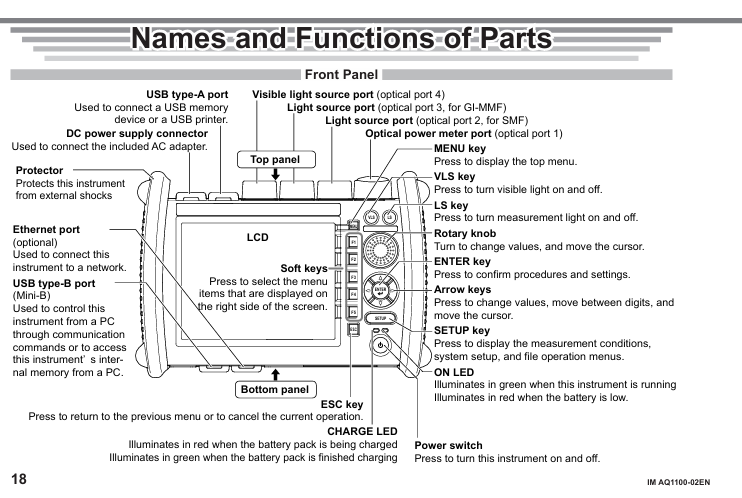
Fiber optic connection: Clean the connector end face before connection (it is recommended to use NTT-AT special cleaning agent), and select the corresponding optical port according to the wavelength (port 2 for single-mode wavelength and port 3 for multi-mode wavelength);
Power on: Press the power button, preheat for ≥ 5 minutes after turning on, the ON LED green indicates running, and the red indicates low power.
(2) Basic Function Operations
Optical power meter (OPM): After turning on, enter the menu through MENU → OPM LS, perform zero calibration (ZERO SET), set wavelength, modulation mode (CW/270Hz, etc.), unit (dBm/W, etc.), and record and store data (CSV format).
Light source output: Set the wavelength and modulation mode through MENU → OPM LS, press the LS key or soft key to turn on/off the light source, and the screen will display the laser on indicator.
Automatic loss test: The host serves as both the light source and the optical power meter. The steps are: zero point calibration → connect the light source port and the power meter port with a short fiber for optical power calibration → connect the tested fiber → press the Loss Test START button to start the test, and the results can be saved in CSV format.
(3) Data and peripheral management
Storage: Supports internal storage (110MB user available space), USB storage, file formats including CSV (data), screenshots, etc;
- OMRON
- ABB
- General Electric
- EMERSON
- Honeywell
- HIMA
- ALSTOM
- Rolls-Royce
- MOTOROLA
- Rockwell
- Siemens
- Woodward
- YOKOGAWA
- FOXBORO
- KOLLMORGEN
- MOOG
- KB
- YAMAHA
- BENDER
- TEKTRONIX
- Westinghouse
- AMAT
- AB
- XYCOM
- Yaskawa
- B&R
- Schneider
- KONGSBERG
- NI
- WATLOW
- ProSoft
- SEW
- ADVANCED
- Reliance
- TRICONEX
- METSO
- MAN
- Advantest
- STUDER
- DANAHER MOTION
- Bently
- Galil
- EATON
- MOLEX
- DEIF
- B&W
- ZYGO
- Aerotech
- DANFOSS
- Beijer
- Moxa
- Rexroth
- Johnson
- WAGO
- TOSHIBA
- BMCM
- SMC
- HITACHI
- HIRSCHMANN
- Application field
- XP POWER
- CTI
- TRICON
- STOBER
- Thinklogical
- Horner Automation
- Meggitt
- Fanuc
- Baldor
- SHINKAWA
- Other Brands
- UniOP
- KUKA
- Iba
- Beckhoff
- ADLINK
-
 Sigmatek MDD111-1 DIAS Drive Axis Module
 -
 Sigmatek DKL042 05-024-042 Terminal Module
 -
 Sigmatek DM822 Control Module
 -
 Sigmatek CDM167 12-008-167-O Module
 -
 Sigmatek TAE151 Touch Display Unit
 -
 Sigmatek DCC041 SLIDES Module 05-700-041-D
 -
 Sigmatek AKM65M-ANC2GBB0 PM Servo Motor
 -
 Sigmatek ETT221 01-230-221 Operator Terminal
 -
 Sigmatek SLIDES DAM 124 Analog Module
 -
Sigmatek AKM31C-ANCNGBB0 Servo Motor
-
 Mannesmann Demag Sigmatek CP626 Central Unit
 -
 SIGMATEK 0332.554.03 Board 371071000154
 -
 SIGMATEK 12-250-021 Base Plate Back Panel CM5V020
 -
 SIGMATEK DM162 S-DIAS Digital Mix Module
 -
 DEMAG ERGOTECH 061 381 66 Sigmatek 9842.243.02 Circuit Board
 -
 SIGMATEK CP313-1 PLC Module
 -
Sigmatek ETV0551-2 VARAN Touch Terminal
-
 Sigmatek SDM 081 FS S-Dias Safety Module
 -
 DEMAG 05-250-023 Ergotech Motherboard with Sigmatek TMS012
 -
Sigmatek CM5V020 12-250-023-K Wiring Base
-
 Sigma Tek 5000B-37 Attitude Gyro Indicator
 -
 Sigmatek SDD120-2 DIAS Drive
 -
 Sigmatek CME221 Memory Module
 -
 Sigmatek DCP640 DIAS Central Unit
 -
 Sigmatek STO040 Safety Output Module
 -
Sigmatek CET281 Control Panel
-
 Sigmatek CIPC LX800 Demag NC5 CPU
 -
 Sigmatek DKL093 05-024-093 Terminal Module
 -
 Sigmatek AI088 20-009-088 Analog Input Module
 -
Sigmatek CAI888 Analog Input Module
-
SIGMATEK CCA021 12-025-021 Analog Output Module
-
SIGMATEK 1104.579.05 Control Module
-
SIGMATEK SDI100 Digital Input Module
-
 SIGMATEK C-IPC 256MB LX800 Compact Dias
 -
 SIGMATEK 9423.090.02 Control Module
 -
SIGMATEK C-IPC 256 Power Supply 148498
-
 SIGMATEK CAI025 Analog Input Module
 -
 SIGMATEK CTO166 Digital Output Module
 -
 SIGMATEK CP112 20-004-112 Processor Module
 -
SIGMATEK CAI887 12-009-887 Safety Module
-
 Sigma-Tek 4000B-31 Directional Gyro 1U262-002-42
 -
Sigmatek C-IPC 256MB LX800 IPC Controller
-
Sigmatek C-IPC 01-450-031 Industrial PC LX800
-
Sigmatek C-IPC 256 Industrial PC Controller
-
Sigmatek CCP-531 PLC Processor Module
-
Sigmatek CDI163 Digital Input Module
-
 Sigmatek ETV0501 VARAN Terminal 12-230-0501
 -
 Sigmatek CTMS020 C-DIAS Technology Module
 -
 Sigmatek CIV512 VARAN Switch Module
 -
 Sigmatek HU011 20-080-011 Interface Module
 -
SIGMATEK SLIDES DAM 124 Module
-
 SIGMATEK C-IPC 161 01-450-161L Industrial PC
 -
SIGMATEK C-IPC 128MB VIA 733MHz 01-450-024-K
-
 SIGMATEK 12-780-012 R8-IPC Geode LX800 Module
 -
SIGMATEK CAM124 Analog Module
-
 SIGMATEK S1 032-8AF61-R4 EZ Servo Motor
 -
 SIGMATEK CTO163 Digital Output Module
 -
 SIGMATEK CCP082 12-004-082 Processor Module
 -
 SIGMATEK CRCH081 C-DIAS Temperature Module
 -
 SIGMATEK PC322-K 01-310-322-K Industrial PC
 -
SIGMATEK SDD310-2 Servo Drive
-
 SIGMATEK AI084 Analog Input Module
 -
SIGMATEK CRCH081 12-752-081 Temperature Module
-
Sigma-Tek 5000L-4 Attitude Gyro 1U284-001-3
-
 SIGMATEK CM5V020 12-250-023-K Wiring Module
 -
Sigma-Tek 4000H-6 Directional Gyro IU262-035-7
-
 SIGMATEK Dias DCP160 05-004-160 Processor Module
 -
SIGMATEK 0147.395.02 Control Module
-
SIGMATEK A1084 Control Module
-
SIGMATEK DI200 20-006-2000 Digital Input Module
-
Sigmatek DNC115 Encoder Module
-
 Sigmatek DAM122 05-017-122 Analog Module
 -
Sigmatek 9802.289.01 Control Board TA71 Display
-
Sigmatek TO127 20-007-127 Digital Output Module
-
Sigmatek DNC031 05-011-031 Digital Module
-
Sigmatek VI022 20-003-022 Interface Module
-
Sigmatek CAI085 Analog Input Module
-
 Sigmatek CP111 S-DIAS CPU Module
 -
Sigmatek CTMS030 Krauss Maffei Module
-
 Sigmatek CAM123 Control Module
 -
 Sigmatek TAE732-P 01-240-732-P Touch Display Unit
 -
Sigmatek MDM021 Digital Mixed Module
-
Sigmatek DCP642 DIAS Central Unit
-
 Sigmatek CST022 12-014-022 C-DIAS Module
 -
 Sigmatek SRO021 20-893-021 Safety Relay Output
 -
 Krauss Maffei MC5 Control System Sigmatek
 -
 Sigmatek DC061 Module 18-24VDC 300mA
 -
 Herrmann EVT0855 Ultrasonic Welder Touch Panel
 -
Sigmatek CIV521 Control Module 1.4A 2W
-
Sigmatek DDI61 05-006-161 Digital Input Module
-
SIGMATEK ETT312-E Touch Terminal 01-230-312
-
Cessna S3326-1 Sigma Tek 5000B-67 Gyro 1U149-015-9
-
SIGMATEK PS101 Power Supply Module
-
SIGMATEK 0332.554.03 Control Module 371071000154
-
 SIGMATEK ETT312-E Touch Terminal 01-230-312
 -
SIGMATEK CDM163 Control Module
-
 SIGMATEK VSV046 16-023-046 Module
 -
SIGMATEK AM221 20-017-221 Analog Module
-
SIGMATEK CTS051 12-053-051 Control Module
-
SIGMATEK AM221 20-017-221 Analog Module
-
Sigmatek CSDI161 12-891-161 Safety Input Module
-
Sigma Tek 4000C-1 Directional Gyro Indicator
-
Sigmatek ETV0501 12-230-0501 VARAN Terminal
-
Sigmatek DDM165 SLIDES Module
-
Sigmatek N100 20-011-100 Control Module
-
Sigmatek AKM54K-ANC2R-B0 PM Servo Motor
-
Sigmatek CTO166 Digital Output Module
-
Sigmatek CP212-K 20-004-212-K CPU Module
-
Sigmatek CDI161 Digital Input Module
-
Sigmatek DCC080 05-700-080-2 Control Module
-
 SIGMATEK SCP011 S-DIAS Safety CPU
 -
SIGMATEK SCP011 S-DIAS Safety CPU
-
SIGMATEK SRO022 Relay Output Module
-
SIGMATEK MDD 121 Drive Axis Module
-
SIGMATEK DSI021 SLIDES Siemens Interface
-
SIGMATEK DIAS DCP161 Module 05-004-161
-
 Sigmatek ETT312 Built-in Touch Terminal
 -
SIGMATEK DCP 643 DIAS Controller System
-
SIGMATEK CIO021 Multi I/O Module
-
SIGMATEK CTMS020 Control Module
-
 Sigmatek CME 221 Memory Module
 -
Sigmatek 0420.615.01 Control Board
-
Sigmatek CP111 20-004-111 CPU Module
-
Sigmatek 9405.065.03 Control Board
-
Sigmatek ETEK 01-450-032-K C-IPC 256MB Industrial PC
-
Sigmatek CTO163 12-007-163 Safety Output Module
-
Sigmatek TO081 20-007-081 Digital Output Module
-
 Sigmatek SI021 20-022-021 Safety Input Module


