
How to install YOKOGAWA DO30G dissolved oxygen sensor?
How to install YOKOGAWA DO30G dissolved oxygen sensor?
Equipment Overview and Adaptation System
The core positioning of DO30G dissolved oxygen sensor is based on the principle of primary battery method, used for continuous measurement of dissolved oxygen concentration in water, suitable for environmental protection, water treatment and other scenarios. It needs to be combined with a supporting analyzer/converter to form a complete system and cannot be used alone.
Model coding rules
Standard model format: DO30G-NN-50-XX-YY, the meanings of each part are as follows:
-NN: Fixed suffix, no special meaning
-50: Permeable membrane thickness, fixed at 50 μ m
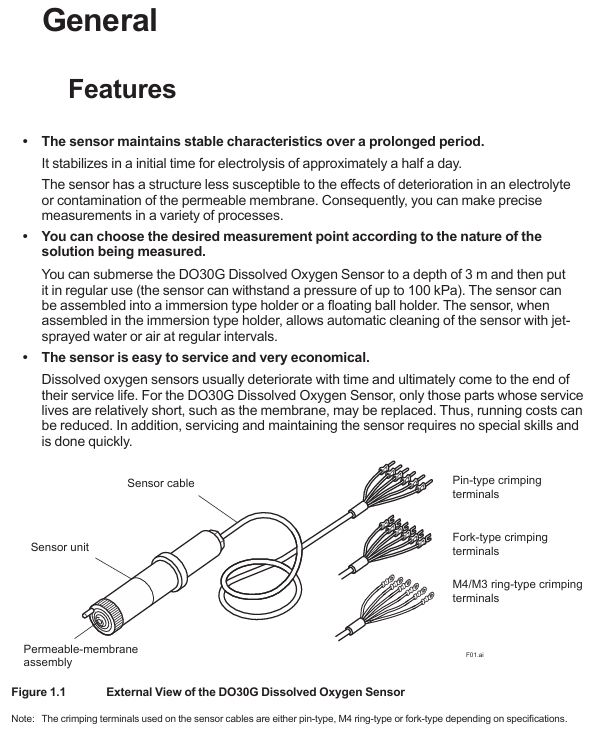
-XX: Cable length, optional -03 (3m), -05 (5m), -10 (10m), -15 (15m), -20 (20m)
-YY: Cable terminal types, - PN (pin type), - FK (fork type), - FL (M4 ring type), - FM (M3 ring type)
Key technical specifications
Specification category specific parameter remarks
Measurement parameter measurement range: 0-20 ppm, 0-20 mg/L, 0-100% (saturation). Specific ranges need to be set in the converter
Repeatability: 0.1 mg/L or 3% FS (whichever is greater) with sensor error included
Temperature compensation error: ± 3% FS (± 5 ℃ variation within 0-40 ℃) including sensor error
Response time: ≤ 2 minutes (90% response) including sensor error
Environmental requirements for measuring solution temperature: 0-40 ℃ (maximum value) Exceeding the range affects accuracy
Measure solution pressure: conventional 0-30 kPa, maximum 100 kPa, depth not exceeding 3m
Measure solution flow rate: ≥ 20 cm/s to prevent errors caused by bubble retention
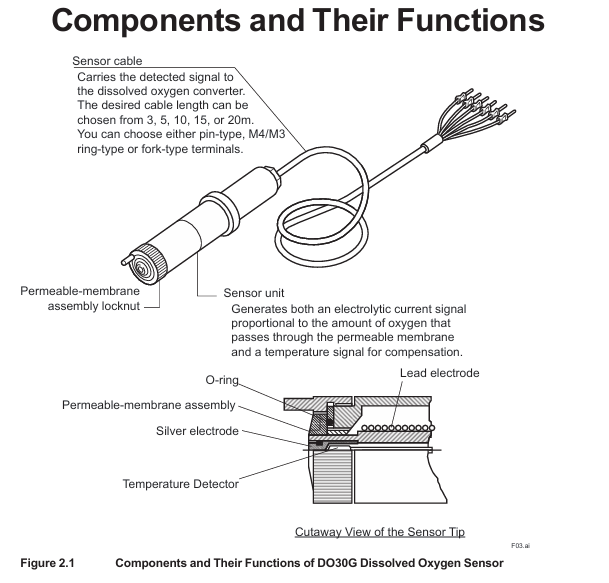
Structural Material Sensor Unit: Hard PVC, Stainless Steel Resistant to Conventional Corrosion
Permeable membrane: Fluororesin (FEP) with a thickness of 50 μ m, requiring regular inspection
O-ring: Nitrile rubber sealing function, it needs to be replaced synchronously when replacing the membrane
Cable: heat-resistant flexible PVC, shielding design length 3-20m, terminal type selected according to requirements
Temperature compensation built-in RTD: PT1000 has a resistance of approximately 1097 Ω at 25 ℃, used to correct the effect of temperature on dissolved oxygen
The basic weight is 0.3 kg+0.12 × N kg (N is the length of the cable), and the total weight of a 5m cable is approximately 0.9 kg
Installation process and precautions
Pre-installation preparation
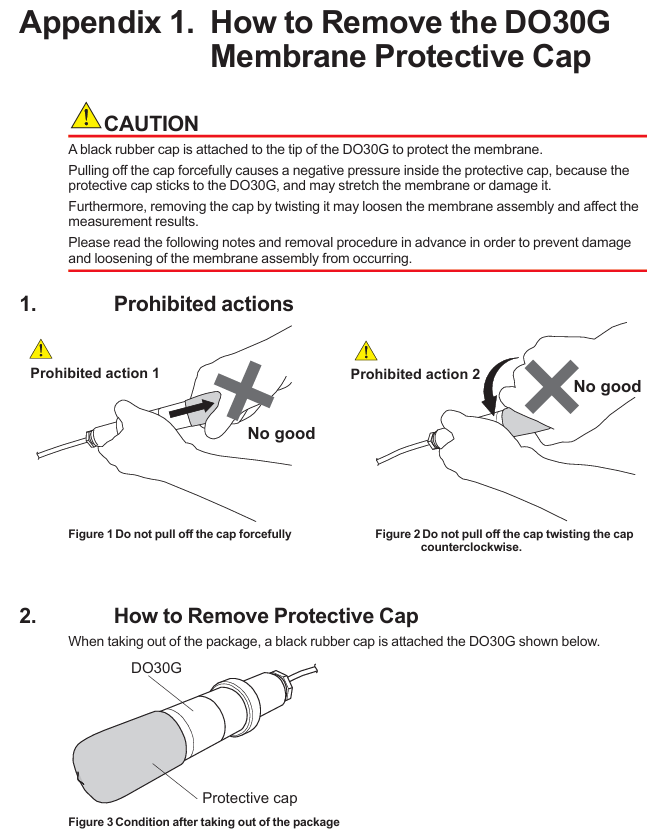
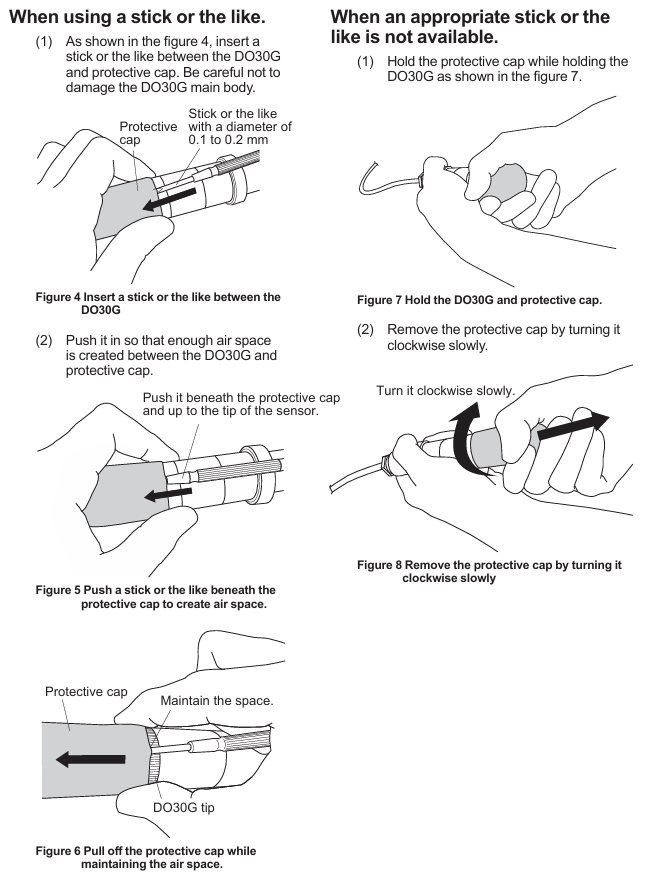
Remove protective cap: There is a black rubber protective cap on the tip of the sensor. It is forbidden to forcefully pull or twist it to remove it (which may cause the film to stretch/break). The correct way is to insert a 0.1-0.2mm thin rod and leave an air gap before pulling it out, or slowly rotate it clockwise to remove it (see Appendix 1 for details).
Check the permeable membrane: visually confirm that the membrane is not wrinkled or damaged, and that the membrane component lock nut is not loose (looseness can cause electrolyte leakage and affect measurement).
Principles for selecting measurement points
Uniform solution composition: avoid areas with frequent bubbles and stagnant water (to prevent fluctuations in measurement values).
Stay away from high velocity sand containing solutions: prevent sand particles from wearing down the permeable membrane.
Depth ≤ 3m: meets the pressure tolerance range (maximum 100 kPa).
Bracket selection and installation | Bracket type | Material/structure | Applicable scenarios | Installation points |
| Sensor tilted installation (anti bubble attachment), cleaning tube connected to water/air source for automatic cleaning|
cable connection
Match the converter according to the terminal number, taking FLXA402 as an example:
Temperature sensor (Pt1000): Connect terminal 11 (T1) and terminal 12 (T2) of the cable to the corresponding temperature terminals of the converter.
Electrode signal: Connect the 13 terminal (IE, anode) and 15 terminal (RE, cathode) of the cable to the corresponding electrode terminals of the converter.
Shielded wire: Connect to the shielded terminal of the converter to reduce interference.
Attention: Cable terminals must not be contaminated with water, and protection should be taken when not connected temporarily.
Maintenance and troubleshooting
Daily maintenance (regular inspection)
Permeation membrane cleaning: During each calibration, rinse the membrane surface with clean water, and wipe stubborn dirt with neutral detergent (do not scrape with hard objects to avoid membrane damage).
Membrane module lock nut inspection: Each calibration confirms that the lock nut is not loose, and if it is loose, it needs to be tightened; If there is still an abnormal display after tightening (such as extremely low measurement values), the electrolyte needs to be replaced.
Fault handling process
Troubleshooting steps and solutions
Abnormal measurement values (low/fluctuating) 1. Check if the membrane is damaged/wrinkled; 2. Check if the lock nut is loose; 3. Check if the electrolyte has deteriorated. 1. Replace the membrane module and electrolyte; 2. Tighten the nut lock; 3. Replace the electrolyte
If the temperature compensation fails and the resistance between terminals 11-12 of the measurement cable (standard value of 1097 Ω at 25 ℃) is abnormal, replace the sensor
Unable to zero/span 1. Replace membrane module+electrolyte and retry; 2. If the corrosion of the lead electrode is still ineffective, replace the sensor (lead electrode has a lifespan of 3-4 years)
Steps for replacing electrolyte and membrane components
Safety reminder: The electrolyte is KOH alkaline solution. If it comes into contact with the skin/eyes, rinse immediately with water and do not leave any residue in the syringe.
Steps:
Remove the sensor and clean the wet area;
Release the lock nut and remove the membrane component and old O-ring;
Empty the old electrolyte (tilt sensor, use a syringe to blow air from the injection port to assist in emptying);
Polishing silver electrode: Dip a damp gauze into aluminum oxide powder and gently wipe it (to avoid excessive polishing and prevent damage to the epoxy material), then clean the remaining powder;
Install a new O-ring, inject 8ml of new electrolyte (Yokogawa specific, model K9171DN), and reserve 1ml of air;
Install a new membrane component: Drop 1 drop of electrolyte on the surface of the silver electrode to prevent bubbles, lightly press the membrane component and tighten the locking nut (do not rotate the membrane component);
Rest: After replacement, it is necessary to rest for more than half a day before adjusting the zero/span (negative values may be displayed in the initial 10 minutes, which is a normal phenomenon).
Core spare parts list
DOX8A Maintenance Kit (Style B): Designed specifically for DO30G, it includes the following items:
Item Name Specification/Quantity Usage
Replace 50mL of electrolyte (model K9171DN) with 8ml each time
Replace damaged/contaminated membranes with 3 sets of membrane components and O-rings (model K9171HM)
500g of zero calibration reagent (sodium sulfite) (model L9920BR) is used to prepare a zero calibration solution (50g is required for 1L)
Inject 5ml (with needle, model L9827NH/L9827NG) of electrolyte into the syringe
200mL beaker (model L9825AF) for draining electrolyte/calibration purposes
30g of silver electrode polishing powder (model K9088PE) is used to polish silver electrodes, with approximately 0.5g used each time
Spare parts: membrane module lock nut (model K9171CH), spare sensor (to avoid measurement interruption caused by sudden failure).
Key issue
Question 1: How long does it take to replace the permeation membrane and electrolyte of DO30G sensor? What safety and operational details should be paid attention to when replacing?
answer:
Replacement cycle: It is recommended to replace the electrolyte every 6-8 months or immediately when the sensor cannot be adjusted for span; The permeable membrane and electrolyte should be replaced synchronously. If the membrane is damaged, wrinkled, or severely contaminated, it needs to be replaced in advance.
Safety details: The electrolyte is KOH alkaline solution. If it comes into contact with the skin, rinse immediately with clean water. If it enters the eyes, rinse and seek medical attention. Do not leave any residue in the syringe;
Operation details: When injecting electrolyte, add 8ml (Yokogawa specific model K9171DN) and reserve 1ml of air to prevent abnormal pressure; Before installing the membrane module, one drop of electrolyte should be dropped on the surface of the silver electrode to avoid the formation of bubbles between the membrane and the electrode; Do not rotate the membrane component when tightening the nut to prevent membrane wrinkling.
Question 2: There are three commonly used mounting brackets for DO30G sensors (PH8HG, PB350G, DOX8HS). How to choose according to the actual scenario? What are the core advantages and installation requirements of each bracket?
answer:
Selection of bracket type scene based on core advantages and installation requirements
PH8HG catheter measurement solution has no bubbles or pollutants (such as clear water tank), PVC material is corrosion-resistant, simple structure, low cost, and needs to be fixed on a pipeline with an outer diameter of 60.5mm. The sensor is suspended in a 2m long catheter
The PB350G floating ball bracket measures the solution level with large fluctuations and a small amount of flocculent substances (such as sedimentation tanks). The floating ball changes with the liquid level, and the sensor is always immersed in the solution; The wet part is smooth and not easy to hang flocs. The bracket is fixed on the 50A pipeline (outer diameter 60.5mm) or horizontal plane, and the float does not deviate from the measurement point
The DOX8HS immersion bracket measurement solution is prone to contamination (such as industrial wastewater) and needs to be regularly cleaned and installed at a 45 ° angle to prevent bubble adhesion; Support automatic cleaning with water/air spray to reduce the need for manual maintenance by connecting to a clean water/air source. The sensor is tilted and fixed to ensure that the cleaning spray port is aligned with the membrane surface
Question 3: When the DO30G sensor displays abnormal measurement values (such as continuous low or large fluctuations), how to gradually investigate the cause of the fault and solve it?
Answer: Troubleshooting should be carried out according to the following steps, with priority given to handling simple faults:
Check the condition of the permeable membrane: visually inspect the membrane for any damage, wrinkles, or severe contamination (such as oil stains or sediment). If there is, replace the membrane module (model K9171HM)+electrolyte; If the pollution is minor, clean with clean water and neutral detergent and try again;
Check the locking nut of the membrane module: confirm whether the locking nut is loose (looseness can cause electrolyte leakage, and the measured value is low). If it is loose, tighten it. If it is still abnormal after tightening, replace the electrolyte;
Check the status of the electrolyte: observe whether the electrolyte is turbid or discolored (normally clear), and replace it if it deteriorates;
Check temperature compensation: Use a multimeter to measure the resistance between terminals 11-12 of the cable (standard value of 1097 Ω at 25 ℃). If the resistance is abnormal, the sensor RTD is faulty and needs to be replaced;
Check the lead electrode: If the above steps are ineffective, it may be due to long-term corrosion failure of the lead electrode (with a lifespan of 3-4 years), and the sensor needs to be replaced as a whole.
- OMRON
- ABB
- General Electric
- EMERSON
- Honeywell
- HIMA
- ALSTOM
- Rolls-Royce
- MOTOROLA
- Rockwell
- Siemens
- Woodward
- YOKOGAWA
- FOXBORO
- KOLLMORGEN
- MOOG
- KB
- YAMAHA
- BENDER
- TEKTRONIX
- Westinghouse
- AMAT
- AB
- XYCOM
- Yaskawa
- B&R
- Schneider
- KONGSBERG
- NI
- WATLOW
- ProSoft
- SEW
- ADVANCED
- Reliance
- TRICONEX
- METSO
- MAN
- Advantest
- STUDER
- DANAHER MOTION
- Bently
- Galil
- EATON
- MOLEX
- DEIF
- B&W
- ZYGO
- Aerotech
- DANFOSS
- Beijer
- Moxa
- Rexroth
- Johnson
- WAGO
- TOSHIBA
- BMCM
- SMC
- HITACHI
- HIRSCHMANN
- Application field
- XP POWER
- CTI
- TRICON
- STOBER
- Thinklogical
- Horner Automation
- Meggitt
- Fanuc
- Baldor
- SHINKAWA
- Other Brands
- UniOP
- KUKA
- Iba
- Beckhoff
- ADLINK
-
 Woodward Micronet 5453-279 Rev E Chassis Rack for TMR Control
 -
 Alcatel-Lucent KFA632 WMOTBUKLAA 10G Optical Interface Carrier
 -
 Alcatel-Lucent 9500-MPR ODU MPT-HC V2 3DB20474BAAB04 23GHz Microwave Radio
 -
 Alcatel-Lucent KFA720 WMOTCMVLAB SFP/XFP Optical Interface Carrier
 -
 Alcatel-Lucent 3AL00114AB Universal Interface Module
 -
 Alcatel-Lucent BBG9 S1:1 OHCTL Optical Hardware Control Module
 -
 Alcatel-Lucent FB16401-A-I03 GTD-5 Analog Master/Slave Control Board
 -
 Alcatel-Lucent MCR1721B Control Module
 -
 Alcatel-Lucent 9500-MPR 3DB20547ACAA01 ODU MPT-HC 11GHz Microwave Radio
 -
 Alcatel-Lucent 3HE01014AAAA02 Interface Module
 -
 Alcatel-Lucent 244-2091-005 High Density Digital Line Card V1.5
 -
 Alcatel-Lucent LAMBDAXTREME WWAA36 Optical Amplifier Module
 -
Alcatel-Lucent 9500-MPR ODU MPT-HC 6GHz 2P-2 Radio 3DB20444BAAA05
-
Alcatel-Lucent 9500-MPR ODU MPT-HC V2 9558HC MPT-XP 6GHz 3DB20442BBAA02
-
 Alcatel-Lucent 9500-MPR ODU MPT-HC 23GHz 3DB20476ABAA01 Microwave Radio
 -
 Alcatel Lucent 3HE01019AAAA01 Module
 -
 Alcatel CPU5 3BA23071 PCB Card with IO2 3BA23050 Set
 -
 Alcatel-Lucent 9500-MPR ODU MPT-HC V2 9558HC 6GHz 3DB20443BBAA02
 -
 Alcatel Lucent 500-1113-211 Rev H Channel Bank Assembly
 -
 Alcatel Lucent 89-0419-B-2 BA9ATS0FAB Frontal Compute Module
 -
Alcatel-Lucent LambdaXtreme 1625 WWAF31 Optical Amplifier CP Module
-
 Alcatel Z24 3BA53065 Analog Extension Card 3BA52065 AAAA KAZZB-01
 -
 Alcatel 3EH08263AAXX000448 OmniPCX Office Large PBX System
 -
 Alcatel Lucent VSEM-C 3FE62453 XA VAUCAJZKAA 7330 DSLAM Line Card
 -
 Alcatel-Lucent 9500-MPR ODU MPT-HC 3DB20432BAAA04 18GHz Microwave Radio
 -
 Alcatel-Lucent 9500-MPR ODU MPT-HC 3DB20546ACAA01 11GHz Microwave Radio
 -
 Alcatel-Lucent 3DB04823AAAA Circuit Board
 -
 Alcatel-Lucent 3DB04530AAAA Circuit Board
 -
 Westell MDIU Modular DAS Interface Unit CS21-005-105Q
 -
 Alcatel-Lucent 90-0423-01 Control Card
 -
 Alcatel-Lucent 3AL91792AA 01 iL-1.2 Optical Interface LC Connector
 -
 Alcatel-Lucent 109637454 WA82 SP2B MODL908832 – Interface Module
 -
 Alcatel-Lucent MDEE DPB11 Part 109773580 – Digital Processing Board
 -
 Alcatel 3EH76027ADAD OmniPCX Enterprise Communication Server R500/30.4
 -
Alcatel-Lucent 3EH73084AEJD Gateway Driver Board GD-3 – Communication Interface
-
Alcatel-Lucent 9500-MPR ODU Radio MPT-HC V2 3DB20476BAAB04 23 GHz Microwave Outdoor Unit
-
 Alcatel-Lucent 9396 Digital 2U NodeB Indoor – UMTS Base Station
 -
 Alcatel-Lucent 3HE03607AA CFM-XP Control Fabric Module – Switch Fabric Controller
 -
 Alcatel-Lucent 8232 DECT Mobile Handset – Cordless Enterprise Phone
 -
 Alcatel-Lucent 244-2082-201 Sierra NAC V3.1 Slave Package – Network Access Control
 -
 Alcatel-Lucent 408154912 CPU Rear I/O Pack Card – Backplane Interface Module
 -
 Alcatel-Lucent 3AL82037ADAA SFP Module
 -
Alcatel-Lucent OMQ 408645968 Optical Module
-
Alcatel-Lucent 9500 MPR 8-Slot Shelf 3DB18485AB
-
 Alcatel-Lucent 408154904 CPU I/O Card
 -
 Alcatel-Annecy 5150 CP Turbo Vacuum Pump
 -
 Alcatel-Lucent 3EH73084AEJD08 Card
 -
Alcatel-Lucent 3EH73050ABAB Interface Card
-
 Alcatel-Lucent 3HE06151ABAA01 SFP Line Card
 -
 Alcatel-Lucent 8DG59242AD Power Filter
 -
Alcatel-Lucent IMM48-1GB-TX 48-Port Module
-
Alcatel Lucent 3CM03285MQ02 Module
-
 Alcatel 3HE07158BA 7750 SR-12 IMM-2PCA-FP3 Optical Transceiver
 -
 Alcatel-Lucent 9396 Digital 2U NodeB Outdoor with Indoor Mainframe and Alarm Module
 -
Alcatel Lucent MPX-16/64-T-L3 MPX1664TL3 Multiplexer Module
-
 Alcatel Lucent 3EH73052AB Power Supply Module
 -
 Alcatel Lucent ASM2-155FM-2W-4C ASM2155FM2W4C Switch Fabric Module
 -
 Alcatel Lucent 3AL00124ABAB Interface Card
 -
Alcatel-Lucent 1AB429380001 Cable Assembly
-
Alcatel Z24 3BA53065 Analog Extension Card 3BA53065AA
-
Alcatel-Lucent 9500-MPR 11GHz MPT-HC ODU Microwave Packet Radio 3DB20371ACAA01
-
 Alcatel-Lucent RRH1900-4x45 Remote Radio Head
 -
 Alcatel-Lucent 3HE00028AA Ethernet Line Card
 -
 Alcatel-Lucent 3HE04939CE CWDM SFP Transceiver
 -
 Nokia Alcatel-Lucent 3FE66546AA Fan Module
 -
 Alcatel-Lucent SSP-6 Speech Signal Processor Board
 -
Alcatel-Lucent 500-1113-212 Channel Bank Assembly
-
Alcatel-Lucent EZ32-2 Board 3BA23265ADKE 01
-
 Alcatel-Lucent GSM-FM-2W-4C Filter Module
 -
 Alcatel-Lucent 3AL00378AF Interface Card
 -
Alcatel-Lucent 3AL00124ABAC Interface Module
-
Alcatel-Lucent BJB1 PWPQALGAAG 48V Independent Microprocessor Board
-
 Alcatel Lucent MDR-8000 Microwave Digital Radio MDR-8506-4 with 13 Modules
 -
 Alcatel Lucent 3AL00424AA Interface Card
 -
 Alcatel Lucent 3BA73012AB Power Supply Module
 -
 Alcatel Lucent ESX-100C-32W ESX100C32W Power Supply Module
 -
 Alcatel Lucent GSX-K-FM-2W GSXKFM2W Fan Module
 -
 Alcatel 8DG59247AA Optical Protection Switch Card
 -
 Alcatel Lucent 91-E03100-B 91E03100B Interface Module
 -
 Alcatel Lucent FSX-FM-1W FSXFM1W Fan Module
 -
 Alcatel Lucent RRH2X40-07L-AT Remote Radio Head
 -
Alcatel-Lucent 9500-MPR MSS-8 Shelf 3DB18485CA
-
 Alcatel Annecy ACP20 Vacuum Pump CP20
 -
 Alcatel-Lucent 9500 MPR P32E1DS1 E1 PDH Card
 -
 Alcatel-Lucent J98726AL-2 D4OI210DAA Module
 -
 Alcatel 409113651 RRH700L1 700MHz Remote Radio Head
 -
 Alcatel io2 3ba23050 PCB Card
 -
Alcatel-Lucent MDR-8000 MDR-8706-8 Digital Radio
-
 Alcatel-Lucent ACT2300M Turbo Pump Controller AF042134A
 -
 Alcatel-Lucent OmniPCX Office Medium PowerCPU PRA-TI
 -
Alcatel-Lucent 9500 MPR 23GHz ODU 3DB23045HDAA01
-
 Alcatel-Lucent 9500 MPR ODU Outdoor Unit 300 11GHz TX Low HP 3DB23035AAAA01
 -
 Alcatel-Lucent ECNT-C 3FE25676 BA AK 06 Termination Card
 -
Alcatel Lucent MDR-8000 Microwave Digital Radio MDR-8606-45 with 13 Modules
-
Alcatel-Lucent 849144415 KS-24829L1 Remote Radio Head v1.4
-
 Alcatel CFF 450 Turbo Pump Controller 137171
 -
 Alcatel-Lucent ACS108 109579896 004 Access Controller
 -
Alcatel-Lucent OS6850-48 Network Switch with PS-126W-AC Power Supply
-
 Alcatel Lucent DFP-CM-14B/2T Filter DCMA Base Station
 -
 Alcatel Lucent ESX-K100C32W4 ESXK100C32W4 Power Supply Module
 -
 Alcatel Lucent 91-E03100-A 91E03100A Interface Module
 -
 Alcatel-Lucent STGR-LIM-A2P-72-HBI ADSL2+ High Bandwidth Module
 -
Alcatel-Lucent 9500 Microwave Packet Radio MPT-3DB20547BBAA02
-
 Alcatel Lucent Enterprise 4049-4059 MMK Keyboard Console Kit
 -
Alcatel-Lucent RRH4X40-1900 Remote Radio Head
-
 Alcatel Lucent OS6450-P48 Switch
 -
 Alcatel Lucent 625617-000-001 Cable Assembly
 -
 Alcatel Lucent 108320 Module
 -
 Alcatel Lucent TN801B Board
 -
 Alcatel-Lucent RRH2X50-800 LTE Remote Radio Head
 -
 Alcatel Lucent CPU8 Board 3BA23258AB OmniPCX 4400
 -
 Alcatel-Lucent 3EM22617AAAE 9500 MPT-HL Microwave Radio Transceiver
 -
 Alcatel-Lucent CPU7-2 3BA23259AAAD 7750 SR Control Processor Module
 -
Alcatel-Lucent 9500 Microwave Packet Radio MPT-3DB20371BCAA01
-
 Alcatel-Lucent Enterprise 4059 MMK Keyboard + Phone PAC Kit
 -
 Alcatel-Lucent Nokia 3HE10329AA 7750 SR Series Router Module
 -
 Alcatel-Lucent 7705 SAR-W IP MPLS Service Aggregation Router 3HE07349AA
 -
 Alcatel-Lucent-Nokia 3HE08429AARC01 7750 SR SFM5-7 Switching Module
 -
 Alcatel-Lucent 3HE00272DB 7750 SR-7 DC Chassis with PEM3+EFT
 -
 Alcatel-Lucent ACT 1300M/1600M HT Turbo Pump Controller
 -
 Alcatel Lucent IMM48-1GB-TX 3HE03625AAG01 48-Port 7750 SR-12 Interface Module
 -
 Alcatel-Lucent AP-500 Wireless Access Point
 -
 Alcatel-Lucent ATP-150 Power Supply
 -
Alcatel-Lucent 622-8603-012 Optical Transceiver
-
 Alcatel-Lucent 270-0038-010 10.5 VDC Power Supply
 -
Nokia 9500-MPR Microwave Radio Module XPIC-RPS/3DB20116BCAA01
-
 Alcatel-Lucent 3DB19017AB EAS Access Switch v2
 -
Alcatel-Lucent 3AL81072AA Matrix Enhanced Unit - Cross-Connect Module


