
How to determine if the GE MLJ synchronous check relay is in calibration mode?
How to determine if the GE MLJ synchronous check relay is in calibration mode?
Product Overview
Core functions
MLJ is a digital synchronous inspection relay mainly used to detect the synchronization conditions of two electrical systems (such as the generator and the power grid, and the two sections of the power grid). By measuring the voltage difference (Δ V), frequency slip (Δ f), and phase angle difference (Δθ) between the bus voltage (VB) and the line voltage (VL), it determines whether the circuit breaker closing conditions are met and outputs a closing permission signal.
Typical application scenarios
Generator and system grid connection
Reconnect the two regions of the system
Manual closing or automatic reclosing of circuit breakers
Verify synchronization conditions to avoid equipment damage caused by asynchronous closing
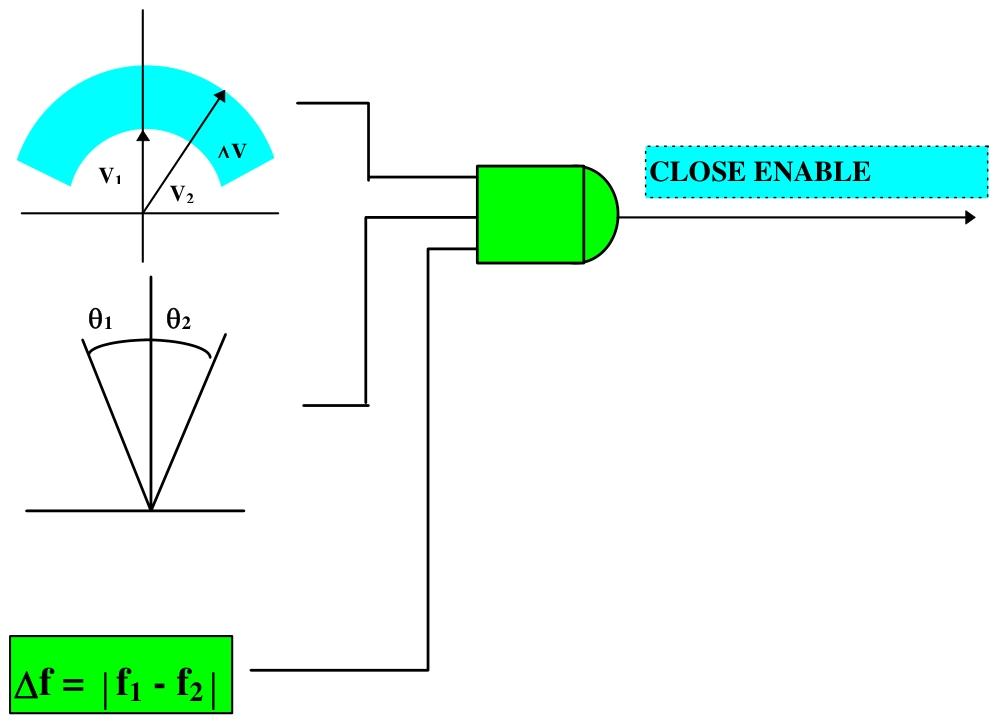
Core functions and working principles
1. Synchronous inspection unit
Measurement parameters:
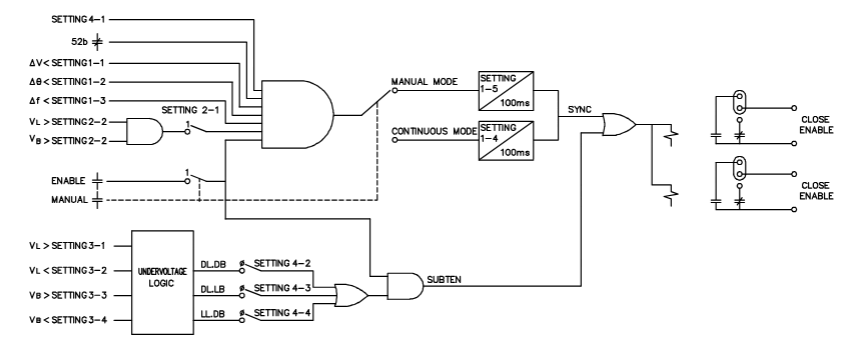
Voltage difference (Δ V): The absolute difference in voltage between the bus and the line, ranging from 2-90V (default 15V).
Phase angle difference (Δ θ): The phase difference between two voltages, ranging from 2-60 ° (default 10 °).
Frequency slip (Δ f): The frequency difference between two voltages, ranging from 10-500MHz (default 20mHz).
Working mode:
Continuous mode: Continuous monitoring of synchronization conditions, with a delay of 0.1-99.0s (default of 0.1s) before allowing the output to close.
Manual mode: Monitoring is triggered by external signals, and after a delay of 0.1-99.0s (default 10.0s), the output allows for closing.
Allowable conditions for closing: Δ V, Δ θ, and Δ f are all less than the set values and continuously meet the set delay.
2. Undervoltage unit
Independently monitor the voltage status (live/dead) of lines and busbars, supporting three combination modes:
DLDB (Loss of Line - Loss of Power Bus)
DLLB (Lost Line - Live Bus)
LLDB (Live Line - Dead Bus)
Voltage thresholds can be set: line/bus live threshold (VL ↑/VB ↑, 40-245V), and power-off threshold (VL ↓/VB ↓, 10-180V).
3. Input/output unit
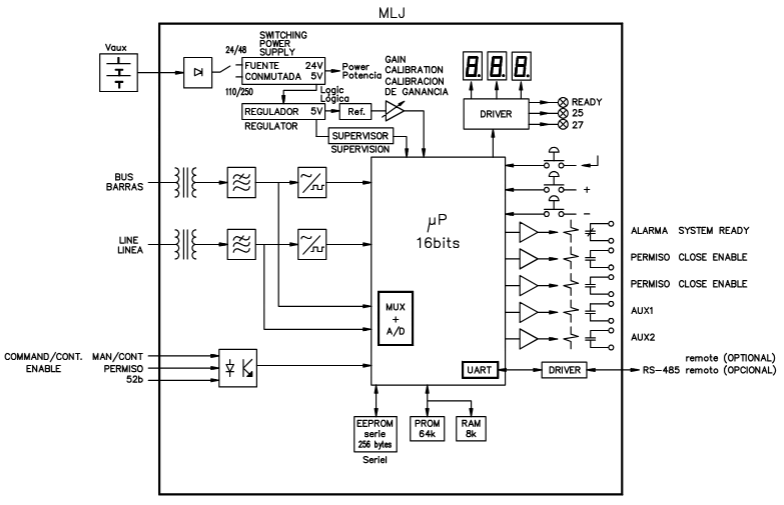
Digital input: 3-channel DC input, including circuit breaker status (allowing synchronous check when open), manual mode trigger, and enable signal.
Output contacts: 5-way relay contacts, including 2-channel closing permission (default normally open), 1-channel alarm (default normally closed), and 2-channel configurable auxiliary contacts (supporting signal outputs such as synchronization, undervoltage, and power loss).
4. Self check and Communication
Continuously monitor memory (ROM/RAM/EEPROM), analog circuits, etc., output alarms and display error codes when faults occur (e.g. 8.0 indicates ROM failure).
Supports RS-485 communication (optional fiber optic interface), baud rate 0.3-38.4kbaud (default 9.6kbaud), and supports Modbus protocol.
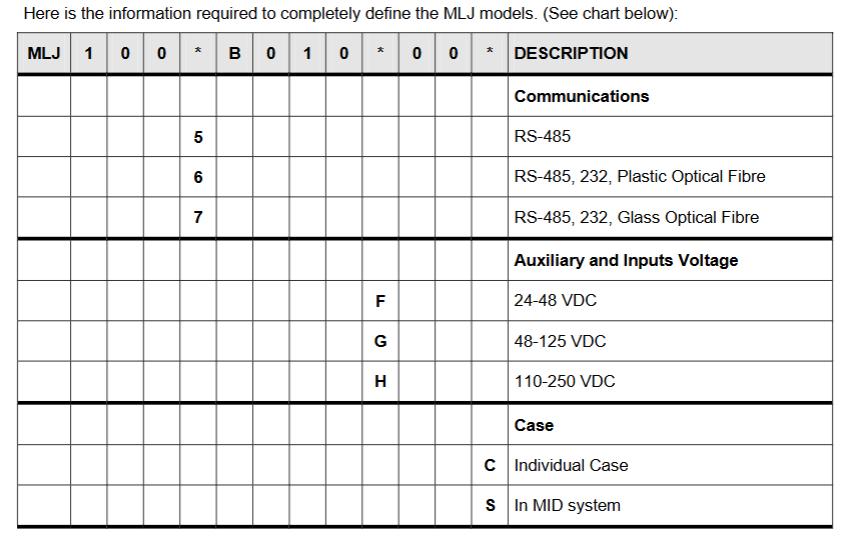
Technical specifications
Electrical parameters
Rated voltage: 63-220Vac (continuous withstand 440Vac).
Auxiliary power supply: 24-48Vdc, 48-125VDC, 110-250Vdc (± 20% fluctuation).
Measurement accuracy: Voltage ± 2% or 0.5V; Angle ± 1 ° (at 20-220Vac); Frequency slip ± 5mHz.
Contact capacity: Closing allows contact 4000VA (maximum 440Vac/300Vdc), auxiliary contact 1760VA.
Environmental and Physical Characteristics
Working temperature: -25 ° C to+55 ° C, storage temperature: -40 ° C to+70 ° C.
Humidity: ≤ 95% (no condensation).
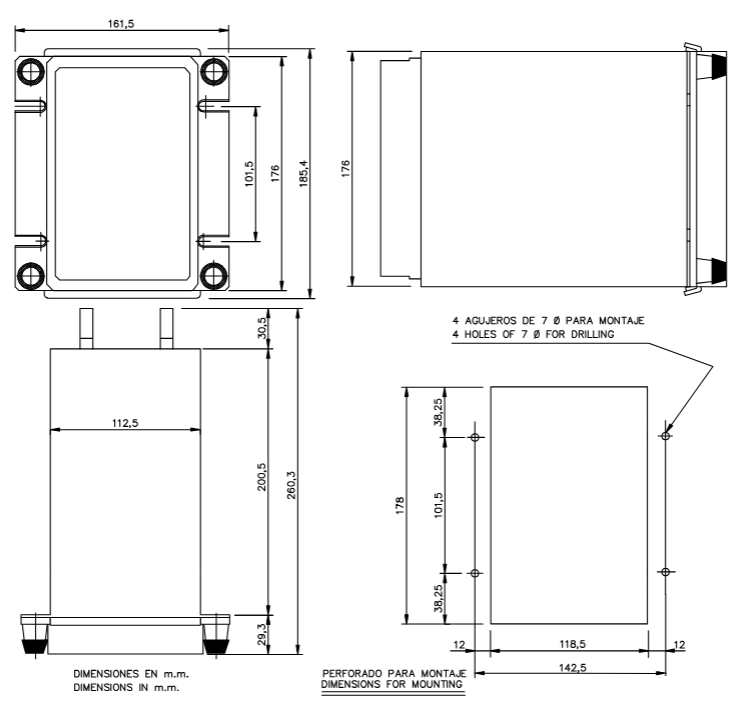
Shell: Made of steel plate material, supporting panel installation or MID system integration, weighing approximately 3kg.
Operation interface and navigation
1. Front end devices
Button: Three vertically arranged buttons, from top to bottom, are ENTER (confirm/enter),+(add/next), and - (decrease/previous).
Display: A 3-digit 7-segment LED display screen used to show parameter values, status codes, and settings.
Indicator lights: 3 LED indicator lights, namely:
READY (green): The relay is ready and the protection function is enabled.
52 (red): The conditions for closing are met.
27 (red): The undervoltage condition is met.
2. Switching between working modes
Reading mode: default power on mode, displaying real-time data and status. Press ENTER to cycle through the various functional items (F0-F12).
Setting mode: In read mode, press ENTER and - simultaneously to enter and modify parameters. After setting up, press+and - simultaneously to return to read mode; If there is no operation for 2 minutes, it will automatically return.
Calibration mode: In reading mode, press ENTER and+simultaneously to enter and display the average values of line voltage and bus voltage for calibration.
Read mode function (F0-F12)
The main functions of cycling through the ENTER key include:
Functional code description
The F0 relay status displays a two digit error code (such as 0.0 indicating normal, 8.0 indicating ROM fault), with the decimal point constantly lit to distinguish the status from the numerical value.
Real time display of RMS voltage value in V for F1-F2 line voltage (VL)/bus voltage (VB).
F3 voltage difference (Δ V) displays the absolute difference between VL and VB, measured in V.
F4 phase angle difference (Δ θ) displays the phase difference between two voltages (0-180 °), and overflow (three horizontal lines) is displayed when the voltage is less than 9V.
F5 frequency slip (Δ f) displays the frequency difference in mHz, and overflow is displayed when the voltage is less than 9V.
Record and store the VL, VB, Δ V, Δ θ, and Δ f values when the last closing condition is met for F6-F10.
The F11 test function display screen is fully lit and flashing, and the LED lights up simultaneously to verify the hardware's normal operation; When the digital input is activated, the corresponding LED flashes.
The F12 line/bus status is indicated by the upper and lower segments of the display screen: the upper segment is lit up to indicate "live", the lower segment is lit up to indicate "power-off", and the middle segment is lit up to indicate that the voltage is between the threshold values.
Set mode parameter configuration
After entering the setting mode, switch the setting items with the+/- keys, press ENTER to enter the modification, and press ENTER again to confirm after adjustment. The main settings are as follows:
1. Basic configuration (0-1, 6-1, 6-2)
0-1 frequency: Choose 50Hz or 60Hz (default 50Hz).
6-1 Communication Address: Set Modbus address (1-255, default 1).
6-2 baud rate: Select the communication rate (0.3-38.4kbaud, default 9.6kbaud).
2. Synchronize check parameters (1-1 to 2-2)
1-1 voltage difference (Δ V): 2-90V (step size 0.5V, default 15V).
1-2 phase angle difference (Δ θ): 2-60 ° (step size 1 °, default 10 °).
1-3 frequency slip (Δ f): 10-500MHz (step size 10mHz, default 20mHz).
1-4 continuous mode delay: 0.1-99.0s (step size 0.1s, default 0.1s).
- OMRON
- ABB
- General Electric
- EMERSON
- Honeywell
- HIMA
- ALSTOM
- Rolls-Royce
- MOTOROLA
- Rockwell
- Siemens
- Woodward
- YOKOGAWA
- FOXBORO
- KOLLMORGEN
- MOOG
- KB
- YAMAHA
- BENDER
- TEKTRONIX
- Westinghouse
- AMAT
- AB
- XYCOM
- Yaskawa
- B&R
- Schneider
- KONGSBERG
- NI
- WATLOW
- ProSoft
- SEW
- ADVANCED
- Reliance
- TRICONEX
- METSO
- MAN
- Advantest
- STUDER
- DANAHER MOTION
- Bently
- Galil
- EATON
- MOLEX
- DEIF
- B&W
- ZYGO
- Aerotech
- DANFOSS
- Beijer
- Moxa
- Rexroth
- Johnson
- WAGO
- TOSHIBA
- BMCM
- SMC
- HITACHI
- HIRSCHMANN
- Application field
- XP POWER
- CTI
- TRICON
- STOBER
- Thinklogical
- Horner Automation
- Meggitt
- Fanuc
- Baldor
- SHINKAWA
- Other Brands
- UniOP
- KUKA
- Iba
- Beckhoff
- ADLINK
-
 Micro Innovation GF1-10TVA-100 Touch Panel
 -
 Micro Innovation GSO-57EQD-000 Operator Panel
 -
 Micro Innovation XN-2AI-U Analog Input Module
 -
 Micro Innovation CAN-4AI/UI Analog Input Module
 -
 Micro Innovation ZSB-1.5/8-S/S/-/PE Base Terminal
 -
Micro Innovation AG XVH-340-57CAN-1-10 HMI Panel
-
 Micro Innovation GSO-57EQD-000 Micro Panel
 -
 Micro Innovation XN-2AI-PT/NI-2/3 Input Module
 -
 Micro Innovation AG GF0-57SQD-000 Display Panel
 -
 MICRO INNOVATION AG XN-16DI-24VDC-P Input Module
 -
 Micro Innovation XN-2AI-PT/NI-2/3 Input Module
 -
 Micro Innovation MC2-442-57CQB-1-2G Display Panel
 -
 Micro Innovation XN-16DO-24VDC-0.5A-P Module
 -
 Micro Design MC200PROFI Programmable Module
 -
Micro Innovation XV-252-57MPN-1-10 Micro Panel
-
 Micro Innovation CAN-4AI/UI Analog Input Module
 -
Micro Innovation GT1-MPI-A000 Panel
-
Micro Innovation MC2-440-10TVB-1-21 Display Panel
-
Micro Innovation XVS-430-57MPI-1-1S 6" HMI
-
Micro Innovation XV-442-57CQB-1-1AB Monitor
-
 Micro Innovation ZSB-1.5/8-S/S/-/PE Base Terminal
 -
Micro Design 895A Microfiche Reader
-
 MICRO INNOVATION XNE-8DI-24VDC-P Input Module 8550100794
 -
MICRO INNOVATION MICRO PANEL GF0-10CVD-002
-
 Micro Innovation XN-PLC-CANopen Controller 85 50 274124
 -
Micro Innovation Display Panel GS0-57E0D-000
-
MICRO INNOVATION CAN-32DI/P2X16 Input Module
-
MICRO INNOVATION XN-2DO-R-NO Relay Output Module
-
MICRO INNOVATION XNE-16DI-24VDC-P Input Module
-
Micro Innovation AG XN-2AI-U Analog Input Module
-
Micro Innovation XN-BR-24DC-D Power Supply
-
Micro Innovation MH2-342-57EIB-1-20 Panel
-
Micro Innovation XV-252-57MPN-1-10 Micro Panel
-
 Micro Innovation Display Card EIB2-TP
 -
 Micro Innovation XV-252-57MPN-1-10 6" HMI
 -
 Micro Innovation XN-B3T-SBC 16x DO Base Module
 -
Micro Innovation XVH-330-57MPI-1-10 Panel
-
Micro Innovation XN-BR-24VDC-D Power Module
-
 Micro Innovation EIB2-TP EIB2TP Module
 -
Micro Innovation GF0-10CVD-100 Touch Panel
-
MICRO INNOVATION XV-230-57CNN-1-10 HMI-PLC
-
MICRO INNOVATION XN-2DO-R-CO Relay Output Module
-
KMK MICRO INNOVATION GS2-90EMD-000 Micro Panel
-
 Micro Innovation XN-2AO-U Analog Output Module
 -
 Micro Innovation XN-1AO-I Analog Output Module
 -
 Micro Innovation CAN-32DI/P-2x16 Rack Module
 -
Eaton Micro Innovation MC2-440-10TVB-1-11 HMI
-
Micro Innovation AG CAN Bridge 8551224177
-
 Micro Innovation XN-2AI-I Analog Input Module Set
 -
Micro Innovation XN-4DI-24VDC-P Input Module
-
 Micro Innovation Winbloc CAN-16DO/0.5A-PK Module
 -
Micro Innovation Micro Panel GFO-10SVD-002 HMI
-
 Micro Innovation CAN-24DI/8DO/0.5A-PK Module
 -
 Micro Innovation DP-24DI/8DO/0.5A-PK I/O Module
 -
 Weidmuller Micro Innovation CAN-BRIDGE ZSFA 1,5R
 -
Micro Innovation CAN-3AI/1AO-UI Profibus Module
-
 Micro Innovation PDP-TP Profibus DP Module
 -
Micro Innovation CAN-3AI/1AO-UI Analog Module
-
 Micro Innovation MC2-430-12TSB-10 HMI Panel
 -
Micro Innovation XNE-8DO-24VDC-0.5A-P I/O Module
-
MICRO INNOVATION AG WINBLOC CAN-32DI/P-2x16 85 51 224182
-
 MICRO INNOVATION AG WINBLOC CAN-4AO/UI 85 51 224195
 -
Micro Innovation Xv-252-57cnn-1-10 HMI Panel
-
Micro Innovation XN Basis XN-S4T-SBBS-CJ 225200
-
Micro Innovation GF1-10TVD-100 Micro Panel
-
Micro Innovation XN-B3T-SBC 16-Fold DO Base Module
-
MICRO INNOVATION AG WINBLOC CAN-3AI/1AO-UI 85 51 224192
-
KMK Micro Innovation GS2-90EMD-000 Micro Panel
-
Micro Innovation MC2-430-10TVB-1-10 PanelView Terminal 24VDC
-
 Micro Innovation XNE-8DO-24VDC-0.5A-P I/O Module 8550100795
 -
MICRO INNOVATION GF1-10TVB-100 Touch Panel
-
MICRO INNOVATION AG WINBLOC CAN-4AI/UI Analog Input Module
-
MICRO INNOVATION AG WINBLOC CAN-32DO/0.5A-P-2x16 Output Module
-
MICRO INNOVATION AG CAN-32DI/P-2X16 8551224182 Input Module
-
 MICRO INNOVATION MK2-230/232-57 Circuit Board 85 28 200000
 -
 MICRO INNOVATION CAN-BRIDGE 8551224177 CAN Bridge
 -
Micro Innovation MC2-430-10TVB-1-10 Panel 24VDC
-
MICRO INNOVATION MC2-432-57CQB-1-10 HMI Panel
-
MICRO INNOVATION AG CAN-BRIDGE 85 51 224177 CAN Bridge
-
MICRO INNOVATION CAN-4AI/UI Analog Input Module
-
MICRO INNOVATION CAN-32DI/P-2X16 Input Module
-
 SIGMATEK MDD111 09-404-111 Drive Module
 -
 SIGMATEK DVI021 Display Interface Module
 -
 SIGMATEK 00-450-024 C-IPC Processor
 -
 SIGMATEK MDD-111 MDD111 Drive Module
 -
 SIGMATEK ICA011 20-102-011 Interface Module
 -
 SIGMATEK 01-250-010-D NC4Kompakt Control Module
 -
 SIGMATEK CRIF081 12-751-081 Interface Module
 -
 SIGMATEK S1026-8AF61-R4E-Z57 Drive Module
 -
 SIGMATEK 9305.081.02 9227.082.00 Control Module
 -
 Sigma Tek 5000B-36 Attitude Indicator
 -
 SIGMATEK CEZ201 12-051-201-O Counter Module
 -
 SIGMATEK DPS001 Power Supply Module
 -
 SIGMATEK 994 395 01z Via Interface Module
 -
 SIGMATEK PC411-K 01-310-411-K Industrial PC
 -
 SIGMATEK 9816.324.00 Demag NC4 Keyboard
 -
 SIGMATEK ET261 90010C-71 Operator Terminal
 -
 SIGMATEK DDI 164 05-006-164 Input Module
 -
 SIGMATEK CCP 082 C-DIAS Processor Module
 -
SIGMATEK CEZ201 12-051-201-O PLC Module
-
SIGMATEK MDD 1111 06178867 Drive Module
-
SIGMATEK S1 073-6AC61-RE-Y08-Z Drive Module
-
SIGMATEK MDD 111 Drive Module MDD111
-
 SIGMATEK CSDI161 Safety Module 12-891-161
 -
SIGMATEK C-IPC Processor 01-450-024
-
 SIGMATEK DIAS DAM122 Analog Mixing Module
 -
Sigma Tek 5000B-36 Attitude Gyro Indicator
-
 SIGMATEK TMS012 Motherboard Module 05-250-012-T
 -
 SIGMATEK CCP-531 PLC Module
 -
SIGMATEK DIAS DNC4 I/O Module 05-250-011
-
 SIGMATEK AI088 Analog Input Module
 -
 SIGMATEK CEZ201 Counter Module
 -
SIGMATEK CIC011 Industrial Computer Module
-
 SIGMATEK MDM021 Motor Drive Module
 -
 SIGMATEK DTO163 Digital Output Module
 -
SIGMA-TEK 5000B-36 Attitude Gyro
-
SIGMATEK DM161 Digital Input Module
-
SIGMATEK CCP-531 PLC Control Panel
-
 SIGMATEK HZS773 Touch Terminal Operator Panel
 -
SIGMATEK MDP101 3 KVA 45-65Hz Driver
-
 SIGMATEK ETV1251 Touch Panel 12-230-1251
 -
SIGMATEK CIO021 Safety Module 12-013-021
-
Sigma Tek 4000H-5 Directional Gyro
-
 SIGMATEK TAE531 I/O Module 01-240-531
 -
 SIGMATEK DAI081 Input Module 05-009-081
 -
 SIGMATEK DCP640 Drive Control Module
 -
 SIGMATEK DCP643 Slides Module A6-29
 -
SIGMATEK SCP011 Safety Module 20-890-011


