
Watlow Series 96 Temperature Controller
Watlow Series 96 Temperature Controller
Product Core Overview
The Watlow Series 96 is a 1/16 DIN sized microprocessor based temperature controller with universal input, multi output configuration, and flexible control capabilities, designed specifically for scenarios such as plastic processing, packaging, semiconductors, food processing, and laboratory equipment. The product has high stability and multifunctional scalability as its core advantages, supporting single/dual PID control, curve programming (Ramp/Soak), remote set point retransmission and other functions. Combined with NEMA 4X front panel protection and 0.1% measurement accuracy, it can meet the precise temperature control requirements of harsh industrial environments.
Core features:
Input/output flexibility: 1 universal input (compatible with thermocouples, RTDs, process signals), 1 auxiliary input (event/remote set point), 4 configurable outputs (relay/SSR/switch DC/process retransmission), suitable for multiple types of sensors and actuators.
Control capability: Supports On Off, P, PI, PID control modes, built-in Auto tune and Burst Fire functions, curve programming supports 2 files, 8 steps per file, and can be linked and extended to 16 step continuous curves.
Convenient operation: The patented Custom Menu can add 16 commonly used parameters, dual 4-digit LED display, support ° C/° F/process unit switching, intuitive button operation, and can be quickly mastered by both new and expert users.
Communication and Expansion: Optional EIA/TIA-232/485 communication (Modbus RTU protocol), supports remote configuration and data retransmission, and some models have event input triggering functions (such as start/pause curves, reset alarms).
Product model and core configuration
(1) Model coding rules
The model consists of 12 characters, and the key dimensions are defined as follows. The complete model format is 96 [power] [input 2] [output 1] [output 2] [output 3] [output 4] [software/display]:
Encoding position meaning optional configuration
Power supply (3rd position) Power supply type A=100-240V AC/DC, B=24-28V AC/DC
Input 2 (4th digit) Auxiliary input function 0=None, 1=Event input+Remote set point (0-5V/4-20mA)
Output 1-4 (bits 5-8) Output type C=switch DC/open collector, D=electromechanical relay (2A), F=process output (0-10V/4-20mA), K=SSR (0.5A), A=none
Software/Display (bits 9-12) Function and Display 00=Standard Software, AA=Curve Programming Software; RR/RG/GR/GG=red/green dual display combination
(2) Core hardware specifications
Category detailed parameters
Input Characteristics - General Input: Thermocouples (J/K/T/N/E/R/S/B, etc.), RTDs (2/3-wire 100 Ω platinum resistors), process signals (0-10V/4-20mA, etc.).
-Input accuracy: ± 0.1% range ± 1 ° C (standard conditions), sampling rate 10Hz (single input)/5Hz (dual input).
-Auxiliary input: Event input supports dry contact or 3-36V DC voltage, remote set point supports 4-20mA/0-10V signal.
Output capability - Relay output: Form C contact, 2A@250V AC/30V DC, The mechanical lifespan is 100000 cycles.
-SSR/DC switch: SSR output 0.5A@20-280V AC, Switch DC maximum 200mA@42V DC。
-Process output: 0-10V (minimum 1k Ω load) or 4-20mA (maximum 800 Ω load), accuracy ± 15mV/± 30 μ A.
Environment and Protection - Operating Temperature: 0-65 ° C (non condensing), Relative Humidity: 0-90% (non condensing).
-Protection level: front panel NEMA 4X, enclosure IP4X.
-Power consumption: Maximum 7VA, supports power-off data storage (non-volatile memory).
Installation and wiring specifications
(1) Installation requirements
Panel opening and fixing
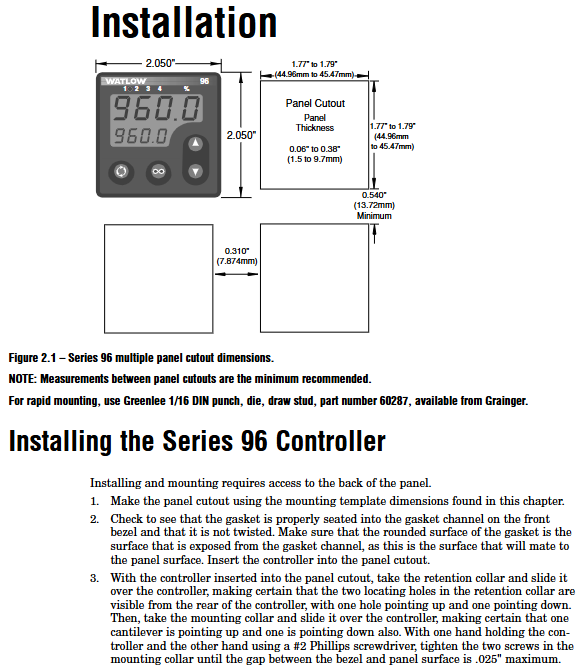
Hole size: 52mm × 52mm (2.05in × 2.05in), panel thickness 1.5-9.7mm (0.06-0.38in).
Installation steps: Confirm that the front panel sealing ring is in place → Insert the controller from the front of the panel → Install the fixing ring and buckle → Tighten the screws (with a maximum gap of 0.025 inches) to ensure a leak proof seal.
Attention: Avoid excessive tightening of screws that may cause damage to the panel. When installing multiple units in parallel, a heat dissipation distance of ≥ 30mm should be reserved and kept away from corrosive gases and strong vibration environments.
Power supply and wiring safety
Power wiring: For high-power models (A), connect L1/L2 terminals (100-240V AC/DC), and for low-power models (B), connect+/- terminals (24-28V AC/DC), matching the power type indicated on the model label.
Wiring specification: Wire specification 12-22 AWG, terminal torque 5.0 in lb, analog input and power/digital signals need to be isolated and wired to avoid ground loop interference.
Safety compliance: Following NEC wiring standards, explosion-proof switches are required for hazardous environments, and sensor wiring must match the type (thermocouple extension wire material is consistent, 3-wire RTD lead resistance is balanced).
(2) Key wiring example
Sensor wiring
Thermocouple: The negative electrode (usually red) should be connected to the S1 terminal, and the extension wire should match the thermocouple material (such as K-type wire) to avoid errors caused by mixing.
When wiring RTD with a 3-wire system, the resistance of the three leads should be consistent (≤ 20 Ω), and S1 should be connected to a white lead to compensate for the effect of lead resistance through wiring.
Process signal: 4-20mA signal connected to+R1/- S1 terminal (input impedance of 100 Ω), 0-10V signal connected to+T1/- S1 terminal (input impedance of 20k Ω), requiring separate shielded wiring.
Output and communication wiring
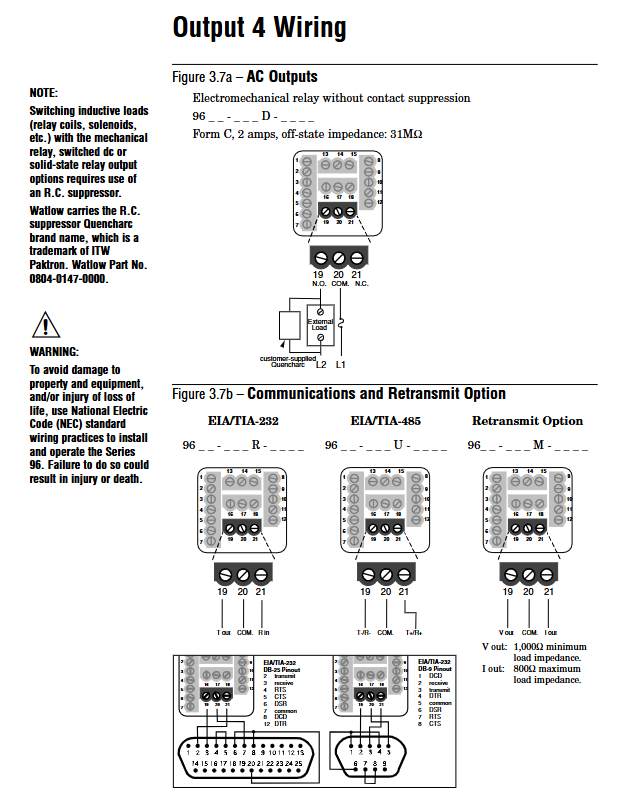
Relay output (D-type): When connecting to an AC load, an RC suppressor (Watlow model 0804-0147-0000) should be connected in series to avoid arcing damage to the contacts due to power failure of inductive loads.
Communication wiring: EIA-485 uses twisted pair cables, with T+/R+connected to terminal B and T -/R - connected to terminal A. A 120 Ω terminal resistor needs to be added at the end of the bus, and it can support up to 32 devices in a network (with extension relays up to 247).
Event input: The dry contact is connected to the EVENT+/- terminal, with an active state resistance of<2k Ω and an inactive state resistance of>23k Ω. The voltage input supports 3-36V DC, with an active state resistance of>3V and an inactive state resistance of<2V.

Operating interface and core functions
(1) User interface
Keys and Display
Key functions: up/down arrow keys (parameter adjustment/menu scrolling), forward key (confirm/enter submenu), infinite key (return to home page/start/pause curve).
Display mode: The process value/error code is displayed on the upper screen, and the set value/parameter name is displayed on the lower screen. The indicator lights include output activation (1-4), manual mode (%), and profile mode.
Custom menu: Press and hold the forward key+infinite key for 6 seconds to enter the factory page, where you can add commonly used parameters (such as set points, PID parameters, alarm thresholds), up to 16 items, for quick access without the need for layer by layer navigation.
Menu Structure
Home Page: Display process values and set points, allowing for direct adjustment of commonly used parameters.
Operations page: including monitoring, users PID1/2、 Alarm menu, configurable control mode, automatic setting, alarm threshold.
Setup page: Configure input types, output functions, global parameters (units, fault modes, etc.).
Factory page: Customize menu, lock, diagnostic, calibration functions (permission required).
(2) Core function operation
PID control and automatic tuning
Automatic tuning: Enter "Operations - Auto tune" and select "tune". The controller aims to achieve 90% of the current set point and calculates the optimal PID parameters by crossing the target value multiple times. During the tuning period, it outputs 100% power and ensures load safety.
Control mode switching: On Off control (proportional band set to 0), PI/PID control (adjusting proportional band/integral/derivative parameters), in dual PID mode, output 1 corresponds to heating, output 2 corresponds to cooling, and a dead zone can be set to avoid antagonism.
Burst Fire: Suitable for resistive loads, reduces electromagnetic interference (RFI) through zero crossing switching, requires the "Burst" function to be enabled in the PID menu, with a cycle time of 0.1-60 seconds.
Curve Programming (Ramp/Soak)
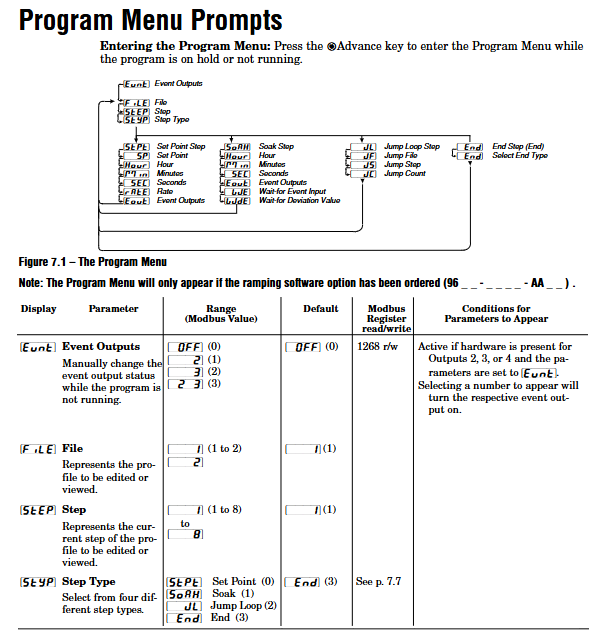
Curve configuration: Supports 2 files (File1/File2), with 8 steps per file. The step types include Set Point, Soak, Jump Loop, and End. Event output can be set (such as starting an external device).
Operation: Press the infinite key from the homepage to enter the pre run menu, select the file and start steps, and then press the infinite key to start; Press the infinite key to pause during operation, and the pause step can be restored through the "resU" parameter.
Waiting function: The insulation step supports "Wait for Event" (event input trigger) and "Wait for Deviation" (process value entering deviation zone trigger), and timing can only start after meeting the conditions.
Alarm and fault handling
Alarm configuration: 4-channel alarms can be set as process alarms (fixed threshold) or deviation alarms (relative to the set point), supporting high/low alarms, locking/non locking, and mute functions. Hysteresis can be set to 1-9999 units to avoid false triggering.
Fault diagnosis: Input error (sensor open circuit/over range), system error (RAM/ROM fault), open-loop detection (100% output without process value change), locate the problem through the error code on the display screen (such as Err1-Err16), refer to the appendix for troubleshooting.
Fault mode: When the sensor fails, it can be set to Bumpless, Manual mode, or Off output mode. Bumpless switching can maintain the output power before the fault and avoid process fluctuations.
Communication and Remote Configuration
(1) Communication parameter settings
Protocol and hardware: Supports Modbus RTU protocol, optional EIA-232 (model including "R") or EIA-485 (model including "U") communication module, wiring needs to distinguish T+/R+/T -/R-terminals.
Configuration steps: Enter "Setup - Output4- Baud Rate" to set the baud rate (1200/2400/4800/9600/19200), and set the device address (1-247) in "Address" to ensure consistency with the parameters of the upper computer (PLC/PC).
Data retransmission: Output 4 can be configured as a retransmission function (model includes "M"), supporting retransmission process values, setpoints, or output power. The signal range is calibrated through "Scale Low/High" and "Range Low/High" (such as 4-20mA corresponding to 0-100 ° C).
(2) Remote operation example
The upper computer reads the process value (register 100), set point (register 300), and alarm status (register 106) through Modbus.
Remote start curve: By writing the Modbus command register (40001=1 to start File140002=1 to start Step1).
Remote parameter modification: Write the set point to register 300 and write the PID parameter to the corresponding register (such as proportional band 500), ensuring communication write permission (non-volatile memory disable requires closing register 24).
Maintenance and troubleshooting
(1) Daily maintenance
Regular inspection: Clean the sealing ring and heat dissipation area of the front panel on a monthly basis, tighten the terminals quarterly (to avoid cold flow loosening), and calibrate the input/output annually (through the "Factory Calibration" menu, a standard signal source is required).
Parameter backup: Save commonly used parameter configurations or record key parameters (input type, PID parameters, alarm thresholds) through the "Factory Custom Menu" to avoid reconfiguration after faults.
Calibration process: Input calibration requires providing high and low point standard signals (such as thermocouple 0mV/50mV), calculating the correction value through "Electrical Input Slope/Offset", and outputting calibration in the same way (such as 4-20mA signal calibration).
(2) Common fault handling
Possible causes and solutions for the fault phenomenon
No display/output power supply not connected, fuse burned out, safety interlock activated. Check the power supply voltage and fuse (Slot C terminal 98/99), confirm the interlock switch status, and re tighten the power supply wiring
The process value deviation is large. The sensor wiring is incorrect, the calibration offset is not set, and the input type does not match. Check the sensor wiring (thermocouple positive and negative poles/RTD leads), adjust the "Calibration Offset", and confirm that the "Input Type" is consistent with the sensor
Communication failure: baud rate/address mismatch, reversed wiring, no terminal resistor added. Unify device communication parameters, check the correspondence between T+/R+and A/B terminals, and add a 120 Ω resistor at the end of the bus
The alarm cannot be cleared. The alarm condition has not been lifted and the alarm lockout confirmation process value has returned to the safe range (including the hysteresis area). Press the infinite key to clear the lockout alarm and check the "Latching" parameter setting
The curve cannot be started and has not entered the pre run mode. The step type configuration is incorrect. Press the infinite key to enter the pre run menu, select the file and step, and confirm that there is no "Jump" loop error in the curve step (such as jumping to the current step)
- OMRON
- ABB
- General Electric
- EMERSON
- Honeywell
- HIMA
- ALSTOM
- Rolls-Royce
- MOTOROLA
- Rockwell
- Siemens
- Woodward
- YOKOGAWA
- FOXBORO
- KOLLMORGEN
- MOOG
- KB
- YAMAHA
- BENDER
- TEKTRONIX
- Westinghouse
- AMAT
- AB
- XYCOM
- Yaskawa
- B&R
- Schneider
- KONGSBERG
- NI
- WATLOW
- ProSoft
- SEW
- ADVANCED
- Reliance
- TRICONEX
- METSO
- MAN
- Advantest
- STUDER
- DANAHER MOTION
- Bently
- Galil
- EATON
- MOLEX
- DEIF
- B&W
- ZYGO
- Aerotech
- DANFOSS
- Beijer
- Moxa
- Rexroth
- Johnson
- WAGO
- TOSHIBA
- BMCM
- SMC
- HITACHI
- HIRSCHMANN
- Application field
- XP POWER
- CTI
- TRICON
- STOBER
- Thinklogical
- Horner Automation
- Meggitt
- Fanuc
- Baldor
- SHINKAWA
- Other Brands
- UniOP
- KUKA
- Iba
- Beckhoff
- ADLINK
-
 SIGMATEK SDD310-2 Servo Drive
 -
 SIGMATEK AI084 Analog Input Module
 -
 SIGMATEK CRCH081 12-752-081 Temperature Module
 -
 Sigma-Tek 5000L-4 Attitude Gyro 1U284-001-3
 -
 SIGMATEK CM5V020 12-250-023-K Wiring Module
 -
Sigma-Tek 4000H-6 Directional Gyro IU262-035-7
-
 SIGMATEK Dias DCP160 05-004-160 Processor Module
 -
 SIGMATEK 0147.395.02 Control Module
 -
 SIGMATEK A1084 Control Module
 -
SIGMATEK DI200 20-006-2000 Digital Input Module
-
 Sigmatek DNC115 Encoder Module
 -
 Sigmatek DAM122 05-017-122 Analog Module
 -
 Sigmatek 9802.289.01 Control Board TA71 Display
 -
Sigmatek TO127 20-007-127 Digital Output Module
-
Sigmatek DNC031 05-011-031 Digital Module
-
 Sigmatek VI022 20-003-022 Interface Module
 -
 Sigmatek CAI085 Analog Input Module
 -
 Sigmatek CP111 S-DIAS CPU Module
 -
 Sigmatek CTMS030 Krauss Maffei Module
 -
 Sigmatek CAM123 Control Module
 -
 Sigmatek TAE732-P 01-240-732-P Touch Display Unit
 -
 Sigmatek MDM021 Digital Mixed Module
 -
Sigmatek DCP642 DIAS Central Unit
-
 Sigmatek CST022 12-014-022 C-DIAS Module
 -
 Sigmatek SRO021 20-893-021 Safety Relay Output
 -
 Krauss Maffei MC5 Control System Sigmatek
 -
 Sigmatek DC061 Module 18-24VDC 300mA
 -
 Herrmann EVT0855 Ultrasonic Welder Touch Panel
 -
 Sigmatek CIV521 Control Module 1.4A 2W
 -
 Sigmatek DDI61 05-006-161 Digital Input Module
 -
SIGMATEK ETT312-E Touch Terminal 01-230-312
-
Cessna S3326-1 Sigma Tek 5000B-67 Gyro 1U149-015-9
-
 SIGMATEK PS101 Power Supply Module
 -
 SIGMATEK 0332.554.03 Control Module 371071000154
 -
 SIGMATEK ETT312-E Touch Terminal 01-230-312
 -
SIGMATEK CDM163 Control Module
-
 SIGMATEK VSV046 16-023-046 Module
 -
SIGMATEK AM221 20-017-221 Analog Module
-
SIGMATEK CTS051 12-053-051 Control Module
-
SIGMATEK AM221 20-017-221 Analog Module
-
Sigmatek CSDI161 12-891-161 Safety Input Module
-
Sigma Tek 4000C-1 Directional Gyro Indicator
-
 Sigmatek ETV0501 12-230-0501 VARAN Terminal
 -
Sigmatek DDM165 SLIDES Module
-
 Sigmatek N100 20-011-100 Control Module
 -
Sigmatek AKM54K-ANC2R-B0 PM Servo Motor
-
Sigmatek CTO166 Digital Output Module
-
 Sigmatek CP212-K 20-004-212-K CPU Module
 -
Sigmatek CDI161 Digital Input Module
-
Sigmatek DCC080 05-700-080-2 Control Module
-
 SIGMATEK SCP011 S-DIAS Safety CPU
 -
SIGMATEK SCP011 S-DIAS Safety CPU
-
 SIGMATEK SRO022 Relay Output Module
 -
SIGMATEK MDD 121 Drive Axis Module
-
SIGMATEK DSI021 SLIDES Siemens Interface
-
SIGMATEK DIAS DCP161 Module 05-004-161
-
 Sigmatek ETT312 Built-in Touch Terminal
 -
 SIGMATEK DCP 643 DIAS Controller System
 -
SIGMATEK CIO021 Multi I/O Module
-
 SIGMATEK CTMS020 Control Module
 -
 Sigmatek CME 221 Memory Module
 -
Sigmatek 0420.615.01 Control Board
-
 Sigmatek CP111 20-004-111 CPU Module
 -
Sigmatek 9405.065.03 Control Board
-
 Sigmatek ETEK 01-450-032-K C-IPC 256MB Industrial PC
 -
 Sigmatek CTO163 12-007-163 Safety Output Module
 -
Sigmatek TO081 20-007-081 Digital Output Module
-
 Sigmatek SI021 20-022-021 Safety Input Module
 -
 Sigmatek 05-052-014 Control Module HW 1.0
 -
Sigmatek TO127 20-007-127 Digital Output Module
-
Sigmatek SV141 20-023-141 VARAN Splitter
-
 SIGMATEK CIV513 C-DIAS VARAN Control Module
 -
Sigmatek DCP 642 SLIDES Control Module with DKL002
-
 Sigma-Tek 5000B-36 Attitude Gyro
 -
SIGMATEK 01-450-024 C-IPC Industrial Computer
-
 SIGMATEK CP102 S-DIAS Processor Module
 -
Sigmatek CRCH081 12-752-081 PLC Module
-
SIGMATEK SDD340-46 Series Drive
-
SIGMATEK TAE731 Touch Display Unit
-
 SIGMATEK CDM167 Module 12-008-167-O
 -
SIGMATEK TO161 Digital Output Module
-
 Sigmatek NC4 45291000003 Control Board
 -
 Sigmatek HGW1033-3 Handheld Wireless Unit
 -
Sigmatek CAI0811 Analog Input Module
-
 Sigmatek STO081 S-DIAS Safety Output Module
 -
 Sigmatek C-IPC 01-450-171-V Industrial PC
 -
 Sigmatek S1 032-8AF61-R4 EZ Servo Motor
 -
Sigmatek CM5V020 Baseplate 12-250-021-K
-
 Sigmatek HGT833-W Panel
 -
 Sigmatek NC4 45291000003 Control Module
 -
 SIGMATEK 12-780-012 R8-IPC Geode LX800
 -
SIGMATEK CCP081 Processor Module
-
SIGMATEK SCP011 S-DIAS Safety CPU
-
 SIGMATEK ETT1533 Touchscreen 01-230-1533
 -
SIGMATEK AI043 Analog Input Module
-
SIGMATEK CTMS020 Control Module
-
 SIGMATEK SLIDES VARAN Interface VAC 012
 -
 SIGMATEK Compact Control Unit 06038666
 -
 SIGMATEK CP112 Control Module
 -
SIGMATEK MDP 101-1 Power Supply Module
-
 Sigmatek CCP621 C-SLIDES Processor Module
 -
Sigmatek MDD111 Axle Module
-
Sigmatek CCL912 C-SLIDES CPU PSU Module
-
Demag NC4 0332.554.03 Sigmatek Control Board
-
Sigmatek Krauss Maffei PC321-K Control Cabinet PC
-
 Sigmatek CNC W150 Circuit Board Wittmann Robot
 -
Sigmatek AKM44G-ANCNGBB0 Servo Motor
-
 Sigmatek CSCP011 Safety Module 12-890-011
 -
Mannesmann Demag Sigmatek CP126 Central Unit
-
 Sigmatek ISE021 Interface Module 20-101-021
 -
Sigmatek CCP251 C-DIAS Processor Module
-
 SIGMATEK ET 352 Terminal
 -
SIGMATEK SV141 Module 20-023-141
-
 SIGMATEK NC-337 3 Axis Module
 -
 Sigmatek MDP 101 Power Module
 -
SIGMATEK HGT834-W Teach Pendant
-
Sigmatek C-DIAS Processor Module CCL912
-
SIGMATEK CP627 Module
-
 SIGMATEK PC 323-K Controller
 -
SIGMATEK MDD121 Controller Module
-
 SIGMATEK ICA111 Module
 -
SIGMATEK MDD 121-1 Drive Axis Module
-
SIGMATEK M5V121 12-300-121 Krauss Maffei M5 Display Unit
-
SIGMATEK CTMS 020 CD Technology Module 12-250-011
-
SIGMATEK PCT122 Touch Panel
-
Stöger MCS4100 SIGMATEK Control Module
-
SIGMATEK Krauss Maffei M5 Keyboard Unit M5K902 12-310-902
-
 SIGMATEK SD310-2 Servo Drive Module


