
Westinghouse ePX3500 Electric High Voltage Cleaning Machine
Flow parameters: maximum water flow rate of 1.76 US GPM (6.66 LPM), rated water flow rate of 1.2 US GPM (4.54 LPM).
Power parameters: Input 120V AC, 60Hz, 13A, equipped with Class A GFCI leakage protection plug, double insulation design.
Applicable water source: Only cold water (tap water) is supported, and the use of hot water, lake water, pool water, etc. is prohibited. The water source pressure should not exceed 150 PSI.
Westinghouse ePX3500 Electric High Voltage Cleaning Machine
Core parameters and product configuration
1. Key specifications
Pressure parameters: maximum pressure 2500 PSI, rated pressure 2000 PSI.
Flow parameters: maximum water flow rate of 1.76 US GPM (6.66 LPM), rated water flow rate of 1.2 US GPM (4.54 LPM).
Power parameters: Input 120V AC, 60Hz, 13A, equipped with Class A GFCI leakage protection plug, double insulation design.
Applicable water source: Only cold water (tap water) is supported, and the use of hot water, lake water, pool water, etc. is prohibited. The water source pressure should not exceed 150 PSI.
2. Core configuration
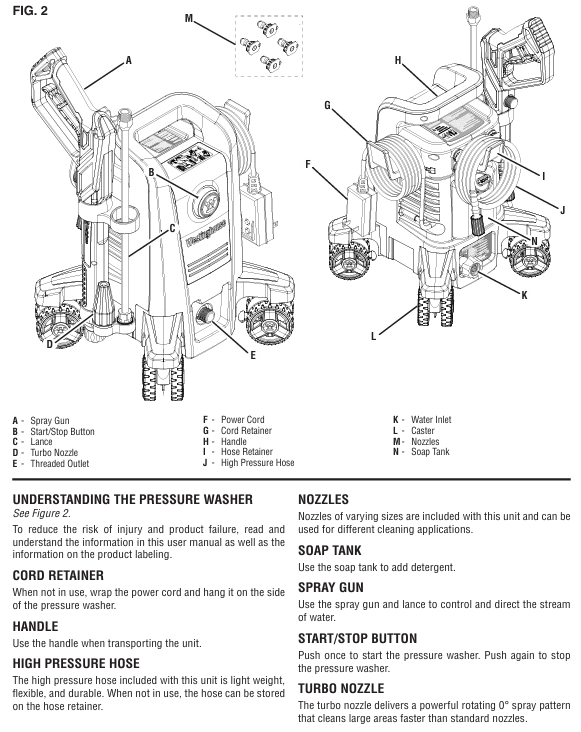
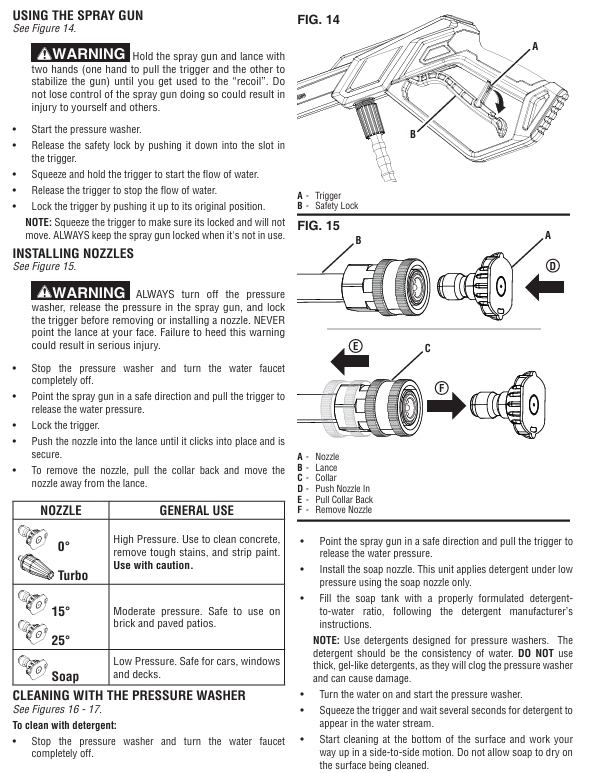
Cleaning accessories: 0 ° turbine nozzle (high-pressure cleaning), 15 °/25 ° nozzle (medium pressure cleaning), soap nozzle (low-pressure spraying).
Body components: high-pressure hose, spray gun, extension rod, soap box, roller (easy to move), cable storage rack, hose storage rack.
Safety configuration: trigger safety lock (to prevent accidental contact), GFCI leakage protection (to be tested monthly), 20A circuit breaker (overload protection).
Core functions and usage scenarios
1. Core functions
Multi scenario cleaning: By changing the nozzle to meet different needs, high-pressure nozzles can remove stubborn stains and paint peeling, medium pressure nozzles are suitable for brick and stone roads, and soap nozzles can be used with specialized cleaning agents to clean vehicles, doors, and windows.
Automatic start stop: When the trigger is triggered, the machine starts and automatically stops when released, reducing energy consumption and wear.
Convenient operation: The roller design is easy to move, components can be quickly assembled and disassembled, and cables and hoses have dedicated storage structures.
2. Applicable and taboo scenarios
Applicable for cleaning hard surfaces such as vehicles, decks, sidewalks, fences, and exterior walls of buildings.
Taboo: Do not directly spray personnel, animals, electrical equipment, glass (easily broken); Do not use in damp environments, flammable dust/liquid areas; Not suitable for cleaning medical equipment or precision instruments.
Complete operation process (assembly → use → shutdown → maintenance)
1. Assembly steps (completed within 10 minutes)
Install the roller: Tilt the body, align the roller with the bottom slot, and push it in firmly until you hear a "click" sound, ensuring that the roller is securely installed (you can gently shake it for testing).
Fixed storage components: Align the spray gun storage rack, hose storage rack, and cable storage rack with the reserved card slot on the body, slide them into place, and tighten the fixing screws (if any).
Connect high-pressure hose:
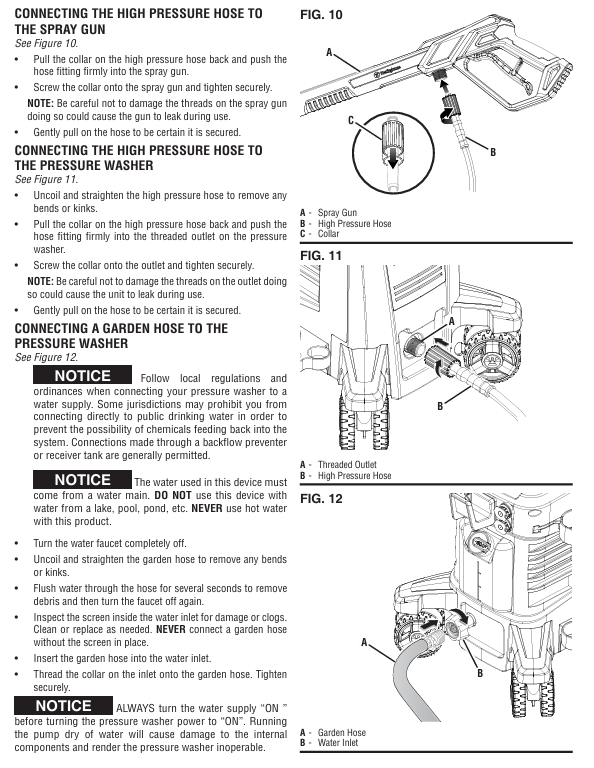
Take out the high-pressure hose, align one end with the water outlet of the machine body, press the hose buckle and push it in, and tighten the locking ring clockwise.
Align the other end with the spray gun interface, press the buckle and tighten it, gently pull the hose to confirm a secure connection.
Connect water source:
Check if the filter inside the water inlet of the aircraft is intact and unobstructed (if there are impurities, rinse with clean water).
Connect one end of the garden hose to the faucet and the other end to the water inlet of the machine. Tighten the buckle clockwise and turn on the faucet to test for water leakage.
Assemble spray gun and nozzle:
Insert the extension rod into the spray gun interface, tighten clockwise (do not apply excessive force to avoid damaging the thread), and gently pull to confirm fixation.
Select the desired nozzle, align it with the front end interface of the extension rod and press it. Once you hear the snap sound, it will be installed in place; Press the buckle and pull out the nozzle during disassembly.
2. Usage steps (divided into regular cleaning and cleaning with cleaning agents)
(1) Regular cleaning (without cleaning agents)
Preparation before startup:
Turn on the faucet to ensure smooth water flow and no impurities.
Unlock the safety lock of the spray gun trigger, press the trigger to release the air and residual impurities in the pipeline until there are no bubbles in the continuous water flow, and then lock the safety lock.
Insert the power plug into the grounding socket and ensure that the plug is dry.
Startup and Cleaning:
Press the "start stop button" on the machine body, and the machine will automatically stop after running for 1-2 seconds (the automatic start stop function is normal).
Unlock the trigger safety lock, press the trigger, the machine starts and sprays high-pressure water flow to start cleaning.
Cleaning technique: Starting from the bottom of the surface, clean upwards in a left-right translation to avoid water flow from top to bottom (which may leave water marks); For stubborn stains, the distance between the nozzle and the surface can be shortened (but not less than 15cm), or the 0 ° turbine nozzle can be replaced.
Shutdown operation:
Release the trigger, the machine will automatically stop, and lock the trigger safety lock.
Turn off the faucet and press the trigger to release any residual pressure in the system.
Disconnect the power supply, wrap the cable around the storage rack, wrap the high-pressure hose around the hose storage rack, and place the spray gun into the storage rack.
(2) Cleaning with cleaning agent
Preparation: Pour the specialized cleaning agent for the high-pressure cleaning machine into the soap box in proportion and cover the box tightly.
Replace nozzle: After turning off the power and releasing the pressure, remove the current nozzle and install the soap nozzle.
Cleaning operation:
Turn on the water source and power, press the trigger, and wait for 3-5 seconds (to allow the cleaning agent to be sucked into the pipeline) until the water flow contains the cleaning agent.
Spray at a uniform speed onto the dry surface, ensuring even coverage of the cleaning agent, and let it sit for 1-2 minutes (do not dry out).
Turn off the power, replace with a 25 ° nozzle, turn on the water source and power, rinse the surface with clean water until there is no residue of cleaning agent.
Follow up processing: Empty the soap box, pour in clean water, install a soap nozzle, press the trigger to flush the pipeline for 1 minute to avoid blockage caused by residual cleaning agents.
3. Daily maintenance and regular maintenance
(1) Maintenance after each use (completed within 5 minutes)
Cleaning nozzle: Remove the nozzle, use specialized cleaning tools or fine needles to clean impurities (such as mud, residue of cleaning agent) in the nozzle hole, and then rinse with clean water.
Cleaning the inlet filter: Unscrew the inlet connector, remove the filter, rinse it with clean water, and reinstall it to ensure that the filter is not damaged (missing the filter can cause impurities to enter the pump body and cause wear).
Drain residual water from the pipeline: Turn off the water source, press the trigger to release residual water, disconnect the high-pressure hose and garden hose, tilt the machine body to drain the accumulated water in the inlet.
Cleaning the body: Wipe the dust and stains on the surface of the body with a damp cloth, do not rinse the body with high-pressure water flow (to avoid water ingress to electrical components), and do not use corrosive cleaning agents such as gasoline and solvents.
(2) Regular maintenance (monthly/every 20 hours of use)
Check the high-pressure hose: Check whether the hose is damaged, bulging, loose joints, and whether the sealing ring is aging (if there is water leakage, replace the sealing ring or hose).
Lubrication sealing ring: Apply a small amount of non water soluble grease (such as Vaseline) on the sealing ring of the high-pressure hose joint and spray gun interface to extend the service life of the sealing ring.
Test GFCI plug: Follow the steps of "leakage protection maintenance" mentioned earlier to ensure that the protection function is normal.
Check nozzle wear: If the nozzle hole becomes larger and the spraying direction deviates, it indicates that it has been worn and needs to be replaced (wear can cause a decrease in pressure and cleaning efficiency).
(3) Long term storage and maintenance (not used for more than one month)
Thoroughly clean: Follow the "maintenance after each use" steps to clean the nozzle, filter screen, and pipeline, ensuring that there is no residual cleaning agent.
Drain water: Disconnect all pipelines, press the trigger to release residual water in the pump body, and tilt the machine body for multi angle drainage.
Pump body protection: It is recommended to use commercial pump body protectants (operate according to the instructions) to prevent the pump body seals from drying out and rusting inside.
Storage requirements:
Store in a dry, ventilated, and heated room with a temperature not lower than 4.5 ℃ (to prevent residual moisture from freezing and expanding, which may cause the pump body to crack).
Disassemble the nozzle, spray gun, and extension rod, clean them and place them in the storage rack. Wrap the high-pressure hose and cable neatly to avoid squeezing or bending.
Stay away from flammable materials, high temperature sources (such as heating, stoves), and corrosive gas environments.
Common troubleshooting (quick problem-solving)
Possible causes and solutions for fault phenomena
The machine cannot start. 1. The power supply is not connected properly or the GFCI plug is not reset; 2. The system pressure has not been released; 3. Motor malfunction: 1. Check if the plug is securely plugged in and press the GFCI "RESET" button; 2. Press the trigger of the spray gun to release pressure; 3. If it still cannot be started, contact after-sales service
There is power supply but no water flow/intermittent water flow. 1. The water source is not turned on or the water pressure is insufficient; 2. The inlet filter is clogged; 3. nozzle blockage; 4. Hose bending/leakage 1. Turn on the faucet and ensure that the water source pressure is ≥ 20 PSI; 2. Disassemble and clean the inlet filter screen; 3. Clean or replace the nozzle; 4. Sort out the hoses and check if the joints are tightened
Insufficient pressure: 1. nozzle wear or blockage; 2. Low water source pressure; 3. Aging of hoses (internal collapse); 4. Wear of pump body seal 1. Clean or replace the nozzle; 2. Change the water source (such as taking water from a bucket and switching to tap water); 3. Replace the high-pressure hose; 4. Contact after-sales service for pump body maintenance
Leakage at the connection point: 1. Damaged or missing sealing ring; 2. The joint is not tightened; 3. Damaged hose: 1. Replace the sealing ring with the corresponding specification; 2. Tighten the joint clockwise (do not apply excessive force); 3. Damaged hoses need to be replaced immediately
The machine will automatically stop after running for 2 seconds. The automatic start stop function is normal (if the trigger is not pressed, the pump will stop after the priming is completed). Pressing the trigger of the spray gun can start it without maintenance; If the machine stops frequently after pressing the trigger, check if the nozzle is blocked or if the pipeline is stuck
The trigger cannot be locked, and the safety lock is stuck or damaged. Check if there are impurities stuck in the safety lock, rinse with clean water, and try to operate it; If it still cannot be locked, the trigger assembly of the spray gun needs to be replaced
GFCI plug frequently trips 1. Circuit leakage; 2. The specifications of the extension cable do not match; 3. Internal electrical failure of the machine: 1. Stop using and check if the plug and cable are damaged; 2. Replace the extension cable that meets the requirements; 3. If it still trips, contact after-sales maintenance for repair
Maintenance and Storage
1. Daily maintenance
After each use: empty the soap box, inject clean water and rinse the pipeline through the soap nozzle; Clean the nozzle (use specialized tools or fine needles to remove blockages); Clean the inlet filter screen.
Regular maintenance: monthly testing of GFCI leakage protection; Regularly inspect high-pressure hoses and sealing rings (lubricated with non water soluble grease), and replace hoses immediately if they are damaged (non repairable).
2. Storage requirements
Environmental conditions: Store in a dry, heated indoor environment with a temperature not lower than 4.5 ℃ (to prevent the pump body from freezing and cracking), away from flammable materials and high temperature sources.
Preparation before storage: Disconnect all pipelines and drain any residual water from the pump body; Disassemble the nozzle and spray gun, clean and store them; Use pump body protector (optional) to extend the lifespan.
Common troubleshooting
Possible causes and solutions for the fault phenomenon
After starting up, there is no water flow. The water source is not turned on, the inlet filter is blocked, the hose is bent to open the water source, the filter is cleaned, and the hose is straightened
Insufficient pressure/intermittent discharge nozzle blockage, insufficient water source pressure to clean nozzle, replacement of qualified water source
The sealing ring at the connection is damaged/missing due to water leakage, the thread is not tightened, replace the sealing ring, and tighten the connection again
The automatic start stop function of the machine stops after running for 2 seconds (without pressing the trigger) and can be started by pressing the trigger, no maintenance is required
GFCI plug cannot reset due to circuit leakage, plug damage and stop using. Contact after-sales service to replace the plug
The spray gun cannot lock the trigger and the safety lock is faulty. Check if the safety lock is stuck and if it is damaged, it needs to be replaced
- OMRON
- ABB
- General Electric
- EMERSON
- Honeywell
- HIMA
- ALSTOM
- Rolls-Royce
- MOTOROLA
- Rockwell
- Siemens
- Woodward
- YOKOGAWA
- FOXBORO
- KOLLMORGEN
- MOOG
- KB
- YAMAHA
- BENDER
- TEKTRONIX
- Westinghouse
- AMAT
- AB
- XYCOM
- Yaskawa
- B&R
- Schneider
- KONGSBERG
- NI
- WATLOW
- ProSoft
- SEW
- ADVANCED
- Reliance
- TRICONEX
- METSO
- MAN
- Advantest
- STUDER
- DANAHER MOTION
- Bently
- Galil
- EATON
- MOLEX
- DEIF
- B&W
- ZYGO
- Aerotech
- DANFOSS
- Beijer
- Moxa
- Rexroth
- Johnson
- WAGO
- TOSHIBA
- BMCM
- SMC
- HITACHI
- HIRSCHMANN
- Application field
- XP POWER
- CTI
- TRICON
- STOBER
- Thinklogical
- Horner Automation
- Meggitt
- Fanuc
- Baldor
- SHINKAWA
- Other Brands
- UniOP
- KUKA
- Iba
- Beckhoff
- ADLINK
-
 Sigmatek MDD111-1 DIAS Drive Axis Module
 -
 Sigmatek DKL042 05-024-042 Terminal Module
 -
 Sigmatek DM822 Control Module
 -
 Sigmatek CDM167 12-008-167-O Module
 -
 Sigmatek TAE151 Touch Display Unit
 -
 Sigmatek DCC041 SLIDES Module 05-700-041-D
 -
 Sigmatek AKM65M-ANC2GBB0 PM Servo Motor
 -
 Sigmatek ETT221 01-230-221 Operator Terminal
 -
 Sigmatek SLIDES DAM 124 Analog Module
 -
Sigmatek AKM31C-ANCNGBB0 Servo Motor
-
 Mannesmann Demag Sigmatek CP626 Central Unit
 -
 SIGMATEK 0332.554.03 Board 371071000154
 -
 SIGMATEK 12-250-021 Base Plate Back Panel CM5V020
 -
 SIGMATEK DM162 S-DIAS Digital Mix Module
 -
 DEMAG ERGOTECH 061 381 66 Sigmatek 9842.243.02 Circuit Board
 -
 SIGMATEK CP313-1 PLC Module
 -
Sigmatek ETV0551-2 VARAN Touch Terminal
-
 Sigmatek SDM 081 FS S-Dias Safety Module
 -
 DEMAG 05-250-023 Ergotech Motherboard with Sigmatek TMS012
 -
Sigmatek CM5V020 12-250-023-K Wiring Base
-
 Sigma Tek 5000B-37 Attitude Gyro Indicator
 -
 Sigmatek SDD120-2 DIAS Drive
 -
 Sigmatek CME221 Memory Module
 -
 Sigmatek DCP640 DIAS Central Unit
 -
 Sigmatek STO040 Safety Output Module
 -
Sigmatek CET281 Control Panel
-
 Sigmatek CIPC LX800 Demag NC5 CPU
 -
 Sigmatek DKL093 05-024-093 Terminal Module
 -
 Sigmatek AI088 20-009-088 Analog Input Module
 -
Sigmatek CAI888 Analog Input Module
-
SIGMATEK CCA021 12-025-021 Analog Output Module
-
SIGMATEK 1104.579.05 Control Module
-
SIGMATEK SDI100 Digital Input Module
-
 SIGMATEK C-IPC 256MB LX800 Compact Dias
 -
 SIGMATEK 9423.090.02 Control Module
 -
SIGMATEK C-IPC 256 Power Supply 148498
-
 SIGMATEK CAI025 Analog Input Module
 -
 SIGMATEK CTO166 Digital Output Module
 -
 SIGMATEK CP112 20-004-112 Processor Module
 -
SIGMATEK CAI887 12-009-887 Safety Module
-
 Sigma-Tek 4000B-31 Directional Gyro 1U262-002-42
 -
Sigmatek C-IPC 256MB LX800 IPC Controller
-
Sigmatek C-IPC 01-450-031 Industrial PC LX800
-
Sigmatek C-IPC 256 Industrial PC Controller
-
Sigmatek CCP-531 PLC Processor Module
-
Sigmatek CDI163 Digital Input Module
-
 Sigmatek ETV0501 VARAN Terminal 12-230-0501
 -
 Sigmatek CTMS020 C-DIAS Technology Module
 -
 Sigmatek CIV512 VARAN Switch Module
 -
 Sigmatek HU011 20-080-011 Interface Module
 -
SIGMATEK SLIDES DAM 124 Module
-
 SIGMATEK C-IPC 161 01-450-161L Industrial PC
 -
SIGMATEK C-IPC 128MB VIA 733MHz 01-450-024-K
-
 SIGMATEK 12-780-012 R8-IPC Geode LX800 Module
 -
SIGMATEK CAM124 Analog Module
-
 SIGMATEK S1 032-8AF61-R4 EZ Servo Motor
 -
 SIGMATEK CTO163 Digital Output Module
 -
 SIGMATEK CCP082 12-004-082 Processor Module
 -
 SIGMATEK CRCH081 C-DIAS Temperature Module
 -
 SIGMATEK PC322-K 01-310-322-K Industrial PC
 -
SIGMATEK SDD310-2 Servo Drive
-
 SIGMATEK AI084 Analog Input Module
 -
SIGMATEK CRCH081 12-752-081 Temperature Module
-
Sigma-Tek 5000L-4 Attitude Gyro 1U284-001-3
-
 SIGMATEK CM5V020 12-250-023-K Wiring Module
 -
Sigma-Tek 4000H-6 Directional Gyro IU262-035-7
-
 SIGMATEK Dias DCP160 05-004-160 Processor Module
 -
SIGMATEK 0147.395.02 Control Module
-
SIGMATEK A1084 Control Module
-
SIGMATEK DI200 20-006-2000 Digital Input Module
-
Sigmatek DNC115 Encoder Module
-
 Sigmatek DAM122 05-017-122 Analog Module
 -
Sigmatek 9802.289.01 Control Board TA71 Display
-
Sigmatek TO127 20-007-127 Digital Output Module
-
Sigmatek DNC031 05-011-031 Digital Module
-
Sigmatek VI022 20-003-022 Interface Module
-
Sigmatek CAI085 Analog Input Module
-
 Sigmatek CP111 S-DIAS CPU Module
 -
Sigmatek CTMS030 Krauss Maffei Module
-
 Sigmatek CAM123 Control Module
 -
 Sigmatek TAE732-P 01-240-732-P Touch Display Unit
 -
Sigmatek MDM021 Digital Mixed Module
-
Sigmatek DCP642 DIAS Central Unit
-
 Sigmatek CST022 12-014-022 C-DIAS Module
 -
 Sigmatek SRO021 20-893-021 Safety Relay Output
 -
 Krauss Maffei MC5 Control System Sigmatek
 -
 Sigmatek DC061 Module 18-24VDC 300mA
 -
 Herrmann EVT0855 Ultrasonic Welder Touch Panel
 -
Sigmatek CIV521 Control Module 1.4A 2W
-
Sigmatek DDI61 05-006-161 Digital Input Module
-
SIGMATEK ETT312-E Touch Terminal 01-230-312
-
Cessna S3326-1 Sigma Tek 5000B-67 Gyro 1U149-015-9
-
SIGMATEK PS101 Power Supply Module
-
SIGMATEK 0332.554.03 Control Module 371071000154
-
 SIGMATEK ETT312-E Touch Terminal 01-230-312
 -
SIGMATEK CDM163 Control Module
-
 SIGMATEK VSV046 16-023-046 Module
 -
SIGMATEK AM221 20-017-221 Analog Module
-
SIGMATEK CTS051 12-053-051 Control Module
-
SIGMATEK AM221 20-017-221 Analog Module
-
Sigmatek CSDI161 12-891-161 Safety Input Module
-
Sigma Tek 4000C-1 Directional Gyro Indicator
-
Sigmatek ETV0501 12-230-0501 VARAN Terminal
-
Sigmatek DDM165 SLIDES Module
-
Sigmatek N100 20-011-100 Control Module
-
Sigmatek AKM54K-ANC2R-B0 PM Servo Motor
-
Sigmatek CTO166 Digital Output Module
-
Sigmatek CP212-K 20-004-212-K CPU Module
-
Sigmatek CDI161 Digital Input Module
-
Sigmatek DCC080 05-700-080-2 Control Module
-
 SIGMATEK SCP011 S-DIAS Safety CPU
 -
SIGMATEK SCP011 S-DIAS Safety CPU
-
SIGMATEK SRO022 Relay Output Module
-
SIGMATEK MDD 121 Drive Axis Module
-
SIGMATEK DSI021 SLIDES Siemens Interface
-
SIGMATEK DIAS DCP161 Module 05-004-161
-
 Sigmatek ETT312 Built-in Touch Terminal
 -
SIGMATEK DCP 643 DIAS Controller System
-
SIGMATEK CIO021 Multi I/O Module
-
SIGMATEK CTMS020 Control Module
-
 Sigmatek CME 221 Memory Module
 -
Sigmatek 0420.615.01 Control Board
-
Sigmatek CP111 20-004-111 CPU Module
-
Sigmatek 9405.065.03 Control Board
-
Sigmatek ETEK 01-450-032-K C-IPC 256MB Industrial PC
-
Sigmatek CTO163 12-007-163 Safety Output Module
-
Sigmatek TO081 20-007-081 Digital Output Module
-
 Sigmatek SI021 20-022-021 Safety Input Module


