
Schneider Electric EcoStruxure Foxboro ™ DCS Thin Client(PSS 41H-4THNCLNT)
Schneider Electric EcoStruxure Foxboro ™ DCS Thin Client(PSS 41H-4THNCLNT)
This product is a thin client designed specifically for Foxboro distributed control system (DCS) by Schneider Electric, based on HP ® The T755 hardware platform is equipped with the Windows 10 IoT Enterprise LTSC 2021 system, which enables DCS system monitoring and operation through remote connection in a compact form. It is suitable for traditional and virtualized Foxboro DCS environments, with both ease of use and high security, and supports flexible networking and redundant configuration.
Core positioning and basic configuration
1. Product essence and hardware selection
Definition: A thin client is a physical hardware terminal that accesses the server-side operating system through remote connections, enabling DCS system event monitoring and response. Compared to workstations, it is smaller in size and can be locally deployed on the user side.
Hardware specifications: designated to use HP ® The T755 model only offers the dual network card (RH103HM) version, and the single network card version has been discontinued; Standard QWERTY keyboard, software installation requires a USB DVD drive (used for installing thin client software, SE RDP connection manager, and alarm keyboard software).
2. Optional configuration (to be purchased separately)
Display device: Supports up to 4 LCD monitors, corresponding to models P0928JJ (23 inch USB touch screen monitor) and RH103FR (24 inch LCD monitor).
Audio and input devices: USB speaker (model RH103DN), up to 4 alarm keyboards (models P0924TT, P0924WV); If the thin client is equipped with a QWERTY keyboard, FoxPanels can be used instead of the alarm keyboard.
Functions and core features
1. Remote access and DCS interaction
Access object: Foxboro DCS software suite can be obtained by connecting to the following remote servers through the network:
H90 and H94 physical servers running Windows Server system;
Virtual machines (VMs) deployed on Foxboro DCS V91 and V95 virtualization hosts.
Communication method: Connect physical or virtual auxiliary communication network (ACN, composed of managed Ethernet switches) through 1GB copper cable Ethernet, Schneider Electric provides dedicated engineering processes for establishing network connections; Supports single or redundant network card connections. If a RDP server failure is detected, it can automatically switch to another server.
Operational capability: As a Human Machine Interface (HMI) station, through Microsoft ® Remote Desktop Services or SE RDP Connection Manager can remotely view and manage DCS software suites, performing operational tasks similar to workstations.
2. Configuration flexibility
Support multiple deployment configurations to meet different usage scenarios:
Restricted connection: Only allow connections to specific virtual machines or physical DCS servers.
Automatic connection: Automatically connects to a single virtual machine or physical server after booting up.
Redundancy and Multiple Connections: Multiple virtual machines/physical servers can be connected (supporting "one redundancy at a time"), or multiple devices can be automatically connected upon startup; It can also be used in non domain environments of local version Control Core Services and enterprise version Control Core Services.
3. Performance and Capacity Limitations
Session support: A single server running Microsoft Remote Desktop Services can support up to 30 FoxView remote sessions and 10 Control HMI remote sessions; Due to the bandwidth limitation of physical Ethernet ports, the total number of RDP sessions for all virtual machines on the virtualization host server does not exceed 60 (the actual number is affected by the type and number of applications running in the sessions).
4. Network security
Access control: thin clients can be configured to only connect to specific remote servers; The remote server assigns corresponding operation permissions based on the logged in user's configuration file.
Additional protection: optional Trellix Terminal Security (ENS) enhanced protection, providing advanced threat defense capabilities; When purchasing the T755 thin client, the Trellix ENS license rights for the first 5 years are included, and renewal is required after 5 years.
Reference document: For detailed security specifications and best practices, please refer to EcoStruxure ™ Foxboro ™ DCS Network Security Reference Guide "(document number B0700HZ).
License authorization requirements
Two types of licenses must be met to ensure legal use:
1. Foxboro DCS related licenses
There is no specific hardware or software license for thin clients, and the existing Foxboro DCS software suite license still applies, but the license belongs to the remote server (non thin client).
Both physical servers and virtual machines, as well as the thin clients connected to them, require corresponding Foxboro DCS software suite licenses. The specific license model needs to be determined based on the type of DCS software installed on the server/thin client.
2. Microsoft License
Free session management: Windows Server allows 2 remote access sessions without CAL (Client Access License), used only for management and technical support, and does not occupy local desktop session resources.
Additional RDS CAL License: If you need more remote connections, you need to purchase a Remote Desktop Services (RDS) client access license (formerly Terminal Services CAL), which supports both "per user" and "per device" authorization modes and can be purchased on the BuyAutomation platform. The specific models and specifications are shown in the table below:
Product Number (P/N) CAL Type Quantity
J0202AW RDS 2016 Device License 5
J0202AV RDS 2016 User License 5
J0202EC RDS 2022 Device License 5
J0202EB RDS 2022 User License 5
J0202EF RDS 2022 Device License 1
J0202EG RDS 2022 User License 1
License rules: The "per device" license must be assigned to one device (thin client, computer, portable device) accessing the remote desktop session, and the license cannot be reused after binding the device; The 'per user' license needs to be assigned to one user for each access session, regardless of the device used by the user; All RDS CALs must be installed and activated on a licensed server (usually an RDS server), and Foxboro DCS servers do not come with any RDS CALs at the factory.
Hardware and Technical Specifications
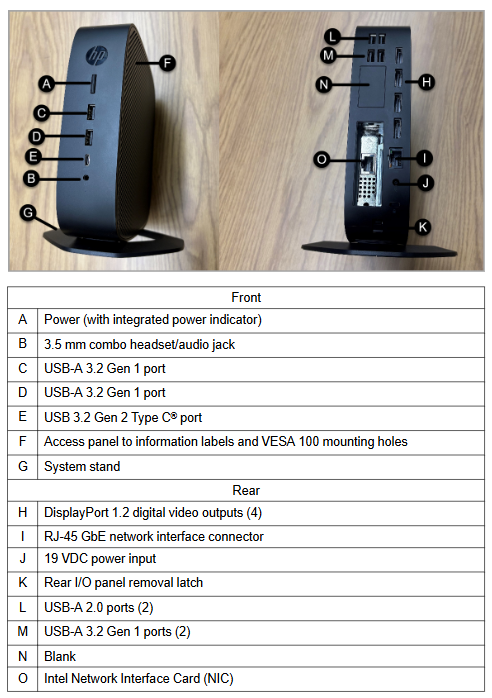
1. Hardware structure and interface (HP t755)
Location interface/component function description
Front A: Power (with indicator light) Power switch and status indicator
B: 3.5mm combination headphones/audio interface for connecting headphones or audio devices
C/D: USB-A 3.2 Gen 1 port for connecting external USB devices (such as mice, printers, etc.)
E: USB 3.2 Gen 2 Type C port high-speed USB connection, supports external devices
F: Information label and VESA 100 installation hole panel for viewing device information, supporting VESA 100 standard installation
G: The system bracket supports vertical or horizontal placement
Back H: Display Port 1.2 interface (4) for connecting LCD displays, up to 4 units
I: RJ-45 Gigabit Ethernet interface network connection interface
J: 19VDC power input connected to DC power supply
K: Disassemble the latch of the rear I/O panel and remove the operating components of the rear I/O panel
L: USB-A 2.0 ports (2) for connecting low-speed USB devices
M: USB-A 3.2 Gen 1 ports (2) for connecting high-speed USB devices
N: Blank interface reserved or unused interface
O: Intel network card for network communication, dual network card configuration for redundancy
Core hardware parameters: AMD ® Ryzen ™ V2546B processor (3GHz reference frequency, up to 3.95GHz acceleration frequency, 2MB cache, 6 cores), 32GB DDR4-3200 SDRAM (maximum transfer rate of 3200MT/s), 256GB flash memory; Integrate one Gigabit Ethernet port and add one plug-in Gigabit Ethernet port, with dual network cards supporting network redundancy.
2. Functional specifications
Category detailed parameters
Operating System Windows 10 IoT Enterprise LTSC 2021
External devices support mouse/trackball (optional), QWERTY keyboard, alarm keyboard, external speakers, touch screen, USB printer (optional)
Built in diagnostics automatically perform self check upon startup
Display performance: 4 DisplayPort 1.2 video ports, maximum refresh rate of 60Hz, over 65000 colors (limited by software), widescreen (16:9) resolution up to 1920 × 1080 pixels (suitable for CCS and CS displays)
One integrated Gigabit Ethernet port and one plug-in Gigabit Ethernet port for network interface; The DCS ACN interface protocol is TCP/IP
The power supply requires an input voltage of 100-240VAC (automatic switching), a frequency of 50-60Hz, and a maximum power consumption of 90W (actual power consumption is affected by software load, peripherals, and environment)
3. Environmental and physical specifications
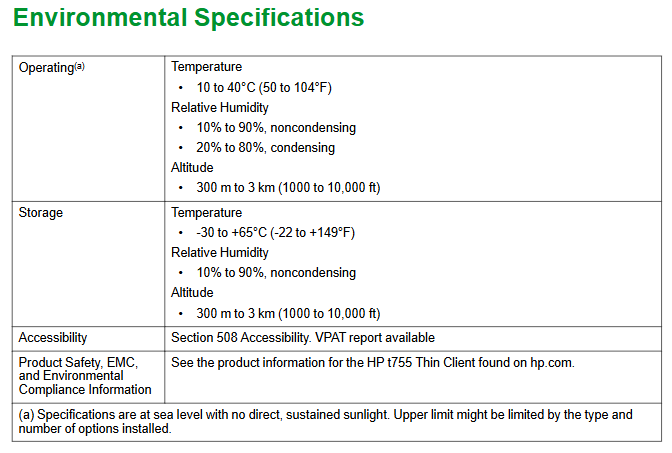
Environmental adaptability:
Scene temperature range, humidity range, altitude range
Run at 10-40 ° C (50-104 ° F) with 10% -90% (no condensation) and 20% -80% (condensation) for 300m-3km (1000-10000ft)
Storage -30-65 ° C (-22-149 ° F) 10% -90% (non condensing) 300m-3km (1000-10000ft)
Physical parameters:
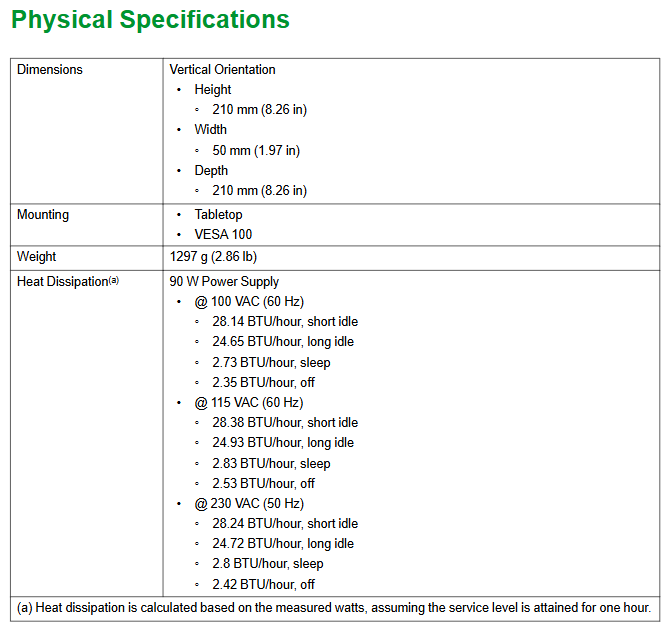
Dimensions (vertical placement): Height 210mm (8.26 inches), Width 50mm (1.97 inches), Depth 210mm (8.26 inches);
Installation method: desktop placement, VESA 100 standard installation;
Weight: 1297g (2.86 pounds);
Heat dissipation: Under a 90W power supply, the heat dissipation varies under different operating conditions (such as 28.14 BTU/hour in short idle state and 2.73 BTU/hour in sleep state at 100VAC 60Hz).
Compliance: Complies with Section 508 accessibility standards (VPAT report available); For product safety, EMC, and environmental compliance information, please refer to the t755 thin client product information on the HP official website.
- OMRON
- ABB
- General Electric
- EMERSON
- Honeywell
- HIMA
- ALSTOM
- Rolls-Royce
- MOTOROLA
- Rockwell
- Siemens
- Woodward
- YOKOGAWA
- FOXBORO
- KOLLMORGEN
- MOOG
- KB
- YAMAHA
- BENDER
- TEKTRONIX
- Westinghouse
- AMAT
- AB
- XYCOM
- Yaskawa
- B&R
- Schneider
- KONGSBERG
- NI
- WATLOW
- ProSoft
- SEW
- ADVANCED
- Reliance
- TRICONEX
- METSO
- MAN
- Advantest
- STUDER
- DANAHER MOTION
- Bently
- Galil
- EATON
- MOLEX
- DEIF
- B&W
- ZYGO
- Aerotech
- DANFOSS
- Beijer
- Moxa
- Rexroth
- Johnson
- WAGO
- TOSHIBA
- BMCM
- SMC
- HITACHI
- HIRSCHMANN
- Application field
- XP POWER
- CTI
- TRICON
- STOBER
- Thinklogical
- Horner Automation
- Meggitt
- Fanuc
- Baldor
- SHINKAWA
- Other Brands
- UniOP
- KUKA
- Iba
- Beckhoff
- ADLINK
-
 SIGMATEK PC321K Industrial Computer
 -
 SIGMATEK MDP 102-1 SLIDES Power Module
 -
 SIGMATEK TAE-151 12-200-151 Light Terminal
 -
 SIGMATEK CP102 20-004-102P6995B HMI Panel
 -
 SIGMATEK CAM-123 12-017-123-C Analog Mixing Module
 -
 SIGMATEK DCC041 DIAS Compact Controller
 -
 SIGMATEK DVI021 and DKL015 DIAS Power Module
 -
 SIGMATEK SDD340-46 SDD Series Servo Drive
 -
 SIGMATEK Robotdrive L6 02220-7997 Engel Drive
 -
 SIGMATEK AKM63M-ANCNGBB0 4.38kW PM Servomotor
 -
 Sigmatek SDD 310 SLIDES-Drive SDD310-4O
 -
 Sigmatek SDD335-23K Drive VARAN Interface 14kVA
 -
 Sigmatek TAE1922-K Touch Display Unit
 -
 Sigmatek DIAS DCP 643 CPU Module DKL003
 -
 Sumitomo CNH-4105Y-43 NSNP Gear Reducer
 -
 Sumitomo CHHP-4160Y-35-213T Inline Gear Reducer
 -
 Sumitomo CNHM02-6090YA-87 NSNP Gear Motor
 -
 Sumitomo CNVXS-6100Y-43 NSNP Gear Reducer
 -
 Sumitomo CNHM2609511 Gear Motor
 -
 Sumitomo CHVM3-6130-B-35 Gear Motor
 -
 Sumitomo HW0389042-A Industrial Component
 -
 Sumitomo F2CF-W55-ZG05-64 Gear Reducer
 -
 Sumitomo CHH-6165Y-13 Inline Gear Reducer
 -
 Sumitomo CNVM3-6125C-EP-6 Cyclo Gear Motor
 -
 Sumitomo RNYX-1320Y-20 Gear Reducer
 -
Sumitomo XFCG111-43/24/165 Control Component
-
 Sumitomo LHYJ-3A105K-Y3-102 Gear Reducer
 -
 Sumitomo CNFM02-6095DA-B-121 TC-FX/FB-02A Motor
 -
 Sumitomo CNHJ-4105DAY-289 NSNP Gear Reducer
 -
 Sumitomo LHYJS-4C145Y-Y1-112 NSNB Gear Reducer
 -
 Radiator 2060351111 Komatsu Sumitomo Linkbelt
 -
 Sumitomo BL3-09B-35MEHDK6 Gearbox ANFJ-L30
 -
 Sumitomo Truninger 8H1-150 Internal Gear Pump
 -
Sumitomo RNFMS01-25R-B-150 200V NSNP Gearmotor
-
Sumitomo CHHBJN1HA-6135Y-29 Inline Reducer
-
Sumitomo EHYMS5-B6125YA-Y3-74 NSNB Reducer
-
 Sumitomo Eaton H-050AA2F-J Orbit Motor
 -
Sumitomo TC-FXVP Motor 0.75kW 4P 400V N-80M
-
 Sumitomo XFCG111-87/24130 Industrial Control Component
 -
 Sumitomo AF3122-030 Inverter 30kW 3Ph 200V
 -
 Sumitomo QT42-25FS-B Internal Gear Pump
 -
 Sumitomo F2CS-A35-ZG09-59 Speed Reducer
 -
 Sumitomo CNHM05-6090-B-29 Gear Motor
 -
 Sumitomo CHHJ-6145Y-29-210T Gear Reducer
 -
 Sumitomo E3P-20-2.2-S1450-E Hydraulic Pump
 -
 Sumitomo RNYMS1-1420C-AV-20 Right Angle Gear Motor
 -
 Sumitomo SR101 SRKG101-76-40-060 Reamer Head
 -
Sumitomo RNYM05-1220-25/UBAABB Gear Motor
-
 Optidrive E3 Sumitomo GHB-36 Vector Inverter Motor
 -
Sumitomo CNH-614HY-35 UNMP Gear Reducer
-
 Sumitomo CNH-612HY-6 SM-Cyclo Gearmotor
 -
 Sumitomo HF3214-A75 Electric Motor
 -
 Sumitomo CNVM02-6100-B-59 NSMP Gear Reducer
 -
 Sumitomo CNHJ4105Y35 NSNP Gear Reducer
 -
 Sumitomo CHH6165Y-29 NSNB Gear Reducer
 -
Sumitomo RNYM1-1420-25 Hyponic Gear Motor
-
 Sumitomo T600C Industrial Control Unit
 -
 Sumitomo LHH-4A115-K2-28 NSNB Gear Reducer
 -
 Sumitomo RNYM02-1220-AV-20 Speed Reducer
 -
 Sumitomo CHHS-6140Y-SB-17 Gear Motor
 -
 Sumitomo Heavy Industries SSE-100A-RM Drive Unit
 -
Sumitomo PA228771 CNHM2-6100YB-EP-8 Gear Motor
-
 Sumitomo RNYM02-1231-B-50 Speed Reducer
 -
Sumitomo CNFM1H-6090-6 Induction Motor
-
 Sumitomo CHH-614HY-11 Gear Reducer
 -
Sumitomo F4C-D25-ZG01-41 Speed Reducer
-
Sumitomo PA224280 CNHM1-6095YC-EP-21 Gear Motor
-
Sumitomo KHYJB4115K185145TC Gear Motor
-
 Sumitomo LHYJS-3A105Y-Y1-179 NSNB Gearmotor
 -
 Sumitomo AF3102-022 BN AC Driver
 -
 Sumitomo SG75M-H Operator Panel
 -
 Sumitomo NT2014-2A2 NSNP Control Unit
 -
Sumitomo RNYMS03-1320-B-60 Gear with Motor
-
Sumitomo F90L/4 F90L4 Drive Motor
-
Sumitomo TC-FX NSMP Motor Unit
-
Sumitomo RNYM05-1210-7 NSMP Gearmotor
-
Sumitomo Fine Cyclo F2CFS-C45-59 Gearbox
-
Sumitomo Heavy Industries SSE-50A Industrial Unit
-
 Sumitomo CHH-6130Y-17 NSNB Gear Reducer
 -
 Sumitomo UMC556000-02 Control Unit
 -
 Sumitomo CHHJ-4155Y-87 Inline Gear Box
 -
 Sumitomo ANFXS-P120F-M30GLD-5 NSNP Reducer
 -
Sumitomo CNHJ-6095Y-17 NSNP Gear Reducer
-
Sumitomo H-3115 17:1 USNT Gear Reducer
-
Sumitomo CHH 6135Y USNTC02 Gear Reducer
-
 Sumitomo JA450918A2 45JA918A Cylinder Head
 -
 Sumitomo SD4SGS-ACB-02C-110-54 Solenoid Valve
 -
Sumitomo CNVMS02-6100DAYA-231 NSMD Gear Reducer
-
Sumitomo CHH4135Y8 NSMD Inline Gear Reducer
-
Sumitomo PA020201 CNH-6125Y-87 Worm Gear Reducer
-
 Sumitomo Connectivity 8100-2730 Connector
 -
Sumitomo CNHJ-6120Y-87 PA021857 NSNB Gear Reducer
-
Sumitomo RNYM02-1330-B-100 Induction Gear Motor
-
 Sumitomo JA762913AC Operator Interface Keypad
 -
 Sumitomo CQT51-100FV-S1262J-A Coolant Pump
 -
Sumitomo PA225389 CNHM1-6095YC-EP-6 Gear Motor
-
Sumitomo CHHJ-4130Y-43 NSNB Gear Reducer
-
Sumitomo RNYJ-1520Y-12 NSNB Gear Reducer
-
Sumitomo HC1480-29.00 NSMD Inline Gear Reducer
-
 Sumitomo MC-550 MCU UMC550000AEG01
 -
 Sumitomo CNVM1H-6125YA-B-87 Gear Reducer
 -
Sumitomo SD4GS-ACB-02B-110-54 Solenoid Valve
-
Sumitomo HCS79310 Main Motor Assembly
-
Sumitomo JA762913AC Operator Interface Keypad
-
Sumitomo CNHJ-6125Y-8 In Line Reducer
-
 Sumitomo X120D30303T-01 Driver
 -
Sumitomo H1Y203-25-F7000 Shaft Mount Reducer
-
 Sumitomo Type-35SE Fiber Fusion Splicer Kit
 -
Sumitomo F2CS-T655-171 Cyclo Drive Gearbox
-
 Sumitomo F80 Adsorber RX19ZT6124
 -
 Sumitomo MC-550 MCU UMC550000AKG01
 -
 Sumitomo Drive FCS-A65G-59 Speed Reducer
 -
 Sumitomo SRA81-56-BM50-140 Modular Reamer Holder
 -
Sumitomo CNHM05-6100YA-59 Gear Motor
-
 DEMAG Sumitomo Ergocontrol NC4 100 V7 Control Unit
 -
Sumitomo HMV02-207 Cyclo Drive Induction Motor
-
 SUN-EH Sumitomo Z4-22172-12 Ozone Power Unit
 -
Sumitomo AF-500 AF502-2A2 Transistor Inverter
-
 Sumitomo T-82C+ Core Alignment Fusion Splicer
 -
Sumitomo P741F6002B Circuit Board
-
 Sumitomo AS-3211 Injection Molding Motherboard
 -
 Yaskawa SGMGH-13Q5A-OM11 Servo Motor with Sumitomo F3CS-A25G-59 Gear
 -
 Sumitomo SH120-5 Final Drive Track Travel Motor
 -
 Sumitomo AS-3345 Circuit Board
 -
 Sumitomo AF300S-1A5-E Transistor Inverter 1.5kW
 -
 Sumitomo Type-Q101-CA SM MM Fiber Fusion Splicer
 -
 Sumitomo SH50 NIV Operator Panel
 -
Sumitomo RNFM-009-17L-B-120-N4FCZ843 AC Gear Motor


