
Westinghouse iGen5000 Digital Inverter Generator
Engine parameters: displacement 224cc, spark plug model 97109-F7RTC, electrode clearance 0.024-0.032 inches (0.60-0.80mm), intake valve clearance 0.0031-0.0047 inches (0.08-0.12mm), exhaust valve clearance 0.0051-0.0067 inches (0.13-0.17mm).
Battery replacement: Disconnect the battery and connect the new battery (part number 511019) to the positive and negative poles (red+, white -). Secure the battery strap and reset the battery cover. Dispose of used batteries according to local regulations.
2. Storage maintenance
(1) Short term storage (<1 month)
Clean the surface of the generator, remove the protective cover of the control panel, store in a dry, ventilated place, away from fire and heat sources.
Keep the battery charged once a month to ensure sufficient power for the next use.
(2) Mid term storage (2-6 months)
Add fresh fuel and fuel stabilizer, run the generator for 5 minutes, and allow the stabilizer to circulate throughout the entire fuel system.
Drain the fuel from the carburetor float chamber to avoid the formation of gum and carbon deposits.
Turn off the battery switch, charge once a month, and cover with a dust cover (plastic cover is prohibited to prevent moisture accumulation).
(3) Long term storage (>6 months)
Drain the fuel from the fuel tank (using a manual fuel pump for extraction, electric fuel pumps are prohibited), and clean the fuel filter.
Drain the fuel from the carburetor float chamber, remove the spark plug, inject 1 teaspoon of engine oil into the cylinder, pull the recoil lever to the piston compression stroke (valve closed), and then install the spark plug (without wiring).
Disconnect the battery, store it separately and charge it regularly. Place the generator in a dry, ventilated, and cool place.
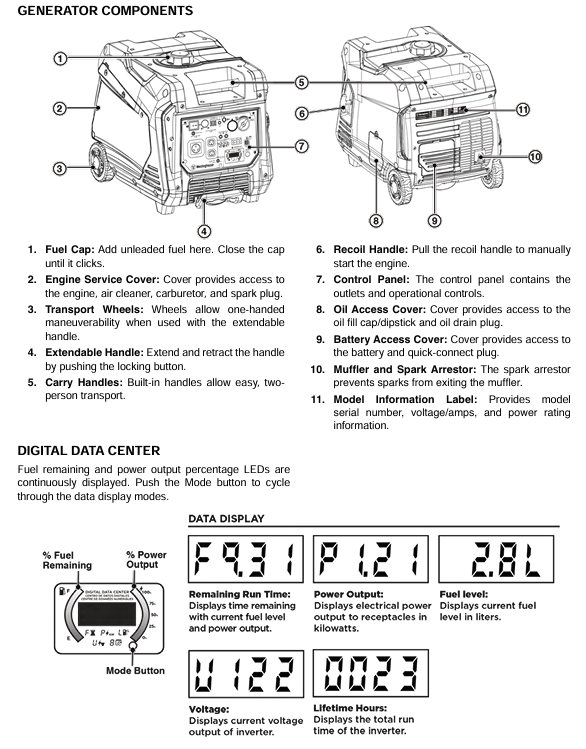
Common troubleshooting
Possible causes and solutions for the fault phenomenon
The engine cannot start due to battery switch OFF, insufficient fuel, or fuel deterioration. Open the battery switch and add fresh fuel. If the fuel deteriorates, empty the fuel tank and clean the fuel system
The air filter is dirty and the low oil level triggers a shutdown for cleaning or replacing the air filter. Add engine oil to the standard level
Wait for 5 minutes until the spark plug is wet (flooded), faulty, or has improper clearance, and then pull the recoil handle to exhaust; Disassemble the spark plug, dry or replace it, and adjust the gap to the specified value
Start the battery with recoil when it runs out of power, or charge it for 8 hours with the included charger
Immediately stop the engine after starting, if there is insufficient fuel, abnormal oil level, or clogged air filter, add fuel, check and adjust the oil level, and clean the air filter
Fuel pollution, low fuel level switch malfunction. Drain the fuel tank and add fresh fuel. If the problem is not resolved, contact customer service
The generator lacks power, the air filter is clogged, the fuel has deteriorated or contaminated. Clean or replace the air filter, empty the old fuel and add fresh fuel
Fuel filter blockage, ignition system malfunction, contact authorized service provider for maintenance
Unstable engine operation/engine shutdown, dirty air filter, generator overload, clean air filter, disconnect partial load, ensure total load does not exceed rated power
Replace or repair faulty equipment due to tool or electrical malfunction, and restart the generator
The overload indicator light of the AC socket without output is on, and the circuit breaker trips to disconnect all loads. Press the overload reset button to reset the circuit breaker and check if the load power exceeds the standard
Output ready light not on, equipment failure. Restart the generator and check if the equipment is normal. If there is still no output, contact customer service
Product registration and after-sales support
After starting, wait for the engine speed to stabilize and the output ready indicator light (green) to light up before connecting the load.
ECO mode on: Only used when there is no heavy load. Press the ECO mode switch, and the engine will adjust its speed according to the load, reducing fuel consumption and noise; When driving large start-up loads such as air conditioning and water pumps, the ECO mode needs to be turned off.
3. Operation and load management
The total power of the load shall not exceed 3900 watts (operating power), and the total starting load shall not exceed 5000 watts (peak power).
Load connection sequence: Start the generator first, connect the maximum load after it stabilizes, and then add other loads in sequence. Connect each load and wait for the generator to stabilize.
Extension cable selection: An outdoor dedicated three core grounding extension cable should be used, and the cable diameter should be selected according to the load current (such as using a 10 gauge cable with a length not exceeding 100 feet for a 20A load).
4. Shutdown steps
Disconnect all connected loads, turn off the electrical switch, and unplug the plug.
Run the generator without load for 3-5 minutes to stabilize the internal temperature.
Press the start/stop button on the control panel for 1 second, or the OFF button on the remote control for 1 second.
Turn off the battery switch (press to OFF position) and turn off the fuel switch (turn counterclockwise to OFF position).
If not used for a long time, the fuel and battery should be disposed of according to storage requirements.
- OMRON
- ABB
- General Electric
- EMERSON
- Honeywell
- HIMA
- ALSTOM
- Rolls-Royce
- MOTOROLA
- Rockwell
- Siemens
- Woodward
- YOKOGAWA
- FOXBORO
- KOLLMORGEN
- MOOG
- KB
- YAMAHA
- BENDER
- TEKTRONIX
- Westinghouse
- AMAT
- AB
- XYCOM
- Yaskawa
- B&R
- Schneider
- KONGSBERG
- NI
- WATLOW
- ProSoft
- SEW
- ADVANCED
- Reliance
- TRICONEX
- METSO
- MAN
- Advantest
- STUDER
- DANAHER MOTION
- Bently
- Galil
- EATON
- MOLEX
- DEIF
- B&W
- ZYGO
- Aerotech
- DANFOSS
- Beijer
- Moxa
- Rexroth
- Johnson
- WAGO
- TOSHIBA
- BMCM
- SMC
- HITACHI
- HIRSCHMANN
- Application field
- XP POWER
- CTI
- TRICON
- STOBER
- Thinklogical
- Horner Automation
- Meggitt
- Fanuc
- Baldor
- SHINKAWA
- Other Brands
- UniOP
- KUKA
- Iba
- Beckhoff
- ADLINK
-
 National Instruments PXIe-6361 Multifunction I/O Module
-
 National Instruments cRIO-9014 CompactRIO Controller
-
 National Instruments PCI-7390 Motion Control Card
-
National Instruments PXI-8512 CAN Interface Module
-
National Instruments sbRIO-9636 Single-Board Controller
-
 National Instruments IC-3120 Industrial Controller
-
 National Instruments PCI-6220 M Series DAQ Card
-
 National Instruments PXI-8176 Embedded Controller
-
 National Instruments PXI-6132 S Series DAQ Module
-
 National Instruments NI 9206 Analog Input Module
-
 National Instruments PXI-2584 Switch Module
-
 National Instruments 196541B-01L Module
-
 National Instruments 778075-01 Module
-
 National Instruments FP-RLY-420 Module
-
 National Instruments USRP-2920 Radio
-
National Instruments PCIe-6351 DAQ Card
-
 National Instruments cRIO-9040 Controller
-
 National Instruments NI 9201 Input Module
-
 National Instruments NI 9411 Input Module
-
National Instruments NI 9216 Input Module
-
 National Instruments PCI-6221 DAQ Device
-
 National Instruments PXI-4498 DSA Module
-
 National Instruments PXI-6259 DAQ Card
-
 National Instruments PXI-7354 Motion Controller
-
National Instruments FP-AI-110 Input Module
-
 National Instruments 192172F-04L Module
-
 National Instruments PXIe-8115 Controller
-
 National Instruments 142931B-01L Module
-
 National Instruments PXI-2503 Switch Module
-
National Instruments 776246-01 Module
-
 National Instruments CFP-2110 Compact FieldPoint Controller
-
 National Instruments 779429-01 Ordering Part Number
-
 National Instruments NI-9149 8-Slot EtherCAT Chassis
-
 National Instruments PXI-4110 Programmable DC Supply
-
 National Instruments 192061-10 Ordering Part Number
-
 National Instruments cDAQ-9181 Chassis Module Carrier
-
National Instruments NI 9437 Digital Input Module
-
National Instruments cFP-2020 Compact FieldPoint Controller
-
 National Instruments PCI-6259 Multifunction DAQ Card
-
National Instruments FP-TC-120 Thermocouple Module
-
National Instruments NI-9174 CompactDAQ Chassis
-
 National Instruments PXI-6030E DAQ Module
-
 National Instruments PXIe-5160 Oscilloscope
-
National Instruments PXI-4462 DSA Module
-
 National Instruments PXI-8109 Controller
-
 National Instruments PXI-6259 DAQ Card
-
 National Instruments PXI-6030E DAQ Card
-
National Instruments cRIO-9056 Controller
-
National Instruments PXIe-8370 MXI Kit
-
 National Instruments USB-6212 DAQ Device
-
 National Instruments RMX-4000 Electronic Load System
-
National Instruments 785040-01 Ordering Part Number
-
 National Instruments cFP-AI-110 Analog Input Module
-
 National Instruments cDAQ-9189 8-Slot Chassis
-
National Instruments PXIe-4139 Source Measure Unit
-
 National Instruments PXI-5620 Digitizer Module
-
 National Instruments PCIe-8371 MXI-Express Card
-
National Instruments 196762B-01L Ordering Part Number
-
 National Instruments NI-9361 Counter Input Module
-
National Instruments cDAQ-9181 Ethernet Chassis
-
National Instruments NI 9221 Input Module
-
 National Instruments cDAQ-9171 Chassis
-
 National Instruments NI 9225 Input Module
-
 National Instruments NI 9171 Chassis
-
 National Instruments 779373-01 Module
-
National Instruments PCI-6034E DAQ Card
-
 National Instruments NI-9211 Input Module
-
National Instruments 779013-01 Module
-
 National Instruments NI-9159 RIO Chassis
-
National Instruments PCIe-GPIB Analyzer Card 778930-01
-
 National Instruments PCI-6110 Multifunction DAQ Card
-
National Instruments PXIe-8840QC Embedded Controller
-
 National Instruments PXI-2530 Switch Module
-
National Instruments 780927-01 Ordering Part Number
-
National Instruments PXI-8420 Serial Interface Module
-
 National Instruments PXIe-8135 Embedded Controller
-
 National Instruments GPIB-ENET/1000 Controller
-
 National Instruments PCI-6704 Analog Output Card
-
National Instruments PXI-6133 S Series DAQ Module
-
 National Instruments PXI-1042 8-Slot Chassis
-
National Instruments NI 9512 Module
-
National Instruments 779003-01 Module
-
 National Instruments cDAQ-9191 Chassis
-
National Instruments USRP-2921 Radio
-
 National Instruments 783368-01 Module
-
National Instruments PXI-2510 Switch Module
-
 National Instruments PCI-7344 Controller
-
 National Instruments PXIe-1082 Chassis
-
National Instruments PXI-8108 Controller
-
 National Instruments USB-6363 DAQ Device
-
 National Instruments cDAQ-9191 Wireless Chassis
-
National Instruments PXIe-4357 RTD Input Module
-
 National Instruments PCI-6512 Industrial Digital I/O Card
-
 National Instruments PXI-6115 Multifunction DAQ Module
-
National Instruments NI-9231 Sound and Vibration Module
-
National Instruments PCI-7344 Motion Controller
-
 National Instruments PCI-8512 CAN Interface Device
-
 National Instruments PCI-1409 Image Acquisition Card
-
National Instruments 783451-01 Ordering Part Number
-
National Instruments 781496-01 cDAQ-9181 Chassis
-
 National Instruments PCI-6250 Multifunction DAQ Device
-
 National Instruments PCI-6224 Multifunction DAQ Card
-
 National Instruments cRIO-9081 CompactRIO Controller
-
National Instruments USB-6353 X Series DAQ Device
-
 National Instruments NI-9223 Simultaneous Analog Input Module
-
 National Instruments PXIe-8133 Embedded Controller
-
National Instruments NI-9403 Digital I/O Module
-
 National Instruments PCI-6111E Multifunction I/O Card
-
 National Instruments FP-1001 FieldPoint Network Module
-
National Instruments PCI-6517 Industrial Digital I/O Card
-
 National Instruments USB-5680 Power Meter
-
National Instruments PXI-6562 Digital Module
-
National Instruments PCI-6254 DAQ Card
-
National Instruments NI 9266 Output Module
-
National Instruments NI 9862 CAN Module
-
 National Instruments NI 9217 Input Module
-
National Instruments PCI-4472 DSA Card
-
National Instruments NI 9232 Vibration Module
-
 National Instruments NI-9269 Output Module
-
National Instruments GPIB-120B Interface
-
 National Instruments NI 9209 Input Module
-
National Instruments NI 9210 Input Module
-
National Instruments NI 9381 Module
-
National Instruments PXI-2570 Relay Module
-
 National Instruments 777318140 Cable
-
National Instruments 781049-01 Module
-
 National Instruments 779140-01 Module
-
National Instruments PXI-6115 DAQ Card


