
Westinghouse iGen5000 Digital Inverter Generator
Engine parameters: displacement 224cc, spark plug model 97109-F7RTC, electrode clearance 0.024-0.032 inches (0.60-0.80mm), intake valve clearance 0.0031-0.0047 inches (0.08-0.12mm), exhaust valve clearance 0.0051-0.0067 inches (0.13-0.17mm).
Westinghouse iGen5000 Digital Inverter Generator
Core parameters and configuration of the product
1. Core performance parameters
Power specifications: Operating power of 3900 watts, peak power of 5000 watts, rated voltage of 120V, rated frequency of 60Hz, total harmonic distortion ≤ 3%, single-phase output.
Engine parameters: displacement 224cc, spark plug model 97109-F7RTC, electrode clearance 0.024-0.032 inches (0.60-0.80mm), intake valve clearance 0.0031-0.0047 inches (0.08-0.12mm), exhaust valve clearance 0.0051-0.0067 inches (0.13-0.17mm).
Fuel and engine oil: Tank capacity 3.4 gallons (12.8 liters), recommended 87-93 octane gasoline, ethanol content ≤ 10% (E15/E85 prohibited); The oil capacity is 0.63 US quarts (0.60 liters), and the recommended model for regular use is 10W-30. For extreme temperatures, 5W-30, 10W-40, or 5W-30 synthetic oil can be selected.
Start and Control: Supports recoil start, electric start, remote start (up to 99 feet/30 meters), equipped with a digital data center that can display remaining operating time, power output, fuel level, voltage, and cumulative operating hours.
2. Key configurations
Control panel: including 120V 20A dual socket (NEMA 5-20R), 120V 30A socket (NEMA TT-30R), USB dual port (5V/2.1A), parallel operation interface, overload reset button, ECO mode switch, etc.
Safety configuration: low oil level indicator light, overload indicator light, output ready indicator light, main circuit breaker and branch circuit breaker, floating neutral grounding system, spark plug lightning arrester.
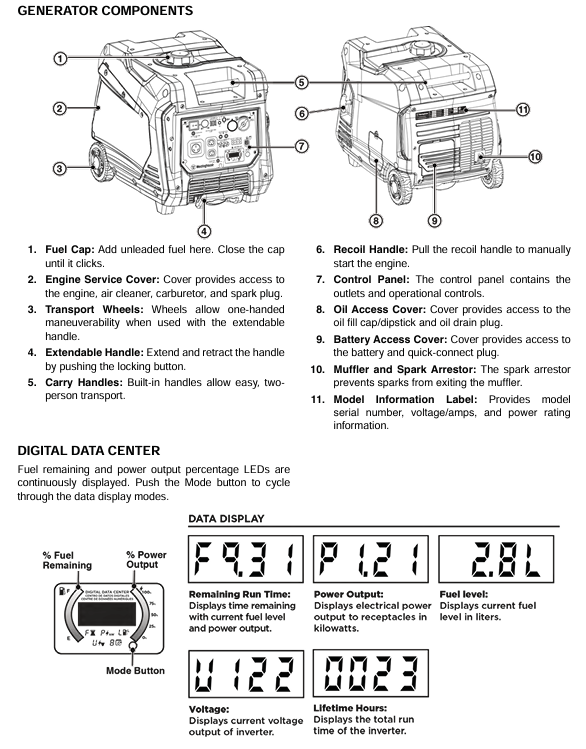
Portable design: equipped with a retractable handle, transport wheels, and a two person carrying handle, making it easy to move and transport.
Safety operation standards (top priority)
1. Environment and scene security
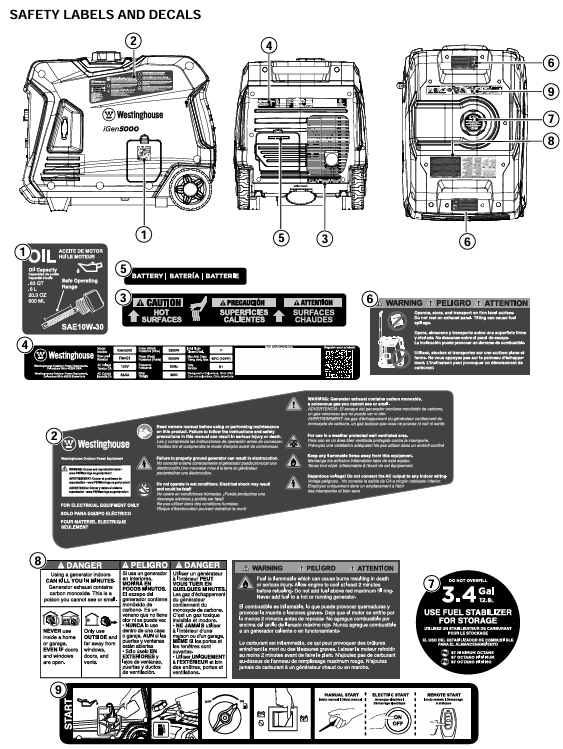
Only operate in well ventilated outdoor areas, away from closed or semi closed spaces such as doors, windows, ventilation openings, garages, basements, etc., to prevent carbon monoxide poisoning.
Maintain a ventilation gap of at least 5 feet (1.5 meters) around the generator, avoid flammable and combustible materials, and cool for at least 30 minutes after operation before storage or transportation.
Do not use in damp environments (rainy, snowy, or waterlogged), avoid skin contact with engine oil and gasoline, and wear protective equipment during operation.
2. Fuel safety operation
Before refueling, the engine must be turned off and cooled for at least 5 minutes. Smoking or being close to sources of ignition is prohibited to avoid fuel spillage.
Fuel should be stored in approved containers, in a well ventilated area, away from heat and ignition sources, and gasoline should not be used as a cleaning agent.
If there is a fuel leak, it should be wiped clean immediately, and the generator should be started only after the leak area is completely dry. Burning the leaked fuel is prohibited.
3. Electrical safety
It is prohibited to directly connect to the building's power grid unless the conversion switch is installed by a qualified electrician and complies with local electrical regulations.
Only use grounded three core extension cords, tools, and appliances, or double insulated equipment to avoid using worn or damaged wires.
When starting and shutting down the generator, it is necessary to disconnect all load connections and gradually add loads to avoid instantaneous overload.
4. Operation taboos
Not suitable for driving medical support equipment, operation is prohibited when fatigued, under the influence of alcohol, or under the influence of drugs.
During transportation or maintenance, it is necessary to disconnect the spark plug wire and battery connection to prevent accidental starting.
Avoid tilting or flipping the generator to prevent fuel or oil leakage.
Complete operational process
1. Preparation before startup
Check that the generator is placed in a horizontal, dry, and ventilated outdoor area, away from doors, windows, and flammable materials.
Confirm that the oil level is between the L (low) and H (high) marks on the dipstick. If it is insufficient, add the recommended model of oil (new engines do not have oil and need to be refilled for the first time).
Check that the fuel is sufficient, the fuel switch is in the off position, all loads have been disconnected, and the battery switch is in the off state.
Connect battery: Open the battery access cover, ensure the battery is securely fixed, connect the quick connector, and reset the battery cover.
2. Startup steps
Turn on the fuel switch (clockwise to the ON position).
Turn on the battery switch (press to the ON position).
Choose the startup method:
Backlash start: Slowly pull the recoil handle until resistance is felt, then quickly pull it.
Electric start: Long press the start/stop button on the control panel for 2 seconds.
Remote start: Long press the ON button on the remote control for 1 second (distance not exceeding 99 feet).
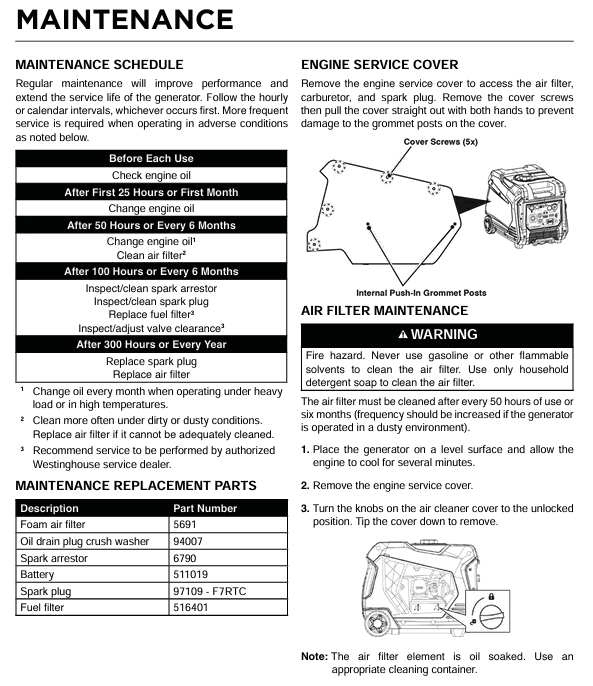
Maintenance Plan and Operation
1. Battery maintenance
After running for 30-60 minutes, the generator will automatically charge the battery. If not in use for a long time, the accompanying charger should be used to charge for 8 hours per month (no more than 8 hours to avoid overcharging).
Battery replacement: Disconnect the battery and connect the new battery (part number 511019) to the positive and negative poles (red+, white -). Secure the battery strap and reset the battery cover. Dispose of used batteries according to local regulations.
2. Storage maintenance
(1) Short term storage (<1 month)
Clean the surface of the generator, remove the protective cover of the control panel, store in a dry, ventilated place, away from fire and heat sources.
Keep the battery charged once a month to ensure sufficient power for the next use.
(2) Mid term storage (2-6 months)
Add fresh fuel and fuel stabilizer, run the generator for 5 minutes, and allow the stabilizer to circulate throughout the entire fuel system.
Drain the fuel from the carburetor float chamber to avoid the formation of gum and carbon deposits.
Turn off the battery switch, charge once a month, and cover with a dust cover (plastic cover is prohibited to prevent moisture accumulation).
(3) Long term storage (>6 months)
Drain the fuel from the fuel tank (using a manual fuel pump for extraction, electric fuel pumps are prohibited), and clean the fuel filter.
Drain the fuel from the carburetor float chamber, remove the spark plug, inject 1 teaspoon of engine oil into the cylinder, pull the recoil lever to the piston compression stroke (valve closed), and then install the spark plug (without wiring).
Disconnect the battery, store it separately and charge it regularly. Place the generator in a dry, ventilated, and cool place.
Common troubleshooting
Possible causes and solutions for the fault phenomenon
The engine cannot start due to battery switch OFF, insufficient fuel, or fuel deterioration. Open the battery switch and add fresh fuel. If the fuel deteriorates, empty the fuel tank and clean the fuel system
The air filter is dirty and the low oil level triggers a shutdown for cleaning or replacing the air filter. Add engine oil to the standard level
Wait for 5 minutes until the spark plug is wet (flooded), faulty, or has improper clearance, and then pull the recoil handle to exhaust; Disassemble the spark plug, dry or replace it, and adjust the gap to the specified value
Start the battery with recoil when it runs out of power, or charge it for 8 hours with the included charger
Immediately stop the engine after starting, if there is insufficient fuel, abnormal oil level, or clogged air filter, add fuel, check and adjust the oil level, and clean the air filter
Fuel pollution, low fuel level switch malfunction. Drain the fuel tank and add fresh fuel. If the problem is not resolved, contact customer service
The generator lacks power, the air filter is clogged, the fuel has deteriorated or contaminated. Clean or replace the air filter, empty the old fuel and add fresh fuel
Fuel filter blockage, ignition system malfunction, contact authorized service provider for maintenance
Unstable engine operation/engine shutdown, dirty air filter, generator overload, clean air filter, disconnect partial load, ensure total load does not exceed rated power
Replace or repair faulty equipment due to tool or electrical malfunction, and restart the generator
The overload indicator light of the AC socket without output is on, and the circuit breaker trips to disconnect all loads. Press the overload reset button to reset the circuit breaker and check if the load power exceeds the standard
Output ready light not on, equipment failure. Restart the generator and check if the equipment is normal. If there is still no output, contact customer service
Product registration and after-sales support
After starting, wait for the engine speed to stabilize and the output ready indicator light (green) to light up before connecting the load.
ECO mode on: Only used when there is no heavy load. Press the ECO mode switch, and the engine will adjust its speed according to the load, reducing fuel consumption and noise; When driving large start-up loads such as air conditioning and water pumps, the ECO mode needs to be turned off.
3. Operation and load management
The total power of the load shall not exceed 3900 watts (operating power), and the total starting load shall not exceed 5000 watts (peak power).
Load connection sequence: Start the generator first, connect the maximum load after it stabilizes, and then add other loads in sequence. Connect each load and wait for the generator to stabilize.
Extension cable selection: An outdoor dedicated three core grounding extension cable should be used, and the cable diameter should be selected according to the load current (such as using a 10 gauge cable with a length not exceeding 100 feet for a 20A load).
4. Shutdown steps
Disconnect all connected loads, turn off the electrical switch, and unplug the plug.
Run the generator without load for 3-5 minutes to stabilize the internal temperature.
Press the start/stop button on the control panel for 1 second, or the OFF button on the remote control for 1 second.
Turn off the battery switch (press to OFF position) and turn off the fuel switch (turn counterclockwise to OFF position).
If not used for a long time, the fuel and battery should be disposed of according to storage requirements.
5. Special operation: Parallel operation
Only compatible Westinghouse inverter generators can be connected in parallel, requiring the use of dedicated parallel cables (such as 507PC model).
Operation steps:
Both generators have turned off the fuel switch and ECO mode.
Connect the parallel interface of two generators using parallel cables.
Start one generator first, wait for the output ready light to turn on, and then start another one.
Gradually connect the load, with the total load not exceeding the sum of the power of the two generators.
Attention: Do not enable ECO mode during parallel operation to avoid voltage instability during high load startup.
6. High altitude operations (>2000 feet/762 meters)
High altitude carburetor kit (part number 518913-01) needs to be installed, otherwise it will result in decreased performance and increased fuel consumption.
For every 1000 feet increase in altitude, the power decreases by about 3.5%, and the load needs to be adjusted according to the actual altitude.
Do not use high-altitude kits at low altitudes (<2000 feet) to avoid damaging the engine.
- OMRON
- ABB
- General Electric
- EMERSON
- Honeywell
- HIMA
- ALSTOM
- Rolls-Royce
- MOTOROLA
- Rockwell
- Siemens
- Woodward
- YOKOGAWA
- FOXBORO
- KOLLMORGEN
- MOOG
- KB
- YAMAHA
- BENDER
- TEKTRONIX
- Westinghouse
- AMAT
- AB
- XYCOM
- Yaskawa
- B&R
- Schneider
- KONGSBERG
- NI
- WATLOW
- ProSoft
- SEW
- ADVANCED
- Reliance
- TRICONEX
- METSO
- MAN
- Advantest
- STUDER
- DANAHER MOTION
- Bently
- Galil
- EATON
- MOLEX
- DEIF
- B&W
- ZYGO
- Aerotech
- DANFOSS
- Beijer
- Moxa
- Rexroth
- Johnson
- WAGO
- TOSHIBA
- BMCM
- SMC
- HITACHI
- HIRSCHMANN
- Application field
- XP POWER
- CTI
- TRICON
- STOBER
- Thinklogical
- Horner Automation
- Meggitt
- Fanuc
- Baldor
- SHINKAWA
- Other Brands
- UniOP
- KUKA
- Iba
- Beckhoff
- ADLINK
-
 Sigmatek MDD111-1 DIAS Drive Axis Module
 -
 Sigmatek DKL042 05-024-042 Terminal Module
 -
 Sigmatek DM822 Control Module
 -
 Sigmatek CDM167 12-008-167-O Module
 -
 Sigmatek TAE151 Touch Display Unit
 -
 Sigmatek DCC041 SLIDES Module 05-700-041-D
 -
 Sigmatek AKM65M-ANC2GBB0 PM Servo Motor
 -
 Sigmatek ETT221 01-230-221 Operator Terminal
 -
 Sigmatek SLIDES DAM 124 Analog Module
 -
Sigmatek AKM31C-ANCNGBB0 Servo Motor
-
 Mannesmann Demag Sigmatek CP626 Central Unit
 -
 SIGMATEK 0332.554.03 Board 371071000154
 -
 SIGMATEK 12-250-021 Base Plate Back Panel CM5V020
 -
 SIGMATEK DM162 S-DIAS Digital Mix Module
 -
 DEMAG ERGOTECH 061 381 66 Sigmatek 9842.243.02 Circuit Board
 -
 SIGMATEK CP313-1 PLC Module
 -
Sigmatek ETV0551-2 VARAN Touch Terminal
-
 Sigmatek SDM 081 FS S-Dias Safety Module
 -
 DEMAG 05-250-023 Ergotech Motherboard with Sigmatek TMS012
 -
Sigmatek CM5V020 12-250-023-K Wiring Base
-
 Sigma Tek 5000B-37 Attitude Gyro Indicator
 -
 Sigmatek SDD120-2 DIAS Drive
 -
 Sigmatek CME221 Memory Module
 -
 Sigmatek DCP640 DIAS Central Unit
 -
 Sigmatek STO040 Safety Output Module
 -
Sigmatek CET281 Control Panel
-
 Sigmatek CIPC LX800 Demag NC5 CPU
 -
 Sigmatek DKL093 05-024-093 Terminal Module
 -
 Sigmatek AI088 20-009-088 Analog Input Module
 -
Sigmatek CAI888 Analog Input Module
-
SIGMATEK CCA021 12-025-021 Analog Output Module
-
SIGMATEK 1104.579.05 Control Module
-
SIGMATEK SDI100 Digital Input Module
-
 SIGMATEK C-IPC 256MB LX800 Compact Dias
 -
 SIGMATEK 9423.090.02 Control Module
 -
SIGMATEK C-IPC 256 Power Supply 148498
-
 SIGMATEK CAI025 Analog Input Module
 -
 SIGMATEK CTO166 Digital Output Module
 -
 SIGMATEK CP112 20-004-112 Processor Module
 -
SIGMATEK CAI887 12-009-887 Safety Module
-
 Sigma-Tek 4000B-31 Directional Gyro 1U262-002-42
 -
Sigmatek C-IPC 256MB LX800 IPC Controller
-
Sigmatek C-IPC 01-450-031 Industrial PC LX800
-
Sigmatek C-IPC 256 Industrial PC Controller
-
Sigmatek CCP-531 PLC Processor Module
-
Sigmatek CDI163 Digital Input Module
-
 Sigmatek ETV0501 VARAN Terminal 12-230-0501
 -
 Sigmatek CTMS020 C-DIAS Technology Module
 -
 Sigmatek CIV512 VARAN Switch Module
 -
 Sigmatek HU011 20-080-011 Interface Module
 -
SIGMATEK SLIDES DAM 124 Module
-
 SIGMATEK C-IPC 161 01-450-161L Industrial PC
 -
SIGMATEK C-IPC 128MB VIA 733MHz 01-450-024-K
-
 SIGMATEK 12-780-012 R8-IPC Geode LX800 Module
 -
SIGMATEK CAM124 Analog Module
-
 SIGMATEK S1 032-8AF61-R4 EZ Servo Motor
 -
 SIGMATEK CTO163 Digital Output Module
 -
 SIGMATEK CCP082 12-004-082 Processor Module
 -
 SIGMATEK CRCH081 C-DIAS Temperature Module
 -
 SIGMATEK PC322-K 01-310-322-K Industrial PC
 -
SIGMATEK SDD310-2 Servo Drive
-
 SIGMATEK AI084 Analog Input Module
 -
SIGMATEK CRCH081 12-752-081 Temperature Module
-
Sigma-Tek 5000L-4 Attitude Gyro 1U284-001-3
-
 SIGMATEK CM5V020 12-250-023-K Wiring Module
 -
Sigma-Tek 4000H-6 Directional Gyro IU262-035-7
-
 SIGMATEK Dias DCP160 05-004-160 Processor Module
 -
SIGMATEK 0147.395.02 Control Module
-
SIGMATEK A1084 Control Module
-
SIGMATEK DI200 20-006-2000 Digital Input Module
-
Sigmatek DNC115 Encoder Module
-
 Sigmatek DAM122 05-017-122 Analog Module
 -
Sigmatek 9802.289.01 Control Board TA71 Display
-
Sigmatek TO127 20-007-127 Digital Output Module
-
Sigmatek DNC031 05-011-031 Digital Module
-
Sigmatek VI022 20-003-022 Interface Module
-
Sigmatek CAI085 Analog Input Module
-
 Sigmatek CP111 S-DIAS CPU Module
 -
Sigmatek CTMS030 Krauss Maffei Module
-
 Sigmatek CAM123 Control Module
 -
 Sigmatek TAE732-P 01-240-732-P Touch Display Unit
 -
Sigmatek MDM021 Digital Mixed Module
-
Sigmatek DCP642 DIAS Central Unit
-
 Sigmatek CST022 12-014-022 C-DIAS Module
 -
 Sigmatek SRO021 20-893-021 Safety Relay Output
 -
 Krauss Maffei MC5 Control System Sigmatek
 -
 Sigmatek DC061 Module 18-24VDC 300mA
 -
 Herrmann EVT0855 Ultrasonic Welder Touch Panel
 -
Sigmatek CIV521 Control Module 1.4A 2W
-
Sigmatek DDI61 05-006-161 Digital Input Module
-
SIGMATEK ETT312-E Touch Terminal 01-230-312
-
Cessna S3326-1 Sigma Tek 5000B-67 Gyro 1U149-015-9
-
SIGMATEK PS101 Power Supply Module
-
SIGMATEK 0332.554.03 Control Module 371071000154
-
 SIGMATEK ETT312-E Touch Terminal 01-230-312
 -
SIGMATEK CDM163 Control Module
-
 SIGMATEK VSV046 16-023-046 Module
 -
SIGMATEK AM221 20-017-221 Analog Module
-
SIGMATEK CTS051 12-053-051 Control Module
-
SIGMATEK AM221 20-017-221 Analog Module
-
Sigmatek CSDI161 12-891-161 Safety Input Module
-
Sigma Tek 4000C-1 Directional Gyro Indicator
-
Sigmatek ETV0501 12-230-0501 VARAN Terminal
-
Sigmatek DDM165 SLIDES Module
-
Sigmatek N100 20-011-100 Control Module
-
Sigmatek AKM54K-ANC2R-B0 PM Servo Motor
-
Sigmatek CTO166 Digital Output Module
-
Sigmatek CP212-K 20-004-212-K CPU Module
-
Sigmatek CDI161 Digital Input Module
-
Sigmatek DCC080 05-700-080-2 Control Module
-
 SIGMATEK SCP011 S-DIAS Safety CPU
 -
SIGMATEK SCP011 S-DIAS Safety CPU
-
SIGMATEK SRO022 Relay Output Module
-
SIGMATEK MDD 121 Drive Axis Module
-
SIGMATEK DSI021 SLIDES Siemens Interface
-
SIGMATEK DIAS DCP161 Module 05-004-161
-
 Sigmatek ETT312 Built-in Touch Terminal
 -
SIGMATEK DCP 643 DIAS Controller System
-
SIGMATEK CIO021 Multi I/O Module
-
SIGMATEK CTMS020 Control Module
-
 Sigmatek CME 221 Memory Module
 -
Sigmatek 0420.615.01 Control Board
-
Sigmatek CP111 20-004-111 CPU Module
-
Sigmatek 9405.065.03 Control Board
-
Sigmatek ETEK 01-450-032-K C-IPC 256MB Industrial PC
-
Sigmatek CTO163 12-007-163 Safety Output Module
-
Sigmatek TO081 20-007-081 Digital Output Module
-
 Sigmatek SI021 20-022-021 Safety Input Module


