
ZYGO MetroPro 9.0 Reference Guide (OMP-0347M)
Version history: From version 4.0 in 1993 to version 9.0 in 2011, the manual revision records cover functional updates in each version (such as the addition of FDA high-resolution analysis in version 7.10 and optimized pattern editor in version 8.0).
ZYGO MetroPro 9.0 Reference Guide (OMP-0347M)
Software Fundamentals and Core Architecture
1. Basic Information and Document System
Software positioning: Suitable for Zygo precision optical measurement equipment, providing data acquisition, analysis, visualization, and automation functions, supporting custom application configuration to adapt to different measurement scenarios (such as surface morphology, roughness, wavefront analysis).
Version history: From version 4.0 in 1993 to version 9.0 in 2011, the manual revision records cover functional updates in each version (such as the addition of FDA high-resolution analysis in version 7.10 and optimized pattern editor in version 8.0).
2. Software architecture and hierarchical logic
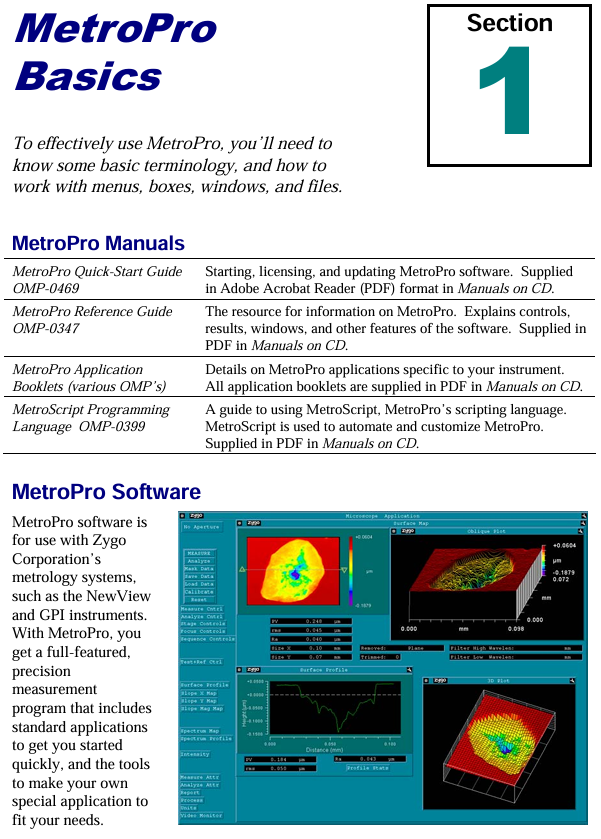
MetroPro adopts a nested window structure, with each component nested in a hierarchical order of "MetroPro main window → application window → function window (control/data/drawing, etc.)". The core components are defined as follows:
Component Type Core Function Example
The top-level interface of MetroPro main window software after startup, which can load/create multiple application windows and display loaded application icons (such as Micro. app)
Application Window is a set of configurations for specific measurement tasks, including sub windows for surface morphology measurement applications such as control and data (including objective control and data display windows)
Control Window manages measurement parameters (such as laser power, scanning mode), triggering operations (measurement/calibration), including the "MEASURE" button and laser intensity control slider
The Data Window displays measurement data, supports plotting (3D/profile), and displays numerical results including filled plots and profile result tables
Plot Window data visualization tools, such as fill plots (surface morphology), profile plots (2D contour), 3D model plots, power spectral density plots (PSD)
Controls/Buttons control parameter adjustment (such as filter type, unit selection), trigger specific function "Auto Focus" button, "Filter Type" dropdown control
3. Basic operating standards
Keyboard and Mouse Operations:
Shortcut keys: F1 triggers measurement, F5 automatically adjusts light intensity, Ctrl+Alt+Delete exits software;
Mouse functions: right-click to bring up menus, middle click to move windows, left click to select/trigger (such as button clicking, text input).
File Management
Supports 10 core file formats, including application configuration (. app), measurement data (. dat), mask (. mas), script (. scr), etc;
File naming convention: The first character is a letter/number, supporting underscores and periods, with a maximum length of 20 characters (after version 7.4). It is recommended to add an extension (such as "Sample01. dat");
Directory operation: Create/switch directories through the "File Handler" dialog box, supporting cross drive file access.
Window Control: Supports window movement, scaling, cascading, and closing (converted to icons), and can be hidden, renamed, deleted, and other operations through the "Window Control" menu.
Detailed explanation of core functional modules
1. Working with Applications
The application is the core task unit of MetroPro, which can be customized to meet different measurement needs. The core operations include:
(1) Application type and loading
Type classification:
Standard application: Pre installed software (such as "Micro. app" for microscopic measurement), write protected, needs to be copied and modified through the user directory;
Custom application: Modify based on existing applications (such as adjusting control positions, adding new drawings) or create from scratch.
Loading process: Right click on the MetroPro main window menu ->"Load Application", select the. app file in the file browser, and support loading multiple applications simultaneously (up to 3 can be opened at the same time).
(2) Application configuration and saving
Core component configuration:
Control window: Add measurement parameter controls (such as objective lens selection, scan length), function buttons (such as "Calibrate" calibration);
Data window: Add plots (such as fill plots, profile plots), result value boxes (such as PV values, RMS values);
Other windows: Report window (generate measurement report), Video monitoring window (real-time display of measurement area).
Save rules:
Save Application ": Specify a name and path when saving for the first time (such as" Customs Surface. app ");
Re save Application ": Overwrite the current application configuration without the need to reselect the path;
Lock application: Press Ctrl+Shift+L to lock the application (to prevent accidental changes), supports password protection (4-13 letters/numbers).
2. Mask Editor
Masks are used to define measurement areas (including/excluding specific areas), supporting 4 types of masks and adapting to different measurement scenarios:
(1) Mask type and function
The core role of mask types in application scenarios
Default (default mask) takes effect by default when no other masks are defined for regular measurements, covering the entire camera field of view
- OMRON
- ABB
- General Electric
- EMERSON
- Honeywell
- HIMA
- ALSTOM
- Rolls-Royce
- MOTOROLA
- Rockwell
- Siemens
- Woodward
- YOKOGAWA
- FOXBORO
- KOLLMORGEN
- MOOG
- KB
- YAMAHA
- BENDER
- TEKTRONIX
- Westinghouse
- AMAT
- AB
- XYCOM
- Yaskawa
- B&R
- Schneider
- KONGSBERG
- NI
- WATLOW
- ProSoft
- SEW
- ADVANCED
- Reliance
- TRICONEX
- METSO
- MAN
- Advantest
- STUDER
- DANAHER MOTION
- Bently
- Galil
- EATON
- MOLEX
- DEIF
- B&W
- ZYGO
- Aerotech
- DANFOSS
- Beijer
- Moxa
- Rexroth
- Johnson
- WAGO
- TOSHIBA
- BMCM
- SMC
- HITACHI
- HIRSCHMANN
- Application field
- XP POWER
- CTI
- TRICON
- STOBER
- Thinklogical
- Horner Automation
- Meggitt
- Fanuc
- Baldor
- SHINKAWA
- Other Brands
- UniOP
- KUKA
- Iba
- Beckhoff
- ADLINK
-
 Sigmatek MDD111-1 DIAS Drive Axis Module
 -
 Sigmatek DKL042 05-024-042 Terminal Module
 -
 Sigmatek DM822 Control Module
 -
 Sigmatek CDM167 12-008-167-O Module
 -
 Sigmatek TAE151 Touch Display Unit
 -
 Sigmatek DCC041 SLIDES Module 05-700-041-D
 -
 Sigmatek AKM65M-ANC2GBB0 PM Servo Motor
 -
 Sigmatek ETT221 01-230-221 Operator Terminal
 -
 Sigmatek SLIDES DAM 124 Analog Module
 -
Sigmatek AKM31C-ANCNGBB0 Servo Motor
-
 Mannesmann Demag Sigmatek CP626 Central Unit
 -
 SIGMATEK 0332.554.03 Board 371071000154
 -
 SIGMATEK 12-250-021 Base Plate Back Panel CM5V020
 -
 SIGMATEK DM162 S-DIAS Digital Mix Module
 -
 DEMAG ERGOTECH 061 381 66 Sigmatek 9842.243.02 Circuit Board
 -
 SIGMATEK CP313-1 PLC Module
 -
Sigmatek ETV0551-2 VARAN Touch Terminal
-
 Sigmatek SDM 081 FS S-Dias Safety Module
 -
 DEMAG 05-250-023 Ergotech Motherboard with Sigmatek TMS012
 -
Sigmatek CM5V020 12-250-023-K Wiring Base
-
 Sigma Tek 5000B-37 Attitude Gyro Indicator
 -
 Sigmatek SDD120-2 DIAS Drive
 -
 Sigmatek CME221 Memory Module
 -
 Sigmatek DCP640 DIAS Central Unit
 -
 Sigmatek STO040 Safety Output Module
 -
Sigmatek CET281 Control Panel
-
 Sigmatek CIPC LX800 Demag NC5 CPU
 -
 Sigmatek DKL093 05-024-093 Terminal Module
 -
 Sigmatek AI088 20-009-088 Analog Input Module
 -
Sigmatek CAI888 Analog Input Module
-
SIGMATEK CCA021 12-025-021 Analog Output Module
-
SIGMATEK 1104.579.05 Control Module
-
SIGMATEK SDI100 Digital Input Module
-
 SIGMATEK C-IPC 256MB LX800 Compact Dias
 -
 SIGMATEK 9423.090.02 Control Module
 -
SIGMATEK C-IPC 256 Power Supply 148498
-
 SIGMATEK CAI025 Analog Input Module
 -
 SIGMATEK CTO166 Digital Output Module
 -
 SIGMATEK CP112 20-004-112 Processor Module
 -
SIGMATEK CAI887 12-009-887 Safety Module
-
 Sigma-Tek 4000B-31 Directional Gyro 1U262-002-42
 -
Sigmatek C-IPC 256MB LX800 IPC Controller
-
Sigmatek C-IPC 01-450-031 Industrial PC LX800
-
Sigmatek C-IPC 256 Industrial PC Controller
-
Sigmatek CCP-531 PLC Processor Module
-
Sigmatek CDI163 Digital Input Module
-
 Sigmatek ETV0501 VARAN Terminal 12-230-0501
 -
 Sigmatek CTMS020 C-DIAS Technology Module
 -
 Sigmatek CIV512 VARAN Switch Module
 -
 Sigmatek HU011 20-080-011 Interface Module
 -
SIGMATEK SLIDES DAM 124 Module
-
 SIGMATEK C-IPC 161 01-450-161L Industrial PC
 -
SIGMATEK C-IPC 128MB VIA 733MHz 01-450-024-K
-
 SIGMATEK 12-780-012 R8-IPC Geode LX800 Module
 -
SIGMATEK CAM124 Analog Module
-
 SIGMATEK S1 032-8AF61-R4 EZ Servo Motor
 -
 SIGMATEK CTO163 Digital Output Module
 -
 SIGMATEK CCP082 12-004-082 Processor Module
 -
 SIGMATEK CRCH081 C-DIAS Temperature Module
 -
 SIGMATEK PC322-K 01-310-322-K Industrial PC
 -
SIGMATEK SDD310-2 Servo Drive
-
 SIGMATEK AI084 Analog Input Module
 -
SIGMATEK CRCH081 12-752-081 Temperature Module
-
Sigma-Tek 5000L-4 Attitude Gyro 1U284-001-3
-
 SIGMATEK CM5V020 12-250-023-K Wiring Module
 -
Sigma-Tek 4000H-6 Directional Gyro IU262-035-7
-
 SIGMATEK Dias DCP160 05-004-160 Processor Module
 -
SIGMATEK 0147.395.02 Control Module
-
SIGMATEK A1084 Control Module
-
SIGMATEK DI200 20-006-2000 Digital Input Module
-
Sigmatek DNC115 Encoder Module
-
 Sigmatek DAM122 05-017-122 Analog Module
 -
Sigmatek 9802.289.01 Control Board TA71 Display
-
Sigmatek TO127 20-007-127 Digital Output Module
-
Sigmatek DNC031 05-011-031 Digital Module
-
Sigmatek VI022 20-003-022 Interface Module
-
Sigmatek CAI085 Analog Input Module
-
 Sigmatek CP111 S-DIAS CPU Module
 -
Sigmatek CTMS030 Krauss Maffei Module
-
 Sigmatek CAM123 Control Module
 -
 Sigmatek TAE732-P 01-240-732-P Touch Display Unit
 -
Sigmatek MDM021 Digital Mixed Module
-
Sigmatek DCP642 DIAS Central Unit
-
 Sigmatek CST022 12-014-022 C-DIAS Module
 -
 Sigmatek SRO021 20-893-021 Safety Relay Output
 -
 Krauss Maffei MC5 Control System Sigmatek
 -
 Sigmatek DC061 Module 18-24VDC 300mA
 -
 Herrmann EVT0855 Ultrasonic Welder Touch Panel
 -
Sigmatek CIV521 Control Module 1.4A 2W
-
Sigmatek DDI61 05-006-161 Digital Input Module
-
SIGMATEK ETT312-E Touch Terminal 01-230-312
-
Cessna S3326-1 Sigma Tek 5000B-67 Gyro 1U149-015-9
-
SIGMATEK PS101 Power Supply Module
-
SIGMATEK 0332.554.03 Control Module 371071000154
-
 SIGMATEK ETT312-E Touch Terminal 01-230-312
 -
SIGMATEK CDM163 Control Module
-
 SIGMATEK VSV046 16-023-046 Module
 -
SIGMATEK AM221 20-017-221 Analog Module
-
SIGMATEK CTS051 12-053-051 Control Module
-
SIGMATEK AM221 20-017-221 Analog Module
-
Sigmatek CSDI161 12-891-161 Safety Input Module
-
Sigma Tek 4000C-1 Directional Gyro Indicator
-
Sigmatek ETV0501 12-230-0501 VARAN Terminal
-
Sigmatek DDM165 SLIDES Module
-
Sigmatek N100 20-011-100 Control Module
-
Sigmatek AKM54K-ANC2R-B0 PM Servo Motor
-
Sigmatek CTO166 Digital Output Module
-
Sigmatek CP212-K 20-004-212-K CPU Module
-
Sigmatek CDI161 Digital Input Module
-
Sigmatek DCC080 05-700-080-2 Control Module
-
 SIGMATEK SCP011 S-DIAS Safety CPU
 -
SIGMATEK SCP011 S-DIAS Safety CPU
-
SIGMATEK SRO022 Relay Output Module
-
SIGMATEK MDD 121 Drive Axis Module
-
SIGMATEK DSI021 SLIDES Siemens Interface
-
SIGMATEK DIAS DCP161 Module 05-004-161
-
 Sigmatek ETT312 Built-in Touch Terminal
 -
SIGMATEK DCP 643 DIAS Controller System
-
SIGMATEK CIO021 Multi I/O Module
-
SIGMATEK CTMS020 Control Module
-
 Sigmatek CME 221 Memory Module
 -
Sigmatek 0420.615.01 Control Board
-
Sigmatek CP111 20-004-111 CPU Module
-
Sigmatek 9405.065.03 Control Board
-
Sigmatek ETEK 01-450-032-K C-IPC 256MB Industrial PC
-
Sigmatek CTO163 12-007-163 Safety Output Module
-
Sigmatek TO081 20-007-081 Digital Output Module
-
 Sigmatek SI021 20-022-021 Safety Input Module


