
YOKOGAWA AQ6150B/AQ6151B Optical Wavelength Meter
YOKOGAWA AQ6150B/AQ6151B Optical Wavelength Meter
Overview
The "Beginner's Guide" (6th Edition, document number IM AQ6150B-02EN) for YOKOGAWA AQ6150B/AQ6151B optical wavelength meters introduces the core functions of the two instruments (measuring light source optical characteristics, supporting single wavelength/multi wavelength detection), preparation before use (packaging content inspection, indoor installation requirements, power connection and power on/off process), basic operations (panel button/mouse/keyboard operation, parameter and string input), maintenance points (firmware updates, daily cleaning, component replacement cycles), and key specifications (wavelength range 900-1700nm, wavelength accuracy up to ± 0.2ppm, etc.), while emphasizing safety precautions (anti electric shock, anti laser eye injury). And provided user registration, technical support contact information, and access to relevant manuals.
Preparation before use
1. Packaging content inspection
After unboxing, it is necessary to confirm that the host, standard accessories, and optional accessories are complete. The standard accessories are as follows (optional accessories need to be purchased separately):
Category, Part Name, Model/Part Number, Quantity, Key Explanation
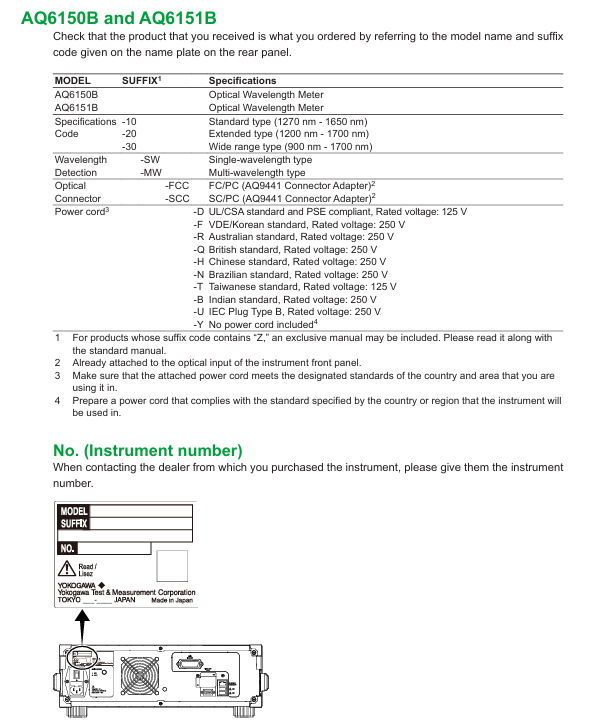
Host AQ6150B/AQ6151B Host -1 Confirm that the back nameplate model is consistent with the order, and record the instrument number (to be provided when contacting the dealer)
Standard Attachment - Power Supply Cord A1006WD (UL/CSA) 1 needs to be matched with regional standards, such as A1064WD for China and A1009WD for Europe; Suffix - Y without power cord
Standard attachment - Other rubber foot pads A9088ZM 2 sheets A9088ZM includes 2 foot pads for fixing instruments to prevent sliding
Standard attachments - Introduction to manuals, IM AQ6150B-02EN, etc. 1 copy each, including download request document, Chinese document, European Language Safety Manual, and global contact information list
Optional accessories - connector AQ9441 connector adapter (FC) AQ9441-FC - for optical input interface, also available in SC model (AQ9441-SC)
2. Instrument installation requirements
Installation environment: For indoor use only, avoid flammable and explosive environments, high vibration/high dust areas, direct sunlight or near heat sources
Placement requirements: Horizontal and stable tabletop, anti tilt; A ventilation gap of ≥ 20cm should be reserved between the bottom air inlet and the back air outlet to prevent internal overheating
Anti impact: When handling, turn off the power, disconnect all cables, and hold the handles on both sides with both hands to avoid falling (to prevent damage to the internal interferometer)
Rack installation: A separate rack kit (EIA standard 751535-E3, JIS standard 751535-J3) needs to be purchased, and the bottom should be supported and not obstruct the ventilation holes during installation
3. Power connection and power on/off
Power specifications: Rated voltage 100-240V AC, frequency 50/60Hz, maximum power consumption ≈ 100VA; allowable voltage range 90-264V AC, frequency 48-63Hz
Power on/off process:
Connect the power cord in the shutdown state (grounded, using a three pin socket);
Turn on the back MAIN POWER switch, and the front POWER light will turn orange;
After waiting for a few seconds, press the front POWER switch, the light turns green, and the instrument starts initialization (displaying STEP 1/6 to STEP 6/6);
To shut down, first press the front POWER switch, confirm the pop-up window, and then click "Yes". After the POWER light turns orange, turn off the MAIN POWER switch.
Basic Operations
1. Control method
Panel button operation:
Function area: including measurement control keys (REPEAT/SINGLE/STOP), function keys (PLAY/SEARCH/SETUP, etc.), and auxiliary keys (PRT SCN/LOCAL);
DATA ENTRY: Enter parameters using the numeric keypad, arrow keys, COARSE key, delete with BACK SPACE key, and confirm with ENTER key.
Mouse/keyboard operation:
Mouse: Left click=panel button operation, right-click to display function key list, can execute menu selection;
External keyboard: supports shortcut key mapping (such as [SHIFT]+[F1] to start display settings, [ALT]+[N] to switch COARSE/FINE mode), can input file names, labels, etc.
2. Core operating procedures
Parameter input:
Numerical input: Press the soft key with parameters, enter through the numeric keypad or arrow keys to adjust, confirm with the ENTER key (automatically reset to the nearest valid value if it exceeds the range);
String input: When entering a label/file name, a on-screen keyboard pops up, and characters can be selected using arrow keys. It supports cursor movement, insertion/deletion operations.
Fiber optic connection:
Clean the fiber end face: Use NTT-AT special cleaning agent, press and rotate to wipe (ensure no dust, avoid damaging the instrument optical interface);
Connecting the instrument: Connect the fiber optic cable to the "Optical INPUT" interface. If an attenuator/amplifier is required, it should be connected in series between the light source and the instrument, and the power offset (POWER OFFSET) should be set to match the actual power.
- OMRON
- ABB
- General Electric
- EMERSON
- Honeywell
- HIMA
- ALSTOM
- Rolls-Royce
- MOTOROLA
- Rockwell
- Siemens
- Woodward
- YOKOGAWA
- FOXBORO
- KOLLMORGEN
- MOOG
- KB
- YAMAHA
- BENDER
- TEKTRONIX
- Westinghouse
- AMAT
- AB
- XYCOM
- Yaskawa
- B&R
- Schneider
- KONGSBERG
- NI
- WATLOW
- ProSoft
- SEW
- ADVANCED
- Reliance
- TRICONEX
- METSO
- MAN
- Advantest
- STUDER
- DANAHER MOTION
- Bently
- Galil
- EATON
- MOLEX
- DEIF
- B&W
- ZYGO
- Aerotech
- DANFOSS
- Beijer
- Moxa
- Rexroth
- Johnson
- WAGO
- TOSHIBA
- BMCM
- SMC
- HITACHI
- HIRSCHMANN
- Application field
- XP POWER
- CTI
- TRICON
- STOBER
- Thinklogical
- Horner Automation
- Meggitt
- Fanuc
- Baldor
- SHINKAWA
- Other Brands
- UniOP
- KUKA
- Iba
- Beckhoff
- ADLINK
-
 National Instruments cDAQ-9189 Chassis
-
 National Instruments PXIe-8394 MXI Module
-
 National Instruments PXIe-4112 Power Supply
-
 National Instruments 778472-01 Module
-
 National Instruments cFP-DO-401 Module
-
 National Instruments PXIe-8379 Interface Card
-
 National Instruments PXIe-7965R Module
-
 National Instruments NI-9485 Relay Module
-
 National Instruments 181045-01 Module
-
 National Instruments TB-4302 Terminal Block
-
 National Instruments PXI-2533 Matrix Switch Module
-
 National Instruments PCI-6220 Analog Input Card
-
 National Instruments PXI-2529 Matrix Switch Module
-
 National Instruments 783732-01 Ordering Part Number
-
 National Instruments PXI-6542 Digital Waveform Module
-
National Instruments PCI-1411 Image Acquisition Card
-
National Instruments PXI-6511 Industrial Digital I/O Module
-
 National Instruments TPC-2012 Touch Panel Computer
-
National Instruments PXI-8101 Embedded Controller
-
 National Instruments cRIO-9035 CompactRIO Controller
-
 National Instruments PXIe-5114 Digitizer Card
-
 National Instruments SCXI-1315 Block
-
 National Instruments PXI-7842R Card
-
 National Instruments PCI-6031E DAQ Device
-
 National Instruments NI-9792 Gateway
-
National Instruments PXI-4132 SMU
-
 National Instruments USB-5132 Digitizer
-
 National Instruments NI 9244 Input Module
-
National Instruments SCXI-1163R Module
-
 National Instruments PCI-6221 DAQ Device
-
 National Instruments cFP-2120 Compact FieldPoint Controller
-
National Instruments cRIO-9073 CompactRIO Controller
-
National Instruments PCI-8516 CAN Interface Card
-
 National Instruments PXIe-1073 5-Slot Chassis
-
 National Instruments NI 9421 DSUB Digital Input Module
-
 National Instruments PXI-4204 High Voltage Input Module
-
 National Instruments PCI-6111 Multifunction DAQ Card
-
National Instruments cRIO-9035 CompactRIO Controller
-
 National Instruments NI 9759 Powertrain Control Module
-
 National Instruments 187254A-01 Ordering Part Number
-
National Instruments PXI-6624 Module
-
 National Instruments cDAQ-9137 Chassis
-
National Instruments PXIe-8133 Controller
-
 National Instruments 779139-01 Module
-
 National Instruments FP-DI-301 Module
-
National Instruments 194021D-01L Module
-
 National Instruments PXI-1000B Chassis
-
 National Instruments PXIe-8510 Module
-
National Instruments PXI-6221 DAQ Card
-
National Instruments cDAQ-9188 Chassis
-
 National Instruments PXI-5421 Arbitrary Waveform Generator
-
 National Instruments cRIO-9023 CompactRIO Controller
-
 National Instruments PCI-6221 Multifunction DAQ Card
-
National Instruments PXI-4065 Digital Multimeter Card
-
 National Instruments NI 9477 Digital Output Module
-
National Instruments cDAQ-9185 TSN Ethernet Chassis
-
National Instruments NI 9147 4-Slot cRIO Chassis
-
 National Instruments USB-6259 Mass Termination DAQ Device
-
 National Instruments 184120F-01 Ordering Part Number
-
 National Instruments PCI-4472B Sound and Vibration Module
-
National Instruments SCXI-1130 Switch
-
 National Instruments VB-8012 VirtualBench
-
National Instruments PXI-7350 Controller
-
 National Instruments eDAQ-9174 Chassis
-
 National Instruments PXI-4461 DSA Module
-
 National Instruments PCI-6280 DAQ Card
-
 National Instruments PXI-6251 DAQ Card
-
 National Instruments PXI-6653 Module
-
 National Instruments PCI-6509 DIO Device
-
National Instruments NI 9751 Driver Module
-
National Instruments PXIe-6361 Multifunction I/O Module
-
 National Instruments cRIO-9014 CompactRIO Controller
-
National Instruments PCI-7390 Motion Control Card
-
National Instruments PXI-8512 CAN Interface Module
-
National Instruments sbRIO-9636 Single-Board Controller
-
 National Instruments IC-3120 Industrial Controller
-
 National Instruments PCI-6220 M Series DAQ Card
-
 National Instruments PXI-8176 Embedded Controller
-
National Instruments PXI-6132 S Series DAQ Module
-
 National Instruments NI 9206 Analog Input Module
-
National Instruments PXI-2584 Switch Module
-
 National Instruments 196541B-01L Module
-
 National Instruments 778075-01 Module
-
 National Instruments FP-RLY-420 Module
-
 National Instruments USRP-2920 Radio
-
National Instruments PCIe-6351 DAQ Card
-
National Instruments cRIO-9040 Controller
-
 National Instruments NI 9201 Input Module
-
National Instruments NI 9411 Input Module
-
National Instruments NI 9216 Input Module
-
National Instruments PCI-6221 DAQ Device
-
National Instruments PXI-4498 DSA Module
-
 National Instruments PXI-6259 DAQ Card
-
 National Instruments PXI-7354 Motion Controller
-
National Instruments FP-AI-110 Input Module
-
National Instruments 192172F-04L Module
-
 National Instruments PXIe-8115 Controller
-
 National Instruments 142931B-01L Module
-
 National Instruments PXI-2503 Switch Module
-
National Instruments 776246-01 Module
-
 National Instruments CFP-2110 Compact FieldPoint Controller
-
National Instruments 779429-01 Ordering Part Number
-
National Instruments NI-9149 8-Slot EtherCAT Chassis
-
National Instruments PXI-4110 Programmable DC Supply
-
 National Instruments 192061-10 Ordering Part Number
-
 National Instruments cDAQ-9181 Chassis Module Carrier
-
National Instruments NI 9437 Digital Input Module
-
National Instruments cFP-2020 Compact FieldPoint Controller
-
National Instruments PCI-6259 Multifunction DAQ Card
-
National Instruments FP-TC-120 Thermocouple Module
-
National Instruments NI-9174 CompactDAQ Chassis
-
National Instruments PXI-6030E DAQ Module
-
 National Instruments PXIe-5160 Oscilloscope
-
National Instruments PXI-4462 DSA Module
-
National Instruments PXI-8109 Controller
-
 National Instruments PXI-6259 DAQ Card
-
National Instruments PXI-6030E DAQ Card
-
National Instruments cRIO-9056 Controller
-
National Instruments PXIe-8370 MXI Kit
-
 National Instruments USB-6212 DAQ Device
-
 National Instruments RMX-4000 Electronic Load System
-
National Instruments 785040-01 Ordering Part Number
-
National Instruments cFP-AI-110 Analog Input Module
-
 National Instruments cDAQ-9189 8-Slot Chassis
-
National Instruments PXIe-4139 Source Measure Unit
-
National Instruments PXI-5620 Digitizer Module
-
 National Instruments PCIe-8371 MXI-Express Card
-
National Instruments 196762B-01L Ordering Part Number


