
Schneider TSXCUSBFIP USB gateway (Fipway/Fipio bus)
Inventory status: Non Stock, usually not regularly stocked in distribution facilities. When purchasing, attention should be paid to the supply cycle.
Schneider TSXCUSBFIP USB gateway (Fipway/Fipio bus)
Product Core Information
(1) Basic positioning
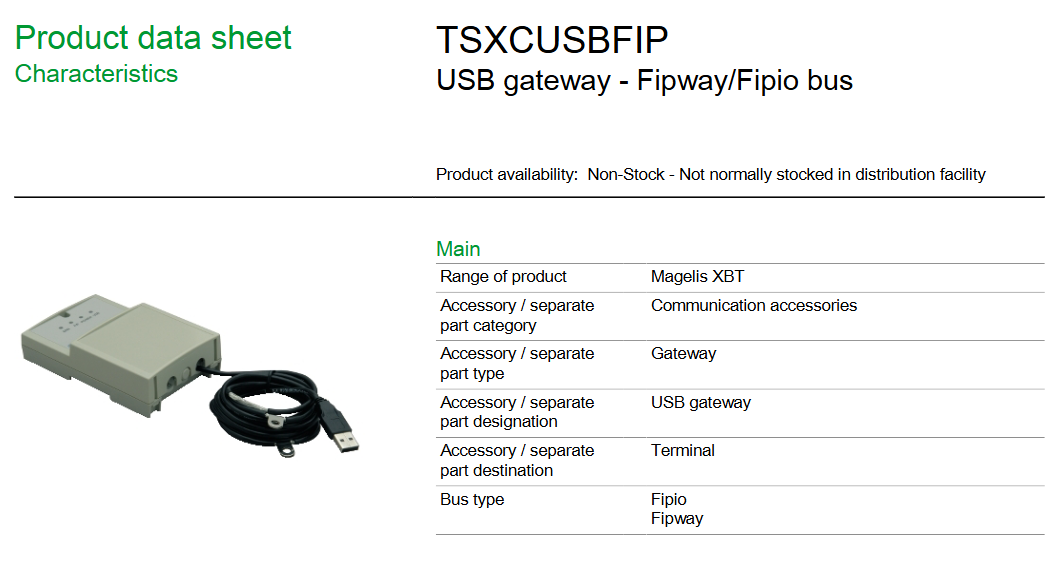
Product series: Magelis XBT series, belongs to communication accessories, specifically USB gateway, mainly used for terminal devices, supports Fipio and Fipway bus types, can realize communication connection between USB interface of related devices and Fipway/Fipio bus.
Inventory status: Non Stock, usually not regularly stocked in distribution facilities. When purchasing, attention should be paid to the supply cycle.
(2) Key performance parameters
Transmission rate: 12 messages/second (12 messages/s), which specifies the efficiency of data transmission between the bus and USB interface, suitable for industrial control scenarios with moderate communication speed requirements.
Product compatibility: It is compatible with XBTGK, XBTGT, and XBTGTW terminal devices under the Magelis XBT series, ensuring stable communication functionality in specific device combinations. When selecting, it is necessary to match the corresponding compatible models.
Ordering and Logistics Details
Category specific information
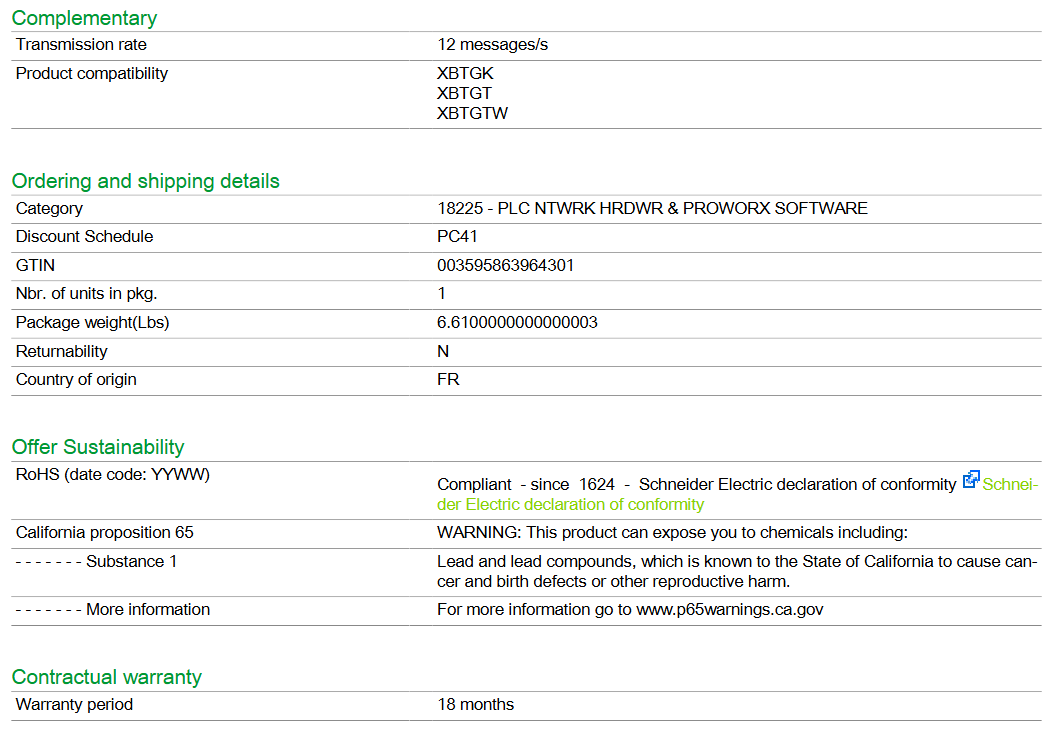
Product Classification Code 18225- PLC Network Hardware and PROWORX Software (18225- PLC NTWRK HRDWR&PROWORX SOFT)
Discount Plan PC41, which allows for corresponding discount policies during procurement
Global Trade Item Code (GTIN) 003595863964301, used for product identification and global trade circulation management
Number of packaging units: 1 unit per package (Nbr. of units in pkg.: 1), specifying the quantity of products per package
The packaging weight is 6.61 pounds (approximately 3.0 kilograms), which facilitates weight calculation and packaging planning in the logistics transportation process
Returnability: N, usually cannot be returned after purchase, and careful confirmation of purchasing needs is necessary
The country of origin, France (FR), reflects the production source of the product and may affect procurement related factors such as tariffs and delivery cycles
Installation precautions
First, the importance of industrial equipment installation
In modern industrial production, various equipment and machines are widely used in various fields, such as manufacturing, energy industry, chemical industry and so on. The installation of industrial equipment is directly related to production efficiency and product quality. Proper installation and commissioning of good equipment can ensure the stable operation of the production line, improve production efficiency and product quality, reduce maintenance costs, and ensure the safety of employees.
Second, the steps of industrial equipment installation
1. Preparation: Before the installation of industrial equipment, it is necessary to carry out adequate preparation work. This includes the tools and equipment required for installation, cleaning and preparation of the installation site, and making installation plans and schedules.
2. Determine the installation position: Determine the installation position of the equipment according to the requirements of the equipment and the layout of the production line. When determining the location, the weight and size of the equipment need to be considered, as well as the coordination of the equipment with the surrounding environment.
3. Install the device: Assemble and install the device according to the installation instructions. Ensure that the device is securely and accurately connected, while protecting the appearance and internal components of the device.
4. Connect power supplies and pipelines: For devices that require power supplies and power supplies, properly connect power supplies and pipelines. The connection of power supply and pipeline should comply with safety standards to avoid hazards such as electric shock and leakage.
5. Commissioning the device: After the installation is complete, you need to commission the device to ensure that the device can run properly. It includes checking the functions and performance of the equipment, adjusting the parameters and Settings of the equipment, and carrying out the necessary tests and inspections.
6. Training operators: After the installation of the equipment, it is necessary to train the operators to understand the operation methods and precautions of the equipment, and improve the operation skills and safety awareness of the employees.
Third, industrial equipment installation precautions
1. Safety first: When installing industrial equipment, safety is the most important consideration. You must operate in strict accordance with safety regulations and wear necessary protective equipment to ensure the safety of the workplace.
2. Strictly follow the equipment instructions: Industrial equipment usually comes with detailed installation instructions, you must carefully read and understand the contents of the instructions, and install the operation in accordance with the requirements of the instructions.
3. Pay attention to the assembly sequence: When installing the device, follow the correct assembly sequence to ensure that all components of the device are assembled correctly to avoid equipment failures or safety accidents caused by incorrect assembly sequence.
Applicable Industries
petroleum
Natural gas
chemical industry
cement
metallurgy
ship
mining industry
aviation
transport
Alcoa
machinery
manufacturing
car
- OMRON
- ABB
- General Electric
- EMERSON
- Honeywell
- HIMA
- ALSTOM
- Rolls-Royce
- MOTOROLA
- Rockwell
- Siemens
- Woodward
- YOKOGAWA
- FOXBORO
- KOLLMORGEN
- MOOG
- KB
- YAMAHA
- BENDER
- TEKTRONIX
- Westinghouse
- AMAT
- AB
- XYCOM
- Yaskawa
- B&R
- Schneider
- KONGSBERG
- NI
- WATLOW
- ProSoft
- SEW
- ADVANCED
- Reliance
- TRICONEX
- METSO
- MAN
- Advantest
- STUDER
- DANAHER MOTION
- Bently
- Galil
- EATON
- MOLEX
- DEIF
- B&W
- ZYGO
- Aerotech
- DANFOSS
- Beijer
- Moxa
- Rexroth
- Johnson
- WAGO
- TOSHIBA
- BMCM
- SMC
- HITACHI
- HIRSCHMANN
- Application field
- XP POWER
- CTI
- TRICON
- STOBER
- Thinklogical
- Horner Automation
- Meggitt
- Fanuc
- Baldor
- SHINKAWA
- Other Brands
- UniOP
- KUKA
- Iba
- Beckhoff
- ADLINK
-
 Bonfiglioli ISMET LCVT050 DK308/50 Line Reactor
 -
 Bonfiglioli C 22 2 F GR063 Gearbox
 -
 Bonfiglioli C31 3 P P63 PV V5 Reducer
 -
 Bonfiglioli CM-485 T Communication Module
 -
 Bonfiglioli W75UF1D30P90B5 Gearbox
 -
 Bonfiglioli BN63 B4 VF49 Gearmotor 0.18kW
 -
 Bonfiglioli ACT 400-004 FA Frequency Inverter
 -
 Bonfiglioli W110U100P90B5B3 Worm Gearbox
 -
 Bonfiglioli SYN10 T 400 05 AF Inverter
 -
 Bonfiglioli MP080.1.4.15.16.40.80.100 Gearbox
 -
Bonfiglioli SYN10S Inverter
-
 Bonfiglioli VF44L2P160 Gearmotor
 -
Bonfiglioli W 86 U 40 P90 B5 B3 Gear Reducer
-
 Bonfiglioli BTD5-1870-05-400 Servomotor
 -
 Bonfiglioli MP 080 2 2C Gearbox with BLDC Motor
 -
 Bonfiglioli MP080.1.10 Planetary Gearbox
 -
 Bonfiglioli C212PHS Reducer
 -
 Bonfiglioli MVF 49F1 Gearbox with ICME T71B4
 -
 Bonfiglioli VF 49 v P71 B5 Gearbox
 -
Bonfiglioli VF 44 P1 Gearmotor
-
 Bonfiglioli C 22 2 NP 6.1 Helical Gearbox
 -
Bonfiglioli F203 316.9 Gearbox with Kaiser Motor
-
 Bonfiglioli SYN10 S 220 07 AF Frequency Inverter
 -
Bonfiglioli 301L251.8-HC-P90 Gearbox 1/51.8
-
 Bonfiglioli ACT401-25A Frequency Inverter
 -
 Bonfiglioli W75 U D30 30 P90B14 B3 Worm Drive
 -
 Bonfiglioli 830G2310M-307638 Motor
 -
 Bonfiglioli C112-P-P90 Inline Gearbox i=6.2
 -
Bonfiglioli SYN10-S-220-03-AF AC Drive
-
 Bonfiglioli VFR49 A HS Worm Drive i=180 B3
 -
Bonfiglioli ACT 401-29 A AC VFD Drive 22kW
-
 Bonfiglioli VF49PIP63B14 Gearbox
 -
 Bonfiglioli ANG 410-18 2 FA Inverter
 -
 Bonfiglioli GVX2000-7.5-T Converter
 -
 Bonfiglioli EM-ENC-02-24 Optical Module
 -
 Bonfiglioli ACT 401-33 A VFD Drive
 -
 Bonfiglioli MVF 49F1 Gearbox with ICME T71B4
 -
 Bonfiglioli BN112M4 Motor
 -
Bonfiglioli MP080.1.7 Planetary Gearbox
-
 Bonfiglioli VF-EP 49 BN-71-B2 Gearmotor
 -
 Bonfiglioli W75UD3010P80B14B3 Gear Reducer
 -
Bonfiglioli W 110 U 100 P80 B5 B3 Worm Gearbox
-
Bonfiglioli ACT 201-11 FA Frequency Inverter 1.5kW
-
Bonfiglioli MP080380STDISS5 Planetary Gearbox
-
 Bonfiglioli ACU 210-05 1 FA Frequency Inverter
 -
 Bonfiglioli BN63B4 Electric Motor 265 460V
 -
Bonfiglioli BN 63 C 2 Electric Motor
-
Bonfiglioli 12.502.410 BCLP 40XDSM Assembly
-
Bonfiglioli ACU401-13FA Frequency Inverter
-
Bonfiglioli MP 130.2.20.15.16.40.80.100 Gearbox
-
Bonfiglioli VF49N60HSB3 Gearbox
-
 Bonfiglioli VF30P Gearbox
 -
Bonfiglioli ACU410-31A5 Inverter
-
 Bonfiglioli 301L251.8 Gearbox
 -
Bonfiglioli 8XNC63040004 Electric Motor
-
Bonfiglioli VF30F115P63B14B3 Gearbox
-
 Bonfiglioli RAN 28/DA HS Right Angle Gear Unit
 -
 Bonfiglioli 300L220.1PCP90E Gear Unit
 -
Bonfiglioli BN90LA4 Motor
-
Bonfiglioli KG2001030 Gear Unit
-
 Bonfiglioli VF44F135P71B14B3 with VF30 Combination
 -
Bonfiglioli W63 U P90B5 B3 Gear Motor 10:1
-
Bonfiglioli W75 U D30 15 P90 B5 B3 Gearbox
-
 Bonfiglioli B310 DC Motor 600W 3000rpm
 -
Bonfiglioli W 110 U 100 P80 B5 B3 Gearbox
-
 Bonfiglioli VF44P120P71B5B3 Worm Gearbox
 -
 Bonfiglioli BN 71 B 2 Gearmotor VF44 F1 P71B14
 -
 Bonfiglioli 2E130136140005 Assembly Reference
 -
Bonfiglioli KE0702030 Gearbox
-
Bonfiglioli ACT400-004A Frequency Inverter
-
 Bonfiglioli W110 UFC1 P100 B14 B6 Gearbox
 -
 Bonfiglioli Vectron ZBA400-010FC Inverter
 -
 Bonfiglioli 700C-1H Final Drive Motor
 -
Bonfiglioli VF 86 P Gearbox
-
Bonfiglioli W63 U 15 Gearbox
-
 Bonfiglioli VF/W30/63U450P63B14B3 Gearbox
 -
 Bonfiglioli BN 63 A 2 Gear Motor
 -
Bonfiglioli BN 63B 4 Motor
-
 Bonfiglioli VF44P17 Gearmotor
 -
Bonfiglioli T56BN/4 Asynchronous Motor
-
Bonfiglioli W63UF1P90B5 Worm Gearbox
-
Bonfiglioli ACU401-13FA Frequency Inverter
-
Bonfiglioli W63UFC1P90B5 Worm Gearbox
-
Bonfiglioli W75 1/50 D30 Speed Reducer
-
 Bonfiglioli KG2401180 Non Standard Gearbox
 -
Bonfiglioli ACU 201 07 FA Frequency Inverter
-
 Bonfiglioli RAN25SA1HSB3 Gear Unit
 -
Bonfiglioli SPL400 17F Industrial Drive 3.7kW
-
Bonfiglioli VF63P124P71B14B3 Worm Gearbox
-
Bonfiglioli W63U64P71B5B3 Worm Gearbox
-
Bonfiglioli BN90LA4FD Motor
-
Bonfiglioli ANG 410-33 6A Inverter
-
 Bonfiglioli CM-CAN 149-650-034 179-675 140 Communication Module
 -
Bonfiglioli WR110U120P90B5B3 Gearbox
-
Bonfiglioli C 112 F S05 Gearmotor with Pump
-
 Bonfiglioli C50 2P P100 Gear Reducer
 -
 Bonfiglioli ACT 401-31A Inverter 30kW
 -
 Bonfiglioli A102UH25S1PV Gearmotor
 -
Bonfiglioli ACT 201-05 FA Inverter
-
Bonfiglioli AGL402-21 3FA Inverter
-
Bonfiglioli VF49 V 71B14 Gearbox with ESA 6S 12 Motor
-
Bonfiglioli GVX2002-22-T Inverter 22kW
-
Bonfiglioli BN63A2 Electric Motor
-
Bonfiglioli EM I/O-03 I/O Module
-
Bonfiglioli C112 U P63 Inline Gearbox
-
Bonfiglioli BRA 400-075 BF2 Brake Chopper
-
Bonfiglioli VF49 P1 HSRB Worm Gearbox
-
Bonfiglioli GVX2000-18.5-T Inverter
-
Bonfiglioli BMD 118 14 3000 400 165 24 K 67 TC1 Drive
-
Bonfiglioli WR 86 U 120 P80 B5 V5 Gearbox
-
 Bonfiglioli W110U56P100B5B3 Gear Reducer
 -
Bonfiglioli A202 UR 35.4 Bevel Gearbox
-
Bonfiglioli ACU 401-26A Inverter
-
 Bonfiglioli BN 71 B 4 Motor
 -
 Bonfiglioli Vectron BTD5-1870-05-400 Servo Motor
 -
Bonfiglioli BE 80B 4 Motor with C122PP80 Gear
-
Bonfiglioli TR160225STD130ACD Gear Unit
-
Bonfiglioli W 63 U 24 P71 Gearbox
-
Bonfiglioli Trasmital KYB MHKAYABAKTMAGA050VP34 Hydraulic Track Drive
-
Bonfiglioli EM-ABS-01 Encoder Module
-
Bonfiglioli RPS Log 100 Data Logging Module
-
Bonfiglioli VF49P1P71B14 Gearbox
-
Bonfiglioli W86U Right Angle Gear Reducer
-
Bonfiglioli W63 U P71B5 Gear Reducer
-
Bonfiglioli W63UP90B5 Gearmotor
-
 Bonfiglioli VER/S 400-150 Inverter
 -
Bonfiglioli F202 H30 P80 Gearbox
-
Bonfiglioli W75UD307P90B14 Gearbox


