
How to install the Rockwell Automation 1757-SRM (B-series) module?
How to install the Rockwell Automation 1757-SRM (B-series) module?
Basic Information
The installation instructions for the redundant modules of the Rockwell Automation 1757-SRM series B-type ProcessLogix and ControlLogix systems are designed to guide users in installing the redundant module into the ProcessLogix or ControlLogix redundant chassis, covering the entire process of installation preparation, operation steps, fault handling, technical specifications, and more.
Important User Information and Security Standards
(1) Definition of Core Security Warning
The document specifies the meanings of different security signs to avoid operational risks, as follows:
Meaning of identification
Warning: Operating scenarios in hazardous environments that may cause explosions, resulting in personal injury, property damage, or economic loss
IMPORTANT annotation is crucial for the successful application and understanding of product information
Attention: Identify operational methods that may result in personal injury, property damage, or economic loss, and explain how to identify and avoid hazards and consequences
Labels on or inside SHOCK HAZARD equipment (such as drivers, motors) warning of hazardous voltage
Labels on or inside BURN HAZARD equipment (such as drives, motors) warning that the surface may reach dangerous temperatures
(2) Special environmental usage requirements
North American Hazardous Area Certification: Products marked as "CL I, DIV 2, GP A, B, C, D" are only applicable to Class I, Division 2, Groups A, B, C, D hazardous areas and non hazardous areas; When the system is used in combination, the overall temperature level must be determined by the temperature code with the lowest "T" number, and the equipment combination must be inspected by the local competent department.
European Hazardous Place Certification: Products marked with EEx comply with EU Directive 94/9/EC, are suitable for potentially explosive environments, must be installed in enclosures that meet at least IP54 protection level (Class I, Zone 2 environment), and can only be used in conjunction with ATEX certified backplates; At the same time, the device is not resistant to sunlight and other ultraviolet radiation, and transient interference should be prevented from exceeding the rated voltage by more than 40% in Class I Zone 2 environment.
General environmental requirements: Suitable for industrial environments with pollution level 2, overvoltage category II applications (compliant with IEC 60664-1), with no need for derating at altitudes up to 2000 meters (6561 feet); Belonging to Group A industrial equipment under the IEC/CISPR 11 standard, if appropriate protective measures are not taken, conducted and radiated interference may affect electromagnetic compatibility; The device is of an open design and needs to be installed in an enclosure that meets specific environmental requirements. The enclosure must have flame retardancy (non-metallic enclosures must reach 5VA, V2, V1, V0 or equivalent flame retardant levels), and the interior must be accessible with tools.
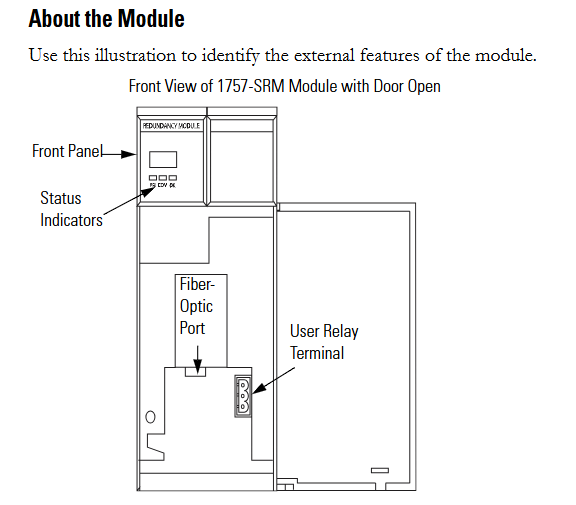
Module basic information and installation preparation
(1) Module core functions and appearance
Functional positioning: The 1757-SRM (B series) module is used for redundant control of ProcessLogix and ControlLogix systems, achieving communication and status synchronization between the primary and backup chassis through fiber optic connections, ensuring smooth switching in case of system failures.
Appearance structure: The front includes status indicator lights, fiber optic ports, and user relay terminals. These components are required to achieve module status monitoring, fiber optic connections, and external device control (such as relay linkage).
(2) Preparation before installation
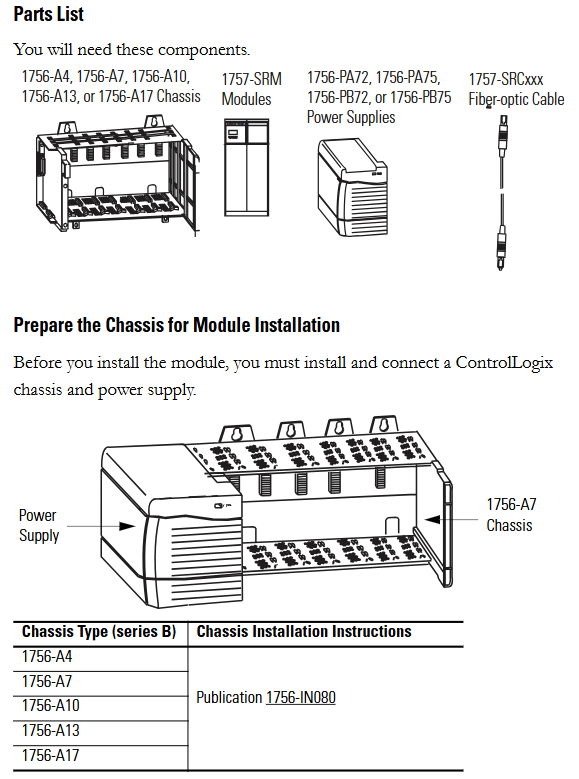
Component List: Prepare 1756-A4/A7/A10/A13/A17 series chassis, 1757-SRM module, 1756-PA72/PA75/PB72/PB75 series power supply, and 1757-SRCxxx series fiber optic cable.
Static electricity protection: The module is sensitive to static electricity. Before operation, it is necessary to touch a grounded object to release static electricity and wear a certified grounding wristband to avoid touching the connectors/pins and internal circuit components of the component board. When idle, it should be stored in anti-static packaging and an anti-static workstation should be used when conditions permit.
Chassis and power pre-processing: The ControlLogix chassis and power supply need to be installed and connected first. Different models of chassis (such as 1756-A4/A7, etc.) and power supplies (such as 1756-PA72/C, 1756-PB72/B, etc.) should refer to the corresponding installation instructions (such as 1756-IN080, 1756-IN078, etc.).
Module slot selection: The recommended slot positions for different models of chassis are different. For example, slot 1 or 2 is recommended for the 1756-A4 chassis, and slot 4 or 5 is recommended for the 1756-A7 chassis. It is necessary to strictly install according to the recommended positions to ensure normal communication and redundancy functions.
Redundant system assembly steps
(1) Core installation process
Fiber optic cable connection: Before installing the module, connect one end of the 1757-SRCxxx series fiber optic cable (available in 1m, 3m, 10m, 50m, 100m specifications) to the fiber optic port of the module; If the distance between the main and backup chassis exceeds 100 meters, customized fiber optic cables must be used. The optical loss at a wavelength of 1300nm should be ≤ 7dB, and the length should be ≤ 4 kilometers (2.49 miles). 62.5/125 micron multimode fiber optic cables and professionally installed SC connectors should be used.
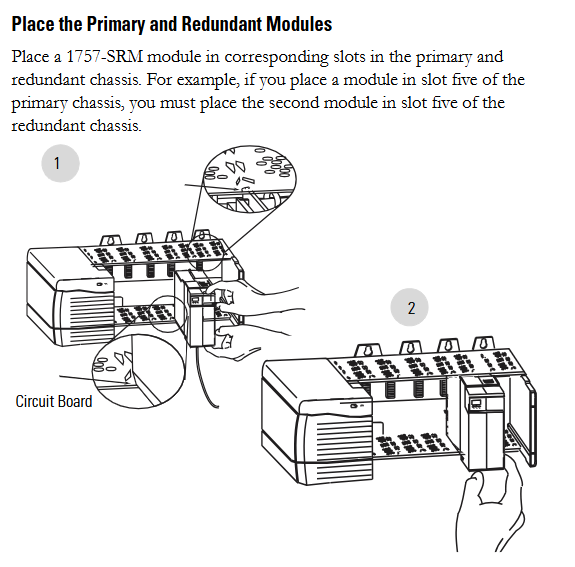
Module installation: Install the 1757-SRM module into the corresponding slots on the main and backup chassis (if the main chassis is plugged into slot 5, the backup chassis also needs to be plugged into slot 5); During installation, align the upper and lower rails of the chassis, slide the module in and ensure that the backplane connector is properly connected. When the module is aligned with other installed modules, it indicates that it is installed in place; When disassembling, press the locking clips on the upper right and lower left corners of the module, and then slide the module out.
Relay terminal wiring: If using a user relay, the wire needs to be threaded through the Steward 28A2029-0A0 model ferrite core (the core should be as close as possible to the end of the wire insulation layer), then connected to a detachable terminal block, and finally inserted into the relay terminal; The relay terminals must obtain external DC power from the same line as the SRM chassis power supply and comply with UL Class 2 (North America) or CE SELV/PELV (Europe) standards.
(2) Key operations of system configuration
Firmware upgrade: Data backup is required before upgrading (upgrading will overwrite old data), from the Rockwell Automation support website( http://support.rockwellautomation.com )Download the latest firmware and ControlFLASH firmware upgrade tool; Only supply power to one redundant chassis, wait for the module to display "FACT BOOT FLSH UPDT REQ", start the upgrade tool to complete firmware installation, and after success, the module displays "PRIM"; Repeat the operation to upgrade another chassis module. If the upgrade is interrupted, the module will display "FACT BOOT FLSH UPDT REQ" or "USER BOOT FLSH UPDT REQ" after restarting the chassis, and a new upgrade is required.
Main chassis specification and system verification:
Main chassis designation: The chassis that is powered on first automatically becomes the main chassis, the module displays "PRIM" and the PRI indicator light turns green, and the normally open contacts of the relay are closed; If both chassis are powered on simultaneously, the chassis containing the module with the smaller serial number becomes the main chassis; The initial display of the backup chassis is "DISQ" or "SYNC", the PRI indicator light is not on, and the normally open contact of the relay is disconnected.
System verification: After the main and backup chassis are powered on, automatic verification begins to verify the hardware and firmware compatibility of the main and backup modules. If the backup chassis displays "SYNC", it indicates compatibility between configuration and firmware; If "DISQ" is displayed, it may be due to mismatched chassis configuration, inconsistent firmware versions, different Keeper parameters of ControlNet module, or MAC address not set to the same node address. The problem needs to be investigated and resolved.

Module status monitoring and fault handling
(1) Status indicator lights and display interpretation
Module status display (four characters):
When starting, displaying "Txxx" (xxx is the hexadecimal test number) indicates self-test;
"Indicates a transitional state;
DISQ "indicates that the backup chassis has not passed validation," SYNC "indicates that the backup chassis has passed validation, and" PRIM "indicates the main chassis;
BOOT, ERAS, and PROG respectively represent boot mode (waiting for instructions), boot mode (erasing firmware), and boot mode (loading new firmware);
'Exxx' (xxx is an error/fault code) indicates a major malfunction and will alternately display fault information and error codes.
Health status indicator light:
Extinguished: The module is not powered on;
Always red: module self checks during startup or serious malfunction occurs;
Flashing red: The module is updating NVS, experiencing non critical faults, or configuring incorrectly;
Evergreen: The module is running normally;
Flashing green: The module is running normally but not communicating with other modules.
Inter module communication indicator light:
Extinguish: The module is not powered on or has no communication activity;
Red flash (<1 second): The module has been started and partner communication has been established;
Frequent red: serious communication failure occurs;
Green flash: There is communication activity (sampled every 250 milliseconds).
Chassis status indicator light:
Extinguish: The module is not powered on or the chassis is in standby/fault state;
Green flash (<1 second): Power on, partner module is determining the main state;
Evergreen: The chassis is in the main engine state.

(2) Fault type and handling
Fault classification:
Minor recoverable faults: do not affect redundant operations, modules may clear on their own;
Minor unrecoverable fault: does not affect redundant operations, but has no recovery mechanism;
Serious recoverable faults: affecting redundant operations (possibly not immediate), such as backup module failures that may affect control in the event of a host failure;
Serious unrecoverable fault: fatal fault, redundant operation stopped, possible switching, module replacement required.
Common faults and solutions:
|Fault code/display | Fault description | Handling measures|
|CFG LOG ERR | Configuration log error | No action required|
|COMM RSRC ERR | Communication resource error | Reset 1757-SRM module|
|COMM ERR PRT2 | Port 2 communication error (inter module link) | Check or replace 1757-SRCxxx fiber optic cable|
|FLSH UPDT REQ | Flash update required | Use corresponding firmware version to upgrade module|
|HDW ERR | Hardware Failure | Replace 1757-SRM Module|
|WDOG FAIL | Watchdog task status check failed | Replace 1757-SRM module|
Recovery instruction: The module displays "RPLC MOD" and needs to be replaced, "RSET MOD" needs to be reset, "REMV MOD" needs to be removed, and "SEAT MOD" needs to be reinserted.
Technical specifications
(1) Module core parameters
Category parameter values
Backplane current 3.3V DC 0.75A
5.1V dc 1.0A
24V dc 0.160A
Dimensions (height x width x depth) Standard ControlLogix chassis (2 slots wide) 14.5 x 7 x 14 centimeters (5.71 x 2.76 x 5.51 inches)
Weight - Approximately 0.452 kilograms (14.53 ounces)
Shell Protection Level - None (Open)
Temperature code IEC T4
North American T4A
Maximum power consumption -11.28W
Maximum heat dissipation -38.49 BTU/hour
Isolation voltage relay terminal to system for a continuous 30V, basic insulation type (853V AC test for 60 seconds)
(2) Redundant cable parameters
Parameter values
Connector SC type (fiber optic)
Cable type 62.5/125 micron multimode fiber
1 channel (sending and receiving fiber optic)
Wavelength 1300nm
(3) User relay terminal parameters
Parameter values
Power requirement: 11-30V DC; Typical current of 270mA at 24V DC (must comply with UL Class 2 or CE SELV/PELV standards)
Guiding load rated 30V DC Class 2/SELV, 100mA
Wiring category (Port 1) 3
Suitable for solid or stranded shielded copper wires of 0.3-2.1 square millimeters (22-14 AWG), rated temperature ≥ 75 ℃ (167 ℉), with a maximum insulation layer of 1.2 millimeters (3/64 inches)
Terminal block torque 0.6-0.8 Nm (5-7 pounds inches)
(4) Environmental specifications
Parameter values
Working temperature 0-60 ℃ (32-140 ℉) (compliant with IEC 60068-2-1, 60068-2-2, 60068-2-14 standards)
Storage temperature -40-85 ℃ (-40-185 ℉) (compliant with IEC 60068-2-1, 60068-2-2, 60068-2-14 standards)
Relative humidity 5% -95% (non condensing) (in accordance with IEC 60068-2-30 standard)
Vibration (working) 2g @ 10-500Hz (compliant with IEC 60068-2-6 standard)
50g impact (non working) (compliant with IEC 60068-2-27 standard)
Impact (working) 30g (compliant with IEC 60068-2-27 standard)
Radiation emission complies with CISPR 11:1 Group A
Electrostatic immunity: 6kV for contact discharge and 8kV for air discharge (in accordance with IEC 61000-4-2 standard)
(5) Certification qualifications
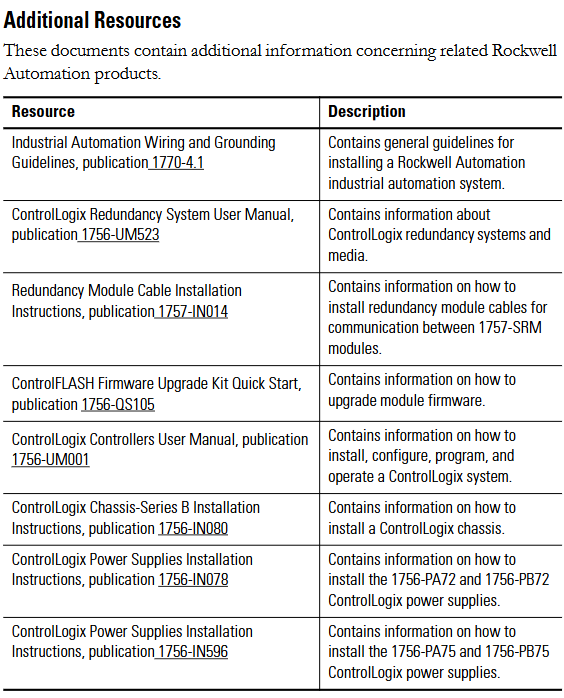
The module is approved by UL (Industrial Control Equipment, document E65584) and CSA (Process Control Equipment, document LR54689C); Multiple certifications such as LR69960C, FM, CE (compliant with the 2004/108/EC EMC Directive), C-Tick (compliant with the Australian Radio Communications Act), EEx (compliant with the 94/9/EC ATEX Directive), T Ü V (functional safety certification, up to SIL 2), etc. are applicable to compliance requirements in different regions and scenarios.
- OMRON
- ABB
- General Electric
- EMERSON
- Honeywell
- HIMA
- ALSTOM
- Rolls-Royce
- MOTOROLA
- Rockwell
- Siemens
- Woodward
- YOKOGAWA
- FOXBORO
- KOLLMORGEN
- MOOG
- KB
- YAMAHA
- BENDER
- TEKTRONIX
- Westinghouse
- AMAT
- AB
- XYCOM
- Yaskawa
- B&R
- Schneider
- KONGSBERG
- NI
- WATLOW
- ProSoft
- SEW
- ADVANCED
- Reliance
- TRICONEX
- METSO
- MAN
- Advantest
- STUDER
- DANAHER MOTION
- Bently
- Galil
- EATON
- MOLEX
- DEIF
- B&W
- ZYGO
- Aerotech
- DANFOSS
- Beijer
- Moxa
- Rexroth
- Johnson
- WAGO
- TOSHIBA
- BMCM
- SMC
- HITACHI
- HIRSCHMANN
- Application field
- XP POWER
- CTI
- TRICON
- STOBER
- Thinklogical
- Horner Automation
- Meggitt
- Fanuc
- Baldor
- SHINKAWA
- Other Brands
- UniOP
- KUKA
- Iba
- Beckhoff
- ADLINK
-
 SIGMATEK ICA111 Module
 -
 SIGMATEK MDD 121-1 Drive Axis Module
 -
 SIGMATEK M5V121 12-300-121 Krauss Maffei M5 Display Unit
 -
SIGMATEK CTMS 020 CD Technology Module 12-250-011
-
 SIGMATEK PCT122 Touch Panel
 -
 Stöger MCS4100 SIGMATEK Control Module
 -
 SIGMATEK Krauss Maffei M5 Keyboard Unit M5K902 12-310-902
 -
 SIGMATEK SD310-2 Servo Drive Module
 -
 SIGMATEK CM5V020 CD Wiring Circuit Module
 -
SIGMATEK ENGEL Robot Drive M3 02220-8748
-
 Sigmatek CFF011 Drive Module
 -
 Sigmatek DCP642 DIAS Central Unit
 -
 Sigmatek SDM081 S-DIAS Safety Module
 -
 Sigmatek C-IPC 01-450-024 Industrial PC
 -
Sigmatek Kompakt NC4 Control Module
-
 Sigmatek VI021 VARAN Interface Module
 -
 Sigmatek Engel RD-M6-2 Robot Drive
 -
Sigmatek CNC031 Positioning Module
-
Sigmatek TO161 Digital Output Module
-
Sigmatek CCL912 CPU PSU Module
-
Sigmatek ETV0821 Operator Terminal
-
 SIGMATEK ET 261 Operator Terminal
 -
 SIGMATEK CP731-K Control Module 20-004-731-K
 -
 SIGMATEK ETEK Motherboard 12-250-021-K CM5V020
 -
 Sigmatek DEZ 181 DIAS Input Output Module
 -
 Sigmatek IPC111-D Industrial PC
 -
 SIGMATEK AKM54L-ANC2GBB0 Servomotor with Gearhead
 -
SIGMATEK CTMS020 CM5V020 CNC Controller
-
 DEMAG ERGOTECH 061 381 66 Sigmatek Control Unit
 -
 Sigmatek DAI 883 Module
 -
 Sigmatek ETV1521 Control Panel Installation Terminal
 -
 Sigmatek 9802.289.01 Board Control TA71 Display
 -
 Wittmann Sigmatek EU-252 proDrive W4 Servo Drive
 -
 Sigmatek CDM166 C-DIAS Module
 -
Sigmatek DCP082 DIAS Central Unit
-
 Sigmatek CCP081 C-DIAS Processor Module
 -
Sigmatek MD111-1 Drive Module
-
Sigmatek ETV0821 Operator Terminal
-
 Sigmatek ISE021 Interface Module
 -
 Sigmatek DCC080L Slide Control Module
 -
 Sigmatek AI075 Analog Input Module
 -
SIGMATEK TO161 20-007-161 Module
-
 SIGMATEK CIC011 Module
 -
 SIGMATEK AE0000318502 Hand Terminal Pendant
 -
 Sigmatek Krauss Maffei PC323-K Control Unit
 -
Sigmatek Krauss Maffei PC321-K Control Cabinet PC
-
SIGMATEK CIV521 Control Module
-
SIGMATEK C-IPC-171 Industrial PC
-
 SIGMATEK MDP101-L DIAS Drive Network Module
 -
 Sigmatek Krauss Maffei PC323-K Control Cabinet PC
 -
 SIGMATEK CRCH081 C-SLIDES Temperature Module
 -
 Sigmatek PC301-E6 Industrial PC SSD
 -
 Sigmatek SDI101 S-SLIDES Safety Input Module
 -
 Sigmatek CIV521 VARAN Control Module
 -
 Kollmorgen Sigmatek AKM42G-ANCNGBB0 Servo Motor
 -
 Sigmatek PC 521 Process Controller
 -
 Sigmatek Geode LX800 12-780-012 Industrial PC
 -
 Sigmatek STO081 S-DIAS Safety Output Module
 -
 Sigmatek SCP111 S-DIAS Safety CPU Module
 -
 Sigmatek CDI161 Industrial I O Module
 -
Sigmatek Wiring Board V2 DIAS 05-250-023
-
Sigmatek CP102 20-004-102 S-DIAS CPU Module
-
SIGMATEK SLIDES CNC 115 Module
-
 SIGMATEK DCC080 05-700-080-2 Control Module
 -
SIGMATEK MDD 121 Drive Axis Module
-
 SIGMATEK CIO011 C-DIAS Multi I/O Module
 -
SIGMATEK CIV512 Servo Drive
-
 SIGMATEK CM5V020 12-250-021-K Wiring Module
 -
 SIGMATEK CIO011 12-013-011 Multi I/O Module
 -
SIGMATEK 01-450-031 C-IPC Industrial Computer
-
SIGMATEK AKM24D-ANBNGBB0 Servo Motor
-
 DEMAG NC4 LP0001289.03 Control Module
 -
 Sigmatek ETEK Industrial PC C-IPC with Option Module
 -
Sigmatek AO081 20-010-081 Analog Output Module
-
Sigmatek CNC 031 Positioning Module
-
Sigmatek CP731-K 20-004-731-K CPU Module
-
Sigmatek MDD 3320-JR-A Drive Module
-
Sigmatek PM Servo Motor AKM52K-ANC2GBB0
-
Sigmatek MDP 101 09-403-101 Power Module
-
Sigmatek S-SLIDES AO046 Analog Output Module
-
Sigmatek ICA111 20-102-111 Interface Module
-
 SIGMATEK DCP646 Module 05-004-646
 -
SIGMATEK SDI101 Digital Input Module 20-891-101
-
 SIGMATEK S3330-2 Directional Gyro Altitude Instrument
 -
SIGMATEK MDP102-1 Controller
-
SIGMATEK SMT 01-230-321 Touch Screen
-
SIGMATEK Krauss Maffei PC301-K 01-310-301-K Industrial PC with 8GB SSD
-
 SIGMATEK ETT731 01-230-731 Built-in Touch Terminal
 -
SIGMATEK CIV521 Control Module
-
 SIGMATEK DME 128 Module 05-005-128
 -
 SIGMATEK SCP111-S 20-890-111-S S-DIAS Safety CPU Module
 -
Sigmatek SCP111 S-DIAS Safety CPU
-
Sigmatek CRIF081 Interface Module
-
Sigmatek CP112-1 S-DIAS CPU Module
-
Sigmatek MDD121-L DIAS Drive Axis Module
-
 Sigmatek C-IPC 01-450-024 Industrial PC
 -
Sigmatek SDD215-23 SLIDES Drive
-
 Sigmatek DPS001 DIAS System Components
 -
Sigma-Tek 4000B-30 Directional Gyro
-
 Sigmatek SDD340-46 SDD Series Drive
 -
 Sigmatek CEZ221 Euromap67 I O Module
 -
 SIGMATEK VI021 Interface Module
 -
SIGMATEK CP731-K Control Module
-
SIGMATEK Krauss Maffei PC321-K Industrial PC
-
SIGMATEK ET322 Operator Terminal
-
SIGMATEK CP102 Control Module 24VDC
-
SIGMATEK SRO021 Relay Output Module
-
SIGMATEK DCP640 DIAS Central Unit
-
 SIGMATEK MDD 121 Drive Axis Module
 -
SIGMATEK AI043 Analog Input Module
-
 ENOTEC OXITEC 5000 SME-53310000 Oxygen Analyzer
 -
SIGMATEK Krauss Maffei PC301-K 01-310-301-K Industrial PC
-
 SIGMATEK SDD310-23 VARAN Servo Drive
 -
 SIGMATEK CDM 163 and CIC 011 C-DIAS Input Modules
 -
SIGMATEK MDP 101-1 Power Module
-
SIGMATEK CM5V020 Wiring Circuit with CTMS020
-
SIGMATEK CCP521 C-DIAS Processor Module
-
 SIGMATEK MDP 101-K Power Module
 -
SIGMATEK ETEK C-IPC 733MHz VIA Eden 7000
-
 SIGMATEK DCP 643 DIAS PLC CPU Module
 -
SIGMATEK TAE121 12-200-121 Operator Terminal
-
Sigmatek TMS012-T Injection Moulding Technology Module
-
Sigmatek MDD 121-1 Controller
-
Sigmatek CDM167 Module
-
Sigmatek DCP082 DIAS Central Unit
-
 Sigmatek ETT731 Built-In Terminal Touch
 -
Sigmatek CCP521 C-DIAS Processor Module
-
Sigmatek Krauss Maffei PC301-K Control Cabinet PC


