
How to install GE IC695CRU320 redundant control unit?
Product Name: Redundant Control Unit, belonging to GE Fanuc RX3i series programmable logic controllers (PLCs). Its core function is to provide dual machine redundant backup for PLC systems, ensuring seamless switching of backup controllers in case of main controller failure and avoiding system shutdown.
Document source: Product specifications and application manual published by NEX Instrument, focusing on hardware parameters, redundant logic, installation configuration, and compatibility instructions.
How to install GE IC695CRU320 redundant control unit?
Product basic information
Product model: IC695CRU320
Product Name: Redundant Control Unit, belonging to GE Fanuc RX3i series programmable logic controllers (PLCs). Its core function is to provide dual machine redundant backup for PLC systems, ensuring seamless switching of backup controllers in case of main controller failure and avoiding system shutdown.
Document source: Product specifications and application manual published by NEX Instrument, focusing on hardware parameters, redundant logic, installation configuration, and compatibility instructions.
Core functions and redundancy principles
(1) Core functions
Dual machine redundant backup
Support two RX3i controllers (such as IC695CPU315/330, etc.) to form a primary and backup architecture, and achieve hardware level redundant control through IC695CPU320.
When the main controller is running normally, the backup controller synchronizes the program, data, and I/O status of the main controller in real time; When the main controller fails (such as power outage or hardware failure), the backup controller switches to the main control mode without disturbance, with a switching time of ≤ 100ms, to ensure continuous production process.
Status monitoring and diagnosis
Built in redundant status indicator lights (such as primary and backup status, synchronization status, fault alarm), visually display the operating status of the redundant system.
Support reading redundant system diagnostic information through RX3i programming software (such as Proficy Machine Edition), including switching reasons, synchronization anomalies, hardware failures, etc., for easy fault location and troubleshooting.
Flexible redundant configuration
Support the "Hot Standby" mode, where both the primary and backup controllers are powered on and running, and the backup devices are in a "ready" state instead of standby mode, improving switching speed.
Can be used with RX3i series I/O modules and communication modules, compatible with redundant I/O architectures (such as IC695RIO remote I/O modules), achieving full system redundancy coverage.
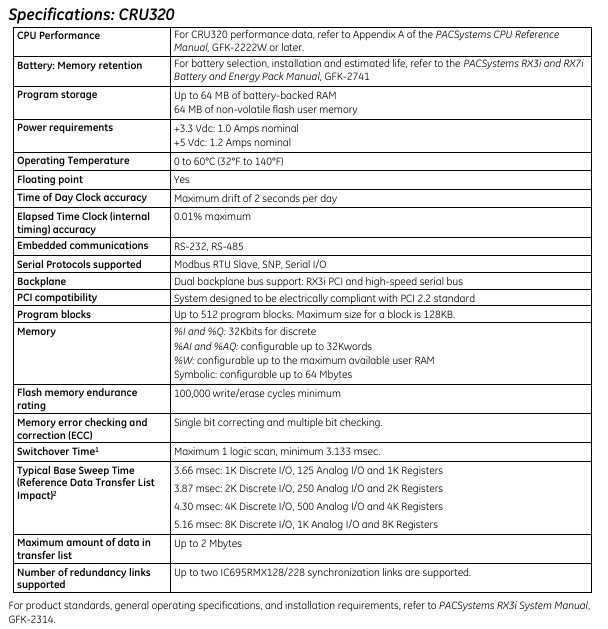
Technical specifications
(1) Hardware parameters
Specification category specific parameters
Power supply requirement input voltage:+5V DC (powered by the RX3i rack backplane, no external independent power supply required); Power consumption: ≤ 5W
Physical dimension width: 40mm (1.57 inches); Height: 100mm (3.94 inches); Depth: 160mm (6.30 inches), compatible with RX3i standard rack (such as IC695CHS012/024)
Working temperature: 0 ° C~60 ° C (operating state); -40 ° C~85 ° C (storage state)
Humidity range 5%~95% RH (non condensing, compliant with IEC 61131-2 environmental standards)
Protection level IP20 (panel installation, to be used in conjunction with control cabinet to prevent dust and liquid intrusion)
(2) Redundancy performance indicators
Performance category indicator requirements
Switching time between primary and backup: ≤ 100ms (from main controller fault detection to backup controller taking over control)
Real time data synchronization in synchronization mode (including program memory, data memory, I/O image area), with a synchronization rate of ≥ 100Mbps
Fault detection range: main controller power failure, CPU hardware failure, memory error, communication link interruption (synchronous link between main and backup)
Redundant links with built-in 2-channel high-speed synchronization interfaces (for data exchange between primary and backup controllers), supporting fiber optic or shielded twisted pair connections
Hardware composition and interfaces
(1) Hardware composition
IC695CRU320 is an independent module structure, with core components including:
Redundant control chip: responsible for determining the primary and backup status, synchronizing logic control, and triggering switching;
Synchronous communication interface: 2 RJ45 or optical ports (depending on configuration), used for data synchronization between the primary and backup controllers;
Status indicator panel: 4 LED indicator lights, meaning as follows:
RUN (green): The redundant unit is running normally;
MASTER (red): The currently connected controller is in main control mode;
STANDBY (yellow): The currently connected controller is in standby mode;
Fault (red): Redundant system failure (such as synchronization failure, module hardware error).
(2) Key interfaces
Interface Type Quantity Function Description
One rack backplane interface is inserted into the RX3i standard rack (such as IC695CHS012) and connected to the rack backplane bus to obtain power and exchange data
Two synchronous communication interfaces are connected to the main and backup controllers to achieve real-time data synchronization (supporting maximum transmission distance: 100m twisted pair cable, 2km fiber optic cable)
One reserved RS232 or Ethernet interface (some versions) for diagnostic equipment to read redundant logs
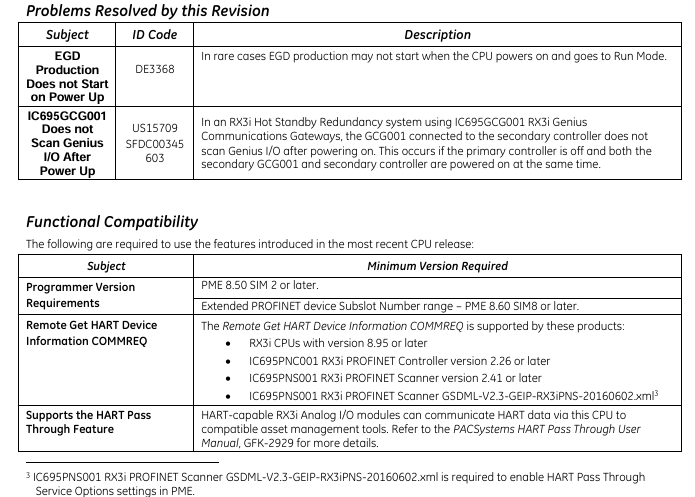
Installation and configuration requirements
(1) Installation conditions
Rack compatibility
Only compatible with RX3i series standard racks, such as IC695CHS012 (12 slots) and IC695CHS024 (24 slots), which need to be installed in the "redundant control unit dedicated slot" of the rack (usually slots 1-2 on the left side of the rack, refer to the rack manual for details).
Controller compatibility
The primary and backup controllers must be RX3i CPU modules of the same model, supporting models including IC695CPU315, IC695CPU330, IC695CPU340, and the CPU firmware version must be consistent (recommended V3.0 and above).
Environmental Requirements
The installation environment should be kept away from strong electromagnetic interference (such as frequency converters, high-power motors), and avoid sudden temperature changes or dusty/humid environments;
Reserve a heat dissipation space of ≥ 50mm around the module to ensure good heat dissipation (without forced air cooling, the ambient temperature does not exceed 55 ° C).
(2) Configuration steps
Hardware Installation
Insert IC695CRU320 into the dedicated slot of RX3i rack and tighten the panel screws;
Connect the synchronization interface between IC695CRU320 and the main and backup controllers using a synchronous cable (twisted pair or fiber optic);
Connect the power supply, I/O module, and communication module separately for the primary and backup controllers (ensuring consistent configuration of primary and backup I/O).
Software configuration (via Proficy Machine Edition)
Create a new RX3i redundancy project, select the "dual machine redundancy" architecture, specify the primary and backup CPU models and IC695CRU320 as redundant control units;
Configure synchronization parameters (such as synchronization rate, timeout) to enable the "automatic switching" function;
Download the program to the main controller, and the software will automatically trigger the synchronization of primary and backup data. After the synchronization is completed, the redundant system will enter the "normal operation" state.

Compatibility and selection suggestions
(1) List of compatible hardware
Example of compatible device types and models
RX3i Controller IC695CPU315 (Compact), IC695CPU330 (Standard), IC695CPU340 (High Performance)
RX3i rack IC695CHS012 (12 slots), IC695CHS024 (24 slots), IC695CHS008 (8 slots, small system)
Redundant I/O modules IC695RIO001 (remote I/O adapter), IC695RIO002 (redundant I/O interface module)
Communication modules IC695ETM001 (Ethernet module), IC695COM001 (RS485 module)
(2) Selection suggestions
Applicable scenarios
Industrial scenarios that require continuous operation, such as chemical production lines, power dispatch systems, water treatment equipment, etc., require a system availability requirement of ≥ 99.99%.
Selection precautions
The primary and backup controllers need to be completely consistent (model, firmware version, memory configuration) to avoid synchronization failure due to hardware differences;
If the system includes remote I/O, redundant I/O modules (such as IC695RIO002) should be used to ensure that the I/O layer also has redundancy capability;
It is recommended to use shielded twisted pair cables (short distance, ≤ 100m) or multimode optical fibers (long distance, ≤ 2km) for synchronous cables to reduce synchronization anomalies caused by interference.
Troubleshooting and Maintenance
(1) Common faults and solutions
Possible causes and solutions for the fault phenomenon
The redundant status light "FAULT" is always on. 1. The synchronization link between the primary and backup controllers is interrupted; 2. The firmware versions of the primary and backup CPUs are inconsistent; 3. CRU module hardware failure: 1. Check the synchronization cable connection and replace the faulty cable; 2. Upgrade the primary and backup CPUs to the same firmware version; 3. Replace the IC695CRU320 module
Primary/backup switching failure: 1. Backup controller data synchronization is not completed; 2. The switch enable is not turned on; 3. Inconsistent I/O configuration: 1. Wait for synchronization to complete (the synchronization light is always on to indicate completion); 2. Enable "automatic switching" in the software; 3. Verify the primary and backup I/O configurations to ensure consistency
The backup controller cannot synchronize. 1. Poor contact of the synchronization interface; 2. Memory error in the main controller; 3. CRU synchronization logic fault 1. Re plug and unplug the synchronization cable, clean the interface; 2. Restart the main controller and check the memory status; 3. Reset CRU module (via software or power off restart)
(2) Daily maintenance suggestions
Regularly (every 3 months) check the redundancy status indicator lights to confirm that the primary and backup are running normally and the synchronization link is normal;
Export redundant system diagnostic logs through Proficy Machine Edition every 6 months to analyze potential risks such as frequent synchronization failures and switching records;
Avoid plugging and unplugging CRU modules or synchronous cables while they are live to prevent hardware damage; When replacing modules, power off first to ensure that the primary and backup controllers are in a "stop" state.
- OMRON
- ABB
- General Electric
- EMERSON
- Honeywell
- HIMA
- ALSTOM
- Rolls-Royce
- MOTOROLA
- Rockwell
- Siemens
- Woodward
- YOKOGAWA
- FOXBORO
- KOLLMORGEN
- MOOG
- KB
- YAMAHA
- BENDER
- TEKTRONIX
- Westinghouse
- AMAT
- AB
- XYCOM
- Yaskawa
- B&R
- Schneider
- KONGSBERG
- NI
- WATLOW
- ProSoft
- SEW
- ADVANCED
- Reliance
- TRICONEX
- METSO
- MAN
- Advantest
- STUDER
- DANAHER MOTION
- Bently
- Galil
- EATON
- MOLEX
- DEIF
- B&W
- ZYGO
- Aerotech
- DANFOSS
- Beijer
- Moxa
- Rexroth
- Johnson
- WAGO
- TOSHIBA
- BMCM
- SMC
- HITACHI
- HIRSCHMANN
- Application field
- XP POWER
- CTI
- TRICON
- STOBER
- Thinklogical
- Horner Automation
- Meggitt
- Fanuc
- Baldor
- SHINKAWA
- Other Brands
- UniOP
- KUKA
- Iba
- Beckhoff
- ADLINK
-
 Sigmatek MDD111-1 DIAS Drive Axis Module
 -
 Sigmatek DKL042 05-024-042 Terminal Module
 -
 Sigmatek DM822 Control Module
 -
 Sigmatek CDM167 12-008-167-O Module
 -
 Sigmatek TAE151 Touch Display Unit
 -
 Sigmatek DCC041 SLIDES Module 05-700-041-D
 -
 Sigmatek AKM65M-ANC2GBB0 PM Servo Motor
 -
 Sigmatek ETT221 01-230-221 Operator Terminal
 -
 Sigmatek SLIDES DAM 124 Analog Module
 -
Sigmatek AKM31C-ANCNGBB0 Servo Motor
-
 Mannesmann Demag Sigmatek CP626 Central Unit
 -
 SIGMATEK 0332.554.03 Board 371071000154
 -
 SIGMATEK 12-250-021 Base Plate Back Panel CM5V020
 -
 SIGMATEK DM162 S-DIAS Digital Mix Module
 -
 DEMAG ERGOTECH 061 381 66 Sigmatek 9842.243.02 Circuit Board
 -
 SIGMATEK CP313-1 PLC Module
 -
Sigmatek ETV0551-2 VARAN Touch Terminal
-
 Sigmatek SDM 081 FS S-Dias Safety Module
 -
 DEMAG 05-250-023 Ergotech Motherboard with Sigmatek TMS012
 -
Sigmatek CM5V020 12-250-023-K Wiring Base
-
 Sigma Tek 5000B-37 Attitude Gyro Indicator
 -
 Sigmatek SDD120-2 DIAS Drive
 -
 Sigmatek CME221 Memory Module
 -
 Sigmatek DCP640 DIAS Central Unit
 -
 Sigmatek STO040 Safety Output Module
 -
Sigmatek CET281 Control Panel
-
 Sigmatek CIPC LX800 Demag NC5 CPU
 -
 Sigmatek DKL093 05-024-093 Terminal Module
 -
 Sigmatek AI088 20-009-088 Analog Input Module
 -
Sigmatek CAI888 Analog Input Module
-
SIGMATEK CCA021 12-025-021 Analog Output Module
-
SIGMATEK 1104.579.05 Control Module
-
SIGMATEK SDI100 Digital Input Module
-
 SIGMATEK C-IPC 256MB LX800 Compact Dias
 -
 SIGMATEK 9423.090.02 Control Module
 -
SIGMATEK C-IPC 256 Power Supply 148498
-
 SIGMATEK CAI025 Analog Input Module
 -
 SIGMATEK CTO166 Digital Output Module
 -
 SIGMATEK CP112 20-004-112 Processor Module
 -
SIGMATEK CAI887 12-009-887 Safety Module
-
 Sigma-Tek 4000B-31 Directional Gyro 1U262-002-42
 -
Sigmatek C-IPC 256MB LX800 IPC Controller
-
Sigmatek C-IPC 01-450-031 Industrial PC LX800
-
Sigmatek C-IPC 256 Industrial PC Controller
-
Sigmatek CCP-531 PLC Processor Module
-
Sigmatek CDI163 Digital Input Module
-
 Sigmatek ETV0501 VARAN Terminal 12-230-0501
 -
 Sigmatek CTMS020 C-DIAS Technology Module
 -
 Sigmatek CIV512 VARAN Switch Module
 -
 Sigmatek HU011 20-080-011 Interface Module
 -
SIGMATEK SLIDES DAM 124 Module
-
 SIGMATEK C-IPC 161 01-450-161L Industrial PC
 -
SIGMATEK C-IPC 128MB VIA 733MHz 01-450-024-K
-
 SIGMATEK 12-780-012 R8-IPC Geode LX800 Module
 -
SIGMATEK CAM124 Analog Module
-
 SIGMATEK S1 032-8AF61-R4 EZ Servo Motor
 -
 SIGMATEK CTO163 Digital Output Module
 -
 SIGMATEK CCP082 12-004-082 Processor Module
 -
 SIGMATEK CRCH081 C-DIAS Temperature Module
 -
 SIGMATEK PC322-K 01-310-322-K Industrial PC
 -
SIGMATEK SDD310-2 Servo Drive
-
 SIGMATEK AI084 Analog Input Module
 -
SIGMATEK CRCH081 12-752-081 Temperature Module
-
Sigma-Tek 5000L-4 Attitude Gyro 1U284-001-3
-
 SIGMATEK CM5V020 12-250-023-K Wiring Module
 -
Sigma-Tek 4000H-6 Directional Gyro IU262-035-7
-
 SIGMATEK Dias DCP160 05-004-160 Processor Module
 -
SIGMATEK 0147.395.02 Control Module
-
SIGMATEK A1084 Control Module
-
SIGMATEK DI200 20-006-2000 Digital Input Module
-
Sigmatek DNC115 Encoder Module
-
 Sigmatek DAM122 05-017-122 Analog Module
 -
Sigmatek 9802.289.01 Control Board TA71 Display
-
Sigmatek TO127 20-007-127 Digital Output Module
-
Sigmatek DNC031 05-011-031 Digital Module
-
Sigmatek VI022 20-003-022 Interface Module
-
Sigmatek CAI085 Analog Input Module
-
 Sigmatek CP111 S-DIAS CPU Module
 -
Sigmatek CTMS030 Krauss Maffei Module
-
 Sigmatek CAM123 Control Module
 -
 Sigmatek TAE732-P 01-240-732-P Touch Display Unit
 -
Sigmatek MDM021 Digital Mixed Module
-
Sigmatek DCP642 DIAS Central Unit
-
 Sigmatek CST022 12-014-022 C-DIAS Module
 -
 Sigmatek SRO021 20-893-021 Safety Relay Output
 -
 Krauss Maffei MC5 Control System Sigmatek
 -
 Sigmatek DC061 Module 18-24VDC 300mA
 -
 Herrmann EVT0855 Ultrasonic Welder Touch Panel
 -
Sigmatek CIV521 Control Module 1.4A 2W
-
Sigmatek DDI61 05-006-161 Digital Input Module
-
SIGMATEK ETT312-E Touch Terminal 01-230-312
-
Cessna S3326-1 Sigma Tek 5000B-67 Gyro 1U149-015-9
-
SIGMATEK PS101 Power Supply Module
-
SIGMATEK 0332.554.03 Control Module 371071000154
-
 SIGMATEK ETT312-E Touch Terminal 01-230-312
 -
SIGMATEK CDM163 Control Module
-
 SIGMATEK VSV046 16-023-046 Module
 -
SIGMATEK AM221 20-017-221 Analog Module
-
SIGMATEK CTS051 12-053-051 Control Module
-
SIGMATEK AM221 20-017-221 Analog Module
-
Sigmatek CSDI161 12-891-161 Safety Input Module
-
Sigma Tek 4000C-1 Directional Gyro Indicator
-
Sigmatek ETV0501 12-230-0501 VARAN Terminal
-
Sigmatek DDM165 SLIDES Module
-
Sigmatek N100 20-011-100 Control Module
-
Sigmatek AKM54K-ANC2R-B0 PM Servo Motor
-
Sigmatek CTO166 Digital Output Module
-
Sigmatek CP212-K 20-004-212-K CPU Module
-
Sigmatek CDI161 Digital Input Module
-
Sigmatek DCC080 05-700-080-2 Control Module
-
 SIGMATEK SCP011 S-DIAS Safety CPU
 -
SIGMATEK SCP011 S-DIAS Safety CPU
-
SIGMATEK SRO022 Relay Output Module
-
SIGMATEK MDD 121 Drive Axis Module
-
SIGMATEK DSI021 SLIDES Siemens Interface
-
SIGMATEK DIAS DCP161 Module 05-004-161
-
 Sigmatek ETT312 Built-in Touch Terminal
 -
SIGMATEK DCP 643 DIAS Controller System
-
SIGMATEK CIO021 Multi I/O Module
-
SIGMATEK CTMS020 Control Module
-
 Sigmatek CME 221 Memory Module
 -
Sigmatek 0420.615.01 Control Board
-
Sigmatek CP111 20-004-111 CPU Module
-
Sigmatek 9405.065.03 Control Board
-
Sigmatek ETEK 01-450-032-K C-IPC 256MB Industrial PC
-
Sigmatek CTO163 12-007-163 Safety Output Module
-
Sigmatek TO081 20-007-081 Digital Output Module
-
 Sigmatek SI021 20-022-021 Safety Input Module


