
RELIANCE ELECTRICI GV3000/SE AC General Purpose (Volts/Hertz) and Vector Duty Drive Version 6.06
GV3000/SE Communication Drive Professional Programming and Startup Guide
Introduction
The GV3000/SE AC drive is a universal frequency converter product launched by the Reliance Electric brand under Rockwell Automation, which supports two adjustment modes: voltage/frequency (V/Hz) and vector control. This article is based on the official technical manual (version 6.06), which systematically outlines its core contents such as hardware characteristics, startup configuration, parameter programming, and fault diagnosis. The aim is to provide engineers and technicians with a complete, professional, and easy-to-use technical reference.
Product Overview and Safety Notice
The GV3000/SE drive is suitable for industrial motor control and has Sensorless Enhanced functionality, supporting open-loop V/Hz and closed-loop vector control. The drive adopts solid-state electronic devices, and its operating characteristics are significantly different from traditional electromechanical devices. Users must read and understand the "Safety Guidelines for Application, Installation, and Maintenance of Solid State Control Devices" (SGI-1.1) before use, and ensure compliance with local safety regulations.
1.1 Important safety signs
Warning: Indicates operations or environments that may cause explosions, personal injury, or equipment damage.
Attention: Identify risks that may cause injury, damage, or economic loss.
SHOCK HAZARD: There may be dangerous voltage inside the equipment.
BURN HAZARD: The surface of the equipment may reach high temperatures.
ARC FLASH HAZARD: May generate an arc, causing serious injury, personal protective equipment (PPE) must be worn.
1.2 Overload protection instructions for electronic motors
This drive does not have speed sensitive overload protection, thermal memory retention, or motor over temperature detection functions. If terminal applications require such protection, it must be implemented through external means.
Initiate the configuration process
The driver supports two adjustment modes: V/Hz (default) and vector control. All hardware installations, including power supply, motor, encoder (optional vector control), and control terminal wiring, must be completed before startup.
2.1 V/Hz control startup process
Step 1: Power on and Diagnosis
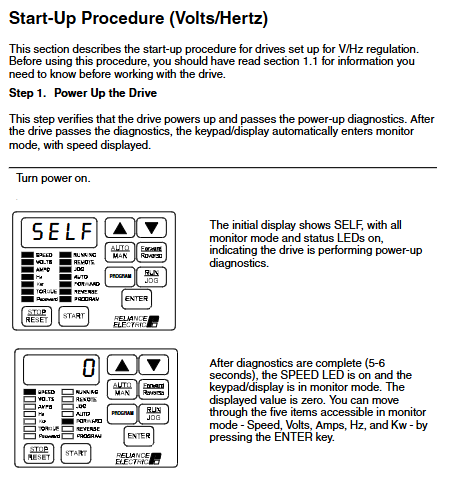
After the power is turned on, the display shows "SELF", all LEDs light up, and a self-test is performed (about 5-6 seconds). After completion, enter monitoring mode and the speed display will be zero.
Step 2: Enter programming mode
Press the "GRAM" key to enter programming mode and access the first menu's general parameters (P.000-P.006).
Step 3: Set the first menu parameters
P. 000 Control Source: Default is Local Control (LOCL).
P. 001 Acceleration Time 1: Set the time required for the motor to increase from zero speed to maximum speed (1.0-999.9 seconds).
P. 002 Deceleration Time 1: Set the time from maximum speed to zero speed.
P. 003 Minimum speed: Limit the speed reference lower limit (starting from 0.5 Hz).
P. 004 maximum speed: limit the speed reference upper limit (≤ H.022 overclocking limit).
P. 005 current limit: set based on the ratio of motor rated current to driver output current (50-110%).
Step 4: Enter the password for the second menu
Access P.006, enter password "107", unlock the second menu parameters (including V/Hz dedicated parameters H.000-H.022).
Step 5: Configure V/Hz dedicated parameters
H. 001 Motor nameplate fundamental frequency: usually 60 Hz, used to set the V/Hz ratio.
H. 002 Motor nameplate current: must be ≤ the rated current of the motor.
H. 003 Torque boost voltage: compensates for motor voltage drop (0-20%) at low speeds.
H. 017 Input power/braking resistor configuration: Select based on the power type (AC/DC) and whether to use braking resistors.
H. 018 V/Hz curve types: 0=linear (constant torque), 1=optimized curve (Reliance motor), 2=square curve (fan and pump type).
Step 6: Return to monitoring mode and test
Exit programming mode, manually set the speed reference through the keyboard, start the motor, and check the direction of rotation (should be counterclockwise). If the direction is incorrect, it is necessary to cut off the power and switch the wire sequence of any two-phase motor.
Step 7: Full speed operation and monitoring
Gradually increase the speed to the maximum value, and check the output current, voltage, frequency and other parameters through monitoring mode to confirm normal operation.
2.2 Vector control startup process
Vector control is divided into flux vector control with encoder feedback (FVC) and sensor vector control without encoder (SVC).
Step 1: Select Vector Adjustment Mode
In P.048, change the default "U-H" to "UEC", and the driver will be re diagnosed and enter vector control mode.
Step 2: Set basic parameters
Including motor pole number (U.002), nameplate fundamental frequency (U.003), rated current (U.004), rated speed (U.005), etc.
Step 3: Perform Self Tuning
By enabling the self-tuning function through U.008, the driver will automatically run tests to calculate the encoder PPR (FVC) and motor magnetization current (U.006). During the self-tuning period, the motor will run at no load to a certain speed, and it is necessary to ensure that the motor is disconnected from the load.
Step 4: Set the maximum speed of the motor (U.017)
For weak magnetic applications, a value higher than the rated speed can be set; Otherwise, it should be consistent with U.005.
Step 5: Adjust the speed loop parameters
U. 012 Speed loop proportional gain: affects dynamic response, and excessive gain can easily cause oscillation.
U. 013 Speed loop integral gain: usually does not require adjustment, high inertia loads can be adjusted appropriately.
Step 6: Trial operation and direction verification
Similar to the V/Hz process, conduct a low-speed start test to ensure correct steering.
Detailed Explanation of Parameter Programming
3.1 Parameter menu structure
First menu: Common general parameters (P.000-P.006), no password required.
Second menu: Advanced parameters, including:
General parameters (P.007 – P.099)
V/Hz parameters (H.000-H.022)
Vector parameters (U.000-U.048)
RMI board parameters (r.001 – r.066, optional)
Error log (Err)
3.2 Key Parameter Function Description
P. 025 Stop Type: 0=Free Parking, 1=Slope Parking.
P. 040 Motor Overload Enable: Enable electronic thermal overload protection, similar to a thermal relay function.
P. 047 Carrier frequency: selectable from 2, 4, and 8 kHz, affecting motor noise and driver output capability.
P. 054 Level Induction Start Enable: Suitable for remote control, the start signal is level hold rather than edge trigger.
U. 024 High DC Bus Fault Avoidance: After activation, the driver attempts to adjust the bus voltage to avoid faults caused by regenerative energy.
3.3 Programming Security and Password Protection
Keyboard parameter modification can be disabled through P.051, with password "26". P. 006 is used to protect access to the second menu, with a password of "107". The password function only restricts local keyboard modification and does not affect parameter writing through serial port or network.
Monitoring and operation interface
4.1 Keyboard and Display Layout
The keyboard contains 9 keys:
Program: Switch between monitoring/programming mode.
AUTO/MAN: Switch between automatic (external) and manual (local) speed references.
▲/▼: Adjust parameter values or reference speed.
ENTER: Confirm the selection or save of parameters.
START, STOP/RESET, RUN/JOG, FORWARD/REVERSE: Used for local control.
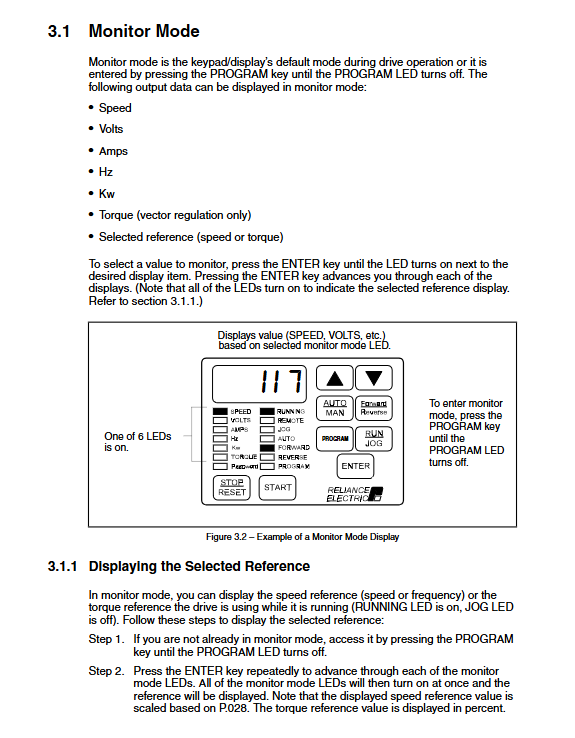
4.2 Monitoring Mode Display Content
Can display the following real-time data in a loop:
Speed (scalable, P.028 setting)
output voltage
output current
output frequency
power (kW)
Torque (specifically for vector control)
4.3 Status indicator lights
RUNNING: The motor is powered on.
Remote: The control source is remote.
AUTO: The speed reference comes from external sources.
FORWARD/REVERSE: Motor direction indicator.
Program: In programming mode.
PASSWORD: Parameter modification is disabled.
Fault diagnosis and error logs
5.1 Alarm and fault codes
Alarm code: Flashing display, driver continues to run (e.g. "LIL" indicates low input voltage).
Fault code: Flashing display, driver shutdown (e.g. "OL" indicates motor overload).
Fatal Fault: Starting with "F", it usually indicates a hardware failure of the regulator board.
5.2 Error log access
By entering the "Err" menu through programming mode, you can view the last 10 fault records, including the occurrence time (based on the 24-hour clock) and date (based on the 248 day counter). The logs can be cleared all at once through the "CLr" option.
5.3 Common Fault Handling
OC/OCA/OCb: overcurrent, check acceleration time, load inertia, and current limit settings.
HU: High DC bus voltage, extending deceleration time or installing braking resistors.
LU: Low DC bus voltage, check the input power supply or adjust the voltage drop time of P.042.
OL: Motor overload, check the rated current parameters of the motor (H.002 or U.004).
SF: Self tuning failed, check the specific reason for U.009.
Advanced features and option configuration
6.1 Network Communication Options
Support network cards such as DeviceNet, ControlNet, PROFIBUS, etc., configure network addresses, reference sources, and response methods through P.060-P.069.
6.2 Outer Loop Control (OCL) Function
Suitable for closed-loop applications such as tension and position, configured with feedback sources, PID parameters, and adjustment ranges through U.040-U.448.
6.3 Braking and Energy Management
Dynamic braking: Configure braking resistors through H.017 to absorb regenerative energy.
DC braking: Set the starting frequency, current, and time of braking through H.005-H.008.
Frequency avoidance: Set the resonance frequency range to be skipped through H.009-H.015.
- OMRON
- ABB
- General Electric
- EMERSON
- Honeywell
- HIMA
- ALSTOM
- Rolls-Royce
- MOTOROLA
- Rockwell
- Siemens
- Woodward
- YOKOGAWA
- FOXBORO
- KOLLMORGEN
- MOOG
- KB
- YAMAHA
- BENDER
- TEKTRONIX
- Westinghouse
- AMAT
- AB
- XYCOM
- Yaskawa
- B&R
- Schneider
- KONGSBERG
- NI
- WATLOW
- ProSoft
- SEW
- ADVANCED
- Reliance
- TRICONEX
- METSO
- MAN
- Advantest
- STUDER
- DANAHER MOTION
- Bently
- Galil
- EATON
- MOLEX
- DEIF
- B&W
- ZYGO
- Aerotech
- DANFOSS
- Beijer
- Moxa
- Rexroth
- Johnson
- WAGO
- TOSHIBA
- BMCM
- SMC
- HITACHI
- HIRSCHMANN
- Application field
- XP POWER
- CTI
- TRICON
- STOBER
- Thinklogical
- Horner Automation
- Meggitt
- Fanuc
- Baldor
- SHINKAWA
- Other Brands
- UniOP
- KUKA
- Iba
- Beckhoff
- ADLINK
-
 Sigmatek MDD111-1 DIAS Drive Axis Module
 -
 Sigmatek DKL042 05-024-042 Terminal Module
 -
 Sigmatek DM822 Control Module
 -
 Sigmatek CDM167 12-008-167-O Module
 -
 Sigmatek TAE151 Touch Display Unit
 -
 Sigmatek DCC041 SLIDES Module 05-700-041-D
 -
 Sigmatek AKM65M-ANC2GBB0 PM Servo Motor
 -
 Sigmatek ETT221 01-230-221 Operator Terminal
 -
 Sigmatek SLIDES DAM 124 Analog Module
 -
Sigmatek AKM31C-ANCNGBB0 Servo Motor
-
 Mannesmann Demag Sigmatek CP626 Central Unit
 -
 SIGMATEK 0332.554.03 Board 371071000154
 -
 SIGMATEK 12-250-021 Base Plate Back Panel CM5V020
 -
 SIGMATEK DM162 S-DIAS Digital Mix Module
 -
 DEMAG ERGOTECH 061 381 66 Sigmatek 9842.243.02 Circuit Board
 -
 SIGMATEK CP313-1 PLC Module
 -
Sigmatek ETV0551-2 VARAN Touch Terminal
-
 Sigmatek SDM 081 FS S-Dias Safety Module
 -
 DEMAG 05-250-023 Ergotech Motherboard with Sigmatek TMS012
 -
Sigmatek CM5V020 12-250-023-K Wiring Base
-
 Sigma Tek 5000B-37 Attitude Gyro Indicator
 -
 Sigmatek SDD120-2 DIAS Drive
 -
 Sigmatek CME221 Memory Module
 -
 Sigmatek DCP640 DIAS Central Unit
 -
 Sigmatek STO040 Safety Output Module
 -
Sigmatek CET281 Control Panel
-
 Sigmatek CIPC LX800 Demag NC5 CPU
 -
 Sigmatek DKL093 05-024-093 Terminal Module
 -
 Sigmatek AI088 20-009-088 Analog Input Module
 -
Sigmatek CAI888 Analog Input Module
-
SIGMATEK CCA021 12-025-021 Analog Output Module
-
SIGMATEK 1104.579.05 Control Module
-
SIGMATEK SDI100 Digital Input Module
-
 SIGMATEK C-IPC 256MB LX800 Compact Dias
 -
 SIGMATEK 9423.090.02 Control Module
 -
SIGMATEK C-IPC 256 Power Supply 148498
-
 SIGMATEK CAI025 Analog Input Module
 -
 SIGMATEK CTO166 Digital Output Module
 -
 SIGMATEK CP112 20-004-112 Processor Module
 -
SIGMATEK CAI887 12-009-887 Safety Module
-
 Sigma-Tek 4000B-31 Directional Gyro 1U262-002-42
 -
Sigmatek C-IPC 256MB LX800 IPC Controller
-
Sigmatek C-IPC 01-450-031 Industrial PC LX800
-
Sigmatek C-IPC 256 Industrial PC Controller
-
Sigmatek CCP-531 PLC Processor Module
-
Sigmatek CDI163 Digital Input Module
-
 Sigmatek ETV0501 VARAN Terminal 12-230-0501
 -
 Sigmatek CTMS020 C-DIAS Technology Module
 -
 Sigmatek CIV512 VARAN Switch Module
 -
 Sigmatek HU011 20-080-011 Interface Module
 -
SIGMATEK SLIDES DAM 124 Module
-
 SIGMATEK C-IPC 161 01-450-161L Industrial PC
 -
SIGMATEK C-IPC 128MB VIA 733MHz 01-450-024-K
-
 SIGMATEK 12-780-012 R8-IPC Geode LX800 Module
 -
SIGMATEK CAM124 Analog Module
-
 SIGMATEK S1 032-8AF61-R4 EZ Servo Motor
 -
 SIGMATEK CTO163 Digital Output Module
 -
 SIGMATEK CCP082 12-004-082 Processor Module
 -
 SIGMATEK CRCH081 C-DIAS Temperature Module
 -
 SIGMATEK PC322-K 01-310-322-K Industrial PC
 -
SIGMATEK SDD310-2 Servo Drive
-
 SIGMATEK AI084 Analog Input Module
 -
SIGMATEK CRCH081 12-752-081 Temperature Module
-
Sigma-Tek 5000L-4 Attitude Gyro 1U284-001-3
-
 SIGMATEK CM5V020 12-250-023-K Wiring Module
 -
Sigma-Tek 4000H-6 Directional Gyro IU262-035-7
-
 SIGMATEK Dias DCP160 05-004-160 Processor Module
 -
SIGMATEK 0147.395.02 Control Module
-
SIGMATEK A1084 Control Module
-
SIGMATEK DI200 20-006-2000 Digital Input Module
-
Sigmatek DNC115 Encoder Module
-
 Sigmatek DAM122 05-017-122 Analog Module
 -
Sigmatek 9802.289.01 Control Board TA71 Display
-
Sigmatek TO127 20-007-127 Digital Output Module
-
Sigmatek DNC031 05-011-031 Digital Module
-
Sigmatek VI022 20-003-022 Interface Module
-
Sigmatek CAI085 Analog Input Module
-
 Sigmatek CP111 S-DIAS CPU Module
 -
Sigmatek CTMS030 Krauss Maffei Module
-
 Sigmatek CAM123 Control Module
 -
 Sigmatek TAE732-P 01-240-732-P Touch Display Unit
 -
Sigmatek MDM021 Digital Mixed Module
-
Sigmatek DCP642 DIAS Central Unit
-
 Sigmatek CST022 12-014-022 C-DIAS Module
 -
 Sigmatek SRO021 20-893-021 Safety Relay Output
 -
 Krauss Maffei MC5 Control System Sigmatek
 -
 Sigmatek DC061 Module 18-24VDC 300mA
 -
 Herrmann EVT0855 Ultrasonic Welder Touch Panel
 -
Sigmatek CIV521 Control Module 1.4A 2W
-
Sigmatek DDI61 05-006-161 Digital Input Module
-
SIGMATEK ETT312-E Touch Terminal 01-230-312
-
Cessna S3326-1 Sigma Tek 5000B-67 Gyro 1U149-015-9
-
SIGMATEK PS101 Power Supply Module
-
SIGMATEK 0332.554.03 Control Module 371071000154
-
 SIGMATEK ETT312-E Touch Terminal 01-230-312
 -
SIGMATEK CDM163 Control Module
-
 SIGMATEK VSV046 16-023-046 Module
 -
SIGMATEK AM221 20-017-221 Analog Module
-
SIGMATEK CTS051 12-053-051 Control Module
-
SIGMATEK AM221 20-017-221 Analog Module
-
Sigmatek CSDI161 12-891-161 Safety Input Module
-
Sigma Tek 4000C-1 Directional Gyro Indicator
-
Sigmatek ETV0501 12-230-0501 VARAN Terminal
-
Sigmatek DDM165 SLIDES Module
-
Sigmatek N100 20-011-100 Control Module
-
Sigmatek AKM54K-ANC2R-B0 PM Servo Motor
-
Sigmatek CTO166 Digital Output Module
-
Sigmatek CP212-K 20-004-212-K CPU Module
-
Sigmatek CDI161 Digital Input Module
-
Sigmatek DCC080 05-700-080-2 Control Module
-
 SIGMATEK SCP011 S-DIAS Safety CPU
 -
SIGMATEK SCP011 S-DIAS Safety CPU
-
SIGMATEK SRO022 Relay Output Module
-
SIGMATEK MDD 121 Drive Axis Module
-
SIGMATEK DSI021 SLIDES Siemens Interface
-
SIGMATEK DIAS DCP161 Module 05-004-161
-
 Sigmatek ETT312 Built-in Touch Terminal
 -
SIGMATEK DCP 643 DIAS Controller System
-
SIGMATEK CIO021 Multi I/O Module
-
SIGMATEK CTMS020 Control Module
-
 Sigmatek CME 221 Memory Module
 -
Sigmatek 0420.615.01 Control Board
-
Sigmatek CP111 20-004-111 CPU Module
-
Sigmatek 9405.065.03 Control Board
-
Sigmatek ETEK 01-450-032-K C-IPC 256MB Industrial PC
-
Sigmatek CTO163 12-007-163 Safety Output Module
-
Sigmatek TO081 20-007-081 Digital Output Module
-
 Sigmatek SI021 20-022-021 Safety Input Module


