
Allen Bradley DeviceNet Communication Module (1203-GK5/1336-GM5)
Features 1203-GK5 module 1336-GM5 board
Physical form independent module embedded board
Installation method: 35 × 7.5mm DIN rail mounting (compatible with 199-DR1 and other models of rails) directly installed inside specific SCANPort products (such as 1336 series drives)
Connection method: 8-pin mini DIN interface+SCANPort cable (up to 10m), 14 pin internal SCANPort connector (no additional cables required)
Most SCANPort products, such as 1305/1336 PLUS/1394, are only compatible with 1336 series drives (compatibility needs to be confirmed for some low-power models)
The packaging accessories include 5-pin/10 pin Phoenix connectors, DIN rail buckles with grounding wristbands, installation screws, nylon support columns, and communication housings
Allen Bradley DeviceNet Communication Module (1203-GK5/1336-GM5)
Product Overview and Core Positioning
1. Product types and differences
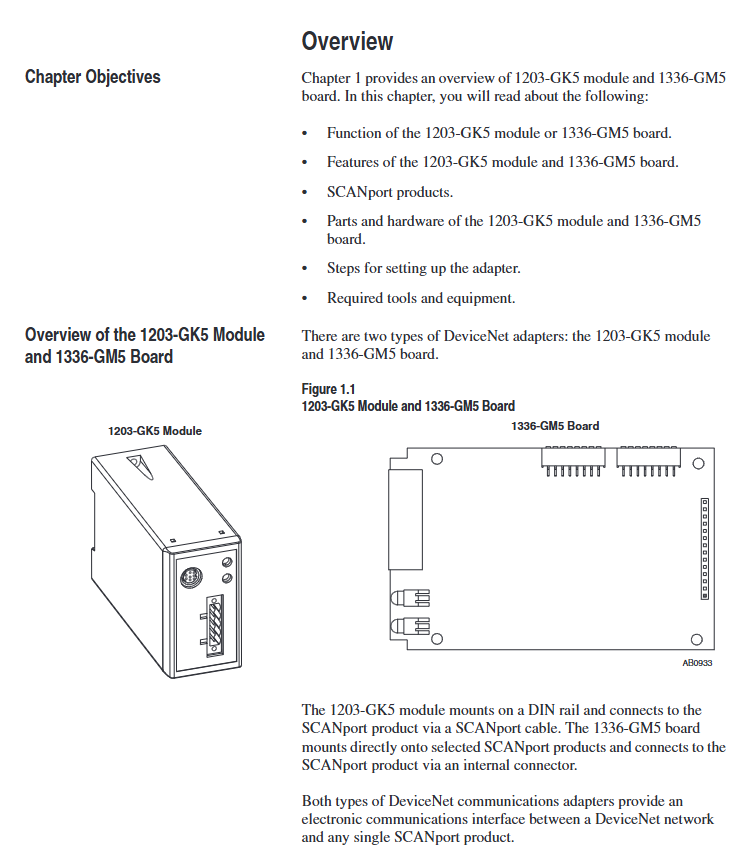
Both devices are DeviceNet communication adapters, with the same core functions but different forms and installation methods. The specific differences are shown in the table below:
Features 1203-GK5 module 1336-GM5 board
Physical form independent module embedded board
Installation method: 35 × 7.5mm DIN rail mounting (compatible with 199-DR1 and other models of rails) directly installed inside specific SCANPort products (such as 1336 series drives)
Connection method: 8-pin mini DIN interface+SCANPort cable (up to 10m), 14 pin internal SCANPort connector (no additional cables required)
Most SCANPort products, such as 1305/1336 PLUS/1394, are only compatible with 1336 series drives (compatibility needs to be confirmed for some low-power models)
The packaging accessories include 5-pin/10 pin Phoenix connectors, DIN rail buckles with grounding wristbands, installation screws, nylon support columns, and communication housings
2. Core functions and features
Communication conversion: Convert DeviceNet messages to SCAnport protocol, supporting polling I/O (logical instructions/reference values/feedback values) and explicit messages (parameter read/write, fault query), DeviceNet speed supports 125K/250K/500Kbps.
Flexible configuration: Set node addresses (0-63), data rates, Datalink enablement, and fault response strategies through DIP switches; Support fault node recovery (SW2-7/8 needs to be set to ON, and the offline node address needs to be modified with software).
Status monitoring: Dual color LED indicator lights (DeviceNet network status, SCANPort connection status) provide real-time feedback on communication and device health status.
Compatibility: Compatible with various SCANPort products, such as 1305 AC micro drives, 1336 series frequency converters (IMPACT/PLUS/FORCE), 1394 multi axis motion systems, etc. Most products support 1-6 peripheral connections, with an I/O word length range of 2-10 words (please refer to the product manual for details).
DIP switch configuration (core pre steps)
The DIP switches of the two devices are in the same layout (1203-GK5 is at the bottom and 1336-GM5 is at the edge of the board). They need to be adjusted after power off to take effect after power on. The specific configuration items are as follows:
1. Node address (SW2-1~SW2-6)
Function: Set the DeviceNet network node address (0-63), default is 63, and ensure that the address is unique within the network.
Configuration rule: Binary encoding, SW2-1 is the lowest bit (1), SW2-6 is the highest bit (32), for example, address 3 corresponds to "000011" (SW2-1/SW2-2 is set to ON, the rest are set to OFF).
2. Data rate (SW2-7~SW2-8)
Function: Define DeviceNet communication rate, default 125Kbps, configuration rules are as follows:
|SW2-8 (high bit) | SW2-7 (low bit) | Data rate | Description|
|0 | 0 | 125Kbps | Default value|
| 0 | 1 | 250Kbps | - |
| 1 | 0 | 500Kbps | - |
|1 | 1 | Software configuration | Requires setting through DeviceNet Manager (supports fault node recovery)|
3. Data link (SW1-1~SW1-4)
Function: Enable Datalink (2 input+2 output words per channel, up to 4 channels), default fully disabled, configuration rules:
|Switch | Function | 0 (OFF) | 1 (ON)|
|SW1-1 | Datalink A | Disabled | Enabled|
|SW1-2 | Datalink B | Disabled | Enabled|
|SW1-3 | Datalink C | Disabled | Enabled|
|SW1-4 | Datalink D | Disabled | Enabled|
Attention: It is necessary to ensure that the SCANPort product supports Datalink and that the same Datalink is not occupied by other adapters.
4. Fault response (SW1-6~SW1-8)
Function: Configure device behavior in case of network failure (communication interruption) or controller idle (programming mode), triggering SCANPort product failure by default. Configuration rules:
|Switch | Function | 0 (OFF) | 1 (ON)|
|SW1-8 | Programming/Idle Fault | Triggered Fault | Non Triggered Fault|
|SW1-7 | Communication interruption fault | Trigger fault | No trigger fault|
|SW1-6 | Standby behavior | Output zero data | Maintain last state|
Safety Reminder: Modifying fault response requires risk assessment to avoid personal injury or equipment damage caused by continuous operation of the equipment.
Installation process and electrostatic protection
1. General safety requirements
Static protection: Modules/boards contain ESD sensitive components, and grounding wristbands must be worn during operation, refer to Rockwell document 8000-4.5.2 "Anti static Damage Guide".
Power off operation: Before installing the 1336-GM5 board, all power sources of the SCANPort product must be disconnected to avoid electric shock; The installation of 1203-GK5 requires disconnecting the DeviceNet network power supply.
2. Installation steps for 1203-GK5 module
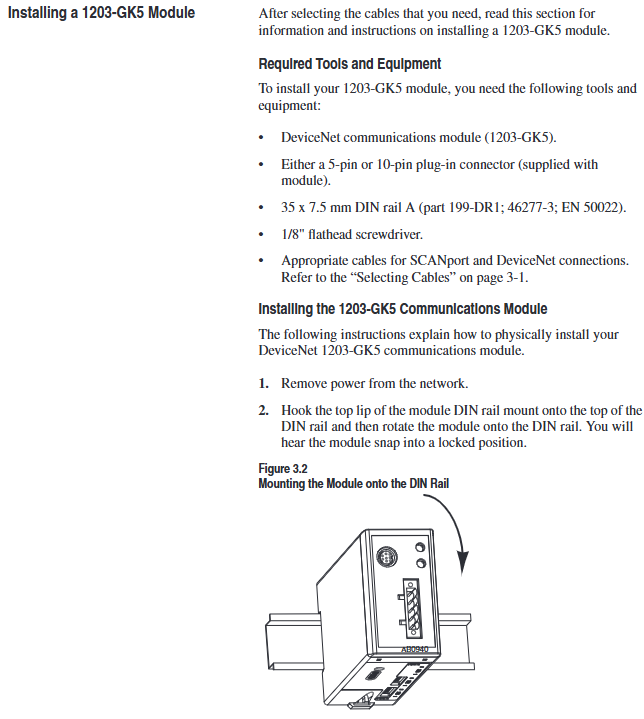
Rail mounting: Insert the top hook of the module into the DIN rail, rotate and fasten it, and use an ohmmeter to check the grounding (the resistance between the metal shell of the RS-232 port of the module and the rail grounding is ≤ 2 Ω).
Cable connection:
DeviceNet: 5-pin connector (point-to-point) or 10 pin connector (daisy chain), wired by color (red=PWR, white=CAN_S, blue=CAN_L, black=COM, bare wire=shielded).
SCAnport: Insert the 8-pin mini DIN interface into the cable and confirm installation with a snap sound. The cable length should be ≤ 10m and kept away from high-power cables to prevent interference.
Power on verification: The SCANPort LED is constantly green, and the DeviceNet LED is flashing green (no connection established). If there is an abnormality, refer to the troubleshooting section.
3. Installation steps for 1336-GM5 board
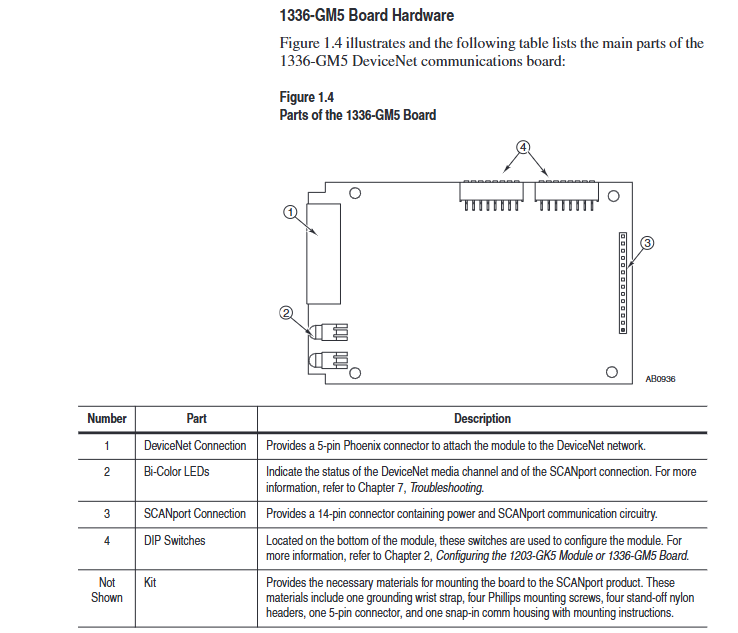
Preparation: Disconnect the power supply of the drive, remove the casing, and install 4 nylon support columns on the drive main control board.
Card fixing: Align the 14 pin pin of the card with the SCANPort interface and insert it, then fix it with 4 screws (to avoid damaging the card due to over tightening).
DeviceNet wiring: Connect 5-pin Phoenix connectors by color, insert them into the card interface, and tighten the screws.
Power on verification: Install the communication enclosure, restore the driver power, keep the SCANPort LED on green, and the DeviceNet LED flashing green.
DeviceNet Network Configuration (DeviceNet Manager)
1. Configuration tools and prerequisites
Software: DeviceNet Manager (Windows application) or RSNetWorx for DeviceNet, requires a 1784-PCD card or 1770-KFD adapter to connect the PC to the DeviceNet network.
Prerequisite: DIP switch configuration has been completed, module/board has been connected to the network, and RSLinx (communication interface software) has been installed on the PC.
2. Core configuration steps
(1) Online mode connection
Start DeviceNet Manager, select "Utilities>Set Up Online Connection", and choose the corresponding driver (such as 1770-KFD).
Configure communication ports (COM1/COM2), baud rate (default 38400bps), PC node address (avoid 63), network data rate (consistent with DIP switch), click "OK" to enter online mode.
(2) Create EDS file (initial configuration)
Select "Who>Network Who" to scan the network, double-click on unrecognized devices (displaying the universal icon), and a prompt "Create EDS file" will pop up. Click "Yes".
Click on 'Load from Device', enter the module/board node address, automatically load the device description, select the device icon (such as 1336. BMP) and SCANPort adapter icon (SCANPORT. BMP).
Enable "Polled Connection", set the I/O size (default 4 bytes, formula: 4+number of enabled Datalinks x 4), click "OK" to save, and rescan the network to confirm that the device icon is displayed normally.
(3) Configure PLC/SLC scanner
Taking 1771-SDN (PLC scanner) as an example:
Double click the scanner icon to enter "1771-SDN Module Configuration", click "Edit Scan List", select "Add Devices From>Who", and drag the target node into the scan list.
Select the node, click "Edit I/O Parameters", and set the polling I/O size (same as EDS configuration) and polling rate (Every Scan/Background).
Click on "Auto Map" to configure the storage address for input/output data (such as PLC N90/N100 files), and click "Map" to complete the mapping.
Select "Save To>SDN", download the configuration to the scanner, prompt "Scanner offline for 5-10 seconds", confirm and complete the configuration.
(4) Save and Verify
Save configuration file (for PLC) Used for SL7 and SLC SL4), Before exiting, confirm that the DeviceNet LED is always green (indicating connection establishment) and the SCANPort LED is always green (indicating normal communication).
Programming and Communication Implementation
1. Ladder diagram programming (RSLogix)
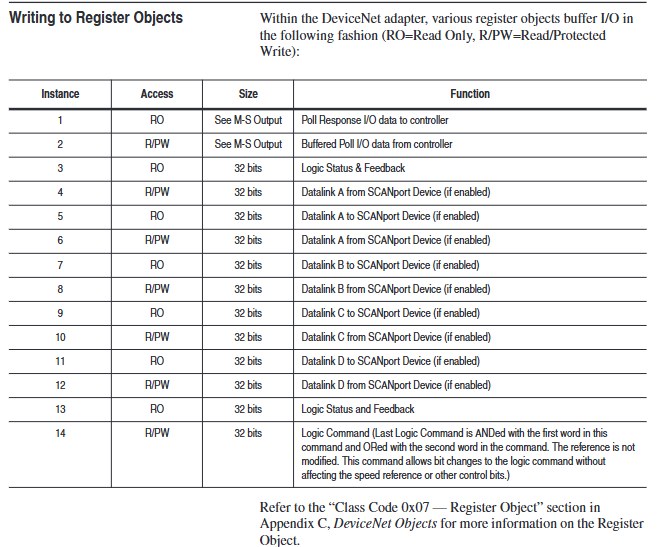
Implementing SCAnport product control through polling I/O requires N-file mapping (input=SCAnport → DeviceNet, output=DeviceNet → SCAnport). Example functions are as follows:
Start stop control: 1336 PLUS driver logic instruction bit definition (bit 0=stop, bit 1=start, bit 2=jog, bit 3=fault clearing), writes the operation signal to the output N-file (such as N10:1) through MOV instruction.
Reference value transmission: The frequency reference value 0-32767 corresponds to 0-maximum frequency, and N7:0 (operator set value) is written to N10:2 (driver reference value) through MOV command.
Status monitoring: Read the drive status bits (bit 1=running, bit 8=fault) from the input N-file (such as N9:1) and output them to the operator display terminal (such as O: 000).
2. Explicit message communication
Support explicit message reading and writing of parameters and fault queries through DeviceNet, following the 8:16 format (8-bit class field+16 bit instance field). The core rules are as follows:
(1) PLC scanner (1771-SDN)
Write the message to the scanner buffer (10 available buffers) using 64 block transfer write (BTW), and retrieve the response through 64 block transfer read (BTR) after completion.
Message format: including transaction ID (1-255), command (1=execute, 2=query status), port (0=channel A), size (in bytes), service code (e.g. 0x0E=get attribute), node address, class/instance/attribute.
(2) SLC scanner (1747-SDN)
Write the message to the M0 file (e.g. M0: 1.224), the scanner processes it and stores the response in the M1 file. After reading, send a "delete command" (command 4) to release the buffer.
Example: Read the number of fault queues (class 0x97, instance 0, attribute 1), store the response data in N20:53, and return the number of fault queue entries.
(3) Safety Tips
Frequent parameter writing through explicit messages can shorten the lifespan of EEPROM. It is recommended to use Datalink to handle high-frequency parameter modifications (Datalink does not write to EEPROM).
Troubleshooting and LED diagnosis
1. Interpretation of LED status
Both devices come with 2 dual color LEDs, and the corresponding fault types are as follows:
(1) DeviceNet network LED (near the DeviceNet interface)
LED Status Meaning Solution
Turn off non powered/non online. Check the power connection, confirm that the node address is unique, and verify that at least one device in the network is functioning properly
Blinking green online but no connection, no operation required (constantly on after establishing I/O or message connection)
Always on green online and connected, running normally
Flashing red I/O connection timeout reduces network traffic, check if the controller is online, and confirm that RPI (Request Packet Interval) ≤ network update time
Always on red bus offline/address conflict troubleshooting address duplication, check cable terminator (terminal resistance 120 Ω), reinstall media
(2) SCANPort status LED (away from DeviceNet interface)
LED Status Meaning Solution
Turn off the non powered/unconnected SCANPort product power supply, re plug and unplug the cable, and verify the SCANPort interface with HIM
Flashing green, no operation required to establish I/O connection (always on after connection is completed)
Constant green SCANPort communication is running normally
Flashing red configuration fault (no communication). Check if Datalink is compatible with the product, unplug the cable, and restart the device
Constant red link fault (no port recognition): Disable unsupported Datalinks, confirm that no other adapters are occupying the same Datalink, power off and restart
Constant Orange Compatibility Test Failed Contact Rockwell Technical Support
Specifications
Project 1203-GK5 Module 1336-GM5 Board
Power supply 12-25V DC, 110mA (surge 4 times/5ms) 12-25V DC, 40mA (DeviceNet power supply)
Working environment temperature 0-50 ° C, humidity 0-95%, no condensation, same as left
500m for communication distance of 125Kbps, 100m for 500Kbps, drop line ≤ 6m, same as left
Protection level NEMA 1 (IP30) depends on the host device casing
ESD protection contact discharge 4KV, air discharge 8KV, same as left
- OMRON
- ABB
- General Electric
- EMERSON
- Honeywell
- HIMA
- ALSTOM
- Rolls-Royce
- MOTOROLA
- Rockwell
- Siemens
- Woodward
- YOKOGAWA
- FOXBORO
- KOLLMORGEN
- MOOG
- KB
- YAMAHA
- BENDER
- TEKTRONIX
- Westinghouse
- AMAT
- AB
- XYCOM
- Yaskawa
- B&R
- Schneider
- KONGSBERG
- NI
- WATLOW
- ProSoft
- SEW
- ADVANCED
- Reliance
- TRICONEX
- METSO
- MAN
- Advantest
- STUDER
- DANAHER MOTION
- Bently
- Galil
- EATON
- MOLEX
- DEIF
- B&W
- ZYGO
- Aerotech
- DANFOSS
- Beijer
- Moxa
- Rexroth
- Johnson
- WAGO
- TOSHIBA
- BMCM
- SMC
- HITACHI
- HIRSCHMANN
- Application field
- XP POWER
- CTI
- TRICON
- STOBER
- Thinklogical
- Horner Automation
- Meggitt
- Fanuc
- Baldor
- SHINKAWA
- Other Brands
- UniOP
- KUKA
- Iba
- Beckhoff
- ADLINK
-
 Sigmatek MDD111-1 DIAS Drive Axis Module
 -
 Sigmatek DKL042 05-024-042 Terminal Module
 -
 Sigmatek DM822 Control Module
 -
 Sigmatek CDM167 12-008-167-O Module
 -
 Sigmatek TAE151 Touch Display Unit
 -
 Sigmatek DCC041 SLIDES Module 05-700-041-D
 -
 Sigmatek AKM65M-ANC2GBB0 PM Servo Motor
 -
 Sigmatek ETT221 01-230-221 Operator Terminal
 -
 Sigmatek SLIDES DAM 124 Analog Module
 -
Sigmatek AKM31C-ANCNGBB0 Servo Motor
-
 Mannesmann Demag Sigmatek CP626 Central Unit
 -
 SIGMATEK 0332.554.03 Board 371071000154
 -
 SIGMATEK 12-250-021 Base Plate Back Panel CM5V020
 -
 SIGMATEK DM162 S-DIAS Digital Mix Module
 -
 DEMAG ERGOTECH 061 381 66 Sigmatek 9842.243.02 Circuit Board
 -
 SIGMATEK CP313-1 PLC Module
 -
Sigmatek ETV0551-2 VARAN Touch Terminal
-
 Sigmatek SDM 081 FS S-Dias Safety Module
 -
 DEMAG 05-250-023 Ergotech Motherboard with Sigmatek TMS012
 -
Sigmatek CM5V020 12-250-023-K Wiring Base
-
 Sigma Tek 5000B-37 Attitude Gyro Indicator
 -
 Sigmatek SDD120-2 DIAS Drive
 -
 Sigmatek CME221 Memory Module
 -
 Sigmatek DCP640 DIAS Central Unit
 -
 Sigmatek STO040 Safety Output Module
 -
Sigmatek CET281 Control Panel
-
 Sigmatek CIPC LX800 Demag NC5 CPU
 -
 Sigmatek DKL093 05-024-093 Terminal Module
 -
 Sigmatek AI088 20-009-088 Analog Input Module
 -
Sigmatek CAI888 Analog Input Module
-
SIGMATEK CCA021 12-025-021 Analog Output Module
-
SIGMATEK 1104.579.05 Control Module
-
SIGMATEK SDI100 Digital Input Module
-
 SIGMATEK C-IPC 256MB LX800 Compact Dias
 -
 SIGMATEK 9423.090.02 Control Module
 -
SIGMATEK C-IPC 256 Power Supply 148498
-
 SIGMATEK CAI025 Analog Input Module
 -
 SIGMATEK CTO166 Digital Output Module
 -
 SIGMATEK CP112 20-004-112 Processor Module
 -
SIGMATEK CAI887 12-009-887 Safety Module
-
 Sigma-Tek 4000B-31 Directional Gyro 1U262-002-42
 -
Sigmatek C-IPC 256MB LX800 IPC Controller
-
Sigmatek C-IPC 01-450-031 Industrial PC LX800
-
Sigmatek C-IPC 256 Industrial PC Controller
-
Sigmatek CCP-531 PLC Processor Module
-
Sigmatek CDI163 Digital Input Module
-
 Sigmatek ETV0501 VARAN Terminal 12-230-0501
 -
 Sigmatek CTMS020 C-DIAS Technology Module
 -
 Sigmatek CIV512 VARAN Switch Module
 -
 Sigmatek HU011 20-080-011 Interface Module
 -
SIGMATEK SLIDES DAM 124 Module
-
 SIGMATEK C-IPC 161 01-450-161L Industrial PC
 -
SIGMATEK C-IPC 128MB VIA 733MHz 01-450-024-K
-
 SIGMATEK 12-780-012 R8-IPC Geode LX800 Module
 -
SIGMATEK CAM124 Analog Module
-
 SIGMATEK S1 032-8AF61-R4 EZ Servo Motor
 -
 SIGMATEK CTO163 Digital Output Module
 -
 SIGMATEK CCP082 12-004-082 Processor Module
 -
 SIGMATEK CRCH081 C-DIAS Temperature Module
 -
 SIGMATEK PC322-K 01-310-322-K Industrial PC
 -
SIGMATEK SDD310-2 Servo Drive
-
 SIGMATEK AI084 Analog Input Module
 -
SIGMATEK CRCH081 12-752-081 Temperature Module
-
Sigma-Tek 5000L-4 Attitude Gyro 1U284-001-3
-
 SIGMATEK CM5V020 12-250-023-K Wiring Module
 -
Sigma-Tek 4000H-6 Directional Gyro IU262-035-7
-
 SIGMATEK Dias DCP160 05-004-160 Processor Module
 -
SIGMATEK 0147.395.02 Control Module
-
SIGMATEK A1084 Control Module
-
SIGMATEK DI200 20-006-2000 Digital Input Module
-
Sigmatek DNC115 Encoder Module
-
 Sigmatek DAM122 05-017-122 Analog Module
 -
Sigmatek 9802.289.01 Control Board TA71 Display
-
Sigmatek TO127 20-007-127 Digital Output Module
-
Sigmatek DNC031 05-011-031 Digital Module
-
Sigmatek VI022 20-003-022 Interface Module
-
Sigmatek CAI085 Analog Input Module
-
 Sigmatek CP111 S-DIAS CPU Module
 -
Sigmatek CTMS030 Krauss Maffei Module
-
 Sigmatek CAM123 Control Module
 -
 Sigmatek TAE732-P 01-240-732-P Touch Display Unit
 -
Sigmatek MDM021 Digital Mixed Module
-
Sigmatek DCP642 DIAS Central Unit
-
 Sigmatek CST022 12-014-022 C-DIAS Module
 -
 Sigmatek SRO021 20-893-021 Safety Relay Output
 -
 Krauss Maffei MC5 Control System Sigmatek
 -
 Sigmatek DC061 Module 18-24VDC 300mA
 -
 Herrmann EVT0855 Ultrasonic Welder Touch Panel
 -
Sigmatek CIV521 Control Module 1.4A 2W
-
Sigmatek DDI61 05-006-161 Digital Input Module
-
SIGMATEK ETT312-E Touch Terminal 01-230-312
-
Cessna S3326-1 Sigma Tek 5000B-67 Gyro 1U149-015-9
-
SIGMATEK PS101 Power Supply Module
-
SIGMATEK 0332.554.03 Control Module 371071000154
-
 SIGMATEK ETT312-E Touch Terminal 01-230-312
 -
SIGMATEK CDM163 Control Module
-
 SIGMATEK VSV046 16-023-046 Module
 -
SIGMATEK AM221 20-017-221 Analog Module
-
SIGMATEK CTS051 12-053-051 Control Module
-
SIGMATEK AM221 20-017-221 Analog Module
-
Sigmatek CSDI161 12-891-161 Safety Input Module
-
Sigma Tek 4000C-1 Directional Gyro Indicator
-
Sigmatek ETV0501 12-230-0501 VARAN Terminal
-
Sigmatek DDM165 SLIDES Module
-
Sigmatek N100 20-011-100 Control Module
-
Sigmatek AKM54K-ANC2R-B0 PM Servo Motor
-
Sigmatek CTO166 Digital Output Module
-
Sigmatek CP212-K 20-004-212-K CPU Module
-
Sigmatek CDI161 Digital Input Module
-
Sigmatek DCC080 05-700-080-2 Control Module
-
 SIGMATEK SCP011 S-DIAS Safety CPU
 -
SIGMATEK SCP011 S-DIAS Safety CPU
-
SIGMATEK SRO022 Relay Output Module
-
SIGMATEK MDD 121 Drive Axis Module
-
SIGMATEK DSI021 SLIDES Siemens Interface
-
SIGMATEK DIAS DCP161 Module 05-004-161
-
 Sigmatek ETT312 Built-in Touch Terminal
 -
SIGMATEK DCP 643 DIAS Controller System
-
SIGMATEK CIO021 Multi I/O Module
-
SIGMATEK CTMS020 Control Module
-
 Sigmatek CME 221 Memory Module
 -
Sigmatek 0420.615.01 Control Board
-
Sigmatek CP111 20-004-111 CPU Module
-
Sigmatek 9405.065.03 Control Board
-
Sigmatek ETEK 01-450-032-K C-IPC 256MB Industrial PC
-
Sigmatek CTO163 12-007-163 Safety Output Module
-
Sigmatek TO081 20-007-081 Digital Output Module
-
 Sigmatek SI021 20-022-021 Safety Input Module


