
Watlow EZ-ZONE ® RME (Expansion) Module
2. Associate correct functional instances
3. Repair the load short circuit and replace the overloaded equipment
4. Replace the relay module or SSR component (original spare parts are required)
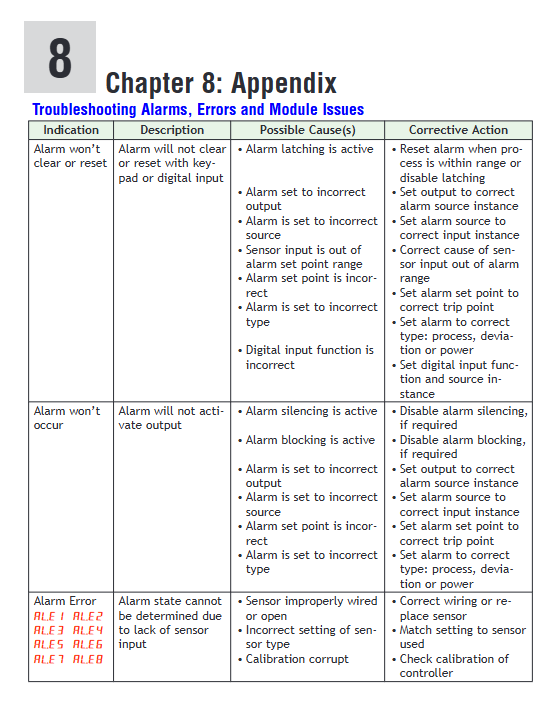
Alarm not triggered, a.st displays "None". 1. Alarm threshold setting error (above/below normal range)
2. Alarm source selection error (sr.a=None)
3. Alarm blocking enabled (a.bL=Startup/Set Point)
4. The alarm lag is too large (a.hy>deviation value). 1. Enter Operations → Alarm Menu and compare the process value with the alarm threshold
2. Enter Setup → Alarm Menu, confirm that "sr.a" selects the correct source (such as Digital I/O, Current)
3. Check if "a.bL" is "Off" and if the blockage is lifted after startup
4. Reduce the "a.hy" value (such as changing from 5 ℃ to 1 ℃). 1. Adjust the alarm threshold to ensure coverage of the abnormal range
2. Select the correct alarm source and associate it with an instance
3. Turn off the alarm blocking or wait for the blocking time to end
4. Adjust the lag to a reasonable value
(2) Meaning of indicator lights and fault logs
Indicator light status meaning investigation direction
Power (green) is constantly on, and the power supply is normal-
Power (red) constantly on. Abnormal power supply (overvoltage/undervoltage, short circuit). Measure the power supply voltage and check the power supply wiring
Comm (green) flashing (once/second) communication active, data exchange normal-
Comm (red) constantly on communication fault (address error, wiring error, protocol mismatch). Check communication parameters and wiring
SD Card (green) flashing SD card read/write in progress-
SD Card (red) always on. SD card fault (unrecognized, damaged, full storage). Re insert and unplug the SD card, format or replace it, and clear the log
Fault log viewing: Go to Factory → Diagnostics Menu and check the "Error Code" (such as "E01=Communication Fault" and "E02=Output Short Circuit") “Software ID”“Serial Number”, After recording the information, contact Watlow technical support for troubleshooting.
Typical application scenarios
1. I/O expansion of semiconductor wafer heat treatment equipment
System composition: 1 RMA (EtherNet/IP gateway)+2 RMCs (temperature control, controlling wafer heating chamber)+3 RMEs (I/O expansion) deployed in semiconductor cleanrooms.
Function implementation:
RME1: Connect 16 digital inputs (chamber door switch, wafer in place sensor) and 8 SSR outputs (driving chamber heating lamp).
RME2: Connect 8 CT inputs (monitor heating lamp current) and 4 process outputs (control nitrogen flow valve).
RME3: Implement interlocking protection for "door not closed → heating stop" and "abnormal current → alarm" through logical operations, and control the duration of wafer heating through timing function.
Value: Distributed I/O reduces cleanroom wiring, logical interlocking enhances equipment safety, and EtherNet/IP enables data exchange with MES systems.
2. Temperature and valve control of chemical reaction kettle
System composition: 1 RMA (Class 1 Div. 2 certification)+1 RMC (temperature control)+1 RME (special equipment control), deployed in the chemical explosion-proof workshop.
Function implementation:
RMC controls the temperature of the reaction vessel, while RME drives the feed valve through the "Motorized Valve" function, configured with "Valve Travel Time=120 seconds" and "Dead Band=2%" to avoid frequent valve adjustments.
RME is connected to 4 CT inputs to monitor the current of the mixing motor. When the current is abnormal, an alarm is triggered and the feeding valve is cut off.
Explosion proof junction boxes and armored shielded wires are used, which comply with Class 1 Div. 2 safety requirements and prohibit live plugging and unplugging of wires.
Value: Explosion proof design suitable for hazardous areas, precise valve control to enhance reaction stability, current monitoring to prevent equipment failure.
3. Timing control of food processing production line
System composition: 1 RMA (Modbus RTU)+1 RMC (oven temperature control)+2 RME (timing and logic control), used for biscuit baking production line.
Function implementation:
RME1: Use the "Sequencer" function to distribute the oven heating power into 4 outputs (1 vernier+3 ON/OFF), use the "Progressive" mode to balance heater wear, and set "Minimum On Time=60 seconds".
RME2: Control the speed of the conveyor belt through timing function (linked to the temperature of the oven), and implement the interlock of "oven not reaching temperature → conveyor belt stop" through logical operation.
PLC reads the production line status through Modbus RTU and issues start stop commands.
Value: Sequencer function extends heater life, timing interlock improves production efficiency, Modbus communication enables centralized monitoring.
- OMRON
- ABB
- General Electric
- EMERSON
- Honeywell
- HIMA
- ALSTOM
- Rolls-Royce
- MOTOROLA
- Rockwell
- Siemens
- Woodward
- YOKOGAWA
- FOXBORO
- KOLLMORGEN
- MOOG
- KB
- YAMAHA
- BENDER
- TEKTRONIX
- Westinghouse
- AMAT
- AB
- XYCOM
- Yaskawa
- B&R
- Schneider
- KONGSBERG
- NI
- WATLOW
- ProSoft
- SEW
- ADVANCED
- Reliance
- TRICONEX
- METSO
- MAN
- Advantest
- STUDER
- DANAHER MOTION
- Bently
- Galil
- EATON
- MOLEX
- DEIF
- B&W
- ZYGO
- Aerotech
- DANFOSS
- Beijer
- Moxa
- Rexroth
- Johnson
- WAGO
- TOSHIBA
- BMCM
- SMC
- HITACHI
- HIRSCHMANN
- Application field
- XP POWER
- CTI
- TRICON
- STOBER
- Thinklogical
- Horner Automation
- Meggitt
- Fanuc
- Baldor
- SHINKAWA
- Other Brands
- UniOP
- KUKA
- Iba
- Beckhoff
- ADLINK
-
 Sigmatek MDD111-1 DIAS Drive Axis Module
 -
 Sigmatek DKL042 05-024-042 Terminal Module
 -
 Sigmatek DM822 Control Module
 -
 Sigmatek CDM167 12-008-167-O Module
 -
 Sigmatek TAE151 Touch Display Unit
 -
 Sigmatek DCC041 SLIDES Module 05-700-041-D
 -
 Sigmatek AKM65M-ANC2GBB0 PM Servo Motor
 -
 Sigmatek ETT221 01-230-221 Operator Terminal
 -
 Sigmatek SLIDES DAM 124 Analog Module
 -
Sigmatek AKM31C-ANCNGBB0 Servo Motor
-
 Mannesmann Demag Sigmatek CP626 Central Unit
 -
 SIGMATEK 0332.554.03 Board 371071000154
 -
 SIGMATEK 12-250-021 Base Plate Back Panel CM5V020
 -
 SIGMATEK DM162 S-DIAS Digital Mix Module
 -
 DEMAG ERGOTECH 061 381 66 Sigmatek 9842.243.02 Circuit Board
 -
 SIGMATEK CP313-1 PLC Module
 -
Sigmatek ETV0551-2 VARAN Touch Terminal
-
 Sigmatek SDM 081 FS S-Dias Safety Module
 -
 DEMAG 05-250-023 Ergotech Motherboard with Sigmatek TMS012
 -
Sigmatek CM5V020 12-250-023-K Wiring Base
-
 Sigma Tek 5000B-37 Attitude Gyro Indicator
 -
 Sigmatek SDD120-2 DIAS Drive
 -
 Sigmatek CME221 Memory Module
 -
 Sigmatek DCP640 DIAS Central Unit
 -
 Sigmatek STO040 Safety Output Module
 -
Sigmatek CET281 Control Panel
-
 Sigmatek CIPC LX800 Demag NC5 CPU
 -
 Sigmatek DKL093 05-024-093 Terminal Module
 -
 Sigmatek AI088 20-009-088 Analog Input Module
 -
Sigmatek CAI888 Analog Input Module
-
SIGMATEK CCA021 12-025-021 Analog Output Module
-
SIGMATEK 1104.579.05 Control Module
-
SIGMATEK SDI100 Digital Input Module
-
 SIGMATEK C-IPC 256MB LX800 Compact Dias
 -
 SIGMATEK 9423.090.02 Control Module
 -
SIGMATEK C-IPC 256 Power Supply 148498
-
 SIGMATEK CAI025 Analog Input Module
 -
 SIGMATEK CTO166 Digital Output Module
 -
 SIGMATEK CP112 20-004-112 Processor Module
 -
SIGMATEK CAI887 12-009-887 Safety Module
-
 Sigma-Tek 4000B-31 Directional Gyro 1U262-002-42
 -
Sigmatek C-IPC 256MB LX800 IPC Controller
-
Sigmatek C-IPC 01-450-031 Industrial PC LX800
-
Sigmatek C-IPC 256 Industrial PC Controller
-
Sigmatek CCP-531 PLC Processor Module
-
Sigmatek CDI163 Digital Input Module
-
 Sigmatek ETV0501 VARAN Terminal 12-230-0501
 -
 Sigmatek CTMS020 C-DIAS Technology Module
 -
 Sigmatek CIV512 VARAN Switch Module
 -
 Sigmatek HU011 20-080-011 Interface Module
 -
SIGMATEK SLIDES DAM 124 Module
-
 SIGMATEK C-IPC 161 01-450-161L Industrial PC
 -
SIGMATEK C-IPC 128MB VIA 733MHz 01-450-024-K
-
 SIGMATEK 12-780-012 R8-IPC Geode LX800 Module
 -
SIGMATEK CAM124 Analog Module
-
 SIGMATEK S1 032-8AF61-R4 EZ Servo Motor
 -
 SIGMATEK CTO163 Digital Output Module
 -
 SIGMATEK CCP082 12-004-082 Processor Module
 -
 SIGMATEK CRCH081 C-DIAS Temperature Module
 -
 SIGMATEK PC322-K 01-310-322-K Industrial PC
 -
SIGMATEK SDD310-2 Servo Drive
-
 SIGMATEK AI084 Analog Input Module
 -
SIGMATEK CRCH081 12-752-081 Temperature Module
-
Sigma-Tek 5000L-4 Attitude Gyro 1U284-001-3
-
 SIGMATEK CM5V020 12-250-023-K Wiring Module
 -
Sigma-Tek 4000H-6 Directional Gyro IU262-035-7
-
 SIGMATEK Dias DCP160 05-004-160 Processor Module
 -
SIGMATEK 0147.395.02 Control Module
-
SIGMATEK A1084 Control Module
-
SIGMATEK DI200 20-006-2000 Digital Input Module
-
Sigmatek DNC115 Encoder Module
-
 Sigmatek DAM122 05-017-122 Analog Module
 -
Sigmatek 9802.289.01 Control Board TA71 Display
-
Sigmatek TO127 20-007-127 Digital Output Module
-
Sigmatek DNC031 05-011-031 Digital Module
-
Sigmatek VI022 20-003-022 Interface Module
-
Sigmatek CAI085 Analog Input Module
-
 Sigmatek CP111 S-DIAS CPU Module
 -
Sigmatek CTMS030 Krauss Maffei Module
-
 Sigmatek CAM123 Control Module
 -
 Sigmatek TAE732-P 01-240-732-P Touch Display Unit
 -
Sigmatek MDM021 Digital Mixed Module
-
Sigmatek DCP642 DIAS Central Unit
-
 Sigmatek CST022 12-014-022 C-DIAS Module
 -
 Sigmatek SRO021 20-893-021 Safety Relay Output
 -
 Krauss Maffei MC5 Control System Sigmatek
 -
 Sigmatek DC061 Module 18-24VDC 300mA
 -
 Herrmann EVT0855 Ultrasonic Welder Touch Panel
 -
Sigmatek CIV521 Control Module 1.4A 2W
-
Sigmatek DDI61 05-006-161 Digital Input Module
-
SIGMATEK ETT312-E Touch Terminal 01-230-312
-
Cessna S3326-1 Sigma Tek 5000B-67 Gyro 1U149-015-9
-
SIGMATEK PS101 Power Supply Module
-
SIGMATEK 0332.554.03 Control Module 371071000154
-
 SIGMATEK ETT312-E Touch Terminal 01-230-312
 -
SIGMATEK CDM163 Control Module
-
 SIGMATEK VSV046 16-023-046 Module
 -
SIGMATEK AM221 20-017-221 Analog Module
-
SIGMATEK CTS051 12-053-051 Control Module
-
SIGMATEK AM221 20-017-221 Analog Module
-
Sigmatek CSDI161 12-891-161 Safety Input Module
-
Sigma Tek 4000C-1 Directional Gyro Indicator
-
Sigmatek ETV0501 12-230-0501 VARAN Terminal
-
Sigmatek DDM165 SLIDES Module
-
Sigmatek N100 20-011-100 Control Module
-
Sigmatek AKM54K-ANC2R-B0 PM Servo Motor
-
Sigmatek CTO166 Digital Output Module
-
Sigmatek CP212-K 20-004-212-K CPU Module
-
Sigmatek CDI161 Digital Input Module
-
Sigmatek DCC080 05-700-080-2 Control Module
-
 SIGMATEK SCP011 S-DIAS Safety CPU
 -
SIGMATEK SCP011 S-DIAS Safety CPU
-
SIGMATEK SRO022 Relay Output Module
-
SIGMATEK MDD 121 Drive Axis Module
-
SIGMATEK DSI021 SLIDES Siemens Interface
-
SIGMATEK DIAS DCP161 Module 05-004-161
-
 Sigmatek ETT312 Built-in Touch Terminal
 -
SIGMATEK DCP 643 DIAS Controller System
-
SIGMATEK CIO021 Multi I/O Module
-
SIGMATEK CTMS020 Control Module
-
 Sigmatek CME 221 Memory Module
 -
Sigmatek 0420.615.01 Control Board
-
Sigmatek CP111 20-004-111 CPU Module
-
Sigmatek 9405.065.03 Control Board
-
Sigmatek ETEK 01-450-032-K C-IPC 256MB Industrial PC
-
Sigmatek CTO163 12-007-163 Safety Output Module
-
Sigmatek TO081 20-007-081 Digital Output Module
-
 Sigmatek SI021 20-022-021 Safety Input Module


