
Watlow F4T Controller Installation and Failure
Environmental requirements for working temperature: -18~50 ℃ (-0~122 ° F); Storage temperature: -40~85 ℃; Humidity 0~90% RH without condensation
High voltage power supply specifications (F4TXX [1-4]): 85~264Vac 50/60Hz; Low voltage type (F4TXX [5-8]): 20.4~30.8Vac/dc
Power consumption 23W (maximum), 54VA
certification standard UL 61010(File E185611)、CSA 22.2#14(File 158031)、FM Class 3545、CE(EN 61326)、RoHS 2
Watlow F4T Controller Installation and Failure
Product Overview and Basic Information
1. Core parameters and authentication
Protection level: IP65 for front panel, IP10 for empty slot cover
Environmental requirements for working temperature: -18~50 ℃ (-0~122 ° F); Storage temperature: -40~85 ℃; Humidity 0~90% RH without condensation
High voltage power supply specifications (F4TXX [1-4]): 85~264Vac 50/60Hz; Low voltage type (F4TXX [5-8]): 20.4~30.8Vac/dc
Power consumption 23W (maximum), 54VA
certification standard UL 61010(File E185611)、CSA 22.2#14(File 158031)、FM Class 3545、CE(EN 61326)、RoHS 2
2. User interface and operation
Display screen: 4.3-inch TFT PCAP color touch screen, supporting 4 physical buttons (home, menu, return, help)
Core Display: Loop Name, Control Mode (Auto/Manual), Process Value (PV), Set Point (SP), Output Power (PWR)
Menu functions: configuration files (40, 50 steps per file), data logs, system settings (network/security)
Installation and wiring specifications
1. Installation method and size
Key requirements for installation type
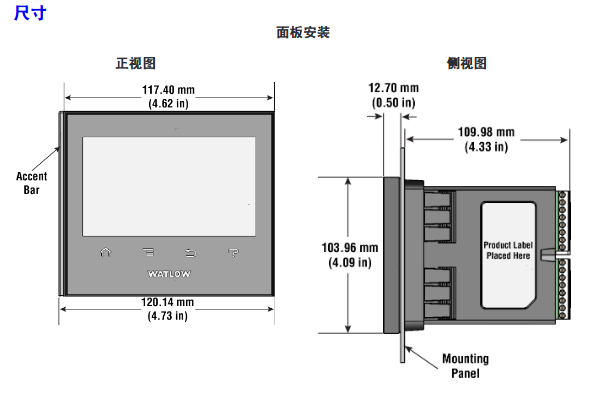
Panel installation hole size: 117.40mm (width) × 120.14mm (height); The fixing ring should be tightly attached to the panel to ensure an IP65 seal
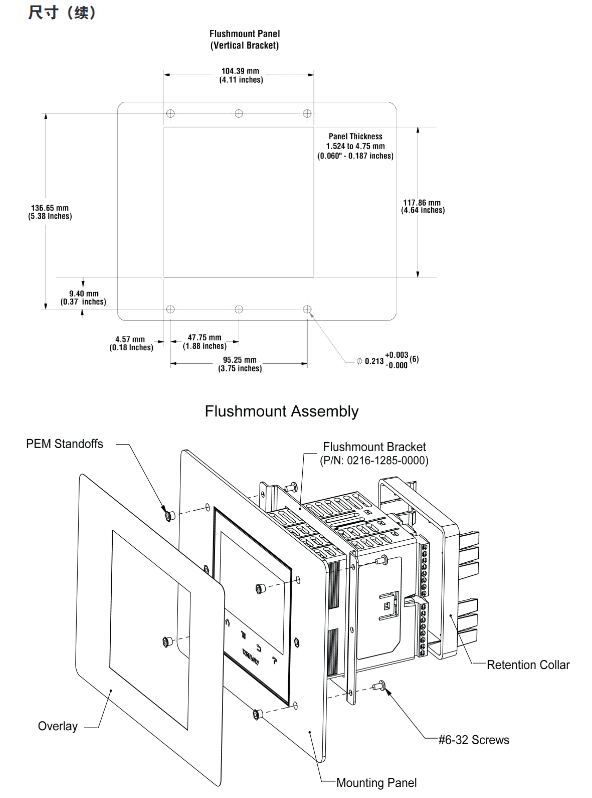
Embedded installation requires PEM nut posts (such as S0-632-6 Z1 galvanized steel); The bracket is fixed with 6 # 6-32 screws, and the front panel needs to be covered
Install through the wall with a hole of 178 × 122mm; install the heat sink vertically, leaving a ventilation space of ≥ 102mm above and below
2. Terminal wiring requirements
Input terminal:
Wire diameter: 0.0507~3.30mm ² (30~12 AWG), double wire termination ≤ 1.31mm ² (16 AWG)
Torque: 0.57Nm (5.0 lb in), wire stripping length 5.5mm
Wire/load/ground terminal:
Wire diameter: 2.5~25mm ² (14~3 AWG)
Torque: 2.7Nm (24 lb in), wire stripping length 11mm; re tighten after 48 hours, every 3-6 months
Power wiring: Terminals 98 (+) and 99 (-) should follow NEC or local electrical regulations to avoid parallel wiring with power lines
3. Installation of Elastic Module (FM)
Slot dependency rules:
The communication module (FMCA series) can only be installed in slot 6;
The high-density dual SSR module (FMHA-KAAA) requires 2 adjacent slots and cannot be placed in slots 3/6;
The module needs to be inserted with the component side facing right, and the key design prevents reverse installation.
Module identification: Confirm the part number through the black label in the lower right corner of the connector (e.g. FMMA-UKAA-AAA is 1 universal input+1 SSR output).
Input/output wiring and module specifications
1. Input wiring (some key types)
Input type wiring requires accuracy and range
Connect the negative electrode (red wire) of the thermocouple to the S terminal; The compensating wire should be made of the same alloy as the thermocouple; Input impedance>20M Ω J-type: ± 1.75 ℃ (0~750 ℃); K-type: ± 2.45 ℃ (-200~1250 ℃)
RTD (Platinum) 2-wire/3-wire, 3-wire self compensating ≤ 10 Ω lead resistance; S1 (white line) connected to R1 100 Ω (0 ℃): ± 2.00 ℃ (-200~800 ℃); 1000Ω(0℃):±2.00℃(-200~800℃)
Digital input voltage input: ≤ 36V (3mA), ≥ 3V (0.25mA) activated; Dry contact: ≤ 100 Ω activated, ≥ 500 Ω inactive update rate 10Hz; maximum short-circuit current 13mA
Current transformer input 0~50mAac; Requires Watlow 16-0246 module; The load line needs to pass through the CT in the same direction with a response time of ≤ 1 second; Accuracy ± 1mA
2. Output wiring (some key types)
Output type wiring requirements specification parameters
Mechanical relay 240Vac/30VDC, 5A resistance load; Minimum 20mA load at 24V; When connecting Quencac (0804-0147-0000) 120/240Vac across coils, a guiding power of 125VA is required; Rated load 100000 cycles
Solid state relay (SSR) 24~264Vac, 0.5A at 149 ° F (65 ℃), 1A at 50 ° F (10 ℃); only AC load optically isolated; The maximum off state leakage current is 105 μ A; 20VA guidance power at 120/240Vac
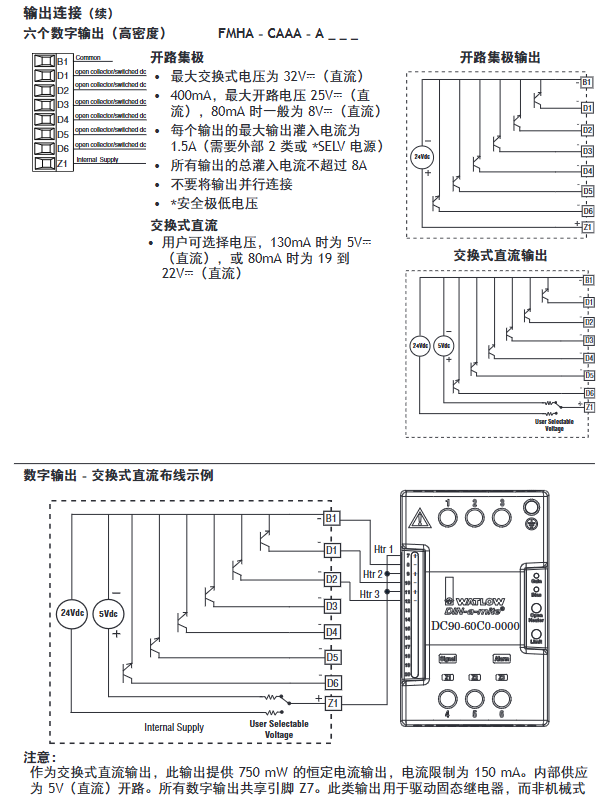
Switching DC 22~32VDC open circuit voltage; 2 output combination current ≤ 40mA; when driving external SSR, connect to DC+/DC - short circuit limit<50mA; DIN-A-MITE compatible
Universal process output 0~10Vdc (minimum load of 1k Ω) or 0~20mA (maximum load of 800 Ω); Voltage/current output accuracy of ± 15mV (voltage)/± 30 μ A (current) cannot be used simultaneously; Temperature stability 100ppm/℃
Calibration and PC connection
1. Calibration operation
Calibration prerequisite: Accurate signal source is required (such as thermocouple 0.000~50.00mV, RTD 50.0~350.0 Ω). It is recommended to first verify whether the error exceeds the specifications (such as thermocouple ± 1.75 ℃).
Operation method:
Composer software: Connect device → Device menu → Calibration → Select module/input → Enter 2 limit values as prompted;
Front panel: Menu → Service → Calibration → Select module/input → Perform on-site calibration.
Notes:
The calibration values will be reset to factory settings and cleared;
3-wire RTD calibration requires cross connection of R, T, and S inputs;
The security settings are divided into "full access/read only/no access", and without access permission, the calibration screen cannot be accessed.
2. PC connection and Composer software
Ethernet settings:
Default parameters: IP 192.168.0.222, subnet 255.255.255.0, gateway 0.0.0.0;
DHCP connection: F4T is connected to the switch, and the DHCP server automatically assigns an IP address;
Fixed IP connection: PC is directly connected to F4T, and the first three segments of PC IP are consistent with F4T (such as 192.168.0. XXX).
Composer software:
Function: Configure elastic module (check if slot module matches), customize function block (alarm/timer/mathematical operation);
Troubleshooting and Maintenance
1. Common faults and solutions (partial)
Possible causes and solutions for the fault phenomenon
Alarm cannot be cleared/reset. 1. Alarm latch activation; 2. Alarm source setting error 1. Reset when the process is within range; 2. Select the correct input instance
No serial communication 1. Address/baud rate mismatch; 2. EIA-485 wiring error 1. Unified device protocol parameters; 2. T+/R+connected to B, T -/R - connected to A
Temperature runaway (overshoot/undershoot): 1. Thermoelectric dipole polarity reversal; 2. Heater short circuit: 1. Connect the red wire to the S terminal; 2. Replace the heater/repair the wiring
No display 1. Power off; 2. The fuse is open circuit; 3. Voltage error: 1. Check the circuit breaker/interlock; 2. Replace the fuse; 3. Confirm 24/240Vac
The process cannot reach the set point 1. The controller is not tuned; 2. Set the control mode to "off". 1. Perform automatic tuning; 2. Set as "PID" or "on-off"
2. Battery replacement
Battery specifications: Model BR2032 (Watlow part number 0830-0858-0000), nominal voltage 3V, lifespan of 10 years at 77 ° F (25 ℃), and replacement time of 7.5 years in harsh environments.
Replacement steps:
Turn off all power sources of F4T;
Use a small screwdriver to push out the battery holder from the side hole and remove the old battery (note the polarity clearly);
Insert the positive pole of the new battery to the left and reset the battery holder;
It is recommended to recycle used batteries and not dispose of them casually.
Model ordering rules (example: F4T11A1A1AA)
Example of optional values for field meanings
The first and second product series F4=T series controller
3rd basic type T=touch screen
4th application type 1=Standard, X=Custom
The 5th future option A=none, J=data record
6th power supply and connector 1=100~240Vac right angle connector (with identification)
The 7th and 8th bits of the configuration file and function block AA=no configuration file+basic function block
Customization options for positions 9-15 (connector/firmware/document) 1A=including DVD document+gray personalized border
Key issues
Question 1: What are the types of elastic modules (FM) for F4T controllers? What are the different types of core functions and slot installation rules?
Answer:
Types and core functions of elastic modules:
Hybrid I/O module (FMMA series): includes 1 universal input (supporting thermocouple/RTD/0~10V/0~20mA)+1 output (such as SSR, mechanical relay, switched DC), used for conventional temperature acquisition and load control, such as FMMA-UKAA-AAA (1 universal input+1 SSR output);
Restriction module (FMLA series): used for safety interlock control, including 1 input (universal/thermistor)+1-2 outputs (such as C-shaped relay, supporting normally closed interlock), such as FMLA-LCJ-AAA (restriction control with universal input+switched DC output);
High density I/O module (FMHA series): integrates multiple inputs/outputs, such as FMHA-RAAA-AAA (4 universal inputs), FMHA-JAAA-AAA (4 mechanical relay outputs), suitable for multi-channel acquisition and control scenarios;
Communication module (FMCA series): Only supports Modbus RTU protocol (EIA-232/485), used for serial communication between the controller and PLC/PC, such as FMCA-2AA-AAA.
Slot installation rules:
Exclusive slot: The communication module (FMCA series) can only be installed in slot 6 and cannot be recognized in other slots;
Multi slot requirement: Some high-density modules (such as dual SSR output FMHA-KAAA) require 2 adjacent slots and cannot be placed in slot 3 (single slot design);
Keying error prevention: The module has a keying structure and cannot be inserted upside down. The component side should face right (when viewed from the back of the controller);
Label requirement: After installation, slot number labels should be affixed to the module and junction box to avoid controller failure caused by inserting the wrong slot during replacement.
Question 2: How to correctly wire the thermocouple input of F4T controller? What steps should be followed when calibrating thermocouple inputs?
Answer:
Requirements for correct wiring of thermocouples:
Polarity differentiation: The negative lead of a thermocouple is usually red and must be connected to the S terminal (signal negative) of the module, while the positive lead is connected to the R terminal (signal positive). Reversing the connections can result in incorrect temperature readings;
Compensation wire: It is necessary to use a compensation wire made of the same alloy as the thermocouple (such as K-type compensation wire for K-type) to reduce the influence of ambient temperature on readings;
Insulation requirements: The input impedance of the thermocouple should be greater than 20M Ω, and the maximum source resistance should be 2k Ω. When wiring, it is necessary to avoid parallel wiring with the power line to prevent electromagnetic interference;
Open circuit detection: The module has a built-in 3 μ A open circuit sensor for detection. If the wiring is open, it will trigger an "incorrect input" alarm.
Thermocouple input calibration steps (using Composer software as an example):
Preparation equipment: high-precision millivolt signal source (if able to output 0.000~50.000mV), copper wire (to minimize wiring error), voltage/ohmmeter (to verify the accuracy of the signal source);
Software connection: Start Composer → Connect F4T (enter IP 192.168.0.222) → Enter "Device menu → Calibration";
Select channel: Select the module where the thermocouple is located and the input channel (such as input 1 of slot 1) in the "pluggable module";
Enter calibration value:
Input the lower limit signal (such as 0.000mV, corresponding to 0 ℃) to the module, enter the actual signal value in the software, and click "Calibrate Lower Limit";
Input the upper limit signal (such as 50.000mV, corresponding to approximately 1200 ℃, depending on the thermocouple type), input the actual value, and click "Calibrate Upper Limit";
Verification and saving: After calibration, input the intermediate value (such as 25.000mV) to the module, confirm that the displayed value and actual value error are ≤ specifications (such as J-type ± 1.75 ℃), and save the calibration data;
Attention: If the factory settings are restored after calibration, the calibration values will be cleared; The calibration of a 3-wire RTD requires crossing the R, T, and S terminals, and the lead resistance should be ≤ 10 Ω.
Question 3: What are the possible reasons for the F4T controller experiencing a "temperature runaway (continuous increase after process value overshoot)" fault? What are the corresponding troubleshooting and resolution steps?
Answer:
Possible reasons:
Output function setting error (such as heating output set to cooling);
Reverse wiring of thermocouple/RTD (e.g. thermocouple red wire connected to positive electrode, RTD S1 not connected to R1);
Controller output wiring error (such as SSR output L1/L2 reversed);
Heater or wiring short circuit (causing continuous power supply to the load);
Power controller connection defects (such as DIN-A-MITE and F4T signal interruption, unable to turn off the load);
The control algorithm is set to "on-off" and the hysteresis is too large (causing the heating to not stop in time).
Troubleshooting and resolution steps:
Check the output function settings:
Front panel: Menu → Settings → Output → Select the corresponding output channel, confirm that the "Function Type" is "Heating" (not "Cooling");
If there is an error, modify it to the correct type and restart the controller to take effect;
Verify sensor wiring:
Thermocouple: Disconnect the wiring, confirm that the red wire (negative electrode) is connected to the S terminal, the positive electrode is connected to the R terminal, and if the wiring is reversed, reconnect it;
RTD: 3 wire type needs to confirm S1 (white wire) connected to R1, T1 connected to S2, lead resistance ≤ 10 Ω (measured with an ohmmeter);
Check the output wiring and load:
After the power is cut off, use a multimeter to check the on/off switch of the heater wiring. If there is a short circuit, replace the heater;
Check SSR/relay output: output 100% power to the controller, measure the output terminal voltage (such as 240Vac), and the voltage should disappear after power failure. If there is continuous voltage, replace the SSR/relay;
Verify power controller connection:
If using a DIN-A-MITE power controller, check the signal lines between F4T and DIN-A-MITE (such as switched DC output) to ensure that there is no looseness/disconnection and that the signal can trigger DIN-A-MITE shutdown normally;
Adjust control algorithm:
If it is "on-off" control: menu → control → algorithm → change to "PID", execute automatic tuning (TRU-TUNE) ®+), Reduce overshoot;
If PID overshoot occurs: adjust the proportional band (increase) or integral time (extend) to reduce response speed;
Test validation:
Power on again, set the target temperature (such as 100 ℃), observe whether the process value stabilizes within the set point ± accuracy range (such as ± 1 ℃), and if it still loses control, troubleshoot the controller output hardware (such as replacing the output module).
- OMRON
- ABB
- General Electric
- EMERSON
- Honeywell
- HIMA
- ALSTOM
- Rolls-Royce
- MOTOROLA
- Rockwell
- Siemens
- Woodward
- YOKOGAWA
- FOXBORO
- KOLLMORGEN
- MOOG
- KB
- YAMAHA
- BENDER
- TEKTRONIX
- Westinghouse
- AMAT
- AB
- XYCOM
- Yaskawa
- B&R
- Schneider
- KONGSBERG
- NI
- WATLOW
- ProSoft
- SEW
- ADVANCED
- Reliance
- TRICONEX
- METSO
- MAN
- Advantest
- STUDER
- DANAHER MOTION
- Bently
- Galil
- EATON
- MOLEX
- DEIF
- B&W
- ZYGO
- Aerotech
- DANFOSS
- Beijer
- Moxa
- Rexroth
- Johnson
- WAGO
- TOSHIBA
- BMCM
- SMC
- HITACHI
- HIRSCHMANN
- Application field
- XP POWER
- CTI
- TRICON
- STOBER
- Thinklogical
- Horner Automation
- Meggitt
- Fanuc
- Baldor
- SHINKAWA
- Other Brands
- UniOP
- KUKA
- Iba
- Beckhoff
- ADLINK
-
 Sigmatek MDD111-1 DIAS Drive Axis Module
 -
 Sigmatek DKL042 05-024-042 Terminal Module
 -
 Sigmatek DM822 Control Module
 -
 Sigmatek CDM167 12-008-167-O Module
 -
 Sigmatek TAE151 Touch Display Unit
 -
 Sigmatek DCC041 SLIDES Module 05-700-041-D
 -
 Sigmatek AKM65M-ANC2GBB0 PM Servo Motor
 -
 Sigmatek ETT221 01-230-221 Operator Terminal
 -
 Sigmatek SLIDES DAM 124 Analog Module
 -
Sigmatek AKM31C-ANCNGBB0 Servo Motor
-
 Mannesmann Demag Sigmatek CP626 Central Unit
 -
 SIGMATEK 0332.554.03 Board 371071000154
 -
 SIGMATEK 12-250-021 Base Plate Back Panel CM5V020
 -
 SIGMATEK DM162 S-DIAS Digital Mix Module
 -
 DEMAG ERGOTECH 061 381 66 Sigmatek 9842.243.02 Circuit Board
 -
 SIGMATEK CP313-1 PLC Module
 -
Sigmatek ETV0551-2 VARAN Touch Terminal
-
 Sigmatek SDM 081 FS S-Dias Safety Module
 -
 DEMAG 05-250-023 Ergotech Motherboard with Sigmatek TMS012
 -
Sigmatek CM5V020 12-250-023-K Wiring Base
-
 Sigma Tek 5000B-37 Attitude Gyro Indicator
 -
 Sigmatek SDD120-2 DIAS Drive
 -
 Sigmatek CME221 Memory Module
 -
 Sigmatek DCP640 DIAS Central Unit
 -
 Sigmatek STO040 Safety Output Module
 -
Sigmatek CET281 Control Panel
-
 Sigmatek CIPC LX800 Demag NC5 CPU
 -
 Sigmatek DKL093 05-024-093 Terminal Module
 -
 Sigmatek AI088 20-009-088 Analog Input Module
 -
Sigmatek CAI888 Analog Input Module
-
SIGMATEK CCA021 12-025-021 Analog Output Module
-
SIGMATEK 1104.579.05 Control Module
-
SIGMATEK SDI100 Digital Input Module
-
 SIGMATEK C-IPC 256MB LX800 Compact Dias
 -
 SIGMATEK 9423.090.02 Control Module
 -
SIGMATEK C-IPC 256 Power Supply 148498
-
 SIGMATEK CAI025 Analog Input Module
 -
 SIGMATEK CTO166 Digital Output Module
 -
 SIGMATEK CP112 20-004-112 Processor Module
 -
SIGMATEK CAI887 12-009-887 Safety Module
-
 Sigma-Tek 4000B-31 Directional Gyro 1U262-002-42
 -
Sigmatek C-IPC 256MB LX800 IPC Controller
-
Sigmatek C-IPC 01-450-031 Industrial PC LX800
-
Sigmatek C-IPC 256 Industrial PC Controller
-
Sigmatek CCP-531 PLC Processor Module
-
Sigmatek CDI163 Digital Input Module
-
 Sigmatek ETV0501 VARAN Terminal 12-230-0501
 -
 Sigmatek CTMS020 C-DIAS Technology Module
 -
 Sigmatek CIV512 VARAN Switch Module
 -
 Sigmatek HU011 20-080-011 Interface Module
 -
SIGMATEK SLIDES DAM 124 Module
-
 SIGMATEK C-IPC 161 01-450-161L Industrial PC
 -
SIGMATEK C-IPC 128MB VIA 733MHz 01-450-024-K
-
 SIGMATEK 12-780-012 R8-IPC Geode LX800 Module
 -
SIGMATEK CAM124 Analog Module
-
 SIGMATEK S1 032-8AF61-R4 EZ Servo Motor
 -
 SIGMATEK CTO163 Digital Output Module
 -
 SIGMATEK CCP082 12-004-082 Processor Module
 -
 SIGMATEK CRCH081 C-DIAS Temperature Module
 -
 SIGMATEK PC322-K 01-310-322-K Industrial PC
 -
SIGMATEK SDD310-2 Servo Drive
-
 SIGMATEK AI084 Analog Input Module
 -
SIGMATEK CRCH081 12-752-081 Temperature Module
-
Sigma-Tek 5000L-4 Attitude Gyro 1U284-001-3
-
 SIGMATEK CM5V020 12-250-023-K Wiring Module
 -
Sigma-Tek 4000H-6 Directional Gyro IU262-035-7
-
 SIGMATEK Dias DCP160 05-004-160 Processor Module
 -
SIGMATEK 0147.395.02 Control Module
-
SIGMATEK A1084 Control Module
-
SIGMATEK DI200 20-006-2000 Digital Input Module
-
Sigmatek DNC115 Encoder Module
-
 Sigmatek DAM122 05-017-122 Analog Module
 -
Sigmatek 9802.289.01 Control Board TA71 Display
-
Sigmatek TO127 20-007-127 Digital Output Module
-
Sigmatek DNC031 05-011-031 Digital Module
-
Sigmatek VI022 20-003-022 Interface Module
-
Sigmatek CAI085 Analog Input Module
-
 Sigmatek CP111 S-DIAS CPU Module
 -
Sigmatek CTMS030 Krauss Maffei Module
-
 Sigmatek CAM123 Control Module
 -
 Sigmatek TAE732-P 01-240-732-P Touch Display Unit
 -
Sigmatek MDM021 Digital Mixed Module
-
Sigmatek DCP642 DIAS Central Unit
-
 Sigmatek CST022 12-014-022 C-DIAS Module
 -
 Sigmatek SRO021 20-893-021 Safety Relay Output
 -
 Krauss Maffei MC5 Control System Sigmatek
 -
 Sigmatek DC061 Module 18-24VDC 300mA
 -
 Herrmann EVT0855 Ultrasonic Welder Touch Panel
 -
Sigmatek CIV521 Control Module 1.4A 2W
-
Sigmatek DDI61 05-006-161 Digital Input Module
-
SIGMATEK ETT312-E Touch Terminal 01-230-312
-
Cessna S3326-1 Sigma Tek 5000B-67 Gyro 1U149-015-9
-
SIGMATEK PS101 Power Supply Module
-
SIGMATEK 0332.554.03 Control Module 371071000154
-
 SIGMATEK ETT312-E Touch Terminal 01-230-312
 -
SIGMATEK CDM163 Control Module
-
 SIGMATEK VSV046 16-023-046 Module
 -
SIGMATEK AM221 20-017-221 Analog Module
-
SIGMATEK CTS051 12-053-051 Control Module
-
SIGMATEK AM221 20-017-221 Analog Module
-
Sigmatek CSDI161 12-891-161 Safety Input Module
-
Sigma Tek 4000C-1 Directional Gyro Indicator
-
Sigmatek ETV0501 12-230-0501 VARAN Terminal
-
Sigmatek DDM165 SLIDES Module
-
Sigmatek N100 20-011-100 Control Module
-
Sigmatek AKM54K-ANC2R-B0 PM Servo Motor
-
Sigmatek CTO166 Digital Output Module
-
Sigmatek CP212-K 20-004-212-K CPU Module
-
Sigmatek CDI161 Digital Input Module
-
Sigmatek DCC080 05-700-080-2 Control Module
-
 SIGMATEK SCP011 S-DIAS Safety CPU
 -
SIGMATEK SCP011 S-DIAS Safety CPU
-
SIGMATEK SRO022 Relay Output Module
-
SIGMATEK MDD 121 Drive Axis Module
-
SIGMATEK DSI021 SLIDES Siemens Interface
-
SIGMATEK DIAS DCP161 Module 05-004-161
-
 Sigmatek ETT312 Built-in Touch Terminal
 -
SIGMATEK DCP 643 DIAS Controller System
-
SIGMATEK CIO021 Multi I/O Module
-
SIGMATEK CTMS020 Control Module
-
 Sigmatek CME 221 Memory Module
 -
Sigmatek 0420.615.01 Control Board
-
Sigmatek CP111 20-004-111 CPU Module
-
Sigmatek 9405.065.03 Control Board
-
Sigmatek ETEK 01-450-032-K C-IPC 256MB Industrial PC
-
Sigmatek CTO163 12-007-163 Safety Output Module
-
Sigmatek TO081 20-007-081 Digital Output Module
-
 Sigmatek SI021 20-022-021 Safety Input Module


