
YOKOGAWA FCN/FCJ Autonomous Controller
YOKOGAWA FCN/FCJ Autonomous Controller
GENERAL
This document describes the system configurations, development/maintenance, software configurations, network and specifications, for two types of autonomous controllers in the STARDOM: FCN with NFCP100 CPU module and FCJ. (FCN is an acronym for field control node, and FCJ for field control junction.)
Notation in this document:
• The term “FCN” refers to the module consisting type autonomous controllers.
• The term “FCN-500” refers to the autonomous controllers with NFCP501/NFCP502 CPU module.
• The term “FCN-100” refers to the autonomous controllers with NFCP100 CPU module.
• The term “FCN-RTU” refers to the low power autonomous controllers with NFCP050 CPU module.
• The term “FCJ” refers to the all-in-one type autonomous controllers.
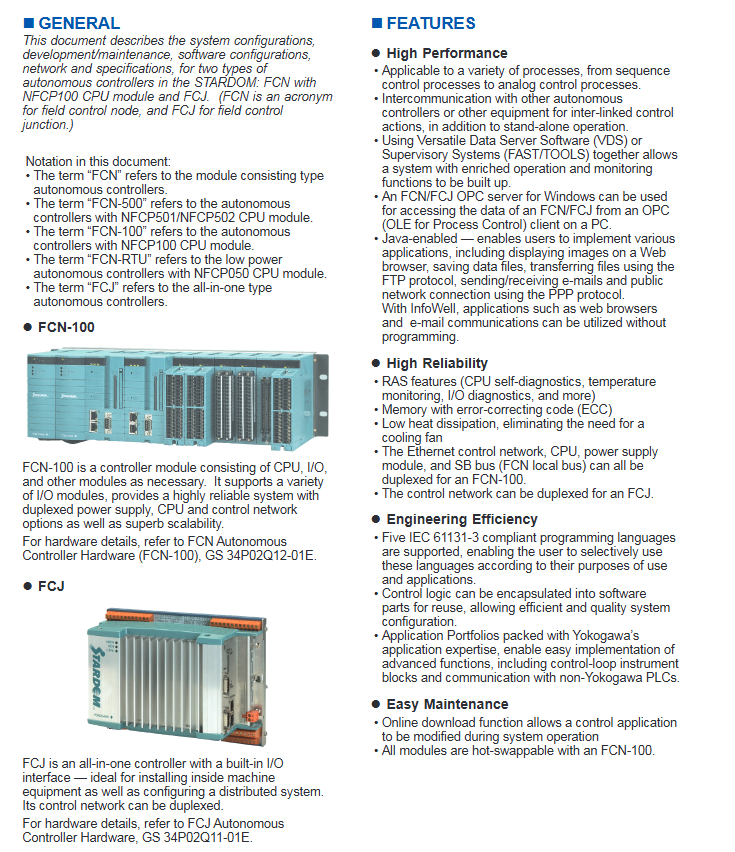
FCN-100
FCN-100 is a controller module consisting of CPU, I/O, and other modules as necessary. It supports a variety of I/O modules, provides a highly reliable system with duplexed power supply, CPU and control network options as well as superb scalability.
For hardware details, refer to FCN Autonomous Controller Hardware (FCN-100), GS 34P02Q12-01E.
FCJ
FCJ is an all-in-one controller with a built-in I/O interface — ideal for installing inside machine equipment as well as configuring a distributed system. Its control network can be duplexed. For hardware details, refer to FCJ Autonomous Controller Hardware, GS 34P02Q11-01E.
FEATURES
l High Performance
• Applicable to a variety of processes, from sequence control processes to analog control processes.
• Intercommunication with other autonomous controllers or other equipment for inter-linked control actions, in addition to stand-alone operation.
• Using Versatile Data Server Software (VDS) or Supervisory Systems (FAST/TOOLS) together allows a system with enriched operation and monitoring functions to be built up.
• An FCN/FCJ OPC server for Windows can be used for accessing the data of an FCN/FCJ from an OPC (OLE for Process Control) client on a PC.
• Java-enabled — enables users to implement various applications, including displaying images on a Web browser, saving data files, transferring files using the FTP protocol, sending/receiving e-mails and public network connection using the PPP protocol.
With InfoWell, applications such as web browsers and e-mail communications can be utilized without programming.
High Reliability
• RAS features (CPU self-diagnostics, temperature monitoring, I/O diagnostics, and more)
• Memory with error-correcting code (ECC)
• Low heat dissipation, eliminating the need for a cooling fan
• The Ethernet control network, CPU, power supply module, and SB bus (FCN local bus) can all be duplexed for an FCN-100.
• The control network can be duplexed for an FCJ.
Engineering Efficiency
• Five IEC 61131-3 compliant programming languages are supported, enabling the user to selectively use these languages according to their purposes of use and applications.
• Control logic can be encapsulated into software parts for reuse, allowing efficient and quality system configuration.
• Application Portfolios packed with Yokogawa’s application expertise, enable easy implementation of advanced functions, including control-loop instrument blocks and communication with non-Yokogawa PLCs.
Easy Maintenance
• Online download function allows a control application to be modified during system operation
• All modules are hot-swappable with an FCN-100.
CONFIGURATIONS
System Configurations
Both FCN and FCJ are locally mounted controllers to allow diverse systems to be configured according to the individual users’ work sites; however, the possible system configurations can be broadly divided into three types:
• A system consisting of a standalone FCN or FCJ
• A system in which FCNs and/or FCJs are connected to each other through the control network and perform interlinked actions (up to a total of 15 FCNs and FCJs can intercommunicate with one FCN/FCJ).
• A system in which one or more FCNs and/or FCJs are interlinked with VDS, FCN/FCJ OPC Server or FAST/TOOLS (up to a total of 4 VDSs, FCN/FCJ OPC Servers and FAST/TOOLS can be connected).
Using a communication portfolio within an Application Portfolio allows an FCN/FCJ to communicate with other kinds of controllers and devices.
Development and Maintenance of FCN/FCJ
Figure Development and Maintenance of FCN/FCJ A PC/AT-compatible computer is used for development and maintenance of applications for an FCN and FCJ. Resource Configurator is a tool program to be installed in the computer used for maintenance, and is used to make the FCN/FCJ hardware settings.
The user can access FCN and FCJs via a Web browser from a PC to make detailed settings for the network and so on, and to perform maintenance operations such as database backup and restoration.
Logic Designer is a tool program for the development of control applications for an FCN/FCJ. Logic Designer requires a license to run.
These tool programs are supplied on a DVD-ROM.
SPECIFICATIONS
CPU Function Specifications
Execution Speed:Approx. 50 µs per kilosteps in an IL program
Number of Control Applications: Max. 16 tasks
Task Priority: Can be specified (in 16 levels)
Task Execution Cycle: 10 ms or longer (by 10 msec. increments)
CPU Memory Capacity
Control Application Capacity:Max. 3 MB (approx. 400 kilosteps in an IL program)
Data Area (*1): Max. 8 MB
Retained Data Area (*2): Max. 410 KB (*3)
Java Application Capacity: Max. 32 MB
*1: The data is not retained when the power is off.
*2: The data is retained even if the power is off. The data is retained during a power failure (can be used to store tuning parameter settings for the control application).
*3: Retained Data Area for control application is Max 350 KByte.
System Card Specifications for FCN/FCJ
| System Card for FCN/FCJ | 128 MByte type | type (*1) 512 MByte | | System program size | 32 Mbyte | | User application size (*2) | 96 MByte | 480 MByte |
*1: Use of a 512-MB system card is recommended in order to implement a Java application such as InfoWell for saving data in the FCN/FCJ system card.
*2: User application size is the total file size of control application, Java application, and data. The file size of control applications is up to 10 Mbyte.
Network (Ethernet) Specifications Application
Ethernet is used as the control network, which can be dual redundant, connecting FCNs/FCJs with various PLCs, display units and VDS. FCNs/FCJs are developed and maintained via Ethernet as well.
Communication Specifications
| Connection Destination | Maximum Connections | Remarks | | VDS | 4 | Total of VDSs, FCN/FCJ OPC Servers and FAST/TOOLS | | FCN/FCJ OPC Server | | FAST/TOOLS | | FCN/FCJ | 15 | Number of FCNs/FCJs as connection destinations (*1) | | PLC | 32 | Number of various PLCs such as FA-M3s or MELSECs (*1) |
*1: Number when assigning the destinations one channel each
Note: Compliant with IEEE802.3
Note: For system network configuration and network load, refer to TI 34P02K25-01E “STARDOM Network Configuration Guide.”
Network (Serial) Specifications
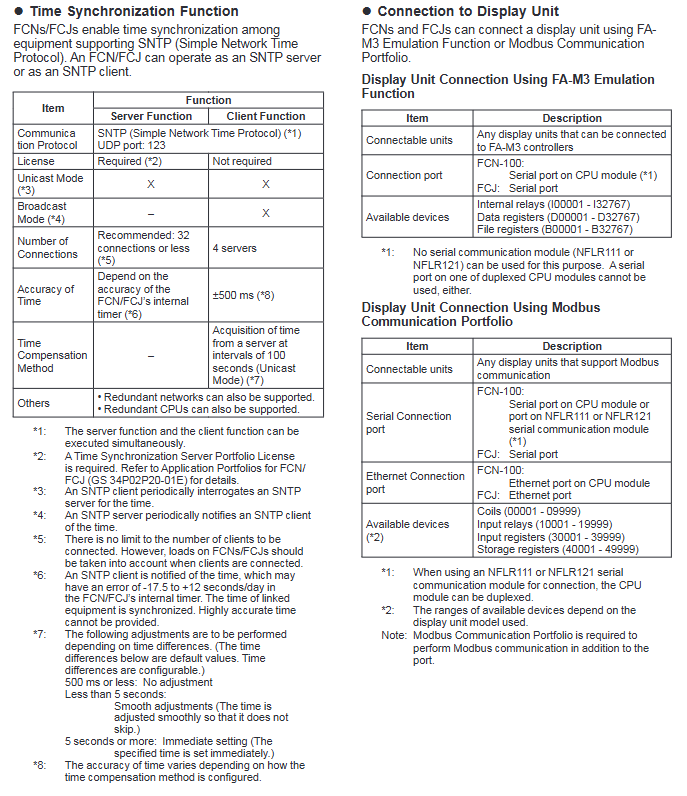
Serial ports can be used to link diverse devices and controllers. Communication portfolios facilitating interconnection with display units, various programmable logic controllers, temperature controllers, and power monitors are available via a serial port.
Specifications
• FCJ: two ports (RS-232-C)
• FCN-100:CPU module: one port (RS-232-C) (*1) serial communication module:two ports per module(RS-232-C or RS-422/RS-485) (*2)
Guideline of Control Application Capacity
As a guideline, the capacity of the control application is a total of the following.
(1) Function blocks (POUs)
• Regulator control blocks (e.g., indicator blocks, controller blocks, and manual loaders): Up to 128
• Others (e.g., calculation blocks, switch instrument blocks, and communication POUs): Up to 384
(2) Sequence program
Up to 180 kilosteps in Ladder or up to 128 sequence tables each of which has 32 condition and 32 action rows.
Example of a control application with the maximum size:
• Inputs/outputs: 96 AIs, 32 AOs, 256 DIs, and 256 DOs
• PID loops: 32
• Sequence program: 128 sequence tables
• Control cycle: 1 second
Specification of FCN-100 with Duplexed CPU Modules
• After a failure of the CPU in service, the stand-by CPU obtains the control right instantaneously and resumes control without any influence of the CPU switchover.
• When additionally installing a CPU module to an FCN with a single CPU module to configure duplexed CPU modules, such as when replacing a failed CPU module, carry out the All-program-copy (APC) command for equalization between the CPU modules. It is also possible to run the APC command automatically after CPU replacement. When the APC command is running, the control period lengthens by a second or two only during its first cycle. (*1)
• Synchronization is periodically performed between the in-service CPU and stand-by CPU. The total processing time is hence longer than that of an FCN100 with single CPU.
• If the control application comprises multiple tasks, those tasks cannot access the same global variable.
• The CPU module’s serial port cannot be used.
• Java applications cannot be run.
*1: If one of the two CPUs in dual-redundant configuration is not style-3 NFCP100 CPUs, the APC command cannot be started automatically. In this case, control stops when the APC command is running and the I/O modules operate in the same way as they do when the Fallback option (can be set to ‘hold the output’ or ‘output specified values,’ for example) is selected.
Online Download Function
• Online download function is a feature with which control applications can be modified while a control function continues in operation.
• With this feature, I/Os, variables, data types, program codes, and libraries can be added, deleted or modified.
• Modifying the control loop during system operation does not affect other control loops. Changing a range of control loop or loop connection causes the control loop to become the MAN mode.
Implementation of Java Virtual Machine
• WWW server functionality:
download HTML files and Java applets to Web browsers and access data in FCN-100s and FCJs
• E-mail transmission/reception:
send and receive e-mail using SMTP and POP3 protocols, respectively
support the authentication function of SMTP servers (SMTP Authentication/Pop Before SMTP)
• FTP client/server functionality:
transfer files to/from other networking systems
• PPP (Point to Point Protocol) functionality: exchange data with a PC or a cellular phone via the public network such as GPRS by connecting a modem to a serial port of FCN/FCJ
support the client mode and the server mode unsupport FCN-100’s serial port on one of duplexed CPU modules
SOFTWARE
FCN-100 and FCJ can simultaneously run IEC 61131-3-compliant control applications and Java applications.
Licenses
The following licenses are required to run an FCN-100 and FCJ.
FCN/FCJ Basic Software License
Available in two editions: License for single-CPU FCN-100 and FCJ, and license for duplexed-CPU FCN-100.
To use the FCN/FCJ Java functions, enable Java in the FCN/FCJ application software. (See *1 below)
For dual-redundant CPUs, FCN/FCJ Java functions cannot be used.
FCN/FCJ Application Portfolio License
To use application portfolios for FCNs/FCJs, respective portfolio licenses are required.
For details, see Application Portfolios for FCN/FCJ, GS 34P02P20-01E.
Logic Designer
Logic Designer is a tool program that runs on a computer and is used for developing control applications as tasks for an FCN/FCJ.
For details, see Logic Designer, GS 34P02Q01-01E.
FCN/FCJ Simulator
The simulator is designed to run control applications, which are created using the Logic Designer, on a general-purpose PC. This simulator enables users to debug control applications without using an FCN/FCJ.
Resource Configurator
Resource Configurator is a tool program that runs on a computer and is used for making basic settings in an FCN/FCJ, including:
• IP address settings
• I/O module settings
• License settings
• Initial communication settings
Note: Resource Configurator is included in the supplied media (DVD-ROM) containing the FCN/FCJ software, and does not require a license to run.
Application Portfolios
An Application Portfolio is a bundle of useful software parts for FCN/FCJ, such as those for advanced control. Application Portfolios are offered as:
For control logic:
PAS Portfolio
SAMA Portfolio
For communication:
FA-M3 Communication Portfolio
MELSEC Communication Portfolio
SYSMAC Communication Portfolio
Modbus Communication Portfolio
DNP3 Communication Portfolio
Temperature Controller Communication Portfolio and many more multifunctional portfolios. For details, see Application Portfolios, GS 34P02P20-01E.
FCN/FCJ Java Application Development Kit
The FCN/FCJ Java Application Development Kit is software for developing Java software applications which run on the FCN-100 or FCJ. For more details, refer to FCN/FCJ Java Application Development Kit, GS 34P02Q76-01E.
InfoWell
InfoWell is designed to transfer control application data from FCN/FCJ via web screens or e-mail. This package does not require programming and enables data transfer via web screens or e-mail by simple settings. For details, see InfoWell, GS 34P02P51-01E.
l FCN/FCJ IT Security Tool
This IT Security Tool sets IT security compliant with other Yokogawa system products security policy. FCN/FCJ engineering tools support IT security.
Note: The IT Security is not available either for Domain Management or for Combination Management in CENTUM VP.
Counter Measure against Wide Area Network connection
It is necessary to install VPN and/or firewall as a counter measure against network risk from Wide Area Network connection. For details, refer to STARDOM Network Configuration Guide, TI 34P02K25-01E.
- OMRON
- ABB
- General Electric
- EMERSON
- Honeywell
- HIMA
- ALSTOM
- Rolls-Royce
- MOTOROLA
- Rockwell
- Siemens
- Woodward
- YOKOGAWA
- FOXBORO
- KOLLMORGEN
- MOOG
- KB
- YAMAHA
- BENDER
- TEKTRONIX
- Westinghouse
- AMAT
- AB
- XYCOM
- Yaskawa
- B&R
- Schneider
- KONGSBERG
- NI
- WATLOW
- ProSoft
- SEW
- ADVANCED
- Reliance
- TRICONEX
- METSO
- MAN
- Advantest
- STUDER
- DANAHER MOTION
- Bently
- Galil
- EATON
- MOLEX
- DEIF
- B&W
- ZYGO
- Aerotech
- DANFOSS
- Beijer
- Moxa
- Rexroth
- Johnson
- WAGO
- TOSHIBA
- BMCM
- SMC
- HITACHI
- HIRSCHMANN
- Application field
- XP POWER
- CTI
- TRICON
- STOBER
- Thinklogical
- Horner Automation
- Meggitt
- Fanuc
- Baldor
- SHINKAWA
- Other Brands
- UniOP
- KUKA
- Iba
- Beckhoff
- ADLINK
-
 Sigmatek MDD111-1 DIAS Drive Axis Module
 -
 Sigmatek DKL042 05-024-042 Terminal Module
 -
 Sigmatek DM822 Control Module
 -
 Sigmatek CDM167 12-008-167-O Module
 -
 Sigmatek TAE151 Touch Display Unit
 -
 Sigmatek DCC041 SLIDES Module 05-700-041-D
 -
 Sigmatek AKM65M-ANC2GBB0 PM Servo Motor
 -
 Sigmatek ETT221 01-230-221 Operator Terminal
 -
 Sigmatek SLIDES DAM 124 Analog Module
 -
Sigmatek AKM31C-ANCNGBB0 Servo Motor
-
 Mannesmann Demag Sigmatek CP626 Central Unit
 -
 SIGMATEK 0332.554.03 Board 371071000154
 -
 SIGMATEK 12-250-021 Base Plate Back Panel CM5V020
 -
 SIGMATEK DM162 S-DIAS Digital Mix Module
 -
 DEMAG ERGOTECH 061 381 66 Sigmatek 9842.243.02 Circuit Board
 -
 SIGMATEK CP313-1 PLC Module
 -
Sigmatek ETV0551-2 VARAN Touch Terminal
-
 Sigmatek SDM 081 FS S-Dias Safety Module
 -
 DEMAG 05-250-023 Ergotech Motherboard with Sigmatek TMS012
 -
Sigmatek CM5V020 12-250-023-K Wiring Base
-
 Sigma Tek 5000B-37 Attitude Gyro Indicator
 -
 Sigmatek SDD120-2 DIAS Drive
 -
 Sigmatek CME221 Memory Module
 -
 Sigmatek DCP640 DIAS Central Unit
 -
 Sigmatek STO040 Safety Output Module
 -
Sigmatek CET281 Control Panel
-
 Sigmatek CIPC LX800 Demag NC5 CPU
 -
 Sigmatek DKL093 05-024-093 Terminal Module
 -
 Sigmatek AI088 20-009-088 Analog Input Module
 -
Sigmatek CAI888 Analog Input Module
-
SIGMATEK CCA021 12-025-021 Analog Output Module
-
SIGMATEK 1104.579.05 Control Module
-
SIGMATEK SDI100 Digital Input Module
-
 SIGMATEK C-IPC 256MB LX800 Compact Dias
 -
 SIGMATEK 9423.090.02 Control Module
 -
SIGMATEK C-IPC 256 Power Supply 148498
-
 SIGMATEK CAI025 Analog Input Module
 -
 SIGMATEK CTO166 Digital Output Module
 -
 SIGMATEK CP112 20-004-112 Processor Module
 -
SIGMATEK CAI887 12-009-887 Safety Module
-
 Sigma-Tek 4000B-31 Directional Gyro 1U262-002-42
 -
Sigmatek C-IPC 256MB LX800 IPC Controller
-
Sigmatek C-IPC 01-450-031 Industrial PC LX800
-
Sigmatek C-IPC 256 Industrial PC Controller
-
Sigmatek CCP-531 PLC Processor Module
-
Sigmatek CDI163 Digital Input Module
-
 Sigmatek ETV0501 VARAN Terminal 12-230-0501
 -
 Sigmatek CTMS020 C-DIAS Technology Module
 -
 Sigmatek CIV512 VARAN Switch Module
 -
 Sigmatek HU011 20-080-011 Interface Module
 -
SIGMATEK SLIDES DAM 124 Module
-
 SIGMATEK C-IPC 161 01-450-161L Industrial PC
 -
SIGMATEK C-IPC 128MB VIA 733MHz 01-450-024-K
-
 SIGMATEK 12-780-012 R8-IPC Geode LX800 Module
 -
SIGMATEK CAM124 Analog Module
-
 SIGMATEK S1 032-8AF61-R4 EZ Servo Motor
 -
 SIGMATEK CTO163 Digital Output Module
 -
 SIGMATEK CCP082 12-004-082 Processor Module
 -
 SIGMATEK CRCH081 C-DIAS Temperature Module
 -
 SIGMATEK PC322-K 01-310-322-K Industrial PC
 -
SIGMATEK SDD310-2 Servo Drive
-
 SIGMATEK AI084 Analog Input Module
 -
SIGMATEK CRCH081 12-752-081 Temperature Module
-
Sigma-Tek 5000L-4 Attitude Gyro 1U284-001-3
-
 SIGMATEK CM5V020 12-250-023-K Wiring Module
 -
Sigma-Tek 4000H-6 Directional Gyro IU262-035-7
-
 SIGMATEK Dias DCP160 05-004-160 Processor Module
 -
SIGMATEK 0147.395.02 Control Module
-
SIGMATEK A1084 Control Module
-
SIGMATEK DI200 20-006-2000 Digital Input Module
-
Sigmatek DNC115 Encoder Module
-
 Sigmatek DAM122 05-017-122 Analog Module
 -
Sigmatek 9802.289.01 Control Board TA71 Display
-
Sigmatek TO127 20-007-127 Digital Output Module
-
Sigmatek DNC031 05-011-031 Digital Module
-
Sigmatek VI022 20-003-022 Interface Module
-
Sigmatek CAI085 Analog Input Module
-
 Sigmatek CP111 S-DIAS CPU Module
 -
Sigmatek CTMS030 Krauss Maffei Module
-
 Sigmatek CAM123 Control Module
 -
 Sigmatek TAE732-P 01-240-732-P Touch Display Unit
 -
Sigmatek MDM021 Digital Mixed Module
-
Sigmatek DCP642 DIAS Central Unit
-
 Sigmatek CST022 12-014-022 C-DIAS Module
 -
 Sigmatek SRO021 20-893-021 Safety Relay Output
 -
 Krauss Maffei MC5 Control System Sigmatek
 -
 Sigmatek DC061 Module 18-24VDC 300mA
 -
 Herrmann EVT0855 Ultrasonic Welder Touch Panel
 -
Sigmatek CIV521 Control Module 1.4A 2W
-
Sigmatek DDI61 05-006-161 Digital Input Module
-
SIGMATEK ETT312-E Touch Terminal 01-230-312
-
Cessna S3326-1 Sigma Tek 5000B-67 Gyro 1U149-015-9
-
SIGMATEK PS101 Power Supply Module
-
SIGMATEK 0332.554.03 Control Module 371071000154
-
 SIGMATEK ETT312-E Touch Terminal 01-230-312
 -
SIGMATEK CDM163 Control Module
-
 SIGMATEK VSV046 16-023-046 Module
 -
SIGMATEK AM221 20-017-221 Analog Module
-
SIGMATEK CTS051 12-053-051 Control Module
-
SIGMATEK AM221 20-017-221 Analog Module
-
Sigmatek CSDI161 12-891-161 Safety Input Module
-
Sigma Tek 4000C-1 Directional Gyro Indicator
-
Sigmatek ETV0501 12-230-0501 VARAN Terminal
-
Sigmatek DDM165 SLIDES Module
-
Sigmatek N100 20-011-100 Control Module
-
Sigmatek AKM54K-ANC2R-B0 PM Servo Motor
-
Sigmatek CTO166 Digital Output Module
-
Sigmatek CP212-K 20-004-212-K CPU Module
-
Sigmatek CDI161 Digital Input Module
-
Sigmatek DCC080 05-700-080-2 Control Module
-
 SIGMATEK SCP011 S-DIAS Safety CPU
 -
SIGMATEK SCP011 S-DIAS Safety CPU
-
SIGMATEK SRO022 Relay Output Module
-
SIGMATEK MDD 121 Drive Axis Module
-
SIGMATEK DSI021 SLIDES Siemens Interface
-
SIGMATEK DIAS DCP161 Module 05-004-161
-
 Sigmatek ETT312 Built-in Touch Terminal
 -
SIGMATEK DCP 643 DIAS Controller System
-
SIGMATEK CIO021 Multi I/O Module
-
SIGMATEK CTMS020 Control Module
-
 Sigmatek CME 221 Memory Module
 -
Sigmatek 0420.615.01 Control Board
-
Sigmatek CP111 20-004-111 CPU Module
-
Sigmatek 9405.065.03 Control Board
-
Sigmatek ETEK 01-450-032-K C-IPC 256MB Industrial PC
-
Sigmatek CTO163 12-007-163 Safety Output Module
-
Sigmatek TO081 20-007-081 Digital Output Module
-
 Sigmatek SI021 20-022-021 Safety Input Module


