
How to install and operate KBAC series adjustable frequency drive?
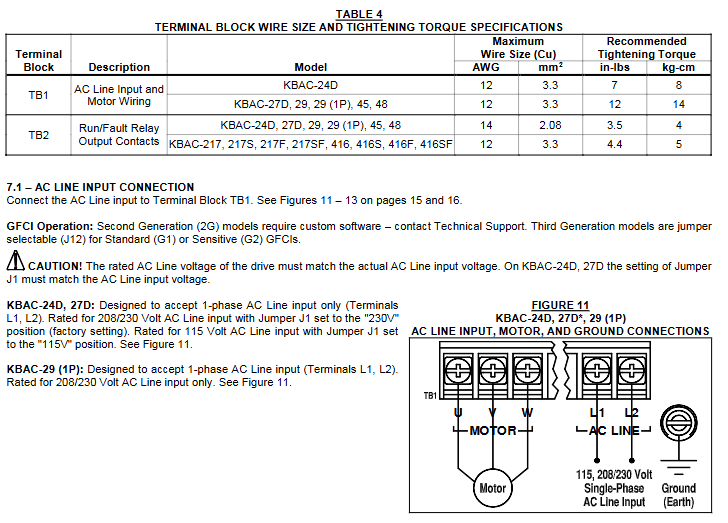
Other connections: including remote main speed potentiometer, remote start stop switch, automatic restart (requiring cancellation of start stop switch and hard wiring), voltage following (0-5V DC analog signal that needs to be isolated), enable circuit, operation/fault relay, etc., all have specific wiring methods and precautions.
(4) Bus capacitor repair
If the drive is stored for more than one year, it is necessary to apply AC input voltage in shutdown mode for at least 1 hour to repair the power bus capacitor, otherwise the capacitor may be damaged.
Operation and Debugging
(1) Start the program
After completing the jumper and fine adjustment potentiometer settings and wiring, connect the AC power supply, and the power (PWR) LED green light will turn on. Use the start stop switch to briefly place it in the "start" position to start the driver, and the motor will accelerate to the set speed. If the motor turns in the wrong direction, replace any two motor leads after powering off.
(2) Restart after malfunction
Drive monitoring includes five types of faults: undervoltage, overvoltage, motor short circuit, overload, and phase loss. After the faults are cleared, restart through the start stop switch; If the start stop switch is cancelled, the AC power supply needs to be disconnected and reconnected to restart. Partial faults (such as overvoltage) can be automatically restarted after the voltage returns to normal in automatic power-off recovery mode.
(3) Fine tuning potentiometer adjustment
Minimum speed (MIN): Factory set to 0% of the frequency setting, clockwise rotation can increase the minimum speed.
Maximum speed (MAX): Factory set to 100% of the frequency setting, counterclockwise/clockwise rotation can reduce/increase the maximum speed.
Acceleration (ACCEL): The factory setting is 1.5 seconds. Clockwise/counterclockwise rotation extends/shortens the acceleration time, and rapid acceleration may trigger the current limiting circuit to extend the acceleration time.
Decel: The factory setting is 1.5 seconds, and clockwise/counterclockwise rotation extends/shortens the deceleration time. In high inertia load applications, the deceleration time may be automatically extended. It is recommended to set the acceleration and deceleration time to 10 seconds or more for high inertia loads.
DECEL (Direct Current Injection Braking): Only when J7 is set to "INJ", this potentiometer is used to set the time for direct current to be applied to the motor. It is factory set to regenerative braking (J7 is set to "RG").
Slip Compensation (COMP): Factory set to 1.5 volts per hertz, clockwise/counterclockwise rotation increases/decreases slip compensation, and can be adjusted through specific steps to achieve speed stability under different loads.
Motor overload (I2t) and RMS current limit (CL): The factory setting is 160% of the rated current of the driver. Clockwise/counterclockwise rotation increases/decreases the current limit, which needs to be adjusted step by step and cannot exceed the rated current of the motor by 160% to avoid motor overheating.
Boost (BOOST): The factory setting is a fixed boost (J6 is set to "FIX"), which can be adjusted when J6 is set to "ADJ". It operates in the frequency range of 0-15Hz and needs to be adjusted step by step to avoid overheating and damage to the motor winding caused by excessive boost.
Jog: An optional run stop jog switch kit is required, which can set the jog speed. When the switch is in the "jog" position, the speed is set by the fine adjustment potentiometer, and when in the "run" position, the speed is set by the main speed potentiometer.
Diagnosis and fault handling
(1) Diagnostic LED
Power LED (PWR): When the AC power is turned on, the green light will turn on. It should not be used as a basis for power outage. Before maintenance, make sure that the main power switch or circuit breaker is disconnected.
Status LED (ST): It is a three color LED with different flashing frequencies and colors corresponding to different operating states and faults, such as normal operation (green light flashing slowly), overload (red light constantly on when 120% -160% full load; red light flashing rapidly when timeout trips), short circuit (red light flashing slowly), undervoltage (red and yellow light flashing rapidly), overvoltage (red and yellow light flashing slowly), stop (yellow light constantly on), standby (yellow light flashing slowly, only when installing forward and reverse switches), input phase loss (yellow light flashing rapidly, specific models), overheating trip (red and yellow light flashing rapidly, specific models), and the status will change accordingly after troubleshooting.
(2) Common fault handling
Overload fault: After clearing the fault, restart and check the motor current with an AC RMS ammeter. If the current limit is set too low, adjust it.
Overvoltage fault: In automatic power-off recovery mode, the driver automatically restarts after the voltage returns to normal.
Motor steering error: replace any two motor leads after powering off.
Other faults: troubleshoot according to the status LED indication, such as checking the motor wiring for short circuits, checking the input voltage for undervoltage/overvoltage, checking the input circuit for phase loss (specific model), and checking the heat dissipation for overheating (specific model).
- OMRON
- ABB
- General Electric
- EMERSON
- Honeywell
- HIMA
- ALSTOM
- Rolls-Royce
- MOTOROLA
- Rockwell
- Siemens
- Woodward
- YOKOGAWA
- FOXBORO
- KOLLMORGEN
- MOOG
- KB
- YAMAHA
- BENDER
- TEKTRONIX
- Westinghouse
- AMAT
- AB
- XYCOM
- Yaskawa
- B&R
- Schneider
- KONGSBERG
- NI
- WATLOW
- ProSoft
- SEW
- ADVANCED
- Reliance
- TRICONEX
- METSO
- MAN
- Advantest
- STUDER
- DANAHER MOTION
- Bently
- Galil
- EATON
- MOLEX
- DEIF
- B&W
- ZYGO
- Aerotech
- DANFOSS
- Beijer
- Moxa
- Rexroth
- Johnson
- WAGO
- TOSHIBA
- BMCM
- SMC
- HITACHI
- HIRSCHMANN
- Application field
- XP POWER
- CTI
- TRICON
- STOBER
- Thinklogical
- Horner Automation
- Meggitt
- Fanuc
- Baldor
- SHINKAWA
- Other Brands
- UniOP
- KUKA
- Iba
- Beckhoff
- ADLINK
-
 SIGMATEK Krauss Maffei PC301-K 01-310-301-K Industrial PC
 -
 SIGMATEK SDD310-23 VARAN Servo Drive
 -
 SIGMATEK CDM 163 and CIC 011 C-DIAS Input Modules
 -
SIGMATEK MDP 101-1 Power Module
-
 SIGMATEK CM5V020 Wiring Circuit with CTMS020
 -
 SIGMATEK CCP521 C-DIAS Processor Module
 -
 SIGMATEK MDP 101-K Power Module
 -
 SIGMATEK ETEK C-IPC 733MHz VIA Eden 7000
 -
 SIGMATEK DCP 643 DIAS PLC CPU Module
 -
 SIGMATEK TAE121 12-200-121 Operator Terminal
 -
 Sigmatek TMS012-T Injection Moulding Technology Module
 -
Sigmatek MDD 121-1 Controller
-
 Sigmatek CDM167 Module
 -
Sigmatek DCP082 DIAS Central Unit
-
 Sigmatek ETT731 Built-In Terminal Touch
 -
Sigmatek CCP521 C-DIAS Processor Module
-
 Sigmatek Krauss Maffei PC301-K Control Cabinet PC
 -
 Sigmatek CIC-21 C-DIAS CAN Module
 -
Sigmatek CIO-011 Multi I O Module
-
 Sigmatek 01-450-152D C-IPC 152 Industrial PC
 -
SIGMATEK 01-450-024 C-IPC 128MB VIA 733MHz
-
SIGMATEK CCL-081 C-DIAS Processor Module
-
 SIGMATEK CP311 20-004-311 Module
 -
 SIGMATEK EP00000262 SLIDES MIDI I O-V3 Controller
 -
SIGMATEK TMS012-T Slides Technology Module
-
SIGMATEK MDD111-1 Drive Axis Module
-
 SIGMATEK MDP101-1 PLC Module
 -
 SIGMATEK CP111 S-DIAS Processor Module
 -
 DEMAG ErgoControl Sigmatek NC4 Display Unit
 -
 SIGMATEK DCP642 Module
 -
 Sigmatek Demag NC4 9617.067.03 Control Module
 -
 Sigmatek DCP 643 Central Processing Unit
 -
Sigmatek VI 021 S-SLIDES VARAN Interface Module
-
 Sigmatek SDD340-46 Servo Drive 14kVA
 -
 Sigmatek DSI021 Slide Siemens Interface
 -
Sigmatek CCL912 C-SLIDES CPU PSU Module
-
 Sigmatek ETV1521 VARAN Control Panel
 -
 Sigmatek ET322 Operator LCD Terminal
 -
 Sigmatek MDD1111 DIAS Drive Module
 -
 Sigmatek CAM123 Module
 -
 SIGMATEK CP111 VARAN Ethernet Controller
 -
 SigmaTek MDD 111 Axle Module
 -
SIGMATEK CIO013 C-DIAS I O Module
-
 SIGMATEK AKM52K-ANC2GBB0 Servomotor 640VDC
 -
 SIGMATEK ETT321 01-230-321 Touch Screen
 -
 SIGMATEK NC4Kompakt 01-250-010-D Safety Controller
 -
 SIGMATEK CIO011 C-DIAS Multi I O Module
 -
 SIGMATEK MDD 121-1 Drive Axis Module
 -
SIGMATEK CDM163 Control Module
-
 Sigma-Tek 4000HR-3 Heading Reference Directional Gyro
 -
 Sigmatek DIAS DAI 883 Analog Input Module
 -
Sigmatek 0332.554.03 Printed Circuit Board Card
-
 Sigma Tek 5000B-36 Attitude Gyro 8130
 -
Demag NC4 0332.554.03 Sigmatek Control Board
-
Sigmatek IPC Pentium 300 CF Industrial PC
-
Sigmatek MDP 102 PLC Module
-
 Sigmatek DTO163 Digital Output Module
 -
 Sigmatek PCT151 Touch IPC 15 Panel and I-PC C300
 -
Sigmatek CCL911 CD Processor Module
-
 Sigmatek SCP011 S-DIAS Safety CPU Module
 -
Sigmatek SE051 Network Splitter Module
-
Sigmatek CIO011 C-DIAS I O Module
-
 Sigmatek SE051 Ethernet Splitter
 -
 Sigmatek CCL911 CD Processor Module
 -
 Sigmatek SDD310-4 DIAS Drive 14kVA
 -
Sigmatek CTMS020 C-DIAS Technology Module
-
Sigmatek CTMS020 CD Technology Module
-
Sigmatek CTO167 C-SLIDES Digital Output Module
-
 Sigmatek C-IPC 152 Industrial PC
 -
 Sigmatek SDD310-4 SLIDES Drive 310
 -
SIGMATEK MDP 102-1 DIAS Power Module
-
 SIGMATEK SCP111 S-DIAS Safety CPU Industrial
 -
SIGMATEK CAO081 Analog Output Module
-
SIGMATEK DCC080L Control Module
-
 SIGMATEK MDP101-1 Power Module
 -
 SIGMATEK SCP111 S-DIAS Safety CPU
 -
 SIGMATEK PC325-K Industrial PC
 -
SIGMATEK ETT 731 Operator Terminal
-
 SIGMATEK DSV011 SLIDES Hub Module 05-023-011
 -
SIGMATEK 12-780-012 R8-IPC Industrial Computer
-
 Sigmatek SE051 Ethernet Splitter
 -
Sigmatek DAI 883 DIAS Analog Module
-
 Sigma Tek 4000B-30 Directional Gyro
 -
 Sigmatek CP112 S-DIAS Processor Module
 -
Sigmatek SDD310 DIAS Drive
-
Sigmatek SDD120-23 DIAS Drive 14kVA
-
Sigmatek C-IPC 152 Industrial PC
-
Sigmatek CIV513 VARAN Control Module
-
Sigmatek DCP 082 Processor Module
-
Sigmatek C-IPC Industrial PC 01-450-023 GEB
-
 SIGMATEK PC572 Operating Terminal
 -
 SIGMATEK DCC041 DIAS Compact Controller HW 6.10
 -
SIGMATEK C-IPC 152 1GB Celeron M440 Controller
-
 SIGMATEK 01-310-322-K PC322-K Industrial PC
 -
SIGMATEK TAE732-P Touch Screen Operator Panel
-
SIGMATEK 01-018-100 Control Module
-
SIGMATEK DDI-164 Digital Input Module
-
 Sigma-Tek 5000B-36 Artificial Horizon
 -
 SIGMATEK 12-780-012 R8-IPC Geode LX800 Computer
 -
SIGMATEK CTMS 020 Servo Drive
-
Sigmatek MDD121-1 Controller
-
Sigmatek ETV1021-L VARAN Terminal
-
Sigmatek DST022 DIAS Module
-
Sigmatek CCP512-K C-Dias Processor Module
-
Sigmatek SRO 021 Relay Output Module
-
 Sigmatek SDI 101 Digital Input Module
 -
 Sigmatek IPC 221 Industrial PC
 -
Sigmatek DNC-305 Digital Input Module
-
 Sigmatek SDD335 DIAS Drive
 -
Sigmatek C-IPC Industrial Controller
-
 SIGMATEK 01-450-031 C-IPC 256MB LX800 Computer
 -
SIGMATEK SDD310-3 DIAS Drive 310
-
 SIGMATEK DSV011 SLIDES Hub Module 05-023-011
 -
SIGMATEK CNC031 CD Analog Module 12-011-031
-
SIGMATEK 01-450-031 C-IPC 256MB LX800
-
SIGMATEK 01-450-026 C-IPC VIA 733MHz Controller
-
 SIGMATEK DCP-643 DIAS CPU Module with DKL-003
 -
SIGMATEK MDD111-L DIAS Drive Axis Module
-
SIGMATEK SDD310-23-L DIAS Drive 310
-
 SIGMATEK Viscotec ETV0551 Touch Panel
 -
 SIGMATEK PC321K Industrial Computer
 -
SIGMATEK MDP 102-1 SLIDES Power Module
-
 SIGMATEK TAE-151 12-200-151 Light Terminal
 -
SIGMATEK CP102 20-004-102P6995B HMI Panel
-
 SIGMATEK CAM-123 12-017-123-C Analog Mixing Module
 -
SIGMATEK DCC041 DIAS Compact Controller
-
SIGMATEK DVI021 and DKL015 DIAS Power Module
-
 SIGMATEK SDD340-46 SDD Series Servo Drive


