
ABB Ability ™ Symphony ® Plus S+ Engineering
ABB Ability ™ Symphony ® Plus S+ Engineering
Overview
ABB Ability ™ Symphony ® Plus S+Engineering is an integrated engineering tool designed for Symphony Plus control systems, aimed at addressing the automation component management needs brought about by the development of new technologies in the process industry. It provides a unified platform, integrates various automation processes, achieves unified data management, reduces repetitive operations, improves engineering efficiency, and is suitable for engineering design, configuration, debugging, and maintenance in all aspects from control system components to network architecture, advanced applications, etc.
This tool takes into account the current situation of intensified industry competition, shortened project delivery cycles, and dispersed engineering tasks. By optimizing workflows, supporting multi-user access, and allowing flexible modifications during the start-up and commissioning phases, it helps EPC contractors and end-users shorten project design cycles, commissioning start-up times, and reduce operation and maintenance costs.
Core Features
Fundamentals of Efficient Engineering Platform
Client/Server Technology: Supports multi-user operation in a network environment, with a configuration server that can simultaneously accept up to 10 client connections, enabling shared access to system configuration information and real-time factory data, ensuring a single source of data, reducing duplicate entries, simplifying database management, and automating configuration tasks. Supports import and export of multiple commonly used file formats.
Engineering and operation separation: Strictly distinguish between engineering and operating environments, support flexible offline engineering workflows, and during the debugging phase, multi-user and remote access capabilities are crucial for on-time delivery. Debugging can be carried out from loop level to controller basic functions.
Tool integration and automation: seamlessly integrate various tools, with powerful workflow automation and batch import/export functions, to improve engineering efficiency; Integrated version control and version comparison facilitate progress tracking and shorten debugging time; Support native language display and ensure data consistency throughout the project lifecycle through intelligent batch interfaces.
Compatibility and Reusability: Supports the reuse of control systems such as Symphony and INFI 90 OPEN from previous generations. Based on ABB's experience in the power and water industries, we provide proven solutions to optimize factory design.

Intuitive engineering interface and management functions
User Management: Configure user information for Windows domains or workgroups, including subdomains or organizational units, through an intuitive interface. Create user profiles and roles, project access permissions, and support copying user and role lists from existing projects to achieve fine-grained authorization management and ensure system security.
Project Management: Integrated project management functions allow authorized users to create system, control, equipment, and electrical engineering projects with just one click, perform user allocation, project backup and recovery, database maintenance, and project upgrades.
Multi user engineering: supports multiple users to access engineering tasks simultaneously. Users can reserve the entire application or part of the content for exclusive use, enabling multiple people to collaborate simultaneously without interfering with each other. Various engineering tasks can be processed in parallel.
Audit Tracking: Provides complete audit tracking functionality, tracks and archives user operations and system configuration changes to a central database, and can also be archived in system history records to meet industry compliance requirements.
Intuitive Navigation: With the help of a graphical user interface, context menu, navigation window, and help function, intuitive navigation is achieved. It supports navigation from tags to relevant control logic documents in the engineering environment, seamlessly crossing navigation with the S+Operations human-machine interface, making it easy to quickly associate relevant information and third-party documents.

System topology and operation engineering
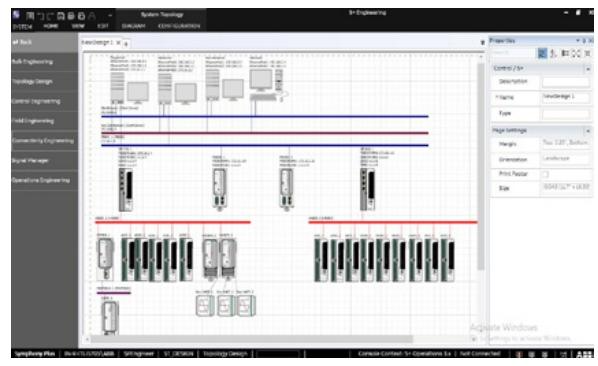
System topology engineering: Through the system topology builder, users can drag and drop visual construction control projects, support logical and detailed network development, automatically generate charts through wizards, automatically configure communication ports, share topology information to S+Operations, generate document reports, etc. It also supports multiple virtual factory network interfaces and multiple historical server configurations.
Operation Engineering: Integrating S+Operations human-machine interface for operation engineering configuration, achieving seamless data exchange with other components, supporting remote deployment configuration, providing parallel deployment, incremental deployment, and differential viewing functions, and efficiently controlling the deployment process; Suitable for traditional DCS and SCADA applications, supporting multiple common protocol configurations.
Multi system support: Multiple S+Operations human-machine interface systems can be configured from a single engineering node or project, facilitating centralized development, maintenance, and deployment of independent systems such as online production and offline testing.
Human Machine Interface Upgrade Support: Provides a seamless path for factories upgrading from the old Symphony human-machine interface platform to S+Operations, allowing for direct reuse of existing console databases and graphics, reducing upgrade workload and training requirements.
Integrated Control Engineering and Tools
Control engineering function: supports the development and maintenance of Symphony Plus control system configuration, including HR series, SD series, and SDe series controllers; Intuitively interact with system configuration information through the Explorer application, supporting the association of various documents; The data browser supports editing label data in Excel view and saving it to the configuration server. It also supports database filtering, batch import and export, and complex query replacement; Automation Architect visualizes control strategies, supports saving as macro reuse, and creates advanced control strategies through drag and drop function blocks.
Control Logic Templates (CLTs): Allow users to define and maintain reusable standard control policy templates as blueprints for control policy structures, support object exchange management, and enable quick definition of control logic documents. Template updates can retain instance specific configurations and spread to all associated instances.
Configurable Function Codes (CFCs): Engineers can use standard function codes to create specific control logic and save it as a package, which can be reused as standard function codes in control logic design. They support custom shape, input-output, parameter, and label mapping, and can choose to hide or display control strategy content.
Library management: The engineering library contains various components and functional blocks, etc. Reusable components are displayed through the object exchange window. Users can use preset function codes and symbols, or customize and save them to a separate folder. It supports copy and paste functions, making it easy to share objects between different projects, saving time and reducing errors.
Controller automatic conversion: Provides conversion tools that support upgrading from Symphony Harmony Rack controllers to the latest SDe series controllers, automatically updating and modifying the communication logic of affected controllers, preserving the original application logic without manual modification.

Batch engineering and equipment integration
Batch engineering: supports configuring signal lists, controlling hardware, I/O allocation, etc. through importing process points or I/O spreadsheets, supports processing multiple revised versions of signals and I/O lists, and avoids duplicate imports; Improve reengineering efficiency through a data editor based on custom queries, supporting entity filtering.
PROFIBUS/HART device integration: supports the use of PROFIBUS and HART protocols to configure, debug, and maintain intelligent field and electrical equipment. Data within the device can be accessed by controller function blocks and used for real-time control strategies; By using Field Device Tool (FDT) and Device Type Manager (DTM) technology to graphically configure and manage devices, it supports standard protocol configuration and can be integrated with Field Information Manager (FIM) to extend device management functionality.
Other protocols and device integration: Supports bidirectional real-time communication between SD and HR series controllers and Modbus TCP devices. Modbus points can be used to control application algorithms or human-machine interface interactions, providing gateway software for simplified configuration and other operations; Support communication between SD series controllers and devices using IEC 60870-5-104 and DNP 3.0 protocols, providing integrated configuration functions and templates; Support the control and monitoring of intelligent electronic devices through the IEC 61850 (Edition 2) protocol, interface configuration and maintenance from S+Engineering, and support horizontal and vertical communication.
Soft controller: Integrated with a soft controller suitable for SD and SDe controllers, it allows the execution of compiled functional code application logic on any S+Engineering node, facilitating testing and pre tuning of control applications before implementation, reducing the start-up and debugging costs of new projects, upgrades, or expansion projects.
Batch and sequential control function
Batch Data Manager (BDM): a tool that includes creating, editing, managing, and downloading batch, sequential, and user-defined feature code configurations. It supports the use of natural syntax control statements to create batch programs and download them to Batch Sequence (BSEQ) feature codes; Create unit programs and main formulas through graphical means, and download the complete formulas to the controller. New formulas can be marked as pending approval status, and relevant events are recorded in the log to ensure system integrity.
User defined Function Codes (UDFs): Support the use of natural syntax control statements to create and compile UDF programs, download them to specific function codes, and integrate them into control strategies without the need for recipes or operator input. The controller automatically executes upon startup, making it suitable for creating unique process function codes or sequential control applications for continuous execution.
Dynamic debugger: facilitates troubleshooting of Batch 90 and UDF programs, allows observation of process data, normal operation of pumps, valves, and control loops, single step execution of programs, setting breakpoints, and online editing of recipe parameters.
Evolution and Compatibility
S+Engineering supports users to retain factory specific intellectual property accumulated over many years, allowing for the reuse of any Symphony Harmony, INFI 90 ™ By configuring the controller (with appropriate modifications), the system can evolve and avoid obsolescence, ensuring user investment in the control system and ensuring continuous adaptation to business needs.

- OMRON
- ABB
- General Electric
- EMERSON
- Honeywell
- HIMA
- ALSTOM
- Rolls-Royce
- MOTOROLA
- Rockwell
- Siemens
- Woodward
- YOKOGAWA
- FOXBORO
- KOLLMORGEN
- MOOG
- KB
- YAMAHA
- BENDER
- TEKTRONIX
- Westinghouse
- AMAT
- AB
- XYCOM
- Yaskawa
- B&R
- Schneider
- KONGSBERG
- NI
- WATLOW
- ProSoft
- SEW
- ADVANCED
- Reliance
- TRICONEX
- METSO
- MAN
- Advantest
- STUDER
- DANAHER MOTION
- Bently
- Galil
- EATON
- MOLEX
- DEIF
- B&W
- ZYGO
- Aerotech
- DANFOSS
- Beijer
- Moxa
- Rexroth
- Johnson
- WAGO
- TOSHIBA
- BMCM
- SMC
- HITACHI
- HIRSCHMANN
- Application field
- XP POWER
- CTI
- TRICON
- STOBER
- Thinklogical
- Horner Automation
- Meggitt
- Fanuc
- Baldor
- SHINKAWA
- Other Brands
- UniOP
- KUKA
- Iba
- Beckhoff
- ADLINK
-
 SIGMATEK SDD310-2 Servo Drive
 -
 SIGMATEK AI084 Analog Input Module
 -
 SIGMATEK CRCH081 12-752-081 Temperature Module
 -
 Sigma-Tek 5000L-4 Attitude Gyro 1U284-001-3
 -
 SIGMATEK CM5V020 12-250-023-K Wiring Module
 -
Sigma-Tek 4000H-6 Directional Gyro IU262-035-7
-
 SIGMATEK Dias DCP160 05-004-160 Processor Module
 -
 SIGMATEK 0147.395.02 Control Module
 -
 SIGMATEK A1084 Control Module
 -
SIGMATEK DI200 20-006-2000 Digital Input Module
-
 Sigmatek DNC115 Encoder Module
 -
 Sigmatek DAM122 05-017-122 Analog Module
 -
 Sigmatek 9802.289.01 Control Board TA71 Display
 -
Sigmatek TO127 20-007-127 Digital Output Module
-
Sigmatek DNC031 05-011-031 Digital Module
-
 Sigmatek VI022 20-003-022 Interface Module
 -
 Sigmatek CAI085 Analog Input Module
 -
 Sigmatek CP111 S-DIAS CPU Module
 -
 Sigmatek CTMS030 Krauss Maffei Module
 -
 Sigmatek CAM123 Control Module
 -
 Sigmatek TAE732-P 01-240-732-P Touch Display Unit
 -
 Sigmatek MDM021 Digital Mixed Module
 -
Sigmatek DCP642 DIAS Central Unit
-
 Sigmatek CST022 12-014-022 C-DIAS Module
 -
 Sigmatek SRO021 20-893-021 Safety Relay Output
 -
 Krauss Maffei MC5 Control System Sigmatek
 -
 Sigmatek DC061 Module 18-24VDC 300mA
 -
 Herrmann EVT0855 Ultrasonic Welder Touch Panel
 -
 Sigmatek CIV521 Control Module 1.4A 2W
 -
 Sigmatek DDI61 05-006-161 Digital Input Module
 -
SIGMATEK ETT312-E Touch Terminal 01-230-312
-
Cessna S3326-1 Sigma Tek 5000B-67 Gyro 1U149-015-9
-
 SIGMATEK PS101 Power Supply Module
 -
 SIGMATEK 0332.554.03 Control Module 371071000154
 -
 SIGMATEK ETT312-E Touch Terminal 01-230-312
 -
SIGMATEK CDM163 Control Module
-
 SIGMATEK VSV046 16-023-046 Module
 -
SIGMATEK AM221 20-017-221 Analog Module
-
SIGMATEK CTS051 12-053-051 Control Module
-
SIGMATEK AM221 20-017-221 Analog Module
-
Sigmatek CSDI161 12-891-161 Safety Input Module
-
Sigma Tek 4000C-1 Directional Gyro Indicator
-
 Sigmatek ETV0501 12-230-0501 VARAN Terminal
 -
Sigmatek DDM165 SLIDES Module
-
 Sigmatek N100 20-011-100 Control Module
 -
Sigmatek AKM54K-ANC2R-B0 PM Servo Motor
-
Sigmatek CTO166 Digital Output Module
-
 Sigmatek CP212-K 20-004-212-K CPU Module
 -
Sigmatek CDI161 Digital Input Module
-
Sigmatek DCC080 05-700-080-2 Control Module
-
 SIGMATEK SCP011 S-DIAS Safety CPU
 -
SIGMATEK SCP011 S-DIAS Safety CPU
-
 SIGMATEK SRO022 Relay Output Module
 -
SIGMATEK MDD 121 Drive Axis Module
-
SIGMATEK DSI021 SLIDES Siemens Interface
-
SIGMATEK DIAS DCP161 Module 05-004-161
-
 Sigmatek ETT312 Built-in Touch Terminal
 -
 SIGMATEK DCP 643 DIAS Controller System
 -
SIGMATEK CIO021 Multi I/O Module
-
 SIGMATEK CTMS020 Control Module
 -
 Sigmatek CME 221 Memory Module
 -
Sigmatek 0420.615.01 Control Board
-
 Sigmatek CP111 20-004-111 CPU Module
 -
Sigmatek 9405.065.03 Control Board
-
 Sigmatek ETEK 01-450-032-K C-IPC 256MB Industrial PC
 -
 Sigmatek CTO163 12-007-163 Safety Output Module
 -
Sigmatek TO081 20-007-081 Digital Output Module
-
 Sigmatek SI021 20-022-021 Safety Input Module
 -
 Sigmatek 05-052-014 Control Module HW 1.0
 -
Sigmatek TO127 20-007-127 Digital Output Module
-
Sigmatek SV141 20-023-141 VARAN Splitter
-
 SIGMATEK CIV513 C-DIAS VARAN Control Module
 -
Sigmatek DCP 642 SLIDES Control Module with DKL002
-
 Sigma-Tek 5000B-36 Attitude Gyro
 -
SIGMATEK 01-450-024 C-IPC Industrial Computer
-
 SIGMATEK CP102 S-DIAS Processor Module
 -
Sigmatek CRCH081 12-752-081 PLC Module
-
SIGMATEK SDD340-46 Series Drive
-
SIGMATEK TAE731 Touch Display Unit
-
 SIGMATEK CDM167 Module 12-008-167-O
 -
SIGMATEK TO161 Digital Output Module
-
 Sigmatek NC4 45291000003 Control Board
 -
 Sigmatek HGW1033-3 Handheld Wireless Unit
 -
Sigmatek CAI0811 Analog Input Module
-
 Sigmatek STO081 S-DIAS Safety Output Module
 -
 Sigmatek C-IPC 01-450-171-V Industrial PC
 -
 Sigmatek S1 032-8AF61-R4 EZ Servo Motor
 -
Sigmatek CM5V020 Baseplate 12-250-021-K
-
 Sigmatek HGT833-W Panel
 -
 Sigmatek NC4 45291000003 Control Module
 -
 SIGMATEK 12-780-012 R8-IPC Geode LX800
 -
SIGMATEK CCP081 Processor Module
-
SIGMATEK SCP011 S-DIAS Safety CPU
-
 SIGMATEK ETT1533 Touchscreen 01-230-1533
 -
SIGMATEK AI043 Analog Input Module
-
SIGMATEK CTMS020 Control Module
-
 SIGMATEK SLIDES VARAN Interface VAC 012
 -
 SIGMATEK Compact Control Unit 06038666
 -
 SIGMATEK CP112 Control Module
 -
SIGMATEK MDP 101-1 Power Supply Module
-
 Sigmatek CCP621 C-SLIDES Processor Module
 -
Sigmatek MDD111 Axle Module
-
Sigmatek CCL912 C-SLIDES CPU PSU Module
-
Demag NC4 0332.554.03 Sigmatek Control Board
-
Sigmatek Krauss Maffei PC321-K Control Cabinet PC
-
 Sigmatek CNC W150 Circuit Board Wittmann Robot
 -
Sigmatek AKM44G-ANCNGBB0 Servo Motor
-
 Sigmatek CSCP011 Safety Module 12-890-011
 -
Mannesmann Demag Sigmatek CP126 Central Unit
-
 Sigmatek ISE021 Interface Module 20-101-021
 -
Sigmatek CCP251 C-DIAS Processor Module
-
 SIGMATEK ET 352 Terminal
 -
SIGMATEK SV141 Module 20-023-141
-
 SIGMATEK NC-337 3 Axis Module
 -
 Sigmatek MDP 101 Power Module
 -
SIGMATEK HGT834-W Teach Pendant
-
Sigmatek C-DIAS Processor Module CCL912
-
SIGMATEK CP627 Module
-
 SIGMATEK PC 323-K Controller
 -
SIGMATEK MDD121 Controller Module
-
 SIGMATEK ICA111 Module
 -
SIGMATEK MDD 121-1 Drive Axis Module
-
SIGMATEK M5V121 12-300-121 Krauss Maffei M5 Display Unit
-
SIGMATEK CTMS 020 CD Technology Module 12-250-011
-
SIGMATEK PCT122 Touch Panel
-
Stöger MCS4100 SIGMATEK Control Module
-
SIGMATEK Krauss Maffei M5 Keyboard Unit M5K902 12-310-902
-
 SIGMATEK SD310-2 Servo Drive Module


