
Tektronix TBS1000B and TBS1000B-EDU series digital storage oscilloscopes
Tektronix TBS1000B and TBS1000B-EDU series digital storage oscilloscopes
Document Overview
This manual is the official guidance document for the Tektronix TBS1000B (General Edition) and TBS1000B-EDU (Education Edition) series of digital storage oscilloscopes, covering the entire process of product safety operation to advanced functional applications. It is suitable for engineers, technicians, and teachers and students in educational settings. The manual has a clear structure and includes modules such as safety information, basic operations, core functions, application cases, performance parameters, and probe information. At the same time, through tables, diagrams, and step-by-step instructions, it reduces operational complexity and ensures that users can quickly master the use and maintenance of the oscilloscope.
Product model and core parameters
1. Model classification and key parameters
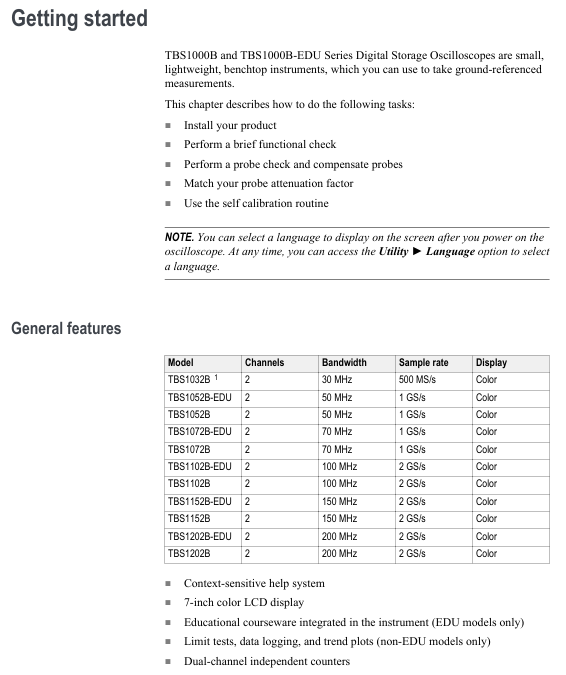
Applicable scenarios for model bandwidth sampling rate
TBS1032B 30MHz 500MS/s Basic Low Frequency Measurement (North America/Europe only)
TBS1052B/TBS1052B-EDU 50MHz 1GS/s Universal Low Frequency Testing and Educational Experiment
Analysis of Low Frequency Signals in TBS1072B/TBS1072B-EDU 70MHz 1GS/s
TBS1102B/TBS1102B-EDU 100MHz 2GS/s High Frequency Digital Signal Test
TBS1152B/TBS1152B-EDU 150MHz 2GS/s High Speed Serial Signal Analysis
TBS1202B/TBS1202B-EDU 200MHz 2GS/s ultra high speed signal (such as DDR memory) testing
2. General core features
Channel configuration: 2 analog channels, supporting simultaneous measurement of 2 signals
Record length: fixed 2500 points/channel to ensure complete signal details
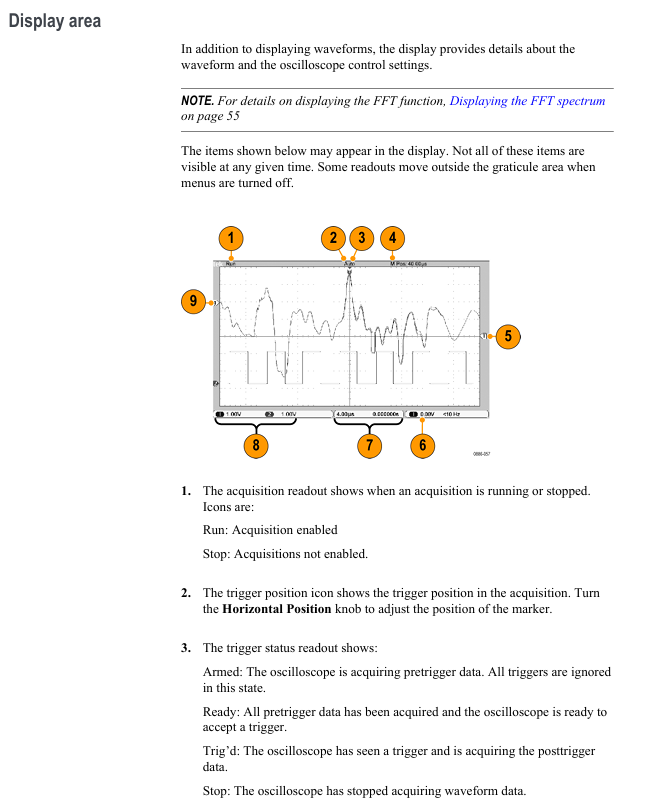
Display screen: 7-inch color LCD, supporting vector/dot display mode
Measurement function: 34 types of automatic measurement, cursor measurement, FFT spectrum analysis
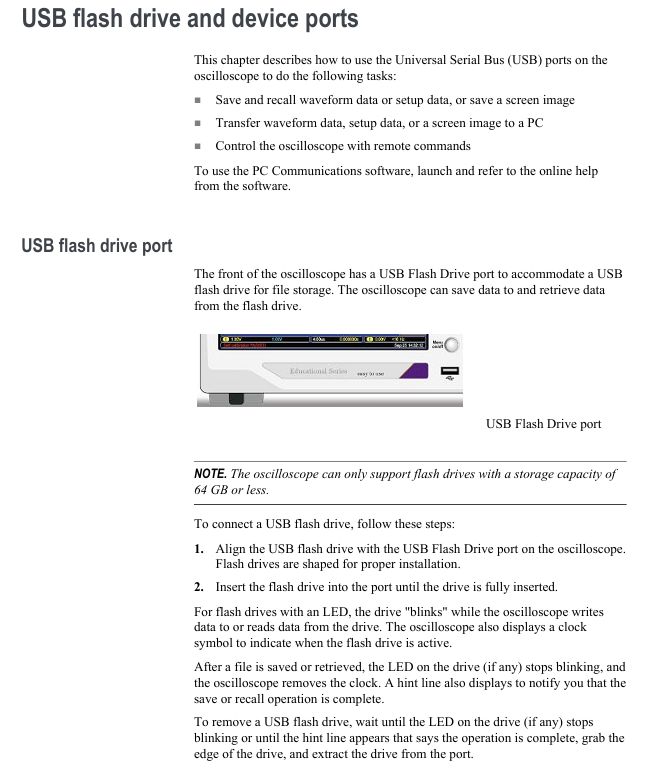
Storage interface: front USB flash drive port (supporting ≤ 64GB), rear USB device port (connected to PC/GPIB)
Language support: 11 languages (including Chinese, English, Japanese, Korean, Russian, etc.)
Safety operation standards
1. Electrical safety
Grounding requirements: A 3-pin power cord must be used, and the grounding conductor must be connected to the ground. It is forbidden to disconnect the grounding
Voltage limitation: The maximum voltage of the input channel is 300V RMS CAT II, and when it exceeds 100kHz, it attenuates by 20dB/tenfold
Probe safety: When using TPP series probes, fingers should be placed behind a protective barrier and touching the metal parts of the probe is prohibited
2. Operation taboos
Prohibited from use in damp/explosive environments, avoid liquid spraying equipment
It is prohibited to dismantle the equipment casing as high internal voltage may cause electric shock
When connecting/disconnecting the probe, the signal source should be disconnected first to avoid arc damage
Basic operation process
1. Equipment installation and functional inspection
Power connection: Connect to a 90-264VAC/45-66Hz power supply, with a maximum power consumption of 30W
Secure fixation: Fix equipment through safety lock holes or cable channels to prevent slipping
Functional check:
Press' Default Setup 'to restore factory settings
Connect the probe to CH1, and connect the probe tip to the PROBE COMP terminal( 5V@1kHz Square wave
Press [Autoset], the screen should display a stable square wave, and the calibration status should be "PASSED"
2. Probe operation
Manual compensation:
Probe connected to CH1, set attenuation to 10X
Connect the probe tip to [PROBE COMP] and press [Autoset]
Adjust the probe compensation hole to make the square wave edge straight (to avoid overcompensation/undercompensation)
Attenuation setting: default 10X, P2220 probe supports 1X/10X switching (bandwidth limited to 6MHz at 1X)
Current probe: The scaling ratio needs to be manually set (default 10A/V) to ensure accurate readings
3. Self calibration and firmware updates
Self calibration:
Trigger condition: If the environmental temperature difference exceeds 5 ℃ or once a week, preheating for 20 minutes is required
Operation steps: Disconnect all probes → 【 Utility 】 → 【 Do Self Cal 】 → Follow the prompts to complete (about 2 minutes)
Firmware update:
Download the latest firmware from the official website (www.tektronix. com/software)
Copy to the root directory of the USB flash drive and insert the oscilloscope
[Utility] → [File Utilities] → [Update Firmware] → Wait for completion
Core System and Control
1. Vertical Controls
Coupling method:
DC: Transmitting AC+DC signals, suitable for measuring signals with DC offset
AC: Block DC components, suitable for observing AC signals
GND: Disconnect input, display 0V line, used for calibrating ground reference
Bandwidth limit: 20MHz bandwidth limit can be selected to reduce high-frequency noise
Voltage/grid adjustment: Range 2mV-5V/div, supports coarse adjustment (1-2-5 sequence)/fine adjustment (small step size)
2. Horizontal Controls
Time base range:
30MHz model: 10ns-50s/div
50/70MHz model: 5ns-50s/div
100/150/200MHz model: 2.5ns-50s/div
Scanning mode: automatically turned on when the time base is ≥ 100ms/div and the trigger mode is "Auto", and the waveform scrolls from left to right
Zoom function: Press [Zoom] to zoom in on specific parts of the waveform, supporting X1/X2/X5/X10 zoom ratios
3. Trigger Controls
Trigger type key parameters applicable scenarios
Edge triggered slope (rising/falling), coupling (AC/DC/noise suppression), stable display of conventional signals (sine wave/square wave)
Video trigger standards (NTSC/PAL/SECAM), synchronous (field/line) composite video signal testing, such as television signals
Pulse width triggering conditions (=≠<>), width (33ns-10s), polarity (positive/negative) capture abnormal pulses (such as spikes, narrow pulses)
Trigger mode:
Auto: Automatically scans without triggering, suitable for signal exploration
Normal: Only displayed when triggered, suitable for stable signal observation
Single: Single capture, suitable for transient signals (such as relay arcs)
4. Acquisition Controls
The working principle of the collection mode is applicable to different scenarios
Sampling mode equidistant sampling, 1 sampling point=1 waveform point for most conventional signals
Peak detection mode records the maximum/minimum values within each interval, captures narrow pulses (≥ 10ns), and reduces aliasing
After multiple acquisitions in average mode (4/16/64/128 times optional), suppress random noise and improve signal clarity
Measurement and analysis functions
1. Basic measurement techniques
Voltage measurement:
Peak to Peak Value (Vp-p): The difference between the maximum and minimum values of the signal, calculated by multiplying the number of vertical partitions by volts per grid and the probe attenuation ratio
Amplitude: Voltage from ground to signal peak, for example: 2V/div x 3 zones x 10X probe=60V
Time measurement:
Cycle/frequency: Cycle=number of horizontal partitions x seconds/grid, frequency=1/cycle
Pulse width: time interval at 50% amplitude, rise/fall time: time interval at 10% -90% amplitude
Phase difference measurement: Turn on XY mode and use the Lissajous diagram to determine (for example, when the frequency ratio is 1:1, the straight line is 0 ° and the circle is 90 °)
2. Automatic measurement and FFT analysis
Automatic measurement:
Supports 34 types, including time class (cycle, frequency, delay), amplitude class (peak to peak, overshoot), and count class (pulse number, edge number)
Up to 6 measurement results can be displayed simultaneously, with an update frequency of approximately 2 times per second
FFT analysis:
Window function selection: Hanning window (excellent frequency resolution), flat top window (excellent amplitude accuracy), rectangular window (transient analysis)
Nyquist frequency: half of the sampling rate. Exceeding this frequency will result in aliasing, which needs to be resolved by increasing the sampling rate or filtering
Spectrum measurement: supports cursor measurement of frequency (Hz) and amplitude (dB, 0dB=1VRMS)
Data storage and transmission
1. USB flash drive operation
Storage content and capacity (approximately per 1MB):
250 setup files (. SET)
18 waveform files (. CSV, containing 2500 point time amplitude data)
16 image files (BMP/JPG)
Key operations:
Save: [Save/Recall] ->Select "Save Image/Set/Waveform" ->Automatic Naming (e.g. TEK0000. BMP)
Recall: [Save/Recall] → Select "Recall Setup/Waveform" → Select file
Format: [Utility] → [File Utilities] → [Format], note to delete all data
2. Connection between PC and GPIB
PC connection:
Install OpenChoice software (official website download)
Connect the USB cable between the oscilloscope's rear USB device port and the PC
Install the driver as prompted, supporting waveform transmission and remote control
GPIB connection:
Connect oscilloscope and GPIB controller through TEK-USB-488 adapter
[Utility] → [GPIB Setup] Set address (default 1)
Run GPIB software to achieve multi device collaborative control
Application Cases (Selected)
1. Video signal testing
Connect the probe to the video output and set the coupling to AC
【 Trigger Menu 】 → Select 'Video' → Set standard to NTSC
Select "All Fields" or "Line Number" synchronously, and press [Autoset]
Adjust the time base to 500ns/div and observe the video line signal (including color synchronization signal)
2. Differential signal analysis
CH1 is connected to the positive terminal of the differential signal, CH2 is connected to the negative terminal, and the probes are both set to 10X
【 Math 】 → Select "Ch1-Ch2" to display the differential waveform
【 Acquire 】 → Set to 'Peak Detect' to capture signal overshoot/noise
Read differential signal amplitude and rise time using automatic measurement function
3. Education version course application (exclusive to EDU version)
Create a course on PC (download specialized software) and save it as an. xpkg file
Insert the USB flash drive into the oscilloscope, go to 【 Utility 】 → 【 Update Course 】 → Load Course
Select the experiment according to 'Course' and view the steps and theories
After completing the experiment, the Data Collection saves the data and generates a report containing waveforms
Appendix and Maintenance
1. Performance parameters (key)
Vertical system: resolution 8-bit, DC gain accuracy ± 3% (10mV-5V/div), input impedance 1M Ω//20pF
Horizontal system: Time base accuracy of 50ppm, maximum delay scanning of 100 partitions
Trigger system: Edge trigger sensitivity ≤ 1mV (50Hz bandwidth), pulse width trigger minimum 33ns
Environmental adaptability: Working temperature 0-50 ℃, humidity ≤ 85% (below 40 ℃)
2. Probe information (TPP series)
Model bandwidth attenuation ratio compensation range, maximum input voltage
TPP0051 50MHz 10:1 15-25pF 300V RMS CAT II
TPP0101 100MHz 10:1 15-25pF 300V RMS CAT II
TPP0201 200MHz 10:1 15-25pF 300V RMS CAT II
3. Equipment maintenance
Cleaning: Use a lint free cloth dipped in 75% isopropanol to wipe the outer shell, avoiding the use of abrasion cleaner
Calibration: It is recommended to conduct factory calibration annually and contact the Tech service center
Troubleshooting: Check the error log through 【 Utility 】 → 【 System Status 】. Common issues include probe not compensating and improper trigger settings
- OMRON
- ABB
- General Electric
- EMERSON
- Honeywell
- HIMA
- ALSTOM
- Rolls-Royce
- MOTOROLA
- Rockwell
- Siemens
- Woodward
- YOKOGAWA
- FOXBORO
- KOLLMORGEN
- MOOG
- KB
- YAMAHA
- BENDER
- TEKTRONIX
- Westinghouse
- AMAT
- AB
- XYCOM
- Yaskawa
- B&R
- Schneider
- KONGSBERG
- NI
- WATLOW
- ProSoft
- SEW
- ADVANCED
- Reliance
- TRICONEX
- METSO
- MAN
- Advantest
- STUDER
- DANAHER MOTION
- Bently
- Galil
- EATON
- MOLEX
- DEIF
- B&W
- ZYGO
- Aerotech
- DANFOSS
- Beijer
- Moxa
- Rexroth
- Johnson
- WAGO
- TOSHIBA
- BMCM
- SMC
- HITACHI
- HIRSCHMANN
- Application field
- XP POWER
- CTI
- TRICON
- STOBER
- Thinklogical
- Horner Automation
- Meggitt
- Fanuc
- Baldor
- SHINKAWA
- Other Brands
- UniOP
- KUKA
- Iba
- Beckhoff
- ADLINK
-
 Bonfiglioli ACT401-19A Frequency Inverter
 -
 Bonfiglioli C102PP71 Gear Motor 13.4:1
 -
 Bonfiglioli C312 P P90 Speed Reducer
 -
 VEM K21R 71 G 4 Motor with Bonfiglioli VF44
 -
 Bonfiglioli C31 3 P P63 PV Bevel Gear Reducer V5
 -
 Bonfiglioli WR75UD28150P71B5B3 Gearbox
 -
 Bonfiglioli ACT401-13FA Frequency Inverter
 -
 Bonfiglioli VF62/P Worm Gearbox 38:1
 -
 Bonfiglioli ME210124001Y C Helical Gearbox
 -
 Bonfiglioli VF63PIP90BI4 Gearbox
 -
Bonfiglioli ACT 401-19A Frequency Inverter
-
 Bonfiglioli C102PP71 Variable Speed Gearmotor
 -
Bonfiglioli C312 P P90 Reducer with Clutch
-
 Bonfiglioli VF44 F1 10 Gearmotor with VEM Motor
 -
 Bonfiglioli C31 3 P P63 PV V5 Reducer
 -
 Bonfiglioli WR75UD28150P71B5B3 Gearbox
 -
Bonfiglioli ACT401-13FA Frequency Inverter
-
Bonfiglioli VF 62/P Worm Gearmotor 38 to 1
-
Bonfiglioli ME210124001Y Inline Gearbox
-
 Bonfiglioli VF63PIP90BI4 Worm Gearbox
 -
 Bonfiglioli VF86FC256 Worm Gearbox 1010B03004
 -
Bonfiglioli VF44F1 Gearmotor 0.43kW 460V
-
 Bonfiglioli W 75 UF1 D30 P80 B14 Gearbox i=100
 -
Bonfiglioli VF63NP80B5 Worm Gearbox
-
 Bonfiglioli 300R3133FPP80POG0A Gear Reducer
 -
 Bonfiglioli VF49F1N56C Gearbox
 -
 Bonfiglioli Trasmittal 300L19 Gearmotor with MEZ UD 1104 Motor
 -
 Bonfiglioli BCS30 Permanent Magnet Motor with Encoder
 -
 Bonfiglioli BN56B4 Gearmotor with VF30 Reducer
 -
Bonfiglioli VF44 Gearbox 100480150
-
Bonfiglioli VF63PIP90B14 Gearbox
-
 Bonfiglioli 830420150 BN63A4 230/400-50 IP55 CLF B14 with VF30F2 P63B14B3-I40
 -
Bonfiglioli BN63A2 Motor
-
Bonfiglioli VF44 ALP63B5 Gearbox
-
 Bonfiglioli A102 UR P80 Gearbox
 -
 Bonfiglioli MP 105 2 16 STD 95A1 CD 19 S1 OR SB KE Planetary Gearbox
 -
 Bonfiglioli T56BN/4 Motor
 -
 Bonfiglioli 8E20020594-M285018 Motor
 -
Bonfiglioli VF49 V P71 B5 Gearbox
-
 Bonfiglioli X VFR49 L1 FA1 180 P63B5 B3 Gearbox
 -
Bonfiglioli W63U7P90B14V6 Right Angle Gear Reducer
-
 Bonfiglioli VF/W30/63UFC2 Gear Reducer i=168
 -
 Bonfiglioli VF44 Gear Reducer 100480150
 -
 Bonfiglioli ACU 201-07 FA Frequency Converter
 -
 Bonfiglioli BN-80B-4 Motor with VF63 Gearbox 38:1
 -
Bonfiglioli MVF 49 Gear Reducer for Servo Motor
-
 Bonfiglioli ACT 400-034 A Frequency Inverter 11kW
 -
 Bonfiglioli SYN10-S-220-03-AF AC Drive 0.5HP
 -
 Bonfiglioli LC 090 1 7 STD FM CD 19 KE Gearbox
 -
Bonfiglioli TQFK070350GR80A1CD Gear Unit
-
Bonfiglioli BN 80 B6 FD Three Phase Motor
-
Bonfiglioli W63U Worm Gear Reducer
-
Bonfiglioli 830G2310M-B048052 Gear Motor
-
Bonfiglioli VF49P128P71B5B3 Worm Gearbox
-
Bonfiglioli W75UD30719/140B3 Worm Gearbox
-
Bonfiglioli VF49F17HSB3 Worm Gearbox
-
 Bonfiglioli C12 2P 20.6 P90 B3 Gearbox
 -
Bonfiglioli BN80B4 623136 Geared Motor
-
 Bonfiglioli 4APC3-4 9142882 Geared Motor 0.18 kW
 -
Bonfiglioli W86 80/90-B5 Worm Gear Reducer 20:1
-
 Bonfiglioli ACU 210-07 1 FA PLC Peripheral Module
 -
 Bonfiglioli MVF44/F Worm Gearbox
 -
 Bonfiglioli W63U Worm Gear Reducer
 -
Bonfiglioli BN63A2 Electric Motor
-
 Bonfiglioli BN 132 M B 4 Electric Motor 9.2kW
 -
Bonfiglioli VF49 L1 P1 P63B5 Worm Reducer i=45
-
Bonfiglioli C413 P S2 7717/1000 Gearmotor 1.5kW
-
 Bonfiglioli VF49F1P63B5B3 Worm Gearbox
 -
 Bonfiglioli BTD5-1870-05-400-ENC8A Servo Motor
 -
Bonfiglioli ACU401-03FA Frequency Inverter
-
 Bonfiglioli MVF63/N Gearbox with AEG Servomotor
 -
Bonfiglioli BN80A4 Gearmotor VF49L1P1P80B14
-
Bonfiglioli VFR 72/FC2 Gear Reducer
-
Bonfiglioli W R 86 U 120 Gearbox Assembly
-
Bonfiglioli W 75 U 30 Gear Reducer
-
 Bonfiglioli W R 86 U 120 P80 B5 V5 Gearbox
 -
 Bonfiglioli RAO 50/DC Gearbox
 -
 Bonfiglioli VF49 F1 P63B5 Gearmotor with SPZ MS6324
 -
 Bonfiglioli X_LC 090 Planetary Gearbox
 -
 Bonfiglioli A302 UH35 P90 Gearbox
 -
 Bonfiglioli VF63FCHS Worm Gearbox 103100390
 -
 Bonfiglioli VF 44 P63 B14 Gearbox M00480210008
 -
 Bonfiglioli MPD1006S0006 Precision Planetary Gearbox
 -
Bonfiglioli VF49F1N56C Worm Gearbox
-
Bonfiglioli TR G 105 3 20 STD Planetary Reducer
-
 Bonfiglioli VFR49P1P63B5 Worm Gearbox
 -
Bonfiglioli WR 86 U 120 P80 B5 V5 Gearbox 2G30013944
-
Bonfiglioli BRA 400-060 BF2 Brake Chopper
-
Bonfiglioli VF49P P71B5 Worm Gearbox
-
 Bonfiglioli C402 P VG1 Gear Speed Reducer 31.4:1
 -
Bonfiglioli ISMET LCVT050 DK308/50 Line Reactor
-
Bonfiglioli C 22 2 F GR063 Gearbox
-
 Bonfiglioli C31 3 P P63 PV V5 Reducer
 -
Bonfiglioli CM-485 T Communication Module
-
Bonfiglioli W75UF1D30P90B5 Gearbox
-
 Bonfiglioli BN63 B4 VF49 Gearmotor 0.18kW
 -
Bonfiglioli ACT 400-004 FA Frequency Inverter
-
Bonfiglioli W110U100P90B5B3 Worm Gearbox
-
Bonfiglioli SYN10 T 400 05 AF Inverter
-
Bonfiglioli MP080.1.4.15.16.40.80.100 Gearbox
-
Bonfiglioli SYN10S Inverter
-
 Bonfiglioli VF44L2P160 Gearmotor
 -
Bonfiglioli W 86 U 40 P90 B5 B3 Gear Reducer
-
Bonfiglioli BTD5-1870-05-400 Servomotor
-
 Bonfiglioli MP 080 2 2C Gearbox with BLDC Motor
 -
Bonfiglioli MP080.1.10 Planetary Gearbox
-
Bonfiglioli C212PHS Reducer
-
 Bonfiglioli MVF 49F1 Gearbox with ICME T71B4
 -
 Bonfiglioli VF 49 v P71 B5 Gearbox
 -
Bonfiglioli VF 44 P1 Gearmotor
-
 Bonfiglioli C 22 2 NP 6.1 Helical Gearbox
 -
Bonfiglioli F203 316.9 Gearbox with Kaiser Motor
-
 Bonfiglioli SYN10 S 220 07 AF Frequency Inverter
 -
Bonfiglioli 301L251.8-HC-P90 Gearbox 1/51.8
-
Bonfiglioli ACT401-25A Frequency Inverter
-
Bonfiglioli W75 U D30 30 P90B14 B3 Worm Drive
-
Bonfiglioli 830G2310M-307638 Motor
-
 Bonfiglioli C112-P-P90 Inline Gearbox i=6.2
 -
Bonfiglioli SYN10-S-220-03-AF AC Drive
-
Bonfiglioli VFR49 A HS Worm Drive i=180 B3
-
Bonfiglioli ACT 401-29 A AC VFD Drive 22kW
-
 Bonfiglioli VF49PIP63B14 Gearbox
 -
 Bonfiglioli ANG 410-18 2 FA Inverter
 -
Bonfiglioli GVX2000-7.5-T Converter
-
 Bonfiglioli EM-ENC-02-24 Optical Module
 -
 Bonfiglioli ACT 401-33 A VFD Drive
 -
 Bonfiglioli MVF 49F1 Gearbox with ICME T71B4
 -
 Bonfiglioli BN112M4 Motor


