
YOKOGAWA WT1801R series precision power analyzer communication interface
YOKOGAWA WT1801R series precision power analyzer communication interface
Overview
The communication interface user guide for YOKOGAWA WT1801R, WT1802R, WT1803R, WT1804R, WT1805R, and WT1806R series precision power analyzers was first released in October 2024. The core of the document revolves around the three communication interfaces of the instrument (Ethernet, USB, GP-IB), providing detailed explanations of interface functions, configuration methods, programming instructions, and status reporting mechanisms. It also provides a document system, terminology conventions, and global contact information, aiming to help users achieve remote control and data exchange of the instrument through PC.
Core Communication Interface Functions and Configuration
1. Ethernet interface
(1) Core Features and Specifications
Compatibility: Compliant with IEEE 802.3 standard and supports TCP/IP (VXI-11) communication protocol.
Connection capability: Supports connection with PC through hub/router, does not support cross line direct connection; The maximum number of simultaneous connections is limited by network devices.
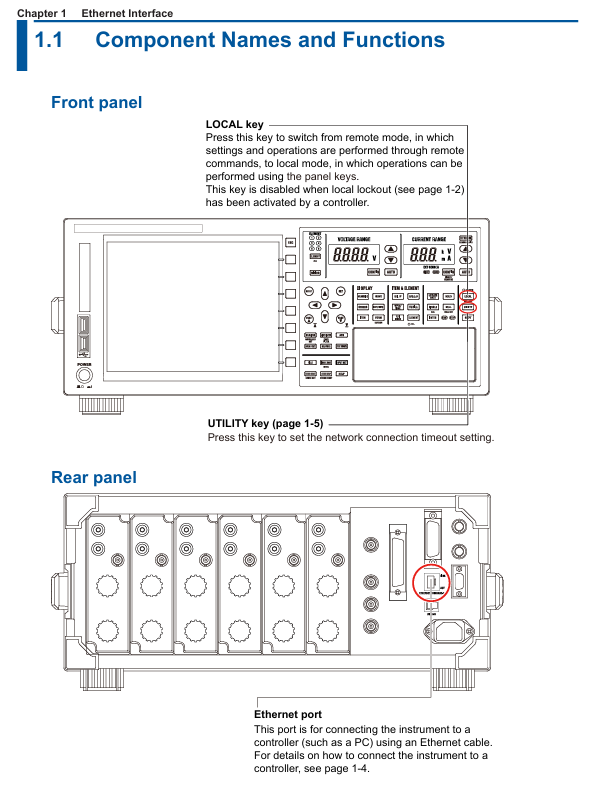
Remote control switch: Receive: Communicate: REMote ON/OFF command to switch between remote/local mode. In remote mode, only the LOCAL key is available (disabled when local is locked).
Timeout setting: The network connection timeout time can be set (1-3600 seconds or "infinite"), and the connection will be automatically disconnected after timeout. The default is "infinite".
(2) Configuration steps
Hardware connection: Use shielded twisted pair (STP) to connect the Ethernet port of the instrument Rear panel to the hub/router.
Enter the configuration menu: Press the UTIL key on the panel → click the Remote Control soft key → select the Network soft key to enter the network settings interface.
TCP/IP settings: IP address, subnet mask, and default gateway need to be configured (refer to section 20.2 of the IM WT1801R-02EN user manual for detailed steps).
Timeout setting: In the network settings interface, adjust the timeout time (Infinite or 1-3600s) through the cursor keys.
2. USB interface (USB-TMC)
(1) Core Features and Specifications
Compatibility: Compliant with USB 3.0 standard, supports USB-TMC (Test Measurement Class) protocol, requires installation of Yokogawa dedicated USB driver.
System requirements: Only supports Windows 10/11 system, PC needs to install communication library (TMCTL) and USB device driver (official website) https://tmi.yokogawa.com/ Downloadable).
Remote mode switching: Consistent with the Ethernet interface logic, it can be switched using the COMMunicate command or LOCAL key, and supports local locking.
Uniqueness: Only one USB device connection is supported at a time and cannot be used simultaneously with Ethernet or GP-IB interfaces.
(2) Configuration steps
Hardware connection: Connect the USB port of the instrument Rear panel to the PC using a USB Type B cable, and wait for 20-30 seconds after booting up before operating (to avoid damaging the device).
Driver installation: Download and install the Yokogawa USB TMC driver from the official website, and prohibit the use of third-party drivers.
View device serial number: Press the UTIL key → click on the Remote Control soft key → select the USB soft key to view the device serial number required for USB-TMC communication.
3. GP-IB interface (IEEE 488)
(1) Core Features and Specifications
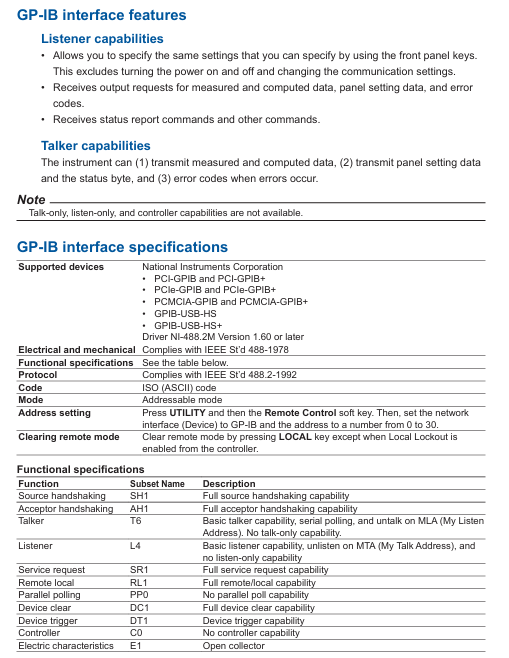
Compatibility: Compliant with IEEE 488-1978 (Mechanical/Electrical) and IEEE 488.2-1992 (Protocol) standards, supports National Instruments GP-IB cards (such as PCIe GPIB, GPIB-UB-HS+).
Functional subset: Supports SH1 (source handshake), AH1 (receive handshake), T6 (basic talker), L4 (basic listener), SR1 (service request) and other functional subsets, without controller capability.
Address setting: The address range is 0-30, and each device on the bus needs to be assigned a unique address to avoid conflicts.
Connection restriction: The bus can connect up to 15 devices (including controllers), with a single cable length of ≤ 2 meters and a total length of ≤ 20 meters.
(2) Configuration steps
Hardware connection: In the shutdown state, use a 24 pin GP-IB cable to connect the GP-IB port of the instrument Rear panel to the GP-IB board of the PC, and tighten the connector screws.
Address configuration: Press the UTIL key → click the Remote Control soft key → select the GP-IB soft key, and set the address (0-30).
Interface response: Supports interface messages such as IFC (interface clearing), REN (remote enable), SDC (selected device clearing), etc. Please refer to section 3.5 of the document for specific response logic.
Fundamentals of Programming and Instruction System
1. Core programming concepts
Message types: divided into "program messages" (instructions sent by the PC to the instrument, such as configuration instructions and query instructions) and "response messages" (data returned by the instrument to the PC, such as measurement results and status information).
Instruction structure:
Common instruction: IEEE 488.2 standard instruction, starting with * (such as * CLS clearing status register, * IDN?)? Check the instrument model).
Composite instruction: Instrument specific hierarchical instruction, separated by: (e.g. DISPlay: MODE NUMeric to set display mode to numerical display).
Simple instruction: Non hierarchical independent instruction (such as HOLD to set data hold).
Data format: Supports decimal (NR1/NR2/NR3), physical quantities (with units, such as 100V), registers (binary/octal/hexadecimal), strings (user-defined, such as file names), and other formats.
2. Core instruction grouping and functions
Chapter 5 of the document provides a detailed list of 23 instruction groups, covering scenarios such as interface control, display settings, data storage, measurement and calculation. The key instruction groups are as follows:
Instruction group core instruction example function description
COMMunicate Group :COMMunicate:REMote ON
: Communicate: READer OFF controls remote/local mode, sets response with header information
DISPlay Group :DISPlay:MODE WAVE
DISPlay: WAVE: TDIV 5MS Set display mode (waveform/value/trend), adjust waveform timeline scale
FILE Group :FILE:SAVE:NUMeric "DATA1"
: FILE: LOAD: SETup "SET1" saves numerical data to a file, loads instrument settings file
MEASure Group :MEASure:AVERaging:STATE ON
MEASure: FUNCtion1: EXPResolution "URMS (E1)" Enable data averaging function and define user-defined measurement functions
NUMeric Group :NUMeric[:NORMal]:VALue?
NUMeric: FORM ASCII queries numerical measurement data, sets data output format (ASCII/FLOAT)
STORe Group :STORe:START
: STORe: FILE: CONVert: EXECUTE "STR1" Start storing data and convert stored data to CSV format
Common Command *IDN?
*OPC? Query instrument identification (model/serial number), query operation completion status
3. Synchronization and status reporting
Synchronization mechanism: through * WAI (waiting for operation completion),: Communicate: WAIT (waiting for specified event), * OPC? (Operation completion query) Avoid instruction execution conflicts and ensure data consistency.
Status report: includes status bytes, standard event registers, extended event registers, and error queues, supported through: Status: ERRor? Query error codes and messages through * STB? Query status bytes to help locate communication or operational anomalies.
Modbus/TCP communication (extended functionality)
Function Overview: Supports Modbus/TCP protocol, can communicate with client devices (such as PLC, SCADA systems), and achieve register read/write and data interaction.
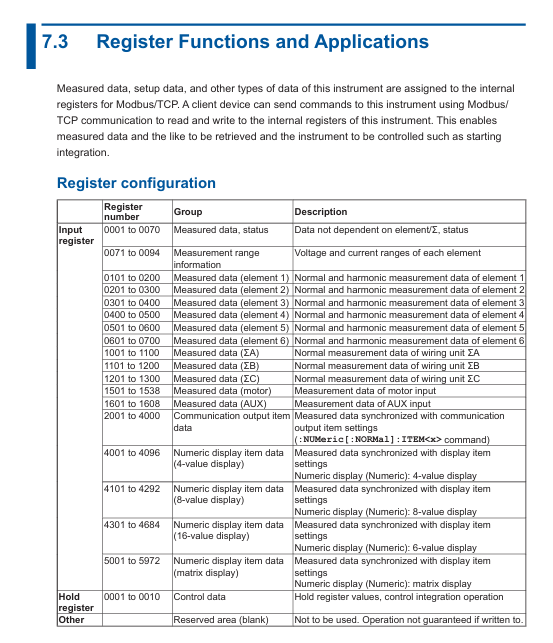
Register configuration: Chapter 7 of the document provides detailed definitions of register addresses and functions, covering measurement data, instrument status, configuration parameters, etc. It supports reading real-time data such as voltage, current, power, etc. through Modbus commands.
Communication process: The client needs to connect to the instrument's IP address and port (default 502) through TCP, and send Modbus function codes (such as 03H read hold registers) to achieve data exchange.
Precautions and Compatibility
Interface exclusivity: Ethernet, USB, and GP-IB interfaces cannot be used simultaneously and need to be manually switched or specified as a unique active interface through commands to avoid command conflicts.
Driver and library dependencies: USB and Ethernet interfaces require the installation of Yokogawa Communication Library (TMCTL) and drivers, and only support Windows systems, not compatible with third-party drivers.
Cable and Connection: GP-IB requires cables that comply with IEEE standards, Ethernet needs to be connected through a hub/router (cross wiring is not supported), and USB needs to be plugged in and unplugged after the instrument is turned on and stabilized.
Legacy compatibility: Chapter 8 of the document provides instructions for compatibility with WT1600, WT1800, and WT1800E series legacy instruments, facilitating smooth migration for existing users.
- OMRON
- ABB
- General Electric
- EMERSON
- Honeywell
- HIMA
- ALSTOM
- Rolls-Royce
- MOTOROLA
- Rockwell
- Siemens
- Woodward
- YOKOGAWA
- FOXBORO
- KOLLMORGEN
- MOOG
- KB
- YAMAHA
- BENDER
- TEKTRONIX
- Westinghouse
- AMAT
- AB
- XYCOM
- Yaskawa
- B&R
- Schneider
- KONGSBERG
- NI
- WATLOW
- ProSoft
- SEW
- ADVANCED
- Reliance
- TRICONEX
- METSO
- MAN
- Advantest
- STUDER
- DANAHER MOTION
- Bently
- Galil
- EATON
- MOLEX
- DEIF
- B&W
- ZYGO
- Aerotech
- DANFOSS
- Beijer
- Moxa
- Rexroth
- Johnson
- WAGO
- TOSHIBA
- BMCM
- SMC
- HITACHI
- HIRSCHMANN
- Application field
- XP POWER
- CTI
- TRICON
- STOBER
- Thinklogical
- Horner Automation
- Meggitt
- Fanuc
- Baldor
- SHINKAWA
- Other Brands
- UniOP
- KUKA
- Iba
- Beckhoff
- ADLINK
-
 Sigmatek MDD111-1 DIAS Drive Axis Module
 -
 Sigmatek DKL042 05-024-042 Terminal Module
 -
 Sigmatek DM822 Control Module
 -
 Sigmatek CDM167 12-008-167-O Module
 -
 Sigmatek TAE151 Touch Display Unit
 -
 Sigmatek DCC041 SLIDES Module 05-700-041-D
 -
 Sigmatek AKM65M-ANC2GBB0 PM Servo Motor
 -
 Sigmatek ETT221 01-230-221 Operator Terminal
 -
 Sigmatek SLIDES DAM 124 Analog Module
 -
Sigmatek AKM31C-ANCNGBB0 Servo Motor
-
 Mannesmann Demag Sigmatek CP626 Central Unit
 -
 SIGMATEK 0332.554.03 Board 371071000154
 -
 SIGMATEK 12-250-021 Base Plate Back Panel CM5V020
 -
 SIGMATEK DM162 S-DIAS Digital Mix Module
 -
 DEMAG ERGOTECH 061 381 66 Sigmatek 9842.243.02 Circuit Board
 -
 SIGMATEK CP313-1 PLC Module
 -
Sigmatek ETV0551-2 VARAN Touch Terminal
-
 Sigmatek SDM 081 FS S-Dias Safety Module
 -
 DEMAG 05-250-023 Ergotech Motherboard with Sigmatek TMS012
 -
Sigmatek CM5V020 12-250-023-K Wiring Base
-
 Sigma Tek 5000B-37 Attitude Gyro Indicator
 -
 Sigmatek SDD120-2 DIAS Drive
 -
 Sigmatek CME221 Memory Module
 -
 Sigmatek DCP640 DIAS Central Unit
 -
 Sigmatek STO040 Safety Output Module
 -
Sigmatek CET281 Control Panel
-
 Sigmatek CIPC LX800 Demag NC5 CPU
 -
 Sigmatek DKL093 05-024-093 Terminal Module
 -
 Sigmatek AI088 20-009-088 Analog Input Module
 -
Sigmatek CAI888 Analog Input Module
-
SIGMATEK CCA021 12-025-021 Analog Output Module
-
SIGMATEK 1104.579.05 Control Module
-
SIGMATEK SDI100 Digital Input Module
-
 SIGMATEK C-IPC 256MB LX800 Compact Dias
 -
 SIGMATEK 9423.090.02 Control Module
 -
SIGMATEK C-IPC 256 Power Supply 148498
-
 SIGMATEK CAI025 Analog Input Module
 -
 SIGMATEK CTO166 Digital Output Module
 -
 SIGMATEK CP112 20-004-112 Processor Module
 -
SIGMATEK CAI887 12-009-887 Safety Module
-
 Sigma-Tek 4000B-31 Directional Gyro 1U262-002-42
 -
Sigmatek C-IPC 256MB LX800 IPC Controller
-
Sigmatek C-IPC 01-450-031 Industrial PC LX800
-
Sigmatek C-IPC 256 Industrial PC Controller
-
Sigmatek CCP-531 PLC Processor Module
-
Sigmatek CDI163 Digital Input Module
-
 Sigmatek ETV0501 VARAN Terminal 12-230-0501
 -
 Sigmatek CTMS020 C-DIAS Technology Module
 -
 Sigmatek CIV512 VARAN Switch Module
 -
 Sigmatek HU011 20-080-011 Interface Module
 -
SIGMATEK SLIDES DAM 124 Module
-
 SIGMATEK C-IPC 161 01-450-161L Industrial PC
 -
SIGMATEK C-IPC 128MB VIA 733MHz 01-450-024-K
-
 SIGMATEK 12-780-012 R8-IPC Geode LX800 Module
 -
SIGMATEK CAM124 Analog Module
-
 SIGMATEK S1 032-8AF61-R4 EZ Servo Motor
 -
 SIGMATEK CTO163 Digital Output Module
 -
 SIGMATEK CCP082 12-004-082 Processor Module
 -
 SIGMATEK CRCH081 C-DIAS Temperature Module
 -
 SIGMATEK PC322-K 01-310-322-K Industrial PC
 -
SIGMATEK SDD310-2 Servo Drive
-
 SIGMATEK AI084 Analog Input Module
 -
SIGMATEK CRCH081 12-752-081 Temperature Module
-
Sigma-Tek 5000L-4 Attitude Gyro 1U284-001-3
-
 SIGMATEK CM5V020 12-250-023-K Wiring Module
 -
Sigma-Tek 4000H-6 Directional Gyro IU262-035-7
-
 SIGMATEK Dias DCP160 05-004-160 Processor Module
 -
SIGMATEK 0147.395.02 Control Module
-
SIGMATEK A1084 Control Module
-
SIGMATEK DI200 20-006-2000 Digital Input Module
-
Sigmatek DNC115 Encoder Module
-
 Sigmatek DAM122 05-017-122 Analog Module
 -
Sigmatek 9802.289.01 Control Board TA71 Display
-
Sigmatek TO127 20-007-127 Digital Output Module
-
Sigmatek DNC031 05-011-031 Digital Module
-
Sigmatek VI022 20-003-022 Interface Module
-
Sigmatek CAI085 Analog Input Module
-
 Sigmatek CP111 S-DIAS CPU Module
 -
Sigmatek CTMS030 Krauss Maffei Module
-
 Sigmatek CAM123 Control Module
 -
 Sigmatek TAE732-P 01-240-732-P Touch Display Unit
 -
Sigmatek MDM021 Digital Mixed Module
-
Sigmatek DCP642 DIAS Central Unit
-
 Sigmatek CST022 12-014-022 C-DIAS Module
 -
 Sigmatek SRO021 20-893-021 Safety Relay Output
 -
 Krauss Maffei MC5 Control System Sigmatek
 -
 Sigmatek DC061 Module 18-24VDC 300mA
 -
 Herrmann EVT0855 Ultrasonic Welder Touch Panel
 -
Sigmatek CIV521 Control Module 1.4A 2W
-
Sigmatek DDI61 05-006-161 Digital Input Module
-
SIGMATEK ETT312-E Touch Terminal 01-230-312
-
Cessna S3326-1 Sigma Tek 5000B-67 Gyro 1U149-015-9
-
SIGMATEK PS101 Power Supply Module
-
SIGMATEK 0332.554.03 Control Module 371071000154
-
 SIGMATEK ETT312-E Touch Terminal 01-230-312
 -
SIGMATEK CDM163 Control Module
-
 SIGMATEK VSV046 16-023-046 Module
 -
SIGMATEK AM221 20-017-221 Analog Module
-
SIGMATEK CTS051 12-053-051 Control Module
-
SIGMATEK AM221 20-017-221 Analog Module
-
Sigmatek CSDI161 12-891-161 Safety Input Module
-
Sigma Tek 4000C-1 Directional Gyro Indicator
-
Sigmatek ETV0501 12-230-0501 VARAN Terminal
-
Sigmatek DDM165 SLIDES Module
-
Sigmatek N100 20-011-100 Control Module
-
Sigmatek AKM54K-ANC2R-B0 PM Servo Motor
-
Sigmatek CTO166 Digital Output Module
-
Sigmatek CP212-K 20-004-212-K CPU Module
-
Sigmatek CDI161 Digital Input Module
-
Sigmatek DCC080 05-700-080-2 Control Module
-
 SIGMATEK SCP011 S-DIAS Safety CPU
 -
SIGMATEK SCP011 S-DIAS Safety CPU
-
SIGMATEK SRO022 Relay Output Module
-
SIGMATEK MDD 121 Drive Axis Module
-
SIGMATEK DSI021 SLIDES Siemens Interface
-
SIGMATEK DIAS DCP161 Module 05-004-161
-
 Sigmatek ETT312 Built-in Touch Terminal
 -
SIGMATEK DCP 643 DIAS Controller System
-
SIGMATEK CIO021 Multi I/O Module
-
SIGMATEK CTMS020 Control Module
-
 Sigmatek CME 221 Memory Module
 -
Sigmatek 0420.615.01 Control Board
-
Sigmatek CP111 20-004-111 CPU Module
-
Sigmatek 9405.065.03 Control Board
-
Sigmatek ETEK 01-450-032-K C-IPC 256MB Industrial PC
-
Sigmatek CTO163 12-007-163 Safety Output Module
-
Sigmatek TO081 20-007-081 Digital Output Module
-
 Sigmatek SI021 20-022-021 Safety Input Module


