
Westinghouse iGen4500DFc Dual Fuel Digital Variable Frequency Generator
Stop the engine: Press the "START/STOP" stop button on the control panel (or the "OFF" button on the remote control) to shut down the engine.
Close the fuel valve: Close the fuel tank valve in gasoline mode, and close the cylinder valve in propane mode (tighten clockwise).
Long term shutdown: Turn off the battery switch, cover with a dust cover (plastic cover is prohibited to avoid moisture), and place in a dry and ventilated place.
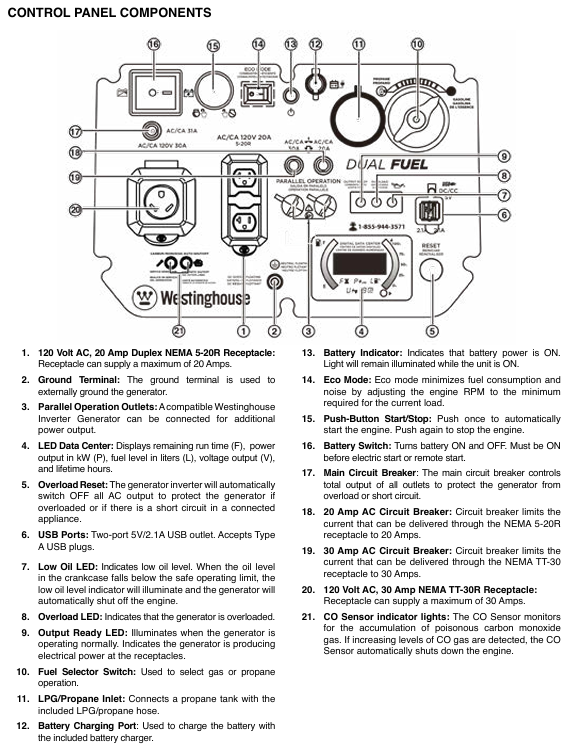
Installation and usage specifications
1. Installation and placement requirements
Placement environment:
Can only be used outdoors, at least 1.5 meters (5 feet) away from doors, windows, ventilation openings, and air conditioning units. It is prohibited to use indoors, in garages, basements, tents, and other enclosed/semi enclosed spaces to prevent carbon monoxide poisoning.
Place on a hard and flat surface (cement floor, wooden board) to avoid sand, grass debris, and soil blocking the heat dissipation outlet; Do not operate on slopes to prevent uneven oil lubrication or fuel leakage.
Grounding requirements:
When only using a socket for direct power supply, there is no need for additional grounding (generator neutral line floating design).
If connecting to the building power supply system (such as a household distribution box), a professional electrician must install a transfer switch (in accordance with NFPA 70 standard) and connect the generator grounding terminal to the grounding electrode (grounding resistance ≤ 4 Ω).
Protection requirements: Do not use in rainy, snowy, or humid environments to avoid rainwater splashing onto control panels or sockets; If temporary outdoor use is required, a rain shelter should be built (to ensure ventilation) and it is prohibited to cover the generator.
2. Extension cable and load adaptation
(1) Extension cable selection
Load current extension cable length ≤ 15 meters Extension cable length ≤ 30 meters Precautions
≤ 10A (such as lamps, computers) 16AWG 3-core grounding extension wire 14AWG 3-core grounding extension wire must use outdoor dedicated, undamaged, and well grounded extension wire
10-20A (such as microwave ovens and small air conditioners) 14AWG 3-core grounding extension cable 12AWG 3-core grounding extension cable. The shorter the length of the extension cable, the better to reduce voltage drop
20-30A (such as RV RVs, high-power water pumps) 12AWG 3-core grounding extension wire 10AWG 3-core grounding extension wire is prohibited from using multi joint extension wires to avoid overload and heating
(2) Common Load Adaptation Table
Equipment type Operating power (W) Starting power (W) Adaptation fuel mode Remarks
Laptop 60-100 60-100 gasoline/propane can activate ECO mode for the longest range
55 inch LED TV 80-150 80-150 gasoline/propane can be connected to the light fixture simultaneously
Household refrigerator (double door) 700-1000 2000-2500 gasoline with high starting power, needs to be started separately before connecting other devices
1.5 horsepower air conditioner (window type) 1200-1500 3000-3500 gasoline with ECO mode off to ensure sufficient peak power
RV RV (regular load) 1500-2500 3000-4000 gasoline/propane use 30A dedicated socket to avoid starting multiple high-power devices at the same time
1/3 horsepower water pump 800-1000 2000-2500 may trigger overload protection when starting gasoline, and other loads need to be disconnected
3. Parallel operation (parallel wires need to be purchased separately)
Applicable scenario: When a single generator has insufficient power (such as supplying power to 2 air conditioners), it can be connected in parallel with another compatible Westinghouse variable frequency generator (such as iGen4500DFc, iGen4000).
Operation steps:
Turn off two generators, disconnect all loads, and ensure that the battery switch is turned off.
Connect parallel wires: Connect the black wire to the black parallel interface of two generators, connect the red wire to the red interface, and connect the green grounding wire to the grounding terminal.
Start two generators in sequence and wait for their respective output ready indicator lights to turn on (green).
Connect the load to the socket of one of the generators, and the load will be shared between the two generators, with a total rated power ≤ the sum of the rated powers of the two generators.
Attention: Do not enable ECO mode when parallel connection is made; The fuel mode of the two generators must be consistent (both gasoline or propane); The total rated power of the load is ≤ 80% of the total rated power to avoid overload.
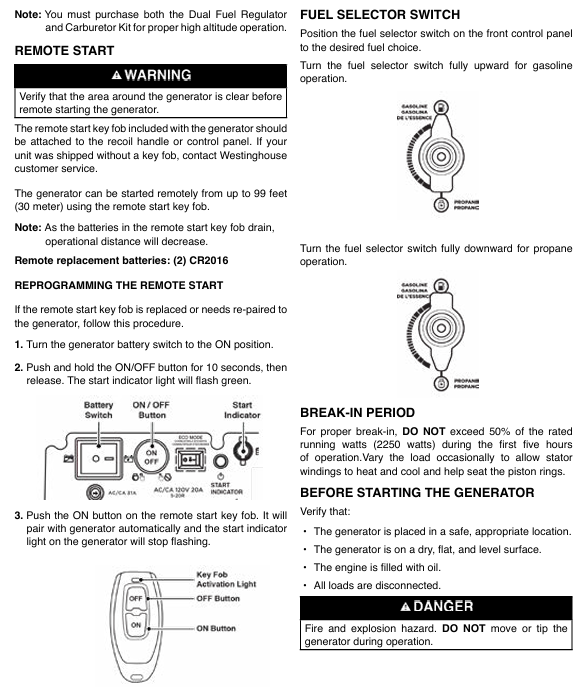
Maintenance and upkeep
1. Regular maintenance schedule
Maintenance project maintenance cycle operation content
Oil check: Before each use or after every 8 hours of operation, take out the dipstick, wipe it clean, insert and tighten it, take it out and check the liquid level. If it is below the L mark, add 10W-30 oil
The first 25 hours or 1 month of oil change; After heating up every 50 hours or 6 months, drain the oil (with the drain bolt at the bottom), replace the new engine oil (0.6L), and replace the drain bolt copper washer (Part # 94007)
Clean the air filter every 50 hours or 6 months; In dusty environment, shorten it to 25 hours, take out the foam filter element, clean it with detergent, soak a small amount of engine oil after drying (squeeze out the excess), and reinstall; Replace if damaged (Part # 5691)
- OMRON
- ABB
- General Electric
- EMERSON
- Honeywell
- HIMA
- ALSTOM
- Rolls-Royce
- MOTOROLA
- Rockwell
- Siemens
- Woodward
- YOKOGAWA
- FOXBORO
- KOLLMORGEN
- MOOG
- KB
- YAMAHA
- BENDER
- TEKTRONIX
- Westinghouse
- AMAT
- AB
- XYCOM
- Yaskawa
- B&R
- Schneider
- KONGSBERG
- NI
- WATLOW
- ProSoft
- SEW
- ADVANCED
- Reliance
- TRICONEX
- METSO
- MAN
- Advantest
- STUDER
- DANAHER MOTION
- Bently
- Galil
- EATON
- MOLEX
- DEIF
- B&W
- ZYGO
- Aerotech
- DANFOSS
- Beijer
- Moxa
- Rexroth
- Johnson
- WAGO
- TOSHIBA
- BMCM
- SMC
- HITACHI
- HIRSCHMANN
- Application field
- XP POWER
- CTI
- TRICON
- STOBER
- Thinklogical
- Horner Automation
- Meggitt
- Fanuc
- Baldor
- SHINKAWA
- Other Brands
- UniOP
- KUKA
- Iba
- Beckhoff
- ADLINK
-
 Sigmatek MDD111-1 DIAS Drive Axis Module
 -
 Sigmatek DKL042 05-024-042 Terminal Module
 -
 Sigmatek DM822 Control Module
 -
 Sigmatek CDM167 12-008-167-O Module
 -
 Sigmatek TAE151 Touch Display Unit
 -
 Sigmatek DCC041 SLIDES Module 05-700-041-D
 -
 Sigmatek AKM65M-ANC2GBB0 PM Servo Motor
 -
 Sigmatek ETT221 01-230-221 Operator Terminal
 -
 Sigmatek SLIDES DAM 124 Analog Module
 -
Sigmatek AKM31C-ANCNGBB0 Servo Motor
-
 Mannesmann Demag Sigmatek CP626 Central Unit
 -
 SIGMATEK 0332.554.03 Board 371071000154
 -
 SIGMATEK 12-250-021 Base Plate Back Panel CM5V020
 -
 SIGMATEK DM162 S-DIAS Digital Mix Module
 -
 DEMAG ERGOTECH 061 381 66 Sigmatek 9842.243.02 Circuit Board
 -
 SIGMATEK CP313-1 PLC Module
 -
Sigmatek ETV0551-2 VARAN Touch Terminal
-
 Sigmatek SDM 081 FS S-Dias Safety Module
 -
 DEMAG 05-250-023 Ergotech Motherboard with Sigmatek TMS012
 -
Sigmatek CM5V020 12-250-023-K Wiring Base
-
 Sigma Tek 5000B-37 Attitude Gyro Indicator
 -
 Sigmatek SDD120-2 DIAS Drive
 -
 Sigmatek CME221 Memory Module
 -
 Sigmatek DCP640 DIAS Central Unit
 -
 Sigmatek STO040 Safety Output Module
 -
Sigmatek CET281 Control Panel
-
 Sigmatek CIPC LX800 Demag NC5 CPU
 -
 Sigmatek DKL093 05-024-093 Terminal Module
 -
 Sigmatek AI088 20-009-088 Analog Input Module
 -
Sigmatek CAI888 Analog Input Module
-
SIGMATEK CCA021 12-025-021 Analog Output Module
-
SIGMATEK 1104.579.05 Control Module
-
SIGMATEK SDI100 Digital Input Module
-
 SIGMATEK C-IPC 256MB LX800 Compact Dias
 -
 SIGMATEK 9423.090.02 Control Module
 -
SIGMATEK C-IPC 256 Power Supply 148498
-
 SIGMATEK CAI025 Analog Input Module
 -
 SIGMATEK CTO166 Digital Output Module
 -
 SIGMATEK CP112 20-004-112 Processor Module
 -
SIGMATEK CAI887 12-009-887 Safety Module
-
 Sigma-Tek 4000B-31 Directional Gyro 1U262-002-42
 -
Sigmatek C-IPC 256MB LX800 IPC Controller
-
Sigmatek C-IPC 01-450-031 Industrial PC LX800
-
Sigmatek C-IPC 256 Industrial PC Controller
-
Sigmatek CCP-531 PLC Processor Module
-
Sigmatek CDI163 Digital Input Module
-
 Sigmatek ETV0501 VARAN Terminal 12-230-0501
 -
 Sigmatek CTMS020 C-DIAS Technology Module
 -
 Sigmatek CIV512 VARAN Switch Module
 -
 Sigmatek HU011 20-080-011 Interface Module
 -
SIGMATEK SLIDES DAM 124 Module
-
 SIGMATEK C-IPC 161 01-450-161L Industrial PC
 -
SIGMATEK C-IPC 128MB VIA 733MHz 01-450-024-K
-
 SIGMATEK 12-780-012 R8-IPC Geode LX800 Module
 -
SIGMATEK CAM124 Analog Module
-
 SIGMATEK S1 032-8AF61-R4 EZ Servo Motor
 -
 SIGMATEK CTO163 Digital Output Module
 -
 SIGMATEK CCP082 12-004-082 Processor Module
 -
 SIGMATEK CRCH081 C-DIAS Temperature Module
 -
 SIGMATEK PC322-K 01-310-322-K Industrial PC
 -
SIGMATEK SDD310-2 Servo Drive
-
 SIGMATEK AI084 Analog Input Module
 -
SIGMATEK CRCH081 12-752-081 Temperature Module
-
Sigma-Tek 5000L-4 Attitude Gyro 1U284-001-3
-
 SIGMATEK CM5V020 12-250-023-K Wiring Module
 -
Sigma-Tek 4000H-6 Directional Gyro IU262-035-7
-
 SIGMATEK Dias DCP160 05-004-160 Processor Module
 -
SIGMATEK 0147.395.02 Control Module
-
SIGMATEK A1084 Control Module
-
SIGMATEK DI200 20-006-2000 Digital Input Module
-
Sigmatek DNC115 Encoder Module
-
 Sigmatek DAM122 05-017-122 Analog Module
 -
Sigmatek 9802.289.01 Control Board TA71 Display
-
Sigmatek TO127 20-007-127 Digital Output Module
-
Sigmatek DNC031 05-011-031 Digital Module
-
Sigmatek VI022 20-003-022 Interface Module
-
Sigmatek CAI085 Analog Input Module
-
 Sigmatek CP111 S-DIAS CPU Module
 -
Sigmatek CTMS030 Krauss Maffei Module
-
 Sigmatek CAM123 Control Module
 -
 Sigmatek TAE732-P 01-240-732-P Touch Display Unit
 -
Sigmatek MDM021 Digital Mixed Module
-
Sigmatek DCP642 DIAS Central Unit
-
 Sigmatek CST022 12-014-022 C-DIAS Module
 -
 Sigmatek SRO021 20-893-021 Safety Relay Output
 -
 Krauss Maffei MC5 Control System Sigmatek
 -
 Sigmatek DC061 Module 18-24VDC 300mA
 -
 Herrmann EVT0855 Ultrasonic Welder Touch Panel
 -
Sigmatek CIV521 Control Module 1.4A 2W
-
Sigmatek DDI61 05-006-161 Digital Input Module
-
SIGMATEK ETT312-E Touch Terminal 01-230-312
-
Cessna S3326-1 Sigma Tek 5000B-67 Gyro 1U149-015-9
-
SIGMATEK PS101 Power Supply Module
-
SIGMATEK 0332.554.03 Control Module 371071000154
-
 SIGMATEK ETT312-E Touch Terminal 01-230-312
 -
SIGMATEK CDM163 Control Module
-
 SIGMATEK VSV046 16-023-046 Module
 -
SIGMATEK AM221 20-017-221 Analog Module
-
SIGMATEK CTS051 12-053-051 Control Module
-
SIGMATEK AM221 20-017-221 Analog Module
-
Sigmatek CSDI161 12-891-161 Safety Input Module
-
Sigma Tek 4000C-1 Directional Gyro Indicator
-
Sigmatek ETV0501 12-230-0501 VARAN Terminal
-
Sigmatek DDM165 SLIDES Module
-
Sigmatek N100 20-011-100 Control Module
-
Sigmatek AKM54K-ANC2R-B0 PM Servo Motor
-
Sigmatek CTO166 Digital Output Module
-
Sigmatek CP212-K 20-004-212-K CPU Module
-
Sigmatek CDI161 Digital Input Module
-
Sigmatek DCC080 05-700-080-2 Control Module
-
 SIGMATEK SCP011 S-DIAS Safety CPU
 -
SIGMATEK SCP011 S-DIAS Safety CPU
-
SIGMATEK SRO022 Relay Output Module
-
SIGMATEK MDD 121 Drive Axis Module
-
SIGMATEK DSI021 SLIDES Siemens Interface
-
SIGMATEK DIAS DCP161 Module 05-004-161
-
 Sigmatek ETT312 Built-in Touch Terminal
 -
SIGMATEK DCP 643 DIAS Controller System
-
SIGMATEK CIO021 Multi I/O Module
-
SIGMATEK CTMS020 Control Module
-
 Sigmatek CME 221 Memory Module
 -
Sigmatek 0420.615.01 Control Board
-
Sigmatek CP111 20-004-111 CPU Module
-
Sigmatek 9405.065.03 Control Board
-
Sigmatek ETEK 01-450-032-K C-IPC 256MB Industrial PC
-
Sigmatek CTO163 12-007-163 Safety Output Module
-
Sigmatek TO081 20-007-081 Digital Output Module
-
 Sigmatek SI021 20-022-021 Safety Input Module


