
Woodward 723PLUS Digital Controller
Woodward 723PLUS Digital Controller
Describe
This manual introduces the hardware related content of the Woodward 723PLUS digital controller (models 9906-619, 9906-620, 9906-700), including general information, installation, control setpoint input, use of Servlink and Watch Window, product support and service options, etc. The controller is suitable for various application scenarios that require speed control.
General information
Application scenarios: It can adapt to various applications through programming. The hardware includes two speed inputs, supports two magneto electric sensors (MPUs) or proximity switches (such as for torsional filtering), as well as four analog inputs, three analog outputs, eight discrete inputs, and three discrete outputs, which can be used in load sharing systems. Its two LON channels can support related control functions.
Control options: Different models have different power input voltage requirements, and discrete input voltage provides switch command signals for control. There are also various other control options, such as proximity switch input suitable for low-frequency speed signals, 0-1mA output of instrument drivers, etc. The controller can be used in conjunction with proximity switches or magneto electric sensors with minimum frequency requirements.
Attachments: including handheld programmer (9907-205), SPM-A synchronizer, power output sensor, active power sensor, etc.
install
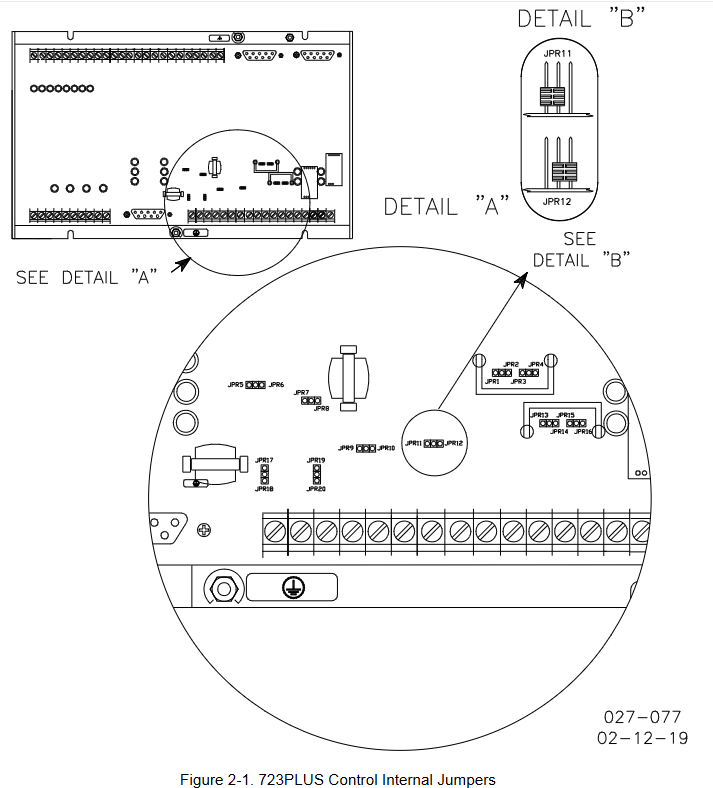
Scope: This includes general installation instructions for the 723PLUS controller, including power requirements, environmental precautions, location considerations, as well as unboxing, electrical connections, and installation inspection procedures.
Unpacking: Before handling the controller, it is necessary to read the relevant content on electrostatic discharge protection. When unpacking, be careful and check whether the controller is damaged. If there is any damage, immediately notify the shipper.
Power requirements: High voltage models require a 90-150Vdc voltage source, while low voltage models require an 18-40Vdc voltage source. To prevent damage to the controller, the input voltage range must not be exceeded. If battery power is used, an AC generator or other battery charging equipment must be equipped.
Location considerations: When selecting the installation location, factors such as ventilation, maintenance space, liquid and condensation prevention, electromagnetic interference prevention, and vibration prevention should be taken into account. The controller should not be installed on the prime mover, and the operating temperature range is -40 to+70 ° C (-40 to+158 ° F).
Specific installation requirements for marine use: The certification requirements for marine use types may change over time. In order to meet these requirements, all wiring, except for the part near the control connection terminal, must be inside metal conduits, and the control must be installed on a grounded metal mounting plate. It is also possible to meet attenuation requirements at specific installation locations or methods without additional special measures, but consultation with the shipyard is required.
Internal jumpers: The 723PLUS controller has ten two position internal jumpers located at the top of the printed circuit board. If you need to change the jumpers, you need to read the electrostatic discharge protection content first, power off and wait before operating. Different jumpers have different default settings and functions.
Electrical connection: External wiring connection and shielding requirements should refer to relevant software manuals. All shielded cables must be twisted pair, signal lines should be shielded, and shielding layer connections should follow specific requirements. It also provides detailed instructions on the connection methods and precautions for power supply, analog output, actuator output, speed signal input, load sharing line input, discrete input, analog input, etc.
Installation inspection program: After installation, visual inspection (checking linkage devices, wiring, terminals, speed sensors, etc.) and grounding inspection are required to ensure that the resistance between each terminal of the controller and the chassis meets the requirements.
Serial port communication: The 723PLUS has two serial ports for communication, which can be configured into multiple types through software. When writing applications, it can be configured as a Modbus communication port and supports relevant protocols.
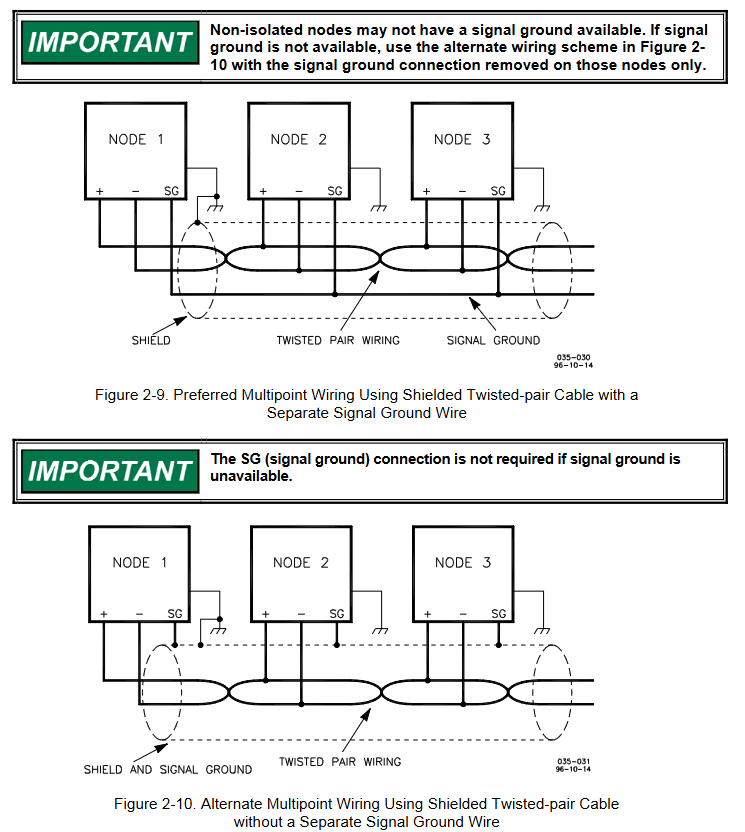
Terminal matching and grounding shielding: Different communication types (RS-422, RS-485) have different terminal matching requirements. RS-422 and RS-485 specifications require grounding wires when there are no other grounding paths between units. There are preferred and alternative wiring methods, and shielding and grounding must be handled correctly.
Control set point input
Overview: Due to differences in installation, system, and component tolerances, the 723PLUS controller must be adjusted for each system to achieve optimal performance. Setpoint inputs can be made through a handheld programmer or PC (using Watch Window software tools and Servlink software).
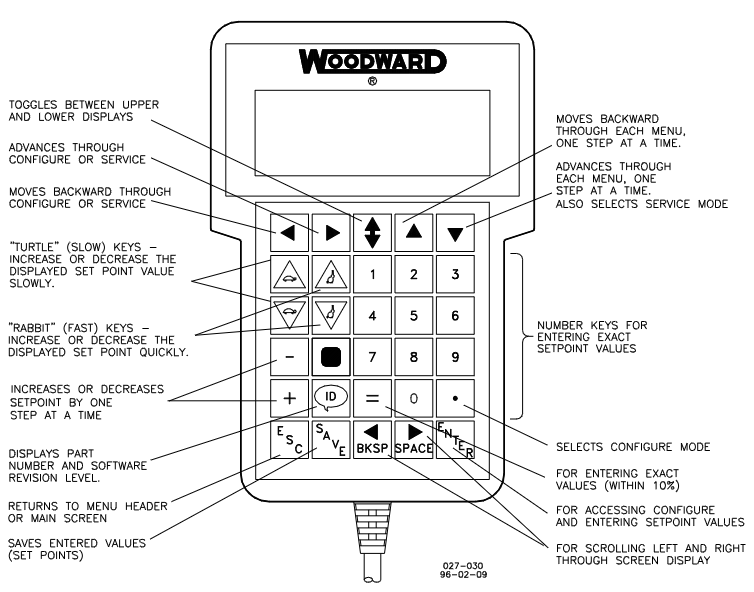
Handheld programmer and menu: The handheld programmer obtains power from the 723PLUS controller, connects to the RS-422 communication serial port of the controller, performs self check after power on, and displays application related information on the screen. The controller has a service menu and a configuration menu. The configuration menu needs to be entered when I/O is turned off (engine stopped), and the service menu can be directly entered through buttons. The operation menu and settings
Control set point input
Overview
Due to differences in installation environment, system, and component tolerances, the 723PLUS controller needs to be adjusted for specific systems to achieve optimal performance. Setpoint input can be completed through a handheld programmer or by connecting to a PC (using Watch Window software and Servlink software).
Handheld programmer and menu
Programmer connection and self-test
The handheld programmer (model 9907-205) obtains power from the 723PLUS controller and connects to the RS-422 communication serial port (J1 terminal) of the controller. When connecting, slightly loosen the right screw of the J1 port cover plate, rotate the cover plate clockwise to expose the 9-pin connector, and then firmly insert the programmer connector into J1.
After connecting the programmer to the controller, it will perform a power on self-test. After the self-test is completed, the screen will display two pieces of information related to the application. Press the ID key to switch between displaying the software's part number and version letter.
Menu type and access
Configure menu: It needs to be accessed while the engine is stopped. Press the corresponding button, and the screen will display "To select configure, press enter". After pressing the ENTER key, it will display "To shutdown I/O, press enter". Press the ENTER key again to enter. If the engine is running during this process, it will shut down due to controller I/O shutdown.
Service menu: Press the DOWN ARROW key to access without shutting down the engine.
Menu Operation
Move between menus: Use the LEFT ARROW and RIGHT ARROW keys.
To move between set points within the menu: use the UP ARROW and DOWN ARROW keys.
Return to menu title: Press ESC key.
Exit menu: Press the ESC key, and the configuration menu will automatically save the set points when exiting.
Setpoint adjustment
Arrange mode
Use the TURTLE UP or RABBIT UP keys to increase the set value, and the TURTLE DOWN or RABBIT DOWN keys to decrease the set value. The adjustment rate of the RABBIT key is about 10 times that of the TURTLE key, which is suitable for situations where a large adjustment value is required.
For settings that require the selection of TRUE or False, use the corresponding increase or decrease keys.
Use the+or - keys to gradually change integer values in the application software.
To enter a precise value, press the=key, enter the desired value, and then press the ENTER key, but the value must be within 10% of the existing value.
Save Setpoints
At any time, the SAVE key can be used to save the set points and transfer the new set point values to the EEPROM memory, which retains all set points even when the controller is powered off.
To prevent the loss of set values after the controller is powered off due to the failure to save the set points, which may damage the engine, it is necessary to save the set points before removing the controller power supply.

- OMRON
- ABB
- General Electric
- EMERSON
- Honeywell
- HIMA
- ALSTOM
- Rolls-Royce
- MOTOROLA
- Rockwell
- Siemens
- Woodward
- YOKOGAWA
- FOXBORO
- KOLLMORGEN
- MOOG
- KB
- YAMAHA
- BENDER
- TEKTRONIX
- Westinghouse
- AMAT
- AB
- XYCOM
- Yaskawa
- B&R
- Schneider
- KONGSBERG
- NI
- WATLOW
- ProSoft
- SEW
- ADVANCED
- Reliance
- TRICONEX
- METSO
- MAN
- Advantest
- STUDER
- DANAHER MOTION
- Bently
- Galil
- EATON
- MOLEX
- DEIF
- B&W
- ZYGO
- Aerotech
- DANFOSS
- Beijer
- Moxa
- Rexroth
- Johnson
- WAGO
- TOSHIBA
- BMCM
- SMC
- HITACHI
- HIRSCHMANN
- Application field
- XP POWER
- CTI
- TRICON
- STOBER
- Thinklogical
- Horner Automation
- Meggitt
- Fanuc
- Baldor
- SHINKAWA
- Other Brands
- UniOP
- KUKA
- Iba
- Beckhoff
- ADLINK
-
 Sigmatek MDD111-1 DIAS Drive Axis Module
 -
 Sigmatek DKL042 05-024-042 Terminal Module
 -
 Sigmatek DM822 Control Module
 -
 Sigmatek CDM167 12-008-167-O Module
 -
 Sigmatek TAE151 Touch Display Unit
 -
 Sigmatek DCC041 SLIDES Module 05-700-041-D
 -
 Sigmatek AKM65M-ANC2GBB0 PM Servo Motor
 -
 Sigmatek ETT221 01-230-221 Operator Terminal
 -
 Sigmatek SLIDES DAM 124 Analog Module
 -
Sigmatek AKM31C-ANCNGBB0 Servo Motor
-
 Mannesmann Demag Sigmatek CP626 Central Unit
 -
 SIGMATEK 0332.554.03 Board 371071000154
 -
 SIGMATEK 12-250-021 Base Plate Back Panel CM5V020
 -
 SIGMATEK DM162 S-DIAS Digital Mix Module
 -
 DEMAG ERGOTECH 061 381 66 Sigmatek 9842.243.02 Circuit Board
 -
 SIGMATEK CP313-1 PLC Module
 -
Sigmatek ETV0551-2 VARAN Touch Terminal
-
 Sigmatek SDM 081 FS S-Dias Safety Module
 -
 DEMAG 05-250-023 Ergotech Motherboard with Sigmatek TMS012
 -
Sigmatek CM5V020 12-250-023-K Wiring Base
-
 Sigma Tek 5000B-37 Attitude Gyro Indicator
 -
 Sigmatek SDD120-2 DIAS Drive
 -
 Sigmatek CME221 Memory Module
 -
 Sigmatek DCP640 DIAS Central Unit
 -
 Sigmatek STO040 Safety Output Module
 -
Sigmatek CET281 Control Panel
-
 Sigmatek CIPC LX800 Demag NC5 CPU
 -
 Sigmatek DKL093 05-024-093 Terminal Module
 -
 Sigmatek AI088 20-009-088 Analog Input Module
 -
Sigmatek CAI888 Analog Input Module
-
SIGMATEK CCA021 12-025-021 Analog Output Module
-
SIGMATEK 1104.579.05 Control Module
-
SIGMATEK SDI100 Digital Input Module
-
 SIGMATEK C-IPC 256MB LX800 Compact Dias
 -
 SIGMATEK 9423.090.02 Control Module
 -
SIGMATEK C-IPC 256 Power Supply 148498
-
 SIGMATEK CAI025 Analog Input Module
 -
 SIGMATEK CTO166 Digital Output Module
 -
 SIGMATEK CP112 20-004-112 Processor Module
 -
SIGMATEK CAI887 12-009-887 Safety Module
-
 Sigma-Tek 4000B-31 Directional Gyro 1U262-002-42
 -
Sigmatek C-IPC 256MB LX800 IPC Controller
-
Sigmatek C-IPC 01-450-031 Industrial PC LX800
-
Sigmatek C-IPC 256 Industrial PC Controller
-
Sigmatek CCP-531 PLC Processor Module
-
Sigmatek CDI163 Digital Input Module
-
 Sigmatek ETV0501 VARAN Terminal 12-230-0501
 -
 Sigmatek CTMS020 C-DIAS Technology Module
 -
 Sigmatek CIV512 VARAN Switch Module
 -
 Sigmatek HU011 20-080-011 Interface Module
 -
SIGMATEK SLIDES DAM 124 Module
-
 SIGMATEK C-IPC 161 01-450-161L Industrial PC
 -
SIGMATEK C-IPC 128MB VIA 733MHz 01-450-024-K
-
 SIGMATEK 12-780-012 R8-IPC Geode LX800 Module
 -
SIGMATEK CAM124 Analog Module
-
 SIGMATEK S1 032-8AF61-R4 EZ Servo Motor
 -
 SIGMATEK CTO163 Digital Output Module
 -
 SIGMATEK CCP082 12-004-082 Processor Module
 -
 SIGMATEK CRCH081 C-DIAS Temperature Module
 -
 SIGMATEK PC322-K 01-310-322-K Industrial PC
 -
SIGMATEK SDD310-2 Servo Drive
-
 SIGMATEK AI084 Analog Input Module
 -
SIGMATEK CRCH081 12-752-081 Temperature Module
-
Sigma-Tek 5000L-4 Attitude Gyro 1U284-001-3
-
 SIGMATEK CM5V020 12-250-023-K Wiring Module
 -
Sigma-Tek 4000H-6 Directional Gyro IU262-035-7
-
 SIGMATEK Dias DCP160 05-004-160 Processor Module
 -
SIGMATEK 0147.395.02 Control Module
-
SIGMATEK A1084 Control Module
-
SIGMATEK DI200 20-006-2000 Digital Input Module
-
Sigmatek DNC115 Encoder Module
-
 Sigmatek DAM122 05-017-122 Analog Module
 -
Sigmatek 9802.289.01 Control Board TA71 Display
-
Sigmatek TO127 20-007-127 Digital Output Module
-
Sigmatek DNC031 05-011-031 Digital Module
-
Sigmatek VI022 20-003-022 Interface Module
-
Sigmatek CAI085 Analog Input Module
-
 Sigmatek CP111 S-DIAS CPU Module
 -
Sigmatek CTMS030 Krauss Maffei Module
-
 Sigmatek CAM123 Control Module
 -
 Sigmatek TAE732-P 01-240-732-P Touch Display Unit
 -
Sigmatek MDM021 Digital Mixed Module
-
Sigmatek DCP642 DIAS Central Unit
-
 Sigmatek CST022 12-014-022 C-DIAS Module
 -
 Sigmatek SRO021 20-893-021 Safety Relay Output
 -
 Krauss Maffei MC5 Control System Sigmatek
 -
 Sigmatek DC061 Module 18-24VDC 300mA
 -
 Herrmann EVT0855 Ultrasonic Welder Touch Panel
 -
Sigmatek CIV521 Control Module 1.4A 2W
-
Sigmatek DDI61 05-006-161 Digital Input Module
-
SIGMATEK ETT312-E Touch Terminal 01-230-312
-
Cessna S3326-1 Sigma Tek 5000B-67 Gyro 1U149-015-9
-
SIGMATEK PS101 Power Supply Module
-
SIGMATEK 0332.554.03 Control Module 371071000154
-
 SIGMATEK ETT312-E Touch Terminal 01-230-312
 -
SIGMATEK CDM163 Control Module
-
 SIGMATEK VSV046 16-023-046 Module
 -
SIGMATEK AM221 20-017-221 Analog Module
-
SIGMATEK CTS051 12-053-051 Control Module
-
SIGMATEK AM221 20-017-221 Analog Module
-
Sigmatek CSDI161 12-891-161 Safety Input Module
-
Sigma Tek 4000C-1 Directional Gyro Indicator
-
Sigmatek ETV0501 12-230-0501 VARAN Terminal
-
Sigmatek DDM165 SLIDES Module
-
Sigmatek N100 20-011-100 Control Module
-
Sigmatek AKM54K-ANC2R-B0 PM Servo Motor
-
Sigmatek CTO166 Digital Output Module
-
Sigmatek CP212-K 20-004-212-K CPU Module
-
Sigmatek CDI161 Digital Input Module
-
Sigmatek DCC080 05-700-080-2 Control Module
-
 SIGMATEK SCP011 S-DIAS Safety CPU
 -
SIGMATEK SCP011 S-DIAS Safety CPU
-
SIGMATEK SRO022 Relay Output Module
-
SIGMATEK MDD 121 Drive Axis Module
-
SIGMATEK DSI021 SLIDES Siemens Interface
-
SIGMATEK DIAS DCP161 Module 05-004-161
-
 Sigmatek ETT312 Built-in Touch Terminal
 -
SIGMATEK DCP 643 DIAS Controller System
-
SIGMATEK CIO021 Multi I/O Module
-
SIGMATEK CTMS020 Control Module
-
 Sigmatek CME 221 Memory Module
 -
Sigmatek 0420.615.01 Control Board
-
Sigmatek CP111 20-004-111 CPU Module
-
Sigmatek 9405.065.03 Control Board
-
Sigmatek ETEK 01-450-032-K C-IPC 256MB Industrial PC
-
Sigmatek CTO163 12-007-163 Safety Output Module
-
Sigmatek TO081 20-007-081 Digital Output Module
-
 Sigmatek SI021 20-022-021 Safety Input Module


