
Tektronix AWG2021 250 MHz Arbitrary Waveform Generator
Tektronix AWG2021 250 MHz Arbitrary Waveform Generator
Basic Information and Security Standards
Product positioning: 250 MHz high-precision arbitrary waveform generator, specializing in laboratory precision testing (such as benchmark signal simulation) and industrial production line screening (such as component parameter verification), supporting custom waveform and standard function waveform generation.
Safety regulations
Specific requirements for safety categories
Overvoltage Category CAT III 1000V, CAT IV 600V Suitable Distribution System (CAT III) and Low Voltage Grid (CAT IV) Scenarios
Terminal rated value "V Ω" terminal maximum 1000V DC/AC; Terminal A has a maximum of 10A DC/AC (continuous) and 20A (30 second pulse). It is prohibited to input voltage beyond the range to avoid device damage
Operating environment working temperature+10 ℃ -+40 ℃, humidity 20% -80% (no condensation); Storage temperature -40 ℃ -+70 ℃. Exceeding this range may result in decreased testing accuracy or hardware failure
Grounding requirements require grounding through the power line grounding conductor to avoid the risk of electric shock caused by leakage
Operation Guide: Basic Process and Panel Control
1. Power on/off and self check
Startup process
Environmental inspection: Ensure good ventilation (leave 15.2cm space on the left and right sides, 7.6cm space on the top/rear), and unobstructed heat dissipation holes.
Power connection: Select the corresponding power cord according to the region (such as North America 125V, Europe 230V, refer to Table 1-1), and connect the Rear panel power interface.
Starting power supply:
Press the 'PRINCIPAL POWER SWITCH' button on the Rear panel to power on the standby circuit.
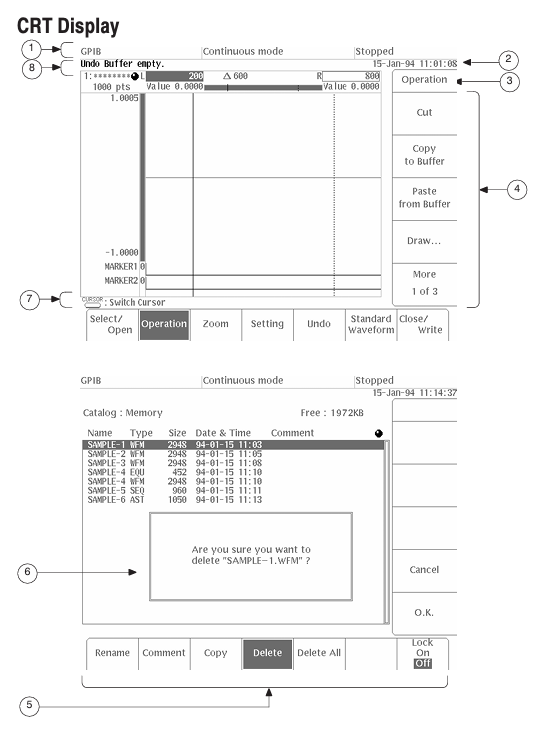
Press the "ON/STBY" button on the front panel to start the instrument and perform a self-test (approximately 3 seconds).
Self check result:
No error: Display "Pass" and enter the SETUP menu.
Error: Display "Fail"+error code (such as "Uncal" requiring UTILITY menu calibration). You can press any key to exit and enter the menu, but the waveform output may not be reliable.
Shutdown process
Press the "ON/STBY" button on the front panel to cut off the power supply to the main circuit.
When not in use for a long time, turn off the 'PRINCIPAL POWER SWITCH' on the Rear panel and unplug the power cord.
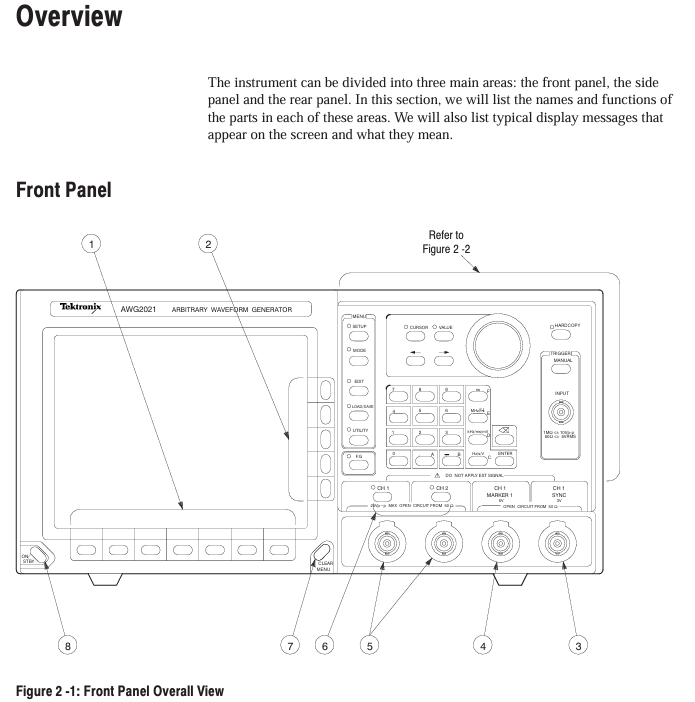
2. Key components of the front-end panel
Specific functional operation examples for component categories
MEAS key in function selection area: switch measurement function; F. G key: Switch to function generator mode and press F. G key to enter standard waveform settings such as sine/triangle/square wave
Menu Control Area MENU Column: SETUP (Parameter Configuration), MODE (Run Mode), EDIT (Editor), LOAD/SAVE (File Management), UTILITY (System Settings) Press the EDIT key to enter the initial menu for file editing
Universal knobs in the data operation area: adjust values/select files; Numerical keys (0-9/.+-): input parameters; Unit key (ns/MHz, etc.): Enter the "1"+"MHz" key to specify the unit and set the clock frequency to 1 MHz
Trigger control area TRIGGER INPUT: external trigger input (maximum ± 10 V ₚ₋ₚ); MANUAL key: Manually triggered. In Triggered mode, press the MANUAL key to trigger waveform output once
Output control area CH1/CH2 ON/OFF keys: switch channel output; SYNC/MARK output interface: Sync/Mark signal output. Press the CH1 ON/OFF button, and the LED will light up to indicate that the CH1 waveform output is turned on
Core functional module: Editor and menu configuration
1. Four core editors (EDIT menu)
(1) Waveform Editor (. WFM file)
Function: Create/edit waveform data, supports 3 display formats:
Graphic display: Visualize waveforms, support point drawing, smoothing (spline/linear interpolation), arithmetic operations (absolute value/integral/derivative).
Timing display: Display timing according to data bits (DATA 11-DATA 0), supporting the setting of - pattern (such as NRZ/NRZI encoding).
Table display: Display each point data in binary/hexadecimal/real form, supporting direct editing of numerical values.
Key operations: Select the editing area (left and right vertical cursor), perform cutting/copying/pasting, or insert other waveform files.
(2) Equation Editor (. QU file)
Function: Generate waveforms through mathematical equations, support 100 line equations, compile and generate WFM file.
Support functions: trigonometric functions (sin/cos), exponents (exp), logarithms (log/ln), random numbers (rnd), differentials (diff), integrals (integ), etc.
Example equation: range (0,1ms) sin (2 * pi * x) (generates a single period sine wave within 0-1ms).
(3) Sequence Editor (. SEQ file)
Function: Combine multiple waveform/sequence files and set the number of repetitions for each file (1-65535 times).
Operation process: Select a file from the directory → Set the number of repetitions → Generate a sequence, support "Show Overview" preview of combined waveforms.
(4) Automatic Step Editor (. AST file)
Function: Program waveforms and output parameters (clock/amplitude/filter) step by step, switch one step per trigger, supporting 100 steps.
Features: In AutoStep mode, the SETUP menu parameters cannot be modified, and the parameters between steps can be independently set (such as Step 1 amplitude of 2V, Step 2 amplitude of 3V).
2. Extended Editor (Option 09)
Editor Type Function Key Parameters
FFT editor for frequency domain editing, supporting fast Fourier transform/inverse transform window functions: 6 types including rectangle, Hanning, and Hamming; Filtering: low-pass/high pass/band-pass/bandstop
Convolutional waveform editor supports high-speed convolution/correlation operations with a maximum of 32000 data points, where the number of result points equals the sum of two waveform points
3. Key menu configuration
(1) SETUP menu (output parameter settings)
Parameter Category Configuration Options Value Range/Description
Clock source: Internal/External; Frequency (Internal) 10.00 Hz -250.0 MHz (4-digit accuracy)
Waveform Sequence (file selection) supports selecting waveform/sequence files WFM/. SEQ file, automatically loads corresponding parameters
CH1 Operation: Normal/AM/Add/External AM AM: CH1 × CH2; Add: CH1+CH2 (1/5 CH2 weight)
Filter Through/1/5/20/50 MHz suppresses high-frequency noise, such as 50 MHz filtering, which is suitable for high-frequency waveforms
Amplitude: Vertical axis full bias voltage of 0.05 V -5 V (50 Ω load, 1 mV step)
Offset Vertical axis offset voltage -2.5 V -+2.5 V (5 mV step size)
(2) MODE menu (operating mode)
Mode name function triggering conditions
Cont (continuous mode) continuously outputs waveforms without triggering, select and run
Triggered mode outputs a waveform every time it is triggered. External trigger (rising/falling edge) or MANUAL key is used
When the gate signal is valid, output waveform external signals (high/low level) or press and hold the MANUAL key
Burst mode: After triggering, output the specified number of waveform bursts 1-65535 times, triggered externally or with the MANUAL key
Waveform Advance switches to the next waveform every time it is triggered, ignoring the number of repetitions in the sequence file and cyclically outputting in order
Press AutoStep AST file step output, with independent parameters for each step and execution of one step per trigger, supporting 100 steps
Data Management and Transmission (LOAD/SAVE menu)
1. Storage medium and capacity
Storage Type Capacity Characteristics
Internal memory (RAM) up to 400 files lost due to power failure, used for temporary editing/output
NVRAM (non-volatile memory) 512KB, up to 400 files can be saved in case of power failure, suitable for long-term storage of critical files
3.5-inch floppy disk is compatible with MS-DOS format and supports directory hierarchy. It needs to be formatted first (UTILITY menu)
2. File loading/saving operations
Load file
Press the LOAD/SAVE key → select Device → select the target media (Disk/NVRam/GPIB).
Select Load → Select 'Load All' or individual file → Confirm loading into internal memory.
Save file
Press the LOAD/SAVE key → select Device → select the target medium.
Select Save → Select "Save All" or individual file → Optional ASCII format for external analysis.
3. GPIB direct transmission
Supported devices: Tek TDS series oscilloscope, HP 54600 series oscilloscope, etc. (refer to Table 3-19).
Operation steps:
Connect AWG2021 to the source device using GPIB cable.
Select Device → GPIB → Select Source Device (such as "Tek TDS CH1").
Select Load ->Automatically load waveform into internal memory (named as "TDSCH1. WFM").
Calibration and maintenance
1. Self calibration process
Trigger condition:
Regular: once every 90 days when the environment is stable (± 2 ℃); When the fluctuation is greater than 5 ℃, once every 30 days.
Manual: Press and hold the CAL key when turning on, or UTILITY → Calibration → Start.
Steps:
Disconnect all probes, the instrument displays "CALIBRATION...".
Internal calibration of ADC and reference source (approximately 2 minutes), complete display of "CAL PASS".
If 'CAL FAIL', check the ambient temperature (+18 ℃ -+28 ℃) and recalibrate.
2. Common troubleshooting
Possible causes and solutions for the fault phenomenon
No display/power adapter failure, fuse blown, replace with 12V/3A adapter; Check the 2A/250V fuse (Rear panel)
The waveform has no inflection point (such as the breakdown voltage test of the Zener transistor), the vertical sensitivity is insufficient, and the filter gear is improper. The vertical sensitivity is set to 1 μ A/div (leakage current measurement), and MAG X10 is turned on; Select a 50 MHz filter
GPIB transmission checksum error, loose cable, incorrect command format, replace GPIB cable (total length ≤ 20m); Confirm that the command termination symbol (EOI/LF) is consistent with the device
Appendix Key Content
Appendix A (Options and Accessories): Detailed description of hardware specifications and connection methods for options such as Option 02 (2-channel) and Option 03 (ECL output).
Appendix B (Performance Characteristics): Electrical characteristics (such as clock frequency accuracy ± 10 ppm), mechanical characteristics (weighing approximately 10kg), environmental characteristics (storage humidity 10% -90%).
Appendix C (Performance Verification): Includes testing procedures for clock frequency/amplitude accuracy/pulse response, etc., which require the use of a standard signal source and oscilloscope.
Appendix D (Sample Waveform Library): Provides formulas and parameters for preset waveforms such as Gaussian pulses, Lorentz pulses, DQPSK signals, etc.
- OMRON
- ABB
- General Electric
- EMERSON
- Honeywell
- HIMA
- ALSTOM
- Rolls-Royce
- MOTOROLA
- Rockwell
- Siemens
- Woodward
- YOKOGAWA
- FOXBORO
- KOLLMORGEN
- MOOG
- KB
- YAMAHA
- BENDER
- TEKTRONIX
- Westinghouse
- AMAT
- AB
- XYCOM
- Yaskawa
- B&R
- Schneider
- KONGSBERG
- NI
- WATLOW
- ProSoft
- SEW
- ADVANCED
- Reliance
- TRICONEX
- METSO
- MAN
- Advantest
- STUDER
- DANAHER MOTION
- Bently
- Galil
- EATON
- MOLEX
- DEIF
- B&W
- ZYGO
- Aerotech
- DANFOSS
- Beijer
- Moxa
- Rexroth
- Johnson
- WAGO
- TOSHIBA
- BMCM
- SMC
- HITACHI
- HIRSCHMANN
- Application field
- XP POWER
- CTI
- TRICON
- STOBER
- Thinklogical
- Horner Automation
- Meggitt
- Fanuc
- Baldor
- SHINKAWA
- Other Brands
- UniOP
- KUKA
- Iba
- Beckhoff
- ADLINK
-
 Bonfiglioli ISMET LCVT050 DK308/50 Line Reactor
 -
 Bonfiglioli C 22 2 F GR063 Gearbox
 -
 Bonfiglioli C31 3 P P63 PV V5 Reducer
 -
 Bonfiglioli CM-485 T Communication Module
 -
 Bonfiglioli W75UF1D30P90B5 Gearbox
 -
 Bonfiglioli BN63 B4 VF49 Gearmotor 0.18kW
 -
 Bonfiglioli ACT 400-004 FA Frequency Inverter
 -
 Bonfiglioli W110U100P90B5B3 Worm Gearbox
 -
 Bonfiglioli SYN10 T 400 05 AF Inverter
 -
 Bonfiglioli MP080.1.4.15.16.40.80.100 Gearbox
 -
Bonfiglioli SYN10S Inverter
-
 Bonfiglioli VF44L2P160 Gearmotor
 -
Bonfiglioli W 86 U 40 P90 B5 B3 Gear Reducer
-
 Bonfiglioli BTD5-1870-05-400 Servomotor
 -
 Bonfiglioli MP 080 2 2C Gearbox with BLDC Motor
 -
 Bonfiglioli MP080.1.10 Planetary Gearbox
 -
 Bonfiglioli C212PHS Reducer
 -
 Bonfiglioli MVF 49F1 Gearbox with ICME T71B4
 -
 Bonfiglioli VF 49 v P71 B5 Gearbox
 -
Bonfiglioli VF 44 P1 Gearmotor
-
 Bonfiglioli C 22 2 NP 6.1 Helical Gearbox
 -
Bonfiglioli F203 316.9 Gearbox with Kaiser Motor
-
 Bonfiglioli SYN10 S 220 07 AF Frequency Inverter
 -
Bonfiglioli 301L251.8-HC-P90 Gearbox 1/51.8
-
 Bonfiglioli ACT401-25A Frequency Inverter
 -
 Bonfiglioli W75 U D30 30 P90B14 B3 Worm Drive
 -
 Bonfiglioli 830G2310M-307638 Motor
 -
 Bonfiglioli C112-P-P90 Inline Gearbox i=6.2
 -
Bonfiglioli SYN10-S-220-03-AF AC Drive
-
 Bonfiglioli VFR49 A HS Worm Drive i=180 B3
 -
Bonfiglioli ACT 401-29 A AC VFD Drive 22kW
-
 Bonfiglioli VF49PIP63B14 Gearbox
 -
 Bonfiglioli ANG 410-18 2 FA Inverter
 -
 Bonfiglioli GVX2000-7.5-T Converter
 -
 Bonfiglioli EM-ENC-02-24 Optical Module
 -
 Bonfiglioli ACT 401-33 A VFD Drive
 -
 Bonfiglioli MVF 49F1 Gearbox with ICME T71B4
 -
 Bonfiglioli BN112M4 Motor
 -
Bonfiglioli MP080.1.7 Planetary Gearbox
-
 Bonfiglioli VF-EP 49 BN-71-B2 Gearmotor
 -
 Bonfiglioli W75UD3010P80B14B3 Gear Reducer
 -
Bonfiglioli W 110 U 100 P80 B5 B3 Worm Gearbox
-
Bonfiglioli ACT 201-11 FA Frequency Inverter 1.5kW
-
Bonfiglioli MP080380STDISS5 Planetary Gearbox
-
 Bonfiglioli ACU 210-05 1 FA Frequency Inverter
 -
 Bonfiglioli BN63B4 Electric Motor 265 460V
 -
Bonfiglioli BN 63 C 2 Electric Motor
-
Bonfiglioli 12.502.410 BCLP 40XDSM Assembly
-
Bonfiglioli ACU401-13FA Frequency Inverter
-
Bonfiglioli MP 130.2.20.15.16.40.80.100 Gearbox
-
Bonfiglioli VF49N60HSB3 Gearbox
-
 Bonfiglioli VF30P Gearbox
 -
Bonfiglioli ACU410-31A5 Inverter
-
 Bonfiglioli 301L251.8 Gearbox
 -
Bonfiglioli 8XNC63040004 Electric Motor
-
Bonfiglioli VF30F115P63B14B3 Gearbox
-
 Bonfiglioli RAN 28/DA HS Right Angle Gear Unit
 -
 Bonfiglioli 300L220.1PCP90E Gear Unit
 -
Bonfiglioli BN90LA4 Motor
-
Bonfiglioli KG2001030 Gear Unit
-
 Bonfiglioli VF44F135P71B14B3 with VF30 Combination
 -
Bonfiglioli W63 U P90B5 B3 Gear Motor 10:1
-
Bonfiglioli W75 U D30 15 P90 B5 B3 Gearbox
-
 Bonfiglioli B310 DC Motor 600W 3000rpm
 -
Bonfiglioli W 110 U 100 P80 B5 B3 Gearbox
-
 Bonfiglioli VF44P120P71B5B3 Worm Gearbox
 -
 Bonfiglioli BN 71 B 2 Gearmotor VF44 F1 P71B14
 -
 Bonfiglioli 2E130136140005 Assembly Reference
 -
Bonfiglioli KE0702030 Gearbox
-
Bonfiglioli ACT400-004A Frequency Inverter
-
 Bonfiglioli W110 UFC1 P100 B14 B6 Gearbox
 -
 Bonfiglioli Vectron ZBA400-010FC Inverter
 -
 Bonfiglioli 700C-1H Final Drive Motor
 -
Bonfiglioli VF 86 P Gearbox
-
Bonfiglioli W63 U 15 Gearbox
-
 Bonfiglioli VF/W30/63U450P63B14B3 Gearbox
 -
 Bonfiglioli BN 63 A 2 Gear Motor
 -
Bonfiglioli BN 63B 4 Motor
-
 Bonfiglioli VF44P17 Gearmotor
 -
Bonfiglioli T56BN/4 Asynchronous Motor
-
Bonfiglioli W63UF1P90B5 Worm Gearbox
-
Bonfiglioli ACU401-13FA Frequency Inverter
-
Bonfiglioli W63UFC1P90B5 Worm Gearbox
-
Bonfiglioli W75 1/50 D30 Speed Reducer
-
 Bonfiglioli KG2401180 Non Standard Gearbox
 -
Bonfiglioli ACU 201 07 FA Frequency Inverter
-
 Bonfiglioli RAN25SA1HSB3 Gear Unit
 -
Bonfiglioli SPL400 17F Industrial Drive 3.7kW
-
Bonfiglioli VF63P124P71B14B3 Worm Gearbox
-
Bonfiglioli W63U64P71B5B3 Worm Gearbox
-
Bonfiglioli BN90LA4FD Motor
-
Bonfiglioli ANG 410-33 6A Inverter
-
 Bonfiglioli CM-CAN 149-650-034 179-675 140 Communication Module
 -
Bonfiglioli WR110U120P90B5B3 Gearbox
-
Bonfiglioli C 112 F S05 Gearmotor with Pump
-
 Bonfiglioli C50 2P P100 Gear Reducer
 -
 Bonfiglioli ACT 401-31A Inverter 30kW
 -
 Bonfiglioli A102UH25S1PV Gearmotor
 -
Bonfiglioli ACT 201-05 FA Inverter
-
Bonfiglioli AGL402-21 3FA Inverter
-
Bonfiglioli VF49 V 71B14 Gearbox with ESA 6S 12 Motor
-
Bonfiglioli GVX2002-22-T Inverter 22kW
-
Bonfiglioli BN63A2 Electric Motor
-
Bonfiglioli EM I/O-03 I/O Module
-
Bonfiglioli C112 U P63 Inline Gearbox
-
Bonfiglioli BRA 400-075 BF2 Brake Chopper
-
Bonfiglioli VF49 P1 HSRB Worm Gearbox
-
Bonfiglioli GVX2000-18.5-T Inverter
-
Bonfiglioli BMD 118 14 3000 400 165 24 K 67 TC1 Drive
-
Bonfiglioli WR 86 U 120 P80 B5 V5 Gearbox
-
 Bonfiglioli W110U56P100B5B3 Gear Reducer
 -
Bonfiglioli A202 UR 35.4 Bevel Gearbox
-
Bonfiglioli ACU 401-26A Inverter
-
 Bonfiglioli BN 71 B 4 Motor
 -
 Bonfiglioli Vectron BTD5-1870-05-400 Servo Motor
 -
Bonfiglioli BE 80B 4 Motor with C122PP80 Gear
-
Bonfiglioli TR160225STD130ACD Gear Unit
-
Bonfiglioli W 63 U 24 P71 Gearbox
-
Bonfiglioli Trasmital KYB MHKAYABAKTMAGA050VP34 Hydraulic Track Drive
-
Bonfiglioli EM-ABS-01 Encoder Module
-
Bonfiglioli RPS Log 100 Data Logging Module
-
Bonfiglioli VF49P1P71B14 Gearbox
-
Bonfiglioli W86U Right Angle Gear Reducer
-
Bonfiglioli W63 U P71B5 Gear Reducer
-
Bonfiglioli W63UP90B5 Gearmotor
-
 Bonfiglioli VER/S 400-150 Inverter
 -
Bonfiglioli F202 H30 P80 Gearbox
-
Bonfiglioli W75UD307P90B14 Gearbox


