
ProSoft Technology ILX56-PBM PROFIBUS DPV1 Master/Slave Module
ProSoft Technology ILX56-PBM PROFIBUS DPV1 Master/Slave Module
ILX56-PBM is an adaptation of ControlLogix launched by ProSoft Technology ® The PROFIBUS DPV1 master/slave module of the platform enables efficient data exchange between the ControlLogix controller and PROFIBUS DP devices, supports DPV0 cyclic data exchange, DPV1 non cyclic message and alarm functions, and has redundant deployment, flexible configuration, and comprehensive diagnostic capabilities. It is suitable for applications that require the integration of PROFIBUS bus and ControlLogix system in industrial automation, process control, and other scenarios.
Core functions and architecture
1. Work mode and core competencies
ILX56-PBM supports bidirectional switching between master and slave modes, with core functionality covering the full protocol stack of PROFIBUS DPV0/DPV1
Master mode:
Manage up to 125 PROFIBUS DP slave devices, supporting DPV0 cyclic data exchange (up to 5000 bytes of data), DPV1 Class 1 (MS1, only communicates with configured slave devices), and Class 2 (MS2, concurrent communication with multiple master stations) non cyclic messages.
Support DPV1 alarm collection (such as diagnostic alarms and process alarms), which can read device alarm and diagnostic information through the ControlLogix controller, and support automatic device discovery and station address modification.
From mode (Slave):
It can simulate up to 10 PROFIBUS DP slave devices, support DPV0 cyclic data exchange and DPV1 Class 1 messages, and each analog slave device can be configured with independent I/O mapping and alarm triggering mechanisms.
Supports communication with third-party PROFIBUS master stations, automatically adapts data formats to ControlLogix user-defined data types (UDT), and ensures alignment of 16/32-bit data structures.
2. Hardware architecture and interfaces
Physical interface:
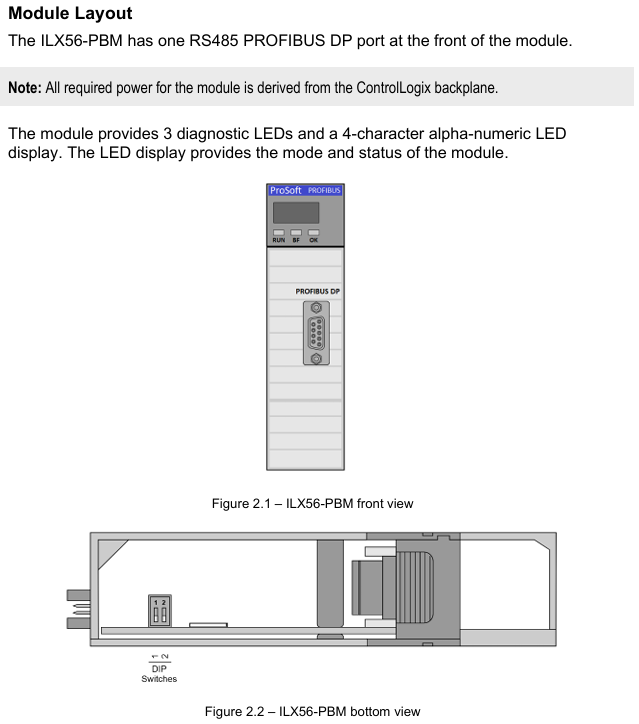
PROFIBUS DP port: RS485 standard DB9 female head, supports+5VDC terminal resistor power supply, pins 3 (RxD/TxD-P) and 8 (RxD/TxD-N) are differential data pins, and pin 5 is reference ground.
Expansion interface: onboard SD card slot (supporting FAT32 format for firmware backup and configuration recovery), 2 DIP switches (SW1: forced safe mode for firmware repair); SW2: Configuration lock to prevent accidental modifications.
Indicator lights and display: 3 diagnostic LEDs (RUN/FB/OK)+4-character alphanumeric display screen, real-time display module mode (such as "MASTER" and "SLAVE"), operating status (such as "OPERATE" and "OFFLINE"), and fault information (such as "Bus Fault" and "Duplicate Station").
Configuration and deployment process
1. Configuration tools and preliminary preparations
Core tool: ProSoft PLX50 Configuration Utility (available for download from the official website) needs to be installed for module parameter configuration, GSD file management, device addition, and configuration download; Studio 5000 requires the installation of Add On Profile (AOP, v21 and above versions, v20 and below require the use of the universal 1756 module configuration file).
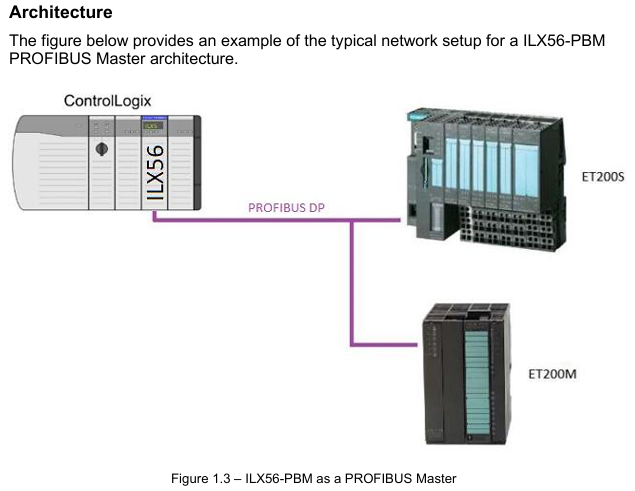
GSD file management: PROFIBUS devices need to be imported into PLX50 tool through GSD files, supporting GSD directory export/import, and can batch add third-party PROFIBUS devices (such as Siemens ET200M, Schneider ATV frequency converter, etc.).
2. Key configuration steps
(1) Basic parameter configuration
Main mode configuration:
Set the PROFIBUS station address (TS, 0-126, which should not conflict with the slave devices), the highest station address (HSA, it is recommended to set it as the actual maximum slave address to optimize performance), and the baud rate (9.6Kbps-12Mbps, which should match all slave devices).
Configure DPV1 parameters: Enable Class 1/Class 2 messages, enable alarms (such as Pull Plug alarms, process alarms), and set timeout time (such as DPV1 request timeout of 2000ms).
From mode configuration:
Simulate the number of slave devices and station addresses, and each slave device needs to be configured with DPV0 data length, DPV1 object (Slot/Index mapping), and alarm triggering conditions (such as Alarm Trigger tag level switching triggering alarms).
(2) ControlLogix Mapping
Generate Logix L5X files using the PLX50 tool, including UDT (such as master status UDT, slave device data UDT), mapping programs, and controller labels. After importing into Studio 5000, automatically associate module input/output mapping areas.
Mapping rule: Input data (from PROFIBUS devices to ControlLogix) and output data (from ControlLogix to PROFIBUS devices) are packaged into byte arrays and automatically parsed into structured labels (such as MyILX56PBM.ET200M.Input. Data) through generated subroutines.
(3) Redundant deployment (exclusive to main mode)
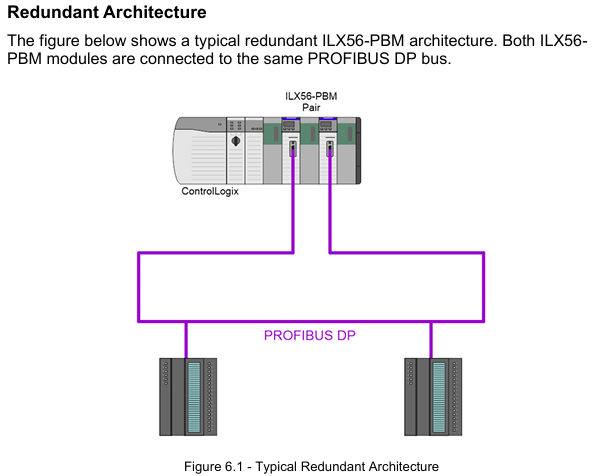
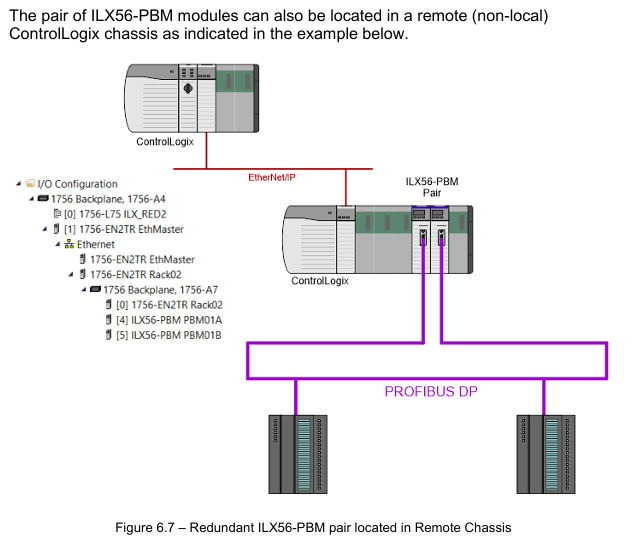
Redundant architecture: Two ILX56-PBM modules share the same PROFIBUS bus, with identical configurations and support for "one master, one backup" switching. The backup machine automatically takes over the main station role by monitoring bus activity (PROFIBUS Inactive Time parameter, default 22ms).
Key parameters:
Profibus Inactive Time: The inactive time of the bus that determines the failure of the main station by the backup machine should be set as "10ms+2 x maximum packet transmission time".
Switch Timeout: The timeout for confirming the primary/backup switch should be set to "Max (1000ms, 4x module RPI)" to avoid switch interruption.
Data interaction and operation
1. Data exchange type
(1) DPV0 cyclic data exchange
Main mode: Interact data with slave devices according to a preset cycle (configurable, minimum 4ms). The input/output data length of each slave device is automatically identified through GSD files, supporting byte/word order exchange (such as AA BB CC DD → BB AA DD CC). In case of communication failure, data can be configured to be forcibly cleared to zero.
From mode: Simulate receiving loop data requests from the PROFIBUS master station, forward ControlLogix output label data to the master station, and write the data issued by the master station to the ControlLogix input label, supporting "Data Exchange Active" status feedback (DataExchange Active label).
(2) DPV1 non cyclic message
Class 1 (MS1): Interacts only with slave devices that have established loop communication in master mode, used for parameter reading and writing (such as modifying slave device range, reading diagnostic registers). The slave address, Slot number, Index number, and data length need to be specified, and the timeout time can be configured (default 4000ms).
Class 2 (MS2): Supports concurrent communication with multiple master stations, requires establishing a connection through "Initialize", obtaining the connection reference number, and performing read and write operations. After the communication ends, a "Abort" message is sent to release resources, suitable for device debugging and parameter configuration.
(3) Alarm and Diagnosis
Alarm collection: Automatically monitor DPV1 alarms from the slave device in main mode, indicating the alarm status through the DeviceAlarmPending tag. Alarm data (such as alarm type, Slot number, detailed description) can be extracted through CIP messages (service code 0x51).
Diagnostic information: Supports standard diagnostics (such as device unresponsive, data length mismatch) and extended diagnostics (device specific diagnostics based on GSD file parsing, such as module failures, wiring errors), which can be viewed or exported in real-time through the PLX50 tool.
Diagnosis and maintenance
1. Status monitoring and LED indication
Meaning of LED light status (main mode) Meaning of status (slave mode)
RUN often red: PROFIBUS STOP mode; Flash green: CLEAR mode; Evergreen: Operational mode; Off: OFFLINE mode is always off (no RUN status indication from mode)
FB flashing red: from device error; Always red: Bus fault (such as cable disconnection); Extinguish: Normal flashing red: Simulate device error; Constant red: Bus communication failure; Extinguish: Normal
OK often red: Hardware malfunction/firmware damage; Flashing green: No configuration; Evergreen: configured normally and running in the same main mode
Display screen: display mode ("MASTER"/"SLAVE"), operating status ("OPERATE"/"STOP"), fault code (such as "Duplicate" indicating station address conflict).
2. Tool based diagnostic function
PROFIBUS packet capture: The PLX50 tool supports real-time capture of bus packets, displaying frame types (SD2/SD4), source/destination addresses, data length, and raw data. It can filter specific station addresses or frame types (such as Token frames, SRD data frames) to troubleshoot communication anomalies.
Event log: The module has built-in non-volatile memory to store event logs (such as power on, configuration download, and failover), which can be exported as text files using the PLX50 tool, including timestamps, event types, and detailed descriptions.
Online status monitoring: The PLX50 tool provides a "Live List" to display the real-time online status of all devices on the bus (online/offline, data exchange in progress/not yet exchanged), and the "Discovered Nodes" tab can view device manufacturer, model, and GSD file information.
Technical specifications and compatibility
1. Hardware and environmental specifications
Category parameters
Power supply from ControlLogix backplane: 5VDC 450mA, 24Vdc 2mA
Working temperature -20 ° C~+70 ° C (operation), -40 ° C~+85 ° C (storage)
Electromagnetic compatibility (EMC) emission: IEC 61000-6-4; Immunity: EN 61000-4-2 (ESD), EN 61000-4-3 (radiated immunity)
PROFIBUS supports baud rates of 9.6Kbps~12Mbps, maximum bus lengths of 1200m (9.6Kbps) and 100m (12Mbps), and supports repeater expansion
Certified CE, UL (94V-0 flame retardant), ATEX (II 3G Ex ec IIC T4 Gc), IECEx (same as ATEX)
2. Software compatibility
ControlLogix platform: Supports ControlLogix 1756 series controllers, Studio 5000 v21 and above (AOP required), v20 and below require the use of a universal module configuration file.
Operating system: PLX50 Configuration Utility supports Windows 10/11 (64 bit), firmware upgrade requires the use of SD card or PLX50 tool's DeviceFlash function.
Third party devices: compatible with slave devices that comply with the PROFIBUS DP V0/V1 standard (such as Siemens ET200 series, Schneider Lexium drivers), requiring the import of corresponding GSD files.
Configuration and Deployment Tools
1. PLX50 Configuration Utility
Core functions: Project management (create/copy/export), GSD file management (add/delete/import directory), module parameter configuration (master/slave mode, PROFIBUS parameters, Logix connection), configuration download/upload, device discovery and diagnosis.
Key operations:
Generate Logix L5X file: Automatically map PROFIBUS data to ControlLogix tags, including UDT and subroutines.
SD card configuration backup: Save the current configuration to the SD card for quick recovery during module replacement.
2. Studio 5000 Integration
AOP installation: After importing the Add On Profile of ILX56-PBM, modules can be directly added in the I/O configuration to automatically generate Module Defined Data Types.
Tag mapping: By importing the L5X file generated by PLX50, controller tags (such as Local: 1: MasterStatus master status tag, MyILX56PBM-ET200M.Input slave device data tag) are automatically created, supporting online monitoring and forced operations.
Ordering and Support
Typical models and accessories
Core module: ILX56-PBM (basic model, including master/slave mode function).
Supporting accessories:
SD card: used for firmware and configuration backup, requiring FAT32 format (recommended 4GB or above).
Terminal resistor: The end of the PROFIBUS bus needs to be connected to a 220 Ω terminal resistor (pins 3-8 of module DB9 can be powered by+5V).
Transfer cable: PROFIBUS bus extension cable (must comply with PROFIBUS standard, impedance 135-165 Ω, electrical)
Application scenarios
ILX56-PBM is suitable for scenarios where PROFIBUS DP devices (such as sensors, drivers, I/O modules) need to be connected to the ControlLogix system. Typical applications include:
Industrial automation: In semiconductor equipment and automated testing equipment (ATE), high-precision timing control is achieved through the main mode management of PROFIBUS I/O modules.
Process control: In petrochemical and water treatment systems, real-time monitoring of valve and transmitter status is achieved through DPV1 alarm and diagnostic functions to ensure process safety.
System integration: Third party PROFIBUS master stations (such as Siemens S7-300/400) interact with the ControlLogix system for data exchange, achieving bidirectional data forwarding through slave mode to avoid protocol conversion bottlenecks.
- OMRON
- ABB
- General Electric
- EMERSON
- Honeywell
- HIMA
- ALSTOM
- Rolls-Royce
- MOTOROLA
- Rockwell
- Siemens
- Woodward
- YOKOGAWA
- FOXBORO
- KOLLMORGEN
- MOOG
- KB
- YAMAHA
- BENDER
- TEKTRONIX
- Westinghouse
- AMAT
- AB
- XYCOM
- Yaskawa
- B&R
- Schneider
- KONGSBERG
- NI
- WATLOW
- ProSoft
- SEW
- ADVANCED
- Reliance
- TRICONEX
- METSO
- MAN
- Advantest
- STUDER
- DANAHER MOTION
- Bently
- Galil
- EATON
- MOLEX
- DEIF
- B&W
- ZYGO
- Aerotech
- DANFOSS
- Beijer
- Moxa
- Rexroth
- Johnson
- WAGO
- TOSHIBA
- BMCM
- SMC
- HITACHI
- HIRSCHMANN
- Application field
- XP POWER
- CTI
- TRICON
- STOBER
- Thinklogical
- Horner Automation
- Meggitt
- Fanuc
- Baldor
- SHINKAWA
- Other Brands
- UniOP
- KUKA
- Iba
- Beckhoff
- ADLINK
-
 SIGMATEK ICA111 Module
 -
 SIGMATEK MDD 121-1 Drive Axis Module
 -
 SIGMATEK M5V121 12-300-121 Krauss Maffei M5 Display Unit
 -
SIGMATEK CTMS 020 CD Technology Module 12-250-011
-
 SIGMATEK PCT122 Touch Panel
 -
 Stöger MCS4100 SIGMATEK Control Module
 -
 SIGMATEK Krauss Maffei M5 Keyboard Unit M5K902 12-310-902
 -
 SIGMATEK SD310-2 Servo Drive Module
 -
 SIGMATEK CM5V020 CD Wiring Circuit Module
 -
SIGMATEK ENGEL Robot Drive M3 02220-8748
-
 Sigmatek CFF011 Drive Module
 -
 Sigmatek DCP642 DIAS Central Unit
 -
 Sigmatek SDM081 S-DIAS Safety Module
 -
 Sigmatek C-IPC 01-450-024 Industrial PC
 -
Sigmatek Kompakt NC4 Control Module
-
 Sigmatek VI021 VARAN Interface Module
 -
 Sigmatek Engel RD-M6-2 Robot Drive
 -
Sigmatek CNC031 Positioning Module
-
Sigmatek TO161 Digital Output Module
-
Sigmatek CCL912 CPU PSU Module
-
Sigmatek ETV0821 Operator Terminal
-
 SIGMATEK ET 261 Operator Terminal
 -
 SIGMATEK CP731-K Control Module 20-004-731-K
 -
 SIGMATEK ETEK Motherboard 12-250-021-K CM5V020
 -
 Sigmatek DEZ 181 DIAS Input Output Module
 -
 Sigmatek IPC111-D Industrial PC
 -
 SIGMATEK AKM54L-ANC2GBB0 Servomotor with Gearhead
 -
SIGMATEK CTMS020 CM5V020 CNC Controller
-
 DEMAG ERGOTECH 061 381 66 Sigmatek Control Unit
 -
 Sigmatek DAI 883 Module
 -
 Sigmatek ETV1521 Control Panel Installation Terminal
 -
 Sigmatek 9802.289.01 Board Control TA71 Display
 -
 Wittmann Sigmatek EU-252 proDrive W4 Servo Drive
 -
 Sigmatek CDM166 C-DIAS Module
 -
Sigmatek DCP082 DIAS Central Unit
-
 Sigmatek CCP081 C-DIAS Processor Module
 -
Sigmatek MD111-1 Drive Module
-
Sigmatek ETV0821 Operator Terminal
-
 Sigmatek ISE021 Interface Module
 -
 Sigmatek DCC080L Slide Control Module
 -
 Sigmatek AI075 Analog Input Module
 -
SIGMATEK TO161 20-007-161 Module
-
 SIGMATEK CIC011 Module
 -
 SIGMATEK AE0000318502 Hand Terminal Pendant
 -
 Sigmatek Krauss Maffei PC323-K Control Unit
 -
Sigmatek Krauss Maffei PC321-K Control Cabinet PC
-
SIGMATEK CIV521 Control Module
-
SIGMATEK C-IPC-171 Industrial PC
-
 SIGMATEK MDP101-L DIAS Drive Network Module
 -
 Sigmatek Krauss Maffei PC323-K Control Cabinet PC
 -
 SIGMATEK CRCH081 C-SLIDES Temperature Module
 -
 Sigmatek PC301-E6 Industrial PC SSD
 -
 Sigmatek SDI101 S-SLIDES Safety Input Module
 -
 Sigmatek CIV521 VARAN Control Module
 -
 Kollmorgen Sigmatek AKM42G-ANCNGBB0 Servo Motor
 -
 Sigmatek PC 521 Process Controller
 -
 Sigmatek Geode LX800 12-780-012 Industrial PC
 -
 Sigmatek STO081 S-DIAS Safety Output Module
 -
 Sigmatek SCP111 S-DIAS Safety CPU Module
 -
 Sigmatek CDI161 Industrial I O Module
 -
Sigmatek Wiring Board V2 DIAS 05-250-023
-
Sigmatek CP102 20-004-102 S-DIAS CPU Module
-
SIGMATEK SLIDES CNC 115 Module
-
 SIGMATEK DCC080 05-700-080-2 Control Module
 -
SIGMATEK MDD 121 Drive Axis Module
-
 SIGMATEK CIO011 C-DIAS Multi I/O Module
 -
SIGMATEK CIV512 Servo Drive
-
 SIGMATEK CM5V020 12-250-021-K Wiring Module
 -
 SIGMATEK CIO011 12-013-011 Multi I/O Module
 -
SIGMATEK 01-450-031 C-IPC Industrial Computer
-
SIGMATEK AKM24D-ANBNGBB0 Servo Motor
-
 DEMAG NC4 LP0001289.03 Control Module
 -
 Sigmatek ETEK Industrial PC C-IPC with Option Module
 -
Sigmatek AO081 20-010-081 Analog Output Module
-
Sigmatek CNC 031 Positioning Module
-
Sigmatek CP731-K 20-004-731-K CPU Module
-
Sigmatek MDD 3320-JR-A Drive Module
-
Sigmatek PM Servo Motor AKM52K-ANC2GBB0
-
Sigmatek MDP 101 09-403-101 Power Module
-
Sigmatek S-SLIDES AO046 Analog Output Module
-
Sigmatek ICA111 20-102-111 Interface Module
-
 SIGMATEK DCP646 Module 05-004-646
 -
SIGMATEK SDI101 Digital Input Module 20-891-101
-
 SIGMATEK S3330-2 Directional Gyro Altitude Instrument
 -
SIGMATEK MDP102-1 Controller
-
SIGMATEK SMT 01-230-321 Touch Screen
-
SIGMATEK Krauss Maffei PC301-K 01-310-301-K Industrial PC with 8GB SSD
-
 SIGMATEK ETT731 01-230-731 Built-in Touch Terminal
 -
SIGMATEK CIV521 Control Module
-
 SIGMATEK DME 128 Module 05-005-128
 -
 SIGMATEK SCP111-S 20-890-111-S S-DIAS Safety CPU Module
 -
Sigmatek SCP111 S-DIAS Safety CPU
-
Sigmatek CRIF081 Interface Module
-
Sigmatek CP112-1 S-DIAS CPU Module
-
Sigmatek MDD121-L DIAS Drive Axis Module
-
 Sigmatek C-IPC 01-450-024 Industrial PC
 -
Sigmatek SDD215-23 SLIDES Drive
-
 Sigmatek DPS001 DIAS System Components
 -
Sigma-Tek 4000B-30 Directional Gyro
-
 Sigmatek SDD340-46 SDD Series Drive
 -
 Sigmatek CEZ221 Euromap67 I O Module
 -
 SIGMATEK VI021 Interface Module
 -
SIGMATEK CP731-K Control Module
-
SIGMATEK Krauss Maffei PC321-K Industrial PC
-
SIGMATEK ET322 Operator Terminal
-
SIGMATEK CP102 Control Module 24VDC
-
SIGMATEK SRO021 Relay Output Module
-
SIGMATEK DCP640 DIAS Central Unit
-
 SIGMATEK MDD 121 Drive Axis Module
 -
SIGMATEK AI043 Analog Input Module
-
 ENOTEC OXITEC 5000 SME-53310000 Oxygen Analyzer
 -
SIGMATEK Krauss Maffei PC301-K 01-310-301-K Industrial PC
-
 SIGMATEK SDD310-23 VARAN Servo Drive
 -
 SIGMATEK CDM 163 and CIC 011 C-DIAS Input Modules
 -
SIGMATEK MDP 101-1 Power Module
-
SIGMATEK CM5V020 Wiring Circuit with CTMS020
-
SIGMATEK CCP521 C-DIAS Processor Module
-
 SIGMATEK MDP 101-K Power Module
 -
SIGMATEK ETEK C-IPC 733MHz VIA Eden 7000
-
 SIGMATEK DCP 643 DIAS PLC CPU Module
 -
SIGMATEK TAE121 12-200-121 Operator Terminal
-
Sigmatek TMS012-T Injection Moulding Technology Module
-
Sigmatek MDD 121-1 Controller
-
Sigmatek CDM167 Module
-
Sigmatek DCP082 DIAS Central Unit
-
 Sigmatek ETT731 Built-In Terminal Touch
 -
Sigmatek CCP521 C-DIAS Processor Module
-
Sigmatek Krauss Maffei PC301-K Control Cabinet PC


