
MKS 979B Atmosphere to Vacuum Transducer
MKS 979B Atmosphere to Vacuum Transducer
Product basic information
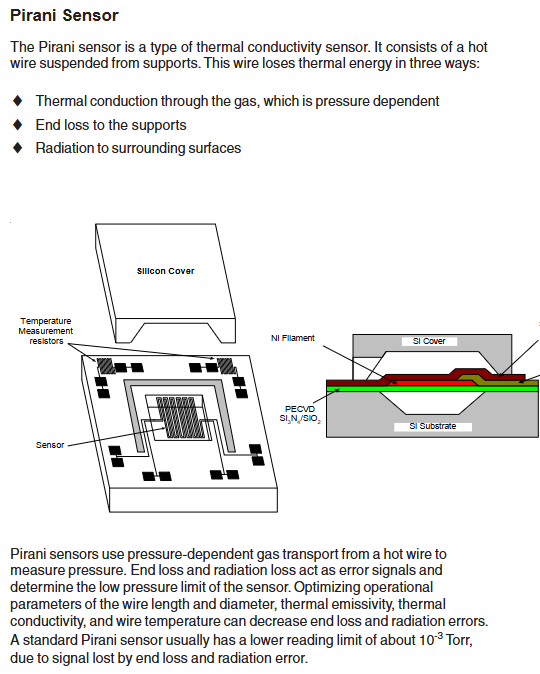
The 979B Transducer is designed to measure vacuum chamber pressures as part of a user’s designed system processes. It combines a Hot Cathode sensor to measure pressures from 5x10 (5 ×10^{-10}) to (3 ×10^{-3}) Torr and a MicroPirani sensor to measure pressures from 1x10 (1 ×10^{-3}) to ATM. PR3 the combined absulute digital pressure output and the analog output provides a single combined reading from 5x10 (5 ×10^{-10}) Torr to ATM. In addition the two sensors can be read independently. Along with an analog output external controls are available for filament select degas so the transducer (often set point values, calibration values ect. have been entered) can operate independently.
Safety and General Specifications
1. Safety warnings and preventive measures
Electrical safety: When replacing sensors or baking, the power supply must be disconnected first (there may be fatal voltage/current), and only qualified technicians can operate electronic components; Use+24 VDC@0.75 Amps power supply, ensure that the sensor is grounded through the vacuum flange and electrical connector rear housing.
Operation restriction: Do not turn on the filament power supply when the system pressure is higher than 5 × 10 ⁻ Torr (which may damage the hot cathode sensor); Prohibited from use in explosive/flammable gas environments (hot cathode heating elements, MicroPirani's nickel film elements may ignite gases); Do not replace parts or modify equipment. Repairs must be sent to the MKS calibration service center.
Pollution protection: prevent dust, metal shavings and other pollutants from entering the equipment; During installation, stay away from electronic/ion sources and strong magnetic fields. If necessary, use a particulate filter (see "Accessories" section for details).
2. General technical specifications
Specific project parameters
Measurement range 5 × 10 ⁻¹⁰ Torr to atmospheric pressure (ATM)
Set point range 5 × 10 ⁻¹⁰ Torr to 100 Torr
Analog output DAC1: 0.5-6.95 VDC (0.5 V/order of magnitude); DAC2: 0.75-10.02 VDC (0.75 V/order of magnitude)
Overvoltage limit of 1500 Torr
Repeatability (typical value) 1 × 10 ⁻⁹ -10 ⁻³ Torr: ± 5% reading; 10 ⁻ -100 Torr: ± 2% reading
Accuracy (typical value) 10 ⁻⁹ -10 ⁻³ Torr: ± 20% reading; 10 ⁻ -100 Torr: ± 5% reading
Supply voltage 24 VDC ± 10%
Power consumption 15 Watts
Rated value of relay contacts 1A@30 VAC/VDC (resistive load), compliant with Semi 52/UL991 safety standards
Vacuum contact material 304 stainless steel, silicon, SiO ₂, SiN ₄, gold, fluororubber (Viton) ®)、 Glass, tungsten, platinum molybdenum plating, yttrium oxide coated iridium, epoxy resin, Kovar alloy
Shell material aluminum/304 stainless steel
Internal volume 23 cm ³
Working temperature 0-40 ℃
Baking temperature (non working state) 85 ℃
Installation direction in any direction
EU certification complies with EMC Directive 89/336/EEC (EN-61326-1) and Low Voltage Directive 73/23/EEC (EN-61010-1)
Vacuum connection methods Mini CF, 2.75 "CF, NW16 KF, NW25 KF, NW40 KF
Size (with KF25) 74 × 79.6 × 100 mm (2.9 "× 3.1" × 3.9 ")
Weight (with KF25) 422 g (0.93 lbs.)
Installation Guide
1. Installation position and direction
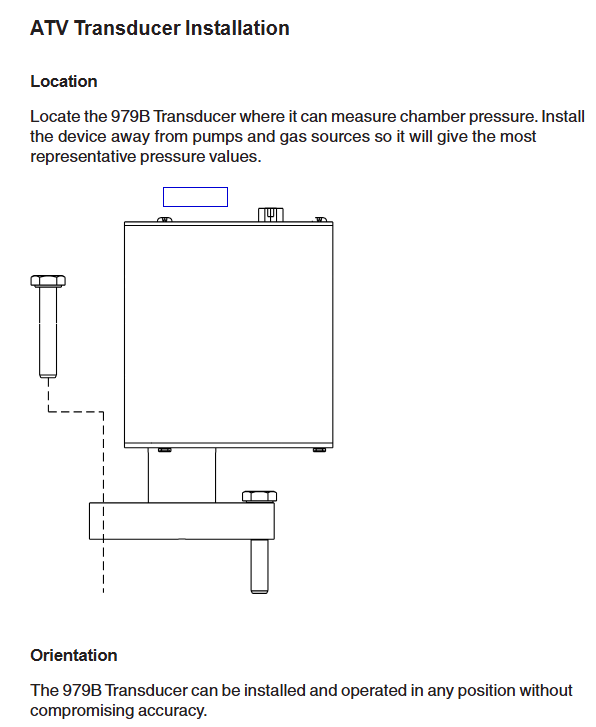
Location selection: It is necessary to be able to accurately measure the pressure in the vacuum chamber, away from the pump and gas source to ensure representative readings; Avoid installing directly above the evaporation source (steam may contaminate the sensor), and shield and stay away from strong magnetic fields when approaching electronic/ion sources.
Installation direction: Supports installation in any direction, it is recommended that the vacuum port face downwards (to prevent particles/liquids from entering), which does not affect measurement accuracy.
2. Vacuum connection
The sensor offers multiple flange types: 2.75 "CF (rotatable), 1.33" CF (rotatable) KF16、KF25、KF40, Corresponding flanges need to be matched according to the system, and the manual provides dimension drawings of each flange for reference.
3. Electrical connection
Cable requirements: Use a 15 pin high-density D-sub female cable with strain relief; To meet the anti-interference requirements of EN61326-1, braided shielded cables are required, with metal hooks connected at both ends of the shielding layer and the power supply grounded.
Pin function: The 15 pin D-sub connector has clear pin division, and the core pins include: 1 pin (RS485-/RS232 TXD), 2 pins (RS485+/RS232 RXD), 3 pins (power+24V), 4 pins (power -), 5 pins (analog output+), 6 pins (analog output -), 9 pins (degassing state), 10 pins (filament selection), 13 pins (degassing on), as well as the common terminals (7, 11, 14 pins) and normal terminals (8, 12, 15 pins) of 3 relays. For details, please refer to the "979B Sensor Electrical Connection Table".
Attention: The negative terminal (6-pin) of the analog output should not be connected to the negative terminal (4-pin) of the power supply or other grounding points (which may cause current diversion and measurement errors, and the longer the cable, the greater the error); When connecting inductive loads (such as solenoids and transformers), an arc extinguishing network (resistor R and capacitor C) needs to be installed. The calculation formula is
C=I 2/(1 × 10 7) (Farads), R=E/I a (ohms, where a=1+(50/E)), and R is at least 0.5 Ω and C is at least 1.0 × 10 ⁻⁹ F.
Operation control
1. Control and status pin operation
Degassing on (Pin13): Enable degassing when grounded, with priority higher than DG command or degassing button; After 30 minutes of degassing, it is necessary to disconnect and reconnect to restart degassing, and degassing should not exceed 30 minutes every 4 hours.
Degassing state (Pin9): When degassing is closed, it is open circuit/suspended, and when it is open, it is grounded; An external pull-up resistor with ≤ 24 VDC can be connected, and the current should be less than 15mA.
Filament selection (Pin10): By switching the active filament on/off the power supply, the state can be switched instead of selecting a fixed filament.
2. Factory default settings
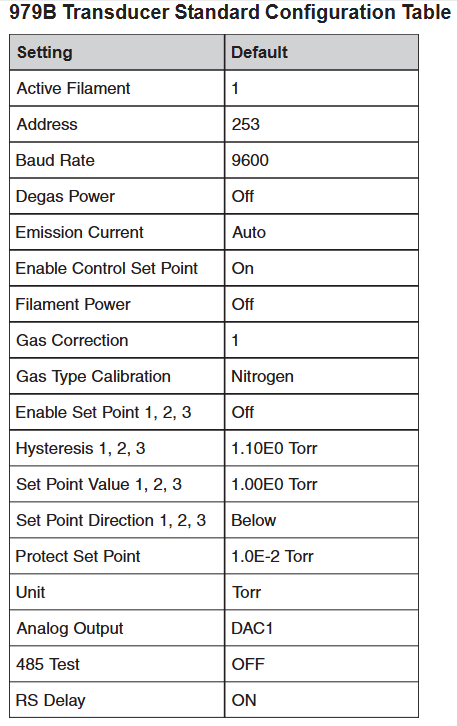
The sensor parameters are preset to default values, including: active filament 1, address 253, baud rate 9600, degassing power off, automatic emission current (20 μ A>1 × 10 ⁻⁴ Torr, 1mA<1 × 10 ⁻⁴ Torr), control set point enabled, filament power off, gas correction 1, gas calibration type nitrogen, 3 set points disabled, hysteresis value 1.10E0 Torr, set point value 1.00E0 Torr, set point direction "below (BELOW)", protection set point 1.0E-2 Torr, unit Torr, analog output DAC1, RS485 test off, RS delay on.
3. RS-485/RS-232 communication protocol
Basic parameters: Supports baud rates of 4800-112200 (default 9600), data format of 8-bit data bits, no checksum, and 1-bit stop bit; RS-485 is a half duplex two-wire system, which is the same protocol as RS-232.
Address rule: Standard address 001-253 (default 253); Universal address 254 (used for communication with unknown address devices, will respond), 255 (broadcast address, executes commands but does not respond, such as batch modification of baud rate).
Command syntax: The query format is @<device address><query command>?; FF (such as querying baud rate: @ 253BR?)?; FF), The command format is @<device address><command instruction>! <Parameters>; FF (such as changing the baud rate to 19200: @ 253BR! 19200; FF); The response starts with ACK (success) or NAK (failure), and the NAK code corresponds to different errors (such as 160=unrecognized message, 169=invalid parameter, 172=value out of range, etc.).
4. Core Command Set
The commands are divided into five categories: setting, status, pressure measurement and degassing, set point, and calibration. The core commands are as follows:
Command Type Command Identification Function Description Example
Set command AF (active filament) to query/select 2 filaments (value 1/2) of the hot cathode sensor. Query: @ 001AF?; FF; Setting: @ 001AF! 2; FF
AD (Address) Query/Set Device Address (001-253) Query: @ 254AD?; FF; Setting: @ 001AD! 002; FF
BR (baud rate) query/set baud rate (4800/9600, etc.) query: @ 001BR?; FF; Setting: @ 001BR! 19200; FF
DAC (Analog Output) Query/Set Analog Output Type (1=DAC1, 2=DAC2) Query: @ 001DAC?; FF; Setting: @ 001DAC! 2;FF
FD (factory default) restores all user calibration values to factory default command: @ 001FD!; FF
Status command DT (device type) query device type response: @ 001ACKMP-HC 979B; FF
FS (filament status) query for the on/off status of the active filament: @ 001FS?; FF
FV (firmware version) query firmware version response: @ 001ACK1.00; FF
SN (serial number) query device serial number response: @ 001ACK0000012345; FF
T (sensor status) query hot cathode status (F=filament fault, G=hot cathode on, etc.) Response: @ 001ACKO; FF (O=normal)
Pressure measurement and degassing FP (filament power supply) switch filament power supply (only effective when the control setpoint is disabled, disabled when the pressure is greater than 5 × 10 ⁻ Torr) command: @ 001FP! ON; FF
DG (degassing power supply) switch degassing (pressure must be<1 × 10 ⁻⁵ Torr, automatically shuts off after 30 minutes) query: @ 001DG?; FF; Setting: @ 001DG! ON; FF
PR1/PR2/PR3 (pressure readings) respectively read MicroPirani (PR1, above 1 × 10 ⁻³ Torr), hot cathode (PR2, below 1 × 10 ⁻⁴ Torr), and combined reading (PR3, full range). Query: @ 001PR1?; FF; Response: @ 001ACK1.23E-2; FF
The set point command SPx (set point value) queries/sets the pressure values (Scientific notation) of the three set points: @ 001SP1! 1.00E-3; FF
SDx (Setpoint Direction) Query/Set Setpoint Direction (BELOW/ABOVE) Setting: @ 001SD1! ABOVE; FF
SHx (hysteresis value) query/set the set point hysteresis value (to avoid relay jitter and match direction) setting: @ 001SH1! 1.10E-3; FF
ENx (Enable Setpoint) Enable/Disable 3 Setpoint Commands: @ 001EN1! ON;FF
Calibration command ATM (atmospheric pressure calibration) to calibrate MicroPirani to full range (requires ventilation to atmospheric pressure, stable for 20 minutes) Command: @ 001ATM! 7.60E+2; FF
VAC (vacuum calibration) calibration MicroPirani zero point (needs to be drawn to<1 × 10 ⁻⁴ Torr, stabilized for 20 minutes, automatically calibrated when hot cathode pressure<1 × 10 ⁻⁴ Torr) command: @ 001VAC!; FF
GT (gas type) query/setting MicroPirani's measurement gas (nitrogen/air/argon, default nitrogen) setting: @ 001GT! ZEROGEN; FF
GC (gas correction) query/set gas correction coefficient for hot cathode (0.10-50.1, default 1, such as argon 1.29) setting: @ 001GC! 1.29; FF
Analog output and gas correction
1. Simulation output calculation and table
DAC1: Pressure calculation formula P=10 (2V − 11) (Torr), the manual provides a detailed voltage correspondence table for 1.0E-10 Torr (0.50V) to 1.0E+03 Torr (7.00V).
DAC2: Pressure calculation formula P=10 0.75 V − 7.75 (Torr), also provide a complete pressure voltage correspondence table.
2. Gas correction factor
MicroPirani is based on gas thermal conductivity measurement, and the hot cathode is based on gas ionization measurement, both of which need to be corrected according to the gas type:
Gas chemical formula gas correction factor (GC)
Air -1.00
Argon gas Ar 1.29
Carbon dioxide CO ₂ 1.24
Deuterium gas D ₂ 0.35
Helium He 0.18
Hydrogen H ₂ 0.46
Krypton gas Kr 1.94
Neon gas Ne 0.30
Nitrogen N ₂ 1.00
Nitric oxide NO 1.16
Oxygen O ₂ 1.01
Sulfur hexafluoride SF ₆ 2.50
Water H ₂ O 1.12
Xenon Xe 2.87
Maintenance and troubleshooting
1. Daily maintenance
Cleaning: The casing can be cleaned with water or alcohol to prevent liquids from entering the electronic casing; The sensor tube must not be cleaned (as it may damage the components), and the sensor needs to be replaced in case of severe contamination.
Degassing operation: When the hot cathode sensor is contaminated by process gas (especially when the sensitivity drifts when the pressure is ≤ 10 ⁻⁸ Torr), regular degassing is required; When degassing, the pressure should be less than 1 × 10 ⁻⁵ Torr. During this period, the pressure can be measured but the reading may be higher than the system pressure. When the pressure is greater than 1 × 10 ⁻⁴ Torr, degassing is paused and restarted after reaching the threshold. It will automatically terminate after 30 minutes, and degassing should not exceed 30 minutes every 4 hours.
2. Common faults and solutions
Possible causes/solutions for the fault phenomenon
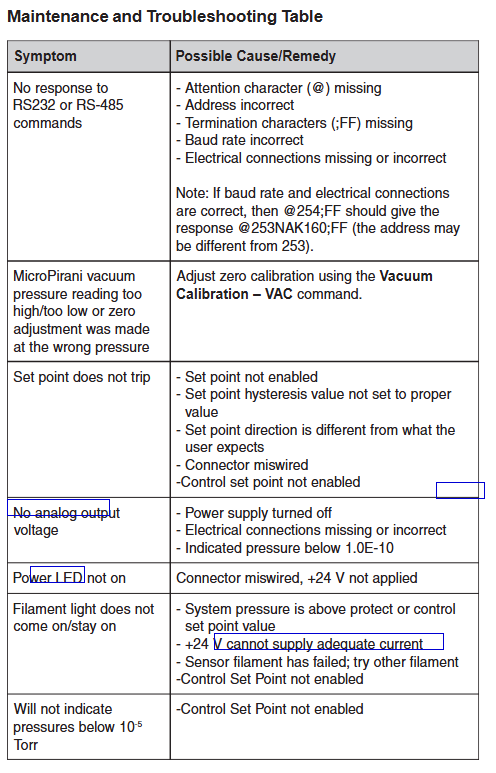
RS-485/RS-232 no response 1. Missing starting character @; 2. Address error (you can try @ 254; FF query); 3. Missing termination character; FF; 4. Baud rate mismatch; 5. Missing/incorrect electrical connections
MicroPirani reading too high/too low/
- OMRON
- ABB
- General Electric
- EMERSON
- Honeywell
- HIMA
- ALSTOM
- Rolls-Royce
- MOTOROLA
- Rockwell
- Siemens
- Woodward
- YOKOGAWA
- FOXBORO
- KOLLMORGEN
- MOOG
- KB
- YAMAHA
- BENDER
- TEKTRONIX
- Westinghouse
- AMAT
- AB
- XYCOM
- Yaskawa
- B&R
- Schneider
- KONGSBERG
- NI
- WATLOW
- ProSoft
- SEW
- ADVANCED
- Reliance
- TRICONEX
- METSO
- MAN
- Advantest
- STUDER
- DANAHER MOTION
- Bently
- Galil
- EATON
- MOLEX
- DEIF
- B&W
- ZYGO
- Aerotech
- DANFOSS
- Beijer
- Moxa
- Rexroth
- Johnson
- WAGO
- TOSHIBA
- BMCM
- SMC
- HITACHI
- HIRSCHMANN
- Application field
- XP POWER
- CTI
- TRICON
- STOBER
- Thinklogical
- Horner Automation
- Meggitt
- Fanuc
- Baldor
- SHINKAWA
- Other Brands
- UniOP
- KUKA
- Iba
- Beckhoff
- ADLINK
-
 National Instruments USB-6363 DAQ Device
 -
 National Instruments NI 9467 GPS Module
 -
 National Instruments USB-6351 DAQ Device
 -
 National Instruments NI 6581 Adapter Module
 -
 National Instruments 781045-01 Output Module
 -
 National Instruments PCI-6225 DAQ Card
 -
 National Instruments TRC-8543 CAN Cable
 -
 National Instruments PXIe-1073 Chassis
 -
 National Instruments USB-6003 DAQ Device
 -
 National Instruments NI 9476 Output Module
 -
 National Instruments myRIO-1900 Embedded Controller
 -
 National Instruments NI-9263 Analog Output Module
 -
 National Instruments 158561A-01L Ordering Part Number
 -
 National Instruments 785024-01 Ordering Part Number
 -
 National Instruments PCI-6510 Industrial Digital I/O Card
 -
 National Instruments USB-6259 Multifunction DAQ Device
 -
National Instruments USB-8452 I2C SPI Interface Device
-
 National Instruments PXI-8432 Serial Interface Module
 -
 National Instruments PXIe-5644R Vector Signal Transceiver
 -
 National Instruments PXI-2569 Relay Module
 -
 National Instruments 781174-01 Module
 -
 National Instruments 782000-01 Module
 -
 National Instruments PXI-5152 Digitizer
 -
 National Instruments PXI-6284 DAQ Card
 -
 National Instruments PCI-1428 Frame Grabber
 -
 National Instruments PXI-1050 Chassis
 -
National Instruments NI USB-8486 Fieldbus
-
 National Instruments NI 9862 CAN Module
 -
 National Instruments NI 9146 FPGA Chassis
 -
 National Instruments PXI-8108 Controller
 -
 National Instruments NI SWB-2816A Matrix Module
 -
 National Instruments NI 9269 Analog Output Module
 -
National Instruments PCI-6031E Multifunction DAQ Card
-
National Instruments PXI-6713 Analog Output Module
-
 National Instruments NI 9216 RTD Input Module
 -
 National Instruments NI-9237 Strain Bridge Input Module
 -
National Instruments PXI-5124 High Resolution Digitizer
-
National Instruments USB-6343 X Series DAQ Device
-
 National Instruments PXIe-6536 Digital I/O Module
 -
 National Instruments CAL-4330 Calibration Fixture
 -
 National Instruments PXI-4110 Programmable Power Supply
 -
 National Instruments 781503-01 Input Module
 -
 National Instruments FP-AI-V10 Module
 -
National Instruments PXI-5114 Digitizer Card
-
 National Instruments PXIe-8398 MXI Module
 -
 National Instruments cRIO-9056 Controller
 -
 National Instruments PCI-6509 DIO Device
 -
 National Instruments cRIO-9053 Controller
 -
National Instruments 781056-01 Output Module
-
 National Instruments 782606-01 Input Module
 -
 National Instruments cRIO-9112 Chassis
 -
National Instruments PXIe-1078 Chassis
-
 National Instruments PCIe-6536 DIO Board
 -
 National Instruments NI-9425 Input Module
 -
 National Instruments PCI-5122 Digitizer Card
 -
National Instruments 779072-01 Relay Module
-
 National Instruments 783703-01 DAQ Module
 -
 National Instruments PXI-6515 Digital Module
 -
National Instruments 781099-01 DAQ Device
-
National Instruments PXI-8183 PXI Controller
-
 National Instruments sbRIO-9626 Single-Board RIO Controller
 -
National Instruments PXIe-1435 Camera Link Frame Grabber
-
 National Instruments NI 9237 Strain Bridge Input Module
 -
National Instruments PXIe-4353 Thermocouple Input Module
-
National Instruments PCIe-6320 X Series DAQ Card
-
 National Instruments NI 1454 Compact Vision System
 -
 National Instruments PCIe-6321 X Series DAQ Card
 -
 National Instruments PXIe-5172 PXI Oscilloscope Module
 -
 National Instruments cDAQ-9134 CompactDAQ Controller
 -
 National Instruments cRIO-9063 CompactRIO Controller
 -
 National Instruments PXI-4070 DMM Card
 -
 National Instruments cFP-BP-4 Backplane
 -
National Instruments 779521-01 Bridge Module
-
 National Instruments cDAQ-9172 Chassis
 -
 National Instruments NI 9236 Strain Module
 -
National Instruments PXI-1042Q Chassis
-
 National Instruments SCXI-1102 Input Module
 -
 National Instruments 776990-01 Input Module
 -
 National Instruments PXI-1045 PXI Chassis
 -
 National Instruments PCIe-6251 DAQ Device
 -
 National Instruments NI 9219 Universal Analog Input Module
 -
National Instruments NI 9215 BNC Analog Input Module
-
 National Instruments PXIe-6570 Digital Pattern Instrument
 -
National Instruments NI-9477 Digital Output Module
-
National Instruments NI 9145 EtherCAT Chassis
-
 National Instruments PCI-6521 Industrial Digital I/O Card
 -
 National Instruments NI 9239 BNC Voltage Input Module
 -
 National Instruments NI 9265 Current Output Module
 -
 National Instruments NI 9212 Thermocouple Input Module
 -
 National Instruments PXI-6229 Multifunction DAQ Module
 -
 National Instruments NI-9146 Chassis
 -
 National Instruments PXIe-5622 Digitizer
 -
 National Instruments PXI-6704 Output Module
 -
National Instruments 782362-01 Input Module
-
National Instruments 779068-01 Digital Module
-
 National Instruments 781063-01 Output Module
 -
 National Instruments PCI-7356 Motion Controller
 -
 National Instruments 779787-01 Input Module
 -
 National Instruments PXIe-1071 System
 -
 National Instruments NI 9219 Input Module
 -
 National Instruments NI 9214 Thermocouple Input Module
 -
 National Instruments PXIe-1085 18-Slot Chassis
 -
 National Instruments PCIe-6320 Multifunction DAQ Card
 -
National Instruments USB-6211 Multifunction I/O Device
-
National Instruments USB-6341 X Series DAQ Device
-
National Instruments NI 9205 Analog Input Module
-
National Instruments NI 9149 8-Slot Chassis
-
 National Instruments PXIe-2569 Relay Module
 -
National Instruments NI 9230 Sound and Vibration Module
-
National Instruments cRIO-9047 CompactRIO Controller
-
National Instruments PCI-6534 Digital IO Card
-
 National Instruments PXI-5122 Digitizer Module
 -
 National Instruments cDAQ-9188XT Chassis
 -
National Instruments cDAQ-9184 Ethernet Chassis
-
National Instruments USB-6225 OEM DAQ Device
-
National Instruments NI 9205 Input Module
-
National Instruments NI 9207 Input Module
-
National Instruments NI-9862 CAN Module
-
National Instruments 781156-01 CAN Module
-
 National Instruments FP-AO-200 Output Module
 -
National Instruments NI 9264 Output Module
-
 National Instruments IC-3173 Controller
 -
 National Instruments NI 9234 Vibration Module
 -
 National Instruments SMB-2163 DIO Accessory
 -
National Instruments PXIe-1062Q DSA System
-
 National Instruments USB-6289 DAQ Device
 -
National Instruments NI 9233 Vibration Module
-
National Instruments PXIe-5840 VST


