Welcome to the Industrial Automation website!
Product
Article
NameDescriptionContent

Zygo Device Standard Operating Procedure (SOP)
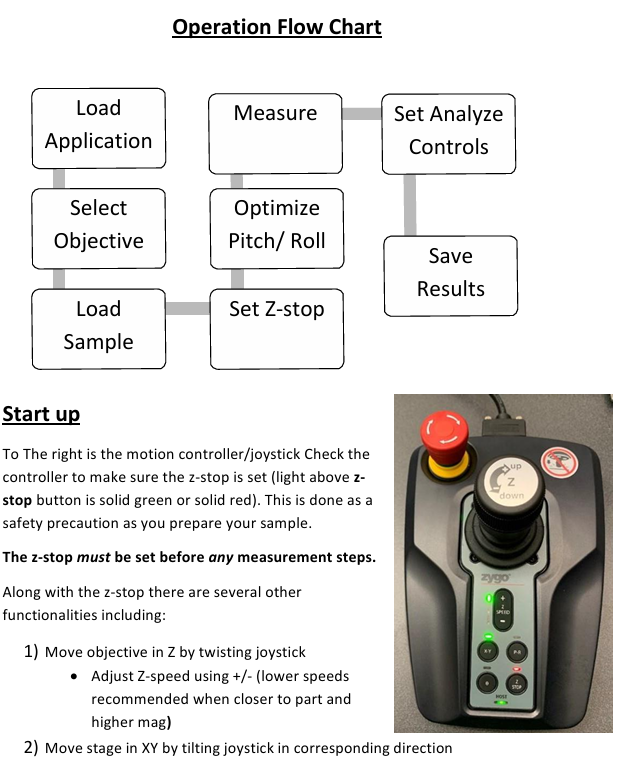
To The right is the motion controller/joystick Check the controller to make sure the z-stop is set (light above z stop button is solid green or solid red).
This is done as a safety precaution as you prepare your sample.
The z-stop must be set before any measurement steps.
This is done as a safety precaution as you prepare your sample.
The z-stop must be set before any measurement steps.
Zygo Device Standard Operating Procedure (SOP)
Start up
To The right is the motion controller/joystick Check the controller to make sure the z-stop is set (light above z stop button is solid green or solid red).
This is done as a safety precaution as you prepare your sample.
The z-stop must be set before any measurement steps.
Along with the z-stop there are several other functionalities including:
1) Move objective in Z by twisting joystick
• Adjust Z-speed using +/- (lower speeds recommended when closer to part and higher mag)
2) Move stage in XY by tilting joystick in corresponding direction
• XY button must be selected (green light above button)
3) Move stage in PR by tilting joystick in corresponding direction
• PR button must be selected (green light above button)
• P=pitch, R=roll (max +/-2 degree)
• Rotate stage, 𝜃, is not functional on our instrument
4) Emergency Off button to cancel the actions taken (Stage will need homed afterwards)
Loading Application
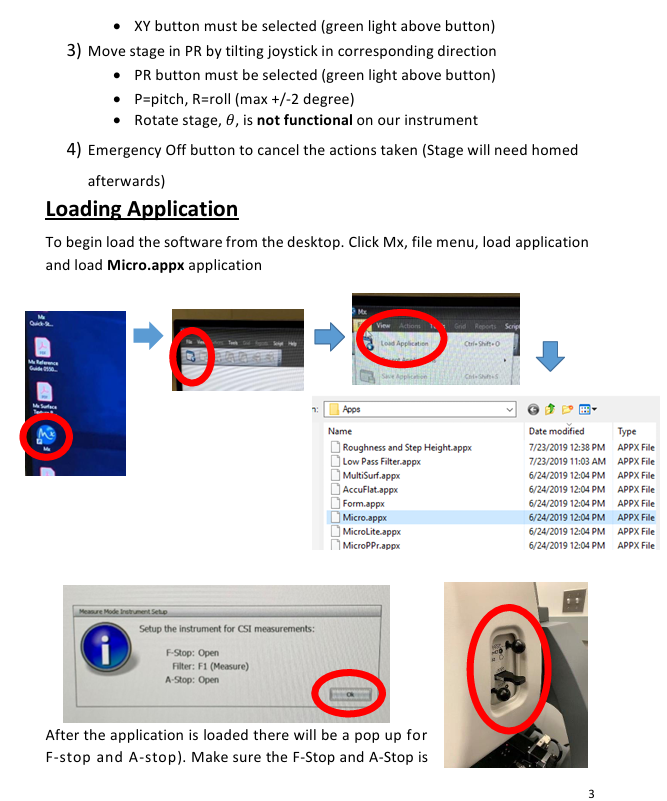
To begin load the software from the desktop. Click Mx, file menu, load application and load Micro.appx application
After the application is loaded there will be a pop up for F-stop and A-stop). Make sure the F-Stop and A-Stop is open (push knobs in) and the filter is set to F1 (measure) as shown on above. Select ok.
Select Objective
Use the software to select the objective you wish to use. The options are 2.5x, 20x, and 50x. There is an internal zoom lens (0.5X, 1X, 2X) to reach finer magnification steps. It’s recommended that you start with the 2.5x objective, 0.5X zoom, and increase in smaller increments. You must always raise the objective high in z before switching objectives to prevent collision.
Load Sample
Ensure objective is sufficiently high. Place sample on stage and align XY rotation by eye since no θ rotation is available. Adjust X and Y on joystick until light from objective is projected onto sample.
Set Z-stop
The Z-Stop has 3 settings noted by the indicator light:
• Blinking red: the z-position is not set (you will also hear an audible beeping sound when trying to move the objective)
• Solid red: the z-position is at the user-set limit
• Solid green: your current position in the z axis is higher than the set z-stop
Procedure:
1) Drive the objective down slowly in Z from a high position (speed can be adjusted on the Motion Controller). Select Auto Light Level (F9).
2) Drive until a surface on sample comes roughly into focus. Slowly drive below that surface and below any features of interest, being careful not to collide with any part of the sample or stage. Look at the bottom computer monitor and part on the stage to do this.
3) Set Z-stop (button on Motion Controller from blinking red to red)
Optimize Pitch/Roll
1) Drive in XY to cleanest, flattest area on your surface.
2) Focus the sample and find the fringes.
3) Select lowest internal zoom possible (0.5X).
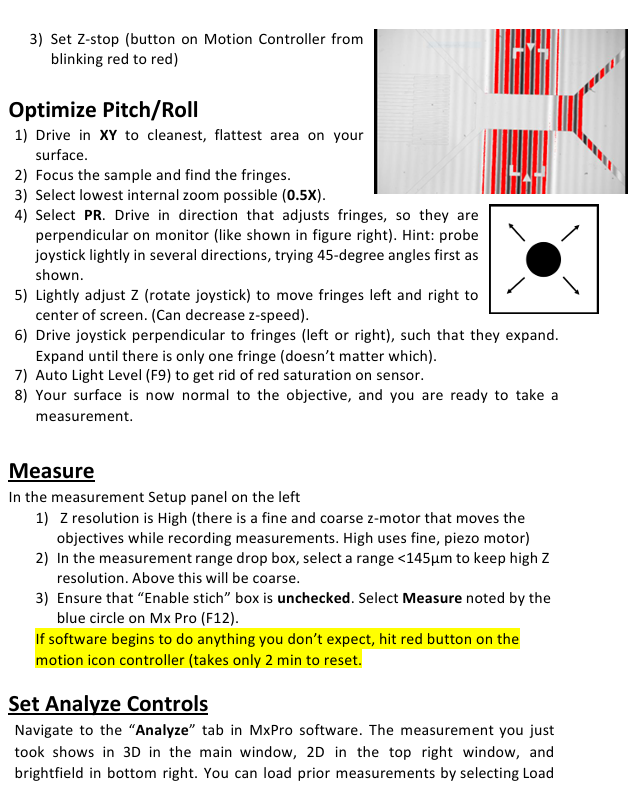
4) Select PR. Drive in direction that adjusts fringes, so they are perpendicular on monitor (like shown in figure right). Hint: probe joystick lightly in several directions, trying 45-degree angles first as shown.
5) Lightly adjust Z (rotate joystick) to move fringes left and right to center of screen. (Can decrease z-speed).
6) Drive joystick perpendicular to fringes (left or right), such that they expand. Expand until there is only one fringe (doesn’t matter which).
7) Auto Light Level (F9) to get rid of red saturation on sensor.
8) Your surface is now normal to the objective, and you are ready to take a measurement.
Measure
In the measurement Setup panel on the left
1) Z resolution is High (there is a fine and coarse z-motor that moves the objectives while recording measurements. High uses fine, piezo motor)
2) In the measurement range drop box, select a range <145µm to keep high Z resolution. Above this will be coarse.
3) Ensure that “Enable stich” box is unchecked. Select Measure noted by the blue circle on Mx Pro (F12).
If software begins to do anything you don’t expect, hit red button on the motion icon controller (takes only 2 min to reset.
Set Analyze Controls
Navigate to the “Analyze” tab in MxPro software. The measurement you just took shows in 3D in the main window, 2D in the top right window, and brightfield in bottom right. You can load prior measurements by selecting Load and then loading a .datx file saved earlier. You will likely need to further level your data with post processing.
2D leveling
1) Right-click on main window 3D figure and select 2D.
2) Select “Linear” above window.
3) A slice with arrows will appear. Click in two positions on your image to select the measurement of interest. Note graph below will automatically plot the profile.
4) Right click on graph, add inspector 1. Right click again and add inspector 2.
5) Slide around to your baseline surface. Right click, Level.
3D leveling
1) In the left panel you are in the “Surface” section. Select “Surface Processing” (pop up window appears)
2) Check “Immediate Update” in bottom left. Check “Use Fit Mask.” Select Mask Editor. A window will pop up.
3) Ensure “Form Remove” is checked.
4) Draw geometry to fully characterize the form you are removing.
5) Close out of the mask editor window when finished. The form being removed is shown in lower left.
6) Close out of the surface processing window. Your changes will be automatically implemented to the 3D data set.
Save Results
1) Zygo file(.datx): File>> Save data. Save in Data (D:)ZygoData folder in D drive.
2) Right click on any plot >> Export to export anything as image or 2D plots as . csv files.
Clean Up
1) Raise the objectives to highest point (set z- stop here. Press once to unlock as blinking red. Press again to set as solid red)
2) Close Mx Software, log off Zygo account, Turn off monitor
3) Sign name in Log-book
4) Report any error during use in log-book. Take the Screen shot and save in data folder.
- OMRON
- ABB
- General Electric
- EMERSON
- Honeywell
- HIMA
- ALSTOM
- Rolls-Royce
- MOTOROLA
- Rockwell
- Siemens
- Woodward
- YOKOGAWA
- FOXBORO
- KOLLMORGEN
- MOOG
- KB
- YAMAHA
- BENDER
- TEKTRONIX
- Westinghouse
- AMAT
- AB
- XYCOM
- Yaskawa
- B&R
- Schneider
- KONGSBERG
- NI
- WATLOW
- ProSoft
- SEW
- ADVANCED
- Reliance
- TRICONEX
- METSO
- MAN
- Advantest
- STUDER
- DANAHER MOTION
- Bently
- Galil
- EATON
- MOLEX
- DEIF
- B&W
- ZYGO
- Aerotech
- DANFOSS
- Beijer
- Moxa
- Rexroth
- Johnson
- WAGO
- TOSHIBA
- BMCM
- SMC
- HITACHI
- HIRSCHMANN
- Application field
- XP POWER
- CTI
- TRICON
- STOBER
- Thinklogical
- Horner Automation
- Meggitt
- Fanuc
- Baldor
- SHINKAWA
- Other Brands
- UniOP
- KUKA
- Iba
- Beckhoff
- ADLINK
236
-
 Sigmatek MDD111-1 DIAS Drive Axis Module
 -
 Sigmatek DKL042 05-024-042 Terminal Module
 -
 Sigmatek DM822 Control Module
 -
 Sigmatek CDM167 12-008-167-O Module
 -
 Sigmatek TAE151 Touch Display Unit
 -
 Sigmatek DCC041 SLIDES Module 05-700-041-D
 -
 Sigmatek AKM65M-ANC2GBB0 PM Servo Motor
 -
 Sigmatek ETT221 01-230-221 Operator Terminal
 -
 Sigmatek SLIDES DAM 124 Analog Module
 -
Sigmatek AKM31C-ANCNGBB0 Servo Motor
-
 Mannesmann Demag Sigmatek CP626 Central Unit
 -
 SIGMATEK 0332.554.03 Board 371071000154
 -
 SIGMATEK 12-250-021 Base Plate Back Panel CM5V020
 -
 SIGMATEK DM162 S-DIAS Digital Mix Module
 -
 DEMAG ERGOTECH 061 381 66 Sigmatek 9842.243.02 Circuit Board
 -
 SIGMATEK CP313-1 PLC Module
 -
Sigmatek ETV0551-2 VARAN Touch Terminal
-
 Sigmatek SDM 081 FS S-Dias Safety Module
 -
 DEMAG 05-250-023 Ergotech Motherboard with Sigmatek TMS012
 -
Sigmatek CM5V020 12-250-023-K Wiring Base
-
 Sigma Tek 5000B-37 Attitude Gyro Indicator
 -
 Sigmatek SDD120-2 DIAS Drive
 -
 Sigmatek CME221 Memory Module
 -
 Sigmatek DCP640 DIAS Central Unit
 -
 Sigmatek STO040 Safety Output Module
 -
Sigmatek CET281 Control Panel
-
 Sigmatek CIPC LX800 Demag NC5 CPU
 -
 Sigmatek DKL093 05-024-093 Terminal Module
 -
 Sigmatek AI088 20-009-088 Analog Input Module
 -
Sigmatek CAI888 Analog Input Module
-
SIGMATEK CCA021 12-025-021 Analog Output Module
-
SIGMATEK 1104.579.05 Control Module
-
SIGMATEK SDI100 Digital Input Module
-
 SIGMATEK C-IPC 256MB LX800 Compact Dias
 -
 SIGMATEK 9423.090.02 Control Module
 -
SIGMATEK C-IPC 256 Power Supply 148498
-
 SIGMATEK CAI025 Analog Input Module
 -
 SIGMATEK CTO166 Digital Output Module
 -
 SIGMATEK CP112 20-004-112 Processor Module
 -
SIGMATEK CAI887 12-009-887 Safety Module
-
 Sigma-Tek 4000B-31 Directional Gyro 1U262-002-42
 -
Sigmatek C-IPC 256MB LX800 IPC Controller
-
Sigmatek C-IPC 01-450-031 Industrial PC LX800
-
Sigmatek C-IPC 256 Industrial PC Controller
-
Sigmatek CCP-531 PLC Processor Module
-
Sigmatek CDI163 Digital Input Module
-
 Sigmatek ETV0501 VARAN Terminal 12-230-0501
 -
 Sigmatek CTMS020 C-DIAS Technology Module
 -
 Sigmatek CIV512 VARAN Switch Module
 -
 Sigmatek HU011 20-080-011 Interface Module
 -
SIGMATEK SLIDES DAM 124 Module
-
 SIGMATEK C-IPC 161 01-450-161L Industrial PC
 -
SIGMATEK C-IPC 128MB VIA 733MHz 01-450-024-K
-
 SIGMATEK 12-780-012 R8-IPC Geode LX800 Module
 -
SIGMATEK CAM124 Analog Module
-
 SIGMATEK S1 032-8AF61-R4 EZ Servo Motor
 -
 SIGMATEK CTO163 Digital Output Module
 -
 SIGMATEK CCP082 12-004-082 Processor Module
 -
 SIGMATEK CRCH081 C-DIAS Temperature Module
 -
 SIGMATEK PC322-K 01-310-322-K Industrial PC
 -
SIGMATEK SDD310-2 Servo Drive
-
 SIGMATEK AI084 Analog Input Module
 -
SIGMATEK CRCH081 12-752-081 Temperature Module
-
Sigma-Tek 5000L-4 Attitude Gyro 1U284-001-3
-
 SIGMATEK CM5V020 12-250-023-K Wiring Module
 -
Sigma-Tek 4000H-6 Directional Gyro IU262-035-7
-
 SIGMATEK Dias DCP160 05-004-160 Processor Module
 -
SIGMATEK 0147.395.02 Control Module
-
SIGMATEK A1084 Control Module
-
SIGMATEK DI200 20-006-2000 Digital Input Module
-
Sigmatek DNC115 Encoder Module
-
 Sigmatek DAM122 05-017-122 Analog Module
 -
Sigmatek 9802.289.01 Control Board TA71 Display
-
Sigmatek TO127 20-007-127 Digital Output Module
-
Sigmatek DNC031 05-011-031 Digital Module
-
Sigmatek VI022 20-003-022 Interface Module
-
Sigmatek CAI085 Analog Input Module
-
 Sigmatek CP111 S-DIAS CPU Module
 -
Sigmatek CTMS030 Krauss Maffei Module
-
 Sigmatek CAM123 Control Module
 -
 Sigmatek TAE732-P 01-240-732-P Touch Display Unit
 -
Sigmatek MDM021 Digital Mixed Module
-
Sigmatek DCP642 DIAS Central Unit
-
 Sigmatek CST022 12-014-022 C-DIAS Module
 -
 Sigmatek SRO021 20-893-021 Safety Relay Output
 -
 Krauss Maffei MC5 Control System Sigmatek
 -
 Sigmatek DC061 Module 18-24VDC 300mA
 -
 Herrmann EVT0855 Ultrasonic Welder Touch Panel
 -
Sigmatek CIV521 Control Module 1.4A 2W
-
Sigmatek DDI61 05-006-161 Digital Input Module
-
SIGMATEK ETT312-E Touch Terminal 01-230-312
-
Cessna S3326-1 Sigma Tek 5000B-67 Gyro 1U149-015-9
-
SIGMATEK PS101 Power Supply Module
-
SIGMATEK 0332.554.03 Control Module 371071000154
-
 SIGMATEK ETT312-E Touch Terminal 01-230-312
 -
SIGMATEK CDM163 Control Module
-
 SIGMATEK VSV046 16-023-046 Module
 -
SIGMATEK AM221 20-017-221 Analog Module
-
SIGMATEK CTS051 12-053-051 Control Module
-
SIGMATEK AM221 20-017-221 Analog Module
-
Sigmatek CSDI161 12-891-161 Safety Input Module
-
Sigma Tek 4000C-1 Directional Gyro Indicator
-
Sigmatek ETV0501 12-230-0501 VARAN Terminal
-
Sigmatek DDM165 SLIDES Module
-
Sigmatek N100 20-011-100 Control Module
-
Sigmatek AKM54K-ANC2R-B0 PM Servo Motor
-
Sigmatek CTO166 Digital Output Module
-
Sigmatek CP212-K 20-004-212-K CPU Module
-
Sigmatek CDI161 Digital Input Module
-
Sigmatek DCC080 05-700-080-2 Control Module
-
 SIGMATEK SCP011 S-DIAS Safety CPU
 -
SIGMATEK SCP011 S-DIAS Safety CPU
-
SIGMATEK SRO022 Relay Output Module
-
SIGMATEK MDD 121 Drive Axis Module
-
SIGMATEK DSI021 SLIDES Siemens Interface
-
SIGMATEK DIAS DCP161 Module 05-004-161
-
 Sigmatek ETT312 Built-in Touch Terminal
 -
SIGMATEK DCP 643 DIAS Controller System
-
SIGMATEK CIO021 Multi I/O Module
-
SIGMATEK CTMS020 Control Module
-
 Sigmatek CME 221 Memory Module
 -
Sigmatek 0420.615.01 Control Board
-
Sigmatek CP111 20-004-111 CPU Module
-
Sigmatek 9405.065.03 Control Board
-
Sigmatek ETEK 01-450-032-K C-IPC 256MB Industrial PC
-
Sigmatek CTO163 12-007-163 Safety Output Module
-
Sigmatek TO081 20-007-081 Digital Output Module
-
 Sigmatek SI021 20-022-021 Safety Input Module
+86-153-9626-8993
WeChat
Contact

Whatsapp

After years of experience, it has developed into a group enterprise entity integrating equipment, industrial, chemical, petroleum equipment, electricity and other products trade and services.
XING-Automation


Product
Copyright © 2026 XING Group All Rights Reserved .