
YASKAWA AC Drive P1000 Industrial Fan and Pump Special Frequency Converter
Protection level: Supports IP20/NEMA 1 (clean environment), IP00/Open Type (requires adapter kit), etc. Some models can upgrade their protection level through the kit.
Core functions: preset fan/pump specific parameters, Auto Tuning, PID control, EZ sleep/wake function, multiple braking modes (DC injection braking, dynamic braking), etc.
YASKAWA AC Drive P1000 Industrial Fan and Pump Special Frequency Converter
Core positioning: Quick Start Guide, to be used in conjunction with the P1000 Series AC Drive Technical Manual (SIEPYAIP1U01). The former focuses on basic installation and trial operation, while the latter provides detailed parameters and advanced feature explanations.
Core specifications of the product
Model coverage:
200 V Class (three-phase): Models 2A0004~2A0415, suitable for motor power of 0.75~175 HP, rated output current of 3.5~415 A;
400 V Class (three-phase): Models 4A0002~4A1200, suitable for motor power of 0.75~1000 HP, rated output current of 2.1~1200 A;
600 V Class (three-phase): models 5A0003~5A0242, suitable for motor power of 1~250 HP, rated output current of 2.7~242 A;
All models are labeled with "ND" (Normal Duty) and are designed specifically for variable torque loads on fans and pumps.
Core features: Support preset application parameters, Auto Tuning, PID closed-loop control, EZ sleep/wake energy-saving function, multiple braking methods (DC injection braking, dynamic braking), in compliance with UL, cUL, CE, RoHS 2 and other certification standards.
Mechanical Installation: Environmental Requirements and Operating Standards
1. Installation environment requirements (must be strictly followed)
Specific requirements for environmental dimensions: Remarks
Temperature IP20/NEMA 1 model: -10~+40 ℃; IP00/Open Type models: -10~+50 ℃. If the temperature exceeds+50 ℃, the capacity needs to be reduced to avoid severe temperature fluctuations
Humidity ≤ 95% RH, no condensation to prevent moisture and short circuit of the circuit board
Altitude ≤ 1000 meters (without capacity reduction); 1000-4000 meters: For every 1000 meters increase, the capacity decreases by 8%. In high-altitude areas, the heat dissipation capacity needs to be evaluated
Avoid direct contact with vibration sources at frequencies of 10-20Hz (9.8m/s ²) and 20-55Hz (5.9m/s ²)
The surrounding environment should be free of dust, oil mist, metal debris, corrosive gases, and direct sunlight. A clean environment is preferred, and suitable protective kits should be selected for harsh environments
2. Installation method and spacing requirements
Installation direction: Only supports vertical installation. Tilting installation can cause poor heat dissipation and damage to internal components.
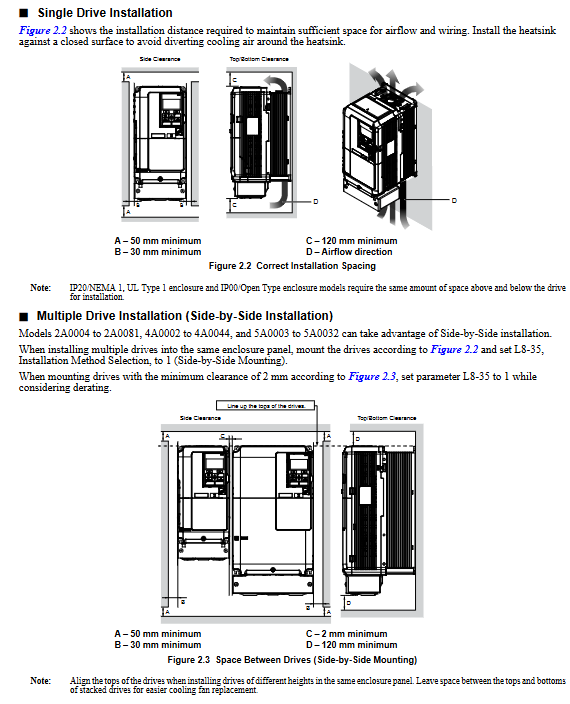
Single installation spacing:
Up and down direction: at least 50mm (heat dissipation space);
Left and right direction: at least 30mm (wiring and heat dissipation);
Rear: It should be tightly attached to the enclosed surface to avoid the dispersion of cooling airflow.
Multiple units installed side by side:
Only low-power models (such as 2A0004~2A0081, 4A0002~4A0044) are supported, and the parameter L8-35=1 (Side by Side mode) needs to be set;
The minimum spacing is 2mm, but capacity reduction needs to be considered and aligned with the top of the model to facilitate fan replacement.
3. Precautions for lifting and protection
Use of lifting rings: Some high-power models (such as 2A0360, 4A0250~4A1200) are equipped with lifting rings, and vertical lifting is only used for temporary installation. Long term suspension is prohibited; The lifting of 4A0930/4A1200 requires a suspension angle of ≥ 50 ° to avoid overloading of the lifting ring.
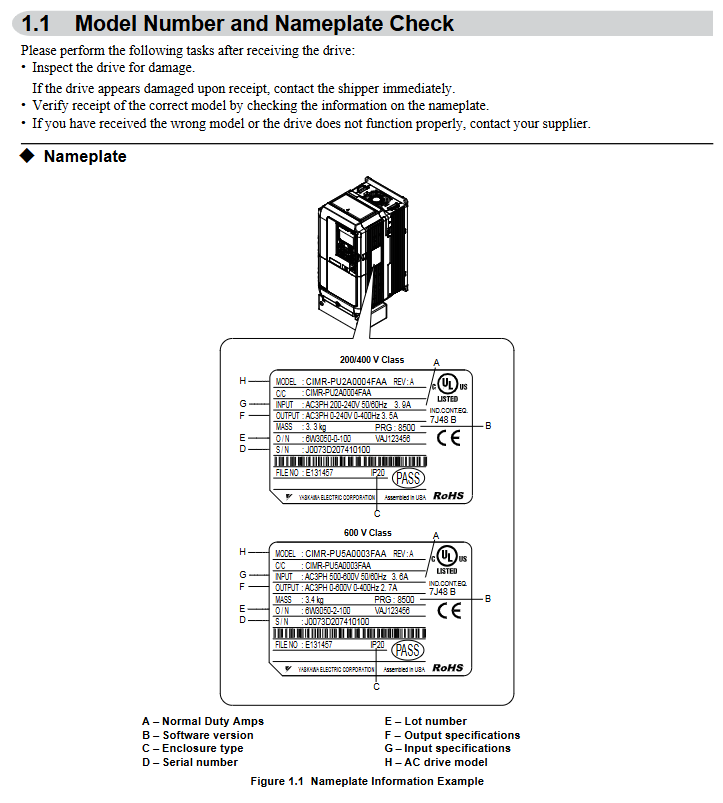
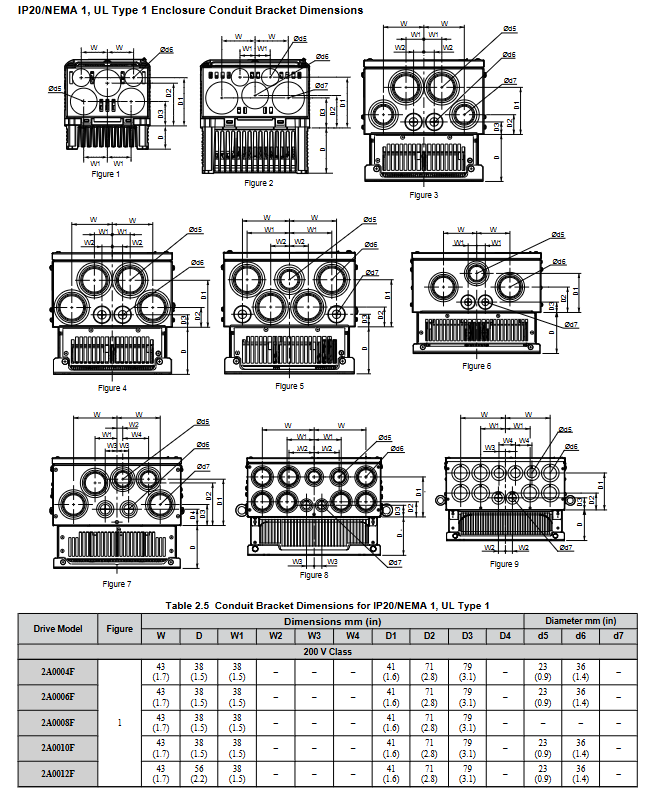
Protection level maintenance: After removing the top protective cover or bottom conduit bracket of IP20/NEMA 1 models, only IP20 protection is retained and NEMA 1 certification is lost.
Electrical installation: wiring specifications and safety requirements
1. Main circuit wiring (prevention and control of core risk points)
Terminal differentiation:
Input terminals (R/L1, S/L2, T/L3): connected to a three-phase power supply, matching the voltage level of the frequency converter (such as 200V level connected to 200-240V, 400V level connected to 380-480V);
Output terminals (U/T1, V/T2, W/T3): connected to the motor, the phase sequence determines the motor direction, and reverse can exchange any two phases ();
Brake terminals (B1, B2): only connect brake resistors/brake units, strictly prohibit connecting other devices.
Wiring requirements:
Wire specifications: Choose according to the rated current of the model. For example, the 2A0004 model uses 14AWG wire for the main circuit, and the 4A1200 model uses 300kcmil wire, and requires the use of ring crimping terminals (UL/cUL certification requirements);
Tightening torque: M4 screws 1.2-1.5N · m, M8 screws 9.9-11N · m. Overtightening may damage the terminals;
Grounding: separate grounding, not sharing grounding wire with high current equipment such as welding machines; The cross-sectional area of the grounding wire for models 4A0414 and above is ≥ 10mm ² (copper) or 16mm ² (aluminum).
2. Control circuit wiring (anti-interference and functional configuration)
Digital input (S1~S8):
Support sinking/sourcing mode, switched through SC-SP/SC-SN jumper, default sinking mode;
Default functions: S1 (forward rotation), S2 (reverse rotation), S3 (external fault), S4 (fault reset), customizable through H1 series parameters.
Analog inputs (A1~A3):
A1/A3 default voltage input (0~10V), A2 default current input (4~20mA), switched through jumper S1;
For frequency setting, it is necessary to set the gain (H3-03/H3-07/H3-11) and bias (H3-04/H3-08/H3-12) to match the signal range (,).
Communication interfaces (R+, R -, S+, S -):
Supports RS-422/RS-485 for MEMOBU/Modbus communication, with the maximum transmission distance being related to the baud rate (up to 115.2kbps);
The terminal resistor (DIP switch S2 set to ON) needs to be enabled at the end of the bus.
3. Handling of special wiring scenarios
Long cable wiring (>50 meters): It is necessary to reduce the carrier frequency (C6-02), set it below 5kHz for 50-100 meters, and below 2kHz for>100 meters to avoid leakage current through large trigger protection (,).
12 pulse rectification (4A0930/4A1200): The jumper wires between R/L1-R1/L11, S/L2-S1/L21, and T/L3-T1/L31 need to be removed, and an external 3-winding transformer (,) needs to be connected.
Start programming and operation: from parameter setting to trial run
1. Use of digital operator (core control interface)
Button functions:
RUN/STOP: Local start/stop, with the STOP key having the highest priority;
LO/RE: Switch between local/remote control, only operable during shutdown;
ESC/ENTER: Return to the previous level/confirm parameters, long press ESC to return to the frequency setting interface ().
Display interpretation:
Status display: "Rdy" (ready), "FWD/REV" (forward/reverse), ALM light (alarm/fault);
Monitoring interface: can view parameters such as output frequency (U1-02), output current (U1-03), PID feedback (U5-01), etc.
2. Core parameter configuration (classified by application scenario)
(1) Basic initialization
Parameter A1-03 (initialization parameter):
0: No initialization;
2220-2 wire system control initialization (S1 forward rotation, S2 reverse rotation);
3330:3 wire system control initialization (S1 start, S2 stop, S5 forward and reverse);
8008~8011: Fan/pump preset (,).
(2) Motor and load adaptation
E2-01 (rated current of motor): It must be strictly set according to the motor nameplate, and will automatically update after automatic tuning;
C1-01/C1-02 (Acceleration/Deceleration Time 1): It is recommended to set the fan/pump load to 60-90 seconds to avoid water/air flow impact;
B1-03 (shutdown mode): default "ramp shutdown" (C1-02), high inertia load can choose "DC injection braking" (b2-02 braking current needs to be set).
(3) Fan/pump specific function
PID control: parameter b5-01=1 enables PID, A2 terminal defaults to feedback signals (such as pressure and flow sensors), b5-19 sets PID setpoint (,);
EZ sleep/wake-up: parameter b5-89=1 enabled, b5-92 sets sleep frequency (such as 0Hz), b5-94 sets wake-up threshold to avoid frequent start stop and save energy (,);
Blockage protection: L3-01=1 (acceleration blockage protection), L3-04=1 (deceleration blockage protection), to avoid overload triggering overcurrent (,).
3. Auto Tuning
Function: Automatically detect motor parameters (stator resistance, leakage inductance, etc.), optimize V/f curve and control accuracy, recommended for first-time use.
Operation steps:
Set T1-01=2 (static tuning, measuring line resistance) or T1-02=3 (dynamic tuning, motor rotation);
Enter the motor nameplate parameters (T1-02 power, T1-04 current, T1-06 pole count, etc.);
Press the RUN key to start tuning, and after completion, display "Tune Successful" (,).
Attention: Dynamic tuning requires disconnecting the motor load to ensure that the motor can rotate freely; Long cables (>50 meters) require static tuning first.
4. Trial operation process (phased verification)
(1) No load trial operation
Step: Disconnect the motor from the load → Set as local control → Start at a given frequency of 6Hz → Check the motor direction, vibration, and current (should be 50% lower than the rated current) → Gradually increase the frequency to the rated value and observe the stability of operation (,).
(2) Test run with load
Preparation: Connect the load and confirm that the emergency stop circuit is effective;
Operation: Starting from low frequency (such as 20Hz), monitor the output current (U1-03), PID feedback (such as whether the pressure is stable), adjust PID parameters (b5-02 proportional gain, b5-03 integration time) to optimize response speed (,).
Troubleshooting and maintenance: ensuring long-term stable operation
1. Common faults and solutions
Possible causes and solutions for fault codes
OC (overcurrent) 1. Motor short circuit/insulation damage; 2. The acceleration and deceleration time is too short; 3. Load blockage 1. Check the motor winding; 2. Extend C1-01/C1-02; 3. Reduce load or increase model size
OV (overvoltage) 1. Input voltage is too high; 2. Slow down too quickly; 3. The braking resistor is not connected. 1. Check the power supply; 2. Extend C1-02 or activate stall protection; 3. Install the braking resistor
OL1 (motor overload) 1. E2-01 is set too low; 2. The load exceeds the rated torque of the motor. 1. Correct E2-01; 2. Verify the load or replace the large motor
FbL (PID feedback low) 1. Sensor disconnection; 2. Feedback signal not connected correctly. 1. Check the sensor and wiring; 2. Confirm the function of terminal A2 (H3-10=B)
2. Regular maintenance plan
(1) Daily inspection (daily)
Appearance: No abnormal noise, odor, or vibration;
Display: No alarm code, stable current/frequency;
Heat dissipation: The fan is running normally and there is no dust blockage.
(2) Regular maintenance (by cycle)
Maintenance project cycle operation requirements
Check the blade wear of the cooling fan after running for 20000 hours and replace it with a fan of the same model
Measure the capacitance of the main circuit capacitor after 5-7 years of operation. If it is lower than 80% of the initial value, it needs to be replaced
Check the torque of the main circuit terminals every 6 months to prevent looseness and heating during terminal tightening
Clean every 3 months by blowing compressed air to remove dust from the radiator (operated after power outage)
3. Maintain monitoring function
Parameters U4-01~U4-04: Display cooling fan, main capacitor IGBT、 The remaining lifespan (percentage) of the control circuit capacitor should be replaced in advance if it is less than 20%.
- OMRON
- ABB
- General Electric
- EMERSON
- Honeywell
- HIMA
- ALSTOM
- Rolls-Royce
- MOTOROLA
- Rockwell
- Siemens
- Woodward
- YOKOGAWA
- FOXBORO
- KOLLMORGEN
- MOOG
- KB
- YAMAHA
- BENDER
- TEKTRONIX
- Westinghouse
- AMAT
- AB
- XYCOM
- Yaskawa
- B&R
- Schneider
- KONGSBERG
- NI
- WATLOW
- ProSoft
- SEW
- ADVANCED
- Reliance
- TRICONEX
- METSO
- MAN
- Advantest
- STUDER
- DANAHER MOTION
- Bently
- Galil
- EATON
- MOLEX
- DEIF
- B&W
- ZYGO
- Aerotech
- DANFOSS
- Beijer
- Moxa
- Rexroth
- Johnson
- WAGO
- TOSHIBA
- BMCM
- SMC
- HITACHI
- HIRSCHMANN
- Application field
- XP POWER
- CTI
- TRICON
- STOBER
- Thinklogical
- Horner Automation
- Meggitt
- Fanuc
- Baldor
- SHINKAWA
- Other Brands
- UniOP
- KUKA
- Iba
- Beckhoff
- ADLINK
-
 SIGMATEK ICA111 Module
 -
 SIGMATEK MDD 121-1 Drive Axis Module
 -
 SIGMATEK M5V121 12-300-121 Krauss Maffei M5 Display Unit
 -
SIGMATEK CTMS 020 CD Technology Module 12-250-011
-
 SIGMATEK PCT122 Touch Panel
 -
 Stöger MCS4100 SIGMATEK Control Module
 -
 SIGMATEK Krauss Maffei M5 Keyboard Unit M5K902 12-310-902
 -
 SIGMATEK SD310-2 Servo Drive Module
 -
 SIGMATEK CM5V020 CD Wiring Circuit Module
 -
SIGMATEK ENGEL Robot Drive M3 02220-8748
-
 Sigmatek CFF011 Drive Module
 -
 Sigmatek DCP642 DIAS Central Unit
 -
 Sigmatek SDM081 S-DIAS Safety Module
 -
 Sigmatek C-IPC 01-450-024 Industrial PC
 -
Sigmatek Kompakt NC4 Control Module
-
 Sigmatek VI021 VARAN Interface Module
 -
 Sigmatek Engel RD-M6-2 Robot Drive
 -
Sigmatek CNC031 Positioning Module
-
Sigmatek TO161 Digital Output Module
-
Sigmatek CCL912 CPU PSU Module
-
Sigmatek ETV0821 Operator Terminal
-
 SIGMATEK ET 261 Operator Terminal
 -
 SIGMATEK CP731-K Control Module 20-004-731-K
 -
 SIGMATEK ETEK Motherboard 12-250-021-K CM5V020
 -
 Sigmatek DEZ 181 DIAS Input Output Module
 -
 Sigmatek IPC111-D Industrial PC
 -
 SIGMATEK AKM54L-ANC2GBB0 Servomotor with Gearhead
 -
SIGMATEK CTMS020 CM5V020 CNC Controller
-
 DEMAG ERGOTECH 061 381 66 Sigmatek Control Unit
 -
 Sigmatek DAI 883 Module
 -
 Sigmatek ETV1521 Control Panel Installation Terminal
 -
 Sigmatek 9802.289.01 Board Control TA71 Display
 -
 Wittmann Sigmatek EU-252 proDrive W4 Servo Drive
 -
 Sigmatek CDM166 C-DIAS Module
 -
Sigmatek DCP082 DIAS Central Unit
-
 Sigmatek CCP081 C-DIAS Processor Module
 -
Sigmatek MD111-1 Drive Module
-
Sigmatek ETV0821 Operator Terminal
-
 Sigmatek ISE021 Interface Module
 -
 Sigmatek DCC080L Slide Control Module
 -
 Sigmatek AI075 Analog Input Module
 -
SIGMATEK TO161 20-007-161 Module
-
 SIGMATEK CIC011 Module
 -
 SIGMATEK AE0000318502 Hand Terminal Pendant
 -
 Sigmatek Krauss Maffei PC323-K Control Unit
 -
Sigmatek Krauss Maffei PC321-K Control Cabinet PC
-
SIGMATEK CIV521 Control Module
-
SIGMATEK C-IPC-171 Industrial PC
-
 SIGMATEK MDP101-L DIAS Drive Network Module
 -
 Sigmatek Krauss Maffei PC323-K Control Cabinet PC
 -
 SIGMATEK CRCH081 C-SLIDES Temperature Module
 -
 Sigmatek PC301-E6 Industrial PC SSD
 -
 Sigmatek SDI101 S-SLIDES Safety Input Module
 -
 Sigmatek CIV521 VARAN Control Module
 -
 Kollmorgen Sigmatek AKM42G-ANCNGBB0 Servo Motor
 -
 Sigmatek PC 521 Process Controller
 -
 Sigmatek Geode LX800 12-780-012 Industrial PC
 -
 Sigmatek STO081 S-DIAS Safety Output Module
 -
 Sigmatek SCP111 S-DIAS Safety CPU Module
 -
 Sigmatek CDI161 Industrial I O Module
 -
Sigmatek Wiring Board V2 DIAS 05-250-023
-
Sigmatek CP102 20-004-102 S-DIAS CPU Module
-
SIGMATEK SLIDES CNC 115 Module
-
 SIGMATEK DCC080 05-700-080-2 Control Module
 -
SIGMATEK MDD 121 Drive Axis Module
-
 SIGMATEK CIO011 C-DIAS Multi I/O Module
 -
SIGMATEK CIV512 Servo Drive
-
 SIGMATEK CM5V020 12-250-021-K Wiring Module
 -
 SIGMATEK CIO011 12-013-011 Multi I/O Module
 -
SIGMATEK 01-450-031 C-IPC Industrial Computer
-
SIGMATEK AKM24D-ANBNGBB0 Servo Motor
-
 DEMAG NC4 LP0001289.03 Control Module
 -
 Sigmatek ETEK Industrial PC C-IPC with Option Module
 -
Sigmatek AO081 20-010-081 Analog Output Module
-
Sigmatek CNC 031 Positioning Module
-
Sigmatek CP731-K 20-004-731-K CPU Module
-
Sigmatek MDD 3320-JR-A Drive Module
-
Sigmatek PM Servo Motor AKM52K-ANC2GBB0
-
Sigmatek MDP 101 09-403-101 Power Module
-
Sigmatek S-SLIDES AO046 Analog Output Module
-
Sigmatek ICA111 20-102-111 Interface Module
-
 SIGMATEK DCP646 Module 05-004-646
 -
SIGMATEK SDI101 Digital Input Module 20-891-101
-
 SIGMATEK S3330-2 Directional Gyro Altitude Instrument
 -
SIGMATEK MDP102-1 Controller
-
SIGMATEK SMT 01-230-321 Touch Screen
-
SIGMATEK Krauss Maffei PC301-K 01-310-301-K Industrial PC with 8GB SSD
-
 SIGMATEK ETT731 01-230-731 Built-in Touch Terminal
 -
SIGMATEK CIV521 Control Module
-
 SIGMATEK DME 128 Module 05-005-128
 -
 SIGMATEK SCP111-S 20-890-111-S S-DIAS Safety CPU Module
 -
Sigmatek SCP111 S-DIAS Safety CPU
-
Sigmatek CRIF081 Interface Module
-
Sigmatek CP112-1 S-DIAS CPU Module
-
Sigmatek MDD121-L DIAS Drive Axis Module
-
 Sigmatek C-IPC 01-450-024 Industrial PC
 -
Sigmatek SDD215-23 SLIDES Drive
-
 Sigmatek DPS001 DIAS System Components
 -
Sigma-Tek 4000B-30 Directional Gyro
-
 Sigmatek SDD340-46 SDD Series Drive
 -
 Sigmatek CEZ221 Euromap67 I O Module
 -
 SIGMATEK VI021 Interface Module
 -
SIGMATEK CP731-K Control Module
-
SIGMATEK Krauss Maffei PC321-K Industrial PC
-
SIGMATEK ET322 Operator Terminal
-
SIGMATEK CP102 Control Module 24VDC
-
SIGMATEK SRO021 Relay Output Module
-
SIGMATEK DCP640 DIAS Central Unit
-
 SIGMATEK MDD 121 Drive Axis Module
 -
SIGMATEK AI043 Analog Input Module
-
 ENOTEC OXITEC 5000 SME-53310000 Oxygen Analyzer
 -
SIGMATEK Krauss Maffei PC301-K 01-310-301-K Industrial PC
-
 SIGMATEK SDD310-23 VARAN Servo Drive
 -
 SIGMATEK CDM 163 and CIC 011 C-DIAS Input Modules
 -
SIGMATEK MDP 101-1 Power Module
-
SIGMATEK CM5V020 Wiring Circuit with CTMS020
-
SIGMATEK CCP521 C-DIAS Processor Module
-
 SIGMATEK MDP 101-K Power Module
 -
SIGMATEK ETEK C-IPC 733MHz VIA Eden 7000
-
 SIGMATEK DCP 643 DIAS PLC CPU Module
 -
SIGMATEK TAE121 12-200-121 Operator Terminal
-
Sigmatek TMS012-T Injection Moulding Technology Module
-
Sigmatek MDD 121-1 Controller
-
Sigmatek CDM167 Module
-
Sigmatek DCP082 DIAS Central Unit
-
 Sigmatek ETT731 Built-In Terminal Touch
 -
Sigmatek CCP521 C-DIAS Processor Module
-
Sigmatek Krauss Maffei PC301-K Control Cabinet PC


