
ABB PFEA113 Tension Electronic Equipment
ABB PFEA113 Tension Electronic Equipment
Product positioning
PFEA113 is based on Presductor ® The high-precision tension measurement and control system of technology is used for tension detection and control in the production process of coil materials such as paper, metal strips, and plastic films. It supports multiple types of weighing sensors (PFCL 301E, PFTL 301E, etc.) and is widely used in industries such as papermaking, printing, and metallurgy.
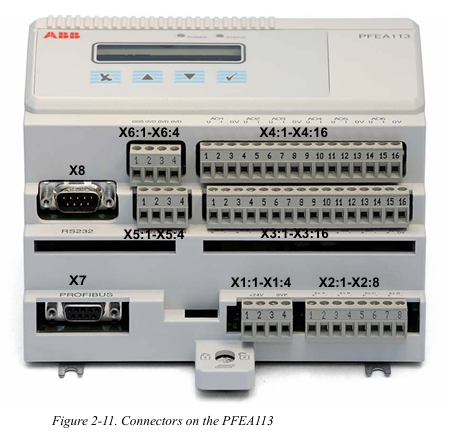
System composition and core technology
1. System composition
Core components: Tension electronic unit (PFEA113), weighing sensors (such as PFCL/PFTL series), junction box (PFXC 141), power module, and communication interface.
Measurement principle: Based on the magnetostriction effect, the sensor core is a stacked alloy sheet. A 330Hz AC current is passed through the primary winding to generate a magnetic field. The secondary winding induces a voltage signal proportional to the tension due to mechanical force, and has strong resistance to lateral and axial force interference (error ≤± 0.5%).
2. Core Features
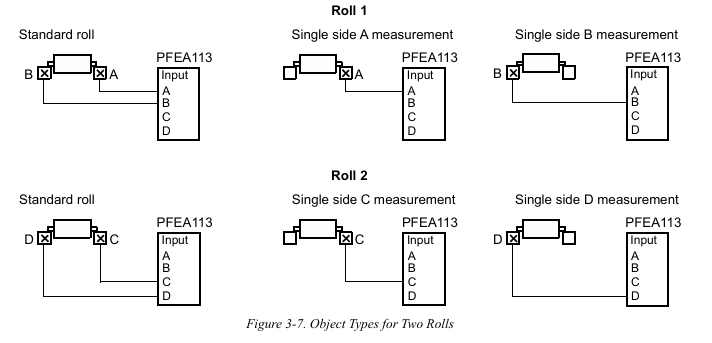
Multi scenario adaptation: Supports single roll, double roll, and segmented roll applications, and can connect up to 12 sensors (cascaded through 3 PFEA113).
Flexible expansion: 6 configurable analog outputs, 4 digital outputs, supports Profibus DP communication, compatible with remote control and data upload.
High reliability: It has protection functions such as overvoltage (OVP), overcurrent (OCP), and over temperature (OTP), and supports fault self diagnosis.
Installation and wiring specifications
1. Installation environment requirements
Physical environment: Operating temperature -10~+55 ℃ (IP20 version), -25~+70 ℃ (IP65 version), relative humidity ≤ 95% (no condensation), avoid strong electromagnetic interference sources (such as frequency converters).
Mechanical requirements: The flatness error of the installation surface should be ≤ 0.1mm, and the gap between the sensor and the adapter plate should be clean and free of debris to avoid force diversion affecting measurement accuracy.
2. Hardware wiring
Sensor wiring:
Analog input supports CT (1A/5A), VT (100V), and sensor signals, and the cable needs to be twisted shielded with a single end grounding of the shielding layer.
Switching input/output adopts optocoupler isolation, with digital output capacity 5A@250V AC/DC, Inductive loads require parallel freewheeling diodes.
Power and Communication:
Wide range auxiliary power supply (24-250V AC/DC, IP20 version) or 85-264V AC (IP65 version), power consumption<15W.
The communication interface supports Profibus DP (RS485) and RS232, with a standard 120 Ω terminal resistor and a maximum communication distance of 1200m.
Debugging and configuration process
1. Basic settings
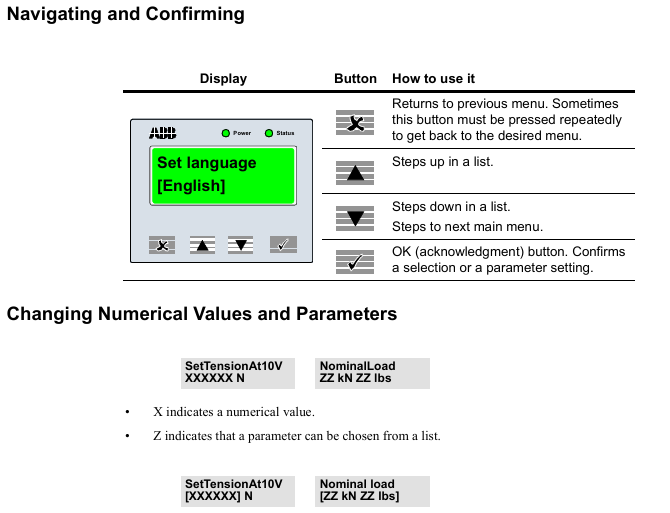
Quick configuration: Set language (English/German/French, etc.), unit (N/kN/kg, etc.), and web width (applicable to N/m, etc.) through panel buttons, supporting fast zero calibration and gain scheduling.
Complete configuration: including system definition (single roll/double roll/segmented roll), sensor type selection, nominal load setting, zero calibration, and wrrap gain calculation (calculated by hanging weight or formula).
2. Key parameter configuration
Wrap gain: the ratio of tension (T) to sensor measured force (FR), calculated as Wrap gain=T/FR, which needs to be derived through geometric relationships based on the installation angle (horizontal/inclined).
Communication settings: Profibus DP address (0-125), baud rate (up to 12Mbps), supports real-time data exchange with PLC or SCADA systems.
Operation and maintenance
Daily operating procedures
1. Startup and shutdown
(1) Startup steps
Pre inspection
Confirm that the main power supply voltage matches the rated value of the equipment (IP20 version: 24V DC; IP65 version: 85-264V AC).
Check that the sensors, junction boxes, and communication cables are securely connected without looseness or damage.
Power on operation
Turn on the external power switch, and the IP65 version requires the internal switch of the device to be turned on at the same time.
The "Power" indicator light (green) on the observation panel is on, and the "Status" indicator light (green) is constantly on, indicating that the system is normal; If the "Status" light is red, the fault information needs to be viewed through the display screen.
(2) Shutdown steps
Turn off the external power switch. For IP65 version, the internal switch of the device needs to be turned off first.
When the machine is shut down for a long time, it is recommended to disconnect the main power supply and protect the equipment from dust.
2. Operation monitoring
(1) Panel operation
Display switching: Use the "Step up/down" button to switch display content, including single sensor tension (such as Tension A), total tension (such as TensionRoll 1), differential tension (such as TensionDiff A-B), and analog output values (AO1-AO6).
Parameter viewing: Press and hold the "OK" button for 5 seconds to enter the menu, where you can browse the system status, fault records, and configuration parameters (such as w_rap gain _, nominal load).
(2) Remote monitoring
Through Profibus DP communication, the upper computer (such as PLC) can read tension values, sensor status, and alarm information in real time, and support remote sending of zero calibration, gain switching, and other instructions.
3. Key operational functions
(1) Zero point calibration
Trigger condition: When no tension is applied (such as when the coil is not running), execute it through the "Zero Set" menu on the panel or remote command.
Operation steps:
Enter the "ZeroSet" menu and select the corresponding sensor group (such as A, B).
After confirming that there is no tension, press "OK" and the display screen will show "ActionDone" to indicate completion.
(2) Gain scheduling
Application scenario: Suitable for changes in coil path (such as different wrrap angles), switching preset wrrap gain parameters through digital input or Profibus.
Setting method: Enable "GainScheduling" in the "SystemDefinition" menu, and configure the w_rap gain 1_ and w_rap gain 2h respectively.
Maintenance and upkeep
1. Preventive maintenance
(1) Regular check (recommended every 6 months)
Key operating points for inspection items
Check the torque of the fixing screws for sensors and connectors (e.g. 24Nm for M12 screws), and clean the dust or debris in the gap between the sensor and adapter board.
Confirm that the cable and shielding layer are not worn, and that the shielding layer is grounded at one end (distance ≤ 50mm) to avoid interference caused by grounding at both ends.
Ventilation openings for heat dissipation and environmental cleaning equipment ensure that the working environment temperature and humidity are within the rated range (without condensation or corrosive gases).
(2) Calibration and verification
Calibration cycle: It is recommended to perform accuracy calibration once a year, using standard weight or calibration equipment to verify measurement errors (should be ≤ ± 0.5% FS).
Verification method: Enter a known tension value through the simulation function in "DataMenu", and compare the displayed value with the theoretical value.

- OMRON
- ABB
- General Electric
- EMERSON
- Honeywell
- HIMA
- ALSTOM
- Rolls-Royce
- MOTOROLA
- Rockwell
- Siemens
- Woodward
- YOKOGAWA
- FOXBORO
- KOLLMORGEN
- MOOG
- KB
- YAMAHA
- BENDER
- TEKTRONIX
- Westinghouse
- AMAT
- AB
- XYCOM
- Yaskawa
- B&R
- Schneider
- KONGSBERG
- NI
- WATLOW
- ProSoft
- SEW
- ADVANCED
- Reliance
- TRICONEX
- METSO
- MAN
- Advantest
- STUDER
- DANAHER MOTION
- Bently
- Galil
- EATON
- MOLEX
- DEIF
- B&W
- ZYGO
- Aerotech
- DANFOSS
- Beijer
- Moxa
- Rexroth
- Johnson
- WAGO
- TOSHIBA
- BMCM
- SMC
- HITACHI
- HIRSCHMANN
- Application field
- XP POWER
- CTI
- TRICON
- STOBER
- Thinklogical
- Horner Automation
- Meggitt
- Fanuc
- Baldor
- SHINKAWA
- Other Brands
- UniOP
- KUKA
- Iba
- Beckhoff
- ADLINK
-
 Sigmatek MDD111-1 DIAS Drive Axis Module
 -
 Sigmatek DKL042 05-024-042 Terminal Module
 -
 Sigmatek DM822 Control Module
 -
 Sigmatek CDM167 12-008-167-O Module
 -
 Sigmatek TAE151 Touch Display Unit
 -
 Sigmatek DCC041 SLIDES Module 05-700-041-D
 -
 Sigmatek AKM65M-ANC2GBB0 PM Servo Motor
 -
 Sigmatek ETT221 01-230-221 Operator Terminal
 -
 Sigmatek SLIDES DAM 124 Analog Module
 -
Sigmatek AKM31C-ANCNGBB0 Servo Motor
-
 Mannesmann Demag Sigmatek CP626 Central Unit
 -
 SIGMATEK 0332.554.03 Board 371071000154
 -
 SIGMATEK 12-250-021 Base Plate Back Panel CM5V020
 -
 SIGMATEK DM162 S-DIAS Digital Mix Module
 -
 DEMAG ERGOTECH 061 381 66 Sigmatek 9842.243.02 Circuit Board
 -
 SIGMATEK CP313-1 PLC Module
 -
Sigmatek ETV0551-2 VARAN Touch Terminal
-
 Sigmatek SDM 081 FS S-Dias Safety Module
 -
 DEMAG 05-250-023 Ergotech Motherboard with Sigmatek TMS012
 -
Sigmatek CM5V020 12-250-023-K Wiring Base
-
 Sigma Tek 5000B-37 Attitude Gyro Indicator
 -
 Sigmatek SDD120-2 DIAS Drive
 -
 Sigmatek CME221 Memory Module
 -
 Sigmatek DCP640 DIAS Central Unit
 -
 Sigmatek STO040 Safety Output Module
 -
Sigmatek CET281 Control Panel
-
 Sigmatek CIPC LX800 Demag NC5 CPU
 -
 Sigmatek DKL093 05-024-093 Terminal Module
 -
 Sigmatek AI088 20-009-088 Analog Input Module
 -
Sigmatek CAI888 Analog Input Module
-
SIGMATEK CCA021 12-025-021 Analog Output Module
-
SIGMATEK 1104.579.05 Control Module
-
SIGMATEK SDI100 Digital Input Module
-
 SIGMATEK C-IPC 256MB LX800 Compact Dias
 -
 SIGMATEK 9423.090.02 Control Module
 -
SIGMATEK C-IPC 256 Power Supply 148498
-
 SIGMATEK CAI025 Analog Input Module
 -
 SIGMATEK CTO166 Digital Output Module
 -
 SIGMATEK CP112 20-004-112 Processor Module
 -
SIGMATEK CAI887 12-009-887 Safety Module
-
 Sigma-Tek 4000B-31 Directional Gyro 1U262-002-42
 -
Sigmatek C-IPC 256MB LX800 IPC Controller
-
Sigmatek C-IPC 01-450-031 Industrial PC LX800
-
Sigmatek C-IPC 256 Industrial PC Controller
-
Sigmatek CCP-531 PLC Processor Module
-
Sigmatek CDI163 Digital Input Module
-
 Sigmatek ETV0501 VARAN Terminal 12-230-0501
 -
 Sigmatek CTMS020 C-DIAS Technology Module
 -
 Sigmatek CIV512 VARAN Switch Module
 -
 Sigmatek HU011 20-080-011 Interface Module
 -
SIGMATEK SLIDES DAM 124 Module
-
 SIGMATEK C-IPC 161 01-450-161L Industrial PC
 -
SIGMATEK C-IPC 128MB VIA 733MHz 01-450-024-K
-
 SIGMATEK 12-780-012 R8-IPC Geode LX800 Module
 -
SIGMATEK CAM124 Analog Module
-
 SIGMATEK S1 032-8AF61-R4 EZ Servo Motor
 -
 SIGMATEK CTO163 Digital Output Module
 -
 SIGMATEK CCP082 12-004-082 Processor Module
 -
 SIGMATEK CRCH081 C-DIAS Temperature Module
 -
 SIGMATEK PC322-K 01-310-322-K Industrial PC
 -
SIGMATEK SDD310-2 Servo Drive
-
 SIGMATEK AI084 Analog Input Module
 -
SIGMATEK CRCH081 12-752-081 Temperature Module
-
Sigma-Tek 5000L-4 Attitude Gyro 1U284-001-3
-
 SIGMATEK CM5V020 12-250-023-K Wiring Module
 -
Sigma-Tek 4000H-6 Directional Gyro IU262-035-7
-
 SIGMATEK Dias DCP160 05-004-160 Processor Module
 -
SIGMATEK 0147.395.02 Control Module
-
SIGMATEK A1084 Control Module
-
SIGMATEK DI200 20-006-2000 Digital Input Module
-
Sigmatek DNC115 Encoder Module
-
 Sigmatek DAM122 05-017-122 Analog Module
 -
Sigmatek 9802.289.01 Control Board TA71 Display
-
Sigmatek TO127 20-007-127 Digital Output Module
-
Sigmatek DNC031 05-011-031 Digital Module
-
Sigmatek VI022 20-003-022 Interface Module
-
Sigmatek CAI085 Analog Input Module
-
 Sigmatek CP111 S-DIAS CPU Module
 -
Sigmatek CTMS030 Krauss Maffei Module
-
 Sigmatek CAM123 Control Module
 -
 Sigmatek TAE732-P 01-240-732-P Touch Display Unit
 -
Sigmatek MDM021 Digital Mixed Module
-
Sigmatek DCP642 DIAS Central Unit
-
 Sigmatek CST022 12-014-022 C-DIAS Module
 -
 Sigmatek SRO021 20-893-021 Safety Relay Output
 -
 Krauss Maffei MC5 Control System Sigmatek
 -
 Sigmatek DC061 Module 18-24VDC 300mA
 -
 Herrmann EVT0855 Ultrasonic Welder Touch Panel
 -
Sigmatek CIV521 Control Module 1.4A 2W
-
Sigmatek DDI61 05-006-161 Digital Input Module
-
SIGMATEK ETT312-E Touch Terminal 01-230-312
-
Cessna S3326-1 Sigma Tek 5000B-67 Gyro 1U149-015-9
-
SIGMATEK PS101 Power Supply Module
-
SIGMATEK 0332.554.03 Control Module 371071000154
-
 SIGMATEK ETT312-E Touch Terminal 01-230-312
 -
SIGMATEK CDM163 Control Module
-
 SIGMATEK VSV046 16-023-046 Module
 -
SIGMATEK AM221 20-017-221 Analog Module
-
SIGMATEK CTS051 12-053-051 Control Module
-
SIGMATEK AM221 20-017-221 Analog Module
-
Sigmatek CSDI161 12-891-161 Safety Input Module
-
Sigma Tek 4000C-1 Directional Gyro Indicator
-
Sigmatek ETV0501 12-230-0501 VARAN Terminal
-
Sigmatek DDM165 SLIDES Module
-
Sigmatek N100 20-011-100 Control Module
-
Sigmatek AKM54K-ANC2R-B0 PM Servo Motor
-
Sigmatek CTO166 Digital Output Module
-
Sigmatek CP212-K 20-004-212-K CPU Module
-
Sigmatek CDI161 Digital Input Module
-
Sigmatek DCC080 05-700-080-2 Control Module
-
 SIGMATEK SCP011 S-DIAS Safety CPU
 -
SIGMATEK SCP011 S-DIAS Safety CPU
-
SIGMATEK SRO022 Relay Output Module
-
SIGMATEK MDD 121 Drive Axis Module
-
SIGMATEK DSI021 SLIDES Siemens Interface
-
SIGMATEK DIAS DCP161 Module 05-004-161
-
 Sigmatek ETT312 Built-in Touch Terminal
 -
SIGMATEK DCP 643 DIAS Controller System
-
SIGMATEK CIO021 Multi I/O Module
-
SIGMATEK CTMS020 Control Module
-
 Sigmatek CME 221 Memory Module
 -
Sigmatek 0420.615.01 Control Board
-
Sigmatek CP111 20-004-111 CPU Module
-
Sigmatek 9405.065.03 Control Board
-
Sigmatek ETEK 01-450-032-K C-IPC 256MB Industrial PC
-
Sigmatek CTO163 12-007-163 Safety Output Module
-
Sigmatek TO081 20-007-081 Digital Output Module
-
 Sigmatek SI021 20-022-021 Safety Input Module


