
Westinghouse WPro8500 and WPro12000 portable generators
2. Fuel and oil requirements
Fuel: Only use unleaded gasoline, ethanol content ≤ 10%, octane rating ≥ 87; Stop the machine for cooling before refueling, ensure that the oil level does not exceed the neck of the filling port, and check for leaks after refueling.
Engine oil: The new engine has no engine oil, and 10W30 engine oil must be added before the first start-up (5W30 in winter and SAE30 in summer); Check the liquid level of the refrigeration unit, which should be between the H (high) and L (low) marks on the dipstick.
3. Startup method
Startup method, operating steps, applicable models, precautions
Electric start 1. Confirm that the engine oil is sufficient and the battery is connected; 2. Reset the circuit breaker; 3. Turn the fuel valve to ON; 4. Press the switch to START and release it after starting (automatic return to RUN). Both options are applicable. If it does not start for 5 seconds, release it and retry after 15 seconds; Charging when the battery is depleted
Backlash start 1. Same as 1-3 above; 2. Slowly pull the rope until the resistance increases, and quickly pull it upwards away from the generator. When only the WPro8500 battery runs out of power/disconnects, manually turn on the choke and turn it off after starting
Remote start 1. Turn the switch to RUN; 2. Long press the REMOTE PAIRING button on the panel for 3 seconds; 3. Long press the STOP button on the remote control until the indicator light flashes, and then long press the START button until it flashes; 4. Press and hold the PAIRING key for 3 seconds to complete pairing; 5. Press the START button on the remote control to start both models, with an effective distance of ≤ 100 feet (affected by battery level). After starting, there will be a 15 second delay in output
4. Stop method
Normal stop: 1 Disconnect all loads; 2. Cooling during no-load operation; 3. Turn the switch to OFF; 4. Close the fuel valve (allow the carburetor to run out of fuel during long-term storage).
Emergency stop: Simply turn the engine control switch to OFF.
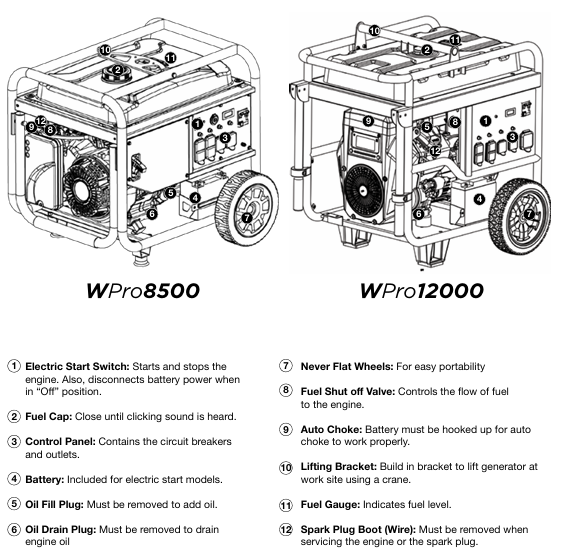
Special maintenance operation
Oil change: When the engine is in a cold state, drain the oil from the oil pan through the oil drain plug, remove the plug and drain, then reinstall and add oil to the standard level.
Air filter cleaning: Remove the cover and take out the filter cotton, clean with household detergent and warm water, squeeze and drain (do not twist), air dry, apply a thin layer of cleaning oil, and reinstall according to the "fine filter (ash) inside, coarse filter (black) outside".
Spark plug maintenance: Remove the spark plug with a spark socket wrench, check the insulation layer for cracks and a gap of 0.027-0.032 inches (0.60-0.80mm), clean and reinstall it; Recommended replacement models: AC Delco 4EXLS, Autolite 52, Champion N9YC, Bosch W7DC, Torch F7TC.
Battery maintenance: Start the generator every 2-3 months and charge it for 15 minutes, or connect the charger to the charging port (RUN mode) for charging; The replacement model is as follows:
Model Westinghouse Part Number Compatible Battery Model Voltage (V) Capacity (Ah) Size (inches)
WPro8500 100557 YT9A 12 9 5 5/16 × 3 × 5 3/8
WPro12000 100639 YT51913-22 12 20 7 1/8 × 3 × 6 9/16
Troubleshooting
Possible causes and solutions for the problem
The engine is running but there is no power output. 1. The circuit breaker has tripped; 2. The power plug is not securely plugged in; 3. Power cord malfunction; 4. Electrical equipment malfunction; 5. GFCI trips; 6. Internal equipment malfunction: 1. Reset the circuit breaker and check for overload; 2. Re plug (the 240V plug needs to be turned clockwise by 1/4 turn); 3. Replace the power cord; 4. Connect to normal equipment testing; 5. Reset the GFCI circuit breaker; 6. Send to authorized service points
The engine cannot start/stalls after starting. 1. The fuel valve is closed; 2. Lack of gasoline; 3. Fuel pipeline blockage; 4. The startup battery runs out of power; 5. The air filter is dirty; 6. Low oil level (low oil protection); 7. Spark plug not tightened/faulty; 8. Fuel deterioration: 1. Open the fuel valve; 2. Add gasoline that meets the requirements; 3. Check and clean the fuel passage; 4. Charging (electric start only); 5. Clean/replace the air filter; 6. Add engine oil to the standard level; 7. Tighten/replace spark plugs; 8. Drain the deteriorated fuel and add new fuel
Remote start failure: 1. The remote control battery is dead; 2. Exceeding the remote control distance (>100 feet); 3. The remote control is not paired with the generator. 1. Replace the remote control battery; 2. Close to the generator (≤ 100 feet); 3. Follow the pairing process again
Sudden shutdown of generator: 1. Lack of fuel; 2. Low oil level (protective shutdown); 3. Excessive load; 4. Internal equipment malfunction: 1. Add gasoline; 2. Add engine oil; 3. Reduce load after restart; 4. Send to authorized service points
Product drawings
Explosion view: WPro8500 (page 26), WPro12000 (page 31) complete machine parts breakdown, including part numbers and names (such as generator assembly, fuel tank, control panel, etc.).
Engine view: Position markings and part numbers for the internal structures (pistons, connecting rods, valves, ignition coils, etc.) of two engine models.
- OMRON
- ABB
- General Electric
- EMERSON
- Honeywell
- HIMA
- ALSTOM
- Rolls-Royce
- MOTOROLA
- Rockwell
- Siemens
- Woodward
- YOKOGAWA
- FOXBORO
- KOLLMORGEN
- MOOG
- KB
- YAMAHA
- BENDER
- TEKTRONIX
- Westinghouse
- AMAT
- AB
- XYCOM
- Yaskawa
- B&R
- Schneider
- KONGSBERG
- NI
- WATLOW
- ProSoft
- SEW
- ADVANCED
- Reliance
- TRICONEX
- METSO
- MAN
- Advantest
- STUDER
- DANAHER MOTION
- Bently
- Galil
- EATON
- MOLEX
- DEIF
- B&W
- ZYGO
- Aerotech
- DANFOSS
- Beijer
- Moxa
- Rexroth
- Johnson
- WAGO
- TOSHIBA
- BMCM
- SMC
- HITACHI
- HIRSCHMANN
- Application field
- XP POWER
- CTI
- TRICON
- STOBER
- Thinklogical
- Horner Automation
- Meggitt
- Fanuc
- Baldor
- SHINKAWA
- Other Brands
- UniOP
- KUKA
- Iba
- Beckhoff
- ADLINK
-
 Sigmatek MDD111-1 DIAS Drive Axis Module
 -
 Sigmatek DKL042 05-024-042 Terminal Module
 -
 Sigmatek DM822 Control Module
 -
 Sigmatek CDM167 12-008-167-O Module
 -
 Sigmatek TAE151 Touch Display Unit
 -
 Sigmatek DCC041 SLIDES Module 05-700-041-D
 -
 Sigmatek AKM65M-ANC2GBB0 PM Servo Motor
 -
 Sigmatek ETT221 01-230-221 Operator Terminal
 -
 Sigmatek SLIDES DAM 124 Analog Module
 -
Sigmatek AKM31C-ANCNGBB0 Servo Motor
-
 Mannesmann Demag Sigmatek CP626 Central Unit
 -
 SIGMATEK 0332.554.03 Board 371071000154
 -
 SIGMATEK 12-250-021 Base Plate Back Panel CM5V020
 -
 SIGMATEK DM162 S-DIAS Digital Mix Module
 -
 DEMAG ERGOTECH 061 381 66 Sigmatek 9842.243.02 Circuit Board
 -
 SIGMATEK CP313-1 PLC Module
 -
Sigmatek ETV0551-2 VARAN Touch Terminal
-
 Sigmatek SDM 081 FS S-Dias Safety Module
 -
 DEMAG 05-250-023 Ergotech Motherboard with Sigmatek TMS012
 -
Sigmatek CM5V020 12-250-023-K Wiring Base
-
 Sigma Tek 5000B-37 Attitude Gyro Indicator
 -
 Sigmatek SDD120-2 DIAS Drive
 -
 Sigmatek CME221 Memory Module
 -
 Sigmatek DCP640 DIAS Central Unit
 -
 Sigmatek STO040 Safety Output Module
 -
Sigmatek CET281 Control Panel
-
 Sigmatek CIPC LX800 Demag NC5 CPU
 -
 Sigmatek DKL093 05-024-093 Terminal Module
 -
 Sigmatek AI088 20-009-088 Analog Input Module
 -
Sigmatek CAI888 Analog Input Module
-
SIGMATEK CCA021 12-025-021 Analog Output Module
-
SIGMATEK 1104.579.05 Control Module
-
SIGMATEK SDI100 Digital Input Module
-
 SIGMATEK C-IPC 256MB LX800 Compact Dias
 -
 SIGMATEK 9423.090.02 Control Module
 -
SIGMATEK C-IPC 256 Power Supply 148498
-
 SIGMATEK CAI025 Analog Input Module
 -
 SIGMATEK CTO166 Digital Output Module
 -
 SIGMATEK CP112 20-004-112 Processor Module
 -
SIGMATEK CAI887 12-009-887 Safety Module
-
 Sigma-Tek 4000B-31 Directional Gyro 1U262-002-42
 -
Sigmatek C-IPC 256MB LX800 IPC Controller
-
Sigmatek C-IPC 01-450-031 Industrial PC LX800
-
Sigmatek C-IPC 256 Industrial PC Controller
-
Sigmatek CCP-531 PLC Processor Module
-
Sigmatek CDI163 Digital Input Module
-
 Sigmatek ETV0501 VARAN Terminal 12-230-0501
 -
 Sigmatek CTMS020 C-DIAS Technology Module
 -
 Sigmatek CIV512 VARAN Switch Module
 -
 Sigmatek HU011 20-080-011 Interface Module
 -
SIGMATEK SLIDES DAM 124 Module
-
 SIGMATEK C-IPC 161 01-450-161L Industrial PC
 -
SIGMATEK C-IPC 128MB VIA 733MHz 01-450-024-K
-
 SIGMATEK 12-780-012 R8-IPC Geode LX800 Module
 -
SIGMATEK CAM124 Analog Module
-
 SIGMATEK S1 032-8AF61-R4 EZ Servo Motor
 -
 SIGMATEK CTO163 Digital Output Module
 -
 SIGMATEK CCP082 12-004-082 Processor Module
 -
 SIGMATEK CRCH081 C-DIAS Temperature Module
 -
 SIGMATEK PC322-K 01-310-322-K Industrial PC
 -
SIGMATEK SDD310-2 Servo Drive
-
 SIGMATEK AI084 Analog Input Module
 -
SIGMATEK CRCH081 12-752-081 Temperature Module
-
Sigma-Tek 5000L-4 Attitude Gyro 1U284-001-3
-
 SIGMATEK CM5V020 12-250-023-K Wiring Module
 -
Sigma-Tek 4000H-6 Directional Gyro IU262-035-7
-
 SIGMATEK Dias DCP160 05-004-160 Processor Module
 -
SIGMATEK 0147.395.02 Control Module
-
SIGMATEK A1084 Control Module
-
SIGMATEK DI200 20-006-2000 Digital Input Module
-
Sigmatek DNC115 Encoder Module
-
 Sigmatek DAM122 05-017-122 Analog Module
 -
Sigmatek 9802.289.01 Control Board TA71 Display
-
Sigmatek TO127 20-007-127 Digital Output Module
-
Sigmatek DNC031 05-011-031 Digital Module
-
Sigmatek VI022 20-003-022 Interface Module
-
Sigmatek CAI085 Analog Input Module
-
 Sigmatek CP111 S-DIAS CPU Module
 -
Sigmatek CTMS030 Krauss Maffei Module
-
 Sigmatek CAM123 Control Module
 -
 Sigmatek TAE732-P 01-240-732-P Touch Display Unit
 -
Sigmatek MDM021 Digital Mixed Module
-
Sigmatek DCP642 DIAS Central Unit
-
 Sigmatek CST022 12-014-022 C-DIAS Module
 -
 Sigmatek SRO021 20-893-021 Safety Relay Output
 -
 Krauss Maffei MC5 Control System Sigmatek
 -
 Sigmatek DC061 Module 18-24VDC 300mA
 -
 Herrmann EVT0855 Ultrasonic Welder Touch Panel
 -
Sigmatek CIV521 Control Module 1.4A 2W
-
Sigmatek DDI61 05-006-161 Digital Input Module
-
SIGMATEK ETT312-E Touch Terminal 01-230-312
-
Cessna S3326-1 Sigma Tek 5000B-67 Gyro 1U149-015-9
-
SIGMATEK PS101 Power Supply Module
-
SIGMATEK 0332.554.03 Control Module 371071000154
-
 SIGMATEK ETT312-E Touch Terminal 01-230-312
 -
SIGMATEK CDM163 Control Module
-
 SIGMATEK VSV046 16-023-046 Module
 -
SIGMATEK AM221 20-017-221 Analog Module
-
SIGMATEK CTS051 12-053-051 Control Module
-
SIGMATEK AM221 20-017-221 Analog Module
-
Sigmatek CSDI161 12-891-161 Safety Input Module
-
Sigma Tek 4000C-1 Directional Gyro Indicator
-
Sigmatek ETV0501 12-230-0501 VARAN Terminal
-
Sigmatek DDM165 SLIDES Module
-
Sigmatek N100 20-011-100 Control Module
-
Sigmatek AKM54K-ANC2R-B0 PM Servo Motor
-
Sigmatek CTO166 Digital Output Module
-
Sigmatek CP212-K 20-004-212-K CPU Module
-
Sigmatek CDI161 Digital Input Module
-
Sigmatek DCC080 05-700-080-2 Control Module
-
 SIGMATEK SCP011 S-DIAS Safety CPU
 -
SIGMATEK SCP011 S-DIAS Safety CPU
-
SIGMATEK SRO022 Relay Output Module
-
SIGMATEK MDD 121 Drive Axis Module
-
SIGMATEK DSI021 SLIDES Siemens Interface
-
SIGMATEK DIAS DCP161 Module 05-004-161
-
 Sigmatek ETT312 Built-in Touch Terminal
 -
SIGMATEK DCP 643 DIAS Controller System
-
SIGMATEK CIO021 Multi I/O Module
-
SIGMATEK CTMS020 Control Module
-
 Sigmatek CME 221 Memory Module
 -
Sigmatek 0420.615.01 Control Board
-
Sigmatek CP111 20-004-111 CPU Module
-
Sigmatek 9405.065.03 Control Board
-
Sigmatek ETEK 01-450-032-K C-IPC 256MB Industrial PC
-
Sigmatek CTO163 12-007-163 Safety Output Module
-
Sigmatek TO081 20-007-081 Digital Output Module
-
 Sigmatek SI021 20-022-021 Safety Input Module


