
How to install the Rockwell Automation 1756 series ControlNet communication module?
Model Core Features Applicable Scenarios
1756-CN2 standard media (non redundant), conventional industrial environment without anti-corrosion coating, single network link
1756-CN2K standard media (non redundant), with anti-corrosion coating (model ending with "K" mark), corrosive industrial environment (such as chemical and metallurgical)
1756-CN2R redundant media (dual link A/B), high reliability demand scenario without anti-corrosion coating (such as energy, transportation)
1756-CN2RK redundant media (dual link A/B) with anti-corrosion coating and high reliability requirements scenario
1756-CN2RXT redundant media, wide temperature design (-25~70 ℃), without anti-corrosion coating for extreme temperature environments (such as outdoor and refrigerated)
How to install the Rockwell Automation 1756 series ControlNet communication module?
Product Family and Core Positioning
1. Model classification and functional differences
The 1756 series ControlNet module is divided into "media type", "corrosion resistance", and "temperature adaptation range" to meet the needs of different industrial scenarios. The specific model functions are as follows:
Model Core Features Applicable Scenarios
1756-CN2 standard media (non redundant), conventional industrial environment without anti-corrosion coating, single network link
1756-CN2K standard media (non redundant), with anti-corrosion coating (model ending with "K" mark), corrosive industrial environment (such as chemical and metallurgical)
1756-CN2R redundant media (dual link A/B), high reliability demand scenario without anti-corrosion coating (such as energy, transportation)
1756-CN2RK redundant media (dual link A/B) with anti-corrosion coating and high reliability requirements scenario
1756-CN2RXT redundant media, wide temperature design (-25~70 ℃), without anti-corrosion coating for extreme temperature environments (such as outdoor and refrigerated)
2. Core advantages of ControlNet network
The ControlNet network connected to the module combines I/O network and Peer to Peer network functions, with the core features of:
Deterministic communication: ensuring repeatable and low latency transmission of critical control data;
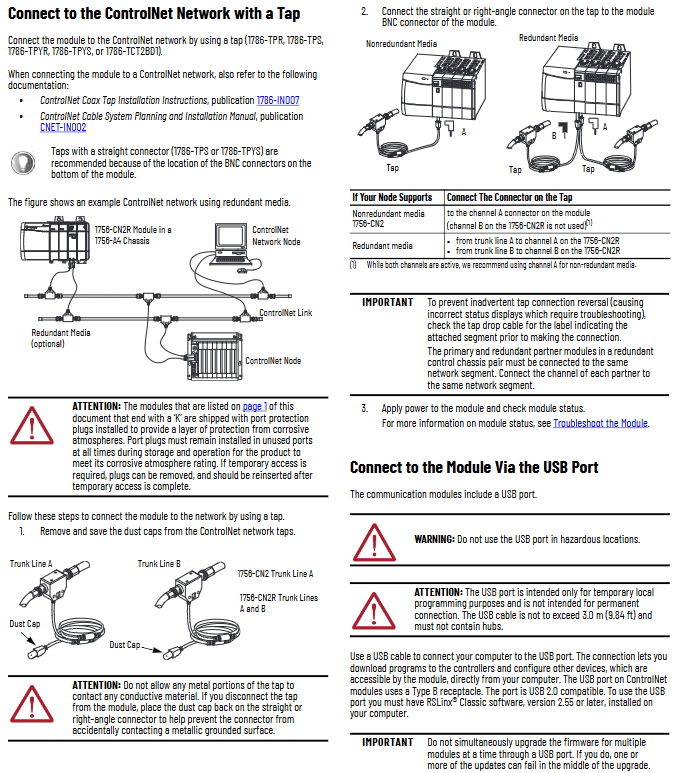
Support redundancy: Redundant models (CN2R/CN2RK/CN2RXT) achieve network fault redundancy switching through dual links (A/B) to improve system stability.
Environmental requirements and safety certification
1. Basic environmental standards
Pollution level: only applicable to industrial environments with pollution level 2 (defined by IEC/EN 60664-1, which means the air contains only a small amount of non-conductive dust);
Overvoltage category: Class II application (IEC/EN 60664-1), suitable for downstream equipment in industrial distribution systems;
Altitude: up to 2000 meters (6562 feet), no need to downgrade for use;
Installation form: Open device, to be installed in an enclosure that meets the following requirements:
Protection level: at least IP54 (EN/IEC 60529);
Flame retardant rating: Non metallic shells must meet a 5VA flame spread rating;
Operation restriction: Tools are required to open the inside of the casing to prevent personnel from coming into contact with live parts.
2. Hazardous Area Certification
The module has been certified for hazardous areas in multiple regions, and the requirements for different regions are as follows:
Core requirements for certification areas
North America (Class I, Div 2) is suitable for A/B/C/D hazardous areas (such as environments containing flammable gases), with a temperature code of T4;
It is strictly prohibited to plug in or unplug modules/wiring in non power off or unknown non hazardous areas;
Components cannot be replaced, otherwise they may compromise their suitability for hazardous locations.
ATEX/UKEX equipment group II, category 3, protection type "Ex ec IIC T4 Gc" (increased safety type);
Only applicable to Zone 2 hazardous areas (where explosive gas environments rarely occur or occur in the short term);
It needs to be used with a UKEX/ATEX certified casing (IP54 or above).
IECEx certification protection type is the same as ATEX (Ex ec IIC T4 Gc), suitable for Zone 2 hazardous areas;
Transient protection must be met (peak voltage at the power supply end ≤ 140% of the rated value).
3. Requirements for electrostatic protection
The module is sensitive to static electricity, and the following should be followed during operation:
Contact with grounded objects to release static electricity, or wear a grounded wristband;
Do not touch module connectors, pins, and internal circuits;
When not in use, it should be stored in anti-static packaging;
Prioritize using anti-static workbenches.
Installation and wiring operations
1. Preparation before module installation
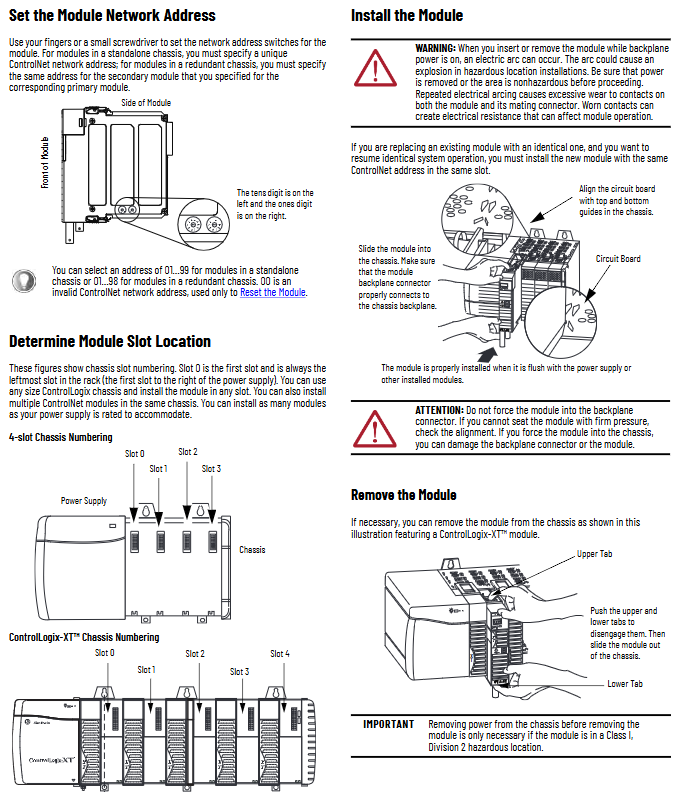
Slot position: Supports any size of ControlLogix chassis and can be installed in any slot (ensuring sufficient power capacity);
Redundant system requirements: The primary/backup modules need to be installed in the same slot of the corresponding chassis (such as the primary module in slot 3, and the backup module also needs to be in slot 3 of the backup chassis).
Network address setting:
Address range: Independent chassis modules range from 01 to 99, redundant chassis modules range from 01 to 98 (00 is an invalid address, only used for resetting);
Setting method: Adjust through the two digit dip switch on the side of the module (ten digits on the left and one digit on the right), ensuring that the address is unique within the same network.
2. Module installation and disassembly steps
(1) Installation steps
Confirm that the power supply of the chassis has been disconnected (power must be cut off in hazardous areas, and normal environments can support live plugging, but it is not recommended);
Align the module circuit board with the upper and lower rails of the chassis, and smoothly push it into the backplane connector;
Confirm that the module is flush with the power/other modules and not loose (do not forcefully press to avoid damaging the connector).
- OMRON
- ABB
- General Electric
- EMERSON
- Honeywell
- HIMA
- ALSTOM
- Rolls-Royce
- MOTOROLA
- Rockwell
- Siemens
- Woodward
- YOKOGAWA
- FOXBORO
- KOLLMORGEN
- MOOG
- KB
- YAMAHA
- BENDER
- TEKTRONIX
- Westinghouse
- AMAT
- AB
- XYCOM
- Yaskawa
- B&R
- Schneider
- KONGSBERG
- NI
- WATLOW
- ProSoft
- SEW
- ADVANCED
- Reliance
- TRICONEX
- METSO
- MAN
- Advantest
- STUDER
- DANAHER MOTION
- Bently
- Galil
- EATON
- MOLEX
- DEIF
- B&W
- ZYGO
- Aerotech
- DANFOSS
- Beijer
- Moxa
- Rexroth
- Johnson
- WAGO
- TOSHIBA
- BMCM
- SMC
- HITACHI
- HIRSCHMANN
- Application field
- XP POWER
- CTI
- TRICON
- STOBER
- Thinklogical
- Horner Automation
- Meggitt
- Fanuc
- Baldor
- SHINKAWA
- Other Brands
- UniOP
- KUKA
- Iba
- Beckhoff
- ADLINK
-
 National Instruments USB-6363 DAQ Device
 -
 National Instruments NI 9467 GPS Module
 -
 National Instruments USB-6351 DAQ Device
 -
 National Instruments NI 6581 Adapter Module
 -
 National Instruments 781045-01 Output Module
 -
 National Instruments PCI-6225 DAQ Card
 -
 National Instruments TRC-8543 CAN Cable
 -
 National Instruments PXIe-1073 Chassis
 -
 National Instruments USB-6003 DAQ Device
 -
 National Instruments NI 9476 Output Module
 -
 National Instruments myRIO-1900 Embedded Controller
 -
 National Instruments NI-9263 Analog Output Module
 -
 National Instruments 158561A-01L Ordering Part Number
 -
 National Instruments 785024-01 Ordering Part Number
 -
 National Instruments PCI-6510 Industrial Digital I/O Card
 -
 National Instruments USB-6259 Multifunction DAQ Device
 -
National Instruments USB-8452 I2C SPI Interface Device
-
 National Instruments PXI-8432 Serial Interface Module
 -
 National Instruments PXIe-5644R Vector Signal Transceiver
 -
 National Instruments PXI-2569 Relay Module
 -
 National Instruments 781174-01 Module
 -
 National Instruments 782000-01 Module
 -
 National Instruments PXI-5152 Digitizer
 -
 National Instruments PXI-6284 DAQ Card
 -
 National Instruments PCI-1428 Frame Grabber
 -
 National Instruments PXI-1050 Chassis
 -
National Instruments NI USB-8486 Fieldbus
-
 National Instruments NI 9862 CAN Module
 -
 National Instruments NI 9146 FPGA Chassis
 -
 National Instruments PXI-8108 Controller
 -
 National Instruments NI SWB-2816A Matrix Module
 -
 National Instruments NI 9269 Analog Output Module
 -
National Instruments PCI-6031E Multifunction DAQ Card
-
National Instruments PXI-6713 Analog Output Module
-
 National Instruments NI 9216 RTD Input Module
 -
 National Instruments NI-9237 Strain Bridge Input Module
 -
National Instruments PXI-5124 High Resolution Digitizer
-
National Instruments USB-6343 X Series DAQ Device
-
 National Instruments PXIe-6536 Digital I/O Module
 -
 National Instruments CAL-4330 Calibration Fixture
 -
 National Instruments PXI-4110 Programmable Power Supply
 -
 National Instruments 781503-01 Input Module
 -
 National Instruments FP-AI-V10 Module
 -
National Instruments PXI-5114 Digitizer Card
-
 National Instruments PXIe-8398 MXI Module
 -
 National Instruments cRIO-9056 Controller
 -
 National Instruments PCI-6509 DIO Device
 -
 National Instruments cRIO-9053 Controller
 -
National Instruments 781056-01 Output Module
-
 National Instruments 782606-01 Input Module
 -
 National Instruments cRIO-9112 Chassis
 -
National Instruments PXIe-1078 Chassis
-
 National Instruments PCIe-6536 DIO Board
 -
 National Instruments NI-9425 Input Module
 -
 National Instruments PCI-5122 Digitizer Card
 -
National Instruments 779072-01 Relay Module
-
 National Instruments 783703-01 DAQ Module
 -
 National Instruments PXI-6515 Digital Module
 -
National Instruments 781099-01 DAQ Device
-
National Instruments PXI-8183 PXI Controller
-
 National Instruments sbRIO-9626 Single-Board RIO Controller
 -
National Instruments PXIe-1435 Camera Link Frame Grabber
-
 National Instruments NI 9237 Strain Bridge Input Module
 -
National Instruments PXIe-4353 Thermocouple Input Module
-
National Instruments PCIe-6320 X Series DAQ Card
-
 National Instruments NI 1454 Compact Vision System
 -
 National Instruments PCIe-6321 X Series DAQ Card
 -
 National Instruments PXIe-5172 PXI Oscilloscope Module
 -
 National Instruments cDAQ-9134 CompactDAQ Controller
 -
 National Instruments cRIO-9063 CompactRIO Controller
 -
 National Instruments PXI-4070 DMM Card
 -
 National Instruments cFP-BP-4 Backplane
 -
National Instruments 779521-01 Bridge Module
-
 National Instruments cDAQ-9172 Chassis
 -
 National Instruments NI 9236 Strain Module
 -
National Instruments PXI-1042Q Chassis
-
 National Instruments SCXI-1102 Input Module
 -
 National Instruments 776990-01 Input Module
 -
 National Instruments PXI-1045 PXI Chassis
 -
 National Instruments PCIe-6251 DAQ Device
 -
 National Instruments NI 9219 Universal Analog Input Module
 -
National Instruments NI 9215 BNC Analog Input Module
-
 National Instruments PXIe-6570 Digital Pattern Instrument
 -
National Instruments NI-9477 Digital Output Module
-
National Instruments NI 9145 EtherCAT Chassis
-
 National Instruments PCI-6521 Industrial Digital I/O Card
 -
 National Instruments NI 9239 BNC Voltage Input Module
 -
 National Instruments NI 9265 Current Output Module
 -
 National Instruments NI 9212 Thermocouple Input Module
 -
 National Instruments PXI-6229 Multifunction DAQ Module
 -
 National Instruments NI-9146 Chassis
 -
 National Instruments PXIe-5622 Digitizer
 -
 National Instruments PXI-6704 Output Module
 -
National Instruments 782362-01 Input Module
-
National Instruments 779068-01 Digital Module
-
 National Instruments 781063-01 Output Module
 -
 National Instruments PCI-7356 Motion Controller
 -
 National Instruments 779787-01 Input Module
 -
 National Instruments PXIe-1071 System
 -
 National Instruments NI 9219 Input Module
 -
 National Instruments NI 9214 Thermocouple Input Module
 -
 National Instruments PXIe-1085 18-Slot Chassis
 -
 National Instruments PCIe-6320 Multifunction DAQ Card
 -
National Instruments USB-6211 Multifunction I/O Device
-
National Instruments USB-6341 X Series DAQ Device
-
National Instruments NI 9205 Analog Input Module
-
National Instruments NI 9149 8-Slot Chassis
-
 National Instruments PXIe-2569 Relay Module
 -
National Instruments NI 9230 Sound and Vibration Module
-
National Instruments cRIO-9047 CompactRIO Controller
-
National Instruments PCI-6534 Digital IO Card
-
 National Instruments PXI-5122 Digitizer Module
 -
 National Instruments cDAQ-9188XT Chassis
 -
National Instruments cDAQ-9184 Ethernet Chassis
-
National Instruments USB-6225 OEM DAQ Device
-
National Instruments NI 9205 Input Module
-
National Instruments NI 9207 Input Module
-
National Instruments NI-9862 CAN Module
-
National Instruments 781156-01 CAN Module
-
 National Instruments FP-AO-200 Output Module
 -
National Instruments NI 9264 Output Module
-
 National Instruments IC-3173 Controller
 -
 National Instruments NI 9234 Vibration Module
 -
 National Instruments SMB-2163 DIO Accessory
 -
National Instruments PXIe-1062Q DSA System
-
 National Instruments USB-6289 DAQ Device
 -
National Instruments NI 9233 Vibration Module
-
National Instruments PXIe-5840 VST


