
YOKOGAWA ADMAG TI Series AXW Electromagnetic Flow Meter (25-450mm) Installation and Operation
YOKOGAWA ADMAG TI Series AXW Electromagnetic Flow Meter (25-450mm) Installation and Operation
Basic Information and Security Standards
1. Document scope and supporting materials
Applicable equipment: AXW series electromagnetic flowmeter (integrated+remote sensor), paired with AXW4A/AXG1A/AXFA11G remote transmitters, supporting multiple communication protocols such as BRAN, HART, Modbus, FOUNDATION Fieldbus, PROFIBUS PA, EtherNet/IP, etc.
2. Core security principles
The document clearly identifies risks through four levels of Warning, Caution, Important Notice, and NOTE, and the key safety requirements are as follows:
Personnel qualifications: Installation, wiring, and maintenance must be carried out by professional engineers or skilled personnel, and ordinary operators are prohibited from participating.
Electrical safety: Power off and wait for at least 20 minutes before wiring; The power supply voltage needs to match the rated value of the equipment (AC 100-240V/24V, DC 100-120V/24V); Unused cable entrances need to be sealed with dedicated plugs to avoid failure of protection level.
Explosion proof requirements: Explosion proof equipment requires additional reading of the corresponding explosion-proof manual (such as ATEX/IECEx/NEPSI certified version), and grounding must comply with the requirements of the explosion-proof system to avoid the generation of mechanical sparks.
Static electricity protection: Equipment components are susceptible to static electricity damage, and anti-static wristbands should be used during operation. Direct contact with circuit components is prohibited.
Environmental restrictions: ambient temperature -10~60 ℃ (refer to special manual for explosion-proof type), humidity 0~100% (avoid long-term high humidity of 95% or more); Avoid corrosive gases (such as H ₂ S, SO ₓ), strong vibrations, and direct sunlight.
Reception and Storage
1. Arrival inspection
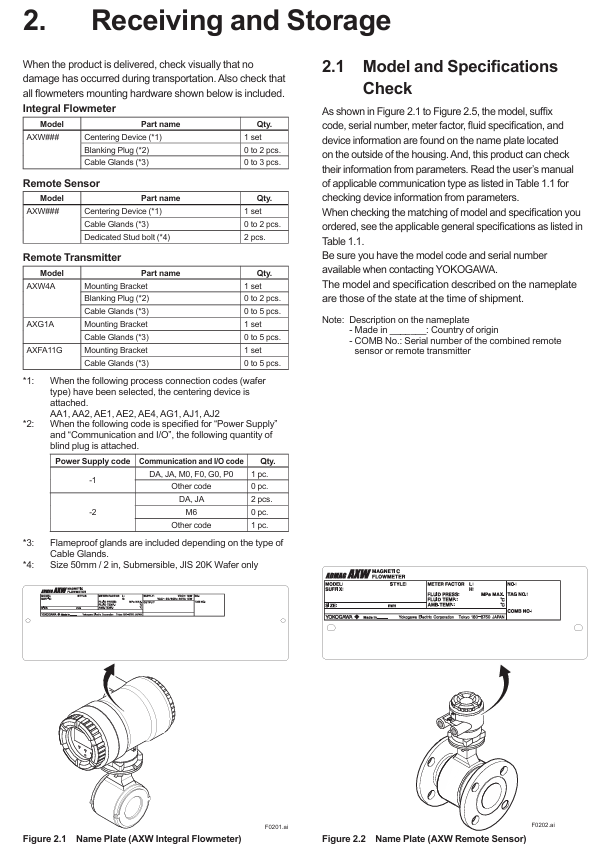
Appearance and accessory verification: Upon arrival, visual inspection of transportation damage is required to confirm the standard accessories according to the model (as shown in the table below). If missing, please contact Yokogawa in a timely manner.
|Equipment type | Standard accessories (example) | Quantity|
|Integrated flowmeter | centering device, plug, cable sealing sleeve | 1 set/0-2 pieces/0-3 pieces|
|Remote Sensor | Centering Device, Cable Sealing Sleeve, Special Double Headed Bolt (Specific Model) | 1 set/0-2 pieces/2 pieces|
|Remote transmitter (such as AXW4A) | Installation bracket, plug, cable sealing sleeve | 1 set/0-2 pieces/0-5 pieces|
Model and specification confirmation: Verify the model, serial number, instrument coefficient, fluid specifications, etc. through the equipment nameplate (as shown in Figure 2.1-2.5) to ensure consistency with the order; The nameplate information can also be viewed through the parameter menu (refer to the corresponding communication type manual).
2. Storage requirements
Packaging: The original packaging should be retained for long-term storage, and the PTFE lining model should retain the accompanying particle board until it is removed before installation.
Environment: Storage temperature -10~70 ℃, humidity 5~80% RH (non condensing), preferably 25 ℃, 65% RH environment; Avoid exposure to rain, vibration, and impact, and install as soon as possible after transportation to the installation site to prevent rainwater infiltration.
Installation process and requirements
1. Preparation before installation: pipeline design principles
Requirements for straight pipe section: It must meet JIS B 7554 standard. The length of the upstream straight pipe section should be 5D~10D (D is the sensor diameter) depending on the upstream pipe fittings, and 2D~3D (as shown in Figure 3.1.1) downstream to avoid uneven flow distribution affecting measurement.
Fluid conditions: The pipeline should always be filled with liquid (when installed vertically, the fluid flows from bottom to top) to avoid bubbles (valves should be installed downstream first to prevent negative pressure from generating bubbles); The injection point of chemical agents should be downstream of the flow meter. If it is necessary to reserve a straight pipe section of more than 50D upstream to ensure uniform mixing.
Anti interference: Keep away from power equipment such as motors and transformers; The distance between multiple electromagnetic flow meters should be ≥ 5D (taking the larger diameter D); To avoid pipeline misalignment and tilting (as shown in Figure 3.2.2), new pipelines need to be flushed to remove foreign objects such as welding slag and sawdust.
2. Installation of sensors and transmitters
(1) Integrated/remote sensor installation
Classification installation:
**Wafer type (25-200mm) * *: It is necessary to use a centering device to ensure concentricity, and the bolt torque should be based on the flange grade (such as JIS 10K, ASME Class 150) according to Table 3.3.2; 50mm/2-inch submersible JIS 20K wafer requires special double headed bolts.
Flange type (25-450mm): The gasket needs to be provided by the user (except in special circumstances), and the use of wrapped gaskets is prohibited; Attention should be paid to avoiding negative pressure for PTFE lining models, and uneven force on the lining should be prevented during installation (refer to Table 3.3.6-3.3.7 for torque values).
Grounding requirements: The protective grounding resistance should be ≤ 100 Ω (Class D), and the lightning protection requirement should be ≤ 10 Ω (Class C); Metal pipelines should be connected to sensor flanges through grounding rings or grounding wires first, while plastic pipelines must use grounding rings.
(2) Remote transmitter installation
Installation location: Avoid direct sunlight and ensure that the environment meets temperature/humidity requirements; AXW4A can be installed vertically/horizontally on 2-inch pipes, while AXG1A/AXFA11G supports surface mounting, 2-inch pipe mounting, and panel mounting (must meet load-bearing requirements: AXG1A 3.5kg, AXFA11G 3.4kg, and the bracket needs to withstand 4 times the weight).
Direction adjustment: The cable entry direction (non submersible/DHC type) can be rotated by -90 °/+90 °/+180 °, and the display screen direction can be rotated clockwise by 90 ° (the cover plate needs to be removed, pay attention to protecting the threads and O-ring).
3. Gasket selection and size
Core requirement: The inner and outer diameters of the gasket must not extend into the pipeline to avoid fluid leakage or affect measurement; Different linings (such as natural hard rubber, PTFE, polyurethane rubber) need to be matched with corresponding hardness gaskets (such as non asbestos gaskets, PTFE coated gaskets), with thickness reference to Tables 3.3.1/3.3.4.
Size inquiry: The user's pipeline gasket size should refer to Table 3.3.8, specifying the effective sealing inner diameter (ø A) and recommended gasket inner diameter (ø C/ø D) corresponding to different linings and connection types (wafer/flange).
Wiring specifications
1. Preparation before wiring
Cable requirements:
Excitation/power/IO cables: JIS C 3401 control cables and JIS C 3312 power cables are recommended, with a wire diameter of 0.5~2.5mm ² (single strand)/0.5~1.5mm ² (multiple strands), and the outer diameter needs to match the cable sealing sleeve (such as waterproof sealing sleeve compatible with 7.5~12mm).
Special signal cable (AX01C): Double shielded structure, with a maximum length of 200m when paired with AXG1A/AXFA11 and 100m when paired with AXW4A. Cutting or splicing is prohibited, and excess length must be cut off.
Protective measures: When the ambient temperature is above 50 ℃, cables with a temperature resistance of 70 ℃ or above are required; Power and signal cables need to be separately threaded through steel conduits (excluding 24V power supply and 4-core cables); Explosion proof wiring must comply with the corresponding explosion-proof standards.
2. Wiring operation
Power wiring: DC power supply should pay attention to the positive and negative poles (L/+connected to the positive pole, N/- connected to the negative pole), and 24V models should not be connected to 100-240V power supply; 15A external switch/circuit breaker needs to be installed and labeled as "power-off equipment".
Grounding Wiring: The protective grounding wire requires a 600V ethylene insulated cable, and the terminals require circular crimping terminals (M4 screws) with insulation covers to ensure reliable connection; Remote type requires separate grounding sensors and transmitters.
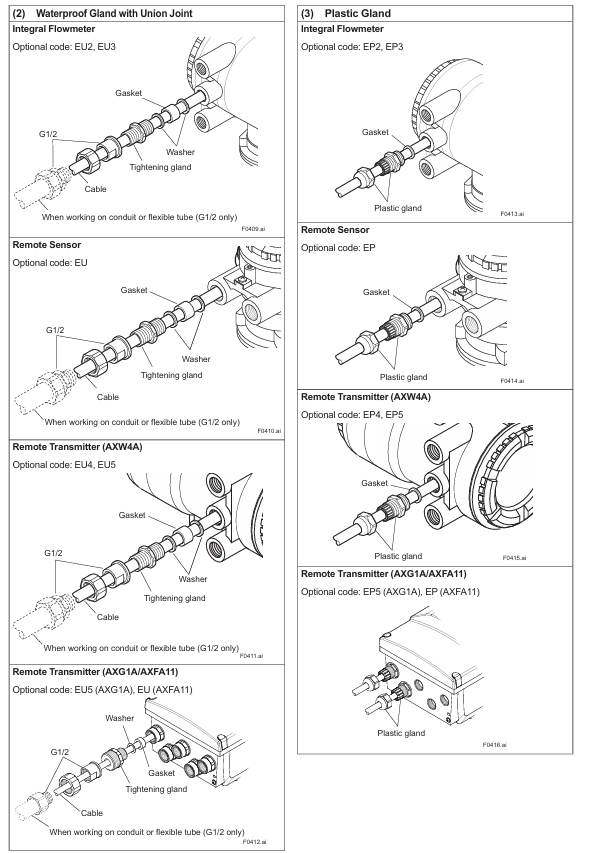
Cable entrance sealing: Unused entrances need to be sealed with dedicated plugs, waterproof sealing sleeves need to be evenly tightened (to avoid damaging the cable due to over tightening), and vertical conduits need to be equipped with drainage valves at the low end and regularly drained.
3. Communication and IO wiring
Communication protocol wiring: Modbus requires 3-core shielded wire (AWG24 or above), FOUNDATION Fieldbus/PROFIBUS PA requires Type A cable, EtherNet/IP requires CAT5e or above shielded twisted pair (without protective cover).
IO signal wiring: current output (4-20mA), pulse output (maximum 10000 pulses/second), status input (no voltage contacts), etc. need to be wired according to the terminal configuration table (such as 4.4.4/4.5.2) to ensure galvanic isolation (input/output/power circuits are isolated from each other).
Basic operations and parameter settings
1. Operation method
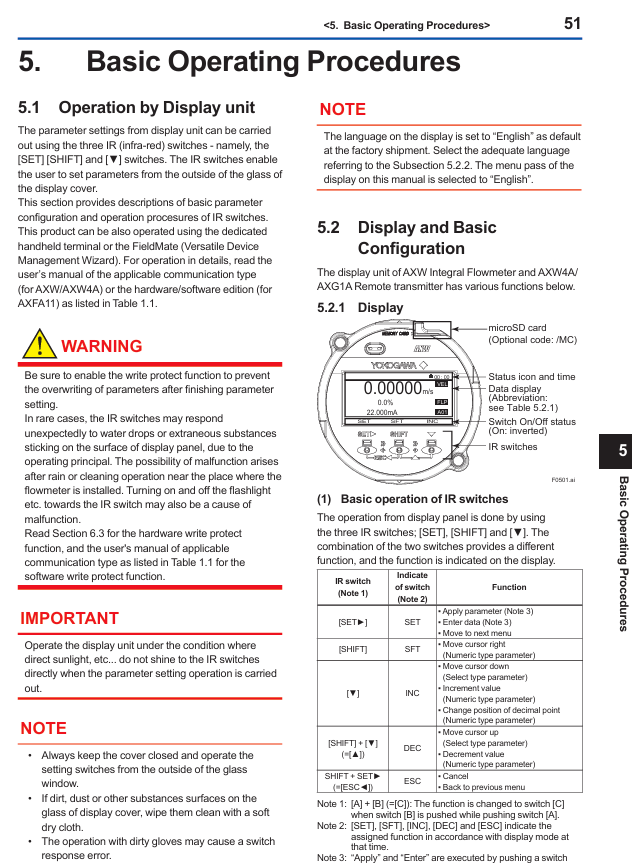
Display screen operation: Operated through three infrared (IR) buttons ([SET], [SHIFT], [▼]), supporting parameter viewing/modification, zero point adjustment, etc; The default display language is English, which can be switched through "Device setup ► Language" (supports multiple languages such as Chinese, French, German, etc., depending on the display code).
Operation level: divided into three levels: Operator (no password required, only basic display settings), Maintenance (maintenance personnel, password required, including zero adjustment), Specialist (expert, password required, full parameter settings), default password "0000".
2. Key operational procedures
(1) Mode switching: Display mode → Set mode
Long press [SET] for a few seconds, touch [FFT]+[INC];
Select "Yes" with [INC], double-click [SET] to confirm;
Select the operation level, enter the corresponding password (Maintenance/Specialist requires password), and enter the "Device setup" menu.
(2) Example of Parameter Setting
Flow unit setting (optional parameter): Path "Device setup ► Detailed setup ► Pro var ► Volume ► Unit/Time Unit". If setting "l/min", select "l (lite)" (physical unit) and "/min" (time unit) respectively.
Flow range setting (numerical parameter): Path "Device setup ► Detailed setup ► Pro var ► Volume ► Span", the unit needs to be set first, and the range value will be automatically converted with the unit.
Tag number setting (alphanumeric parameter): Path "Device setup ► Detailed setup ► Device info ► Order info ► Tag No.", maximum input of 8 ASCII characters.
(3) Pre operation Zero Adjustment
Prerequisite: The sensor is filled with fluid and the flow rate is 0 (with the valve closed). For the FILDVUE/PROFIBUS PA type, all sensor blocks must first be set to "O/S" mode.
Operation path: "Device setup ► Diag/Service ► Autozero ► Execute". Double click [SET] to start, taking about 30 seconds. After completion, check the "Result ► Zero value" to confirm the result (exceeding 10cm/s will trigger a warning "092: AZ warning").
3. Use of configuration tools
BRAN/HART: Connected through BT200 or FieldMate, it needs to be parallel in a 4-20mA circuit, with load resistance ≥ 250 Ω/230 Ω respectively.
Modbus/FOUNDATION Fieldbus/PROFIBUS PA: Corresponding DTM (such as AXW4A Modbus DTM 1.1.4.0 or above) is required, and FieldMate needs to be upgraded to the corresponding version.
EtherNet/IP: Supports web configuration (requires IE8+/Chrome/Edge browser), requires installation of corresponding EDS file (supplier ID 250, product code 206).
Operation and maintenance
1. Hardware switch settings
Burnout switch: When the CPU fails, the current output direction defaults to a high value (>21.6mA), and when C1/C2 is installed, a low value (<2.4mA) is set.
Write Protect: To prevent parameter tampering, rewriting is prohibited when the hardware switch is set to "ON" (in conjunction with software write protection).
Address switch: Modbus (1-127), PROFIBUS PA (0-126), EtherNet/IP (set IP segment 4) need to be set through 8-bit dialing, and priority is controlled by the SW3-1 switch.
Terminal resistor switch (SW2): A 150 Ω terminal resistor (SW2-1/SW2-2 both "ON") is required at both ends of the Modbus bus.
2. Correction factor setting (for specific flanges)
Applicable scenarios: When using 40-125mm wafer type and specific linings (such as polyurethane rubber U, natural hard rubber H) with carbon steel flanges, a correction factor (CFL/CFH: double-sided carbon steel) needs to be set; CF1L/CF1H: single-sided carbon steel), the coefficient is marked on the nameplate or on the Yokogawa official website for reference.
Set path: such as the display screen "Device setup ► Detailed setup ► Sensors ► Low MF/High MF", Modbus address 40321 (Low MF)/40323 (High MF).
3. Fault handling
Chapter 7 of the document provides a detailed list of four types of faults: system alarms (equipment failures, such as "010: Main CPU FAIL" requiring contact with the service center), process alarms (process issues, such as "051: Empty detect" requiring fluid filling), set alarms (parameter errors, such as "060: Span cfg ERR" requiring range adjustment), and warnings (such as "087: Adhesion lv 3" requiring electrode cleaning). Each fault includes NE107 status (F/C/S/M/N), description, and countermeasures. Examples are as follows:
NE107 status error code/information reason countermeasures
F 010: Main CPU FAIL Mainboard CPU failure Contact Yokogawa Service Center
S 051: Empty detect sensor fills the pipeline with liquid through the empty tube
C 060: Span cfg ERR flow range setting error (requires 0.05<Span<16m/s) Check and correct range parameters
M 087: Adhesion lv 3 electrode adhesion insulation (resistance exceeding level 3). It is recommended to clean the electrode
- OMRON
- ABB
- General Electric
- EMERSON
- Honeywell
- HIMA
- ALSTOM
- Rolls-Royce
- MOTOROLA
- Rockwell
- Siemens
- Woodward
- YOKOGAWA
- FOXBORO
- KOLLMORGEN
- MOOG
- KB
- YAMAHA
- BENDER
- TEKTRONIX
- Westinghouse
- AMAT
- AB
- XYCOM
- Yaskawa
- B&R
- Schneider
- KONGSBERG
- NI
- WATLOW
- ProSoft
- SEW
- ADVANCED
- Reliance
- TRICONEX
- METSO
- MAN
- Advantest
- STUDER
- DANAHER MOTION
- Bently
- Galil
- EATON
- MOLEX
- DEIF
- B&W
- ZYGO
- Aerotech
- DANFOSS
- Beijer
- Moxa
- Rexroth
- Johnson
- WAGO
- TOSHIBA
- BMCM
- SMC
- HITACHI
- HIRSCHMANN
- Application field
- XP POWER
- CTI
- TRICON
- STOBER
- Thinklogical
- Horner Automation
- Meggitt
- Fanuc
- Baldor
- SHINKAWA
- Other Brands
- UniOP
- KUKA
- Iba
- Beckhoff
- ADLINK
-
 Sigmatek MDD111-1 DIAS Drive Axis Module
 -
 Sigmatek DKL042 05-024-042 Terminal Module
 -
 Sigmatek DM822 Control Module
 -
 Sigmatek CDM167 12-008-167-O Module
 -
 Sigmatek TAE151 Touch Display Unit
 -
 Sigmatek DCC041 SLIDES Module 05-700-041-D
 -
 Sigmatek AKM65M-ANC2GBB0 PM Servo Motor
 -
 Sigmatek ETT221 01-230-221 Operator Terminal
 -
 Sigmatek SLIDES DAM 124 Analog Module
 -
Sigmatek AKM31C-ANCNGBB0 Servo Motor
-
 Mannesmann Demag Sigmatek CP626 Central Unit
 -
 SIGMATEK 0332.554.03 Board 371071000154
 -
 SIGMATEK 12-250-021 Base Plate Back Panel CM5V020
 -
 SIGMATEK DM162 S-DIAS Digital Mix Module
 -
 DEMAG ERGOTECH 061 381 66 Sigmatek 9842.243.02 Circuit Board
 -
 SIGMATEK CP313-1 PLC Module
 -
Sigmatek ETV0551-2 VARAN Touch Terminal
-
 Sigmatek SDM 081 FS S-Dias Safety Module
 -
 DEMAG 05-250-023 Ergotech Motherboard with Sigmatek TMS012
 -
Sigmatek CM5V020 12-250-023-K Wiring Base
-
 Sigma Tek 5000B-37 Attitude Gyro Indicator
 -
 Sigmatek SDD120-2 DIAS Drive
 -
 Sigmatek CME221 Memory Module
 -
 Sigmatek DCP640 DIAS Central Unit
 -
 Sigmatek STO040 Safety Output Module
 -
Sigmatek CET281 Control Panel
-
 Sigmatek CIPC LX800 Demag NC5 CPU
 -
 Sigmatek DKL093 05-024-093 Terminal Module
 -
 Sigmatek AI088 20-009-088 Analog Input Module
 -
Sigmatek CAI888 Analog Input Module
-
SIGMATEK CCA021 12-025-021 Analog Output Module
-
SIGMATEK 1104.579.05 Control Module
-
SIGMATEK SDI100 Digital Input Module
-
 SIGMATEK C-IPC 256MB LX800 Compact Dias
 -
 SIGMATEK 9423.090.02 Control Module
 -
SIGMATEK C-IPC 256 Power Supply 148498
-
 SIGMATEK CAI025 Analog Input Module
 -
 SIGMATEK CTO166 Digital Output Module
 -
 SIGMATEK CP112 20-004-112 Processor Module
 -
SIGMATEK CAI887 12-009-887 Safety Module
-
 Sigma-Tek 4000B-31 Directional Gyro 1U262-002-42
 -
Sigmatek C-IPC 256MB LX800 IPC Controller
-
Sigmatek C-IPC 01-450-031 Industrial PC LX800
-
Sigmatek C-IPC 256 Industrial PC Controller
-
Sigmatek CCP-531 PLC Processor Module
-
Sigmatek CDI163 Digital Input Module
-
 Sigmatek ETV0501 VARAN Terminal 12-230-0501
 -
 Sigmatek CTMS020 C-DIAS Technology Module
 -
 Sigmatek CIV512 VARAN Switch Module
 -
 Sigmatek HU011 20-080-011 Interface Module
 -
SIGMATEK SLIDES DAM 124 Module
-
 SIGMATEK C-IPC 161 01-450-161L Industrial PC
 -
SIGMATEK C-IPC 128MB VIA 733MHz 01-450-024-K
-
 SIGMATEK 12-780-012 R8-IPC Geode LX800 Module
 -
SIGMATEK CAM124 Analog Module
-
 SIGMATEK S1 032-8AF61-R4 EZ Servo Motor
 -
 SIGMATEK CTO163 Digital Output Module
 -
 SIGMATEK CCP082 12-004-082 Processor Module
 -
 SIGMATEK CRCH081 C-DIAS Temperature Module
 -
 SIGMATEK PC322-K 01-310-322-K Industrial PC
 -
SIGMATEK SDD310-2 Servo Drive
-
 SIGMATEK AI084 Analog Input Module
 -
SIGMATEK CRCH081 12-752-081 Temperature Module
-
Sigma-Tek 5000L-4 Attitude Gyro 1U284-001-3
-
 SIGMATEK CM5V020 12-250-023-K Wiring Module
 -
Sigma-Tek 4000H-6 Directional Gyro IU262-035-7
-
 SIGMATEK Dias DCP160 05-004-160 Processor Module
 -
SIGMATEK 0147.395.02 Control Module
-
SIGMATEK A1084 Control Module
-
SIGMATEK DI200 20-006-2000 Digital Input Module
-
Sigmatek DNC115 Encoder Module
-
 Sigmatek DAM122 05-017-122 Analog Module
 -
Sigmatek 9802.289.01 Control Board TA71 Display
-
Sigmatek TO127 20-007-127 Digital Output Module
-
Sigmatek DNC031 05-011-031 Digital Module
-
Sigmatek VI022 20-003-022 Interface Module
-
Sigmatek CAI085 Analog Input Module
-
 Sigmatek CP111 S-DIAS CPU Module
 -
Sigmatek CTMS030 Krauss Maffei Module
-
 Sigmatek CAM123 Control Module
 -
 Sigmatek TAE732-P 01-240-732-P Touch Display Unit
 -
Sigmatek MDM021 Digital Mixed Module
-
Sigmatek DCP642 DIAS Central Unit
-
 Sigmatek CST022 12-014-022 C-DIAS Module
 -
 Sigmatek SRO021 20-893-021 Safety Relay Output
 -
 Krauss Maffei MC5 Control System Sigmatek
 -
 Sigmatek DC061 Module 18-24VDC 300mA
 -
 Herrmann EVT0855 Ultrasonic Welder Touch Panel
 -
Sigmatek CIV521 Control Module 1.4A 2W
-
Sigmatek DDI61 05-006-161 Digital Input Module
-
SIGMATEK ETT312-E Touch Terminal 01-230-312
-
Cessna S3326-1 Sigma Tek 5000B-67 Gyro 1U149-015-9
-
SIGMATEK PS101 Power Supply Module
-
SIGMATEK 0332.554.03 Control Module 371071000154
-
 SIGMATEK ETT312-E Touch Terminal 01-230-312
 -
SIGMATEK CDM163 Control Module
-
 SIGMATEK VSV046 16-023-046 Module
 -
SIGMATEK AM221 20-017-221 Analog Module
-
SIGMATEK CTS051 12-053-051 Control Module
-
SIGMATEK AM221 20-017-221 Analog Module
-
Sigmatek CSDI161 12-891-161 Safety Input Module
-
Sigma Tek 4000C-1 Directional Gyro Indicator
-
Sigmatek ETV0501 12-230-0501 VARAN Terminal
-
Sigmatek DDM165 SLIDES Module
-
Sigmatek N100 20-011-100 Control Module
-
Sigmatek AKM54K-ANC2R-B0 PM Servo Motor
-
Sigmatek CTO166 Digital Output Module
-
Sigmatek CP212-K 20-004-212-K CPU Module
-
Sigmatek CDI161 Digital Input Module
-
Sigmatek DCC080 05-700-080-2 Control Module
-
 SIGMATEK SCP011 S-DIAS Safety CPU
 -
SIGMATEK SCP011 S-DIAS Safety CPU
-
SIGMATEK SRO022 Relay Output Module
-
SIGMATEK MDD 121 Drive Axis Module
-
SIGMATEK DSI021 SLIDES Siemens Interface
-
SIGMATEK DIAS DCP161 Module 05-004-161
-
 Sigmatek ETT312 Built-in Touch Terminal
 -
SIGMATEK DCP 643 DIAS Controller System
-
SIGMATEK CIO021 Multi I/O Module
-
SIGMATEK CTMS020 Control Module
-
 Sigmatek CME 221 Memory Module
 -
Sigmatek 0420.615.01 Control Board
-
Sigmatek CP111 20-004-111 CPU Module
-
Sigmatek 9405.065.03 Control Board
-
Sigmatek ETEK 01-450-032-K C-IPC 256MB Industrial PC
-
Sigmatek CTO163 12-007-163 Safety Output Module
-
Sigmatek TO081 20-007-081 Digital Output Module
-
 Sigmatek SI021 20-022-021 Safety Input Module


