
YOKOGAWA CENTUM VP System HMI (HIS)
YOKOGAWA CENTUM VP System HMI (HIS)
Core features and hardware composition of HIS
(1) Core design philosophy and characteristics
Ergonomic Design: Adopting the "Simple&Intuitive" concept, unifying icon styles, information layouts, and color schemes, reducing the physical and mental burden on operators, and improving operational comfort and accuracy
Multi monitor support: 1 HIS can connect up to 4 monitors, supports single button switching of monitor display content, can display multiple types of monitoring windows simultaneously, and is suitable for parallel operation in complex scenarios
High speed data update: The data collection and interface update speed is as fast as 1 second, meeting the real-time requirements for manual control of key parameters such as pressure and flow rate
Operational inheritance: compatible with traditional HMI operation logic, supporting touch operation, 8-key control, 64 function keys, reducing operator learning costs
Cross system integration capability: capable of integrating alarm and event data from CENTUM VP, ProSafe RS (Safety Instrumented System), STARDOM (Network Control System), and PRM (Field Device Management Package)
Remote operation and maintenance support: Remote operation and monitoring can be achieved through the intranet, and the remote PC can use the same operation window as the local HIS (except for some functions)
(2) Detailed explanation of hardware composition
1. Core hardware configuration
Host: Pre installed with Microsoft Windows system (such as Windows 7 SP1), supports widescreen displays, and has multi interface expansion capabilities such as PCI, USB, Ethernet, etc
Operation keyboard: two types, both using flat key design, supporting one click operation, suitable for high-frequency use in industrial scenarios
Keyboard type, core key layout, special design
8-key control type with 64 function keys, mode selection switch, operation confirmation key, data input key, and 8 control keys with touch sensors adapted for multi loop parallel control
1-key control type with 64 function keys, mode selection switch, operation confirmation key, data input key, and 1 core control key simplifies operation logic and is suitable for single loop control
Monitor: Supports multiple linkage (up to 4), compatible with widescreen models, supports high-resolution display, ensuring clear presentation of graphics and data
Core functions of operation and monitoring
(1) Overall display layout
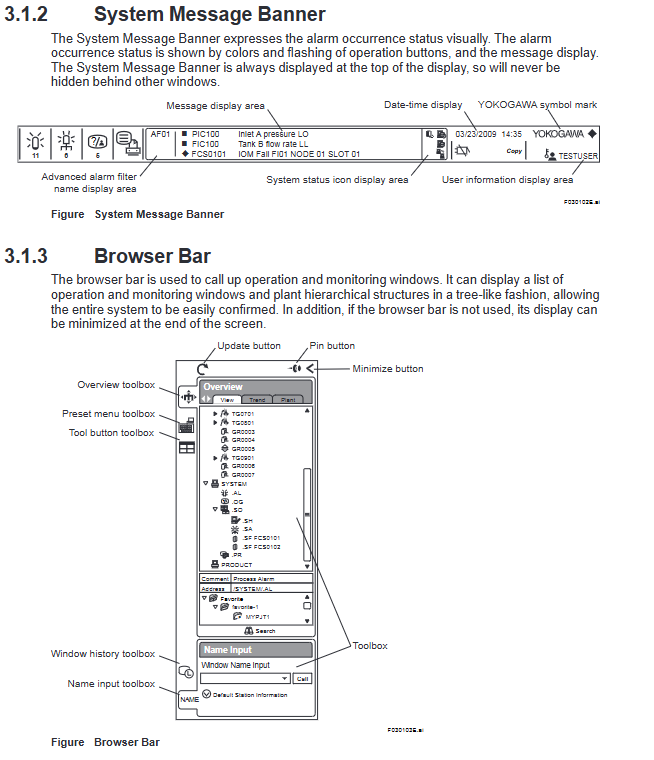
The HIS display interface adopts a fixed three part structure to ensure unified operation logic and no window obstruction:
System message bar: permanently displayed at the top, cannot be hidden, core functions include:
Visual alarm prompt: Display the alarm status through button color changes and flashing
Basic information display: date and time, current username, system status icon, advanced alarm filter name
Alarm message preview: scroll display key alarm information (such as equipment failure, parameter exceeding)
Browser Bar: Foldable area on the left, with core functions including:
Window Call: Tree based Display of Operation Monitoring Window List and Factory Hierarchical Structure
Quick Tools: Preset Menu Toolbox, Tool Button Toolbox, Window History
Flexible configuration: supports minimizing hiding and does not occupy monitoring space
HIS desktop area: the core workspace, using a three-level structure of "container window frame view":
View: Single monitoring unit (such as graphical view, trend view)
Framework: Supports multiple views (up to 4 per frame), supports tab switching
Container window: the outermost "canvas" that supports multiple frames and allows for free layout
(2) Core operation monitoring window
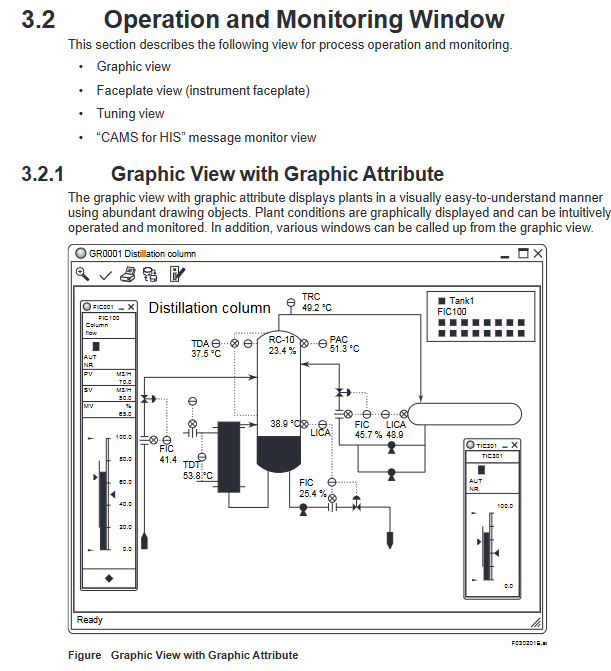
1. Graphic view (two major attributes)
Attribute Type Core Function Key Features
Visual display of factory layout and equipment status using graphic properties as drawing objects. 1. Supports rich drawing elements such as valves, pumps, and storage tanks
2. Intuitively present device connection relationships and real-time parameters (such as temperature and flow)
3. Other operation windows can be directly called from the view
Control attributes to display function block status in the dashboard. 1. Supports two panel sizes: 8 large sizes/16 small sizes for parallel display
2. Can mix and display panels of different sizes
3. Real time presentation of functional block operation modes (AUT/NR, etc.) and parameter values
2. Panel View (Instrument Faceplates)
Core purpose: Compact display of key information of a single functional block, including data values, operating modes, alarm states, input and output parameters
Supporting module types: covering more than 10 core modules such as PVI input indication, PID controller, MLD manual loader, MC-2 dual position motor control, ALM-R alarm block, etc
Display elements: tag name/comment, block mode/status, alarm status, engineering unit, parameter scale bar, limit alarm tag (high high/high/low/low low)
3. Trend View
Core function: Display process data changes in time series, support historical data tracing and trend comparison
Key parameters:
Data capacity: Supports simultaneous display of 8 or 16 data entries
Split screen mode: Three tiled modes (pen split/simulation discrete split/trend data reference mode split)
Data export: Supports graphic copying (excluding window borders), numerical data copying (including labels, time, values, status, etc.), and can be pasted into tools such as Excel
Flexible configuration: Supports displaying data with different sampling periods on the same screen, and can adjust the magnification ratio of the timeline and data axis
4. Tune View
Core function: Display the tuning parameters and trends of a single instrument, support parameter adjustment
Display content:
Basic parameters: PV (process variable), SV (set value), MV (operating variable), operating mode, alarm status
Tuning parameters: proportional (P), integral (I), derivative (D) parameters, limit settings (HH/PH/ML/LL, etc.)
Trend curve: Real time display of PV, SV, MV trends over time, supporting axis scaling
CAMS for HIS message monitoring (core alarm management tool)
Following the EEMUA 191 alarm management standard, solving the problem of alarm overflow, the core functions include:
Multi system alarm integration: Centralized display of alarms and events for CENTUM VP, ProSafe RS, STARDOM, and PRM
Intelligent filtering function:
Filtering/Sorting: Basic filtering (process/system alarms), user-defined filtering, temporary filtering
Eclipsing: Integrating duplicate alarms of the same label into a single line display
Shelving: Manually/automatically move non essential alarms to temporary areas
Load Shedding: Automatically activates preset filters when a large number of sudden alarms occur
Suppression: Suppress redundant messages by alarm group/site
Alarm value-added information: configurable monitoring purposes (safety/environmental/economic), target user groups, response time, priority, root cause analysis, processing flow, etc
Alarm setting value management:
Save the set values of the engineering phase as the baseline values, and support comparing the baseline values with the current values
Display differences in set values, support benchmark values to override current values or vice versa
Archive difference setting values for easy traceability and adjustment of records
Long term data archiving: supports long-term storage of alarm history data, which can be traced through a history viewer
(3) Auxiliary support function
1. Report function
Core purpose: Automatically generate daily/monthly reports, support production data analysis and compliance records
Tool dependency: Based on Microsoft Excel, supporting template reuse and custom creation
Imported data types: settlement data (mean/total/maximum/minimum), trend data, historical messages, tag information, real-time process data, batch data
Printing method:
Automatic printing: timed triggering, sequence message triggering
Manual printing: triggered by function keys, graphic view buttons, Excel direct printing, VB program call
Remote printing: Other PCs within the network can print reports through Excel
2. Remote operation and monitoring server
Deployment Architecture: Remote PC (Client) → Intranet → Remote Operations Server → CENTUM VP Control Network
Core function: Remote implementation of operation monitoring and engineering configuration, using operation windows consistent with local HIS
Reliability requirement: The control network needs to be equipped with at least one standard HIS to ensure real-time performance and redundant backup
3. CENTUM Desktop
Dedicated operating environment: Hide Windows redundant features (such as desktop icons, unrelated start menu items, shutdown options)
Core value: Focus on production operations, avoid misoperation of Windows system functions, and enhance operational security
4. HIS Utility tool
Purpose: Configure HIS operating environment, support multi tab settings
Core configuration items:
User management: Add/delete users, configure automatic login (only in CENTUM authentication mode)
Operation configuration: keyboard type, mouse increase/decrease mode, trend collection pen allocation
Security Policy: Set HIS Security Rules
Special configuration: CAMS for HIS parameters, remote operation and maintenance parameters, OPC interface parameters
System management and security control
(1) System management window
Window Name Core Usage Key Features
Overview of System Status: Monitor the status of all stations and communication equipment within the monitoring domain. 1. Use icons to visually display the operational status of FCS, HIS, BCV, and other equipment
2. Support calling the system maintenance window
3. Domain definition: All sites connected by the control bus (Vnet/VNet/IP)
System alarm view displays hardware/communication error alarms. 1. The alarms are arranged in reverse chronological order (latest first)
2. When the alarm is triggered, it is accompanied by buzzing and flashing prompts
3. Automatically switch to CAMS message monitoring when CAMS takes effect
FCS status display view shows FCS hardware configuration and operational status. 1. Display site information, hardware architecture, and communication bus status
2. Color identification of normal/abnormal status of equipment
3. Support starting/closing the control station
HIS status display view shows HIS hardware configuration and operating status. 1. Display host information and hardware interface status (such as Ethernet, USB)
2. Monitor hardware parameters such as fans, hard drives, temperature, etc
3. Support switching control bus effectiveness
HIS settings window configuration HIS operating parameters 1. 18 configuration tags (display, printer, buzzer, alarm, trend, etc.)
2. Support multi monitor settings, customizable function keys, and report parameter configuration
3. Some configurations require a restart of HIS to take effect
(2) Security control system
Adopting a dual layer architecture of "CENTUM dedicated security+Windows IT security" to ensure operational and data security:
1. CENTUM dedicated security
User three attributes:
Username: Unique identifier for the operator, associated with operation logs and password
User group: Define the scope of operation monitoring (such as specific FCS, windows, factory areas)
User permissions: subdivided operation levels, default 3 levels of standard permissions+7 levels of custom permissions
Permission level monitoring permission operation permission engineering permission
S1 (ordinary operator) present or absent
Is S2 (Senior Operator) available
S3 (Engineer) Yes Yes Yes Yes
U1-U7 (custom) configurable configurable configurable
Fine grained control granularity:
Function block level: Modification of important function block parameters requires secondary confirmation, and operation permissions can be temporarily disabled
Window level: Restrict operations such as modifying graphical view dashboards and adjusting trend view parameters
Tag level: Tag priority (important/normal/auxiliary 1/auxiliary 2), differentiated alarm processing
Advanced security features:
User lockout: Multiple password errors trigger system alarm, which can lock illegal login accounts
Password expiration: password expiration period can be set, with a 14 day reminder before expiration
Prohibition of duplicate passwords: Historical passwords cannot be used when changing passwords
Automatic logout: Automatically log out after no operation timeout
2. Windows IT Security
Security Model: Provides 3 models to adapt to different scenarios
Model Type Core Defense Scope Applicable Scenarios
Traditional models lack reinforcement and prioritize compatibility with legacy products for upgrading old systems, requiring compatibility with old devices
Standard model defense against network attacks and direct operational attacks in conventional industrial scenarios, balancing security and compatibility
Strengthen model defense against network attacks, direct operation attacks, and high security scenarios such as component/data theft (such as petroleum and chemical industries)
Authentication mode:
Windows authentication mode: integrates Windows account and HIS operation permissions, supports domain management and single sign on
Single sign on method: Windows login automatically synchronizes HIS login; Or the system can automatically log in to Windows and HIS can be started with the lowest privilege
Communication control: Restrict communication types and ports through Windows firewall and DCOM settings to defend against network attacks
Applicable scenarios and core values
(1) Applicable industries and scenarios
Industry scope: Process industries such as petroleum refining, chemical, steel, food, and electricity
Core scenario:
Real time operation monitoring: device start stop, parameter adjustment, status observation
Alarm management: Multi system alarm integration, critical alarm screening, alarm processing guidance
Data tracing: trend data query, historical alarm archiving, production report generation
Remote operation and maintenance: remote factory monitoring, remote parameter adjustment, troubleshooting
(2) Core values
Improve operational efficiency: ergonomic design+multi window parallel display, reducing operational steps and switching costs
Ensuring system security: dual layer security control+refined permissions to prevent illegal operations and data leakage
Reduce the difficulty of operation and maintenance: remote operation and maintenance+intelligent alarm management, reducing on-site duty and fault handling time
Strengthen data support: report function+trend analysis, providing data basis for production optimization

- OMRON
- ABB
- General Electric
- EMERSON
- Honeywell
- HIMA
- ALSTOM
- Rolls-Royce
- MOTOROLA
- Rockwell
- Siemens
- Woodward
- YOKOGAWA
- FOXBORO
- KOLLMORGEN
- MOOG
- KB
- YAMAHA
- BENDER
- TEKTRONIX
- Westinghouse
- AMAT
- AB
- XYCOM
- Yaskawa
- B&R
- Schneider
- KONGSBERG
- NI
- WATLOW
- ProSoft
- SEW
- ADVANCED
- Reliance
- TRICONEX
- METSO
- MAN
- Advantest
- STUDER
- DANAHER MOTION
- Bently
- Galil
- EATON
- MOLEX
- DEIF
- B&W
- ZYGO
- Aerotech
- DANFOSS
- Beijer
- Moxa
- Rexroth
- Johnson
- WAGO
- TOSHIBA
- BMCM
- SMC
- HITACHI
- HIRSCHMANN
- Application field
- XP POWER
- CTI
- TRICON
- STOBER
- Thinklogical
- Horner Automation
- Meggitt
- Fanuc
- Baldor
- SHINKAWA
- Other Brands
- UniOP
- KUKA
- Iba
- Beckhoff
- ADLINK
-
 Sigmatek MDD111-1 DIAS Drive Axis Module
 -
 Sigmatek DKL042 05-024-042 Terminal Module
 -
 Sigmatek DM822 Control Module
 -
 Sigmatek CDM167 12-008-167-O Module
 -
 Sigmatek TAE151 Touch Display Unit
 -
 Sigmatek DCC041 SLIDES Module 05-700-041-D
 -
 Sigmatek AKM65M-ANC2GBB0 PM Servo Motor
 -
 Sigmatek ETT221 01-230-221 Operator Terminal
 -
 Sigmatek SLIDES DAM 124 Analog Module
 -
Sigmatek AKM31C-ANCNGBB0 Servo Motor
-
 Mannesmann Demag Sigmatek CP626 Central Unit
 -
 SIGMATEK 0332.554.03 Board 371071000154
 -
 SIGMATEK 12-250-021 Base Plate Back Panel CM5V020
 -
 SIGMATEK DM162 S-DIAS Digital Mix Module
 -
 DEMAG ERGOTECH 061 381 66 Sigmatek 9842.243.02 Circuit Board
 -
 SIGMATEK CP313-1 PLC Module
 -
Sigmatek ETV0551-2 VARAN Touch Terminal
-
 Sigmatek SDM 081 FS S-Dias Safety Module
 -
 DEMAG 05-250-023 Ergotech Motherboard with Sigmatek TMS012
 -
Sigmatek CM5V020 12-250-023-K Wiring Base
-
 Sigma Tek 5000B-37 Attitude Gyro Indicator
 -
 Sigmatek SDD120-2 DIAS Drive
 -
 Sigmatek CME221 Memory Module
 -
 Sigmatek DCP640 DIAS Central Unit
 -
 Sigmatek STO040 Safety Output Module
 -
Sigmatek CET281 Control Panel
-
 Sigmatek CIPC LX800 Demag NC5 CPU
 -
 Sigmatek DKL093 05-024-093 Terminal Module
 -
 Sigmatek AI088 20-009-088 Analog Input Module
 -
Sigmatek CAI888 Analog Input Module
-
SIGMATEK CCA021 12-025-021 Analog Output Module
-
SIGMATEK 1104.579.05 Control Module
-
SIGMATEK SDI100 Digital Input Module
-
 SIGMATEK C-IPC 256MB LX800 Compact Dias
 -
 SIGMATEK 9423.090.02 Control Module
 -
SIGMATEK C-IPC 256 Power Supply 148498
-
 SIGMATEK CAI025 Analog Input Module
 -
 SIGMATEK CTO166 Digital Output Module
 -
 SIGMATEK CP112 20-004-112 Processor Module
 -
SIGMATEK CAI887 12-009-887 Safety Module
-
 Sigma-Tek 4000B-31 Directional Gyro 1U262-002-42
 -
Sigmatek C-IPC 256MB LX800 IPC Controller
-
Sigmatek C-IPC 01-450-031 Industrial PC LX800
-
Sigmatek C-IPC 256 Industrial PC Controller
-
Sigmatek CCP-531 PLC Processor Module
-
Sigmatek CDI163 Digital Input Module
-
 Sigmatek ETV0501 VARAN Terminal 12-230-0501
 -
 Sigmatek CTMS020 C-DIAS Technology Module
 -
 Sigmatek CIV512 VARAN Switch Module
 -
 Sigmatek HU011 20-080-011 Interface Module
 -
SIGMATEK SLIDES DAM 124 Module
-
 SIGMATEK C-IPC 161 01-450-161L Industrial PC
 -
SIGMATEK C-IPC 128MB VIA 733MHz 01-450-024-K
-
 SIGMATEK 12-780-012 R8-IPC Geode LX800 Module
 -
SIGMATEK CAM124 Analog Module
-
 SIGMATEK S1 032-8AF61-R4 EZ Servo Motor
 -
 SIGMATEK CTO163 Digital Output Module
 -
 SIGMATEK CCP082 12-004-082 Processor Module
 -
 SIGMATEK CRCH081 C-DIAS Temperature Module
 -
 SIGMATEK PC322-K 01-310-322-K Industrial PC
 -
SIGMATEK SDD310-2 Servo Drive
-
 SIGMATEK AI084 Analog Input Module
 -
SIGMATEK CRCH081 12-752-081 Temperature Module
-
Sigma-Tek 5000L-4 Attitude Gyro 1U284-001-3
-
 SIGMATEK CM5V020 12-250-023-K Wiring Module
 -
Sigma-Tek 4000H-6 Directional Gyro IU262-035-7
-
 SIGMATEK Dias DCP160 05-004-160 Processor Module
 -
SIGMATEK 0147.395.02 Control Module
-
SIGMATEK A1084 Control Module
-
SIGMATEK DI200 20-006-2000 Digital Input Module
-
Sigmatek DNC115 Encoder Module
-
 Sigmatek DAM122 05-017-122 Analog Module
 -
Sigmatek 9802.289.01 Control Board TA71 Display
-
Sigmatek TO127 20-007-127 Digital Output Module
-
Sigmatek DNC031 05-011-031 Digital Module
-
Sigmatek VI022 20-003-022 Interface Module
-
Sigmatek CAI085 Analog Input Module
-
 Sigmatek CP111 S-DIAS CPU Module
 -
Sigmatek CTMS030 Krauss Maffei Module
-
 Sigmatek CAM123 Control Module
 -
 Sigmatek TAE732-P 01-240-732-P Touch Display Unit
 -
Sigmatek MDM021 Digital Mixed Module
-
Sigmatek DCP642 DIAS Central Unit
-
 Sigmatek CST022 12-014-022 C-DIAS Module
 -
 Sigmatek SRO021 20-893-021 Safety Relay Output
 -
 Krauss Maffei MC5 Control System Sigmatek
 -
 Sigmatek DC061 Module 18-24VDC 300mA
 -
 Herrmann EVT0855 Ultrasonic Welder Touch Panel
 -
Sigmatek CIV521 Control Module 1.4A 2W
-
Sigmatek DDI61 05-006-161 Digital Input Module
-
SIGMATEK ETT312-E Touch Terminal 01-230-312
-
Cessna S3326-1 Sigma Tek 5000B-67 Gyro 1U149-015-9
-
SIGMATEK PS101 Power Supply Module
-
SIGMATEK 0332.554.03 Control Module 371071000154
-
 SIGMATEK ETT312-E Touch Terminal 01-230-312
 -
SIGMATEK CDM163 Control Module
-
 SIGMATEK VSV046 16-023-046 Module
 -
SIGMATEK AM221 20-017-221 Analog Module
-
SIGMATEK CTS051 12-053-051 Control Module
-
SIGMATEK AM221 20-017-221 Analog Module
-
Sigmatek CSDI161 12-891-161 Safety Input Module
-
Sigma Tek 4000C-1 Directional Gyro Indicator
-
Sigmatek ETV0501 12-230-0501 VARAN Terminal
-
Sigmatek DDM165 SLIDES Module
-
Sigmatek N100 20-011-100 Control Module
-
Sigmatek AKM54K-ANC2R-B0 PM Servo Motor
-
Sigmatek CTO166 Digital Output Module
-
Sigmatek CP212-K 20-004-212-K CPU Module
-
Sigmatek CDI161 Digital Input Module
-
Sigmatek DCC080 05-700-080-2 Control Module
-
 SIGMATEK SCP011 S-DIAS Safety CPU
 -
SIGMATEK SCP011 S-DIAS Safety CPU
-
SIGMATEK SRO022 Relay Output Module
-
SIGMATEK MDD 121 Drive Axis Module
-
SIGMATEK DSI021 SLIDES Siemens Interface
-
SIGMATEK DIAS DCP161 Module 05-004-161
-
 Sigmatek ETT312 Built-in Touch Terminal
 -
SIGMATEK DCP 643 DIAS Controller System
-
SIGMATEK CIO021 Multi I/O Module
-
SIGMATEK CTMS020 Control Module
-
 Sigmatek CME 221 Memory Module
 -
Sigmatek 0420.615.01 Control Board
-
Sigmatek CP111 20-004-111 CPU Module
-
Sigmatek 9405.065.03 Control Board
-
Sigmatek ETEK 01-450-032-K C-IPC 256MB Industrial PC
-
Sigmatek CTO163 12-007-163 Safety Output Module
-
Sigmatek TO081 20-007-081 Digital Output Module
-
 Sigmatek SI021 20-022-021 Safety Input Module


