
EcoStruxure Foxboro DCS Control Editors products
EcoStruxure Foxboro DCS Control Editors products
Product positioning and core values
EcoStruxure Foxboro DCS Control Editors is a professional configuration and development tool launched by Schneider Electric for Foxboro distributed control systems (DCS). Its core positioning is to provide full lifecycle control strategy design, editing, configuration, deployment, and operation support for industrial automation projects. Relying on the AVEVA intuitive user interface and Microsoft Visio rendering engine, complex control logic is transformed into visual operations, greatly reducing engineering difficulty and improving configuration quality and efficiency.
The core value of this tool lies in breaking the limitations of traditional DCS configuration and achieving integrated management from strategy design to deployment and operation: on the one hand, it supports multi scenario adaptation, which can not only meet the initial engineering design of new projects, but also support the expansion and technological upgrading of existing systems; On the other hand, through standardization, templating, and automation functions, it reduces repetitive labor, ensures consistency and reliability of control logic, and has strong compatibility and scalability to meet the control needs of different scale industrial scenarios.
Core concepts and architecture system
Before using Control Editors for configuration, it is necessary to clarify its core concepts and architectural hierarchy to ensure the standardization of policy design and system deployment
(1) Core level definition
Control Station: The hardware platform core responsible for executing the adjustment, sequence, logic, and supervisory control strategies assigned to it. It is the physical carrier for the operation of control strategies.
Compound: The top-level logical unit that needs to be bound to a specific control station and contains multiple user designed control policies. It is the intermediate layer of association between policies and hardware.
Control Strategy: A functional reusable control entity composed of multiple control blocks and internal sub strategies, which can be instantiated as specific control circuits and other control units.
Control Block: The most basic control element, corresponding to specific control functions (such as signal acquisition, logic operation, regulation control, etc.). Foxboro DCS supports over 100 different types of control blocks, divided into two categories: basic templates and user derived templates.
(2) Architectural design features
Modular architecture: All control logic is based on "blocks" and "strategies" as basic modules, supporting free combination, reuse, and expansion. The control system can be flexibly built according to project requirements.
Hierarchical deployment logic: Following the hierarchical allocation mechanism of "policy → composite object → control station", ensuring precise matching between control logic and hardware resources, facilitating system management and maintenance.
Open compatibility architecture: supports integration with ArchestrA industrial application servers, third-party systems, and various fieldbus devices, follows standardized communication protocols, and ensures system interconnectivity.
Core functions and operational features
(1) Control Strategy Design and Editing
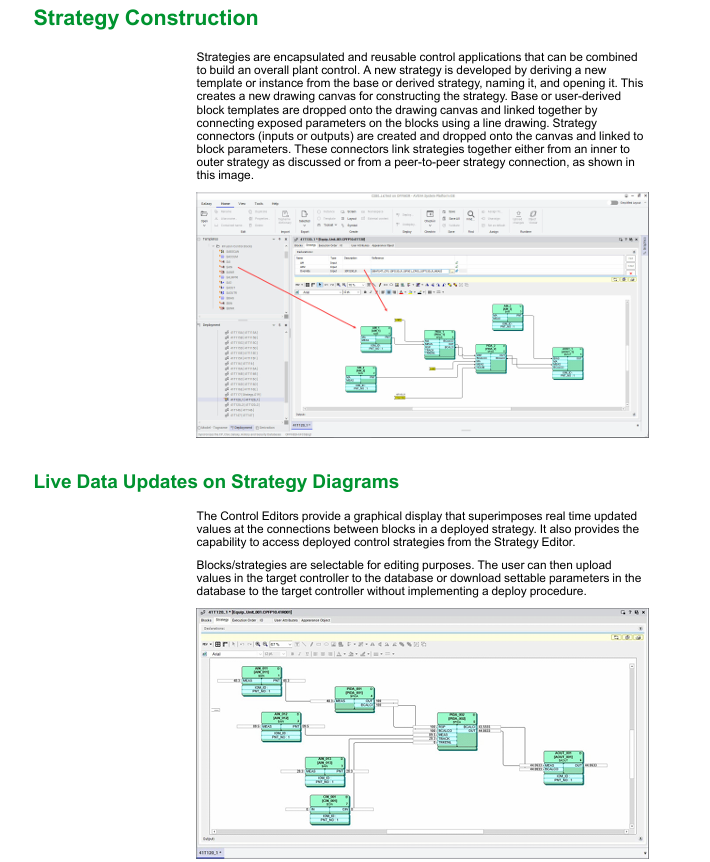
Graphic visualization design: The strategy editor provides a visual canvas, where users can drag and drop basic control blocks or derived templates onto the canvas, connect exposed parameters of the blocks through lines, and quickly build control logic. Support user-defined rendering styles for policy components, including Scientific Apparatus Makers Association (SAMA) standard symbols, to meet industry standards.
Flexible configuration of control blocks:
Basic control block: covering core functions such as signal input, logical operation, and regulation control, and can directly call configuration;
Derivative control block: Users can customize based on the basic block, such as deriving the basic analog input block (AIN) into an iron constantan thermocouple input block, or modifying the appearance and functional exposure of the PIDA block to generate control entities that comply with SAMA standards.
Programmable logic support: For complex control scenarios, multiple types of programmable blocks and exclusive editors are provided:
Text editor: used for High Level Batch Language (HLBL) programming, adapted to batch control scenarios;
Graphic Editor: Supports Sequential Function Charts (FoxSFC) and Ladder Logic Diagram (LLD) programming, visually presenting sequential control and logic control processes;
Universal computing blocks: including MATH, LOGIC, Calc, CalcA and other calculator blocks, to meet various mathematical operations and logical judgment needs.
(2) Data interaction and debugging optimization
Multi dimensional data interface:
Report interface: Supports exporting configuration data from Microsoft SQL Server and Excel for easy data archiving and analysis;
Editing interface: Provides an intuitive Excel interface that allows for direct editing of configuration parameters in Excel, improving batch editing efficiency.
Real time debugging capability: Control strategy drawings can overlay and display real-time updated parameter values, allowing for intuitive observation of control logic operation status without relying on human-machine interface (HMI); Support uploading real-time data from the controller directly to the database, or downloading configurable parameters from the database to the controller, without the need for a complete deployment process, greatly reducing the debugging cycle.
(3) Batch operation and migration upgrade
Batch generation strategy: Supports batch generation of control strategies based on predefined templates and external project data (such as Excel, CSV, SaveAll, IACC Export, SysDef Export, or proprietary XML documents). Users can use Visual Basic scripts to perform targeted editing on imported data grids, such as batch modifying policy parameters and adjusting composite object assignments, to quickly complete large-scale project configurations.
System migration compatibility: Provides the ability to batch migrate control strategies from installed I/A Series systems and Foxboro DCS, seamlessly migrating the control logic and intellectual property of existing systems to new systems, protecting users' existing investments, and reducing upgrade costs.
Import and export function: Supports the import and export of control strategy design files, facilitating cross project reuse, backup, and sharing, and improving engineering efficiency.
(4) System and equipment configuration
System topology construction: Users can instantiated hardware units such as control stations and fieldbus modules (FBMs) and customize their names. These hardware units can be allocated to designated factory unit areas (such as centrifuge area, purification area, reaction area, solvent recovery area, storage tank area, etc.) through a network view, visually presenting the system hardware layout and ownership relationships.
Intelligent device lifecycle management: supports comprehensive management of digital field devices using FOUNDATION Fieldbus, HART, and PROFIBUS technologies, including device access, parameter configuration, operation monitoring, fault diagnosis, debugging, and troubleshooting, ensuring stable linkage between field devices and DCS systems.
ArchestrA platform deployment: ArchestrA IAS platform, engine, and application objects (such as OLEDB database applications) can be created and deployed to the Foxboro DCS control software application environment to expand the system's functional boundaries.
(5) Security and Collaboration Management
Role based permission control: ArchestrA's role-based security model is adopted, where users subscribe to corresponding roles based on job responsibilities, and roles are associated with specific access permissions (such as operations, secure writes, configuration modifications, etc.) and security groups (corresponding to factory areas). Supports three authentication methods: local authentication, host operating system binding authentication, and Microsoft Active Directory authentication (it is recommended to configure at least two redundant domain controllers to enhance security).
Change Tracking and Traceability: Deeply integrated with Foxboro DCS' System Advisor change tracking function and FoxCTS change tracking software, all control configuration modifications (such as parameter adjustments) and program changes (such as HLBL, FoxSFC, LLD program modifications) will be recorded and synchronized to associated software, meeting industry regulatory requirements and facilitating fault tracing and auditing.
Multi client concurrent access: The server supports multiple clients to access the configuration database simultaneously through remote desktop services, with a record locking mechanism to prevent concurrent operation conflicts. The client runs independently and only communicates with the server when the session is open or closed, fully utilizing network resources and ensuring smooth operation.
Deployment process and operation mechanism
(1) Deploy core processes
Strategy design and configuration: Complete the graphical design, parameter configuration, and logical correlation of control strategies;
Hierarchical allocation: Assign control strategies to composite objects, and then bind the composite objects to the target control station;
Deployment execution: Select the corresponding object through the deployment view, execute the deployment command, and the system automatically completes the following operations:
Download the composite object and control block to the designated control station and Compound Summary Access (CSA);
Load the security access settings of the composite object and control block into the ArchestrA security system;
Update ArchestrA historical database and synchronize the configured collection point information;
Change deployment: After modifying the strategy or composite object, it is necessary to redeploy. The system only updates the affected targets and modified parameters to avoid resource consumption and downtime risks caused by full deployment.
(2) Operation guarantee mechanism
Resource isolation: Client and server resources are isolated, with the client only providing an operating interface and core computing relying on server resources to ensure operational stability;
Fault tolerance: Supports redundant configuration of critical hardware, combined with change tracking and fault diagnosis functions, to quickly locate and handle operational anomalies;
Real time synchronization: Configure data and run data to be synchronized in real-time, ensuring that modified parameters take effect in a timely manner and guaranteeing the accuracy of control logic.
Software and hardware specification requirements
(1) Minimum configuration requirements
Device/Role Memory (RAM) Hard Disk Capacity Special Instructions
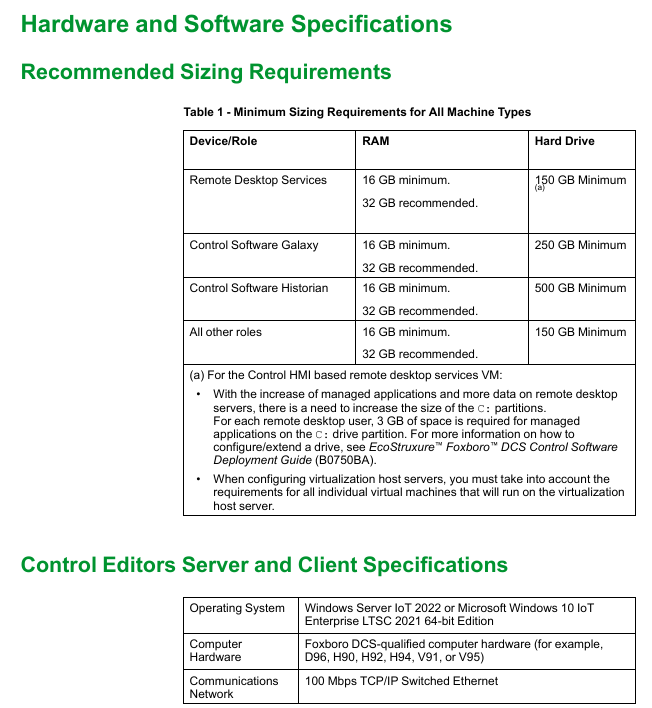
Remote desktop services require a minimum of 16GB, with a recommended minimum of 32GB and 150GB for controlling HMI. Virtual machines based on remote desktop services require additional reserved space, with each user requiring 3GB of C drive space for managing applications
Control software Galaxy minimum 16GB, recommended 32GB minimum 250GB for storing system configuration and policy data
The control software Historian has a minimum of 16GB, with a recommended minimum of 32GB and 500GB for storing historical operational data, which needs to be expanded according to the data volume
All other roles require a minimum of 16GB, with a recommended minimum of 32GB and 150GB, covering regular clients, configured workstations, etc
(2) System and hardware compatibility
Operating System: Supports Windows Server IoT 2022 or Microsoft Windows 10 IoT Enterprise LTSC 2021 (64 bit version);
Computer hardware: Hardware devices that require Foxboro DCS certification, such as D96, H90, H92, H94, V91, V95, etc;
Communication network: Require 100 Mbps TCP/IP switched Ethernet to ensure stability and real-time data transmission.
Product advantages and applicable scenarios
(1) Core advantages
Engineering efficiency improvement: Through graphic design, template reuse, batch operation and other functions, the initial design and expansion transformation cycle of the project is significantly shortened, reducing repetitive labor;
Configuration quality assurance: standardized design process, role-based permission control, and change tracking function to ensure consistency, security, and traceability of control logic;
Strong system compatibility: Supports migration from legacy systems (I/A Series, old Foxboro DCS), compatible with multiple fieldbus devices and third-party systems, reducing system upgrade and integration costs;
Full lifecycle support: covering the entire process of project design, deployment, debugging, operation, and upgrade, providing one-stop configuration and management tools to adapt to the needs of different stages of the project.
(2) Applicable scenarios
New industrial automation projects: suitable for new projects in industries such as chemical, power, pharmaceutical, petroleum, etc., quickly build Foxboro DCS control system;
Existing system upgrade and renovation: Provide a technical upgrade path for existing users of Foxboro DCS to achieve smooth migration of control logic and functional expansion;
Large scale project expansion: supports batch generation and configuration strategies, adapting to the control requirements of large factories or cross regional projects;
Multi project reuse scenario: The control strategy and intellectual property of one project can be transferred to other projects, and the new scenario can be adapted through editing tools to improve the efficiency of multi project implementation.
- OMRON
- ABB
- General Electric
- EMERSON
- Honeywell
- HIMA
- ALSTOM
- Rolls-Royce
- MOTOROLA
- Rockwell
- Siemens
- Woodward
- YOKOGAWA
- FOXBORO
- KOLLMORGEN
- MOOG
- KB
- YAMAHA
- BENDER
- TEKTRONIX
- Westinghouse
- AMAT
- AB
- XYCOM
- Yaskawa
- B&R
- Schneider
- KONGSBERG
- NI
- WATLOW
- ProSoft
- SEW
- ADVANCED
- Reliance
- TRICONEX
- METSO
- MAN
- Advantest
- STUDER
- DANAHER MOTION
- Bently
- Galil
- EATON
- MOLEX
- DEIF
- B&W
- ZYGO
- Aerotech
- DANFOSS
- Beijer
- Moxa
- Rexroth
- Johnson
- WAGO
- TOSHIBA
- BMCM
- SMC
- HITACHI
- HIRSCHMANN
- Application field
- XP POWER
- CTI
- TRICON
- STOBER
- Thinklogical
- Horner Automation
- Meggitt
- Fanuc
- Baldor
- SHINKAWA
- Other Brands
- UniOP
- KUKA
- Iba
- Beckhoff
- ADLINK
-
 Sigmatek MDD111-1 DIAS Drive Axis Module
 -
 Sigmatek DKL042 05-024-042 Terminal Module
 -
 Sigmatek DM822 Control Module
 -
 Sigmatek CDM167 12-008-167-O Module
 -
 Sigmatek TAE151 Touch Display Unit
 -
 Sigmatek DCC041 SLIDES Module 05-700-041-D
 -
 Sigmatek AKM65M-ANC2GBB0 PM Servo Motor
 -
 Sigmatek ETT221 01-230-221 Operator Terminal
 -
 Sigmatek SLIDES DAM 124 Analog Module
 -
Sigmatek AKM31C-ANCNGBB0 Servo Motor
-
 Mannesmann Demag Sigmatek CP626 Central Unit
 -
 SIGMATEK 0332.554.03 Board 371071000154
 -
 SIGMATEK 12-250-021 Base Plate Back Panel CM5V020
 -
 SIGMATEK DM162 S-DIAS Digital Mix Module
 -
 DEMAG ERGOTECH 061 381 66 Sigmatek 9842.243.02 Circuit Board
 -
 SIGMATEK CP313-1 PLC Module
 -
Sigmatek ETV0551-2 VARAN Touch Terminal
-
 Sigmatek SDM 081 FS S-Dias Safety Module
 -
 DEMAG 05-250-023 Ergotech Motherboard with Sigmatek TMS012
 -
Sigmatek CM5V020 12-250-023-K Wiring Base
-
 Sigma Tek 5000B-37 Attitude Gyro Indicator
 -
 Sigmatek SDD120-2 DIAS Drive
 -
 Sigmatek CME221 Memory Module
 -
 Sigmatek DCP640 DIAS Central Unit
 -
 Sigmatek STO040 Safety Output Module
 -
Sigmatek CET281 Control Panel
-
 Sigmatek CIPC LX800 Demag NC5 CPU
 -
 Sigmatek DKL093 05-024-093 Terminal Module
 -
 Sigmatek AI088 20-009-088 Analog Input Module
 -
Sigmatek CAI888 Analog Input Module
-
SIGMATEK CCA021 12-025-021 Analog Output Module
-
SIGMATEK 1104.579.05 Control Module
-
SIGMATEK SDI100 Digital Input Module
-
 SIGMATEK C-IPC 256MB LX800 Compact Dias
 -
 SIGMATEK 9423.090.02 Control Module
 -
SIGMATEK C-IPC 256 Power Supply 148498
-
 SIGMATEK CAI025 Analog Input Module
 -
 SIGMATEK CTO166 Digital Output Module
 -
 SIGMATEK CP112 20-004-112 Processor Module
 -
SIGMATEK CAI887 12-009-887 Safety Module
-
 Sigma-Tek 4000B-31 Directional Gyro 1U262-002-42
 -
Sigmatek C-IPC 256MB LX800 IPC Controller
-
Sigmatek C-IPC 01-450-031 Industrial PC LX800
-
Sigmatek C-IPC 256 Industrial PC Controller
-
Sigmatek CCP-531 PLC Processor Module
-
Sigmatek CDI163 Digital Input Module
-
 Sigmatek ETV0501 VARAN Terminal 12-230-0501
 -
 Sigmatek CTMS020 C-DIAS Technology Module
 -
 Sigmatek CIV512 VARAN Switch Module
 -
 Sigmatek HU011 20-080-011 Interface Module
 -
SIGMATEK SLIDES DAM 124 Module
-
 SIGMATEK C-IPC 161 01-450-161L Industrial PC
 -
SIGMATEK C-IPC 128MB VIA 733MHz 01-450-024-K
-
 SIGMATEK 12-780-012 R8-IPC Geode LX800 Module
 -
SIGMATEK CAM124 Analog Module
-
 SIGMATEK S1 032-8AF61-R4 EZ Servo Motor
 -
 SIGMATEK CTO163 Digital Output Module
 -
 SIGMATEK CCP082 12-004-082 Processor Module
 -
 SIGMATEK CRCH081 C-DIAS Temperature Module
 -
 SIGMATEK PC322-K 01-310-322-K Industrial PC
 -
SIGMATEK SDD310-2 Servo Drive
-
 SIGMATEK AI084 Analog Input Module
 -
SIGMATEK CRCH081 12-752-081 Temperature Module
-
Sigma-Tek 5000L-4 Attitude Gyro 1U284-001-3
-
 SIGMATEK CM5V020 12-250-023-K Wiring Module
 -
Sigma-Tek 4000H-6 Directional Gyro IU262-035-7
-
 SIGMATEK Dias DCP160 05-004-160 Processor Module
 -
SIGMATEK 0147.395.02 Control Module
-
SIGMATEK A1084 Control Module
-
SIGMATEK DI200 20-006-2000 Digital Input Module
-
Sigmatek DNC115 Encoder Module
-
 Sigmatek DAM122 05-017-122 Analog Module
 -
Sigmatek 9802.289.01 Control Board TA71 Display
-
Sigmatek TO127 20-007-127 Digital Output Module
-
Sigmatek DNC031 05-011-031 Digital Module
-
Sigmatek VI022 20-003-022 Interface Module
-
Sigmatek CAI085 Analog Input Module
-
 Sigmatek CP111 S-DIAS CPU Module
 -
Sigmatek CTMS030 Krauss Maffei Module
-
 Sigmatek CAM123 Control Module
 -
 Sigmatek TAE732-P 01-240-732-P Touch Display Unit
 -
Sigmatek MDM021 Digital Mixed Module
-
Sigmatek DCP642 DIAS Central Unit
-
 Sigmatek CST022 12-014-022 C-DIAS Module
 -
 Sigmatek SRO021 20-893-021 Safety Relay Output
 -
 Krauss Maffei MC5 Control System Sigmatek
 -
 Sigmatek DC061 Module 18-24VDC 300mA
 -
 Herrmann EVT0855 Ultrasonic Welder Touch Panel
 -
Sigmatek CIV521 Control Module 1.4A 2W
-
Sigmatek DDI61 05-006-161 Digital Input Module
-
SIGMATEK ETT312-E Touch Terminal 01-230-312
-
Cessna S3326-1 Sigma Tek 5000B-67 Gyro 1U149-015-9
-
SIGMATEK PS101 Power Supply Module
-
SIGMATEK 0332.554.03 Control Module 371071000154
-
 SIGMATEK ETT312-E Touch Terminal 01-230-312
 -
SIGMATEK CDM163 Control Module
-
 SIGMATEK VSV046 16-023-046 Module
 -
SIGMATEK AM221 20-017-221 Analog Module
-
SIGMATEK CTS051 12-053-051 Control Module
-
SIGMATEK AM221 20-017-221 Analog Module
-
Sigmatek CSDI161 12-891-161 Safety Input Module
-
Sigma Tek 4000C-1 Directional Gyro Indicator
-
Sigmatek ETV0501 12-230-0501 VARAN Terminal
-
Sigmatek DDM165 SLIDES Module
-
Sigmatek N100 20-011-100 Control Module
-
Sigmatek AKM54K-ANC2R-B0 PM Servo Motor
-
Sigmatek CTO166 Digital Output Module
-
Sigmatek CP212-K 20-004-212-K CPU Module
-
Sigmatek CDI161 Digital Input Module
-
Sigmatek DCC080 05-700-080-2 Control Module
-
 SIGMATEK SCP011 S-DIAS Safety CPU
 -
SIGMATEK SCP011 S-DIAS Safety CPU
-
SIGMATEK SRO022 Relay Output Module
-
SIGMATEK MDD 121 Drive Axis Module
-
SIGMATEK DSI021 SLIDES Siemens Interface
-
SIGMATEK DIAS DCP161 Module 05-004-161
-
 Sigmatek ETT312 Built-in Touch Terminal
 -
SIGMATEK DCP 643 DIAS Controller System
-
SIGMATEK CIO021 Multi I/O Module
-
SIGMATEK CTMS020 Control Module
-
 Sigmatek CME 221 Memory Module
 -
Sigmatek 0420.615.01 Control Board
-
Sigmatek CP111 20-004-111 CPU Module
-
Sigmatek 9405.065.03 Control Board
-
Sigmatek ETEK 01-450-032-K C-IPC 256MB Industrial PC
-
Sigmatek CTO163 12-007-163 Safety Output Module
-
Sigmatek TO081 20-007-081 Digital Output Module
-
 Sigmatek SI021 20-022-021 Safety Input Module


