
Beijer Mitsubishi Electric E1000 Series Operation Panel
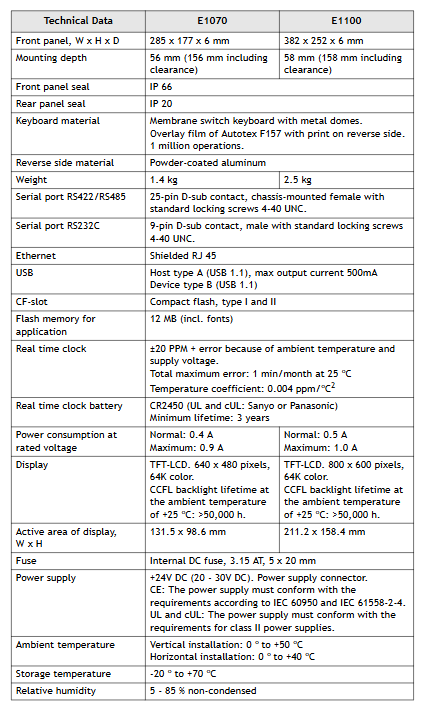
The maximum ambient temperature for horizontal installation is 40 ° C, and for vertical installation it is 50 ° C.
There is an explosion risk warning, such as not disconnecting the equipment before power outage, component replacement may affect applicability, only UL and cUL certified expansion units are allowed to be connected (currently there are no relevant evaluated units), batteries need to be replaced in non hazardous areas, and AWG 28-12 cables need to be used to connect the power supply, with a minimum tightening torque of 0.5 Nm, and can only be used in 4X shell flat rooms.
Beijer Mitsubishi Electric E1000 Series Operation Panel
Safety precautions
UL and cUL installation requirements
The equipment is only suitable for Class I Zone 2 (Groups A, B, C, D) or non hazardous locations. The combination of equipment in the system must be inspected by the local competent department.
The maximum ambient temperature for horizontal installation is 40 ° C, and for vertical installation it is 50 ° C.
There is an explosion risk warning, such as not disconnecting the equipment before power outage, component replacement may affect applicability, only UL and cUL certified expansion units are allowed to be connected (currently there are no relevant evaluated units), batteries need to be replaced in non hazardous areas, and AWG 28-12 cables need to be used to connect the power supply, with a minimum tightening torque of 0.5 Nm, and can only be used in 4X shell flat rooms.

General Safety Rules
It is necessary to carefully read the safety precautions, inspect for transportation damage, and promptly notify the supplier. The use of equipment in high explosive risk environments is prohibited.
Suppliers are not responsible for modifying, altering, or reassembling equipment and may only use components and accessories that meet the supplier's specifications.
Before installation, use, or maintenance, it is necessary to read the relevant instructions to prevent liquids, metal debris, etc. from entering the equipment and causing fires or electric shocks, and only qualified personnel are allowed to operate.
The storage temperature of the device must meet the requirements, otherwise it may cause the LCD display liquid to solidify or denature. If the display liquid comes into contact with the skin or eyes, it should be handled in a specific way.
The illustrations in the manual are for illustration purposes only, and the supplier is not responsible for the actual use based on the illustrations, nor does they guarantee that the equipment is suitable for specific applications or assume responsibility for product design, installation, or operation.
Safety during installation
The operation panel should be fixedly installed on a flat surface without high explosion risk, strong magnetic field, direct sunlight, or drastic temperature changes, and installed and grounded according to the installation instructions, and only by qualified personnel.
High voltage cables, signal lines, and power lines need to be separated, and the voltage and polarity should be confirmed to be correct before connecting the power supply. Peripheral equipment should be adapted to the application scenario and location.
Safety during use
Keep the control panel clean. Emergency stop and other safety functions cannot be controlled by the control panel. Avoid using excessive force or sharp objects when operating buttons or touch screens.
Service and Maintenance of Security
Only qualified personnel are allowed to carry out repairs, following the agreed warranty terms. Before cleaning or maintenance, the power must be disconnected, and the display panel and front cover must be cleaned with a soft cloth and mild cleaning agent. The battery must be replaced according to the supplier's recommended model to avoid accidental replacement and explosion.
Disassembly and scrapping safety
The operation panel or its components need to be recycled according to local regulations. Components such as lithium batteries, electrolytic capacitors, and displays contain substances that may harm health and the environment.
Product Introduction
Product Model Classification and Parameters
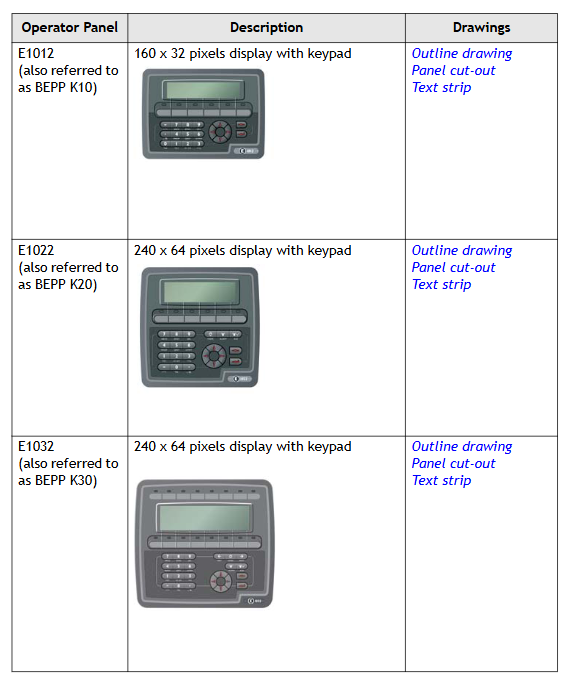
The E1000 series operation panel is divided into keyboard operation type and touch screen operation type. The specific models, descriptions, and corresponding drawings are as follows:
Type and Model Description Drawing
Keyboard operated E1012 (BEPP K10) 160 × 32 pixel display screen with keyboard outline, panel cutout, and text bar
E1022 (BEPP K20) 240 × 64 pixel display screen with keyboard outline, panel cutout, and text bar
E1032 (BEPP K30) 240 × 64 pixel display screen with keyboard outline, panel cutout, and text bar
E1060/E1062 (BEPP K60) 5.7-inch display screen with keyboard outline, panel cutout, and text bar
E1070 (BEPP 64K) 6.5-inch display screen with keyboard outline, panel cutout, and text bar
E1100 (BEPP 104K) 10.4-inch display screen with keyboard outline, panel cutout, and text bar
Touch screen operation type E1041/E1043 (BEPP T40) 3.5-inch touch screen display outline and panel cut diagram
E1061/E1063 (BEPP T60) 5.7-inch touchscreen display outline drawing and panel cutout drawing
E1071 (BEPP 64T) 6.5-inch touchscreen display outline drawing and panel cutout drawing
E1101 (BEPP 104T) 10.4-inch touchscreen display outline and panel cutout diagram
E1151 (BEPP 150T) 15 inch touchscreen display outline and panel cutout diagram
Maintenance Requirements
Before maintenance, it is necessary to carefully read the instructions. Only qualified personnel are allowed to operate. Follow the warranty and license agreement. Equipment damage caused by personnel will void the warranty.
Before cleaning or maintenance, disconnect the power supply and use a soft cloth and mild cleaning agent (such as water, isopropanol, or hexane) to clean the display panel and front cover. The battery should be replaced according to the recommended model to prevent explosion. All repaired parts are covered by a 6-month warranty.
- OMRON
- ABB
- General Electric
- EMERSON
- Honeywell
- HIMA
- ALSTOM
- Rolls-Royce
- MOTOROLA
- Rockwell
- Siemens
- Woodward
- YOKOGAWA
- FOXBORO
- KOLLMORGEN
- MOOG
- KB
- YAMAHA
- BENDER
- TEKTRONIX
- Westinghouse
- AMAT
- AB
- XYCOM
- Yaskawa
- B&R
- Schneider
- KONGSBERG
- NI
- WATLOW
- ProSoft
- SEW
- ADVANCED
- Reliance
- TRICONEX
- METSO
- MAN
- Advantest
- STUDER
- DANAHER MOTION
- Bently
- Galil
- EATON
- MOLEX
- DEIF
- B&W
- ZYGO
- Aerotech
- DANFOSS
- Beijer
- Moxa
- Rexroth
- Johnson
- WAGO
- TOSHIBA
- BMCM
- SMC
- HITACHI
- HIRSCHMANN
- Application field
- XP POWER
- CTI
- TRICON
- STOBER
- Thinklogical
- Horner Automation
- Meggitt
- Fanuc
- Baldor
- SHINKAWA
- Other Brands
- UniOP
- KUKA
- Iba
- Beckhoff
- ADLINK
-
 National Instruments PCI-6250 Multifunction DAQ Device
-
 National Instruments PCI-6224 Multifunction DAQ Card
-
 National Instruments cRIO-9081 CompactRIO Controller
-
 National Instruments USB-6353 X Series DAQ Device
-
 National Instruments NI-9223 Simultaneous Analog Input Module
-
 National Instruments PXIe-8133 Embedded Controller
-
 National Instruments NI-9403 Digital I/O Module
-
 National Instruments PCI-6111E Multifunction I/O Card
-
 National Instruments FP-1001 FieldPoint Network Module
-
 National Instruments PCI-6517 Industrial Digital I/O Card
-
 National Instruments USB-5680 Power Meter
-
 National Instruments PXI-6562 Digital Module
-
 National Instruments PCI-6254 DAQ Card
-
 National Instruments NI 9266 Output Module
-
National Instruments NI 9862 CAN Module
-
 National Instruments NI 9217 Input Module
-
National Instruments PCI-4472 DSA Card
-
 National Instruments NI 9232 Vibration Module
-
 National Instruments NI-9269 Output Module
-
 National Instruments GPIB-120B Interface
-
 National Instruments NI 9209 Input Module
-
National Instruments NI 9210 Input Module
-
 National Instruments NI 9381 Module
-
National Instruments PXI-2570 Relay Module
-
 National Instruments 777318140 Cable
-
 National Instruments 781049-01 Module
-
 National Instruments 779140-01 Module
-
 National Instruments PXI-6115 DAQ Card
-
 National Instruments cDAQ-9185 Chassis
-
National Instruments NI-9375 I O Module
-
National Instruments USB-6366 X Series DAQ Device
-
 National Instruments USB-6361 X Series DAQ Device
-
 National Instruments PXI-4496 Sound and Vibration Module
-
 National Instruments PCI-6289 Multifunction DAQ Card
-
 National Instruments PXI-8119 Quad-Core Controller
-
National Instruments NI-9206 Analog Input Module
-
National Instruments 779516-01 Ordering Part Number
-
 National Instruments cDAQ-9132 CompactDAQ Controller
-
 National Instruments 782401-01 Ordering Part Number
-
National Instruments PXI-8105 Embedded Controller
-
 National Instruments USB-6361 Multifunction I/O Device
-
 National Instruments SCXI-1314 Terminal Block
-
 National Instruments PCI-6515 Industrial Digital I/O Card
-
National Instruments 779038-01 Ordering Part Number
-
 National Instruments cRIO-9012 CompactRIO Controller
-
 National Instruments PXI-8364 MXI-Express Interface
-
National Instruments PXIe-8360 Interface Card
-
 National Instruments 196859B-01 Ordering Part Number
-
 National Instruments PXIe-1073 5-Slot Chassis
-
 National Instruments NI 9209 Voltage Input Module
-
 National Instruments USB-5133 Digitizer
-
 National Instruments PXI-1044 Chassis
-
National Instruments NI 9266 785046-01 Module
-
 National Instruments USB-6216 DAQ Device
-
National Instruments NI 9266 Output Module
-
National Instruments NI 9230 Vibration Module
-
 National Instruments PCI-6230 DAQ Card
-
National Instruments PXI-6123 DAQ Card
-
National Instruments PCI-6255 DAQ Card
-
 National Instruments PXI-8433 Serial Module
-
 National Instruments PXIe-4138 Source Measure Unit
-
 National Instruments 781044-01 PCIe-6321 DAQ Part Number
-
 National Instruments PXIe-6356 X Series DAQ Module
-
 National Instruments PCI-6513 Industrial Digital Output Card
-
National Instruments 183345A-04 Ordering Part Number
-
 National Instruments PCIe-6351 X Series DAQ Card
-
National Instruments PXI-4070 FlexDMM Module
-
National Instruments PXI-6225 Multifunction DAQ Module
-
 National Instruments 781496-01 Ordering Part Number
-
 National Instruments 779592-01 Ordering Part Number
-
 National Instruments SCXI-1121 Module
-
 National Instruments NI 9148 Chassis
-
National Instruments PXI-6255 DAQ Module
-
 National Instruments USB-4065 DMM
-
 National Instruments PXI-6221 DAQ Module
-
 National Instruments PXIe-1065 Chassis
-
National Instruments NI 9210 Input Module
-
National Instruments 778948-01 Output Module
-
 National Instruments cRIO-9014 Controller
-
National Instruments cDAQ-9171 Chassis
-
 National Instruments USB-6363 DAQ Device
-
National Instruments NI 9467 GPS Module
-
 National Instruments USB-6351 DAQ Device
-
National Instruments NI 6581 Adapter Module
-
 National Instruments 781045-01 Output Module
-
National Instruments PCI-6225 DAQ Card
-
 National Instruments TRC-8543 CAN Cable
-
National Instruments PXIe-1073 Chassis
-
 National Instruments USB-6003 DAQ Device
-
 National Instruments NI 9476 Output Module
-
National Instruments myRIO-1900 Embedded Controller
-
National Instruments NI-9263 Analog Output Module
-
 National Instruments 158561A-01L Ordering Part Number
-
 National Instruments 785024-01 Ordering Part Number
-
National Instruments PCI-6510 Industrial Digital I/O Card
-
 National Instruments USB-6259 Multifunction DAQ Device
-
National Instruments USB-8452 I2C SPI Interface Device
-
 National Instruments PXI-8432 Serial Interface Module
-
National Instruments PXIe-5644R Vector Signal Transceiver
-
 National Instruments PXI-2569 Relay Module
-
National Instruments 781174-01 Module
-
National Instruments 782000-01 Module
-
 National Instruments PXI-5152 Digitizer
-
 National Instruments PXI-6284 DAQ Card
-
National Instruments PCI-1428 Frame Grabber
-
 National Instruments PXI-1050 Chassis
-
National Instruments NI USB-8486 Fieldbus
-
National Instruments NI 9862 CAN Module
-
 National Instruments NI 9146 FPGA Chassis
-
 National Instruments PXI-8108 Controller
-
 National Instruments NI SWB-2816A Matrix Module
-
 National Instruments NI 9269 Analog Output Module
-
National Instruments PCI-6031E Multifunction DAQ Card
-
National Instruments PXI-6713 Analog Output Module
-
National Instruments NI 9216 RTD Input Module
-
National Instruments NI-9237 Strain Bridge Input Module
-
National Instruments PXI-5124 High Resolution Digitizer
-
National Instruments USB-6343 X Series DAQ Device
-
 National Instruments PXIe-6536 Digital I/O Module
-
 National Instruments CAL-4330 Calibration Fixture
-
 National Instruments PXI-4110 Programmable Power Supply
-
 National Instruments 781503-01 Input Module
-
 National Instruments FP-AI-V10 Module
-
National Instruments PXI-5114 Digitizer Card
-
 National Instruments PXIe-8398 MXI Module
-
 National Instruments cRIO-9056 Controller
-
National Instruments PCI-6509 DIO Device
-
 National Instruments cRIO-9053 Controller


