
Woodward LS-521 V2 (Option K12) Circuit Breaker Control Unit
Woodward LS-521 V2 (Option K12) Circuit Breaker Control Unit
Product Overview and Safety Notice
1.1 Product Introduction
LS-521 V2 (Option K12) belongs to the Woodward LS-5 series and is an intelligent control device with dual system monitoring, synchronous grid connection, circuit breaker control, and power parameter measurement functions. Its hardware version is V2, supporting 6 current transformer input terminals, suitable for various wiring modes such as three-phase four wire, three-phase three wire, single-phase three wire, and single-phase two wire.
1.2 Important Safety Warning
Overspeed shutdown protection: The prime mover must be equipped with an overspeed, overtemperature, or overpressure shutdown device independent of the control device to prevent equipment damage or personal injury caused by control failure.
Unauthorized modifications are prohibited: Any modifications that exceed mechanical, electrical, or operational limitations are considered "misuse" or "negligence" and may result in the invalidation of warranty and equipment certification.
Static protection: The controller contains static sensitive components, and body static electricity must be released before operation to avoid contact with circuit board conductors.
Battery charging device: Before disconnecting the battery, the charging device must be turned off to prevent damage to the control system.
1.3 Manual Update and Revision
The latest version of this manual can be obtained through the Woodward official website. Revision history shows that the D version released in April 2022 added synchronous grid connection parameters and CAN commands, and corrected the phase angle definition in the wiring diagram and CAN messages.
Installation and wiring
2.1 Mechanical Installation
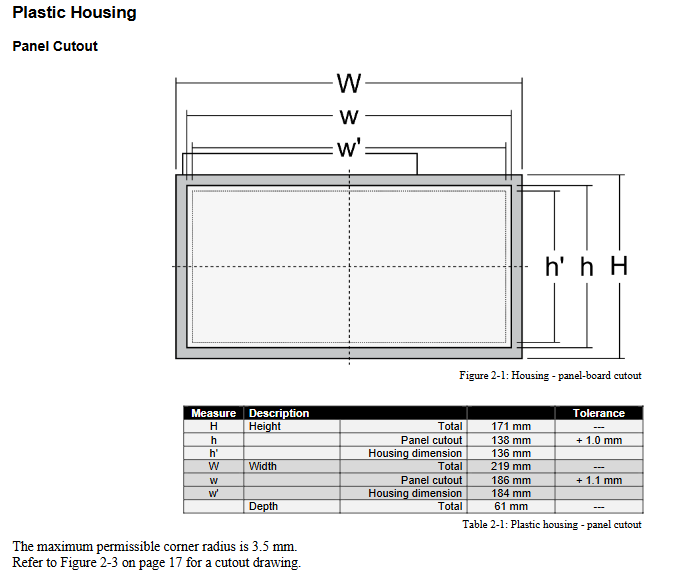
Shell type: Plastic shell with LCD display screen, panel mounted.
Hole size: 138 mm (height) x 186 mm (width), tolerance+1.0/+1.1 mm.
Installation method: Supports fixture fixation or screw fixation, the latter can achieve IP65 protection level.
2.2 Power Supply and Grounding
Power input: 12/24 Vdc, range 8-40 Vdc, recommended to use 6A slow melting fuse or C-type miniature circuit breaker.
Functional grounding: A grounding wire of ≥ 2.5 mm ² must be connected through terminal 55 to prevent the risk of electric shock.
2.3 Voltage and current measurement wiring
2.3.1 Voltage Measurement of System A and System B
Input terminals: divided into two groups of 120 Vac and 480 Vac, cannot be used simultaneously.
Wiring method: Select the corresponding terminal according to the system configuration (such as 3Ph4W, 3Ph3W, 1Ph2W, etc.).
PT setting: The rated voltage of the PT primary and secondary sides needs to be set in the parameters.
2.3.2 Current measurement
CT input: Supports 5A or 1A secondary current, system A supports L1 L2 L3 or single-phase measurement.
Safety precautions: Before disconnecting the CT, the secondary must be short circuited to prevent open circuit high voltage.
2.4 Discrete Input and Relay Output
Discrete Input (DI): 8 channels, supporting positive/negative polarity, configurable as normally open or normally closed.
Relay output: 6 channels, with R5 fixed as "closing CBA", R6 fixed as "opening CBA" in dual relay mode, and the rest can be freely programmed through LogicsManager.
2.5 Communication Interface
Service port: RJ-45 interface, needs to be connected to PC with Woodward DPC cable.
CAN bus: Supports CANopen protocol and requires the installation of 120 Ω terminal resistors at both ends. The maximum length depends on the baud rate (e.g. 125 kbit/s corresponds to 100 meters).
Configuration and parameter settings
3.1 Configuration Method
Front panel operation: Basic settings can be made through buttons and the display screen.
PC software ToolKit: Visualize configuration and data monitoring through Woodward ToolKit software.
3.2 Key parameter group
3.2.1 Language and Clock
Supports multilingual display and can be configured to automatically switch between daylight saving time.
3.2.2 Passwords and Access Levels
CL0 (user level): Monitoring only, no password.
CL1 (Service Level): Password 0001, basic parameters can be modified.
CL2 (temporary debugging level): one-time password, valid for 2 hours.
CL3 (debugging level): Password 0003, full parameter access.
3.2.3 System Management
Device address (1-31), backlight control, key locking, factory reset, etc.
3.2.4 Circuit Breaker Control Configuration
CBA control mode: 1 relay or 2 relay mode.
Synchronization parameters: frequency difference, voltage difference, phase angle compensation, maximum phase angle, etc.
Dead zone closure: Supports dead zone closure between systems, with configurable delay time and voltage threshold.
3.2.5 Monitoring Configuration
System A/B voltage and frequency limits: Set the normal operating window and hysteresis value.
Phase sequence monitoring: can detect system A/B phase sequence errors and phase sequence mismatches.
CAN interface monitoring: Heartbeat timeout alarm can be set.
3.2.6 Measurement Configuration
Rated frequency, voltage, current, power and other reference values.
Voltage measurement method (phase phase or phase neutral point) and phase sequence assumption.
3.2.7 Interface Configuration
CAN baud rate (20 kbit/s to 1 Mbit/s), CANopen master-slave mode, RS-232 parameters, etc.
Operation and Display
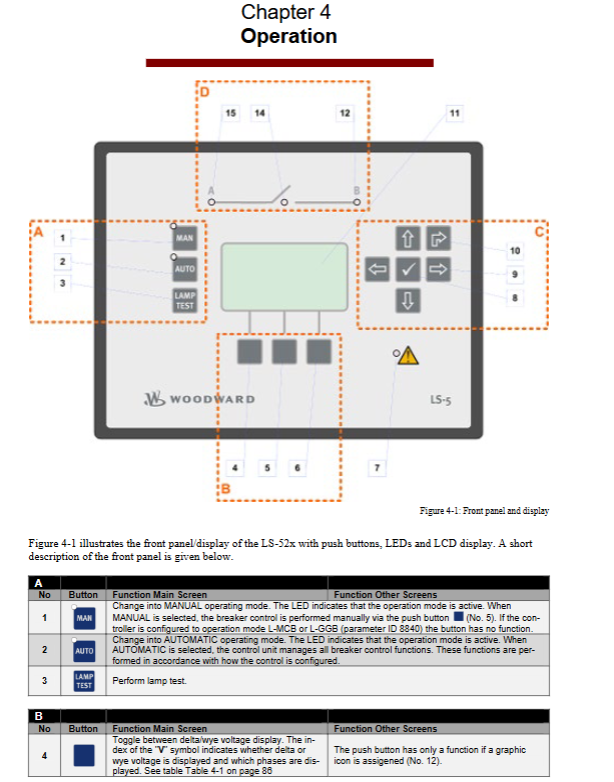
4.1 Front panel layout
Mode button: Switch between manual/automatic mode.
Function buttons: alarm list, main menu, parameter settings, confirm, return, etc.
Indicator lights: System A/B status, circuit breaker status, alarm indication.
4.2 Screen Structure and Navigation
Main screen: displays key parameters such as A/B voltage, frequency, and power of the system.
Alarm List: Display unconfirmed alarms and their occurrence times.
Parameter menu: Access configuration items.
Main menu: Measurement Value, Synchronous Oscilloscope, Counter, Diagnosis, Event History, etc.
4.3 Synchronous oscilloscope function
Graphically display the phase angle difference between system A and B to assist in synchronous operation.
LogicsManager Logic Manager
5.1 Function Overview
LogicsManager allows users to customize control sequences through logical combinations, such as relay actions, alarm responses, etc.
5.2 Logical Elements
Command variables: including alarm class, system status, discrete input/output, etc.
Operators: AND, OR, NAND, NOR, XOR, etc.
Output: Relay or internal function.
5.3 Application Examples
By combining discrete inputs, system states, and alarm conditions, complex chain control logic is achieved.
6、 Communication Protocol and Data Exchange
6.1 CANopen Protocol
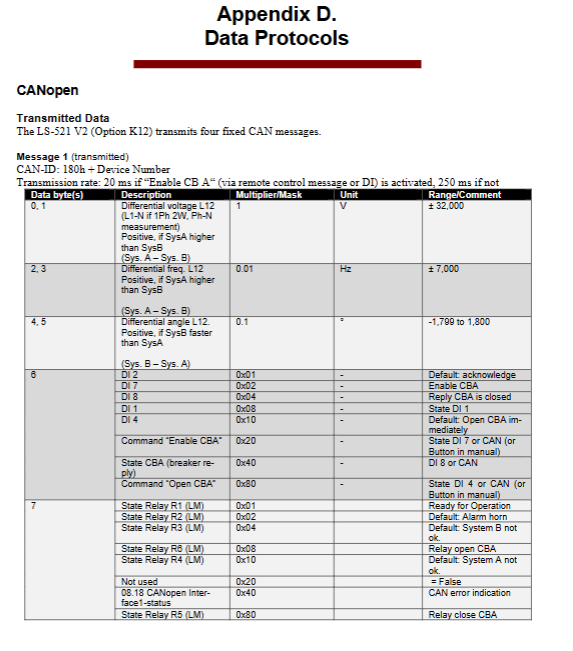
Sending messages: 4 fixed messages, including voltage difference, frequency difference, phase angle, power, status bit, etc.
Receiving messages: Remote control messages used for circuit breaker operation, alarm confirmation, etc.
6.2 Data Format
Voltage, current, power and other data with scaling factors support the transmission of large-scale measurement values.
Technical data and performance
7.1 Electrical Parameters
Power supply: 8-40 Vdc, power consumption approximately 6W.
Voltage measurement: 120 Vac (maximum 150 Vac) or 480 Vac (maximum 600 Vac).
Current measurement: 1A or 5A CT input, linear range 1.5 x rated value.
Discrete input: 8-40 Vdc, input resistance of approximately 20 k Ω.
Relay output: Contact capacity 2A @ 250 Vac, 2A @ 24 Vdc.
7.2 Environment and Machinery
Working temperature: -20 ° C to+70 ° C.
Protection level: Front panel IP54 (clamp) or IP66 (screw), rear panel IP20.
Vibration and impact: Complies with EN 60255-21 and MIL-STD-810 standards.
Certification: CE, UL/cUL, LR classification society certification.
7.3 Measurement accuracy
Frequency: ± 0.1% (range 85 Hz).
Voltage: ± 1% (range 120/480 V).
Current: ± 1% (range 1/5 A).
Power: ± 2% (range voltage x current).
Appendix and Maintenance Information
8.1 Interference Suppression Circuit
When connecting a 24V relay, it is recommended to use diodes, varistors, or RC circuits to suppress turn off voltage spikes.
8.2 Alarm classification
Class A: Only display, no relay action.
Class B/C: Trigger alarm light and horn.
Class D/E/F: Immediately open the circuit breaker.
8.3 Event History
Record 300 events, including status changes, alarms, and operation records.
8.4 Service Support
Before returning for repair, an authorization number (RAN) must be applied for in advance.
Provide technical assistance, training, on-site debugging and other services
- OMRON
- ABB
- General Electric
- EMERSON
- Honeywell
- HIMA
- ALSTOM
- Rolls-Royce
- MOTOROLA
- Rockwell
- Siemens
- Woodward
- YOKOGAWA
- FOXBORO
- KOLLMORGEN
- MOOG
- KB
- YAMAHA
- BENDER
- TEKTRONIX
- Westinghouse
- AMAT
- AB
- XYCOM
- Yaskawa
- B&R
- Schneider
- KONGSBERG
- NI
- WATLOW
- ProSoft
- SEW
- ADVANCED
- Reliance
- TRICONEX
- METSO
- MAN
- Advantest
- STUDER
- DANAHER MOTION
- Bently
- Galil
- EATON
- MOLEX
- DEIF
- B&W
- ZYGO
- Aerotech
- DANFOSS
- Beijer
- Moxa
- Rexroth
- Johnson
- WAGO
- TOSHIBA
- BMCM
- SMC
- HITACHI
- HIRSCHMANN
- Application field
- XP POWER
- CTI
- TRICON
- STOBER
- Thinklogical
- Horner Automation
- Meggitt
- Fanuc
- Baldor
- SHINKAWA
- Other Brands
- UniOP
- KUKA
- Iba
- Beckhoff
- ADLINK
-
 MICRO INNOVATION GF1-10TVB-100 Touch Panel
 -
 MICRO INNOVATION AG WINBLOC CAN-4AI/UI Analog Input Module
 -
 MICRO INNOVATION AG WINBLOC CAN-32DO/0.5A-P-2x16 Output Module
 -
 MICRO INNOVATION AG CAN-32DI/P-2X16 8551224182 Input Module
 -
 MICRO INNOVATION MK2-230/232-57 Circuit Board 85 28 200000
 -
 MICRO INNOVATION CAN-BRIDGE 8551224177 CAN Bridge
 -
 Micro Innovation MC2-430-10TVB-1-10 Panel 24VDC
 -
 MICRO INNOVATION MC2-432-57CQB-1-10 HMI Panel
 -
MICRO INNOVATION AG CAN-BRIDGE 85 51 224177 CAN Bridge
-
 MICRO INNOVATION CAN-4AI/UI Analog Input Module
 -
MICRO INNOVATION CAN-32DI/P-2X16 Input Module
-
 SIGMATEK MDD111 09-404-111 Drive Module
 -
 SIGMATEK DVI021 Display Interface Module
 -
 SIGMATEK 00-450-024 C-IPC Processor
 -
 SIGMATEK MDD-111 MDD111 Drive Module
 -
 SIGMATEK ICA011 20-102-011 Interface Module
 -
 SIGMATEK 01-250-010-D NC4Kompakt Control Module
 -
 SIGMATEK CRIF081 12-751-081 Interface Module
 -
 SIGMATEK S1026-8AF61-R4E-Z57 Drive Module
 -
 SIGMATEK 9305.081.02 9227.082.00 Control Module
 -
 Sigma Tek 5000B-36 Attitude Indicator
 -
 SIGMATEK CEZ201 12-051-201-O Counter Module
 -
 SIGMATEK DPS001 Power Supply Module
 -
 SIGMATEK 994 395 01z Via Interface Module
 -
 SIGMATEK PC411-K 01-310-411-K Industrial PC
 -
 SIGMATEK 9816.324.00 Demag NC4 Keyboard
 -
 SIGMATEK ET261 90010C-71 Operator Terminal
 -
 SIGMATEK DDI 164 05-006-164 Input Module
 -
 SIGMATEK CCP 082 C-DIAS Processor Module
 -
SIGMATEK CEZ201 12-051-201-O PLC Module
-
SIGMATEK MDD 1111 06178867 Drive Module
-
SIGMATEK S1 073-6AC61-RE-Y08-Z Drive Module
-
SIGMATEK MDD 111 Drive Module MDD111
-
 SIGMATEK CSDI161 Safety Module 12-891-161
 -
SIGMATEK C-IPC Processor 01-450-024
-
 SIGMATEK DIAS DAM122 Analog Mixing Module
 -
Sigma Tek 5000B-36 Attitude Gyro Indicator
-
 SIGMATEK TMS012 Motherboard Module 05-250-012-T
 -
 SIGMATEK CCP-531 PLC Module
 -
SIGMATEK DIAS DNC4 I/O Module 05-250-011
-
 SIGMATEK AI088 Analog Input Module
 -
 SIGMATEK CEZ201 Counter Module
 -
SIGMATEK CIC011 Industrial Computer Module
-
 SIGMATEK MDM021 Motor Drive Module
 -
 SIGMATEK DTO163 Digital Output Module
 -
SIGMA-TEK 5000B-36 Attitude Gyro
-
SIGMATEK DM161 Digital Input Module
-
SIGMATEK CCP-531 PLC Control Panel
-
 SIGMATEK HZS773 Touch Terminal Operator Panel
 -
SIGMATEK MDP101 3 KVA 45-65Hz Driver
-
 SIGMATEK ETV1251 Touch Panel 12-230-1251
 -
SIGMATEK CIO021 Safety Module 12-013-021
-
Sigma Tek 4000H-5 Directional Gyro
-
 SIGMATEK TAE531 I/O Module 01-240-531
 -
 SIGMATEK DAI081 Input Module 05-009-081
 -
 SIGMATEK DCP640 Drive Control Module
 -
 SIGMATEK DCP643 Slides Module A6-29
 -
SIGMATEK SCP011 Safety Module 20-890-011
-
SIGMATEK DDM 164-D Slides Module
-
 SIGMATEK C-IPC Processor 146267
 -
SIGMATEK ET3200 Display Screen
-
SIGMATEK CEZ221 C-DIAS Mixing Module
-
 SIGMATEK SDD120-2 DIAS Servo Drive
 -
SIGMATEK DIP011 05-058-011 Module
-
 Sigmatek DEC181 I/O Module
 -
SIGMATEK DCP640 DIAS Central Unit
-
SIGMATEK 00-450-024 C-IPC Industrial Computer
-
SIGMATEK AKM32C-ANCNR-B0 Servomotor
-
SIGMATEK DVI021 DIAS Power Module
-
SIGMATEK CTS051 12-053-051 Control Module
-
 SIGMATEK CTS022 Control Module
 -
 Sigmatek 01-250-010-D NC4Kompakt V2.1 Module
 -
 SIGMATEK Control Keyboard 01-285-042 Interface
 -
 SIGMATEK TO081 20-007-081 Digital Output Module
 -
 Sigmatek AKM73Q-ANCNGBB0 7.07kW Servo Motor
 -
Sigmatek DIP012 Demag 07024165 Processor Module
-
 SIGMATEK PC 411 Injection Molding Controller
 -
SIGMATEK CEZ201 12-051-201-O Processor Module
-
 SIGMATEK VI021 20-003-021 Digital Input Module
 -
SIGMATEK Computer C-IPC 144904 Industrial PC
-
 SIGMATEK 9307.083.01 9305.081.02 Industrial Module
 -
 SIGMATEK AI075 Analog Input Module
 -
 SIGMATEK HGT834-W Teaching Pendant
 -
Sigmatek CDI161 Digital Input Module
-
 SIGMATEK HGT834 Teaching Pendant
 -
 SIGMATEK CEZ201 12-051-201-O Module
 -
SIGMATEK Demag 9617.067.03 9708.244.00 Module
-
 SIGMATEK SCP010 Safety CPU Module
 -
SIGMATEK N100 20-011-100 Module
-
 SIGMATEK CNC 031 Positioning Output Module
 -
 Sigmatek 01-355-016 Control Module
 -
 Sigmatek MDM021 Digital Mixed Module
 -
Sigmatek DAI411 05-020-411 Analog Module
-
Attitude Gyro 1U367-232-2 Aircraft Instrument
-
 Sigma-Tek 5000B-36 Attitude Gyro 23-501-06-16
 -
Sigmatek HGT834-W Injection Molding Teach Pendant
-
Sigma Tek 5000EG Attitude Gyro 1U670-003-12
-
Sigmatek HGT834-W Teach Pendant
-
Sigmatek DEE011 05-068-011 Module
-
Sigmatek DIAS DCP643 Central Processing Unit
-
Sigmatek MDD111-1 DIAS Drive Axis Module
-
 Sigmatek DKL042 05-024-042 Terminal Module
 -
Sigmatek DM822 Control Module
-
Sigmatek CDM167 12-008-167-O Module
-
Sigmatek TAE151 Touch Display Unit
-
 Sigmatek DCC041 SLIDES Module 05-700-041-D
 -
Sigmatek AKM65M-ANC2GBB0 PM Servo Motor
-
Sigmatek ETT221 01-230-221 Operator Terminal
-
Sigmatek SLIDES DAM 124 Analog Module
-
Sigmatek AKM31C-ANCNGBB0 Servo Motor
-
Mannesmann Demag Sigmatek CP626 Central Unit
-
SIGMATEK 0332.554.03 Board 371071000154
-
 SIGMATEK 12-250-021 Base Plate Back Panel CM5V020
 -
SIGMATEK DM162 S-DIAS Digital Mix Module
-
DEMAG ERGOTECH 061 381 66 Sigmatek 9842.243.02 Circuit Board
-
 SIGMATEK CP313-1 PLC Module
 -
Sigmatek ETV0551-2 VARAN Touch Terminal
-
 Sigmatek SDM 081 FS S-Dias Safety Module
 -
 DEMAG 05-250-023 Ergotech Motherboard with Sigmatek TMS012
 -
Sigmatek CM5V020 12-250-023-K Wiring Base
-
Sigma Tek 5000B-37 Attitude Gyro Indicator
-
Sigmatek SDD120-2 DIAS Drive
-
 Sigmatek CME221 Memory Module
 -
Sigmatek DCP640 DIAS Central Unit
-
 Sigmatek STO040 Safety Output Module
 -
Sigmatek CET281 Control Panel
-
Sigmatek CIPC LX800 Demag NC5 CPU
-
Sigmatek DKL093 05-024-093 Terminal Module


