
YOKOGAWA MY600 Digital Insulation Resistance Tester
YOKOGAWA MY600 Digital Insulation Resistance Tester
Product positioning and core functions
MY600 is a compact digital insulation resistance tester designed to measure the insulation resistance of electrical equipment or circuits. It supports voltage measurement (AC/DC) and low resistance on/off inspection, and is portable, high-precision, and adaptable to multiple scenarios. It is widely used in fields such as power equipment maintenance, electrical installation acceptance, and industrial circuit testing.
Packaging and Accessories
1. Standard accessories (included with the product)
After opening the box, it is necessary to confirm that the following accessories are intact. If they are missing or damaged, please contact the Yokogawa distributor:
Accessory Name Model/Part Number Quantity Usage
Portable case 93045 1 for storing instruments and accessories, easy to carry
Line probe with remote switch 98008 1 connected to LINE terminal for line side measurement
Grounding probe group 98009 1 is connected to the EARTH terminal for measuring the grounding side
Shoulder strap 99018 1 hanging instrument, supports dual hand operation
Alkaline dry battery -4 instrument power supply (AA alkaline battery recommended)
User manual set IM MY600-01EN/92Z1/00C01C01-01Z2/PIM113-01Z2, each containing multilingual instructions and global contact information
2. Optional accessories (to be purchased separately)
According to the requirements of the measurement scenario, it is necessary to ensure that the accessories meet the rated parameters of the instrument:
Accessory Name Model/Part Number Usage
USB communication adapter 91030 is used to connect to a PC and transfer measurement data from memory
Hook probe tip 99012 replaces standard probe, suitable for special wiring scenarios
Long probe tip 99013 deep into narrow spaces for measurement, expanding measurement range
Safety regulations
1. Core safety warning (to avoid electric shock/equipment damage)
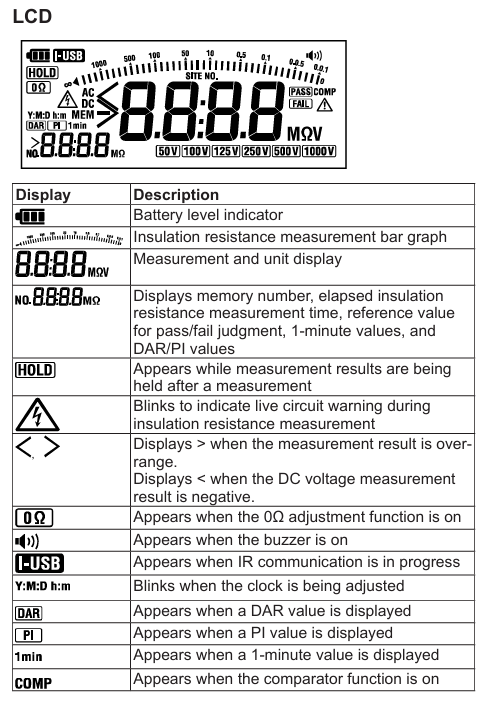
Laser and high voltage protection: When measuring insulation resistance, there is high voltage at the tip of the probe, and touching the probe or the tested circuit is prohibited; After measurement, wait for automatic discharge to complete(“ ⚠️” Symbol flashing+buzzing), then touch the circuit.
Measurement category restriction: The rated measurement category of the instrument is CAT III 600V, and it is prohibited to use it for CAT IV or main power circuits exceeding 600V; When the probe is paired with different accessories, the category is different (for example, 98008 with insulation cap is CAT III 600V, and without cap is CAT II 1000V).
Requirements for the tested equipment: Before measurement, the power supply of the DUT must be cut off, and the voltage measurement function must be used to confirm that there is no power before starting; Do not measure live circuits to avoid instrument damage or electric shock.
Equipment status check: If the instrument casing is damaged, the probe cable is exposed, or the battery compartment is damp, use is prohibited; After falling or colliding, it is necessary to contact the dealer for maintenance to avoid insulation protection failure.
2. Operation safety rules
Battery replacement: Before replacing, power off and remove the probe. It is forbidden to open the battery compartment during measurement; New batteries of the same type should be used to avoid mixing old and new/different models.
Environmental restrictions: Do not use in flammable gas, humid (with condensation) or outdoor rainy environments; Working temperature range -10~+50 ℃, storage temperature -20~+60 ℃, avoid direct sunlight.
Probe usage: Only Yokogawa designated probes can be used, damaged or aged probes should be replaced in a timely manner; Before connecting/disassembling the probe, it is necessary to disconnect it from the device being tested.
Core functions and operating procedures
1. Measurement mode and parameters
The instrument supports three core measurement modes, and the parameters and applicable scenarios for each mode are as follows:
(1) Voltage measurement (AC/DC automatic detection)
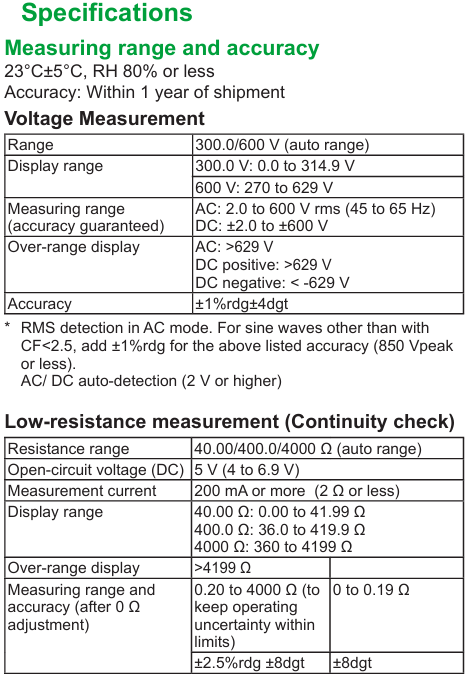
Range and Range: Automatic range (300.0V/600V), measurement range AC 2.0~600V (45~65Hz), DC ± 2.0~± 600V, over range display ">629V" (AC/positive DC) or "<-629V" (negative DC).
Accuracy: ± 1% reading ± 4 digits (23 ℃± 5 ℃, RH ≤ 80%), AC detected using true RMS, non sinusoidal (CF<2.5) requires an additional ± 1% error.
Operation steps:
Connect the line probe (98008) to the LINE terminal, and connect the ground probe (98009) to the EARTH terminal.
Set the range switch to "V/Ω" and connect the probes to the line side and ground side of the tested circuit.
No need to press the measurement switch, the instrument automatically detects AC/DC and displays the value (triggering a live warning when ≥ 30V:“ ⚠️” Blinking and buzzing.
(2) Insulation resistance measurement (core function)
Rated voltage and range: Supports six rated voltages of 50V/100V/125V/250V/500V/1000V, with automatic range switching (such as 1000V range of 4~4000M Ω), and a fixed value displayed for exceeding the range (such as>4199M Ω).
Key parameters:
Open circuit voltage: 100-110% of rated voltage.
Short circuit current: ≤ 1.5mA (1000V range) to ensure measurement safety.
Accuracy: First effective range (such as 1000V range 0.100~1000M Ω) ± 2% reading ± 2 digits; Second effective range (1001~4000M Ω) ± 5% reading.
Featured Features:
Automatic discharge: After measurement, keep the probe connected, and the instrument will automatically release the charge of the measured capacitor load. Before the discharge is completed“ ⚠️” Flashing and buzzing.
Pass/Tail judgment: A reference value (0.001~4199M Ω) can be set. When the measured value is ≥ the reference value, the backlight flashes green and "PASS", otherwise it flashes red and "FAIL".
DAR/PI calculation: Automatically calculate the dielectric loss absorption ratio (DAR=1 minute value/15 second value) and polarization index (PI=10 minute value/1 minute value), ranging from 0.00 to 9.99, with ">9.99" displayed if out of range.
Operation steps:
Connect the probe, confirm that the tested device is powered off, and verify that there is no power using voltage measurement.
Turn the range switch to the corresponding rated voltage level (long press SELECT to switch between 125V/100V levels).
Connect the probe to the device under test, and simultaneously press the instrument's "measurement switch" and the probe's "remote switch" to start measuring (continuous measurement requires locking the measurement switch).
After the measurement is completed, wait for the automatic discharge to end before removing the probe.
(3) Low resistance measurement (on-off check)
Range and Range: Automatic Range (40.00 Ω/400.0 Ω/4000 Ω), Measurement Range 0.00-4199 Ω, Over Range Display ">4199 Ω".
Key parameters:
Open circuit voltage: DC 4~6.9V.
Measurement current: below 2 Ω ≥ 200mA, when the current is ≥ 200mA, a buzzer will sound to indicate on/off.
Accuracy: 0.20-4000 Ω± 2.5% reading ± 8 digits; 0~0.19 Ω± 8 digits (0 Ω calibration needs to be performed first).
Featured feature: 0 Ω calibration (can counteract probe and fuse resistance, up to 3 Ω), ensuring low resistance measurement accuracy.
Operation steps:
Turn the range switch to "V/Ω" and press SELECT to switch to low resistance mode.
Short circuit the probe, long press the "0 Ω ADJ" button to perform calibration (display "0.00 Ω" and light up the "0 Ω" indicator light).
Connect the probe to the tested circuit, press the measurement switch, and display the resistance value (beep when the current is ≥ 200mA).
2. Auxiliary functions
Backlight and LED lights: The illuminance sensor automatically detects the ambient brightness, automatically turns on the backlight and measurement point LED lights when dim, and automatically turns off after 2 minutes of inactivity; It can also be manually set to be normally off.
Automatic shutdown: Automatic shutdown after 10 minutes of inactivity (disabled during measurement or when the measurement switch is locked), with a warning beep before shutdown.
Clock settings: Year/month/day/hour/minute can be set, measurement data is automatically associated with timestamps, and there is a built-in lithium battery backup clock (with a lifespan of about 10 years).
Memory function: can store 1000 sets of measurement data (voltage/insulation resistance/low resistance), including DAR/PI, time, range and other information; Support data viewing and deletion (single/all), and transfer to PC through USB adapter.
System Settings and Data Management
1. Function configuration (long press SETUP to enter configuration mode)
Pass/Tail reference value: Set the judgment threshold for each voltage level, supporting preset values (such as default 0.5M Ω for 500V level) or custom values (0.001-4199M Ω).
Backlight/LED lights: Set to "ON" (automatic start stop) or "OFF" (normally off).
Buzzer: Set "ON" (live warning, discharge, on/off prompt) or "OFF" (turn off all beeps).
Clock calibration: Adjust the year/month/day/hour/minute to ensure accurate data timestamps.
2. Data management
Storage: When holding the measurement value, press the MemoRY button briefly to set the site number (SITE No.1/2, 0~99) and data number (automatically increasing) to complete the storage.
View: Press and hold the Memory button during standby time, select the data number using the directional keys, and view the measured values and station information.
Delete: When viewing data, select the number (or "ALL") and press ENTER to confirm the deletion (single or all).
Transmission: Connect to the PC via USB communication adapter (91030), install the driver, and export data using commands (refer to IM 91030-01EN manual).
Maintenance and repair
1. Daily maintenance
Battery management: When the battery level is low, the "battery icon" displays "empty" and needs to be replaced in a timely manner (4 AA alkaline batteries); Long term disuse requires removing the battery to avoid leaking and damaging the instrument.
Cleaning: Wipe the outer shell with a dry soft cloth, and do not use abrasives or solvents; The surface of the illuminance sensor needs to be kept clean to avoid affecting the automatic backlight/LED function.
Calibration cycle: It is recommended to calibrate once a year to ensure measurement accuracy. Calibration must be performed by Yokogawa certified personnel.
2. Fault handling and maintenance
Frequently Asked Questions:
Inaccurate measurement value: Check the battery level, probe connection, and perform 0 Ω calibration again for low resistance measurement.
Backlight/LED not on: Clean the illuminance sensor or manually confirm that the configuration mode is set to "ON".
Unable to store data: Memory is full (old data needs to be deleted), or the operation was not in the 'measurement value hold' state.
Maintenance restrictions: It is prohibited to disassemble the instrument by oneself (only battery replacement can open the battery compartment). For internal faults, please contact the Yokogawa dealer. Repairs involving safety insulation components require professional operation.
3. Disposal and Compliance
Equipment disposal: When disposing of equipment, local laws and regulations must be followed, and batteries (alkaline batteries and built-in lithium batteries) must be separated and classified for disposal.
Environmental Compliance: Compliant with EU RoHS Directive, WEEE Directive (prohibiting the mixing of household waste in EU regions), and EU Battery Directive (batteries must be recycled separately).
Product Specifications
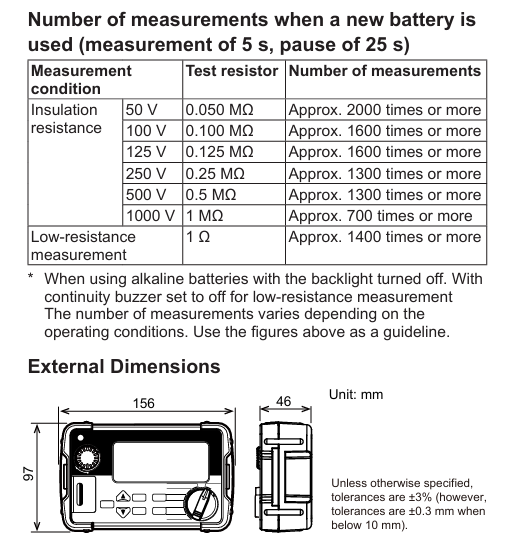
Appearance dimensions: 156 (W) × 46 (H) × 97 (D) mm, weight approximately 490g (including battery).
Factory default settings: such as Pass/Tail reference values for each voltage level (0.5M Ω for 500V level), default "ON" for backlight/buzzer, default clearing of memory, etc.
- OMRON
- ABB
- General Electric
- EMERSON
- Honeywell
- HIMA
- ALSTOM
- Rolls-Royce
- MOTOROLA
- Rockwell
- Siemens
- Woodward
- YOKOGAWA
- FOXBORO
- KOLLMORGEN
- MOOG
- KB
- YAMAHA
- BENDER
- TEKTRONIX
- Westinghouse
- AMAT
- AB
- XYCOM
- Yaskawa
- B&R
- Schneider
- KONGSBERG
- NI
- WATLOW
- ProSoft
- SEW
- ADVANCED
- Reliance
- TRICONEX
- METSO
- MAN
- Advantest
- STUDER
- DANAHER MOTION
- Bently
- Galil
- EATON
- MOLEX
- DEIF
- B&W
- ZYGO
- Aerotech
- DANFOSS
- Beijer
- Moxa
- Rexroth
- Johnson
- WAGO
- TOSHIBA
- BMCM
- SMC
- HITACHI
- HIRSCHMANN
- Application field
- XP POWER
- CTI
- TRICON
- STOBER
- Thinklogical
- Horner Automation
- Meggitt
- Fanuc
- Baldor
- SHINKAWA
- Other Brands
- UniOP
- KUKA
- Iba
- Beckhoff
- ADLINK
-
 National Instruments PCI-6111 Multifunction DAQ Card
-
 National Instruments cRIO-9035 CompactRIO Controller
-
 National Instruments NI 9759 Powertrain Control Module
-
 National Instruments 187254A-01 Ordering Part Number
-
 National Instruments PXI-6624 Module
-
 National Instruments cDAQ-9137 Chassis
-
 National Instruments PXIe-8133 Controller
-
 National Instruments 779139-01 Module
-
 National Instruments FP-DI-301 Module
-
National Instruments 194021D-01L Module
-
 National Instruments PXI-1000B Chassis
-
 National Instruments PXIe-8510 Module
-
 National Instruments PXI-6221 DAQ Card
-
National Instruments cDAQ-9188 Chassis
-
 National Instruments PXI-5421 Arbitrary Waveform Generator
-
 National Instruments cRIO-9023 CompactRIO Controller
-
 National Instruments PCI-6221 Multifunction DAQ Card
-
National Instruments PXI-4065 Digital Multimeter Card
-
 National Instruments NI 9477 Digital Output Module
-
 National Instruments cDAQ-9185 TSN Ethernet Chassis
-
National Instruments NI 9147 4-Slot cRIO Chassis
-
 National Instruments USB-6259 Mass Termination DAQ Device
-
 National Instruments 184120F-01 Ordering Part Number
-
 National Instruments PCI-4472B Sound and Vibration Module
-
 National Instruments SCXI-1130 Switch
-
 National Instruments VB-8012 VirtualBench
-
 National Instruments PXI-7350 Controller
-
 National Instruments eDAQ-9174 Chassis
-
 National Instruments PXI-4461 DSA Module
-
 National Instruments PCI-6280 DAQ Card
-
 National Instruments PXI-6251 DAQ Card
-
 National Instruments PXI-6653 Module
-
 National Instruments PCI-6509 DIO Device
-
 National Instruments NI 9751 Driver Module
-
National Instruments PXIe-6361 Multifunction I/O Module
-
 National Instruments cRIO-9014 CompactRIO Controller
-
National Instruments PCI-7390 Motion Control Card
-
National Instruments PXI-8512 CAN Interface Module
-
National Instruments sbRIO-9636 Single-Board Controller
-
 National Instruments IC-3120 Industrial Controller
-
 National Instruments PCI-6220 M Series DAQ Card
-
 National Instruments PXI-8176 Embedded Controller
-
 National Instruments PXI-6132 S Series DAQ Module
-
 National Instruments NI 9206 Analog Input Module
-
 National Instruments PXI-2584 Switch Module
-
 National Instruments 196541B-01L Module
-
 National Instruments 778075-01 Module
-
 National Instruments FP-RLY-420 Module
-
 National Instruments USRP-2920 Radio
-
National Instruments PCIe-6351 DAQ Card
-
National Instruments cRIO-9040 Controller
-
 National Instruments NI 9201 Input Module
-
National Instruments NI 9411 Input Module
-
National Instruments NI 9216 Input Module
-
National Instruments PCI-6221 DAQ Device
-
National Instruments PXI-4498 DSA Module
-
 National Instruments PXI-6259 DAQ Card
-
 National Instruments PXI-7354 Motion Controller
-
National Instruments FP-AI-110 Input Module
-
 National Instruments 192172F-04L Module
-
 National Instruments PXIe-8115 Controller
-
 National Instruments 142931B-01L Module
-
 National Instruments PXI-2503 Switch Module
-
National Instruments 776246-01 Module
-
 National Instruments CFP-2110 Compact FieldPoint Controller
-
National Instruments 779429-01 Ordering Part Number
-
National Instruments NI-9149 8-Slot EtherCAT Chassis
-
National Instruments PXI-4110 Programmable DC Supply
-
 National Instruments 192061-10 Ordering Part Number
-
 National Instruments cDAQ-9181 Chassis Module Carrier
-
National Instruments NI 9437 Digital Input Module
-
National Instruments cFP-2020 Compact FieldPoint Controller
-
National Instruments PCI-6259 Multifunction DAQ Card
-
National Instruments FP-TC-120 Thermocouple Module
-
National Instruments NI-9174 CompactDAQ Chassis
-
National Instruments PXI-6030E DAQ Module
-
 National Instruments PXIe-5160 Oscilloscope
-
National Instruments PXI-4462 DSA Module
-
National Instruments PXI-8109 Controller
-
 National Instruments PXI-6259 DAQ Card
-
National Instruments PXI-6030E DAQ Card
-
National Instruments cRIO-9056 Controller
-
National Instruments PXIe-8370 MXI Kit
-
 National Instruments USB-6212 DAQ Device
-
 National Instruments RMX-4000 Electronic Load System
-
National Instruments 785040-01 Ordering Part Number
-
 National Instruments cFP-AI-110 Analog Input Module
-
 National Instruments cDAQ-9189 8-Slot Chassis
-
National Instruments PXIe-4139 Source Measure Unit
-
 National Instruments PXI-5620 Digitizer Module
-
 National Instruments PCIe-8371 MXI-Express Card
-
National Instruments 196762B-01L Ordering Part Number
-
 National Instruments NI-9361 Counter Input Module
-
National Instruments cDAQ-9181 Ethernet Chassis
-
National Instruments NI 9221 Input Module
-
 National Instruments cDAQ-9171 Chassis
-
 National Instruments NI 9225 Input Module
-
 National Instruments NI 9171 Chassis
-
 National Instruments 779373-01 Module
-
National Instruments PCI-6034E DAQ Card
-
 National Instruments NI-9211 Input Module
-
National Instruments 779013-01 Module
-
 National Instruments NI-9159 RIO Chassis
-
National Instruments PCIe-GPIB Analyzer Card 778930-01
-
 National Instruments PCI-6110 Multifunction DAQ Card
-
National Instruments PXIe-8840QC Embedded Controller
-
 National Instruments PXI-2530 Switch Module
-
National Instruments 780927-01 Ordering Part Number
-
National Instruments PXI-8420 Serial Interface Module
-
 National Instruments PXIe-8135 Embedded Controller
-
 National Instruments GPIB-ENET/1000 Controller
-
 National Instruments PCI-6704 Analog Output Card
-
National Instruments PXI-6133 S Series DAQ Module
-
 National Instruments PXI-1042 8-Slot Chassis
-
National Instruments NI 9512 Module
-
National Instruments 779003-01 Module
-
 National Instruments cDAQ-9191 Chassis
-
National Instruments USRP-2921 Radio
-
 National Instruments 783368-01 Module
-
National Instruments PXI-2510 Switch Module
-
National Instruments PCI-7344 Controller
-
 National Instruments PXIe-1082 Chassis
-
National Instruments PXI-8108 Controller
-
 National Instruments USB-6363 DAQ Device
-
National Instruments cDAQ-9191 Wireless Chassis
-
National Instruments PXIe-4357 RTD Input Module
-
 National Instruments PCI-6512 Industrial Digital I/O Card
-
 National Instruments PXI-6115 Multifunction DAQ Module


