
Woodward MicroNet TMR 5009 Digital Control System: Authoritative Guide to Hardware Installation and Configuration
Woodward MicroNet TMR 5009 Digital Control System: Authoritative Guide to Hardware Installation and Configuration
Introduction: Redundant Core of Industrial Control
In the control field of key prime movers such as gas turbines and steam turbines, the reliability, safety, and fault tolerance of the system are of utmost importance. The MicroNet TMR 5009 digital control system launched by Woodward has become a benchmark in the field of high availability industrial control with its triple modular redundancy (TMR) architecture. This manual (85580V2, revised E) serves as the second volume of the four volume set of technical documents, providing a detailed explanation of the hardware composition, mechanical and electrical installation, troubleshooting, and maintenance specifications of the 5009 control system. This article aims to provide a comprehensive installation, debugging, and maintenance guide for engineering and technical personnel by delving into the core content of the manual, ensuring that the control system can operate safely, stably, and efficiently.
Chapter 1: System Overview and Security Principles
1.1 System documentation and scope of application
The technical documentation for MicroNet TMR 5009 is divided into four volumes, with this volume (Installation/Hardware Manual) focusing on hardware level information. It covers basic maintenance processes such as hardware description, mechanical and electrical installation steps, hardware specifications, troubleshooting guides, and module replacement. The manual is applicable to a series of 5009 part numbers (such as 9907-794 to 9907-1012, etc.) and provides general guidance, but users must apply it in conjunction with the specific system configuration (such as whether it includes cabinets, operator interfaces, etc.).
1.2 Critical Safety Warning
The manual emphasizes the importance of safety at the beginning, and all installation, operation, or maintenance personnel must read the entire text and related publications before starting work.
Overspeed protection: The prime mover must be equipped with an overspeed shutdown device that is completely independent of the control system to prevent speeding accidents and ensure personal and equipment safety.
Personal protective equipment (PPE): When operating, it is necessary to wear appropriate PPE according to the job content, such as goggles, hearing protection devices, safety helmets, gloves, safety boots, and respirators.
Emergency preparedness: When starting the prime mover, it is necessary to be prepared for emergency shutdown.
Electrostatic Discharge (ESD) Protection: The control module contains components that are sensitive to static electricity. Strict procedures must be followed during handling: contact the grounding surface to release body static electricity in the event of a power outage; Avoid using materials such as plastic and vinyl around the circuit board that are prone to static electricity; Do not touch the components or conductors on the printed circuit board with your hands or conductive devices. Suggest referring to Woodward manual 82715.
Hazardous Area Compliance: Unless otherwise specified, this equipment is suitable for Class I, Division 2, Groups A, B, C, D hazardous or non hazardous areas. Key limitation: If an F/T relay module (DTM) is installed, the entire device is no longer suitable for Class I, Division 2 hazardous areas and can only be used in ordinary (non hazardous) locations. All wiring must comply with the corresponding hazardous area wiring specifications.
High voltage warning: If there is a 125 Vdc voltage on the DTM terminal block, then there is also high voltage on the discrete module cable. Extreme care must be taken to avoid contact with cables when power cannot be cut off.
Chapter 2: In depth Analysis of Hardware Architecture
The 5009 system can provide various hardware configurations according to requirements, with the main components as follows:
2.1 Main control chassis and power architecture
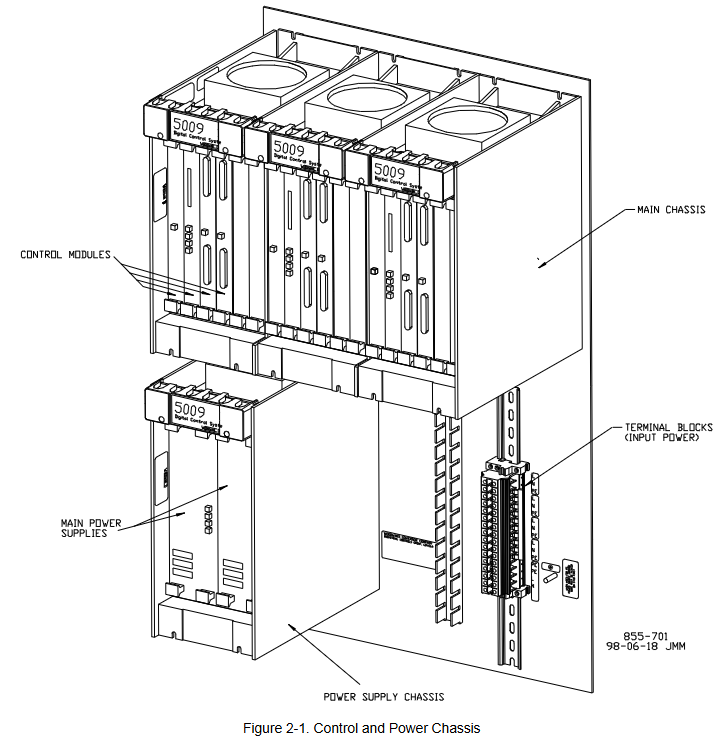
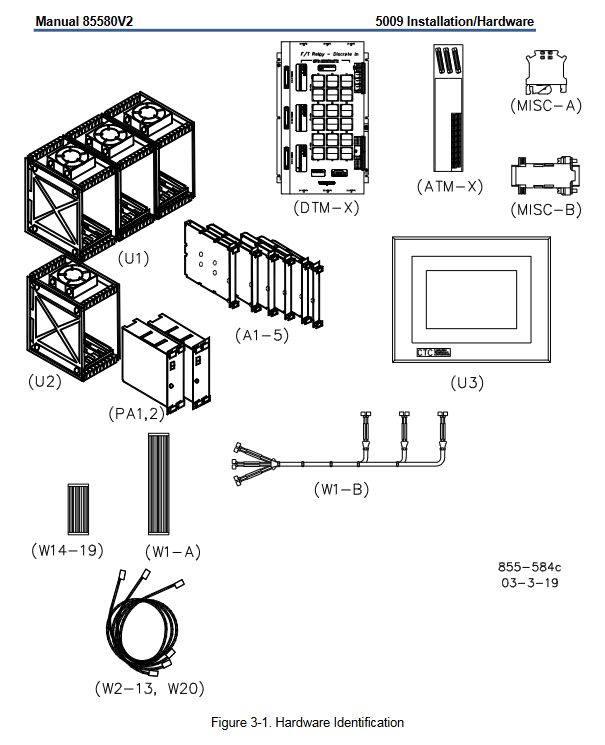
Main control chassis (U1): adopts VME (VERSAmodule Eurocard) bus structure, including three independent six slot core parts (A, B, C). Each kernel is physically and electrically isolated from each other to ensure that a single kernel failure does not cause system shutdown. The chassis is cooled by forced air cooling, and each six slot card holder is equipped with a cooling fan.
Power system:
Power case (U2): accommodates two pluggable main power modules (PA1, PA2), providing input power conversion.
Main power module: Various models (LVDC: 18-32 Vdc; AC/DC: 88-132 Vac/100-150 Vdc; HVAC/DC: 180-264 Vac/200-300 Vdc), can be paired and mixed to form a redundant power supply system. They generate six independent 24 Vdc outputs, which are shared by the load to power three cores.
Core power module (A1): One for each core, converting 24 Vdc to a stable 5 Vdc and 5 V pre charging power supply for use by other modules within the core, and allowing hot swapping of I/O modules.
2.2 Core functional modules
The standard configuration for each kernel includes:
Central processing unit module (CPU, A2): using Motorola 68040 microprocessor to execute control logic and operations. The front panel includes an RS-232 serial port, PCMCIA slot for downloading applications, real-time clock battery, and status indicator lights (running, low voltage, I/O lock, fault).
MPU and Analog I/O Module (A3): Integrated with driver circuits for 4 speed sensor inputs, 8 analog inputs (4-20 mA), 4 analog outputs (4-20 mA), and 2 proportional actuator outputs. All calibrations are completed through software without potentiometers.
Discrete I/O module (A4): processes 24 discrete inputs (dry contacts) and 12 relay output commands. Input isolation is achieved through optocouplers.
Serial Input/Output Module (SIO, A5): Optional module, usually installed in the A and B cores. Provide additional serial communication ports (RS-232/422/485) to enhance communication redundancy and capability.
2.3 Terminal Module: On site Interface
Analog Terminal Modules (ATM-1, ATM-2): Installed on standard DIN rails. As the interface between on-site analog signals (speed, analog I/O, actuator) and analog I/O modules within three cores. Provide signal routing, summation, and isolation power supply (for proximity switch probes) functions.
Discrete terminal module (DTM-1 to DTM-4): used to connect on-site discrete wiring (contact input and relay output). Each DTM processes 6 contact inputs and 3 relay outputs. The relay output adopts a unique 6-relay fault-tolerant configuration, supporting latent fault detection (LFD), which can detect relay faults without affecting the output status.
2.4 Optional Components
Cabinet: Standard floor standing front door cabinet (compliant with NEMA 12/IP55), weighing approximately 272 kilograms. The control system can be installed as a whole inside the factory, providing integrated power interface board and wiring management.
OpView ™ Operator Interface (U3): A computer-based touchscreen workstation used as a touchscreen alarm and remote control panel.
Chapter 3: Detailed explanation of mechanical installation steps
3.1 Preparation before installation
Storage: The device should be stored in an environment with a temperature of -20 ° C to+70 ° C and a humidity of ≤ 90% (non condensing). When stored for a long time, the main power supply needs to be powered on at least once every 18 months.
Open box inspection: Carefully inspect all components (see Table 3-1) for damage. Systems with cabinets are shipped as a complete package, while those without cabinets are shipped as individual parts.
3.2 Installation process
Site selection: Choose a location that is dry, well ventilated, with an ambient temperature of 0-55 ° C (0-46 ° C inside the cabinet), and away from strong electromagnetic interference. Ensure good grounding.
Installation of cabinet (if equipped): Fix with standard floor brackets, introduce cables from the bottom, and reliably ground with ≥ 10 mm ² wires.
Installation of chassis: Install the main control chassis and power chassis on the panel or backplane at a specified distance (50-200 mm). Connect the two using the provided W1-B cable and ensure that the chassis is grounded.
Installation module: In the event of a power outage, insert each module (power supply, CPU, I/O, etc.) accurately into the corresponding slot of the main control chassis according to the slot identification (Figure 3-6), and tighten it with screws. Do not use brute force.
Install terminal module:
ATM: Installed on a well grounded DIN rail, and reliably grounded its "chassis ground" terminal using the accompanying grounding terminal (Misc A) and short wire (≤ 15 cm).
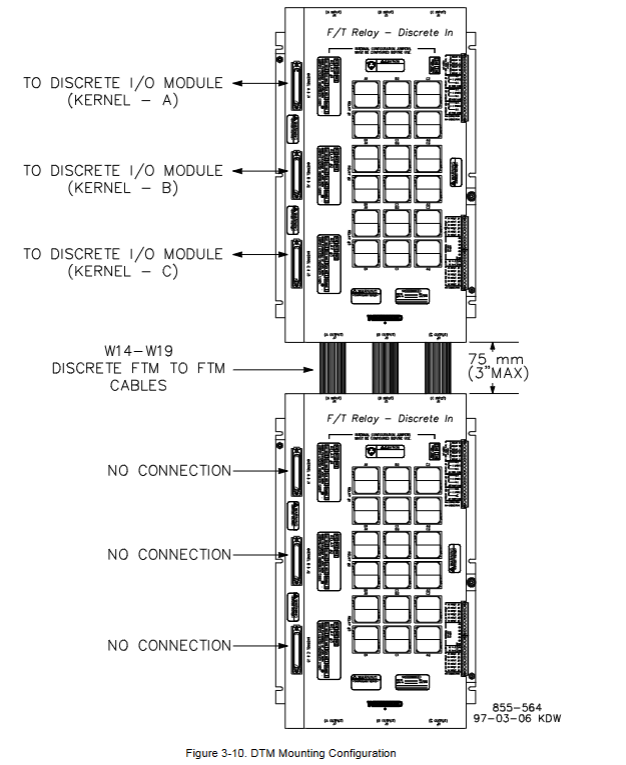
DTM: Master DTM (1,3) must be installed directly above Slave DTM (2,4). Ensure that the installation panel is reliably grounded.
Install OpView: Install according to the template (Figure 3-12) to ensure sufficient heat dissipation space is reserved.
Chapter 4: Electrical Installation and Wiring Specifications
4.1 General Principles
All on-site wiring must meet a temperature rating of at least 75 ° C.
Following EMC standards, analog and discrete I/O wiring must be separated from power lines.
Use shielded twisted pair cables to connect speed sensors, analog I/O, and communication ports. The shielding layer should be grounded at a single point at the control terminal and all intermediate terminal blocks, with an exposed wire length not exceeding 25 mm.
4.2 Power Wiring
Each main power supply must be equipped with an independent branch circuit protection (fuse or circuit breaker), with a rated value not exceeding 250% of the rated input current of the power supply (see Table 4-1). Slow melting protective devices must be used.
The input power wire diameter must meet the requirements in Table 4-1 (e.g. 10 mm ² or 8 AWG wire is required for a 24 Vdc power supply).
The three isolated 24 Vdc outputs (A, B, C) of the system must remain isolated and must not be short circuited externally, otherwise a short circuit at one point may cause the entire control system to lose power.
The leakage current exceeds 3.5 mA, therefore a protective earth (PE) connection is mandatory.
4.3 Detailed explanation of signal wiring
Speed sensor input: Supports passive magneto electric speed sensors (MPU) or active proximity switch probes (12/24 Vdc). MPU needs to install jumpers to enable three core detection; The proximity probe is provided with isolated power supply by ATM. Attention should be paid to frequency and voltage range limitations.
Analog input (4-20 mA): Supports two-wire (loop power supply) or four wire (self powered) transmitters. Attention should be paid to whether a common terminal jumper needs to be installed when wiring. The input impedance is 200 Ω.
Analog output (4-20 mA): The maximum driving capacity is 600 Ω load. Output non isolated, attention should be paid to the grounding loop.
Output of actuator: It can be configured to drive single coil or double coil actuators, with an output range of 4-20 mA or 20-160 mA. When wiring, specified jumpers need to be installed or removed according to the configuration.
Discrete (contact) input: 24 inputs, of which 4 have fixed functions (external emergency stop, reset, speed up, speed down). The contact wetting voltage can be provided by internal 24 Vdc, external 18-32 Vdc, or 100-150 Vdc (UL only). When using the internal power supply, jumper wires need to be installed on the DTM.
Relay output: 12 outputs, of which 2 have fixed functions (shutdown relay, alarm relay). Each route consists of 6 relays in series and parallel to achieve fault tolerance and latent fault detection.
LFD configuration: LFD is only suitable for circuits with 18-32 Vdc, 88-132 Vac, or 100-150 Vdc. It will inject a small leakage current into the load to detect faults when the relay is disconnected. It is necessary to verify whether the leakage voltage on the load is lower than its release voltage through the curves in Figures 4-10 to 4-12, otherwise LFD or parallel shunt resistor should be disabled.
Jumper setting: Each relay output requires two sets of jumpers: one set selects the circuit voltage to match the LFD logic, and the other set selects whether to detect normally open (NO) or normally closed (NC) contacts. It is recommended to use internal 24 Vdc for the relay coil power supply.
4.4 Communication and System Power on
Serial communication: The system provides multiple RS-232/422/485 ports for connecting engineering workstations (PCI), Modbus devices, printers (connected to CPU-B or SIO Port 1), OpView, etc. The communication distance of RS-232 is limited to 15 meters, and longer distances require the use of RS-422/485 or a converter.
System power on:
Turn on both main power sources in sequence and confirm that only the green "OK" LED is lit.
Instantly turn the "Reset/Run" switch of the A, B, and C core CPUs to the reset position and then turn it back.
The system will perform offline diagnosis (taking several minutes). After completion, all CPU red fault lights should turn off, green running lights should turn on, and the application program will start running.
Warning: Before starting the turbine for the first time, it is necessary to verify the calibration of all external input and output devices.
Chapter 5: Troubleshooting and Module Replacement
This chapter provides detailed LED status instructions, diagnostic procedures, and module replacement steps.
5.1 Key points for module diagnosis and replacement
Main power module: The status is indicated by the front panel LED (normal, input fault, overheating, power fault). When replacing, the input power must be disconnected first.
Kernel power module: Before replacement, it is necessary to use an engineering workstation to confirm that other kernels are running normally, then reset the CPU of that kernel, and first unplug all other modules in that kernel before replacing the kernel power supply.
CPU module: indicates status through running, I/O lockout, low VCC, and watchdog LED. Before replacing, confirm that other CPUs are functioning properly, reset the target CPU, disconnect the communication cable, and then replace.
I/O module (analog/discrete): The fault LED is constantly on or flashing, indicating a module fault. Key steps for hot plugging: First, release the module to disconnect it from the motherboard but still plug it into the slot, then disconnect the I/O cable and remove the faulty module; When installing a new module, first insert the module (without forcefully pressing it to the bottom), connect the I/O cable, and finally fully press the module into the motherboard socket and tighten it. This sequence can avoid system tripping caused by pin short circuits.
Terminal module (ATM/DTM): It is recommended to replace it when the system is offline. The fuse (24 Vdc/0.1 A) on the ATM can be replaced online. When replacing DTM relays, be sure to pay attention to high voltage hazards.
5.2 System Diagnosis
Offline diagnosis: Execute after CPU reset to detect core hardware such as memory, communication, clock, etc. The fault is represented by the flashing frequency code of the CPU fault LED (Table 5-1).
Online diagnosis: continuous during runtime, detecting task timeouts, memory errors, etc. The fault information is displayed in the OpSys fault mode of the engineering workstation (Table 5-2).
5.3 Comprehensive Investigation Guidelines
The manual provides a comprehensive system troubleshooting checklist (pages 79-80), covering various aspects such as actuators, linkage mechanisms, valves, oil circuits, steam conditions, input/output signals, sensors, power supplies, wiring, external devices, etc. It is a valuable tool for systematic fault location.
Chapter 6: Quick Check of Hardware Specifications
This chapter provides technical parameters for all key components, which serve as the basis for selection and acceptance.
Compliance and Certification: Compliant with EMC (EN 61000-6-2, -6-4) and Low Voltage Directive (EN50178). Certified by UL/cUL, suitable for Class I Div. 2 (excluding F/T relay modules) or ordinary locations. Lloyd's ENV1/ENV2 certification.
Environment: Working temperature 0-55 ° C; Storage temperature -20-70 ° C; Pollution level 2.
Power specifications: Detailed list of rated current, power, protector specifications, wire diameter, and holding time for various input voltage ranges.
I/O specifications:
Speed input: MPU (100-25k Hz, 1-25 Vrms); Proximity probe (0.5-25k Hz).
Analog input: 8 channels, 4-20 mA, 16 bit precision, 200 Ω impedance.
Analog output: 4 channels, 4-20 mA, maximum 600 Ω load.
Executive output: 2 channels, configurable for 4-20 mA (360 Ω) or 20-160 mA (45 Ω).
Discrete input: 24 channels, optocoupler isolation.
Relay output: 12 channels, contact capacity detailed in the manual (such as 28 Vdc/10A, 120Vac/15A, etc.).
Cabinet: Size approximately 2251H x 599W x 834D mm, weight approximately 272 kg, NEMA 12/IP55 protection.
Chapter 7: Preventive Maintenance
Regular inspection: Cable connection status.
Fan replacement: It is recommended to replace the cooling fans of the main chassis and power supply chassis every 50000 operating hours; The cabinet door fan is replaced every 60000 hours.
Air filter: Regularly clean the intake filter of the cabinet fan.
Battery inspection: Regularly check the CPU battery for any signs of leakage, swelling, or damage.
Chapter 8: Introduction to Compatible Products
Briefly introduced Woodward products that can be used with the 5009 system, including:
Operator Control Panel (OCP): A hardware panel that provides local start stop, speed regulation, and other functions.
Digital Synchronization and Load Control (DSLC): Used for synchronization, load distribution, VAR/PF control, etc. in generator applications.
Real power sensor (RPS): measures the generator or active power and provides a 4-20 mA signal to the 5009 system.
- OMRON
- ABB
- General Electric
- EMERSON
- Honeywell
- HIMA
- ALSTOM
- Rolls-Royce
- MOTOROLA
- Rockwell
- Siemens
- Woodward
- YOKOGAWA
- FOXBORO
- KOLLMORGEN
- MOOG
- KB
- YAMAHA
- BENDER
- TEKTRONIX
- Westinghouse
- AMAT
- AB
- XYCOM
- Yaskawa
- B&R
- Schneider
- KONGSBERG
- NI
- WATLOW
- ProSoft
- SEW
- ADVANCED
- Reliance
- TRICONEX
- METSO
- MAN
- Advantest
- STUDER
- DANAHER MOTION
- Bently
- Galil
- EATON
- MOLEX
- DEIF
- B&W
- ZYGO
- Aerotech
- DANFOSS
- Beijer
- Moxa
- Rexroth
- Johnson
- WAGO
- TOSHIBA
- BMCM
- SMC
- HITACHI
- HIRSCHMANN
- Application field
- XP POWER
- CTI
- TRICON
- STOBER
- Thinklogical
- Horner Automation
- Meggitt
- Fanuc
- Baldor
- SHINKAWA
- Other Brands
- UniOP
- KUKA
- Iba
- Beckhoff
- ADLINK
-
 Micro Innovation CAN-3AI/1AO-UI Profibus Module
 -
 Micro Innovation PDP-TP Profibus DP Module
 -
 Micro Innovation CAN-3AI/1AO-UI Analog Module
 -
 Micro Innovation MC2-430-12TSB-10 HMI Panel
 -
 Micro Innovation XNE-8DO-24VDC-0.5A-P I/O Module
 -
MICRO INNOVATION AG WINBLOC CAN-32DI/P-2x16 85 51 224182
-
 MICRO INNOVATION AG WINBLOC CAN-4AO/UI 85 51 224195
 -
Micro Innovation Xv-252-57cnn-1-10 HMI Panel
-
Micro Innovation XN Basis XN-S4T-SBBS-CJ 225200
-
 Micro Innovation GF1-10TVD-100 Micro Panel
 -
 Micro Innovation XN-B3T-SBC 16-Fold DO Base Module
 -
MICRO INNOVATION AG WINBLOC CAN-3AI/1AO-UI 85 51 224192
-
 KMK Micro Innovation GS2-90EMD-000 Micro Panel
 -
 Micro Innovation MC2-430-10TVB-1-10 PanelView Terminal 24VDC
 -
 Micro Innovation XNE-8DO-24VDC-0.5A-P I/O Module 8550100795
 -
 MICRO INNOVATION GF1-10TVB-100 Touch Panel
 -
MICRO INNOVATION AG WINBLOC CAN-4AI/UI Analog Input Module
-
 MICRO INNOVATION AG WINBLOC CAN-32DO/0.5A-P-2x16 Output Module
 -
 MICRO INNOVATION AG CAN-32DI/P-2X16 8551224182 Input Module
 -
 MICRO INNOVATION MK2-230/232-57 Circuit Board 85 28 200000
 -
 MICRO INNOVATION CAN-BRIDGE 8551224177 CAN Bridge
 -
Micro Innovation MC2-430-10TVB-1-10 Panel 24VDC
-
MICRO INNOVATION MC2-432-57CQB-1-10 HMI Panel
-
MICRO INNOVATION AG CAN-BRIDGE 85 51 224177 CAN Bridge
-
MICRO INNOVATION CAN-4AI/UI Analog Input Module
-
MICRO INNOVATION CAN-32DI/P-2X16 Input Module
-
 SIGMATEK MDD111 09-404-111 Drive Module
 -
 SIGMATEK DVI021 Display Interface Module
 -
 SIGMATEK 00-450-024 C-IPC Processor
 -
 SIGMATEK MDD-111 MDD111 Drive Module
 -
 SIGMATEK ICA011 20-102-011 Interface Module
 -
 SIGMATEK 01-250-010-D NC4Kompakt Control Module
 -
 SIGMATEK CRIF081 12-751-081 Interface Module
 -
 SIGMATEK S1026-8AF61-R4E-Z57 Drive Module
 -
 SIGMATEK 9305.081.02 9227.082.00 Control Module
 -
 Sigma Tek 5000B-36 Attitude Indicator
 -
 SIGMATEK CEZ201 12-051-201-O Counter Module
 -
 SIGMATEK DPS001 Power Supply Module
 -
 SIGMATEK 994 395 01z Via Interface Module
 -
 SIGMATEK PC411-K 01-310-411-K Industrial PC
 -
 SIGMATEK 9816.324.00 Demag NC4 Keyboard
 -
 SIGMATEK ET261 90010C-71 Operator Terminal
 -
 SIGMATEK DDI 164 05-006-164 Input Module
 -
 SIGMATEK CCP 082 C-DIAS Processor Module
 -
SIGMATEK CEZ201 12-051-201-O PLC Module
-
SIGMATEK MDD 1111 06178867 Drive Module
-
SIGMATEK S1 073-6AC61-RE-Y08-Z Drive Module
-
SIGMATEK MDD 111 Drive Module MDD111
-
 SIGMATEK CSDI161 Safety Module 12-891-161
 -
SIGMATEK C-IPC Processor 01-450-024
-
 SIGMATEK DIAS DAM122 Analog Mixing Module
 -
Sigma Tek 5000B-36 Attitude Gyro Indicator
-
 SIGMATEK TMS012 Motherboard Module 05-250-012-T
 -
 SIGMATEK CCP-531 PLC Module
 -
SIGMATEK DIAS DNC4 I/O Module 05-250-011
-
 SIGMATEK AI088 Analog Input Module
 -
 SIGMATEK CEZ201 Counter Module
 -
SIGMATEK CIC011 Industrial Computer Module
-
 SIGMATEK MDM021 Motor Drive Module
 -
 SIGMATEK DTO163 Digital Output Module
 -
SIGMA-TEK 5000B-36 Attitude Gyro
-
SIGMATEK DM161 Digital Input Module
-
SIGMATEK CCP-531 PLC Control Panel
-
 SIGMATEK HZS773 Touch Terminal Operator Panel
 -
SIGMATEK MDP101 3 KVA 45-65Hz Driver
-
 SIGMATEK ETV1251 Touch Panel 12-230-1251
 -
SIGMATEK CIO021 Safety Module 12-013-021
-
Sigma Tek 4000H-5 Directional Gyro
-
 SIGMATEK TAE531 I/O Module 01-240-531
 -
 SIGMATEK DAI081 Input Module 05-009-081
 -
 SIGMATEK DCP640 Drive Control Module
 -
 SIGMATEK DCP643 Slides Module A6-29
 -
SIGMATEK SCP011 Safety Module 20-890-011
-
SIGMATEK DDM 164-D Slides Module
-
 SIGMATEK C-IPC Processor 146267
 -
SIGMATEK ET3200 Display Screen
-
SIGMATEK CEZ221 C-DIAS Mixing Module
-
 SIGMATEK SDD120-2 DIAS Servo Drive
 -
SIGMATEK DIP011 05-058-011 Module
-
 Sigmatek DEC181 I/O Module
 -
SIGMATEK DCP640 DIAS Central Unit
-
SIGMATEK 00-450-024 C-IPC Industrial Computer
-
SIGMATEK AKM32C-ANCNR-B0 Servomotor
-
SIGMATEK DVI021 DIAS Power Module
-
SIGMATEK CTS051 12-053-051 Control Module
-
 SIGMATEK CTS022 Control Module
 -
 Sigmatek 01-250-010-D NC4Kompakt V2.1 Module
 -
 SIGMATEK Control Keyboard 01-285-042 Interface
 -
 SIGMATEK TO081 20-007-081 Digital Output Module
 -
 Sigmatek AKM73Q-ANCNGBB0 7.07kW Servo Motor
 -
Sigmatek DIP012 Demag 07024165 Processor Module
-
 SIGMATEK PC 411 Injection Molding Controller
 -
SIGMATEK CEZ201 12-051-201-O Processor Module
-
 SIGMATEK VI021 20-003-021 Digital Input Module
 -
SIGMATEK Computer C-IPC 144904 Industrial PC
-
 SIGMATEK 9307.083.01 9305.081.02 Industrial Module
 -
 SIGMATEK AI075 Analog Input Module
 -
 SIGMATEK HGT834-W Teaching Pendant
 -
Sigmatek CDI161 Digital Input Module
-
 SIGMATEK HGT834 Teaching Pendant
 -
 SIGMATEK CEZ201 12-051-201-O Module
 -
SIGMATEK Demag 9617.067.03 9708.244.00 Module
-
 SIGMATEK SCP010 Safety CPU Module
 -
SIGMATEK N100 20-011-100 Module
-
 SIGMATEK CNC 031 Positioning Output Module
 -
 Sigmatek 01-355-016 Control Module
 -
 Sigmatek MDM021 Digital Mixed Module
 -
Sigmatek DAI411 05-020-411 Analog Module
-
Attitude Gyro 1U367-232-2 Aircraft Instrument
-
 Sigma-Tek 5000B-36 Attitude Gyro 23-501-06-16
 -
Sigmatek HGT834-W Injection Molding Teach Pendant
-
Sigma Tek 5000EG Attitude Gyro 1U670-003-12
-
Sigmatek HGT834-W Teach Pendant
-
Sigmatek DEE011 05-068-011 Module
-
Sigmatek DIAS DCP643 Central Processing Unit
-
Sigmatek MDD111-1 DIAS Drive Axis Module
-
 Sigmatek DKL042 05-024-042 Terminal Module
 -
Sigmatek DM822 Control Module
-
Sigmatek CDM167 12-008-167-O Module
-
Sigmatek TAE151 Touch Display Unit
-
 Sigmatek DCC041 SLIDES Module 05-700-041-D
 -
Sigmatek AKM65M-ANC2GBB0 PM Servo Motor
-
Sigmatek ETT221 01-230-221 Operator Terminal
-
Sigmatek SLIDES DAM 124 Analog Module
-
Sigmatek AKM31C-ANCNGBB0 Servo Motor
-
Mannesmann Demag Sigmatek CP626 Central Unit
-
SIGMATEK 0332.554.03 Board 371071000154
-
 SIGMATEK 12-250-021 Base Plate Back Panel CM5V020


