
How to use Honeywell OELD intelligent junction box
Provide local visual status indication and Bluetooth low-energy interface, which can be configured and maintained through Bluetooth enabled mobile devices, certified by ATEX and IECEx, suitable for Zone 1 (gas) or Zone 21 (dust) hazardous areas, and the explosion-proof version also has cULus certification, suitable for Class I Zone 1 or Class II Zone 1.
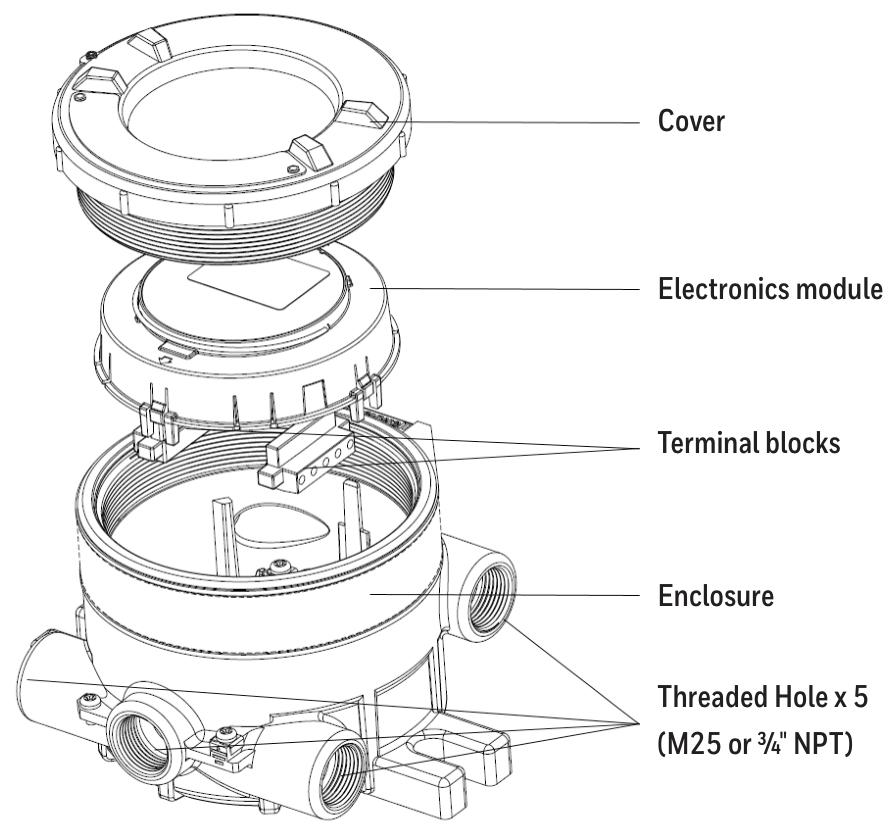
There are 5 entrances (M25 or 3/4 "NPT depending on the version) and 3 certified plugs, while the Ex e version of the OELD only has 5 M25x1.5 entrances.
How to use Honeywell OELD intelligent junction box
Security Warning and Information
The installation must comply with the standards recognized by relevant national authoritative institutions, and reference should be made to EN 60079-14 and EN 60079-29-2 in the European region.
It is strictly prohibited to open the casing when powered on or when there may be explosive atmospheres present.
Operators need to be aware of the measures to be taken when the gas concentration exceeds the alarm level, and must not modify the product structure, otherwise it may render critical safety and certification requirements ineffective.
Only trained personnel are allowed to carry out internal operations of the product. Its measurement function has not obtained ATEX certification, and it is not allowed to rely on the backlight status indication of the OELD display screen for safety related operations. The equipment must not operate in an environment with an oxygen content exceeding 21%.
Special safety conditions for use (increased safety Ex e version)
Each terminal can be connected to a maximum of one single or multiple wires on either side, unless multiple wires are connected in an appropriate manner.
The insulation layer of the wire connected to the terminal should be suitable for the corresponding voltage and extend within 1mm of the terminal throat.
All used and unused terminal screws should be tightened to between 0.5Nm and 0.6Nm, and terminals can only be installed and wired using cables recommended by IECEx KEM 10.0093U.
Disposal and Environmental Protection
The product should be disposed of in accordance with local regulations, including materials such as the shell (aluminum alloy or 316 stainless steel), lid (aluminum alloy or 316 stainless steel, glass).
The product must be disposed of through appropriate WEEE disposal facilities and cannot be treated as general industrial or household waste.
Product Overview
Basic Introduction
OELD is a certified junction box for hazardous locations, suitable for detectors with 4-20mA output, and can be used in conjunction with Searchpoint Optima Plus or Searchline Excel series gas detectors.
Provide local visual status indication and Bluetooth low-energy interface, which can be configured and maintained through Bluetooth enabled mobile devices, certified by ATEX and IECEx, suitable for Zone 1 (gas) or Zone 21 (dust) hazardous areas, and the explosion-proof version also has cULus certification, suitable for Class I Zone 1 or Class II Zone 1.
There are 5 entrances (M25 or 3/4 "NPT depending on the version) and 3 certified plugs, while the Ex e version of the OELD only has 5 M25x1.5 entrances.
Structure and function
There are two grounding connection points and an electronic module with two pluggable terminal blocks inside the shell, used to connect the field and detector wiring.
Featuring four-color backlighting (green, yellow, red, blue) and a customized 7-segment liquid crystal display (LCD), different backlight colors represent different states, such as green for normal operation or warning, red for alarm, etc.
Options
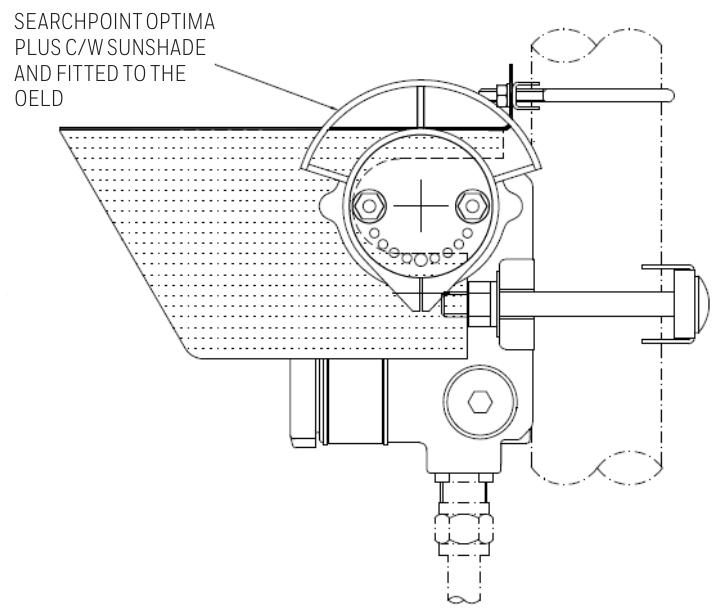
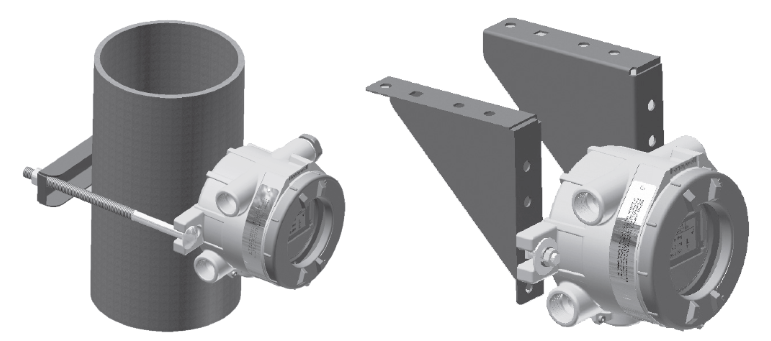
Including pipeline installation kit (1226A0358), which can install OELD on pipelines with diameters ranging from 2 "to 6" (50 to 150mm); Ceiling installation bracket kit (1226A0355), used for ceiling installation; Sun visor (94000-A-1006), made of 316 stainless steel, can protect OELD and related detectors from direct sunlight.

Installation related
Site selection and positioning
The placement of gas detectors should follow the recommendations of gas diffusion experts, process equipment experts, safety personnel, and engineering personnel, and record the protocol for determining the detector location.
Installation designers should refer to IEC/EN 60079-29-2 and other national practice standards, as well as the site selection recommendations for specific locations in the gas detector technical manual.
Mechanical Installation
OELD can be installed in various ways through integrated mounting pads, such as on flat walls Unistrut ® On the bracket, use the optional pipe installation kit to install on the pipeline or utility pole, or use the ceiling installation bracket kit to install on the ceiling.
When installing, it is necessary to consider the correct direction of the detector, ensure that the installation bolts are fully tightened, and use appropriate locking washers.
electrical installation
The detector can be installed directly or remotely to the OELD, and some detectors have corresponding junction boxes for remote installation.
The installation steps include removing the cover, taking out the electronic module, installing cable glands or conduit fittings, installing detectors (with different installation methods for different entrance versions), sealing unused cable entrances, making electrical connections, reinstalling the display module and cover, etc.
Electrical connection
Terminal block definition
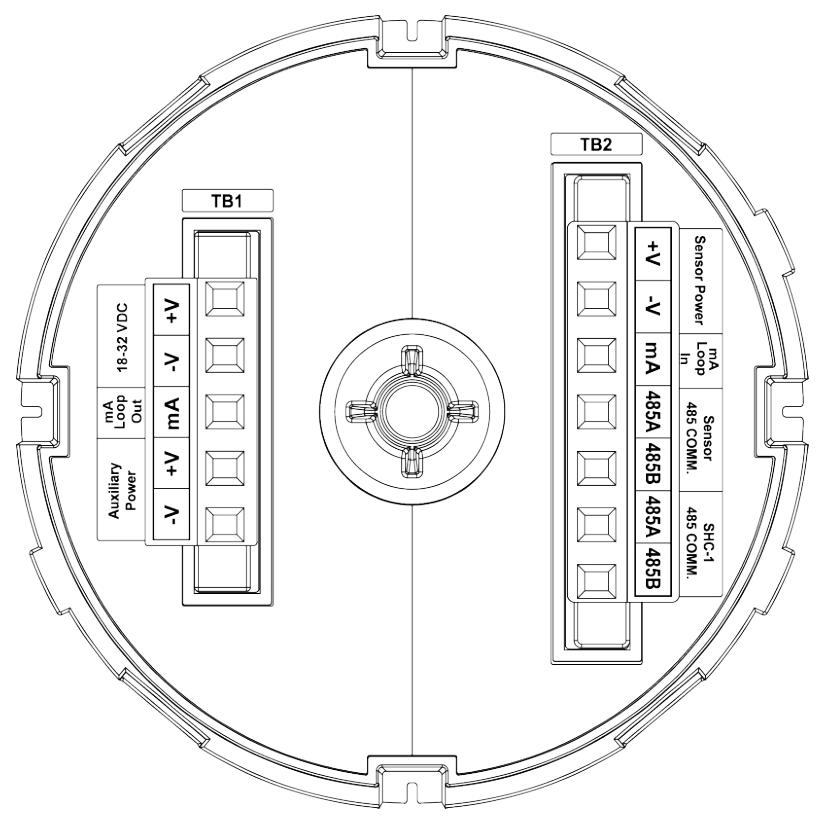
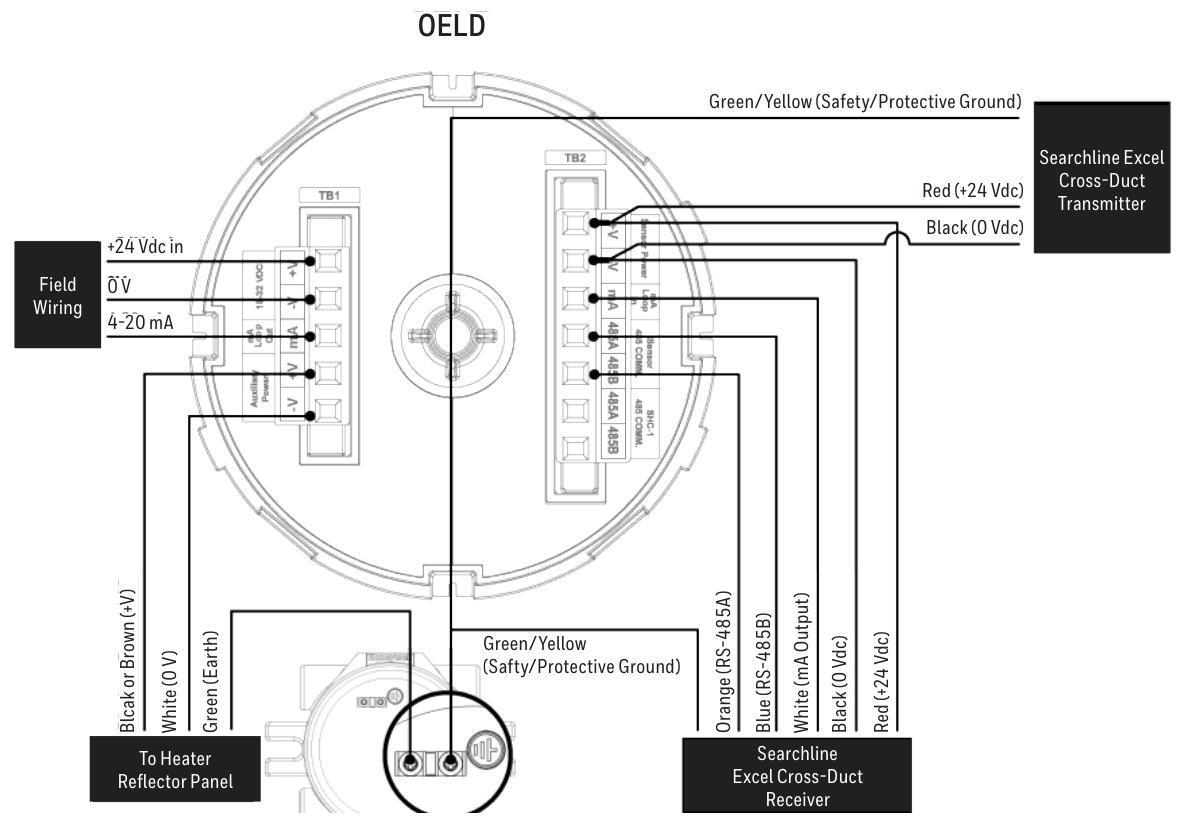
Terminal block 1 (TB1) and terminal block 2 (TB2) have different markings, colors, and functions for each terminal. For example, terminal 1 of TB1 is - V (black) and is used for auxiliary power supply.
The increased safety (Ex e) version uses terminal blocks of specific manufacturers and types, while the explosion-proof (Ex d) version is black and the increased safety version is green. They must not be mixed, otherwise the product certification will be invalidated.
Wiring diagram
Provided OELD and Searchpoint Optima Plus、Searchline Excel、Searchline Excel Cross-Duct(XD) Wait for the wiring diagram of the detector, as well as the connection method of the detector with the current sink and current source configuration.
Grounding connections should avoid grounding loops. The OELD has two internal grounding points, and the on-site cable shielding layer should be connected to the instrument grounding in the control room. The internal and external grounding points of the OELD have corresponding specifications and connection requirements.
Power supply and cables
The OELD requires a voltage supply of 18-32Vdc (nominal 24Vdc) with a maximum power consumption of 2W, taking into account the voltage drop caused by cable resistance to ensure the minimum required supply voltage at the detector.
The cable should be suitable for hazardous area classification and comply with relevant regulations. It is recommended to use industrial grade shielded field cables. The allowable wire size for terminals is 0.2-2.5mm ² (24-12AWG), and the rated wire temperature should be greater than 80 ° C. The terminal tightening torque should be 0.5Nm to 0.6Nm.
Configuration
Configurable parameters
Including local alarm indication threshold (can be set between 5 and 65% FSD, default 20% FSD), mA input level setting (to match the detector's mA output curve), and OELD universal display settings (such as full-scale range, measurement unit, gas name, etc.).
configuration process
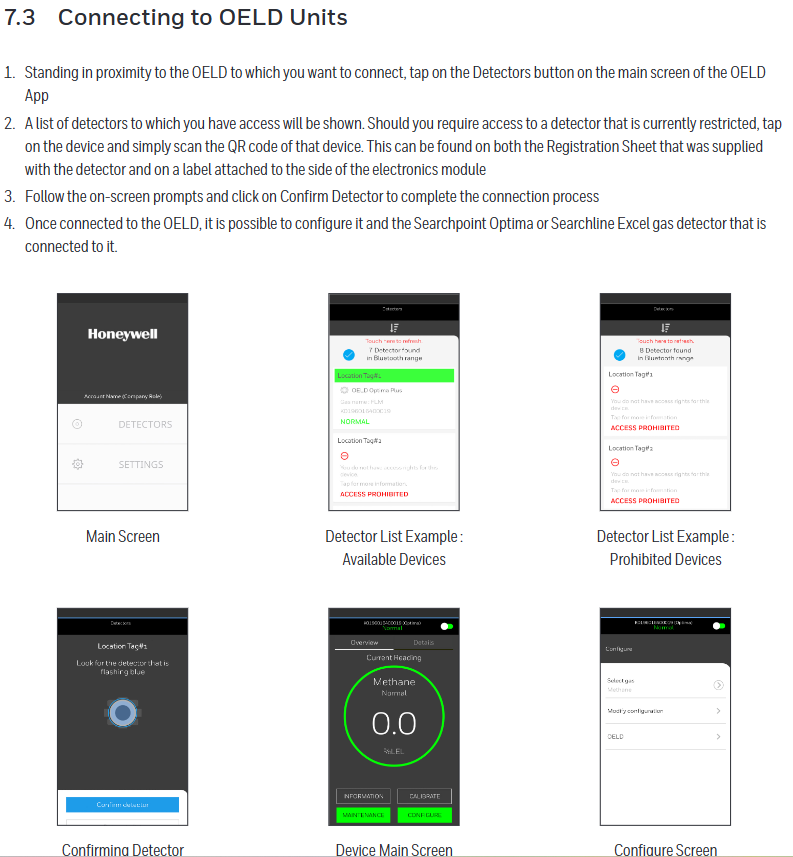
Configure by running the OELD App on a mobile device, including steps such as launching the application, logging in, searching for nearby OELD units, selecting and confirming connections, etc.
After completing the configuration or changing the settings, the configuration should be read back and verified to ensure that the changes are correct.
Operation
Startup and self-test
The startup and self-test sequence takes about 60 seconds, during which display testing, backlight testing, internal hardware and memory checks, etc. will be performed. After completion, it will enter normal operating mode.
normal operation
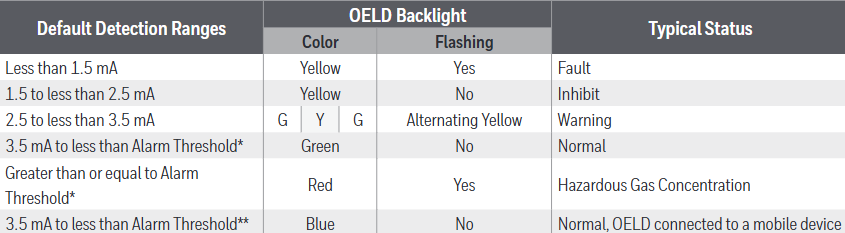
During normal operation, the LCD backlight indicates the detector status based on the 4-20mA output of the detector, and different current ranges correspond to different backlight colors and flashing states.
The display screen displays gas concentration information (in graphical and numerical form) and other information during normal operation. At low temperatures, the refresh rate of the display screen will automatically decrease. At extremely low temperatures, the screen clarity may decrease, but it can return to normal after the temperature is restored.
communication model
Equipped with Bluetooth Low Energy (BLE) interface, it supports non-invasive connection with mobile devices running the OELD App, and can also communicate with specific detectors through RS-485 interface.
Honeywell Analytics SHC-1 handheld interrogator and SHC protection device can also be used to connect with relevant detectors, but attention should be paid to relevant warnings and precautions.
OELD Mobile Application
Installation and operation
The OELD mobile application can run on Android 4.3 (Jelly Bean) or higher operating systems that support Bluetooth Low Energy (BLE) and can be downloaded and installed from the Google Play Store.
The first launch requires reading the End User License Agreement, logging in or registering an account. Registration requires an Internet connection and at least one OELD device's QR code.
Connection and Configuration
Can connect to OELD devices that have already been registered to the user account. The connection steps include clicking on relevant buttons on the main screen of the application, selecting the device, scanning the QR code (if access to restricted devices is required), confirming the connection, etc.
Multiple parameters of the OELD device can be configured, as well as parameters of detectors such as Searchpoint Optima Plus and Searchline Excel connected to the OELD, and calibration operations can also be performed (specific detectors).
Maintenance and troubleshooting
maintenance
Regularly inspect the OELD and cables for physical damage, clean the glass windows with a damp cloth, and do not use solvents or abrasive cleaners. The OELD has no user repairable parts.
It is recommended to check the configuration and operation of the equipment at least once a year, and the gas detector connected to the OELD should be checked and calibrated according to its operating instructions.
The replacement of the display module requires following specific steps, including power-off, removing the cover and electronic module, replacing the module, etc. After replacement, it needs to be reconfigured.
Malfunctions and warnings
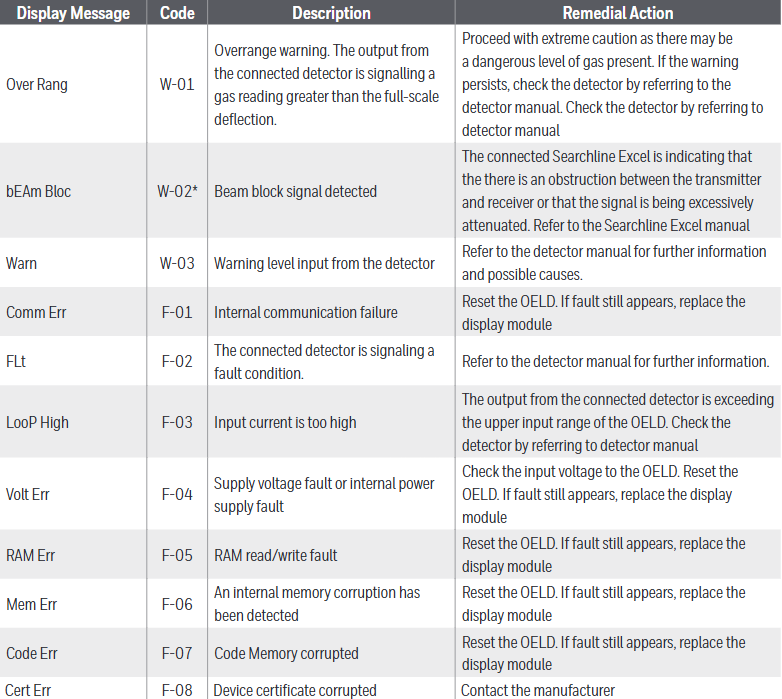
Different display messages and codes correspond to different types of faults or warnings, such as "Over Rang" (W-01) indicating an over range warning, "Comm Err" (F-01) indicating an internal communication fault, etc., with corresponding remedial measures.
Specifications and ordering information
specifications
The material is marine grade aluminum alloy or 316 stainless steel (with 5-coated painted surface treatment), and the weight varies depending on the material. The size is 159x197x114mm, and the number and type of cable entrances vary depending on the version. There are corresponding terminals, storage and working temperatures, humidity, display information, visual indicators, power supply, interfaces, protection levels, and certifications.
ordering information
We provide models and descriptions of different versions of OELD smart junction boxes and related accessories (such as universal service kits, terminal block groups, plugs, installation kits, sunshades, etc.). We warn that it is necessary to obtain service kits that match the OELD version, otherwise the product certification will be invalidated.
Certification and Warranty
Certification and Approval
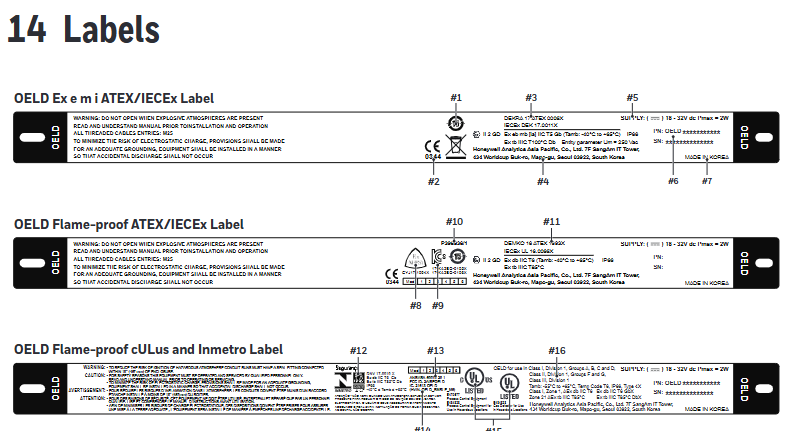
Including EU conformity declaration, hazardous area certification (such as ATEX, IECEx, cULus, Inmetro, etc.), performance certification, wireless certification, etc. Different certifications have corresponding certificate numbers and scope of application.
Warranty Summary
Honeywell Analytics guarantees that the OELD will be free of component and process defects, repairable or replaceable under correct use for a period of 24 months from the date of shipment, excluding consumables, normal wear and tear, accidental damage, etc. Claims must be made within the warranty period.
- OMRON
- ABB
- General Electric
- EMERSON
- Honeywell
- HIMA
- ALSTOM
- Rolls-Royce
- MOTOROLA
- Rockwell
- Siemens
- Woodward
- YOKOGAWA
- FOXBORO
- KOLLMORGEN
- MOOG
- KB
- YAMAHA
- BENDER
- TEKTRONIX
- Westinghouse
- AMAT
- AB
- XYCOM
- Yaskawa
- B&R
- Schneider
- KONGSBERG
- NI
- WATLOW
- ProSoft
- SEW
- ADVANCED
- Reliance
- TRICONEX
- METSO
- MAN
- Advantest
- STUDER
- DANAHER MOTION
- Bently
- Galil
- EATON
- MOLEX
- DEIF
- B&W
- ZYGO
- Aerotech
- DANFOSS
- Beijer
- Moxa
- Rexroth
- Johnson
- WAGO
- TOSHIBA
- BMCM
- SMC
- HITACHI
- HIRSCHMANN
- Application field
- XP POWER
- CTI
- TRICON
- STOBER
- Thinklogical
- Horner Automation
- Meggitt
- Fanuc
- Baldor
- SHINKAWA
- Other Brands
- UniOP
- KUKA
- Iba
- Beckhoff
- ADLINK
-
 Sigmatek CFF011 Drive Module
 -
 Sigmatek DCP642 DIAS Central Unit
 -
 Sigmatek SDM081 S-DIAS Safety Module
 -
 Sigmatek C-IPC 01-450-024 Industrial PC
 -
 Sigmatek Kompakt NC4 Control Module
 -
 Sigmatek VI021 VARAN Interface Module
 -
 Sigmatek Engel RD-M6-2 Robot Drive
 -
Sigmatek CNC031 Positioning Module
-
Sigmatek TO161 Digital Output Module
-
 Sigmatek CCL912 CPU PSU Module
 -
 Sigmatek ETV0821 Operator Terminal
 -
 SIGMATEK ET 261 Operator Terminal
 -
 SIGMATEK CP731-K Control Module 20-004-731-K
 -
 SIGMATEK ETEK Motherboard 12-250-021-K CM5V020
 -
 Sigmatek DEZ 181 DIAS Input Output Module
 -
 Sigmatek IPC111-D Industrial PC
 -
 SIGMATEK AKM54L-ANC2GBB0 Servomotor with Gearhead
 -
SIGMATEK CTMS020 CM5V020 CNC Controller
-
 DEMAG ERGOTECH 061 381 66 Sigmatek Control Unit
 -
 Sigmatek DAI 883 Module
 -
 Sigmatek ETV1521 Control Panel Installation Terminal
 -
 Sigmatek 9802.289.01 Board Control TA71 Display
 -
 Wittmann Sigmatek EU-252 proDrive W4 Servo Drive
 -
 Sigmatek CDM166 C-DIAS Module
 -
Sigmatek DCP082 DIAS Central Unit
-
 Sigmatek CCP081 C-DIAS Processor Module
 -
Sigmatek MD111-1 Drive Module
-
Sigmatek ETV0821 Operator Terminal
-
 Sigmatek ISE021 Interface Module
 -
 Sigmatek DCC080L Slide Control Module
 -
 Sigmatek AI075 Analog Input Module
 -
SIGMATEK TO161 20-007-161 Module
-
 SIGMATEK CIC011 Module
 -
 SIGMATEK AE0000318502 Hand Terminal Pendant
 -
 Sigmatek Krauss Maffei PC323-K Control Unit
 -
Sigmatek Krauss Maffei PC321-K Control Cabinet PC
-
SIGMATEK CIV521 Control Module
-
SIGMATEK C-IPC-171 Industrial PC
-
 SIGMATEK MDP101-L DIAS Drive Network Module
 -
 Sigmatek Krauss Maffei PC323-K Control Cabinet PC
 -
 SIGMATEK CRCH081 C-SLIDES Temperature Module
 -
 Sigmatek PC301-E6 Industrial PC SSD
 -
 Sigmatek SDI101 S-SLIDES Safety Input Module
 -
 Sigmatek CIV521 VARAN Control Module
 -
 Kollmorgen Sigmatek AKM42G-ANCNGBB0 Servo Motor
 -
 Sigmatek PC 521 Process Controller
 -
 Sigmatek Geode LX800 12-780-012 Industrial PC
 -
 Sigmatek STO081 S-DIAS Safety Output Module
 -
 Sigmatek SCP111 S-DIAS Safety CPU Module
 -
 Sigmatek CDI161 Industrial I O Module
 -
Sigmatek Wiring Board V2 DIAS 05-250-023
-
 Sigmatek CP102 20-004-102 S-DIAS CPU Module
 -
SIGMATEK SLIDES CNC 115 Module
-
 SIGMATEK DCC080 05-700-080-2 Control Module
 -
SIGMATEK MDD 121 Drive Axis Module
-
 SIGMATEK CIO011 C-DIAS Multi I/O Module
 -
SIGMATEK CIV512 Servo Drive
-
 SIGMATEK CM5V020 12-250-021-K Wiring Module
 -
 SIGMATEK CIO011 12-013-011 Multi I/O Module
 -
SIGMATEK 01-450-031 C-IPC Industrial Computer
-
SIGMATEK AKM24D-ANBNGBB0 Servo Motor
-
 DEMAG NC4 LP0001289.03 Control Module
 -
 Sigmatek ETEK Industrial PC C-IPC with Option Module
 -
Sigmatek AO081 20-010-081 Analog Output Module
-
Sigmatek CNC 031 Positioning Module
-
Sigmatek CP731-K 20-004-731-K CPU Module
-
Sigmatek MDD 3320-JR-A Drive Module
-
Sigmatek PM Servo Motor AKM52K-ANC2GBB0
-
Sigmatek MDP 101 09-403-101 Power Module
-
Sigmatek S-SLIDES AO046 Analog Output Module
-
Sigmatek ICA111 20-102-111 Interface Module
-
 SIGMATEK DCP646 Module 05-004-646
 -
SIGMATEK SDI101 Digital Input Module 20-891-101
-
 SIGMATEK S3330-2 Directional Gyro Altitude Instrument
 -
SIGMATEK MDP102-1 Controller
-
SIGMATEK SMT 01-230-321 Touch Screen
-
SIGMATEK Krauss Maffei PC301-K 01-310-301-K Industrial PC with 8GB SSD
-
 SIGMATEK ETT731 01-230-731 Built-in Touch Terminal
 -
SIGMATEK CIV521 Control Module
-
 SIGMATEK DME 128 Module 05-005-128
 -
 SIGMATEK SCP111-S 20-890-111-S S-DIAS Safety CPU Module
 -
Sigmatek SCP111 S-DIAS Safety CPU
-
Sigmatek CRIF081 Interface Module
-
Sigmatek CP112-1 S-DIAS CPU Module
-
 Sigmatek MDD121-L DIAS Drive Axis Module
 -
 Sigmatek C-IPC 01-450-024 Industrial PC
 -
Sigmatek SDD215-23 SLIDES Drive
-
 Sigmatek DPS001 DIAS System Components
 -
Sigma-Tek 4000B-30 Directional Gyro
-
 Sigmatek SDD340-46 SDD Series Drive
 -
 Sigmatek CEZ221 Euromap67 I O Module
 -
 SIGMATEK VI021 Interface Module
 -
SIGMATEK CP731-K Control Module
-
SIGMATEK Krauss Maffei PC321-K Industrial PC
-
SIGMATEK ET322 Operator Terminal
-
SIGMATEK CP102 Control Module 24VDC
-
SIGMATEK SRO021 Relay Output Module
-
SIGMATEK DCP640 DIAS Central Unit
-
 SIGMATEK MDD 121 Drive Axis Module
 -
SIGMATEK AI043 Analog Input Module
-
 ENOTEC OXITEC 5000 SME-53310000 Oxygen Analyzer
 -
SIGMATEK Krauss Maffei PC301-K 01-310-301-K Industrial PC
-
 SIGMATEK SDD310-23 VARAN Servo Drive
 -
 SIGMATEK CDM 163 and CIC 011 C-DIAS Input Modules
 -
SIGMATEK MDP 101-1 Power Module
-
SIGMATEK CM5V020 Wiring Circuit with CTMS020
-
SIGMATEK CCP521 C-DIAS Processor Module
-
 SIGMATEK MDP 101-K Power Module
 -
SIGMATEK ETEK C-IPC 733MHz VIA Eden 7000
-
 SIGMATEK DCP 643 DIAS PLC CPU Module
 -
SIGMATEK TAE121 12-200-121 Operator Terminal
-
Sigmatek TMS012-T Injection Moulding Technology Module
-
Sigmatek MDD 121-1 Controller
-
Sigmatek CDM167 Module
-
Sigmatek DCP082 DIAS Central Unit
-
 Sigmatek ETT731 Built-In Terminal Touch
 -
Sigmatek CCP521 C-DIAS Processor Module
-
Sigmatek Krauss Maffei PC301-K Control Cabinet PC
-
 Sigmatek CIC-21 C-DIAS CAN Module
 -
Sigmatek CIO-011 Multi I O Module
-
Sigmatek 01-450-152D C-IPC 152 Industrial PC
-
SIGMATEK 01-450-024 C-IPC 128MB VIA 733MHz
-
SIGMATEK CCL-081 C-DIAS Processor Module
-
SIGMATEK CP311 20-004-311 Module
-
 SIGMATEK EP00000262 SLIDES MIDI I O-V3 Controller
 -
SIGMATEK TMS012-T Slides Technology Module
-
SIGMATEK MDD111-1 Drive Axis Module
-
 SIGMATEK MDP101-1 PLC Module


