
SIEMENS SIMATIC S7-1500/ET 200MP Automation System
SIEMENS SIMATIC S7-1500/ET 200MP Automation System
Basic Framework and Core Positioning
The official system manual for Siemens SIMATIC S7-1500 automation system and ET 200MP distributed I/O system was released in December 2014 (document number A5E03461182-AC), aiming to provide technical guidance for industrial automation engineers throughout the entire process from project planning to equipment maintenance, suitable for scenarios such as machine manufacturing and process control. The document follows a "general sub general" structure, first outlining the system positioning and components, then explaining the implementation details in modules, and finally supplementing technical parameters and appendices to ensure the coherence and operability of information.
System Overview and Core Components
1. S7-1500 automation system
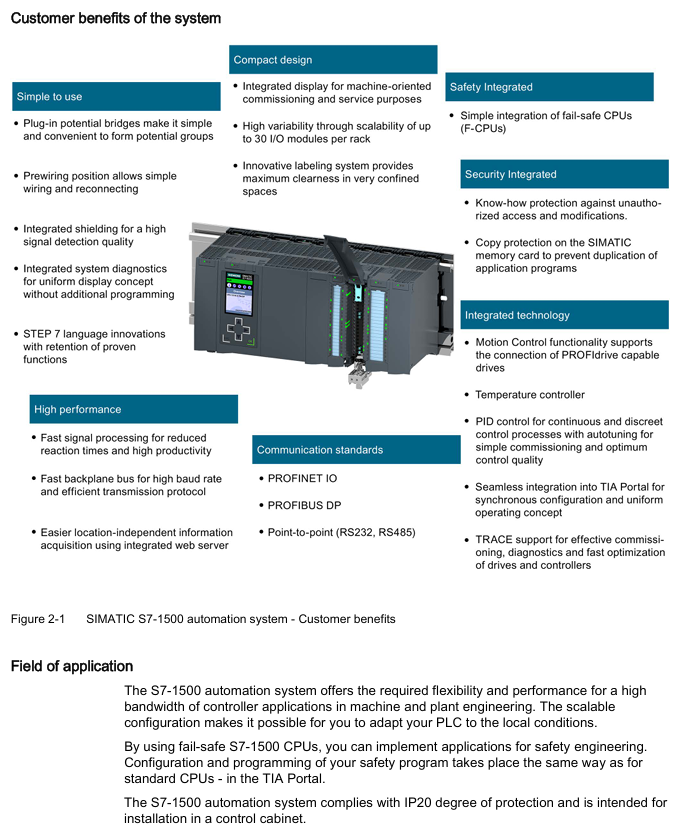
Positioning and advantages: As an upgraded product of S7-300/400, it focuses on high cost-effectiveness and compact design, supports up to 32 modules (slots 0-31), integrates high-speed backplane bus (improves data transmission efficiency), web server (remote monitoring) and Motion Control function (drive control), meets IP20 protection level, and needs to be installed in the control cabinet.
Core components:
Example of Key Parameters for Component Type Function Description
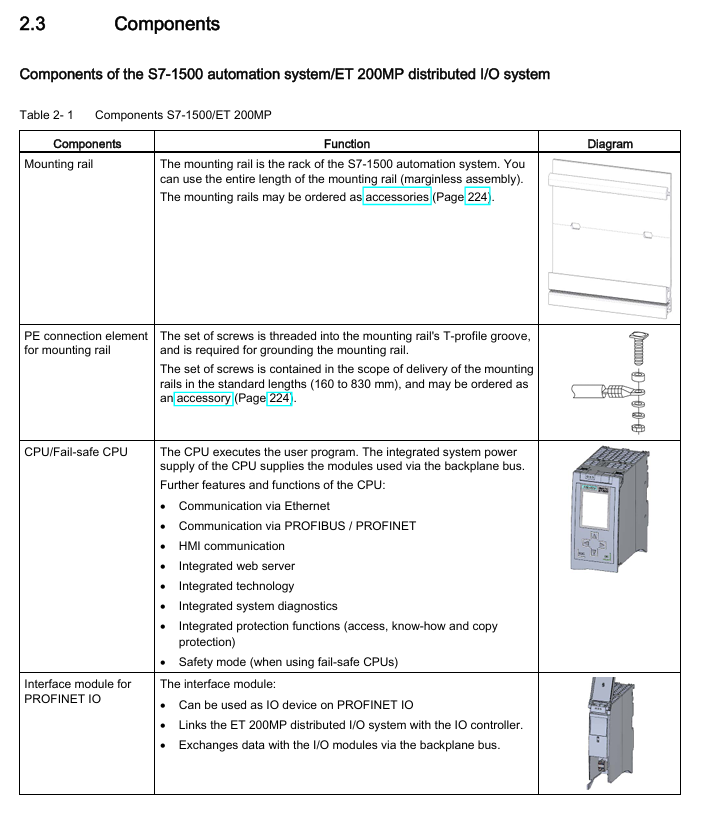
The CPU executes user programs and provides PROFINET/PROFIBUS communication interface model 1518-4PN/DP, supporting 8 communication modules
The system power supply (PS) is powered by the backplane bus, and the diagnostic function integrates PS 25W 24V DC and PS 60W 120/230V AC/DC
I/O module for digital/analog signal acquisition and output, including technical modules (counting, positioning), digital module DI 32x24VDC HF, analog module AI 8xU/I
Communication module (CM) extends communication interface, supporting point-to-point (RS232/RS485), PROFINET/Ethernet CM 1542-5 (DP master/slave)
2. ET 200MP distributed I/O system
Positioning and advantages: A scalable distributed I/O solution that communicates with the central controller through PROFINET/PROFIBUS, supports high channel density (25mm wide module with 32 channels), adapts to S7-1500 I/O modules, and can be flexibly expanded to 30 I/O modules (PN interface) or 12 I/O modules (DP interface).
Core components:
Example of Key Parameters for Component Type Function Description
The interface module (IM) connects distributed I/O with the central controller, and supports isochronous mode (250 μ s cycle) for PROFINET version (IM 155-5 PN ST/HF) or PROFIBUS version (IM 155-5 DP ST) IM 155-5 PN HF
The I/O module is compatible with S7-1500 and supports digital, analog, and technical modules with the same parameters as S7-1500 I/O module
The system power supply (PS) is powered by the backplane bus and needs to be separately configured with the same S7-1500 system power supply
Application planning and hardware configuration
1. Hardware configuration rules
S7-1500 configuration restrictions:
Module type allows maximum number of slots. Please note
Load power (PM) slot 0 has no limit (only 1 is displayed in STEP 7) and does not occupy the backplane bus. External wiring is required
System power (PS) slots 0, 2-31, 3 for supplementing backplane bus power
CPU slot 1: 1 required component, indispensable
I/O modules 2-31, 30 including digital, analog, and technical modules
Communication module 2-31 4-8 (depending on CPU model) CPU 1511-1PN supports 4, 1518-4PN/DP supports 8
ET 200MP configuration limit:
Interface type allows maximum number of I/O modules in the slot. Remarks
PROFINET (IM 155-5 PN) slot 1 30 (slots 2-31) supports system power expansion (up to 3)
PROFIBUS (IM 155-5 DP) slots 2 12 (slots 3-14) without system power expansion function
2. Power configuration and power balance
Classification of power supply types:
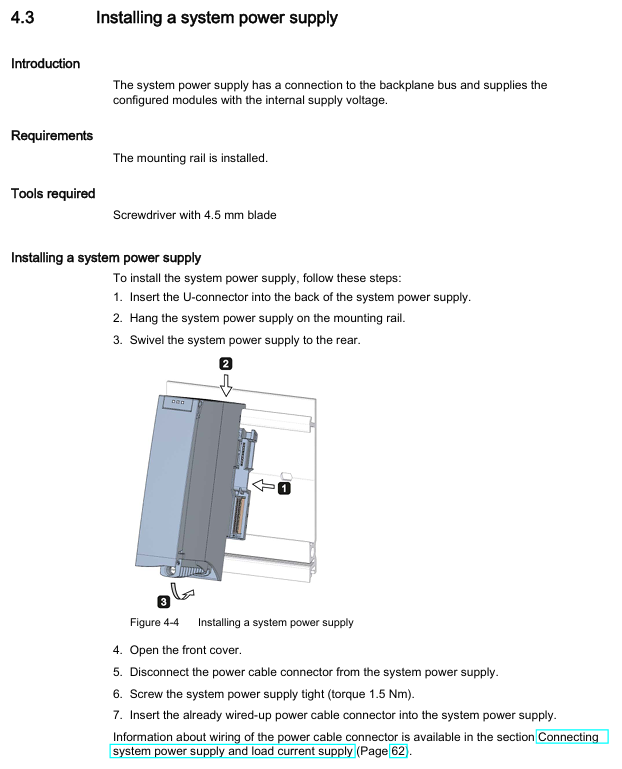
System power supply (PS): only supplies power to the backplane bus (module electronic components, LEDs), needs to be connected to the backplane through a U connector, supports 24/48/60V DC or 120/230V AC input;
Load Power Supply (PM): Provides power to I/O module input/output circuits, sensors/actuators, without backplane bus connection, installed on rails but not occupying slots, recommended Siemens SIMATIC series (PM 70W/190W 120/230V AC).
Power balance calculation: It is necessary to ensure that the backplane bus "supply power ≥ consumption power", and STEP 7 will automatically verify. If the power is insufficient, the system power supply needs to be added. The calculation logic is as follows:
Calculate the backplane power supply of CPU/interface modules (such as 14W provided by CPU 1516-3 PN/DP);
Accumulate the power consumption of each I/O module (such as DI 32x24VDC HF consumption of 1.1W);
If the total consumption exceeds the supply, a system power supply (such as PS 25W to supplement 25W) needs to be added to slot 2-31.
Installation and wiring specifications
1. Installation process and requirements
Guide rail installation: Use TH 35 standard guide rails (length 160/245/482.6/530/830/2000mm), with M6 fixing screws (torque 4Nm). For guide rails ≥ 530mm, fixing screws should be added every 500mm;
Module installation sequence: From left to right, it is "System power supply (optional) → CPU/interface module → I/O module". The modules are mechanically and electrically connected through U connectors, and the last module does not require the installation of U connectors;
Minimum gap: A gap of ≥ 25mm (for heat dissipation and operation space) should be left at the top/bottom of the module. The operating temperature for horizontal installation is 0-60 ℃, and for vertical installation it is 0-40 ℃.
2. Wiring rules
Power wiring:
CPU/Interface Module: Connected to 24V DC (L+, M) through a 4-pole plug, with wire cross-sections of 0.25-2.5mm ² (multiple strands without conduit) and 0.25-1.5mm ² (multiple strands with conduit), and a stripping length of 10-11mm;
System power supply/load power supply: Connected through an encoded power plug, AC input needs to distinguish L1/N, DC input needs to distinguish L+/M, wire stripping length is 7-8mm, torque is 0.5-0.6Nm.
Front connector of I/O module:
Connector type, applicable module width, wiring method, key parameters
Screw terminal 35mm tool fastening supports 2 wires (total cross-section ≤ 1.5mm ²), torque 0.4-0.7Nm
Spring type terminal (push in) 35mm/25mm, tool free hard wire directly inserted, multi strand wire needs to be stripped 8-11mm
The simulation module requires additional installation of shielding brackets and shielding clamps to ensure EMC protection (interference current is grounded through the rail).
Configuration and Debugging Process
1. Software Configuration (STEP 7 TIA Portal)
Basic configuration steps:
Create a project and add S7-1500/ET 200MP devices;
Hardware detection: After connecting to the CPU online, the actual configuration is automatically read through "Hardware detection" to avoid manual input errors;
Address allocation: STEP 7 automatically assigns I/O addresses (digital modules by bit/byte, analog modules by word), supports manual adjustment, can be divided into 32 process image partitions (PIP), PIP 0 is automatically updated, PIP 1-31 can be bound to OB blocks;
Download configuration: The CPU needs to be in STOP mode, and check "Consistent download" to ensure data integrity.
Key configuration functions:
Configuration control: "one main configuration adapts to multiple sub configurations" is realized through control data record (No. 196), which supports module slot adjustment or omission. It is necessary to call WRREC command to transmit data in startup OB;
Block protection: Set know-how protection (password encryption, only displaying interfaces and comments) and copy protection (binding CPU/SIMATIC storage card serial number) for OB/FC/FB/DB.
2. Debugging process
First power on inspection:
Confirm correct wiring (power supply, grounding, I/O circuit);
Insert SIMATIC memory card (required, supports 24MB-2GB, distinguishes program card/firmware update card);
After power on, the CPU performs a self-test (LED flashes all → STOP light turns yellow). If there is a fault, check the diagnostic buffer.
IO testing:
Scan the PROFINET network and test I/O wiring using the PRONETA tool (free of charge);
Monitor/modify variables through STEP 7 "Watch&Force Tables", or directly operate on the CPU display screen (supporting forced peripheral input/output).
Program processing and security protection
1. Fundamentals of Program Processing
Organizational Block (OB): Execute based on event triggers, priority 1-26 (1 lowest, 26 highest), core OB functions are as follows:
OB Number Triggering Event Priority (Default) Function Description
OB 1 loop program 1 main loop executes user program
OB 10-17 timed interrupt 2 triggered at the set time (e.g. every 100ms)
OB 40-47 hardware interrupt 18 triggered by I/O module signal (such as rising edge)
OB 80 time error 22 triggered when cycle time exceeds the limit
OB 121 programming error 7 triggered when there is a syntax error in the program
CPU overload handling: The event queue caches events of the same priority. If the "maximum number of queues" is exceeded, they will be discarded. The time error OB can be triggered through the "event threshold" (such as calling OB 80 when the number of queues is ≥ 1).
2. Safety protection
Access protection: Level 4 permission control, password needs to be configured in CPU properties:
Protection level permission description
Full access to read and write hardware configuration and blocks, no password requirement
Read only access Read only configuration/block, cannot be downloaded, requires password to unlock write permission
HMI access is only available for HMI and diagnostic access, and requires password unlocking for read and write permissions
No access, all access is prohibited. Password unlocking is required
Other protections:
Physical protection: The front cover of the CPU/interface module can be locked (with a diameter of 3mm) or sealed with a seal;
Network protection: Disable unused communication interfaces (such as NTP, PUT/GET), and only allow HTTPS access to the web server.
Maintenance and fault diagnosis
1. Daily maintenance
Module replacement: When replacing the I/O module after power failure, attention should be paid to the coding components (the front connector should be separated from the module when first inserted to ensure that it is only compatible with modules of the same type);
Firmware update: supports 3 methods (online STEP 7, SIMATIC memory card, web server), requires CPU in STOP mode, 2GB card can update CPU 1517/1518 firmware;
Factory reset: By using the mode selector (MRES key), display screen, or executing STEP 7, the IP address and user program will be cleared, leaving only the MAC address.
2. Fault diagnosis
Diagnostic buffer: records CPU/module faults (such as power overload, configuration mismatch), which can be read through STEP 7 or CPU display screen;
Service data reading: In the event of a malfunction, export the DUMP.S7S file through a web server, STEP 7, or SIMATIC storage card for analysis by Siemens technical support;
Testing function:
LED flash test: After triggering, the CPU RUN/STOP/ErrOR/MAINT lights flash to locate the device;
Trace function: records variable changes (such as drive parameters), supports triggering condition settings (such as value exceeding threshold).
Technical Parameters and Appendices
1. Core technical parameters
Environmental parameters:
Parameter Type Range Remarks
Operating temperature 0-60 ℃ (horizontal)/0-40 ℃ (vertical) Display screen automatically shuts down due to overheating
Storage temperature -40-80 ℃ under original packaging conditions
Relative humidity of 10% -95% (no condensation) in accordance with IEC 61131-2 3K3 level
Vibration/shock 5-9Hz (3.5mm amplitude)/250m/s ² (6ms) in accordance with IEC 60068-2-6/27
EMC performance:
Anti interference: electrostatic discharge ± 8kV (air)/± 6kV (contact), surge ± 2kV (power supply)/± 1kV (signal);
Launch: EN 55016 Class A (industrial environment), additional protection is required in residential areas (such as grounding control cabinets).
2. Appendix Resources
Dimensional drawings: including detailed dimensions of guide rails, shielding brackets, and label strips (e.g. 35mm module shielding bracket width 25mm);
Accessories list: Core accessory models (such as front connector 6ES7592-AM00-0XB0, potential bridge 6ES7592-3AA00-0AA0);
- OMRON
- ABB
- General Electric
- EMERSON
- Honeywell
- HIMA
- ALSTOM
- Rolls-Royce
- MOTOROLA
- Rockwell
- Siemens
- Woodward
- YOKOGAWA
- FOXBORO
- KOLLMORGEN
- MOOG
- KB
- YAMAHA
- BENDER
- TEKTRONIX
- Westinghouse
- AMAT
- AB
- XYCOM
- Yaskawa
- B&R
- Schneider
- KONGSBERG
- NI
- WATLOW
- ProSoft
- SEW
- ADVANCED
- Reliance
- TRICONEX
- METSO
- MAN
- Advantest
- STUDER
- DANAHER MOTION
- Bently
- Galil
- EATON
- MOLEX
- DEIF
- B&W
- ZYGO
- Aerotech
- DANFOSS
- Beijer
- Moxa
- Rexroth
- Johnson
- WAGO
- TOSHIBA
- BMCM
- SMC
- HITACHI
- HIRSCHMANN
- Application field
- XP POWER
- CTI
- TRICON
- STOBER
- Thinklogical
- Horner Automation
- Meggitt
- Fanuc
- Baldor
- SHINKAWA
- Other Brands
- UniOP
- KUKA
- Iba
- Beckhoff
- ADLINK
-
 MICRO INNOVATION GF1-10TVB-100 Touch Panel
 -
 MICRO INNOVATION AG WINBLOC CAN-4AI/UI Analog Input Module
 -
 MICRO INNOVATION AG WINBLOC CAN-32DO/0.5A-P-2x16 Output Module
 -
 MICRO INNOVATION AG CAN-32DI/P-2X16 8551224182 Input Module
 -
 MICRO INNOVATION MK2-230/232-57 Circuit Board 85 28 200000
 -
 MICRO INNOVATION CAN-BRIDGE 8551224177 CAN Bridge
 -
 Micro Innovation MC2-430-10TVB-1-10 Panel 24VDC
 -
 MICRO INNOVATION MC2-432-57CQB-1-10 HMI Panel
 -
MICRO INNOVATION AG CAN-BRIDGE 85 51 224177 CAN Bridge
-
 MICRO INNOVATION CAN-4AI/UI Analog Input Module
 -
MICRO INNOVATION CAN-32DI/P-2X16 Input Module
-
 SIGMATEK MDD111 09-404-111 Drive Module
 -
 SIGMATEK DVI021 Display Interface Module
 -
 SIGMATEK 00-450-024 C-IPC Processor
 -
 SIGMATEK MDD-111 MDD111 Drive Module
 -
 SIGMATEK ICA011 20-102-011 Interface Module
 -
 SIGMATEK 01-250-010-D NC4Kompakt Control Module
 -
 SIGMATEK CRIF081 12-751-081 Interface Module
 -
 SIGMATEK S1026-8AF61-R4E-Z57 Drive Module
 -
 SIGMATEK 9305.081.02 9227.082.00 Control Module
 -
 Sigma Tek 5000B-36 Attitude Indicator
 -
 SIGMATEK CEZ201 12-051-201-O Counter Module
 -
 SIGMATEK DPS001 Power Supply Module
 -
 SIGMATEK 994 395 01z Via Interface Module
 -
 SIGMATEK PC411-K 01-310-411-K Industrial PC
 -
 SIGMATEK 9816.324.00 Demag NC4 Keyboard
 -
 SIGMATEK ET261 90010C-71 Operator Terminal
 -
 SIGMATEK DDI 164 05-006-164 Input Module
 -
 SIGMATEK CCP 082 C-DIAS Processor Module
 -
SIGMATEK CEZ201 12-051-201-O PLC Module
-
SIGMATEK MDD 1111 06178867 Drive Module
-
SIGMATEK S1 073-6AC61-RE-Y08-Z Drive Module
-
SIGMATEK MDD 111 Drive Module MDD111
-
 SIGMATEK CSDI161 Safety Module 12-891-161
 -
SIGMATEK C-IPC Processor 01-450-024
-
 SIGMATEK DIAS DAM122 Analog Mixing Module
 -
Sigma Tek 5000B-36 Attitude Gyro Indicator
-
 SIGMATEK TMS012 Motherboard Module 05-250-012-T
 -
 SIGMATEK CCP-531 PLC Module
 -
SIGMATEK DIAS DNC4 I/O Module 05-250-011
-
 SIGMATEK AI088 Analog Input Module
 -
 SIGMATEK CEZ201 Counter Module
 -
SIGMATEK CIC011 Industrial Computer Module
-
 SIGMATEK MDM021 Motor Drive Module
 -
 SIGMATEK DTO163 Digital Output Module
 -
SIGMA-TEK 5000B-36 Attitude Gyro
-
SIGMATEK DM161 Digital Input Module
-
SIGMATEK CCP-531 PLC Control Panel
-
 SIGMATEK HZS773 Touch Terminal Operator Panel
 -
SIGMATEK MDP101 3 KVA 45-65Hz Driver
-
 SIGMATEK ETV1251 Touch Panel 12-230-1251
 -
SIGMATEK CIO021 Safety Module 12-013-021
-
Sigma Tek 4000H-5 Directional Gyro
-
 SIGMATEK TAE531 I/O Module 01-240-531
 -
 SIGMATEK DAI081 Input Module 05-009-081
 -
 SIGMATEK DCP640 Drive Control Module
 -
 SIGMATEK DCP643 Slides Module A6-29
 -
SIGMATEK SCP011 Safety Module 20-890-011
-
SIGMATEK DDM 164-D Slides Module
-
 SIGMATEK C-IPC Processor 146267
 -
SIGMATEK ET3200 Display Screen
-
SIGMATEK CEZ221 C-DIAS Mixing Module
-
 SIGMATEK SDD120-2 DIAS Servo Drive
 -
SIGMATEK DIP011 05-058-011 Module
-
 Sigmatek DEC181 I/O Module
 -
SIGMATEK DCP640 DIAS Central Unit
-
SIGMATEK 00-450-024 C-IPC Industrial Computer
-
SIGMATEK AKM32C-ANCNR-B0 Servomotor
-
SIGMATEK DVI021 DIAS Power Module
-
SIGMATEK CTS051 12-053-051 Control Module
-
 SIGMATEK CTS022 Control Module
 -
 Sigmatek 01-250-010-D NC4Kompakt V2.1 Module
 -
 SIGMATEK Control Keyboard 01-285-042 Interface
 -
 SIGMATEK TO081 20-007-081 Digital Output Module
 -
 Sigmatek AKM73Q-ANCNGBB0 7.07kW Servo Motor
 -
Sigmatek DIP012 Demag 07024165 Processor Module
-
 SIGMATEK PC 411 Injection Molding Controller
 -
SIGMATEK CEZ201 12-051-201-O Processor Module
-
 SIGMATEK VI021 20-003-021 Digital Input Module
 -
SIGMATEK Computer C-IPC 144904 Industrial PC
-
 SIGMATEK 9307.083.01 9305.081.02 Industrial Module
 -
 SIGMATEK AI075 Analog Input Module
 -
 SIGMATEK HGT834-W Teaching Pendant
 -
Sigmatek CDI161 Digital Input Module
-
 SIGMATEK HGT834 Teaching Pendant
 -
 SIGMATEK CEZ201 12-051-201-O Module
 -
SIGMATEK Demag 9617.067.03 9708.244.00 Module
-
 SIGMATEK SCP010 Safety CPU Module
 -
SIGMATEK N100 20-011-100 Module
-
 SIGMATEK CNC 031 Positioning Output Module
 -
 Sigmatek 01-355-016 Control Module
 -
 Sigmatek MDM021 Digital Mixed Module
 -
Sigmatek DAI411 05-020-411 Analog Module
-
Attitude Gyro 1U367-232-2 Aircraft Instrument
-
 Sigma-Tek 5000B-36 Attitude Gyro 23-501-06-16
 -
Sigmatek HGT834-W Injection Molding Teach Pendant
-
Sigma Tek 5000EG Attitude Gyro 1U670-003-12
-
Sigmatek HGT834-W Teach Pendant
-
Sigmatek DEE011 05-068-011 Module
-
Sigmatek DIAS DCP643 Central Processing Unit
-
Sigmatek MDD111-1 DIAS Drive Axis Module
-
 Sigmatek DKL042 05-024-042 Terminal Module
 -
Sigmatek DM822 Control Module
-
Sigmatek CDM167 12-008-167-O Module
-
Sigmatek TAE151 Touch Display Unit
-
 Sigmatek DCC041 SLIDES Module 05-700-041-D
 -
Sigmatek AKM65M-ANC2GBB0 PM Servo Motor
-
Sigmatek ETT221 01-230-221 Operator Terminal
-
Sigmatek SLIDES DAM 124 Analog Module
-
Sigmatek AKM31C-ANCNGBB0 Servo Motor
-
Mannesmann Demag Sigmatek CP626 Central Unit
-
SIGMATEK 0332.554.03 Board 371071000154
-
 SIGMATEK 12-250-021 Base Plate Back Panel CM5V020
 -
SIGMATEK DM162 S-DIAS Digital Mix Module
-
DEMAG ERGOTECH 061 381 66 Sigmatek 9842.243.02 Circuit Board
-
 SIGMATEK CP313-1 PLC Module
 -
Sigmatek ETV0551-2 VARAN Touch Terminal
-
 Sigmatek SDM 081 FS S-Dias Safety Module
 -
 DEMAG 05-250-023 Ergotech Motherboard with Sigmatek TMS012
 -
Sigmatek CM5V020 12-250-023-K Wiring Base
-
Sigma Tek 5000B-37 Attitude Gyro Indicator
-
Sigmatek SDD120-2 DIAS Drive
-
 Sigmatek CME221 Memory Module
 -
Sigmatek DCP640 DIAS Central Unit
-
 Sigmatek STO040 Safety Output Module
 -
Sigmatek CET281 Control Panel
-
Sigmatek CIPC LX800 Demag NC5 CPU
-
Sigmatek DKL093 05-024-093 Terminal Module


