
SIEMENS SITRANS P DS III series pressure transmitter
Measurement type:
Basic measurements: Gauge Pressure, Absolute Pressure, Differential Pressure;
Extended measurement: Through parameter configuration and additional components such as flow orifice plates and remote seals, liquid level, volume, mass, volumetric flow, and mass flow measurements can be achieved.
SIEMENS SITRANS P DS III series pressure transmitter
Product positioning and core functions
Product model: Covering three sub series: 7MF4.33., 7MF4.34., and 7MF4.35., suitable for pressure measurement of corrosive, non corrosive, and hazardous gases, vapors, and liquids.
Measurement type:
Basic measurements: Gauge Pressure, Absolute Pressure, Differential Pressure;
Extended measurement: Through parameter configuration and additional components such as flow orifice plates and remote seals, liquid level, volume, mass, volumetric flow, and mass flow measurements can be achieved.
Core output: Always a 4-20mA load independent DC signal, supporting three communication protocols: HART, PROFIBUS PA, and Foundation Fieldbus.
Explosion proof features: Provides two explosion-proof versions: intrinsic safety (Ex i) and explosion-proof (Ex d), compliant with ATEX 94/9/EC directive, can be installed in hazardous environments in zones 0/1/2, and has an EC type inspection certificate.
Safety warning system (core emphasis)
1. Risk grading standards
The document adopts a four level risk warning system, clarifying the definitions and response requirements for different risk levels:
Warning level identification, risk description, typical scenarios
DANGER red safety warning symbol. Failure to take measures may result in death or serious personal injury. Failure to ventilate during toxic medium leakage
Warning red safety warning symbol. Failure to take measures may result in death or serious personal injury. Use of non explosion proof equipment in hazardous areas
CAUTION yellow safety warning symbol. Failure to take measures may result in minor personal injury from contact with equipment surfaces above 70 ℃
NOTICE unsigned failure to take measures may result in property damage and unauthorized modification of equipment
2. Key safety requirements
Personnel qualifications: Only "qualified personnel" are allowed to operate, and the following abilities are required:
Master the knowledge of safety protection for electrical circuits, high-voltage equipment, and hazardous media;
Familiar with electrical operation standards in hazardous areas;
Able to use protective equipment and possess first aid skills.
Special requirements for hazardous areas:
Explosion proof type selection: The appropriate explosion-proof version (Ex i/Ex d/nA) should be selected based on the hazardous area level (such as Zone 0, Zone 1, Zone 2), and non corresponding explosion-proof components should be prohibited;
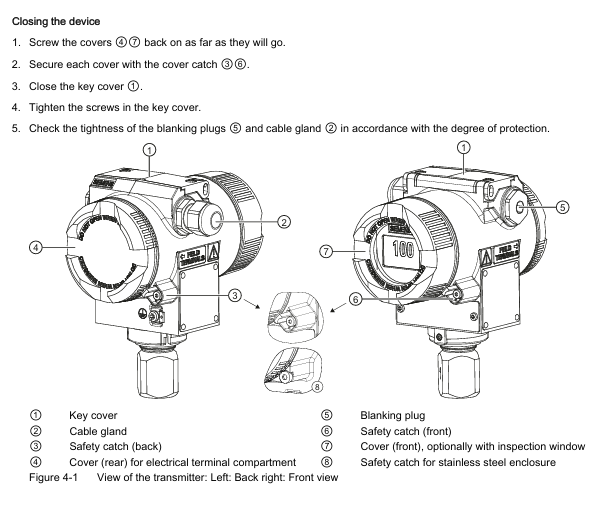
Electrostatic protection: When operating in hazardous areas, close the key cover and tighten the screws to avoid static electricity accumulation and explosion;
Wiring specifications: Use B-type RCD (trip limit 300mA), the power supply must comply with SELV (safety isolation ultra-low voltage) requirements, and shielded cables must only be grounded at one end.
Equipment modification restrictions: Only modifications according to document instructions are allowed. Unauthorized modifications will result in the invalidation of warranty and the invalidation of explosion-proof certification.
Installation specifications (mechanical+electrical)
1. Preparation before installation
Arrival inspection:
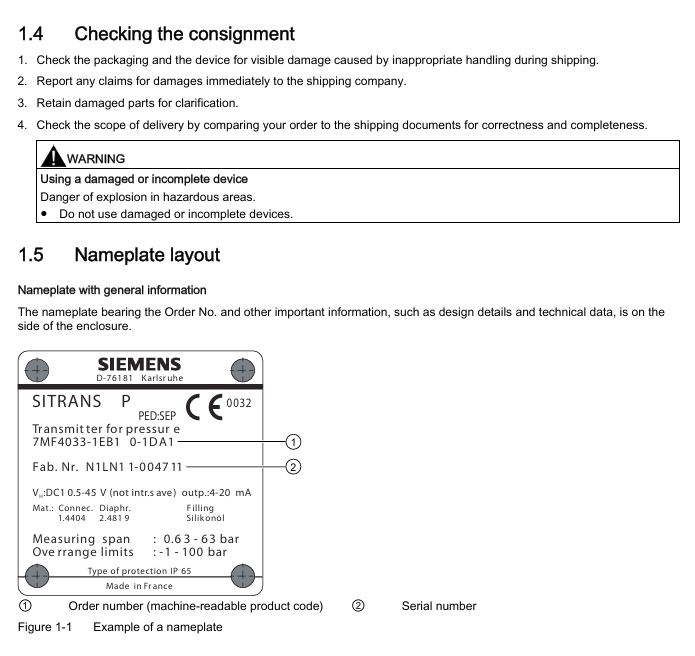
Check the packaging and equipment for any transportation damage. If there is any damage, immediately claim compensation from the shipping company and keep the damaged parts;
Compare the order with the shipping documents to confirm the integrity and correctness of the equipment model and accessories (such as flanges and seals);
Prohibit the use of damaged or incomplete equipment (especially in hazardous areas, which may cause explosions).
Environmental conditions: The following environmental requirements must be met, otherwise it may affect equipment performance or cause safety accidents:
Remarks on Environmental Parameter Requirements
Operating temperature -40~85 ℃ (Ex i/T6 version -40~60 ℃) Avoid direct sunlight, and additional heat dissipation is required in high-temperature environments
Storage temperature -50~85 ℃. The packaging only provides limited moisture-proof protection and requires additional protection
Humidity ≤ 95% (no condensation). Moisture proof devices need to be installed in condensing environments
Vibration acceleration ≤ 9.8m/s ² (in accordance with DIN IEC 68-2-6) Keep away from strong vibration equipment (such as pumps and compressors)
The output current drops to 80% when the altitude is ≤ 2000m (over altitude requires reduced capacity)
2. Mechanical installation specifications
General requirements:
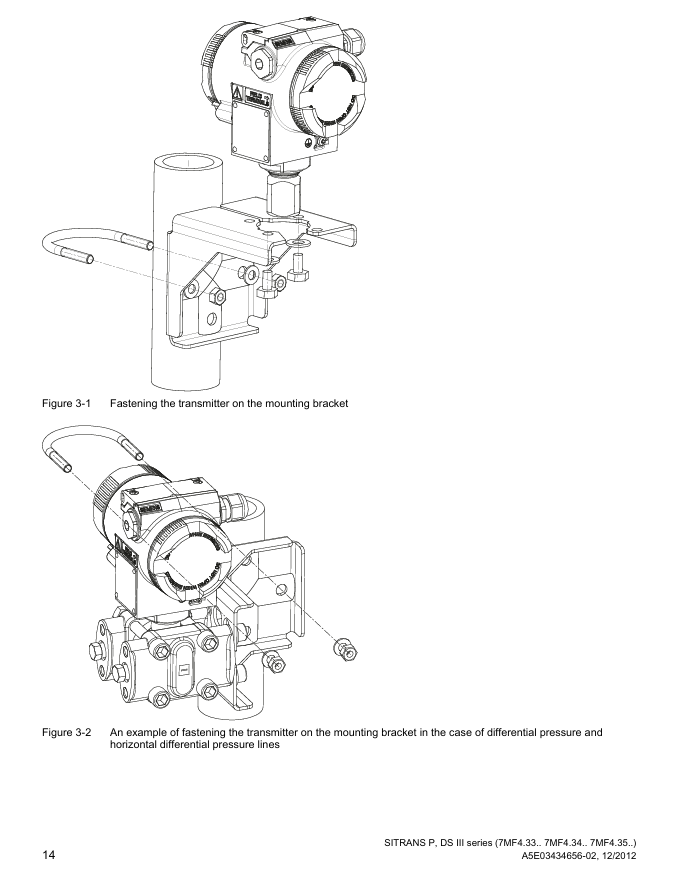
Installation method: Only vertical installation is allowed to avoid shell rotation (which may damage the measuring unit);
Explosion proof gap: The distance between the explosion-proof surface of explosion-proof equipment and fixed components should be ≥ 40mm to prevent explosions caused by high-temperature gas leakage;
Sealing selection: The flange seal should be compatible with the process medium (such as PTFE seal used in FDA compliant scenarios), and the seal should be centered without obstructing the movement of the diaphragm.
Scenario based installation differences: According to the measurement medium state, the equipment installation position and pipeline layout need to be designed differently:
Measurement medium installation position pipeline requirements
The gas transmitter is higher than the pressure tapping point and the pipeline is inclined towards the pressure tapping point, which facilitates the discharge of condensed water
The liquid/steam transmitter is located below the pressure tapping point and the pipeline is inclined towards the pressure tapping point for easy gas discharge (a condensation tank needs to be installed for steam)
The flange of the liquid level (open container) is lower than the minimum measured liquid level, and the negative pressure chamber is open to the atmosphere. The open interface needs to be protected to prevent pollution
The flange of the liquid level (closed container) is lower than the minimum measured liquid level, and in strong condensation scenarios, negative pressure pipelines need to be filled and condensation tanks need to be installed
3. Electrical installation specifications
Grounding requirements:
Grounding must be carried out according to IEC 536 Class 1 standard, and the cross-sectional area of the PE wire must not be smaller than that of the power wire;
Explosion proof equipment requires equipotential connection (excluding Ex i type) to avoid explosion caused by compensating current;
Grounding through the "+" terminal is prohibited, and grounding through the "-" terminal is required (otherwise it may damage the equipment).
Wiring specifications:
Cable selection: High temperature environments (≥ 60 ℃) require the use of cables with a temperature resistance of ≥ 80 ℃, and shielded cables must meet EMC requirements;
Cable gland: Only use gland compatible with explosion-proof type, and the tightening torque must comply with technical specifications (such as M20 gland torque of 2.5Nm);
Cable separation: Power cables (power+motor) and control cables need to be wired separately (in different cable trays/conduits) to avoid EMI interference.
Special wiring in hazardous areas:
IT power supply system: It is necessary to remove the internal "Y" capacitor of the equipment and install an output reactor;
Conduit system: A spark barrier should be installed at a designated distance from the equipment input port, in compliance with national regulations and explosion-proof certification requirements.
Debugging process (scenario based steps)
1. Preparation before debugging
Power on preheating: After the equipment is powered on, it needs to be preheated for 5 minutes to ensure stable measurement values;
Parameter verification: Confirm that the equipment nameplate parameters (such as range, power supply, explosion-proof level) are consistent with the actual operating requirements;
Tool preparation: Select the appropriate tool (HART communicator, SIMATIC PDM, BOP/AOP panel) based on the communication protocol.
2. Scenario based debugging steps
(1) Gas medium debugging
Close all valves and apply range starting pressure (such as 0mbar) to the transmitter through the testing interface;
Check if the output signal is 4mA, and calibrate if there is a deviation;
Close the test valve, open the pressure tap valve, and then slowly open the process valve;
Adjust to the end pressure of the range, confirm that the output signal is 20mA, and complete the debugging.
(2) Liquid medium debugging
Close all valves, open the pressure tap valve and balance valve;
If the transmitter is located below the differential pressure sensor, open the drain valve to release air (until no bubbles of liquid flow out); If it is above, open the exhaust valve to release air;
Close the drain/exhaust valve, open the positive pressure side differential pressure valve and exhaust valve (close after emptying the bubbles);
Repeat step 3 on the negative pressure side and close the differential pressure valve;
Open the positive pressure side differential pressure valve 1/2 turn and calibrate the zero point (0 bar corresponds to 4mA);
Close the balance valve, fully open the differential pressure valve, and complete the debugging.
(3) Steam medium debugging
Close all valves, open the pressure tapping valve and balance valve, and wait for the differential pressure pipeline and the steam in the condensing tank to completely condense;
Open the differential pressure valve and exhaust valve on the positive pressure side (close after draining the condensate until there are no bubbles);
Repeat step 2 on the negative pressure side and close the differential pressure valve;
Open the positive pressure side differential pressure valve 1/2 turn and calibrate the zero point (0 bar corresponds to 4mA);
Close the balance valve and fully open the differential pressure valve;
Temporarily open the drain valve to clean the pipeline (close before steam leakage) and complete the debugging.
Maintenance and troubleshooting
1. Regular maintenance
Maintenance cycle: The cycle should be defined based on the corrosiveness of the medium and the concentration of environmental dust (such as once every 3 months for strong corrosion scenarios and once every 6 months for cleaning scenarios).
Core maintenance project:
Precautions for maintaining project steps
Sealing inspection 1. Clean the shell and seal; 2. Check for cracks/damage; 3. Lubrication or replacement of differential pressure equipment seals requires Siemens authorized personnel to operate
Anti static tools should be used in hazardous areas where the dust layer on the surface of the dust cleaning and removal equipment is greater than 5mm to avoid the accumulation of static electricity
Use a soft brush and an appropriate solvent to clean film deposits. Do not use sharp tools to avoid scratching the film
Parameter calibration: Regularly verify the range and zero point (e.g. every 6 months) using a standard pressure source and record calibration data
2. Fault handling
Fault indication method:
SDP panel: indicates faults through a combination of on/off/flashing of 2 LEDs (such as alternating flashing of dual lights=RAM fault);
BOP/AOP panel: displays Fxxx fault codes (such as F0001=ground fault) or Axxx alarm codes (such as A0002=over range alarm);
HART/PA/FF: View detailed fault information (such as sensor disconnection, EEPROM failure) through communication tools.
Common troubleshooting solutions:
Fault code, fault type, possible causes, and solutions
F0001 grounding fault 1. Motor power does not match equipment; 2. Cable grounding; 3. Equipment overload: 1. Check P0307 (motor power); 2. Check the insulation of the cable; 3. Reduce load
F0002 DC bus overvoltage 1. Input voltage exceeds the range; 2. The slope descent time is too short; 3. The regenerative energy of the load is high. 1. Check the power supply voltage (which should be between 10.5-45V DC); 2. Increase P1121 (slope descent time); 3. Install a braking unit
F0051 EEPROM fault EEPROM read/write failure 1. Perform factory reset (P0010=30+P0970=1); 2. Replace the electronic unit (if reset is ineffective)
Fault reset method:
Power off and restart the device;
Press the reset button on the BOP/AOP panel;
Trigger reset through digital input 3 (parameters need to be configured in advance).
Technical specifications (core parameters)
1. Pressure range (HART/PA/FF universal)
Measurement Type Range Maximum Operating Pressure (MAWP) Maximum Test Pressure
Gauge pressure 0.01~700bar g 0.04~800bar g 0.06~800bar g
Absolute pressure 8.3mbar~100bar a 1.5~160bar a 6~250bar a
Differential pressure 1mbar~30bar 32~420bar 32~600bar
2. Temperature range
Temperature Type Range Remarks
The ambient temperature is -40~85 ℃ for Ex i/T6 version and -40~60 ℃ for Ex d/T4 version
Process temperature -40~250 ℃ can reach 250 ℃ with cooling extension, and -40~100 ℃ without extension
Storage temperature -50~85 ℃, limited moisture-proof packaging, requires additional protection
3. Electrical and communication parameters
Parameters: HART PROFIBUS PA/Foundation Fieldbus
Supply voltage DC 10.5~45V (Ex i type 10.5~30V) Bus supply DC 9~32V (Ex i type 9~24V)
Current consumption - maximum 15.5mA (in case of fault)
Output signal 4-20mA (load independent) digital signal (compliant with PROFIBUS PA/FF specifications)
EMC compatibility complies with EN 61326, NAMUR NE 21 complies with EN 61326, NAMUR NE 21
4. Certification and Protection
Protection level: IP65/IP68 (EN 60529), NEMA 4X;
Explosion proof certification: ATEX(PTB 99 ATEX 1160)、FM(Certificate of Compliance 3008490)、CSA(Certificate of Compliance 1153651);
Compliance directives: EMC 2004/108/EC, ATEX 94/9/EC, PED 97/23/EC.
- OMRON
- ABB
- General Electric
- EMERSON
- Honeywell
- HIMA
- ALSTOM
- Rolls-Royce
- MOTOROLA
- Rockwell
- Siemens
- Woodward
- YOKOGAWA
- FOXBORO
- KOLLMORGEN
- MOOG
- KB
- YAMAHA
- BENDER
- TEKTRONIX
- Westinghouse
- AMAT
- AB
- XYCOM
- Yaskawa
- B&R
- Schneider
- KONGSBERG
- NI
- WATLOW
- ProSoft
- SEW
- ADVANCED
- Reliance
- TRICONEX
- METSO
- MAN
- Advantest
- STUDER
- DANAHER MOTION
- Bently
- Galil
- EATON
- MOLEX
- DEIF
- B&W
- ZYGO
- Aerotech
- DANFOSS
- Beijer
- Moxa
- Rexroth
- Johnson
- WAGO
- TOSHIBA
- BMCM
- SMC
- HITACHI
- HIRSCHMANN
- Application field
- XP POWER
- CTI
- TRICON
- STOBER
- Thinklogical
- Horner Automation
- Meggitt
- Fanuc
- Baldor
- SHINKAWA
- Other Brands
- UniOP
- KUKA
- Iba
- Beckhoff
- ADLINK
-
 SIGMATEK ET3200 Display Screen
 -
 SIGMATEK CEZ221 C-DIAS Mixing Module
 -
 SIGMATEK SDD120-2 DIAS Servo Drive
 -
SIGMATEK DIP011 05-058-011 Module
-
 Sigmatek DEC181 I/O Module
 -
 SIGMATEK DCP640 DIAS Central Unit
 -
 SIGMATEK 00-450-024 C-IPC Industrial Computer
 -
 SIGMATEK AKM32C-ANCNR-B0 Servomotor
 -
SIGMATEK DVI021 DIAS Power Module
-
 SIGMATEK CTS051 12-053-051 Control Module
 -
 SIGMATEK CTS022 Control Module
 -
 Sigmatek 01-250-010-D NC4Kompakt V2.1 Module
 -
 SIGMATEK Control Keyboard 01-285-042 Interface
 -
 SIGMATEK TO081 20-007-081 Digital Output Module
 -
 Sigmatek AKM73Q-ANCNGBB0 7.07kW Servo Motor
 -
Sigmatek DIP012 Demag 07024165 Processor Module
-
 SIGMATEK PC 411 Injection Molding Controller
 -
 SIGMATEK CEZ201 12-051-201-O Processor Module
 -
 SIGMATEK VI021 20-003-021 Digital Input Module
 -
SIGMATEK Computer C-IPC 144904 Industrial PC
-
 SIGMATEK 9307.083.01 9305.081.02 Industrial Module
 -
 SIGMATEK AI075 Analog Input Module
 -
 SIGMATEK HGT834-W Teaching Pendant
 -
Sigmatek CDI161 Digital Input Module
-
 SIGMATEK HGT834 Teaching Pendant
 -
 SIGMATEK CEZ201 12-051-201-O Module
 -
SIGMATEK Demag 9617.067.03 9708.244.00 Module
-
 SIGMATEK SCP010 Safety CPU Module
 -
SIGMATEK N100 20-011-100 Module
-
 SIGMATEK CNC 031 Positioning Output Module
 -
 Sigmatek 01-355-016 Control Module
 -
 Sigmatek MDM021 Digital Mixed Module
 -
Sigmatek DAI411 05-020-411 Analog Module
-
Attitude Gyro 1U367-232-2 Aircraft Instrument
-
 Sigma-Tek 5000B-36 Attitude Gyro 23-501-06-16
 -
Sigmatek HGT834-W Injection Molding Teach Pendant
-
Sigma Tek 5000EG Attitude Gyro 1U670-003-12
-
 Sigmatek HGT834-W Teach Pendant
 -
 Sigmatek DEE011 05-068-011 Module
 -
Sigmatek DIAS DCP643 Central Processing Unit
-
 Sigmatek MDD111-1 DIAS Drive Axis Module
 -
 Sigmatek DKL042 05-024-042 Terminal Module
 -
Sigmatek DM822 Control Module
-
Sigmatek CDM167 12-008-167-O Module
-
Sigmatek TAE151 Touch Display Unit
-
 Sigmatek DCC041 SLIDES Module 05-700-041-D
 -
Sigmatek AKM65M-ANC2GBB0 PM Servo Motor
-
Sigmatek ETT221 01-230-221 Operator Terminal
-
Sigmatek SLIDES DAM 124 Analog Module
-
Sigmatek AKM31C-ANCNGBB0 Servo Motor
-
 Mannesmann Demag Sigmatek CP626 Central Unit
 -
 SIGMATEK 0332.554.03 Board 371071000154
 -
 SIGMATEK 12-250-021 Base Plate Back Panel CM5V020
 -
 SIGMATEK DM162 S-DIAS Digital Mix Module
 -
 DEMAG ERGOTECH 061 381 66 Sigmatek 9842.243.02 Circuit Board
 -
 SIGMATEK CP313-1 PLC Module
 -
Sigmatek ETV0551-2 VARAN Touch Terminal
-
 Sigmatek SDM 081 FS S-Dias Safety Module
 -
 DEMAG 05-250-023 Ergotech Motherboard with Sigmatek TMS012
 -
Sigmatek CM5V020 12-250-023-K Wiring Base
-
Sigma Tek 5000B-37 Attitude Gyro Indicator
-
Sigmatek SDD120-2 DIAS Drive
-
 Sigmatek CME221 Memory Module
 -
 Sigmatek DCP640 DIAS Central Unit
 -
 Sigmatek STO040 Safety Output Module
 -
Sigmatek CET281 Control Panel
-
 Sigmatek CIPC LX800 Demag NC5 CPU
 -
Sigmatek DKL093 05-024-093 Terminal Module
-
 Sigmatek AI088 20-009-088 Analog Input Module
 -
Sigmatek CAI888 Analog Input Module
-
SIGMATEK CCA021 12-025-021 Analog Output Module
-
SIGMATEK 1104.579.05 Control Module
-
SIGMATEK SDI100 Digital Input Module
-
 SIGMATEK C-IPC 256MB LX800 Compact Dias
 -
SIGMATEK 9423.090.02 Control Module
-
SIGMATEK C-IPC 256 Power Supply 148498
-
SIGMATEK CAI025 Analog Input Module
-
 SIGMATEK CTO166 Digital Output Module
 -
SIGMATEK CP112 20-004-112 Processor Module
-
SIGMATEK CAI887 12-009-887 Safety Module
-
 Sigma-Tek 4000B-31 Directional Gyro 1U262-002-42
 -
Sigmatek C-IPC 256MB LX800 IPC Controller
-
Sigmatek C-IPC 01-450-031 Industrial PC LX800
-
Sigmatek C-IPC 256 Industrial PC Controller
-
Sigmatek CCP-531 PLC Processor Module
-
Sigmatek CDI163 Digital Input Module
-
 Sigmatek ETV0501 VARAN Terminal 12-230-0501
 -
 Sigmatek CTMS020 C-DIAS Technology Module
 -
 Sigmatek CIV512 VARAN Switch Module
 -
Sigmatek HU011 20-080-011 Interface Module
-
SIGMATEK SLIDES DAM 124 Module
-
 SIGMATEK C-IPC 161 01-450-161L Industrial PC
 -
SIGMATEK C-IPC 128MB VIA 733MHz 01-450-024-K
-
 SIGMATEK 12-780-012 R8-IPC Geode LX800 Module
 -
SIGMATEK CAM124 Analog Module
-
 SIGMATEK S1 032-8AF61-R4 EZ Servo Motor
 -
 SIGMATEK CTO163 Digital Output Module
 -
SIGMATEK CCP082 12-004-082 Processor Module
-
SIGMATEK CRCH081 C-DIAS Temperature Module
-
SIGMATEK PC322-K 01-310-322-K Industrial PC
-
SIGMATEK SDD310-2 Servo Drive
-
 SIGMATEK AI084 Analog Input Module
 -
SIGMATEK CRCH081 12-752-081 Temperature Module
-
Sigma-Tek 5000L-4 Attitude Gyro 1U284-001-3
-
 SIGMATEK CM5V020 12-250-023-K Wiring Module
 -
Sigma-Tek 4000H-6 Directional Gyro IU262-035-7
-
SIGMATEK Dias DCP160 05-004-160 Processor Module
-
SIGMATEK 0147.395.02 Control Module
-
SIGMATEK A1084 Control Module
-
SIGMATEK DI200 20-006-2000 Digital Input Module
-
Sigmatek DNC115 Encoder Module
-
 Sigmatek DAM122 05-017-122 Analog Module
 -
Sigmatek 9802.289.01 Control Board TA71 Display
-
Sigmatek TO127 20-007-127 Digital Output Module
-
Sigmatek DNC031 05-011-031 Digital Module
-
Sigmatek VI022 20-003-022 Interface Module
-
Sigmatek CAI085 Analog Input Module
-
 Sigmatek CP111 S-DIAS CPU Module
 -
Sigmatek CTMS030 Krauss Maffei Module
-
 Sigmatek CAM123 Control Module
 -
 Sigmatek TAE732-P 01-240-732-P Touch Display Unit
 -
Sigmatek MDM021 Digital Mixed Module
-
Sigmatek DCP642 DIAS Central Unit
-
 Sigmatek CST022 12-014-022 C-DIAS Module
 -
 Sigmatek SRO021 20-893-021 Safety Relay Output
 -
 Krauss Maffei MC5 Control System Sigmatek
 -
 Sigmatek DC061 Module 18-24VDC 300mA
 -
 Herrmann EVT0855 Ultrasonic Welder Touch Panel


