
Westinghouse ST Switch Intelligent Automatic Portable Transfer Switch
Input parameters: Grid input 120V 20A 60Hz, generator input 120V 20A 60Hz (equipped with L14-30P plug).
Interface configuration: 120V 20A 5-20R dual socket, grid power input port, generator control cable interface, 25 foot generator power cord.
Protection configuration: 20A circuit breaker to prevent overload damage to equipment.
Westinghouse ST Switch Intelligent Automatic Portable Transfer Switch
Core parameters and compatibility
1. Key specifications
Output parameters: 120V, 20A, 60Hz, maximum output power matching generator operating power of 2400W.
Input parameters: Grid input 120V 20A 60Hz, generator input 120V 20A 60Hz (equipped with L14-30P plug).
Interface configuration: 120V 20A 5-20R dual socket, grid power input port, generator control cable interface, 25 foot generator power cord.
Protection configuration: 20A circuit breaker to prevent overload damage to equipment.
2. Compatibility requirements
Only compatible with Westinghouse generators with "Smart Switch Ready" interface, not compatible with other brands or generators without this interface.
Do not use in series with other conversion switches, do not connect GFCI sockets or use socket adapters.
Core functions and working principles
1. Full process working mechanism
(1) When the power grid is normal (standby mode)
Power supply path: grid power supply → transfer switch → connected electrical appliances. At this time, the green "grid power indicator light" is constantly on.
Additional function: The generator battery is continuously charged by the power grid through the generator control cable, ensuring that the generator battery is fully charged and can be started at any time.
Key state: The generator is in the "RUN" position but not starting, only the battery charging circuit is working.
(2) When the power grid is cut off (emergency power supply state)
Trigger mechanism: When the conversion switch detects a power outage in the power grid, the red "power grid interruption indicator light" immediately lights up.
Start up process: After a delay of 5-10 seconds (to avoid accidental triggering due to instantaneous fluctuations in the power grid), send a start signal to the generator through the control cable, and the generator will automatically start and enter a stable operating state.
Switching power supply: After the generator output stabilizes (within about 30 seconds), the transfer switch automatically cuts off the power grid circuit and connects the generator power supply circuit. The green "generator power indicator light" lights up, and the electrical appliances are powered by the generator.
(3) When the power grid is restored (switching and cooling state)
Detection process: After the power grid is restored, the transfer switch first undergoes a 5-10 second stability test (to prevent frequent switching caused by voltage fluctuations in the power grid), and at this time, the red and green indicator lights are constantly on.
Switching power supply: After confirming the stability of the power grid, cut off the generator power supply circuit, connect the power grid circuit, the red "power grid interruption indicator light" will turn off, and the electrical appliances will resume power supply to the grid.
Cooling shutdown: The switch keeps the generator running for 45-50 seconds during the cooling period to avoid damage to the engine caused by high-temperature shutdown. After the cooling is complete, the generator will automatically shut down and the green "generator power indicator light" will turn off.
2. Full analysis of indicator lights (including abnormal states)
Description of indicator light combination status and operation suggestions
Only the green grid light stays on and is in normal standby mode. The power is supplied by the grid, and there is no need to operate the generator battery during charging. Regularly check the cable connections
Only the red power grid interruption light remains on. The power grid has been cut off, and we are waiting to start the generator to confirm that the fuel and oil are sufficient and there are no fault alarms
Only the green generator light is constantly on, and the power grid has not been restored to monitor the operation status of the generator to ensure sufficient fuel supply
The traffic lights are constantly on at the same time, and the power grid has been restored. Stability testing will be conducted and wait for 5-10 seconds without manual intervention
The green light stays on and the red light flashes. The power grid is restored but the voltage is unstable. Keep observing. If it does not return to normal within 1 minute, check the power grid line
The generator light is constantly on+the grid light is flashing. The generator power supply is normal, and the grid is in a fluctuating state without operation. The transfer switch will continue to monitor the grid
No indicator light is on, the conversion switch is not connected to the power grid, or there is an internal fault. Check if the power grid connection line is tightly plugged in. If the connection is normal, it needs to be reported for repair
Safety operation standards (including risk avoidance)
1. Installation and placement safety
Generator placement requirements:
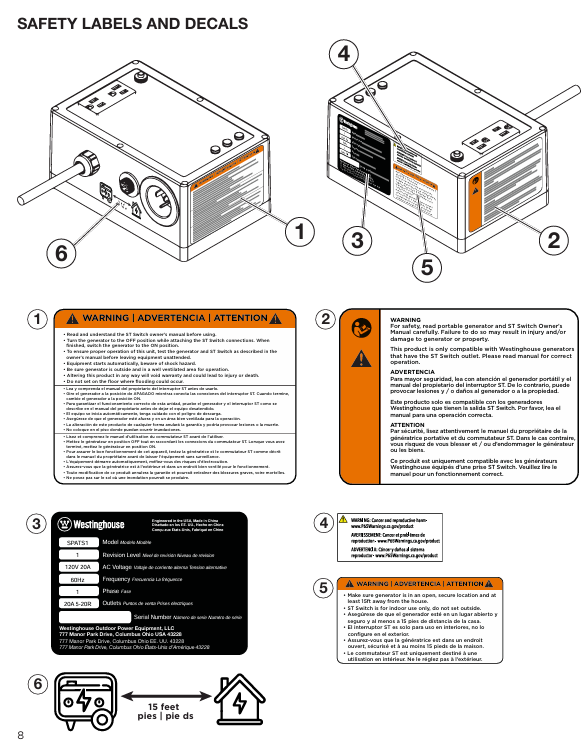
It must be placed in an outdoor ventilated area, at least 15 feet (about 4.6 meters) away from the doors, windows, and ventilation openings of the house, to prevent carbon monoxide exhaust from entering the room.
Place on a hard, level surface to avoid tilting and causing fuel leakage; Keep a safe distance of at least 3 feet (approximately 0.9 meters) away from flammable materials such as hay, wood, and paint.
It is prohibited to place the generator on rainy, snowy, or damp ground. A temporary rain shelter (not enclosed) must be built to prevent rainwater from entering the generator and causing a short circuit.
Requirements for placement of transfer switch:
Only suitable for indoor use, placed in a dry, ventilated, away from water sources (such as kitchens, bathrooms) and flammable materials.
Do not place it in areas prone to water accumulation such as basements and low-lying areas to avoid equipment short circuits caused by floods or water leaks.
The placement height should be at least 1 foot (about 0.3 meters) above the ground to prevent moisture erosion on the ground.
2. Cable connection safety
Connection sequence: The power grid must be connected first, then the generator control cable, and finally the generator power line. It is forbidden to reverse the sequence.
Cable requirements:
Grid input extension cable: A grounded three core cable with no damage or aging is required, with a length not exceeding 30 feet (approximately 9.1 meters) and a core cross-sectional area of ≥ 1.5mm ².
Generator control/power cord: The total length should not exceed 50 feet (approximately 15.2 meters). If extension is required, Westinghouse original extension cords (model 3021225C is the power cord extension cord, STCORD25 is the control cable extension cord) must be used. Non original cables are prohibited.
Connection operation:
All connections must be made after the generator is turned off and cooled down, and the plug must be fully inserted into the interface and locked to avoid loosening and overheating.
After connection, check that the cables are not twisted or compressed, and keep them away from high-temperature components such as the generator exhaust pipe to prevent cable aging.
3. Safety of electrical loads
Load accounting rules:
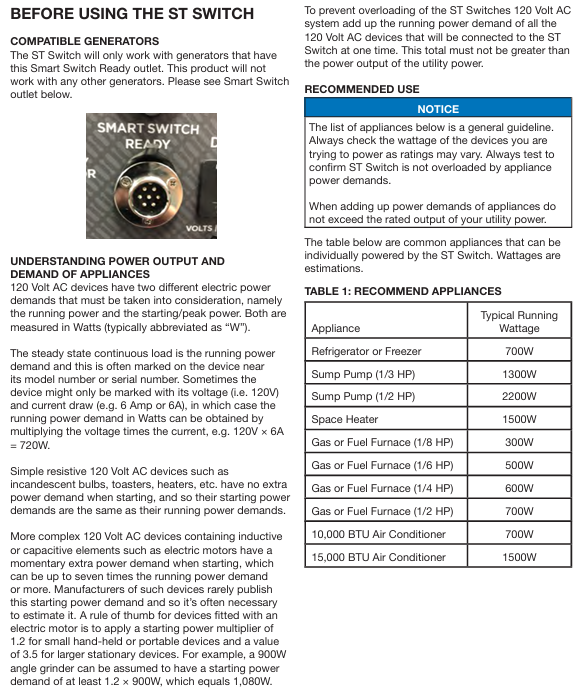
Pure resistance load (light bulb, heater, rice cooker): total operating power ≤ 20A × 120V=2400W.
Inductive loads (motors: refrigerators, water pumps, air conditioners): starting power=operating power multiplied by multiple (small handheld devices multiplied by 1.2, large fixed devices multiplied by 3.5), total starting power ≤ 2400W.
Example: 1500W space heater (pure resistor)+700W refrigerator (starting power 700 × 3.5=2450W), total starting power 2450W>2400W, cannot be connected simultaneously; 1500W heater+500W furnace (starting power 500 × 1.2=600W), total starting power 2100W ≤ 2400W, can be connected simultaneously.
Taboo for load connection:
Prohibit the connection of electrical appliances with unknown power to avoid overload triggering circuit breaker tripping.
It is prohibited to simultaneously connect multiple large inductive loads (such as two air conditioners, one water pump+one air conditioner) to prevent excessive starting power.
When connecting electrical appliances, it is necessary to first turn off the electrical switch and then turn it on again to avoid arcing caused by load insertion and removal.
4. Emergency safety handling
Generator malfunction unable to start: Immediately disconnect the transfer switch from the generator, manually start the generator to troubleshoot (such as low fuel, low oil, spark plug malfunction), and reconnect after troubleshooting.
The transfer switch does not switch the power supply: check the status of the indicator light. If the red light is on after the power grid is cut off but the generator does not start, check the connection of the control cable; If the green light does not turn on after the generator is started, check the power cord connection and restart the transfer switch if necessary (unplug the power grid for 30 seconds and then reinsert it).
Fire/Leakage Emergency: Immediately shut down the generator, unplug all connecting wires of the transfer switch, and use ABE or BE class fire extinguishers to extinguish the fire (water is prohibited from extinguishing electrical fires); If electric shock occurs, immediately cut off the power and seek medical attention.
Operation process (setup+testing+daily use)
1. Initial process setup (required steps)
Generator preparation:
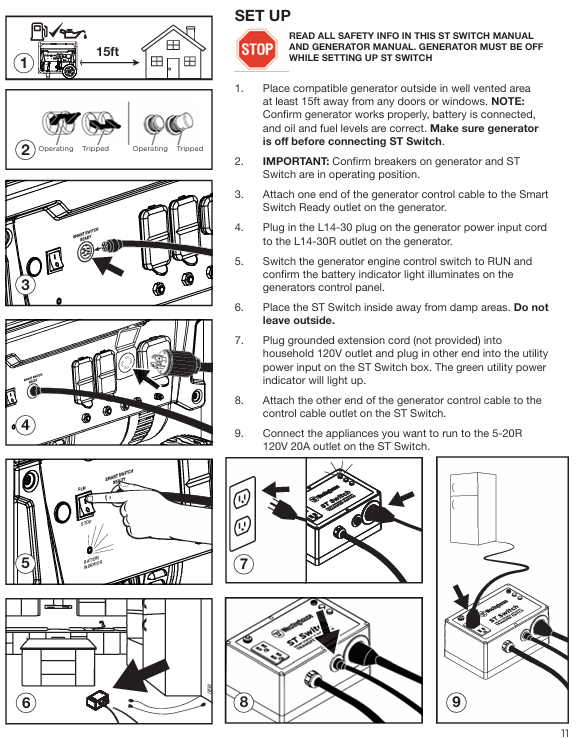
Place the generator in a safe outdoor location, check that the fuel (unleaded gasoline) and engine oil (four stroke engine oil that meets the requirements of the generator) levels are normal, and that the battery connection is secure.
Start the generator and test it to run normally independently. After confirming that there are no fault alarms, turn it off and cool it down to room temperature.
Switch connection:
Place the transfer switch in a dry indoor location, connect the grid power supply to the "grid power input port" of the transfer switch with a grounding extension wire, and the green grid indicator light will light up at this time.
Connect the generator control cable: Insert one end into the "Smart Switch Ready" interface of the generator and the other end into the "Control Cable Interface" of the conversion switch. You can hear the locking sound of the buckle.
Connect the generator power cord: Insert the 25 foot power cord L14-30P plug that comes with the conversion switch into the generator L14-30R socket, and tighten the fixing nut.
Electrical connections and generator settings:
Connect the electrical appliances that require emergency power supply (such as refrigerators and heaters) to the 120V dual socket of the conversion switch to ensure that the total power does not exceed the standard.
Turn on the "RUN" switch of the generator, confirm that the generator battery indicator light is on (indicating that the charging circuit is normal), and complete the first setting.
2. Functional testing process (must be done before first use)
Test purpose: To verify that the automatic switching function of the transfer switch is normal and to avoid failure in emergency situations.
Test preparation: Ensure all connections are complete, connect a small appliance (such as a desk lamp, phone charger), and confirm that the appliance is powered by the power grid normally.
Simulated power-off test:
Unplug the power grid input extension line of the conversion switch and simulate a power outage in the power grid.
Observe the indicator light: The red power grid interruption light will immediately turn on, and the generator will automatically start after 5-10 seconds.
Confirm switch: About 30 seconds after the generator starts, the green generator light will turn on, and the electrical appliances will be powered by the generator normally.
Simulated recovery test:
Re insert the power grid input extension line to simulate power grid recovery.
Observe the indicator lights: both traffic and green lights remain on (5-10 second detection period), then the red light goes out and the electrical appliances resume power supply to the grid.
Confirm shutdown: Wait for 45-50 seconds, the generator will automatically shut down, the green generator light will turn off, and the test is complete.
Exception handling: If a step in the test is not executed as expected, check if the cable connection is secure and if the generator is in the "RUN" position. After troubleshooting, retest.
3. Daily use and emergency activation process
(1) Daily maintenance (non emergency state)
Every month: Check if all cable connections are secure, without damage or aging; Start the generator and run it for 10 minutes to ensure that there are no faults in the generator.
Every 6 months: Conduct a complete test of the transfer switch according to the "functional testing process" to ensure that the automatic switching function is normal; Check the battery level of the generator and recharge it if necessary.
Long term use (exceeding 3 months): Disconnect the transfer switch from the power grid and generator, store the transfer switch in a dry environment, and maintain the generator according to long-term storage requirements.
(2) Emergency use (sudden power outage in the power grid)
No manual operation required: The switch automatically completes the entire process of "detecting power failure → starting the generator → switching power supply".
Key monitoring: Observe the status of the conversion switch indicator light and confirm that it switches as expected; Monitor the fuel level of the generator and replenish fuel if necessary under safe conditions (operate after shutting down the generator and cooling it down).
After the power grid is restored: without intervention, the transfer switch automatically switches back to the grid and shuts down the generator. After the generator cools down, its "RUN" switch can be turned off (or kept on for the next emergency start).
Maintenance and Warranty
1. Key points of maintenance and upkeep
Switch maintenance:
Cleaning: Use a dry cloth to wipe away surface dust. Do not use water or solvents for cleaning to prevent liquids from entering the interface.
Storage: When not in use for a long time, disconnect all connections and place in a dry, ventilated storage box, avoiding direct sunlight and high temperature and humidity environments.
Testing: Conduct a functional test every 6 months to ensure that there are no faults in the internal circuit.
Cable maintenance:
Regularly inspect the cable sheath for any damage or cracking, and ensure that the plug has no signs of oxidation or erosion.
Avoid excessive bending and squeezing during storage to prevent internal core breakage; The generator end cable should be kept away from high-temperature components such as exhaust pipes.
2. Detailed explanation of warranty policy
Warranty period: 1 year from the date of purchase, covering faults caused by material and process defects.
Warranty scope: For quality issues with the main body of the conversion switch and original cables (control cables, power cords), free repair or replacement of faulty components is provided.
Not covered by warranty:
Human damage (such as falling, collision, liquid immersion, overload use).
Unauthorized maintenance and modification (such as splicing cables, replacing non original components).
Normal wear and tear (such as plug contact wear), damage caused by natural disasters or accidents.
Malfunctions caused by failure to follow the manual, such as connecting incompatible generators or illegally extending cables.
Common troubleshooting
Possible causes and solutions for fault phenomena
The generator does not start after the power grid is cut off. 1. The control cable is not properly connected; 2. Insufficient battery power in the generator; 3. The generator is in the "OFF" position; 4. Generator malfunction (insufficient fuel/oil, alarm lock) 1. Check if the control cable plug is securely plugged in; 2. Manually start the generator to charge the battery or replace the battery; 3. Confirm that the generator is in the "RUN" position; 4. Check for generator faults and solve them according to the generator manual
The power supply is not switched after the generator is started. 1. The power cord is not properly connected; 2. Generator output fault; 3. Overload protection trip of transfer switch 1. Check if the power cord plug is tightened; 2. Disconnect the conversion switch and directly use the generator to supply power to the electrical appliance, verifying the output of the generator; 3. Disconnect part of the load and press the reset button of the circuit breaker on the transfer switch
After the power grid is restored, it will not switch back to the grid. 1. The voltage of the power grid is unstable; 2. Switch detection circuit fault 1. Use a multimeter to measure the grid voltage (normal 110-130V) and eliminate the grid problem; 2. Restart the conversion switch (unplug for 30 seconds and then reinsert), if it still does not work, report for repair
Abnormal flashing of indicator light: 1. Grid voltage fluctuation; 2. Internal circuit failure of the transfer switch. 1. Observe the restoration of the power grid and contact the power company if there is continuous fluctuation; 2. If the issue persists after disconnecting all connections and restarting, report for repair
Frequent tripping of circuit breakers: 1. The total power of the connected electrical appliances exceeds the standard; 2. Electrical short circuit; 3. Cable damage and short circuit: 1. Reduce the number of connected electrical appliances and calculate the total power; 2. Disconnect all electrical appliances and connect them one by one to check for short-circuit devices; 3. Check if the cable is damaged and replace the faulty cable
- OMRON
- ABB
- General Electric
- EMERSON
- Honeywell
- HIMA
- ALSTOM
- Rolls-Royce
- MOTOROLA
- Rockwell
- Siemens
- Woodward
- YOKOGAWA
- FOXBORO
- KOLLMORGEN
- MOOG
- KB
- YAMAHA
- BENDER
- TEKTRONIX
- Westinghouse
- AMAT
- AB
- XYCOM
- Yaskawa
- B&R
- Schneider
- KONGSBERG
- NI
- WATLOW
- ProSoft
- SEW
- ADVANCED
- Reliance
- TRICONEX
- METSO
- MAN
- Advantest
- STUDER
- DANAHER MOTION
- Bently
- Galil
- EATON
- MOLEX
- DEIF
- B&W
- ZYGO
- Aerotech
- DANFOSS
- Beijer
- Moxa
- Rexroth
- Johnson
- WAGO
- TOSHIBA
- BMCM
- SMC
- HITACHI
- HIRSCHMANN
- Application field
- XP POWER
- CTI
- TRICON
- STOBER
- Thinklogical
- Horner Automation
- Meggitt
- Fanuc
- Baldor
- SHINKAWA
- Other Brands
- UniOP
- KUKA
- Iba
- Beckhoff
- ADLINK
-
 Sigmatek MDD111-1 DIAS Drive Axis Module
 -
 Sigmatek DKL042 05-024-042 Terminal Module
 -
 Sigmatek DM822 Control Module
 -
 Sigmatek CDM167 12-008-167-O Module
 -
 Sigmatek TAE151 Touch Display Unit
 -
 Sigmatek DCC041 SLIDES Module 05-700-041-D
 -
 Sigmatek AKM65M-ANC2GBB0 PM Servo Motor
 -
 Sigmatek ETT221 01-230-221 Operator Terminal
 -
 Sigmatek SLIDES DAM 124 Analog Module
 -
Sigmatek AKM31C-ANCNGBB0 Servo Motor
-
 Mannesmann Demag Sigmatek CP626 Central Unit
 -
 SIGMATEK 0332.554.03 Board 371071000154
 -
 SIGMATEK 12-250-021 Base Plate Back Panel CM5V020
 -
 SIGMATEK DM162 S-DIAS Digital Mix Module
 -
 DEMAG ERGOTECH 061 381 66 Sigmatek 9842.243.02 Circuit Board
 -
 SIGMATEK CP313-1 PLC Module
 -
Sigmatek ETV0551-2 VARAN Touch Terminal
-
 Sigmatek SDM 081 FS S-Dias Safety Module
 -
 DEMAG 05-250-023 Ergotech Motherboard with Sigmatek TMS012
 -
Sigmatek CM5V020 12-250-023-K Wiring Base
-
 Sigma Tek 5000B-37 Attitude Gyro Indicator
 -
 Sigmatek SDD120-2 DIAS Drive
 -
 Sigmatek CME221 Memory Module
 -
 Sigmatek DCP640 DIAS Central Unit
 -
 Sigmatek STO040 Safety Output Module
 -
Sigmatek CET281 Control Panel
-
 Sigmatek CIPC LX800 Demag NC5 CPU
 -
 Sigmatek DKL093 05-024-093 Terminal Module
 -
 Sigmatek AI088 20-009-088 Analog Input Module
 -
Sigmatek CAI888 Analog Input Module
-
SIGMATEK CCA021 12-025-021 Analog Output Module
-
SIGMATEK 1104.579.05 Control Module
-
SIGMATEK SDI100 Digital Input Module
-
 SIGMATEK C-IPC 256MB LX800 Compact Dias
 -
 SIGMATEK 9423.090.02 Control Module
 -
SIGMATEK C-IPC 256 Power Supply 148498
-
 SIGMATEK CAI025 Analog Input Module
 -
 SIGMATEK CTO166 Digital Output Module
 -
 SIGMATEK CP112 20-004-112 Processor Module
 -
SIGMATEK CAI887 12-009-887 Safety Module
-
 Sigma-Tek 4000B-31 Directional Gyro 1U262-002-42
 -
Sigmatek C-IPC 256MB LX800 IPC Controller
-
Sigmatek C-IPC 01-450-031 Industrial PC LX800
-
Sigmatek C-IPC 256 Industrial PC Controller
-
Sigmatek CCP-531 PLC Processor Module
-
Sigmatek CDI163 Digital Input Module
-
 Sigmatek ETV0501 VARAN Terminal 12-230-0501
 -
 Sigmatek CTMS020 C-DIAS Technology Module
 -
 Sigmatek CIV512 VARAN Switch Module
 -
 Sigmatek HU011 20-080-011 Interface Module
 -
SIGMATEK SLIDES DAM 124 Module
-
 SIGMATEK C-IPC 161 01-450-161L Industrial PC
 -
SIGMATEK C-IPC 128MB VIA 733MHz 01-450-024-K
-
 SIGMATEK 12-780-012 R8-IPC Geode LX800 Module
 -
SIGMATEK CAM124 Analog Module
-
 SIGMATEK S1 032-8AF61-R4 EZ Servo Motor
 -
 SIGMATEK CTO163 Digital Output Module
 -
 SIGMATEK CCP082 12-004-082 Processor Module
 -
 SIGMATEK CRCH081 C-DIAS Temperature Module
 -
 SIGMATEK PC322-K 01-310-322-K Industrial PC
 -
SIGMATEK SDD310-2 Servo Drive
-
 SIGMATEK AI084 Analog Input Module
 -
SIGMATEK CRCH081 12-752-081 Temperature Module
-
Sigma-Tek 5000L-4 Attitude Gyro 1U284-001-3
-
 SIGMATEK CM5V020 12-250-023-K Wiring Module
 -
Sigma-Tek 4000H-6 Directional Gyro IU262-035-7
-
 SIGMATEK Dias DCP160 05-004-160 Processor Module
 -
SIGMATEK 0147.395.02 Control Module
-
SIGMATEK A1084 Control Module
-
SIGMATEK DI200 20-006-2000 Digital Input Module
-
Sigmatek DNC115 Encoder Module
-
 Sigmatek DAM122 05-017-122 Analog Module
 -
Sigmatek 9802.289.01 Control Board TA71 Display
-
Sigmatek TO127 20-007-127 Digital Output Module
-
Sigmatek DNC031 05-011-031 Digital Module
-
Sigmatek VI022 20-003-022 Interface Module
-
Sigmatek CAI085 Analog Input Module
-
 Sigmatek CP111 S-DIAS CPU Module
 -
Sigmatek CTMS030 Krauss Maffei Module
-
 Sigmatek CAM123 Control Module
 -
 Sigmatek TAE732-P 01-240-732-P Touch Display Unit
 -
Sigmatek MDM021 Digital Mixed Module
-
Sigmatek DCP642 DIAS Central Unit
-
 Sigmatek CST022 12-014-022 C-DIAS Module
 -
 Sigmatek SRO021 20-893-021 Safety Relay Output
 -
 Krauss Maffei MC5 Control System Sigmatek
 -
 Sigmatek DC061 Module 18-24VDC 300mA
 -
 Herrmann EVT0855 Ultrasonic Welder Touch Panel
 -
Sigmatek CIV521 Control Module 1.4A 2W
-
Sigmatek DDI61 05-006-161 Digital Input Module
-
SIGMATEK ETT312-E Touch Terminal 01-230-312
-
Cessna S3326-1 Sigma Tek 5000B-67 Gyro 1U149-015-9
-
SIGMATEK PS101 Power Supply Module
-
SIGMATEK 0332.554.03 Control Module 371071000154
-
 SIGMATEK ETT312-E Touch Terminal 01-230-312
 -
SIGMATEK CDM163 Control Module
-
 SIGMATEK VSV046 16-023-046 Module
 -
SIGMATEK AM221 20-017-221 Analog Module
-
SIGMATEK CTS051 12-053-051 Control Module
-
SIGMATEK AM221 20-017-221 Analog Module
-
Sigmatek CSDI161 12-891-161 Safety Input Module
-
Sigma Tek 4000C-1 Directional Gyro Indicator
-
Sigmatek ETV0501 12-230-0501 VARAN Terminal
-
Sigmatek DDM165 SLIDES Module
-
Sigmatek N100 20-011-100 Control Module
-
Sigmatek AKM54K-ANC2R-B0 PM Servo Motor
-
Sigmatek CTO166 Digital Output Module
-
Sigmatek CP212-K 20-004-212-K CPU Module
-
Sigmatek CDI161 Digital Input Module
-
Sigmatek DCC080 05-700-080-2 Control Module
-
 SIGMATEK SCP011 S-DIAS Safety CPU
 -
SIGMATEK SCP011 S-DIAS Safety CPU
-
SIGMATEK SRO022 Relay Output Module
-
SIGMATEK MDD 121 Drive Axis Module
-
SIGMATEK DSI021 SLIDES Siemens Interface
-
SIGMATEK DIAS DCP161 Module 05-004-161
-
 Sigmatek ETT312 Built-in Touch Terminal
 -
SIGMATEK DCP 643 DIAS Controller System
-
SIGMATEK CIO021 Multi I/O Module
-
SIGMATEK CTMS020 Control Module
-
 Sigmatek CME 221 Memory Module
 -
Sigmatek 0420.615.01 Control Board
-
Sigmatek CP111 20-004-111 CPU Module
-
Sigmatek 9405.065.03 Control Board
-
Sigmatek ETEK 01-450-032-K C-IPC 256MB Industrial PC
-
Sigmatek CTO163 12-007-163 Safety Output Module
-
Sigmatek TO081 20-007-081 Digital Output Module
-
 Sigmatek SI021 20-022-021 Safety Input Module


