
TEKTRONIX TCPA300/400 current probe amplifier
Probe: TCP312(30A/100MHz)、TCP305(50A/50MHz)、TCP303(150A/15MHz)、TCP404XL(750A/2MHz, Discontinuous).
TEKTRONIX TCPA300/400 current probe amplifier
Product positioning
Product portfolio:
Amplifier: TCPA300 (supports TCP312/305/303 probes), TCPA400 (only supports TCP404XL probes);
Probe: TCP312(30A/100MHz)、TCP305(50A/50MHz)、TCP303(150A/15MHz)、TCP404XL(750A/2MHz, Discontinuous).
Safe operation and system configuration
1. Core security standards
Prohibited live operation: Before connecting/disconnecting the probe/test line, the voltage source must be cut off to avoid insulation breakdown inside the probe;
Terminal matching requirements: The amplifier output needs to be connected to a 50 Ω load (oscilloscope or 50 Ω through terminal), otherwise the NOT TERMINATED IN 50 Ω LED will light up, affecting measurement accuracy;
Wire usage restrictions:
TCP312/305: Only insulated wires can be tested, and contact with exposed conductors is prohibited;
TCP303/404XL: can measure exposed conductors, but the probe needs to be removed and installed after power failure;
Environmental restrictions: Prohibit humid/explosive environments, working humidity of 5% -95% (≤ 30 ℃), 5% -85% (>30 ℃ -+50 ℃), non condensing.
2. System configuration and connection
(1) System composition
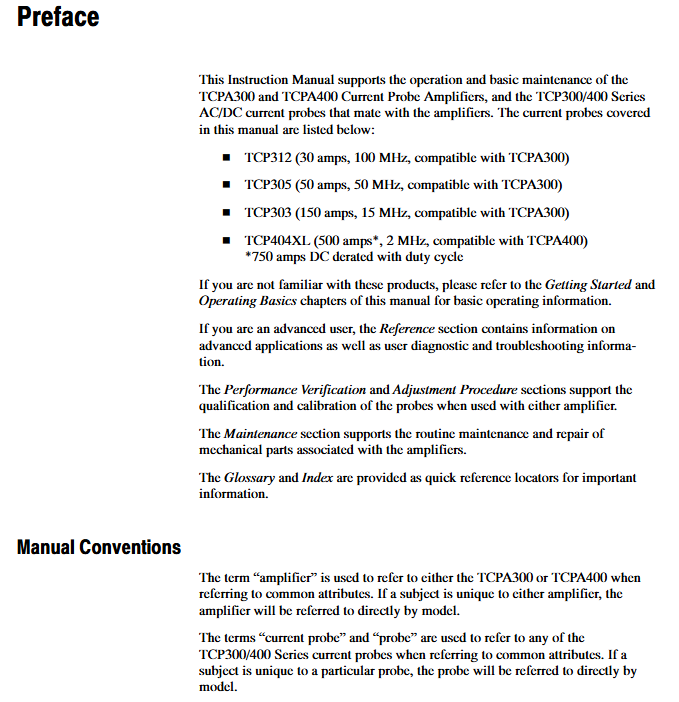
A complete current measurement system requires three parts:
TCPA300/400 amplifier: converts probe induced current into proportional voltage;
TCP300/400 series probe: clamp type induction current (effective after sliding cover locking);
Oscilloscope: requires a 50 Ω input impedance (if not available, add a 50 Ω straight through terminal), and the recommended bandwidth is 5 times the probe (e.g. TCP312 requires ≥ 500MHz oscilloscope).
(2) Connection steps
Amplifier → Oscilloscope:
TEKPROBE compatible oscilloscope: use TEKPROBE interface cable;
Non compatible oscilloscope: use 50 Ω BNC wire, set the oscilloscope input to 50 Ω;
Probe → Amplifier: Align the red marked points of the probe and amplifier, and lock them in place (do not twist);
Preheating: All equipment should be powered on and preheated for 20 minutes to ensure thermal stability.
Core Function Operation Guide
1. Key operations of the probe
(1) Demagnetization and automatic balancing (mandatory steps)
Function: Eliminate residual magnetism in the probe core, offset DC offset in the amplifier, and avoid measurement errors;
Trigger conditions: The probe slide is locked and disconnected from the live conductor;
Operation steps:
Press the PROBE DEGAUSS AUTOBALANCE button on the amplifier;
Wait for 5 seconds, the LED will flash from orange to green (successful), red (failed, terminal/probe connection needs to be checked);
Trigger scenarios: after startup, replacement of probe, overload, exposure to strong magnetic field.
(2) Sliding operation (different probe differences)
Probe model, sliding cover, opening method, locking method, precautions
TCP312/305 pulls the sliding cover backwards and pushes it forward until the buckle is fixed, only clamping the insulated wire
TCP303/404XL press lock+press handle release handle+press lock can clamp exposed wires (power-off operation)
2. Amplifier core control
(1) Key buttons and indicators
Control/indication function description exception handling
The COUPLING key switches between AC/DC coupling (AC only measures AC, DC measures AC/DC), and flashing indicates the display of Error Code
The RANGE key (TCPA300) switches the range (1/5/10/50A/V), and the LED indicates the current range. If the LED is not on, it means that the probe is not connected
PROBE OPEN LED probe slide not locked and turns off after locking the slide
OVERLOAD LED red: current beyond continuous range; Orange: Overtemperature; Flashing: Both exceed power-off cooling+demagnetization
NOT TERMINATED LED amplifier output not connected to 50 Ω load. Check oscilloscope impedance or add terminal
(2) Manual balancing (under DC coupling)
Function: Fine tune DC offset to improve measurement accuracy;
Operation: Press the MANUAL BALANCE key (left and right keys to adjust the offset direction), the LED lights up to indicate entering manual mode;
Limitation: Only DC coupling is effective, disabled under AC coupling.
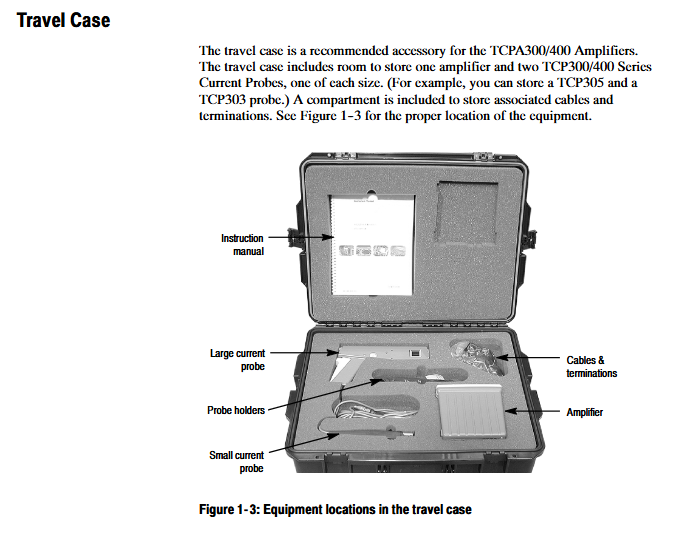
3. Measurement process (taking DC current as an example)
Preheat the system for 20 minutes, set the amplifier to DC coupling, and set the oscilloscope input to 50 Ω;
Probe slide lock (no conductor), perform demagnetization/automatic balancing;
Adjust the grounding reference of the oscilloscope to the target scale;
Open the probe slide cover, clamp the tested conductor (probe arrow pointing in the normal current direction: positive → negative), and lock the slide cover;
Adjust the oscilloscope time base, trigger and gain, and read the current value (current=oscilloscope voltage value/amplifier range, for example, 2V corresponds to 10A at 5A/V range).
Performance validation and calibration
1. Preconditions for Performance Verification
Environmental conditions: temperature 23 ℃± 5 ℃, humidity meets requirements, no strong magnetic field;
Equipment requirements: current source (0.1% accuracy), DMM (5.5bit resolution), high-frequency current loop, etc. (see Table 5-3/5-11/5-17 for details);
Data recording: Corresponding test record forms (such as TCPA300 Table 5-16, TCP305 Table 5-29) need to be filled out.
2. Core testing items (amplifier+probe)
(1) DC gain accuracy test (taking TCP305 as an example)
Equipment connection: current source → 5-turn current loop → probe → amplifier → DMM (50 Ω terminal);
Test steps:
After demagnetization, the probe clamps the current loop and the current source outputs+1.00A;
Record the DMM voltage value M1, and then output -1.00A to record M2;
Calculation error:% Error=[(M1-M2) -2 × VE]/(2 × VE) × 100% (VE is the expected voltage, such as 1A corresponding to 1V in the 5A/V range);
Qualified range: ≤± 3% (guaranteed value), ≤± 1% (typical value).
(2) Bandwidth test (using TCP312 as an example)
Equipment connection: level sine wave generator → high-frequency current loop → probe → amplifier → oscilloscope;
Test steps:
The generator outputs a 3MHz, 3Vpp signal and records the oscilloscope peak to peak value M1;
Adjust the generator frequency to 100MHz (TCP312 bandwidth) and record M2;
Verification: (M2/M1) × 1.18 ≥ 0.707 (1.18 is the impedance correction factor);
Qualified range: -3dB bandwidth ≥ 100MHz.
(3) Rise time test (taking TCP404XL as an example)
Equipment connection: High voltage pulse generator → Built in current loop → Probe → Amplifier → Oscilloscope;
Test steps:
The generator outputs 5A, 250 μ s pulses, and the oscilloscope is set to 80ns/div;
Measure the rise time of pulses ranging from 10% to 90%;
Qualified range: ≤ 175ns (derived from a bandwidth of 2MHz: 0.35/2MHz=175ns).
3. Calibration adjustment (only operated by qualified personnel)
(1) Amplifier adjustment (TCPA300)
Prerequisite: The casing needs to be disassembled and a calibration adapter (174-4765-00) needs to be used;
Step: The current source outputs 0.100A, adjust the corresponding range potentiometer (such as adjusting the 25 Ω potentiometer for 5A/V) to make the DMM voltage meet the expected value (such as 0.1A corresponding to 0.25V at 5A/V range).
(2) Probe adjustment (TCP305/312)
DC gain adjustment: Open the probe housing and adjust the DC gain potentiometer to make the DMM voltage error ≤ ± 3% (refer to Table 6-7);
Attention: Record the original position before adjustment to avoid exceeding the specifications.
Troubleshooting and Maintenance
1. Common faults and solutions
Possible causes and solutions for the fault phenomenon
Demagnetization failed (LED red), 50 Ω load not connected, probe not locked, check terminal+lock slide cover
OVERLOAD LED constantly on, current exceeding range, probe overheating, current reduction+power-off cooling+demagnetization
The measurement value is not accurate without demagnetization, the range is selected incorrectly, the terminal is not connected to demagnetization+check the range+check the 50 Ω load
The probe without output signal is not connected, and the coupling is set to AC (measuring DC). Connect the probe and switch the DC coupling
2. Interpretation of Error Code
Display mode: AC/DC coupled LED flashes alternately, and 4 fault LEDs (PROBE OPEN is MSB, NONCOMPATIBLE is LSB) display a 4-digit binary code;
Common code:
Code 1: No Hall element detected in the probe → Reconnect or replace the probe;
Code 2: DC offset calibration failed → restart amplifier+demagnetization;
Code 15: Internal software error - If restarting is ineffective, contact after-sales service.
3. Daily maintenance
Cleaning: Wipe the outer shell with 75% isopropanol, and do not use solvents such as benzene/acetone;
Storage: Non working temperature -40 ℃ -+75 ℃, avoid moisture/dust;
Calibration cycle: It is recommended to calibrate once a year, with a reference frequency error (± 10ppm) valid for one year.
Accessories and Replacement Parts
1. Standard accessories (included with the product)
Category, accessory name, purpose
Amplifier accessory 50 Ω straight through terminal (011-0049-02) matching output impedance
Connect the TEKPROBE interface cable (012-1605-00) to the TEKPROBE oscilloscope
BNC line (012-0117-00) connected to non TEKPROBE oscilloscope
Probe accessories Probe cover (016-1923-00) protects the probe
Grounding lead (196-3120-01) probe grounding
2. Key replacement parts (partial)
Component type, model, and part number
TCPA300 motherboard circuit motherboard 671-5434-00
TCP305 coil current transformer component 120-184-00
TCP404XL cable probe cable assembly 174-4816-00
Amplifier fan axial fan (12VDC) 119-6721-00
- OMRON
- ABB
- General Electric
- EMERSON
- Honeywell
- HIMA
- ALSTOM
- Rolls-Royce
- MOTOROLA
- Rockwell
- Siemens
- Woodward
- YOKOGAWA
- FOXBORO
- KOLLMORGEN
- MOOG
- KB
- YAMAHA
- BENDER
- TEKTRONIX
- Westinghouse
- AMAT
- AB
- XYCOM
- Yaskawa
- B&R
- Schneider
- KONGSBERG
- NI
- WATLOW
- ProSoft
- SEW
- ADVANCED
- Reliance
- TRICONEX
- METSO
- MAN
- Advantest
- STUDER
- DANAHER MOTION
- Bently
- Galil
- EATON
- MOLEX
- DEIF
- B&W
- ZYGO
- Aerotech
- DANFOSS
- Beijer
- Moxa
- Rexroth
- Johnson
- WAGO
- TOSHIBA
- BMCM
- SMC
- HITACHI
- HIRSCHMANN
- Application field
- XP POWER
- CTI
- TRICON
- STOBER
- Thinklogical
- Horner Automation
- Meggitt
- Fanuc
- Baldor
- SHINKAWA
- Other Brands
- UniOP
- KUKA
- Iba
- Beckhoff
- ADLINK
-
 Sigmatek SE051 Network Splitter Module
 -
 Sigmatek CIO011 C-DIAS I O Module
 -
 Sigmatek SE051 Ethernet Splitter
 -
 Sigmatek CCL911 CD Processor Module
 -
 Sigmatek SDD310-4 DIAS Drive 14kVA
 -
Sigmatek CTMS020 C-DIAS Technology Module
-
 Sigmatek CTMS020 CD Technology Module
 -
 Sigmatek CTO167 C-SLIDES Digital Output Module
 -
 Sigmatek C-IPC 152 Industrial PC
 -
 Sigmatek SDD310-4 SLIDES Drive 310
 -
 SIGMATEK MDP 102-1 DIAS Power Module
 -
 SIGMATEK SCP111 S-DIAS Safety CPU Industrial
 -
 SIGMATEK CAO081 Analog Output Module
 -
 SIGMATEK DCC080L Control Module
 -
 SIGMATEK MDP101-1 Power Module
 -
 SIGMATEK SCP111 S-DIAS Safety CPU
 -
 SIGMATEK PC325-K Industrial PC
 -
 SIGMATEK ETT 731 Operator Terminal
 -
 SIGMATEK DSV011 SLIDES Hub Module 05-023-011
 -
SIGMATEK 12-780-012 R8-IPC Industrial Computer
-
 Sigmatek SE051 Ethernet Splitter
 -
 Sigmatek DAI 883 DIAS Analog Module
 -
 Sigma Tek 4000B-30 Directional Gyro
 -
 Sigmatek CP112 S-DIAS Processor Module
 -
 Sigmatek SDD310 DIAS Drive
 -
 Sigmatek SDD120-23 DIAS Drive 14kVA
 -
Sigmatek C-IPC 152 Industrial PC
-
 Sigmatek CIV513 VARAN Control Module
 -
Sigmatek DCP 082 Processor Module
-
 Sigmatek C-IPC Industrial PC 01-450-023 GEB
 -
 SIGMATEK PC572 Operating Terminal
 -
 SIGMATEK DCC041 DIAS Compact Controller HW 6.10
 -
SIGMATEK C-IPC 152 1GB Celeron M440 Controller
-
 SIGMATEK 01-310-322-K PC322-K Industrial PC
 -
SIGMATEK TAE732-P Touch Screen Operator Panel
-
SIGMATEK 01-018-100 Control Module
-
SIGMATEK DDI-164 Digital Input Module
-
 Sigma-Tek 5000B-36 Artificial Horizon
 -
 SIGMATEK 12-780-012 R8-IPC Geode LX800 Computer
 -
SIGMATEK CTMS 020 Servo Drive
-
 Sigmatek MDD121-1 Controller
 -
 Sigmatek ETV1021-L VARAN Terminal
 -
Sigmatek DST022 DIAS Module
-
Sigmatek CCP512-K C-Dias Processor Module
-
 Sigmatek SRO 021 Relay Output Module
 -
 Sigmatek SDI 101 Digital Input Module
 -
 Sigmatek IPC 221 Industrial PC
 -
Sigmatek DNC-305 Digital Input Module
-
 Sigmatek SDD335 DIAS Drive
 -
Sigmatek C-IPC Industrial Controller
-
 SIGMATEK 01-450-031 C-IPC 256MB LX800 Computer
 -
SIGMATEK SDD310-3 DIAS Drive 310
-
 SIGMATEK DSV011 SLIDES Hub Module 05-023-011
 -
SIGMATEK CNC031 CD Analog Module 12-011-031
-
 SIGMATEK 01-450-031 C-IPC 256MB LX800
 -
SIGMATEK 01-450-026 C-IPC VIA 733MHz Controller
-
 SIGMATEK DCP-643 DIAS CPU Module with DKL-003
 -
 SIGMATEK MDD111-L DIAS Drive Axis Module
 -
SIGMATEK SDD310-23-L DIAS Drive 310
-
 SIGMATEK Viscotec ETV0551 Touch Panel
 -
 SIGMATEK PC321K Industrial Computer
 -
SIGMATEK MDP 102-1 SLIDES Power Module
-
 SIGMATEK TAE-151 12-200-151 Light Terminal
 -
SIGMATEK CP102 20-004-102P6995B HMI Panel
-
 SIGMATEK CAM-123 12-017-123-C Analog Mixing Module
 -
SIGMATEK DCC041 DIAS Compact Controller
-
SIGMATEK DVI021 and DKL015 DIAS Power Module
-
 SIGMATEK SDD340-46 SDD Series Servo Drive
 -
 SIGMATEK Robotdrive L6 02220-7997 Engel Drive
 -
 SIGMATEK AKM63M-ANCNGBB0 4.38kW PM Servomotor
 -
 Sigmatek SDD 310 SLIDES-Drive SDD310-4O
 -
 Sigmatek SDD335-23K Drive VARAN Interface 14kVA
 -
 Sigmatek TAE1922-K Touch Display Unit
 -
 Sigmatek DIAS DCP 643 CPU Module DKL003
 -
 Sumitomo CNH-4105Y-43 NSNP Gear Reducer
 -
 Sumitomo CHHP-4160Y-35-213T Inline Gear Reducer
 -
 Sumitomo CNHM02-6090YA-87 NSNP Gear Motor
 -
 Sumitomo CNVXS-6100Y-43 NSNP Gear Reducer
 -
 Sumitomo CNHM2609511 Gear Motor
 -
 Sumitomo CHVM3-6130-B-35 Gear Motor
 -
 Sumitomo HW0389042-A Industrial Component
 -
 Sumitomo F2CF-W55-ZG05-64 Gear Reducer
 -
 Sumitomo CHH-6165Y-13 Inline Gear Reducer
 -
 Sumitomo CNVM3-6125C-EP-6 Cyclo Gear Motor
 -
 Sumitomo RNYX-1320Y-20 Gear Reducer
 -
Sumitomo XFCG111-43/24/165 Control Component
-
 Sumitomo LHYJ-3A105K-Y3-102 Gear Reducer
 -
 Sumitomo CNFM02-6095DA-B-121 TC-FX/FB-02A Motor
 -
 Sumitomo CNHJ-4105DAY-289 NSNP Gear Reducer
 -
 Sumitomo LHYJS-4C145Y-Y1-112 NSNB Gear Reducer
 -
 Radiator 2060351111 Komatsu Sumitomo Linkbelt
 -
 Sumitomo BL3-09B-35MEHDK6 Gearbox ANFJ-L30
 -
 Sumitomo Truninger 8H1-150 Internal Gear Pump
 -
Sumitomo RNFMS01-25R-B-150 200V NSNP Gearmotor
-
Sumitomo CHHBJN1HA-6135Y-29 Inline Reducer
-
Sumitomo EHYMS5-B6125YA-Y3-74 NSNB Reducer
-
 Sumitomo Eaton H-050AA2F-J Orbit Motor
 -
Sumitomo TC-FXVP Motor 0.75kW 4P 400V N-80M
-
 Sumitomo XFCG111-87/24130 Industrial Control Component
 -
 Sumitomo AF3122-030 Inverter 30kW 3Ph 200V
 -
 Sumitomo QT42-25FS-B Internal Gear Pump
 -
 Sumitomo F2CS-A35-ZG09-59 Speed Reducer
 -
 Sumitomo CNHM05-6090-B-29 Gear Motor
 -
 Sumitomo CHHJ-6145Y-29-210T Gear Reducer
 -
 Sumitomo E3P-20-2.2-S1450-E Hydraulic Pump
 -
 Sumitomo RNYMS1-1420C-AV-20 Right Angle Gear Motor
 -
 Sumitomo SR101 SRKG101-76-40-060 Reamer Head
 -
Sumitomo RNYM05-1220-25/UBAABB Gear Motor
-
 Optidrive E3 Sumitomo GHB-36 Vector Inverter Motor
 -
Sumitomo CNH-614HY-35 UNMP Gear Reducer
-
 Sumitomo CNH-612HY-6 SM-Cyclo Gearmotor
 -
 Sumitomo HF3214-A75 Electric Motor
 -
 Sumitomo CNVM02-6100-B-59 NSMP Gear Reducer
 -
 Sumitomo CNHJ4105Y35 NSNP Gear Reducer
 -
 Sumitomo CHH6165Y-29 NSNB Gear Reducer
 -
Sumitomo RNYM1-1420-25 Hyponic Gear Motor
-
 Sumitomo T600C Industrial Control Unit
 -
 Sumitomo LHH-4A115-K2-28 NSNB Gear Reducer
 -
 Sumitomo RNYM02-1220-AV-20 Speed Reducer
 -
 Sumitomo CHHS-6140Y-SB-17 Gear Motor
 -
 Sumitomo Heavy Industries SSE-100A-RM Drive Unit
 -
Sumitomo PA228771 CNHM2-6100YB-EP-8 Gear Motor
-
 Sumitomo RNYM02-1231-B-50 Speed Reducer
 -
Sumitomo CNFM1H-6090-6 Induction Motor
-
 Sumitomo CHH-614HY-11 Gear Reducer
 -
Sumitomo F4C-D25-ZG01-41 Speed Reducer
-
Sumitomo PA224280 CNHM1-6095YC-EP-21 Gear Motor
-
Sumitomo KHYJB4115K185145TC Gear Motor


