
GE VMIVME-3100 16 channel 12 bit analog-to-digital converter board
GE VMIVME-3100 16 channel 12 bit analog-to-digital converter board
Product Overview
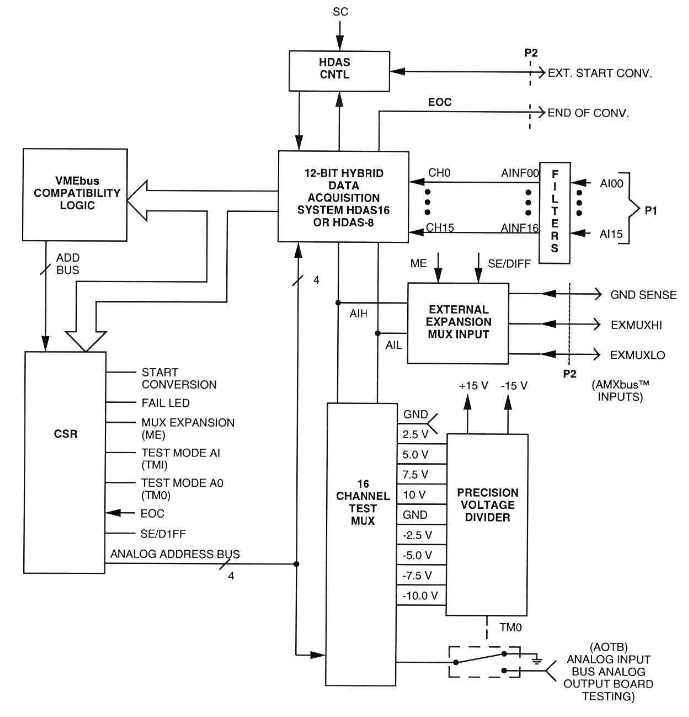
VMIVME-3100 is a mid performance 12 bit analog-to-digital converter (ADC) board that supports 16 single ended or 8-channel differential front-end analog inputs, as well as multiple multiplexing expansion boards. Expansion board utilizing AMXbus ™ The analog signal is routed from the multiplexer input to the ADC board, which also has built-in testing capabilities. The fault LED on the front-end panel can provide users with fault detection and isolation capabilities.
Core functions and parameters
Key Features
12 bit resolution, maximum conversion time of 9 μ s, acquisition time of 9 μ s (can be selected based on full-scale input voltage).
16 channel single ended multiplexer, 8-channel differential input option.
Onboard built-in testing logic for fault detection and isolation, equipped with front-end panel fault LED.
Onboard precision voltage source, supporting self check.
You can choose one ADC per slot or one ADC plus a slave MUX board.
It has overvoltage protection input, separate encoding/key controlled VME connector, dual European card appearance, and fault safety function in case of power failure.
Throughput
Analog to digital (A/D) throughput: The throughput time of the operation is the sum of the amplifier setup time (acquisition time) and the A/D conversion time. The A/D conversion time is 9 μ s, and the amplifier setup time depends on the input voltage range and gain setting.
System throughput: Supports multiple multiplexing expansion boards, and the total system throughput can be calculated according to the relevant formula, which is
F S= N(T 1+T 2+T 3)1( Samples per second), Where N is the number of channels, T1 is the acquisition time of the remote multiplexer, T2 is the setup time of the VMIVME-3100 amplifier, and T3 is the conversion time of the VMIVME-3100 ADC.
protection function
16 front-end analog inputs have overvoltage protection. When the+15V power supply is turned on, the maximum input voltage range is ± 35V; when the power supply is turned off, the maximum input voltage is+20V.
Operation Mode
Normal mode operation
Analog signals can be transmitted through the front panel P3 connector or AMXbus ™ (P2 connector) receiving, AMXbus ™ Supports multiple analog input multiplexing expansion boards.
The front-end panel input (P3 connector) supports 8 differential or 16 single ended analog inputs. In single ended mode, each input has a related ground signal, and multiple low-pass filter options are also available.
AMXbus ™ The operation supports connecting up to 16 VMIC multiplexer boards to one ADC, achieving high-density and low-cost analog input expansion, and also supports built-in testing functions related to VMIC analog output boards.
ADC conversion can be initiated through an external TTL compatible signal, and the external trigger conversion circuit is enabled by setting the bit in the control word.
Built in testing mode
The ADC board contains a Control Status Register (CSR), which can be used to select certain operating modes. Users can use the read and write capabilities of CSR to verify the DO-D14 function of VMIVME-3100 VMEbus logic.
On board 9 precision voltage sources (-10.000V, -7.500V, -5.000V, -2.500V, 0.000V,+2.500V,+5.000V,+7.500V,+10.000V) can be selected by the user testing subroutine to verify the correct operation and accuracy of the board, and can also be used for calibration.
Can be accessed through AMXbus ™ Interconnect VMIVME-3100, VMIVME-41XX, and VMIVME-32XX boards to perform loop testing from analog output to analog input. It can also be used in conjunction with VMIVME-4500 for fault detection and isolation.
VMEbus interface description
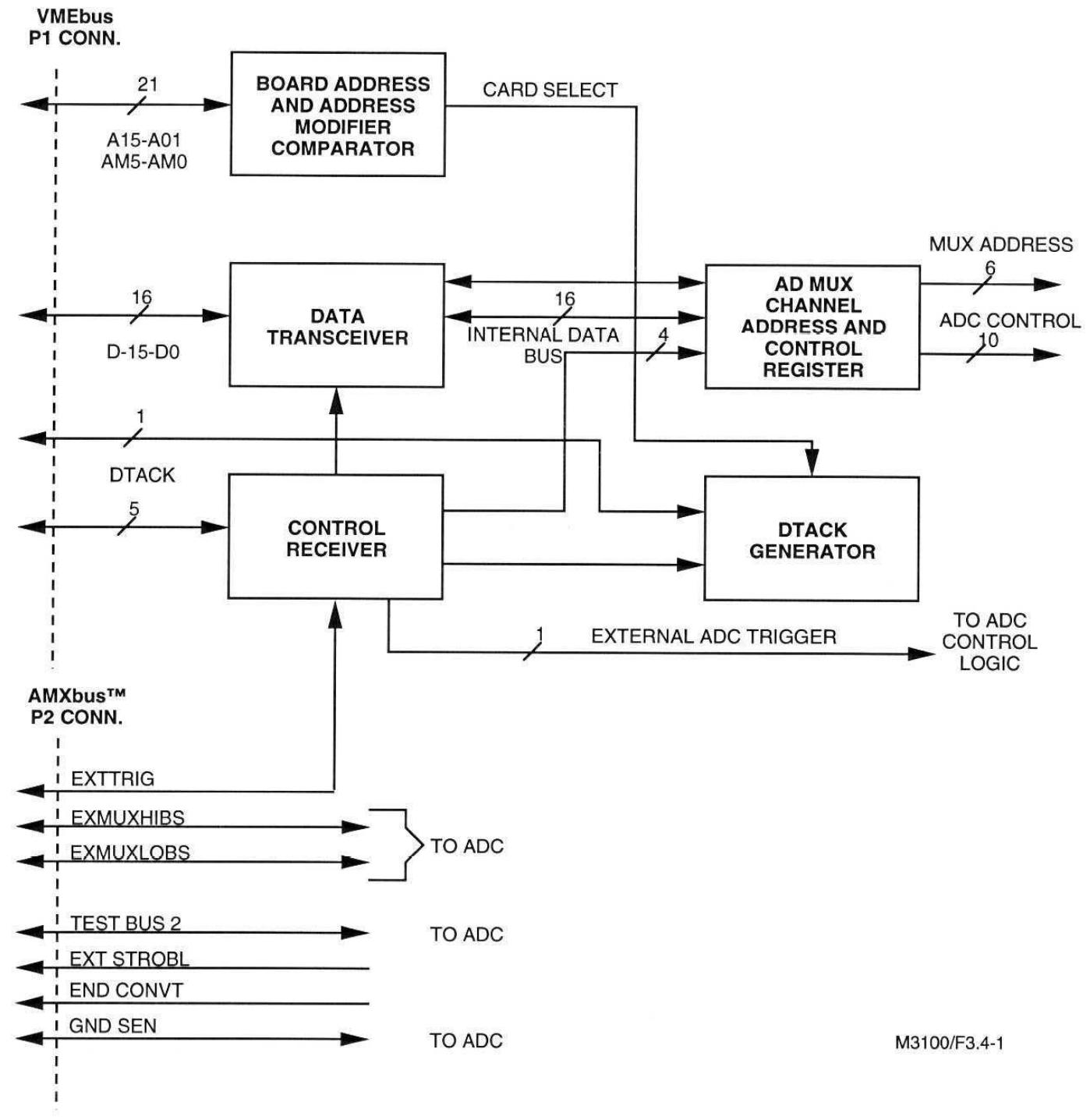
The VMEbus interface of VMIVME-3100 includes the logic required to connect the slave board to VMEbus and perform memory mapping in the VMEbus short I/O address space. In the write cycle of the board address, bits A01 to A15 are compared with the previously selected board address, which is selected by the DIP switch. If the address matches, a board selection signal is generated, which, together with the control signal received on the board, gates the data (DO to D15) to the CSR on VMIVME-3100.
The circuit requires+5V,+15V, and -15V voltages, with+5V provided to the board through P1 and P2 connectors. The onboard DC-DC converter generates+15V and -15V for the analog circuit.
Programming related
Overview
The ADC board performs memory mapping in the VME short I/O address space, occupying only one word position within the 65535 byte VME short I/O address space. The board address is selected by DIP switches, and the short I/O space is mapped from FF0000 (hexadecimal) to FFFFF (hexadecimal). The ADC data register containing 12 bit converted digital data is a read-only register, while the control status register (CSR) is a read-write register used for board control. Since these two registers use the same address, CSR access and ADC conversion end register access are selected through data bit D15.
Description of Control Status Register (CSR)
The operating mode of the CSR programming selection board, CSR is a 16 bit read-write register. To initiate AD conversion, it is necessary to set data bit D6 in CSR and program data bits DO to D5 and D8 to D14 according to the desired operating mode. Data bit D15 is used to distinguish between two possible read cycles. Writing "0" to CSR can read the converted digital data from the ADC data register, while writing "1" can read CSR.
ADC board reads data format
To read 12 bit converted data, it is necessary to first write the low-level data bit D15 into CSR. The data is only valid when data bit D15 is read as logical '0', and the valid data is included in data bits DO to D11.
Programming Example
Provides various MC68000 assembly language programming examples, including ADC conversion of P3 connector input and using AMXbus ™ Expansion of functions, testing and programming of ADC board, testing of analog output of VMIVME-4100 DAC board using ADC board, and verification of VMIVM-3200 multiplexer board in combination with VMIVME-4100 DAC board.
Configuration and Installation
Unboxing program
Some components are sensitive to electrostatic discharge, and unused boards should be stored in their original packaging. When placing the board on the workbench, it is recommended to insert conductive material underneath the board to provide conductive diversion. After receiving the goods, it is necessary to carefully inspect for any transportation damage. If there is any damage, a claim should be made to the carrier and a complete report should be sent to VMIC.
Physical installation
When installing or disassembling the board, the power should be turned off. Insert the board into the corresponding slot of the chassis, ensure correct alignment and orientation, and smoothly slide the card forward against the mating connector until it is firmly inserted.
Pre installation checklist
Before installation, it is necessary to confirm that the relevant theoretical and programming content has been read and applied. Check whether the jumper and board address switch settings installed by the factory meet the requirements, change the relevant settings as needed, confirm that the cable connection is correct, and calibrate by the factory. If recalibration is required, please refer to the relevant sections.
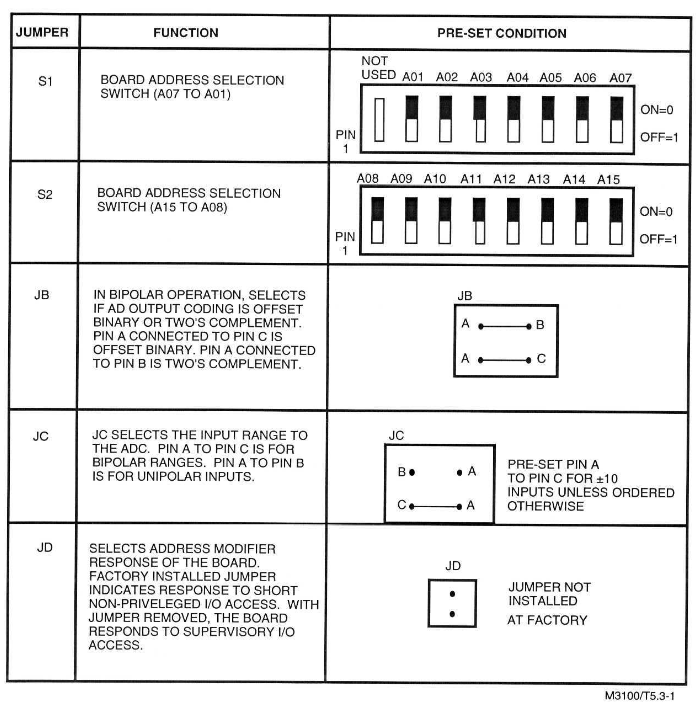
Board address selection switch
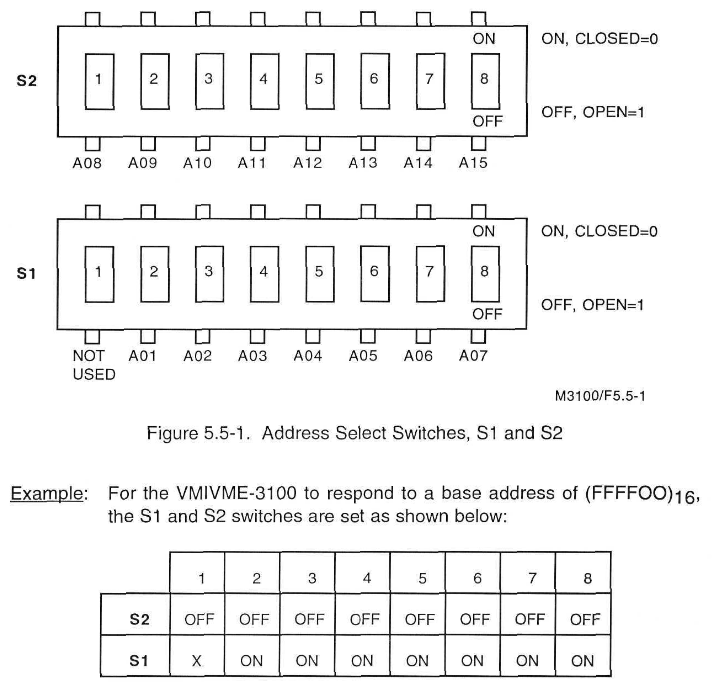
There are two address DIP switches on VMIVME-3100, each corresponding to an address bit or unused. When the switch is turned on, the corresponding address bit is compared with the logic "0". During the reading and writing of the DAC board, all corresponding address bits must be compared with the switch position.
Other configurations
Address modifier response selection: The response method of the address modifier code on the board can be selected through jumper wires.
ADC output encoding selection: Factory configured for straight binary digital encoding with unipolar input and offset binary encoding with bipolar input, which can be changed to binary complement code through jumper wires.
Analog input full-scale range selection: Select the full-scale range to be digitized by the ADC through jumper (JC) and related gain resistor (R28).
RDELAY (optional) selection: The factory is configured with no RDELAY resistor, and a collection setup time of 9 μ s can be selected. Different RDELAY can be chosen as needed to obtain different collection times.
Connector Description
P1 and P2 connectors connect the VMIVME-3100 board to the VMEbus backplane. P1 contains address data and control lines, as well as all additional signals required for control data transmission and other bus functions. P2's user I/O pins are provided by AMXbus ™ Used to control external multiplexing expansion boards and test analog output boards for VMIC.
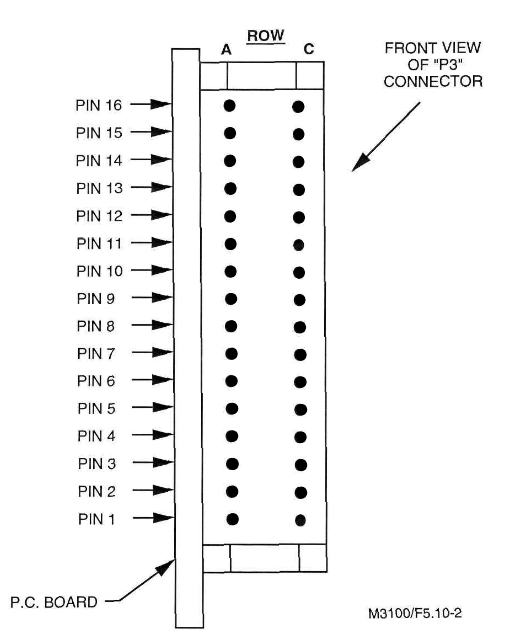
The P3 connector is a Panduit 32 pin male connector that supports 16 single ended or 8-differential analog inputs, each with an associated analog ground pin.
calibration
There are four potentiometers adjusted on the VMIVME-3100, and the factory has correctly adjusted and applied anti loosening glue. If recalibration is required, the onboard precision benchmark needs to be calibrated first, and then used to recalibrate the ADC.
Maintenance and Warranty
maintenance
The maintenance section provides information on the maintenance and upkeep of VMIC products. If the product malfunctions, users should check the software, system configuration, electrical connections, etc. User level repairs are not recommended and should contact VMIC to obtain a Return Merchandise Authorization (RMA) number. The appendix contains drawings and charts for reference.
warranty
VMIC's standard products are guaranteed to be free of material and process defects within 90 days from the date of shipment. For products that meet the warranty conditions, VMIC may choose to repair or replace them at its facilities. Customers are required to notify VMIC within a reasonable time after discovering defects. Prior to returning the product, they must contact the customer service department to obtain the call ticket number and RMA number. There are corresponding regulations on the transportation method and cost of the product. In some cases, VMIC does not assume warranty or liability, and the final determination of warranty eligibility is made by VMIC. The warranty period for replacement or repair products is the same as that of the original products.
Over warranty maintenance policy
VMIC's maintenance policy for standard products is divided into two categories: product replacement and fixed price maintenance. All product repairs require return authorization, and repair pricing can be consulted with the factory representative. Payment should be made upon delivery or within 30 days after the delivery date selected by VMIC, and shipping costs should be borne by the customer (excluding warranty repairs). VMIC's repaired products are guaranteed to be free of process and material defects for 90 days from the date of shipment to the customer, and repair rates may not apply to products that have suffered abnormal physical or electrical damage.
- OMRON
- ABB
- General Electric
- EMERSON
- Honeywell
- HIMA
- ALSTOM
- Rolls-Royce
- MOTOROLA
- Rockwell
- Siemens
- Woodward
- YOKOGAWA
- FOXBORO
- KOLLMORGEN
- MOOG
- KB
- YAMAHA
- BENDER
- TEKTRONIX
- Westinghouse
- AMAT
- AB
- XYCOM
- Yaskawa
- B&R
- Schneider
- KONGSBERG
- NI
- WATLOW
- ProSoft
- SEW
- ADVANCED
- Reliance
- TRICONEX
- METSO
- MAN
- Advantest
- STUDER
- DANAHER MOTION
- Bently
- Galil
- EATON
- MOLEX
- DEIF
- B&W
- ZYGO
- Aerotech
- DANFOSS
- Beijer
- Moxa
- Rexroth
- Johnson
- WAGO
- TOSHIBA
- BMCM
- SMC
- HITACHI
- HIRSCHMANN
- Application field
- XP POWER
- CTI
- TRICON
- STOBER
- Thinklogical
- Horner Automation
- Meggitt
- Fanuc
- Baldor
- SHINKAWA
- Other Brands
- UniOP
- KUKA
- Iba
- Beckhoff
- ADLINK
-
 Applied Materials 0195-14157 CMP Tool Controller
 -
 Allen-Bradley SK-H1-PWRMOD-D590 Power Structure
 -
 Zebra RSR12-RG5G8G5G5A1A2B XSLATE R12 Rugged Tablet
 -
 LTI SC52.0040.0012.0000.0 Compact Servo Drive
 -
LTI Tools LT4400-30 Twist Socket 1/2 inch Drive
-
 Lust LTi CDE32.008 Position Controller
 -
 LUST B-DS 125.1 LTi Drives 181-00635 Module
 -
 LTI DRIVES MS100 Montageset 0927.0017
 -
 Lust LTi Servo One SO84.032.0043.0000.2 Drive
 -
 LTI CDF 30.008.C3.6 Drive Power Supply
 -
 LTI SC52.0040.0012.0000.0 Servo Drive
 -
 LTi Drive CDF30.002 Power Supply Fuse
 -
 LTI Tools LT-4621-D Deep Well Twist Socket
 -
 MOOG LTI CDE54.044.D Pitch Master Turbine Drive
 -
 LTI TOOLS LT-1460 Wheel Torque Extension Kit
 -
 LUST LTi SO82.004.0030.0000.2 Servo Drive
 -
 LTI MOTION SA54.0075.0033.0000.0 Servo Drive
 -
 LUST LTi CDE34.006 W2.0 BR Servo Drive
 -
LUST LTi MOTION CDE34.044 W2.4 H13 Servo Drive
-
LUST LTi CDE32.008 W2.2.BR Positioning Controller
-
 LUST LTi DRiVES B-DS 125.1 Braking Resistor
 -
 LTI MOTION CDE34.006.WXX.PC1 Servo Drive
 -
 LTI MOTION SO24.007.0030.1000.0 Servo Drive
 -
Lust CDD34.005.C2.1 LTI Drive
-
LTI SC52.0040.0012.0000.0 Compact Servo Drive
-
LTI Tools LT4400-30 Twist Socket 1/2 inch Drive
-
 Lust LTi CDE32.008 Position Controller
 -
 LUST B-DS 125.1 LTi Drives 181-00635 Module
 -
LTI DRIVES MS100 Montageset 0927.0017
-
 Lust LTi Servo One SO84.032.0043.0000.2 Drive
 -
LTI CDF 30.008.C3.6 Drive Power Supply
-
LTI SC52.0040.0012.0000.0 Servo Drive
-
LTi Drive CDF30.002 Power Supply Fuse
-
LTI Tools LT-4621-D Deep Well Twist Socket
-
 LTI Tools LT-1400C Wheel Torque Extension
 -
LTI SO CM-P.0122.2015.1 Servo Drive SA000-13029N
-
LTI MOTION SC32.0075.1011.0000.0 Servo Drive
-
 LTI MOTION SC34.0200.0011.0000.0-SL Servo Drive
 -
 LTI CDE34.017 W2.4 H18 Frequency Inverter
 -
 LTI SO CM-P.0122.2015.1 Servo Drive
 -
 LTI FLPF-142-3-12-560/T4 Servomotor
 -
 MOOG LTI CDE54.044.D Pitchmaster Turbine Drive
 -
Lust LTi CDB34.003.C2.4 SH Servo Controller
-
 LTI SC52.0040.0012.0000.0 Servo Drive
 -
LTI SA52.0100.0033.0000.0 Servo Driver
-
 LUST CDE 54.044.D Pitch Master Turbine Drive
 -
 Lust LTi Servo One SO84.032.0040.0000.2 Drive
 -
 LTi LSH-074-2-60-560/T1 P S4 B14.1R Servo Motor
 -
LTI SC52.0040.0012.0000.0 Servo Drive
-
 LTI CDS44.072.LC1.1.NF Servo Driver
 -
 LTI SO CM-P.0122.2015.1 Servo Drive
 -
LTI MOTION SO24.007.0030.1000.0 Servo Drive
-
LTI MOTION SC34.0300.0011.0000.0 Servo Drive
-
 LTI DRIVES GmbH MS100 Mounting Set 0927.0017
 -
 LTI CDB34.014 W2.4 BR SH Servo Driver
 -
LTi Drives 0920.0034.14 Documentation DVD
-
 LTI MOOG CDE54.044 Pitchmaster Frequency Converter 181-01019
 -
LTI LSN-097-0960-30-560 Servo Motor
-
LUST LTI CDE32.008 W2.2.BR Positioning Controller
-
LTI Drives MS100 0927.0017 Assembly Set
-
 LTI SO82.004.0030.0000.2 Servo Drive
 -
LTI MOTION SC32.0040.1011.0000.0 Servo Drive
-
LTi Drives 0920.0034.14 Product DVD
-
LTI MOOG CDE54.044 Pitchmaster Servo Drive 181-01019
-
LUST LTI CDE34.017 W2.4 Servo Drive
-
 Lust LTi Servo One SO84.032.0040.0000.2 Drive
 -
 LUST LTI SO84.012.0011.1700.2 Servo Drive
 -
LTI LSN-097-0960-30-560 Servo Motor
-
LUST CDE 54.044.D Pitch Master Turbine Drive
-
 LTI Luster SA54.0550.0033.0000.0 Servo Drive
 -
LTI CDS44.072.LC1.1.NF Servo Driver
-
 LTI DRIVES GmbH MS100 Assembly Set 0927.0017
 -
 LTi Drives DSM4-14.2-21R83-200 Servo Motor
 -
LTI Motion SC52.0150.0012.0000.0 Servo Drive
-
LTI Motion LSP04-004-048-60-0PR1PY17E0440 Servo Motor
-
 LTI KP300-R Drive Interface Operator Display
 -
 Lust LTI SO84.020.0002.0100.2 Servo Drive
 -
 LUST LTI CDD34.008.W2.1 CDD3000 Servo Drive
 -
LTI MOTION SA54.0550.0033.0000.0 Servo Drive
-
 LTI Drives MS100 0927.0017 Mounting Kit
 -
 LTi DRiVES LSP06-015-320-30-00H1MY170 Servo Motor
 -
 LTI MC6412 C1 D3 S12 Servo Drive
 -
LUST LTi SO82.004.0030.0000.2 Servo Drive
-
LTi Drives LSP06-015-320-30-00H1MY170 Servomotor
-
LUST LTi CDE34.003 C2.0 Servo Drive
-
LUST LTi LSH-127-1-30-560 T1 Servo Motor
-
 LTI MOOG CDE54.044 Pitchmaster Servo Drive
 -
LTI Lock Technology 1237 Flip Socket Set
-
LTi LSP08-028-560-55-00H1MY1M0 Servomotor
-
Lust LTi CDE34.010.D2.4 Position Controller 10A
-
 Lust LTi CDE34.010.D2.4 Positioning Controller 10A
 -
LTi Drives FLPF-142-3-12-560/T4 Servomotor
-
 LUST LTI Motion CDD54.045 W2.1 Servo Drive
 -
LUST LTI CDD34.006.W2.2.PC1 Servo Drive
-
 LTI KP200-XL Operator Panel Keypad 4 Key
 -
 Lust LTI CDE32.008 W2.2.BR Positioning Controller
 -
LTI Servo One SO82.004.0030.0000.2 Drive Amplifier
-
LTI MOTION SC54.0550.0012.0000.0 Servo Drive
-
LTI LSN-097-0510-30-560 Servo Motor
-
LTi Drives 0920.0034.14 Product DVD
-
LTI SO82.004.0030.0000.2 Servo Drive
-
MOOG LTI CDE54.044 Pitchmaster Frequency Converter
-
LUST LTI CDE34.017 W3.0 Servo Drive
-
LUST LTi Drives CDS44.072 LC1.1 Servo Drive
-
LUST LTi DC1-3.0006.1000.0 Servo Drive
-
LTi LSMM13-100-4N-001 Servo Motor
-
LTI MOOG CDE54.044 Pitchmaster Servo Drive
-
 LUST LTi Drives NFE12.3 Line Filter
 -
LTI MOTION SC34.0100.1011.0000.0 Drive
-
LUST LTi LSH-074-2-30-560/T1 B S4 G6.1M Servomotor
-
LUST LTI CDE34.044W2.3 Servo Drive
-
LUST LTi LST-127-5-15-560/T1 S4 G12.1S Servomotor
-
Lust LTi MOTION CDE34.044 W2.4 H13 Servo Drive
-
LTI Servo One SO82.004.0030.0000.2 Drive Amplifier
-
Lust LTI CDE34.006 W2.4 V4.10-02 Servo Controller
-
LTI Drives Stromag FLP 20/0014-60 BA 1 Servomotor
-
Lust LTI CDE34.024.Wx.x.PC1 Servo Controller
-
LTI Drives FLP13-0395-30-AC2 9.5 kW Servo Motor
-
LTI CDB32.004-C2.0SH Servo Drive
-
LTi LSH-074-2-30-320/T1 1R Servo Motor
-
LTi DRiVES LSP08-028-320-30-BPH2MY17E0803 Servo Motor
-
LUST LTI SO24.007.0020.0000.1 Servo Controller
-
LTI CDE34.017.W3.0 Frequency Inverter
-
LUST LTi DRIVES LSH-097-0960-30-560/T1 Servomotor
-
LTi DRiVES LSP10-056-560-50-00H1MY 1M0 Servomotor
-
LTi DRiVES LSP08-028-320-55-00H1MY 170 Servomotor
-
 LTI MC6432 C1 D3 S12 G20 Servo Drive
 -
 Keba LTi CDE32.008 C3.0 Frequency Inverter


