
Yokogawa WTB10-DO Series Dissolved Oxygen Measurement System Terminal Box
Yokogawa WTB10-DO Series Dissolved Oxygen Measurement System Terminal Box
Product basic information and positioning
1. Core functions and application scenarios
Product positioning: The WTB10-DO series terminal box is a supporting equipment for dissolved oxygen measurement systems, used for signal conversion when dissolved oxygen sensors and converters (such as FLXA402, FLXA202, FLXA21) are installed separately. It supports outdoor installation (in accordance with JIS C0920 rainproof structure standard).
System association: It needs to be used in conjunction with specific models of dissolved oxygen sensors (such as DO30G), converters, and installation brackets (such as PH8HG, PB350G, DOX8HS) from Yokogawa. Different models of terminal boxes correspond to different converters. The specific association manual is shown in the table below:
Associated device model, device name, corresponding manual number
FLXA402 4-wire converter IM 12A01F05-01eN
FLXA202, FLXA21 2-wire liquid analyzer IM 12A01A02-01E
DO30G dissolved oxygen sensor IM 12J5B3-01E
PH8HG guide bracket IM 12B7M2-01E
PB350G floating bracket IM 19H1E1-01E
DOX8HS diving bracket IM 19H1D2-01E
Product specifications and model description
1. Core specification parameters
Structural type: Outdoor type, JIS C0920 rainproof structure
Shell material: Glass fiber reinforced polycarbonate resin
Shell color gray green (Munsell color card 2.5 GY 5.0/1.0 or equivalent color)
Installation methods: bracket installation (no additional bracket required), pipeline installation (requires/P option bracket), wall installation (requires/W option bracket)
Weight: Terminal box body 0.5kg; Pipe installation bracket about 0.7kg; Wall installation bracket about 0.3kg
Working temperature -10~50 ℃
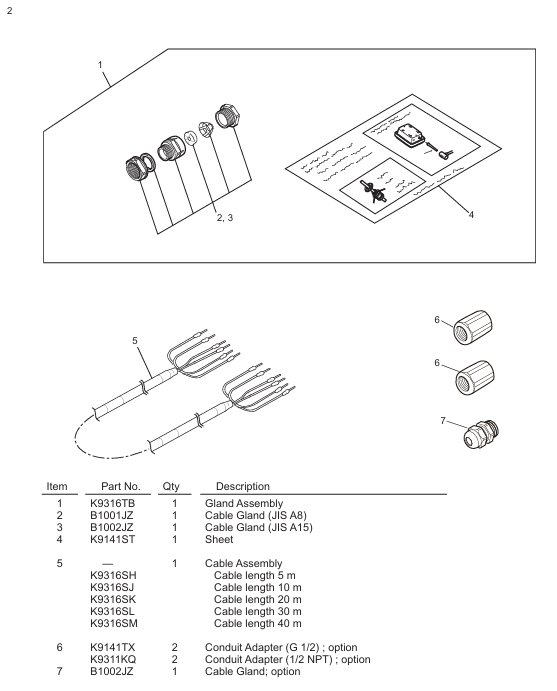
Cable entrance sensor cable: diameter 13mm, equipped with JIS A8 grade cable sealing sleeve (suitable for cable outer diameter 5.5-7mm); Special extension cable: diameter 21mm, equipped with JIS A15 grade cable sealing sleeve (suitable for cable outer diameter 9-12mm)
The length of the dedicated extension cable can be selected from 5m, 10m, 20m, 30m, and 40m, and the end has been pre treated; When installing/AWTB (G1/2 internal thread) or/ANSI (1/2 NPT) conduit adapters, a sealing sleeve and adapter will be included
2. Model and suffix code rules
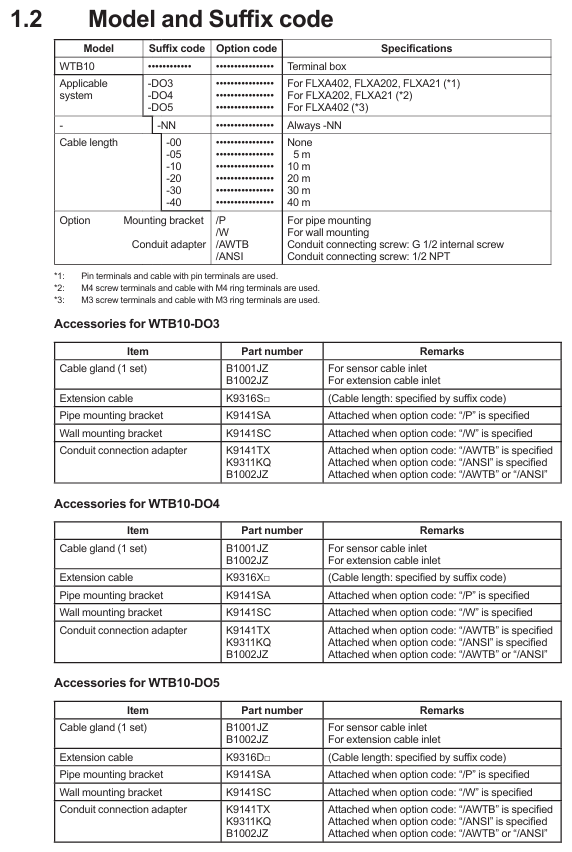
Model structure: WTB10- [Applicable system code] - [Fixed suffix] - [Cable length code]+[Option code], the meanings of each part are as follows:
Meaning of Component Code Examples
Applicable System - DO3 compatible with FLXA402, FLXA202, FLXA21 (pin terminal, cable with pin terminal)
-DO4 compatible with FLXA202, FLXA21 (M4 threaded terminal, with M4 ring terminal cable)
-DO5 compatible with FLXA402 (M3 threaded terminal, with M3 ring terminal cable)
Fixed suffix - NN is used for all models
Cable length -00 without extension cable
-05/-10/-20/-30/-40 Extension cable length 5m/10m/20m/30m/40m
Option code/P includes pipeline installation bracket
/W includes wall installation bracket
/AWTB includes G1/2 internal thread conduit adapter
/ANSI includes 1/2 NPT conduit adapter
Accessories List: Different models of terminal boxes come with different standard accessories. Taking WTB10-DO3 as an example, the standard accessories include sensor cable sealing sleeve (B1001JZ), extension cable sealing sleeve (B1002JZ), and corresponding length extension cable (K9316S □ series). Corresponding brackets are included when installing/P or/W, and conduit adapters are included when installing/AWTB or/ANSI.
Installation process and requirements
1. Preparation before installation
Installation environment:
Outdoor rainproof, sensors should be installed as close as possible to the terminal box;
Avoid high humidity and corrosive gas environments (to prevent contact failures caused by cable breakage, poor insulation, or corrosion);
The terminal box cover is equipped with a silicone desiccant (about 30g), and its moisture absorption status needs to be checked regularly.
Installation tools and accessories: Prepare M5 screws (bracket installation, length=bracket thickness+5mm), M8 screws (wall installation, 3 pieces), U-bolts (pipeline installation, suitable for pipes with an outer diameter of 60.5mm), as well as standard accessories such as cable glands and extension cables according to the installation method.
2. Detailed explanation of installation method
(1) Bracket installation
Drill holes on the bracket according to the installation hole size of the terminal box (4 holes with a diameter of 5.5mm, hole spacing of 75 ± 0.2mm × 70 ± 0.2mm);
Fix the terminal box on the bracket with 4 M5 screws, and the screw depth should cover the thickness of the bracket before penetrating 5mm to ensure firmness.
(2) Pipeline installation (requires/P option support)
Fix the pipeline installation bracket (K9141SA) onto a sturdy pipeline with an outer diameter of 60.5mm (nominal 50A) using U-bolts, washers, and nuts;
Fix the terminal box on the bracket with 4 M5 screws, which can be installed vertically or horizontally.
(3) Wall installation (requires/W option bracket)
Drill holes on the wall according to the size (3 M8 screw holes, with a hole spacing that meets the positioning requirements of the terminal box center);
Fix the wall mounting bracket (K9141SC) to the wall with 3 M8 screws, and then secure the terminal box to the bracket with 4 M5 screws.
3. Cable entrance opening
The cable entrance at the bottom of the terminal box is a pre designed groove (not opened), which needs to be opened with a tool before wiring: align the tip of a cross screwdriver or other tool with the center of the groove, lightly tap the tool head with a hammer, and break the entrance hole along the groove (the sensor cable entrance and the extension cable entrance need to be opened separately).

Wiring operation specifications
1. Sensor cable connection
Dismantling the terminal box cover: Loosen the 2 screws on the front panel and remove the cover;
Installation of cable sealing sleeve: Remove the nut of JIS A8 grade cable sealing sleeve (B1001JZ) and assemble it to the sensor cable inlet in the order of "nut → gasket → main body → cap", ensuring that the sealing sleeve is in contact with the box body;
Cable insertion: Remove the cap, clamping claw, and rubber gasket from the sealing sleeve, place it on the sensor cable, and insert the front end of the cable into the terminal box;
Wiring: Connect the sensor cable core wires according to the terminal numbers (refer to the correspondence between "core wire color terminal number": brown -16, white -12, black -11, green -14, yellow -15, red -13), ensuring correct and secure wiring;
Sealing fixation: Install the rubber gasket and clamping claw back into the sealing sleeve, tighten the cap to prevent water ingress, and be careful not to overtighten and damage the cable.
2. Extend cable connection (terminal box converter)
Preparation work: The two ends of the extension cable have been pre treated (with no directional difference). If conduit protection is required, the DIN Pg13.5 sealing sleeve at the inlet of the converter sensor cable needs to be replaced with a JIS A15 level sealing sleeve (standard);
Install sealing sleeve/adapter:
No conduit: Install the JIS A15 grade sealing sleeve (B1002JZ) onto the extension cable in the order of "cap → clamping claw → rubber gasket → main body → gasket → nut", and fix the nut after the cable enters the terminal box;
With conduit: Replace the cap of the sealing sleeve with the optional/AWTB (G1/2) or/ANSI (1/2 NPT) adapter, tighten the adapter, and connect the conduit union;
Wiring: Connect the extension cable core wires according to the terminal numbers to ensure consistency with the terminal correspondence of the sensor cable;
Cover the box: After checking the wiring is correct, install the front panel cover back into the terminal box and tighten the screws to ensure sealing.
3. Wiring diagram
WTB10-DO3/- DO4 terminal box: The sensor cable and extension cable are connected to terminals 11 (T1, black), 12 (T2, white), 13 (IE, red), 14 (S, green), 15 (RE, yellow), 16 (SE, brown). The converter (FLXA402/FLXA202/FLXA21) receives signals through the extension cable;
WTB10-DO5 terminal box: only compatible with FLXA402 converter, wiring logic is consistent with - DO3/- DO4, please note that the terminal thread specification is M3 (- DO3 is pin type, - DO4 is M4).

Inspection and maintenance
1. Regular inspection (recommended once a year or every two years, with early inspection in case of abnormalities)
**Moisture inspection * *: Remove the terminal box cover and check if the interior is damp. If it is damp, use a hair dryer to dry it; Several desiccants (silica gel) are saturated with moisture, replace with spare desiccants (30g/part, part number K9020XR);
Corrosion inspection: Check whether the terminals and wires have corroded due to the invasion of corrosive gases. If there is a risk of poor contact or wire breakage, the corroded parts need to be replaced; When replacing the core wire crimping terminal, it is necessary to keep the wiring number label (ribbon) to avoid wiring errors.
2. Maintain parts list
The commonly used maintenance parts for terminal boxes include seals, fasteners, desiccants, etc. Different models correspond to slightly different part numbers. Taking WTB10-DO3 as an example:
Part name, part number, quantity, and purpose
O-ring G9303NB 2 sealing box gap
Desiccant (30g) K9020XR 1 absorbs moisture inside the box
Panel screws (M3 × 4) Y9304LB 2 fix the front panel
Install screws (M5 × 8) Y9508JU 4 to fix the terminal box and bracket
Cable sealing sleeve (JIS A8) B1001JZ 1 sensor cable sealing
Cable sealing sleeve (JIS A15) B1002JZ 1 extension cable sealing
Key precautions
Installation sealing: All cable entrances and box covers must be sealed to prevent rainwater and moisture from entering; When adapting the conduit, the flexible joint should be tightened to avoid cable protection failure;
Wiring specifications: strictly follow the corresponding wiring of "core wire color terminal number", incorrect wiring may cause measurement abnormalities or equipment damage; The length of the extended cable must be consistent with the selection and cannot be cut or spliced arbitrarily;
Environmental protection: Although it is an outdoor type, it is still necessary to avoid long-term exposure to strong corrosion and high humidity environments, and regularly check the condition of desiccants and seals;
Parts replacement: Only spare parts certified by Yokogawa (such as sealing sleeves, brackets, desiccants) can be used. Non certified parts may affect equipment performance and safety.
- OMRON
- ABB
- General Electric
- EMERSON
- Honeywell
- HIMA
- ALSTOM
- Rolls-Royce
- MOTOROLA
- Rockwell
- Siemens
- Woodward
- YOKOGAWA
- FOXBORO
- KOLLMORGEN
- MOOG
- KB
- YAMAHA
- BENDER
- TEKTRONIX
- Westinghouse
- AMAT
- AB
- XYCOM
- Yaskawa
- B&R
- Schneider
- KONGSBERG
- NI
- WATLOW
- ProSoft
- SEW
- ADVANCED
- Reliance
- TRICONEX
- METSO
- MAN
- Advantest
- STUDER
- DANAHER MOTION
- Bently
- Galil
- EATON
- MOLEX
- DEIF
- B&W
- ZYGO
- Aerotech
- DANFOSS
- Beijer
- Moxa
- Rexroth
- Johnson
- WAGO
- TOSHIBA
- BMCM
- SMC
- HITACHI
- HIRSCHMANN
- Application field
- XP POWER
- CTI
- TRICON
- STOBER
- Thinklogical
- Horner Automation
- Meggitt
- Fanuc
- Baldor
- SHINKAWA
- Other Brands
- UniOP
- KUKA
- Iba
- Beckhoff
- ADLINK
-
 Micro Innovation GF1-10TVA-100 Touch Panel
 -
 Micro Innovation GSO-57EQD-000 Operator Panel
 -
 Micro Innovation XN-2AI-U Analog Input Module
 -
 Micro Innovation CAN-4AI/UI Analog Input Module
 -
 Micro Innovation ZSB-1.5/8-S/S/-/PE Base Terminal
 -
Micro Innovation AG XVH-340-57CAN-1-10 HMI Panel
-
 Micro Innovation GSO-57EQD-000 Micro Panel
 -
 Micro Innovation XN-2AI-PT/NI-2/3 Input Module
 -
 Micro Innovation AG GF0-57SQD-000 Display Panel
 -
 MICRO INNOVATION AG XN-16DI-24VDC-P Input Module
 -
 Micro Innovation XN-2AI-PT/NI-2/3 Input Module
 -
 Micro Innovation MC2-442-57CQB-1-2G Display Panel
 -
 Micro Innovation XN-16DO-24VDC-0.5A-P Module
 -
 Micro Design MC200PROFI Programmable Module
 -
Micro Innovation XV-252-57MPN-1-10 Micro Panel
-
 Micro Innovation CAN-4AI/UI Analog Input Module
 -
Micro Innovation GT1-MPI-A000 Panel
-
Micro Innovation MC2-440-10TVB-1-21 Display Panel
-
Micro Innovation XVS-430-57MPI-1-1S 6" HMI
-
Micro Innovation XV-442-57CQB-1-1AB Monitor
-
 Micro Innovation ZSB-1.5/8-S/S/-/PE Base Terminal
 -
Micro Design 895A Microfiche Reader
-
 MICRO INNOVATION XNE-8DI-24VDC-P Input Module 8550100794
 -
MICRO INNOVATION MICRO PANEL GF0-10CVD-002
-
 Micro Innovation XN-PLC-CANopen Controller 85 50 274124
 -
Micro Innovation Display Panel GS0-57E0D-000
-
MICRO INNOVATION CAN-32DI/P2X16 Input Module
-
MICRO INNOVATION XN-2DO-R-NO Relay Output Module
-
MICRO INNOVATION XNE-16DI-24VDC-P Input Module
-
Micro Innovation AG XN-2AI-U Analog Input Module
-
Micro Innovation XN-BR-24DC-D Power Supply
-
Micro Innovation MH2-342-57EIB-1-20 Panel
-
Micro Innovation XV-252-57MPN-1-10 Micro Panel
-
 Micro Innovation Display Card EIB2-TP
 -
 Micro Innovation XV-252-57MPN-1-10 6" HMI
 -
 Micro Innovation XN-B3T-SBC 16x DO Base Module
 -
Micro Innovation XVH-330-57MPI-1-10 Panel
-
Micro Innovation XN-BR-24VDC-D Power Module
-
 Micro Innovation EIB2-TP EIB2TP Module
 -
Micro Innovation GF0-10CVD-100 Touch Panel
-
MICRO INNOVATION XV-230-57CNN-1-10 HMI-PLC
-
MICRO INNOVATION XN-2DO-R-CO Relay Output Module
-
KMK MICRO INNOVATION GS2-90EMD-000 Micro Panel
-
 Micro Innovation XN-2AO-U Analog Output Module
 -
 Micro Innovation XN-1AO-I Analog Output Module
 -
 Micro Innovation CAN-32DI/P-2x16 Rack Module
 -
Eaton Micro Innovation MC2-440-10TVB-1-11 HMI
-
Micro Innovation AG CAN Bridge 8551224177
-
 Micro Innovation XN-2AI-I Analog Input Module Set
 -
Micro Innovation XN-4DI-24VDC-P Input Module
-
 Micro Innovation Winbloc CAN-16DO/0.5A-PK Module
 -
Micro Innovation Micro Panel GFO-10SVD-002 HMI
-
 Micro Innovation CAN-24DI/8DO/0.5A-PK Module
 -
 Micro Innovation DP-24DI/8DO/0.5A-PK I/O Module
 -
 Weidmuller Micro Innovation CAN-BRIDGE ZSFA 1,5R
 -
Micro Innovation CAN-3AI/1AO-UI Profibus Module
-
 Micro Innovation PDP-TP Profibus DP Module
 -
Micro Innovation CAN-3AI/1AO-UI Analog Module
-
 Micro Innovation MC2-430-12TSB-10 HMI Panel
 -
Micro Innovation XNE-8DO-24VDC-0.5A-P I/O Module
-
MICRO INNOVATION AG WINBLOC CAN-32DI/P-2x16 85 51 224182
-
 MICRO INNOVATION AG WINBLOC CAN-4AO/UI 85 51 224195
 -
Micro Innovation Xv-252-57cnn-1-10 HMI Panel
-
Micro Innovation XN Basis XN-S4T-SBBS-CJ 225200
-
Micro Innovation GF1-10TVD-100 Micro Panel
-
Micro Innovation XN-B3T-SBC 16-Fold DO Base Module
-
MICRO INNOVATION AG WINBLOC CAN-3AI/1AO-UI 85 51 224192
-
KMK Micro Innovation GS2-90EMD-000 Micro Panel
-
Micro Innovation MC2-430-10TVB-1-10 PanelView Terminal 24VDC
-
 Micro Innovation XNE-8DO-24VDC-0.5A-P I/O Module 8550100795
 -
MICRO INNOVATION GF1-10TVB-100 Touch Panel
-
MICRO INNOVATION AG WINBLOC CAN-4AI/UI Analog Input Module
-
MICRO INNOVATION AG WINBLOC CAN-32DO/0.5A-P-2x16 Output Module
-
MICRO INNOVATION AG CAN-32DI/P-2X16 8551224182 Input Module
-
 MICRO INNOVATION MK2-230/232-57 Circuit Board 85 28 200000
 -
 MICRO INNOVATION CAN-BRIDGE 8551224177 CAN Bridge
 -
Micro Innovation MC2-430-10TVB-1-10 Panel 24VDC
-
MICRO INNOVATION MC2-432-57CQB-1-10 HMI Panel
-
MICRO INNOVATION AG CAN-BRIDGE 85 51 224177 CAN Bridge
-
MICRO INNOVATION CAN-4AI/UI Analog Input Module
-
MICRO INNOVATION CAN-32DI/P-2X16 Input Module
-
 SIGMATEK MDD111 09-404-111 Drive Module
 -
 SIGMATEK DVI021 Display Interface Module
 -
 SIGMATEK 00-450-024 C-IPC Processor
 -
 SIGMATEK MDD-111 MDD111 Drive Module
 -
 SIGMATEK ICA011 20-102-011 Interface Module
 -
 SIGMATEK 01-250-010-D NC4Kompakt Control Module
 -
 SIGMATEK CRIF081 12-751-081 Interface Module
 -
 SIGMATEK S1026-8AF61-R4E-Z57 Drive Module
 -
 SIGMATEK 9305.081.02 9227.082.00 Control Module
 -
 Sigma Tek 5000B-36 Attitude Indicator
 -
 SIGMATEK CEZ201 12-051-201-O Counter Module
 -
 SIGMATEK DPS001 Power Supply Module
 -
 SIGMATEK 994 395 01z Via Interface Module
 -
 SIGMATEK PC411-K 01-310-411-K Industrial PC
 -
 SIGMATEK 9816.324.00 Demag NC4 Keyboard
 -
 SIGMATEK ET261 90010C-71 Operator Terminal
 -
 SIGMATEK DDI 164 05-006-164 Input Module
 -
 SIGMATEK CCP 082 C-DIAS Processor Module
 -
SIGMATEK CEZ201 12-051-201-O PLC Module
-
SIGMATEK MDD 1111 06178867 Drive Module
-
SIGMATEK S1 073-6AC61-RE-Y08-Z Drive Module
-
SIGMATEK MDD 111 Drive Module MDD111
-
 SIGMATEK CSDI161 Safety Module 12-891-161
 -
SIGMATEK C-IPC Processor 01-450-024
-
 SIGMATEK DIAS DAM122 Analog Mixing Module
 -
Sigma Tek 5000B-36 Attitude Gyro Indicator
-
 SIGMATEK TMS012 Motherboard Module 05-250-012-T
 -
 SIGMATEK CCP-531 PLC Module
 -
SIGMATEK DIAS DNC4 I/O Module 05-250-011
-
 SIGMATEK AI088 Analog Input Module
 -
 SIGMATEK CEZ201 Counter Module
 -
SIGMATEK CIC011 Industrial Computer Module
-
 SIGMATEK MDM021 Motor Drive Module
 -
 SIGMATEK DTO163 Digital Output Module
 -
SIGMA-TEK 5000B-36 Attitude Gyro
-
SIGMATEK DM161 Digital Input Module
-
SIGMATEK CCP-531 PLC Control Panel
-
 SIGMATEK HZS773 Touch Terminal Operator Panel
 -
SIGMATEK MDP101 3 KVA 45-65Hz Driver
-
 SIGMATEK ETV1251 Touch Panel 12-230-1251
 -
SIGMATEK CIO021 Safety Module 12-013-021
-
Sigma Tek 4000H-5 Directional Gyro
-
 SIGMATEK TAE531 I/O Module 01-240-531
 -
 SIGMATEK DAI081 Input Module 05-009-081
 -
 SIGMATEK DCP640 Drive Control Module
 -
 SIGMATEK DCP643 Slides Module A6-29
 -
SIGMATEK SCP011 Safety Module 20-890-011


